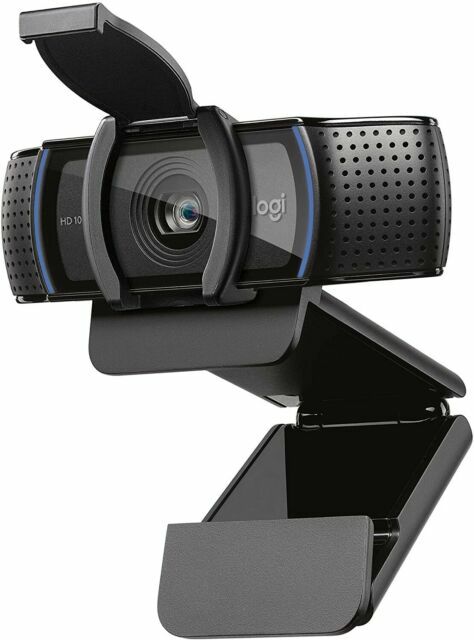
Elevate your video calls with the Logitech C920e Full HD Autofocus Webcam Pro, providing clear video even in low-light conditions. Records clear video even in dim lighting conditions Make high-quality video calls with popular platforms like Google Hangout The advanced H.264 compression technology enables Full HD video Achieve clarity in various lighting environments, thanks to RightLight 2 technology The attachable privacy shutter lets you cover or expose the lens Integrated tripod threads and an adjustable clip make it easy to mount Low light brilliance The Logitech C920e webcam excels even in low-light conditions, ensuring that your video calls and recordings are clear and professional, no matter the lighting in your environment. Full-HD clarity Thanks to advanced H.264 compression technology, the C920e offers Full HD video clarity. Your video calls and recordings will be sharp, detailed, and impressive. Crystal clear audio The C920e features dual-integrated omnidirectional microphones that capture audio up to 1 metre away with exceptional clarity. Use the Logi Tune Desktop app to activate and fine-tune your audio experience for crystal clear sound quality in every call. Versatile mounting options With an adjustable clip and integrated tripod threads, this webcam offers a range of mounting options. Whether it’s on your laptop, external monitor, tabletop, or full-size tripod, you can choose the placement and angle that suits your needs. Attachable privacy shade The attachable privacy shutter gives you control over your privacy. Easily cover or expose the lens as needed, enhancing your sense of security.
Elevate your video calls with the Logitech C920e Full HD Autofocus Webcam Pro, providing clear video even in low-light conditions. Records clear video even in dim lighting conditions Make high-quality video calls with popular platforms like Google Hangout The advanced H.264 compression technology enables Full HD video Achieve clarity in various lighting environments, thanks to RightLight 2 technology The attachable privacy shutter lets you cover or expose the lens Integrated tripod threads and an adjustable clip make it easy to mount Low light brilliance The Logitech C920e webcam excels even in low-light conditions, ensuring that your video calls and recordings are clear and professional, no matter the lighting in your environment. Full-HD clarity Thanks to advanced H.264 compression technology, the C920e offers Full HD video clarity. Your video calls and recordings will be sharp, detailed, and impressive. Crystal clear audio The C920e features dual-integrated omnidirectional microphones that capture audio up to 1 metre away with exceptional clarity. Use the Logi Tune Desktop app to activate and fine-tune your audio experience for crystal clear sound quality in every call. Versatile mounting options With an adjustable clip and integrated tripod threads, this webcam offers a range of mounting options. Whether it’s on your laptop, external monitor, tabletop, or full-size tripod, you can choose the placement and angle that suits your needs. Attachable privacy shade The attachable privacy shutter gives you control over your privacy. Easily cover or expose the lens as needed, enhancing your sense of security.
in 1 offers
The lowest price for right now is .
Logitech C920e Full HD Autofocus Webcam Pro
Elevate your video calls with the Logitech C920e Full HD Autofocus Webcam Pro, providing clear video even in low-light conditions. Records clear video even in dim lighting conditions Make high-quality video calls with popular platforms like Google Hangout The advanced H.264 compression technology enables Full HD video Achieve clarity in various lighting environments, thanks to RightLight 2 technology The attachable privacy shutter lets you cover or expose the lens Integrated tripod threads and an adjustable clip make it easy to mount Low light brilliance The Logitech C920e webcam excels even in low-light conditions, ensuring that your video calls and recordings are clear and professional, no matter the lighting in your environment. Full-HD clarity Thanks to advanced H.264 compression technology, the C920e offers Full HD video clarity. Your video calls and recordings will be sharp, detailed, and impressive. Crystal clear audio The C920e features dual-integrated omnidirectional microphones that capture audio up to 1 metre away with exceptional clarity. Use the Logi Tune Desktop app to activate and fine-tune your audio experience for crystal clear sound quality in every call. Versatile mounting options With an adjustable clip and integrated tripod threads, this webcam offers a range of mounting options. Whether it’s on your laptop, external monitor, tabletop, or full-size tripod, you can choose the placement and angle that suits your needs. Attachable privacy shade The attachable privacy shutter gives you control over your privacy. Easily cover or expose the lens as needed, enhancing your sense of security.
Elevate your video calls with the Logitech C920e Full HD Autofocus Webcam Pro, providing clear video even in low-light conditions. Records clear video even in dim lighting conditions Make high-quality video calls with popular platforms like Google Hangout The advanced H.264 compression technology enables Full HD video Achieve clarity in various lighting environments, thanks to RightLight 2 technology The attachable privacy shutter lets you cover or expose the lens Integrated tripod threads and an adjustable clip make it easy to mount Low light brilliance The Logitech C920e webcam excels even in low-light conditions, ensuring that your video calls and recordings are clear and professional, no matter the lighting in your environment. Full-HD clarity Thanks to advanced H.264 compression technology, the C920e offers Full HD video clarity. Your video calls and recordings will be sharp, detailed, and impressive. Crystal clear audio The C920e features dual-integrated omnidirectional microphones that capture audio up to 1 metre away with exceptional clarity. Use the Logi Tune Desktop app to activate and fine-tune your audio experience for crystal clear sound quality in every call. Versatile mounting options With an adjustable clip and integrated tripod threads, this webcam offers a range of mounting options. Whether it’s on your laptop, external monitor, tabletop, or full-size tripod, you can choose the placement and angle that suits your needs. Attachable privacy shade The attachable privacy shutter gives you control over your privacy. Easily cover or expose the lens as needed, enhancing your sense of security.
The all-time low was $34.09 on 6 Nov 2024 — today's price is 218% above the lowest ever. It has been notably cheaper before — worth setting a price alert.
Prices last updated 23 Oct 2026.
Last updated at 23/10/2026 01:23:01
Logitech C920e HD Pro 1080P Webcam Auto Focus for Skype, Hangouts, Facetime and Teams, Wired
Affiliate Disclosure: We may receive a small commission for purchases made through this link at no extra cost to you. This helps support our site. Thank you!
originally posted on lenovo.com
I have three monitors set up in my at-home office (two monitors, laptop used as third monitor). I purchased this because I prefer a front-facing camera atop my middle monitor vs the integrated camera on my laptop. This was super easy to install, literally plug and play! Microsoft Teams recognized it immediately as Logi Webcam C920e. Both video and audio quality so far is clear and crisp (although I preferably use a headset for my mic).
originally posted on bestbuy.com
This is an excellent all-purpose webcam series and product. It works flawlessly with any recent version of Windows or Macintosh. The only really stupid thing Logitech did in this latest version is disable the microphone by default without including any notifications to customers. After wasting a lot of time to troubleshoot the non-working microphone, the customer can discover that they need to install the Logitech app to simply change the default setting to enable the microphone.
originally posted on bhphotovideo.com
I bought this webcam exclusively for the price. I needed a new webcam, nothing fancy, for occasional video conferences, and wanted a budget-friendly option. With that said, this is NOT a pay and play model. I followed the Logitech setup instructions exactly as they were written, but audio would not work. Took me two days of troubleshooting to figure out and then set up the settings on my computer - something the description of this product says won't be necessary. They lied, and I almost gave up and returned this product to B&H. If you're trying to save money, might be worth it. If you have a bigger budget, go with something else.
| Brand | Logitech |
| Video Resolution | 1920 x 1080 |
| Autofocus | Yes |
| High Definition | Yes |

Logitech C920e HD Pro 1080P Webcam Auto Focus for Skype, Hangouts, Facetime and Teams, Wired
Affiliate Disclosure: We may receive a small commission for purchases made through this link at no extra cost to you. This helps support our site. Thank you!
I have three monitors set up in my at-home office (two monitors, laptop used as third monitor). I purchased this because I prefer a front-facing camera atop my middle monitor vs the integrated camera on my laptop. This was super easy to install, literally plug and play! Microsoft Teams recognized it immediately as Logi Webcam C920e. Both video and audio quality so far is clear and crisp (although I preferably use a headset for my mic).
This is an excellent all-purpose webcam series and product. It works flawlessly with any recent version of Windows or Macintosh. The only really stupid thing Logitech did in this latest version is disable the microphone by default without including any notifications to customers. After wasting a lot of time to troubleshoot the non-working microphone, the customer can discover that they need to install the Logitech app to simply change the default setting to enable the microphone.
I bought this webcam exclusively for the price. I needed a new webcam, nothing fancy, for occasional video conferences, and wanted a budget-friendly option. With that said, this is NOT a pay and play model. I followed the Logitech setup instructions exactly as they were written, but audio would not work. Took me two days of troubleshooting to figure out and then set up the settings on my computer - something the description of this product says won't be necessary. They lied, and I almost gave up and returned this product to B&H. If you're trying to save money, might be worth it. If you have a bigger budget, go with something else.
Very simple to attach to the top of my screen and no programs are needed to use this camera. Integration is seamless and the led light feature to notify you that the camera is on is convenient. The quality isn't as high as my Macbook Air, but having the angle from the top of my work desk monitor is very nice.Great purchase and I don't regret it. I'll probably buy another with a higher-quality camera in the future.
I love this speaker, maybe too much. The sound quality is superb. There are pros and cons but the value for money makes you look beyond the cons. I have this hooked up to my TV and here are my pros and cons. Pros 1. Awesome Sound Quality 2. Bass Reproduction is accurate Cons 1. No remote to control volume volume is physical. I guess this is so because it was designed for computers where speakers are handlength away and so much not for TV. But it works well though. 2. Cable to main satellite is huuuuge and just downright ugly. 3. Cables are proprietary, so if something goes wrong, might as well replace the entire unit since it is cheap anyways. In the end, you cannot go wrong with these. Sound Quality is awesome and that is the reason for most persons purchasing ... MoreI love this speaker, maybe too much. The sound quality is superb. There are pros and cons but the value for money makes you look beyond the cons. I have this hooked up to my TV and here are my pros and cons. Pros 1. Awesome Sound Quality 2. Bass Reproduction is accurate Cons 1. No remote to control volume volume is physical. I guess this is so because it was designed for computers where speakers are handlength away and so much not for TV. But it works well though. 2. Cable to main satellite is huuuuge and just downright ugly. 3. Cables are proprietary, so if something goes wrong, might as well replace the entire unit since it is cheap anyways. In the end, you cannot go wrong with these. Sound Quality is awesome and that is the reason for most persons purchasing decision. So the cons are just meeeehhh. The thing delivers what they were made to deliver... Good sound.
I bought these to replace a more expensive set of Klipsch 5.1 speakers for my office and Im very happy with what you get for the price. The bass is maybe a bit less crisp than the Klipsch but is still very good. There is no noticeable hiss or distortion and the satellites sound surprisingly good. The Klipsch speakers I replaced had an annoying loud hum if left on when the computer was off, however the Logitech speakers are completely silent. I used a Killawatt to measure power usage. It uses 1 watt when turned off, 5 watts when on but silent, and between 5 and 26 watts playing relatively bass heavy music at a volume level you would probably consider too loud for a small room 12 x 12. I consider 5 watts low enough to just always leave it on and not have to worry ... MoreI bought these to replace a more expensive set of Klipsch 5.1 speakers for my office and Im very happy with what you get for the price. The bass is maybe a bit less crisp than the Klipsch but is still very good. There is no noticeable hiss or distortion and the satellites sound surprisingly good. The Klipsch speakers I replaced had an annoying loud hum if left on when the computer was off, however the Logitech speakers are completely silent. I used a Killawatt to measure power usage. It uses 1 watt when turned off, 5 watts when on but silent, and between 5 and 26 watts playing relatively bass heavy music at a volume level you would probably consider too loud for a small room 12 x 12. I consider 5 watts low enough to just always leave it on and not have to worry about turning it off and on with each use. My only complaint would be that the cables for the satellite speakers are not long enough for a large desk. Not a big deal to get an extension for the speaker that uses an RCA jack, but the cable that goes to the speaker with the controls would be a lot harder to find an extension for. It would also help with speaker placement if there was a switch to flip which speakers are left and right. One other annoyance there was no manual included.
I plugged in this little gem and it worked immediately and perfectly. Picture is sharp and my team tells me they can now see my wrinkles and gray hair much more clearly. Yay for that, I guess! Despite the directions inside the box, it is not necessary to download anything from Logitech. My main monitor doesn't have a camera and this saves me opening my laptop to get camera functionality.
The privacy shutter (which just clips on and can also be easily removed) is a nice little extra feature on this one compared to similar models.Excellent image quality and the sound was decent when tested. To be clear, I refer to the sound captured by the dual/stereo microphone. That's what's on the sides of this and similar webcams. I've seen some complaints about sound quality from the speakers, but this doesn't have speakers, your system speakers are used.One catch with this particular model- it comes with the built in microphones disabled. This is great if you're just wanting to capture images with no audio and are concerned about privacy, but we wanted to use it for Zoom meetings, etc. Instructions were included in the package for how to enable the dual ... MoreThe privacy shutter (which just clips on and can also be easily removed) is a nice little extra feature on this one compared to similar models.Excellent image quality and the sound was decent when tested. To be clear, I refer to the sound captured by the dual/stereo microphone. That's what's on the sides of this and similar webcams. I've seen some complaints about sound quality from the speakers, but this doesn't have speakers, your system speakers are used.One catch with this particular model- it comes with the built in microphones disabled. This is great if you're just wanting to capture images with no audio and are concerned about privacy, but we wanted to use it for Zoom meetings, etc. Instructions were included in the package for how to enable the dual microphone (involved installing driver software, changing a setting, restarting the computer). Pretty painless, and I knew about it ahead of time so not docking any stars. If you don't want this minor hassle and DO want to use the microphones, maybe pick another webcam (even same model with a different letter on the end). I might have gotten a different model, knowing about this issue, but this was the best fit that was in stock and turning the mic on was pretty painless for me.
Bought these to upgrade from basic 720p model, which has served me well over the years. It may come with the microphone disabled on the firmware level. You will need to plug this into a windows or mac computer in order to turn it on with the Logi Tune software. I was able to then plug it into a Linux machine afterwards and then the microphone was detected. Other than it needing a software download to do that, it has performed very well now and need zero tweaking for frequent Zoom calls.
As some others stated - the mic does not work. The marketing info missing is that the microphone on this does not come pre-activated. It requires a separate software called Logi-tune to go in and activate it. I contacted LogiTune support and this was their response: "Unfortunately in your case, because you have a Windows 7 computer, the Logi Tune software won't work, however because the activation occur in the microphone itself, it mean that you only need to activate the microphone once on any computer with Windows 10 or Mac for it to work on any other computer. " Be aware this is undisclosed but hopefully someone will read this and recognize what a bad design from Logitech
| Brand | Logitech |
| Video Resolution | 1920 x 1080 |
| Autofocus | Yes |
| High Definition | Yes |