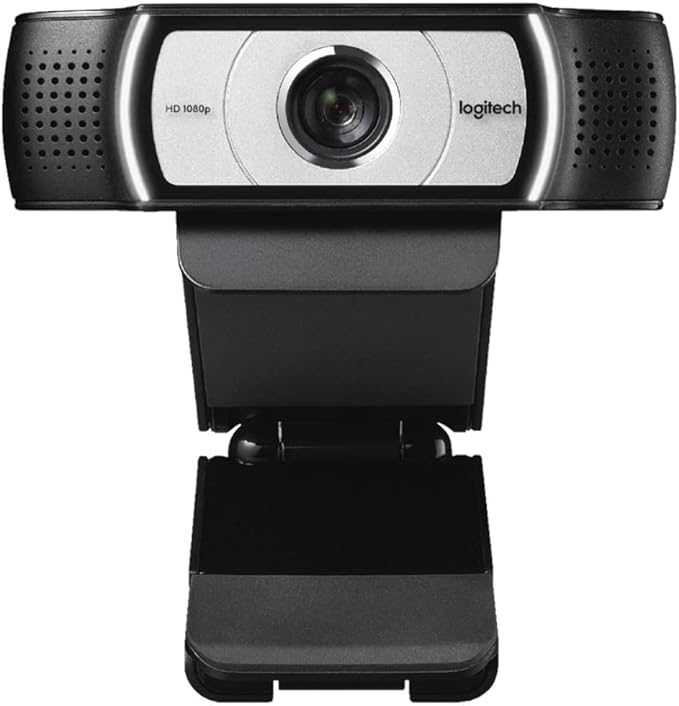
Logitech C930c 1080P HD Webcam
The Logitech C930C is a business-grade USB webcam designed to deliver reliable, low-latency Full-HD video for unified communications (UC) and conferencing platforms. Its 1920×1080 sensor streams clean 1080p video at 30 fps while H.264/SVC hardware encoding on the device minimizes host CPU and network load — an important advantage in large deployments and bandwidth-constrained environments. The 90° diagonal field of view and 4× zoom let teams include whiteboards, multiple participants, or product demos without swapping lenses, and the autofocus + pan/tilt controls ensure consistently framed footage. RightLight 2 improves image clarity under challenging lighting and the integrated dual omnidirectional microphones capture intelligible speech for a single presenter or small group. These characteristics make the C930C appropriate for enterprise desktops, huddle rooms, telemedicine, instruction capture, and streaming where image quality, bandwidth efficiency and flexible framing are required. Key Features: Full HD 1080p 30 fps for sharp video in meetings and recordings. H.264 / SVC on-camera encoding (UVC 1.5) reduces PC/USB bandwidth by offloading compression to the camera. 90° diagonal field of view (ultra wide-angle) to capture groups, whiteboards or multi-participant scenes without external optics. 4× digital zoom with pan/tilt controls and autofocus for framing flexibility. RightLight 2 technology for automatic exposure and colour correction in mixed/low light. Dual omnidirectional microphones optimized for clear pickup up to ~1 m (conference use). Universal mounting + tripod thread and an attachable privacy shutter for easy deployment and privacy.
The Logitech C930C is a business-grade USB webcam designed to deliver reliable, low-latency Full-HD video for unified communications (UC) and conferencing platforms. Its 1920×1080 sensor streams clean 1080p video at 30 fps while H.264/SVC hardware encoding on the device minimizes host CPU and network load — an important advantage in large deployments and bandwidth-constrained environments. The 90° diagonal field of view and 4× zoom let teams include whiteboards, multiple participants, or product demos without swapping lenses, and the autofocus + pan/tilt controls ensure consistently framed footage. RightLight 2 improves image clarity under challenging lighting and the integrated dual omnidirectional microphones capture intelligible speech for a single presenter or small group. These characteristics make the C930C appropriate for enterprise desktops, huddle rooms, telemedicine, instruction capture, and streaming where image quality, bandwidth efficiency and flexible framing are required. Key Features: Full HD 1080p 30 fps for sharp video in meetings and recordings. H.264 / SVC on-camera encoding (UVC 1.5) reduces PC/USB bandwidth by offloading compression to the camera. 90° diagonal field of view (ultra wide-angle) to capture groups, whiteboards or multi-participant scenes without external optics. 4× digital zoom with pan/tilt controls and autofocus for framing flexibility. RightLight 2 technology for automatic exposure and colour correction in mixed/low light. Dual omnidirectional microphones optimized for clear pickup up to ~1 m (conference use). Universal mounting + tripod thread and an attachable privacy shutter for easy deployment and privacy.
The Logitech C930C is a business-grade USB webcam designed to deliver reliable, low-latency Full-HD video for unified communications (UC) and conferencing platforms. Its 1920×1080 sensor streams clean 1080p video at 30 fps while H.264/SVC hardware encoding on the device minimizes host CPU and network load — an important advantage in large deployments and bandwidth-constrained environments. The 90° diagonal field of view and 4× zoom let teams include whiteboards, multiple participants, or product demos without swapping lenses, and the autofocus + pan/tilt controls ensure consistently framed footage. RightLight 2 improves image clarity under challenging lighting and the integrated dual omnidirectional microphones capture intelligible speech for a single presenter or small group. These characteristics make the C930C appropriate for enterprise desktops, huddle rooms, telemedicine, instruction capture, and streaming where image quality, bandwidth efficiency and flexible framing are required. Key Features: Full HD 1080p 30 fps for sharp video in meetings and recordings. H.264 / SVC on-camera encoding (UVC 1.5) reduces PC/USB bandwidth by offloading compression to the camera. 90° diagonal field of view (ultra wide-angle) to capture groups, whiteboards or multi-participant scenes without external optics. 4× digital zoom with pan/tilt controls and autofocus for framing flexibility. RightLight 2 technology for automatic exposure and colour correction in mixed/low light. Dual omnidirectional microphones optimized for clear pickup up to ~1 m (conference use). Universal mounting + tripod thread and an attachable privacy shutter for easy deployment and privacy.
The Logitech C930C is a business-grade USB webcam designed to deliver reliable, low-latency Full-HD video for unified communications (UC) and conferencing platforms. Its 1920×1080 sensor streams clean 1080p video at 30 fps while H.264/SVC hardware encoding on the device minimizes host CPU and network load — an important advantage in large deployments and bandwidth-constrained environments. The 90° diagonal field of view and 4× zoom let teams include whiteboards, multiple participants, or product demos without swapping lenses, and the autofocus + pan/tilt controls ensure consistently framed footage. RightLight 2 improves image clarity under challenging lighting and the integrated dual omnidirectional microphones capture intelligible speech for a single presenter or small group. These characteristics make the C930C appropriate for enterprise desktops, huddle rooms, telemedicine, instruction capture, and streaming where image quality, bandwidth efficiency and flexible framing are required. Key Features: Full HD 1080p 30 fps for sharp video in meetings and recordings. H.264 / SVC on-camera encoding (UVC 1.5) reduces PC/USB bandwidth by offloading compression to the camera. 90° diagonal field of view (ultra wide-angle) to capture groups, whiteboards or multi-participant scenes without external optics. 4× digital zoom with pan/tilt controls and autofocus for framing flexibility. RightLight 2 technology for automatic exposure and colour correction in mixed/low light. Dual omnidirectional microphones optimized for clear pickup up to ~1 m (conference use). Universal mounting + tripod thread and an attachable privacy shutter for easy deployment and privacy.
in 23 offers
The lowest price for Logitech C930c 1080P HD Webcam right now is $96.25 at TechCart, compared across 18 retailers.
The all-time low was $29.00 on 22 Aug 2026 — today's price is 232% above the lowest ever. It has been notably cheaper before — worth setting a price alert.
Prices last updated 26 Oct 2026.
Last updated at 26/10/2026 09:36:24
Logitech-C930c Webcam (Black, 960-001260)
Delivery $50
Logitech 1080P HD Business Webcam(C930c)
Delivery between 30 Oct – 4 Nov $7.95
Logitech C930c HD Webcam 960 001260 - Web Cams
Delivery $13.27
Logitech C930c HD Webcam 960 001260 - Web Cams
Delivery $12
Logitech C930c HD Webcam - Black - Tristar Online
Free delivery between 30 Oct – 9 Nov
Logitech C930c HD 1080P Webcam with Zeiss Lens 4x Digital Zoom USB Video Camera Upgrade for Computer
Free delivery
Logitech C930c Advanced 1080p Business Webcam With Wide Angle Lens
Free delivery
Affiliate Disclosure: We may receive a small commission for purchases made through this link at no extra cost to you. This helps support our site. Thank you!
Logitech C930c Plug and Play Full HD FHD 1080p Ultra Wide Angle Webcam
Delivery $11
Logitech C930c Plug and Play Full HD FHD 1080p Ultra Wide Angle Webcam
Delivery $11
Logitech C930c HD Webcam (960-001260)
Free delivery between Wed – Thu
originally posted on influenster.com
Not a huge fan of this Webcam. When lighting is good then the image quality is fine. However if lighting is a bit on the dimmer side then the image quality decreases significantly. For me my face ends up looking red and a little glowy. There are no extra controls for zooming or anything and the microphone quality us subpar as well. I'd look for something better in my opinion.
originally posted on umart.com.au
Camera arrived today, it is intuitive to use, just like my old work webcam logitech C615. Great zoom and image quality. As others have mentioned, download LogiTune, you will be able to update driver and to adjust camera setting through it. The Logitech Camera Settings software also allows camera setting adjustment - I find it working slightly better than LogiTune. You can download it under C930e downloads page. The Logitech China website appears to have the latest software versions when I checked.
originally posted on umart.com.au
Hardware it is equivalent to the C930e. It is the version for the Chinese market.It comes up as a pile of Chinese characters then C930c.The Logitech Camera Settings app I downloaded from Logitech was out of date - it said there was an update - asked if I wanted to download it but it would not download.There is a firmware update for the C930e but there was nothing for the C930c. Logitech support brings up C930e when you search for C930c.Logitech support - gave me a link to the latest Logitech Camera Settings app, advised there is no firmware update for the C930c, and advised that you cannot load the firmware for the C930e. The doco says that the support for the hardware is at the .cn site. Going there and searching for the C930c did the same as the US ... MoreHardware it is equivalent to the C930e. It is the version for the Chinese market.It comes up as a pile of Chinese characters then C930c.The Logitech Camera Settings app I downloaded from Logitech was out of date - it said there was an update - asked if I wanted to download it but it would not download.There is a firmware update for the C930e but there was nothing for the C930c. Logitech support brings up C930e when you search for C930c.Logitech support - gave me a link to the latest Logitech Camera Settings app, advised there is no firmware update for the C930c, and advised that you cannot load the firmware for the C930e. The doco says that the support for the hardware is at the .cn site. Going there and searching for the C930c did the same as the US site.It works nicely, great image clarity, sound is clear. I found that sometimes the autofocus would not kick in. Leaving the camera settings app open and clicking autofocus off and on sorted that.
| Frame Rate | 30 fps (at 1920 x 1080) |
| Storage Media | SDHC |
| Photo Resolution | 1080p |
| Resolution | 1080p |
| HD Format | 1080p |
Logitech-C930c Webcam (Black, 960-001260)
Delivery $50
Logitech 1080P HD Business Webcam(C930c)
Delivery between 30 Oct – 4 Nov $7.95
Logitech C930c HD Webcam 960 001260 - Web Cams
Delivery $13.27
Logitech C930c HD Webcam 960 001260 - Web Cams
Delivery $12
Logitech C930c HD Webcam - Black - Tristar Online
Free delivery between 30 Oct – 9 Nov
Not a huge fan of this Webcam. When lighting is good then the image quality is fine. However if lighting is a bit on the dimmer side then the image quality decreases significantly. For me my face ends up looking red and a little glowy. There are no extra controls for zooming or anything and the microphone quality us subpar as well. I'd look for something better in my opinion.
Camera arrived today, it is intuitive to use, just like my old work webcam logitech C615. Great zoom and image quality. As others have mentioned, download LogiTune, you will be able to update driver and to adjust camera setting through it. The Logitech Camera Settings software also allows camera setting adjustment - I find it working slightly better than LogiTune. You can download it under C930e downloads page. The Logitech China website appears to have the latest software versions when I checked.
Hardware it is equivalent to the C930e. It is the version for the Chinese market.It comes up as a pile of Chinese characters then C930c.The Logitech Camera Settings app I downloaded from Logitech was out of date - it said there was an update - asked if I wanted to download it but it would not download.There is a firmware update for the C930e but there was nothing for the C930c. Logitech support brings up C930e when you search for C930c.Logitech support - gave me a link to the latest Logitech Camera Settings app, advised there is no firmware update for the C930c, and advised that you cannot load the firmware for the C930e. The doco says that the support for the hardware is at the .cn site. Going there and searching for the C930c did the same as the US ... MoreHardware it is equivalent to the C930e. It is the version for the Chinese market.It comes up as a pile of Chinese characters then C930c.The Logitech Camera Settings app I downloaded from Logitech was out of date - it said there was an update - asked if I wanted to download it but it would not download.There is a firmware update for the C930e but there was nothing for the C930c. Logitech support brings up C930e when you search for C930c.Logitech support - gave me a link to the latest Logitech Camera Settings app, advised there is no firmware update for the C930c, and advised that you cannot load the firmware for the C930e. The doco says that the support for the hardware is at the .cn site. Going there and searching for the C930c did the same as the US site.It works nicely, great image clarity, sound is clear. I found that sometimes the autofocus would not kick in. Leaving the camera settings app open and clicking autofocus off and on sorted that.
Pros: The C930e has excellent image quality. It deals really well with low-light situations, the auto-focus is fantastic, and the white balance is really good - it produces natural-looking skin tones every time. When I swapped to this camera, people I'd been conferencing with on my old camera commented on the improvement in picture quality.Cons: This is a "business" camera and claims compatibility with industry standards, but beware that software support for this camera is patchy at best. The Logitech camera control software is clunky as anything - the only way to use it is to start the conferencing app of your choice, connect to the camera, THEN start the camera control app to adjust the image. You have to do this every time - if you leave the camera app running, ... MorePros: The C930e has excellent image quality. It deals really well with low-light situations, the auto-focus is fantastic, and the white balance is really good - it produces natural-looking skin tones every time. When I swapped to this camera, people I'd been conferencing with on my old camera commented on the improvement in picture quality.Cons: This is a "business" camera and claims compatibility with industry standards, but beware that software support for this camera is patchy at best. The Logitech camera control software is clunky as anything - the only way to use it is to start the conferencing app of your choice, connect to the camera, THEN start the camera control app to adjust the image. You have to do this every time - if you leave the camera app running, conferencing software (Zoom, Meet etc.) won't be able to use the video feed from the camera. It's also not supported by Logitech's own "Capture" software (frustrating!), so you need to use 3rd party software if you want to use it for recording video (I'm a University lecturer, and my University's lecture recording suite works really well with this camera). Don't even bother trying to register your purchase with Logitech. Their website and customer support are a broken, infuriating mess.
I bought this trying to improve visuals for my video calls. Has the ability to zoom, tilt, and pan which is nice although the range of movements is quite small. Disappointed overall and will probably sell it.Color is a big issue with these. Saturation and white balance is poor compared to a LG 5K built in camera. Manually adjusting the color balance along the purple/green slider doesn't result in anything really lifelike. Color saturation is oddly both weak and too rich in the same frame. I end up going with weak color saturation to avoid how poor color balance is on skin tones.Maybe for a conference room with many people this makes sense but for an Apple product or the matching LG 5k monitor, you won't really improve much with this camera.
Excellent webcam, suitable for streaming or video work. I had an old Logitech C600, it was 2MP with autofocus- but it needed a lot of light to work properly. In dimmer light it got very grainy & jittery. So I decided to get a newer webcam, and this one does just what I want! Since I'm using a 32" TV as a monitor, it's great that this webcam has the capability to be attached to a tripod; I've got it set up now in front of my monitor, at just under eye level, so to my family it appears that I'm looking directly at them- which I am! It works in bright light or dim light, the images are crystal-clear, it has autofocus & zoom, facial tracking- in short, it's perfect for my needs. My family is in Australia, where they can't leave & I can't enter, so for the foreseeable ... MoreExcellent webcam, suitable for streaming or video work. I had an old Logitech C600, it was 2MP with autofocus- but it needed a lot of light to work properly. In dimmer light it got very grainy & jittery. So I decided to get a newer webcam, and this one does just what I want! Since I'm using a 32" TV as a monitor, it's great that this webcam has the capability to be attached to a tripod; I've got it set up now in front of my monitor, at just under eye level, so to my family it appears that I'm looking directly at them- which I am! It works in bright light or dim light, the images are crystal-clear, it has autofocus & zoom, facial tracking- in short, it's perfect for my needs. My family is in Australia, where they can't leave & I can't enter, so for the foreseeable future we can only get together by video chats, and this webcam is the bee's knees!
This is a good product at a competitive price, and I had only slight problems with the set-up. The zoom and autofocus work out-of-the-box with Logitech Camera Settings software (we use Windows10). However, be aware that this model is C930C (not C930E) and is basically the Chinese version of this device. We use Logitech's "Logicapture" software which in the Uk has support for the C930E but NOT the C930C, so Logicapture did NOT recognise the device. I researched this problem and found that it's necessary to edit the logicapture.exe.config (just an XML file in the "bin" folder, so any text editor will do) to change the PID of the C930E (0x0843) to that of the C930C (0x0891). After that simple change the camera works very well with Logicapture. Of course if Logicapture ... MoreThis is a good product at a competitive price, and I had only slight problems with the set-up. The zoom and autofocus work out-of-the-box with Logitech Camera Settings software (we use Windows10). However, be aware that this model is C930C (not C930E) and is basically the Chinese version of this device. We use Logitech's "Logicapture" software which in the Uk has support for the C930E but NOT the C930C, so Logicapture did NOT recognise the device. I researched this problem and found that it's necessary to edit the logicapture.exe.config (just an XML file in the "bin" folder, so any text editor will do) to change the PID of the C930E (0x0843) to that of the C930C (0x0891). After that simple change the camera works very well with Logicapture. Of course if Logicapture ever needs to be reinstalled the above change will need to be repeated. It's also possible that in the future updated versions of Logicapture may have a bearing on the above.
I have just bought and tested the Logitech C920, C925 and the C930. The Webcams are primarily used for VC for business discussions and have been used in single person and also with group VC calls. - C930e: Highest price sharper than C920. Much wider at 90degrees -- much wider at 90 degrees - for my use this was the best for VC's where we have 4 people around the table - the wider angle makes a clear difference - I would recommend the C930e for group video calls as the 90 degrees makes a huge difference. I am using it on two Macs - with OS Catalina and Big Sur, works perfectly fine. Make sure you download the utility software named as "Camera Settings". This is like pimping the c930e, it does magics. Don't use Capture software, use only "Camera Settings" software and ... MoreI have just bought and tested the Logitech C920, C925 and the C930. The Webcams are primarily used for VC for business discussions and have been used in single person and also with group VC calls. - C930e: Highest price sharper than C920. Much wider at 90degrees -- much wider at 90 degrees - for my use this was the best for VC's where we have 4 people around the table - the wider angle makes a clear difference - I would recommend the C930e for group video calls as the 90 degrees makes a huge difference. I am using it on two Macs - with OS Catalina and Big Sur, works perfectly fine. Make sure you download the utility software named as "Camera Settings". This is like pimping the c930e, it does magics. Don't use Capture software, use only "Camera Settings" software and you will never look behind.
Pros: Trusted brand-Logitech, Significantly improved image quality over laptop Webcam. Completely Plug-N-Play, no drivers to download, Clip attaches firmly to monitor and tilt operation is easy. Cons: Really none so far. Not really a con, but be ready for the 90% angle of view, especially if you are working from home and have a bit of clutter like I do. The video apps I use all provide a Blur function for background which deals nicely with this - and I stay completely in focus. Overall I would recommend this model to anyone looking for a high quality, easy to use Webcam, especially in place of your laptop' built in camera.
I bought the Logitech C930e webcam to stream our church service. It works well with our PC laptop on Zoom and is a great improvement over the integrated laptop webcam. Exposure is much better especially in backlight instances. The digital zoom is nice too up to about 3x, beyond 3x the resolution is not good. Make sure you switch to HD, my webcam defaulted to a lower resolution at first.Download the software apps for the webcam too. They are easy to use and allow one to take advantage of the webcam's features.
| Frame Rate | 30 fps (at 1920 x 1080) |
| Storage Media | SDHC |
| Photo Resolution | 1080p |
| Resolution | 1080p |
| HD Format | 1080p |

