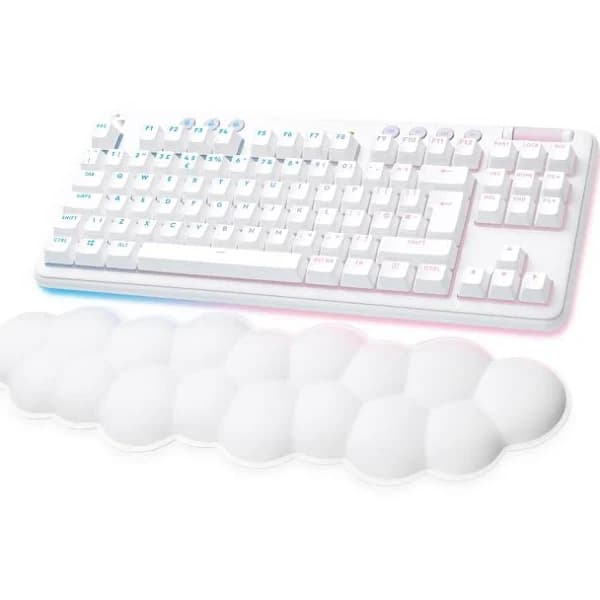
Introducing the G715 Wireless Gaming Keyboard from Logitech, a game-changer for passionate gamers seeking ultimate control and precision. This cutting-edge keyboard is designed to enhance your gaming experience, delivering unrivaled performance and freedom of movement. With its wireless connectivity, you can say goodbye to tangled cords and enjoy seamless gameplay from anywhere in the room. Feel the smoothness of every keystroke as you navigate through intense battles and challenging quests. The G715's responsive keys provide lightning-fast response times, allowing you to execute commands with unparalleled speed and accuracy. Crafted with gamers in mind, this keyboard features customizable RGB lighting, allowing you to create a personalized gaming atmosphere that matches your style and mood. Immerse yourself in a kaleidoscope of colors that bring your gaming setup to life. The G715 Wireless Gaming Keyboard also boasts exceptional durability, ensuring it can withstand even the most intense gaming sessions. Its sleek and ergonomic design guarantees comfort, allowing you to game for hours without fatigue. Upgrade your gaming arsenal with the G715 Wireless Gaming Keyboard from Logitech and unleash your true gaming potential. Dominate the virtual battlefield like never before and experience gaming like never before.
Introducing the G715 Wireless Gaming Keyboard from Logitech, a game-changer for passionate gamers seeking ultimate control and precision. This cutting-edge keyboard is designed to enhance your gaming experience, delivering unrivaled performance and freedom of movement. With its wireless connectivity, you can say goodbye to tangled cords and enjoy seamless gameplay from anywhere in the room. Feel the smoothness of every keystroke as you navigate through intense battles and challenging quests. The G715's responsive keys provide lightning-fast response times, allowing you to execute commands with unparalleled speed and accuracy. Crafted with gamers in mind, this keyboard features customizable RGB lighting, allowing you to create a personalized gaming atmosphere that matches your style and mood. Immerse yourself in a kaleidoscope of colors that bring your gaming setup to life. The G715 Wireless Gaming Keyboard also boasts exceptional durability, ensuring it can withstand even the most intense gaming sessions. Its sleek and ergonomic design guarantees comfort, allowing you to game for hours without fatigue. Upgrade your gaming arsenal with the G715 Wireless Gaming Keyboard from Logitech and unleash your true gaming potential. Dominate the virtual battlefield like never before and experience gaming like never before.
in 1 offers
The lowest price for Logitech G715 Wireless Gaming Keyboard - right now is $140.00 at CeX.
The all-time low was $123.50 on 1 June 2025 — today's price is 13% above the lowest ever. That's a little above the best price we've seen.
Prices last updated 9 Mar 2026.
Logitech G715 Wireless Gaming Keyboard -
Introducing the G715 Wireless Gaming Keyboard from Logitech, a game-changer for passionate gamers seeking ultimate control and precision. This cutting-edge keyboard is designed to enhance your gaming experience, delivering unrivaled performance and freedom of movement. With its wireless connectivity, you can say goodbye to tangled cords and enjoy seamless gameplay from anywhere in the room. Feel the smoothness of every keystroke as you navigate through intense battles and challenging quests. The G715's responsive keys provide lightning-fast response times, allowing you to execute commands with unparalleled speed and accuracy. Crafted with gamers in mind, this keyboard features customizable RGB lighting, allowing you to create a personalized gaming atmosphere that matches your style and mood. Immerse yourself in a kaleidoscope of colors that bring your gaming setup to life. The G715 Wireless Gaming Keyboard also boasts exceptional durability, ensuring it can withstand even the most intense gaming sessions. Its sleek and ergonomic design guarantees comfort, allowing you to game for hours without fatigue. Upgrade your gaming arsenal with the G715 Wireless Gaming Keyboard from Logitech and unleash your true gaming potential. Dominate the virtual battlefield like never before and experience gaming like never before.
Introducing the G715 Wireless Gaming Keyboard from Logitech, a game-changer for passionate gamers seeking ultimate control and precision. This cutting-edge keyboard is designed to enhance your gaming experience, delivering unrivaled performance and freedom of movement. With its wireless connectivity, you can say goodbye to tangled cords and enjoy seamless gameplay from anywhere in the room. Feel the smoothness of every keystroke as you navigate through intense battles and challenging quests. The G715's responsive keys provide lightning-fast response times, allowing you to execute commands with unparalleled speed and accuracy. Crafted with gamers in mind, this keyboard features customizable RGB lighting, allowing you to create a personalized gaming atmosphere that matches your style and mood. Immerse yourself in a kaleidoscope of colors that bring your gaming setup to life. The G715 Wireless Gaming Keyboard also boasts exceptional durability, ensuring it can withstand even the most intense gaming sessions. Its sleek and ergonomic design guarantees comfort, allowing you to game for hours without fatigue. Upgrade your gaming arsenal with the G715 Wireless Gaming Keyboard from Logitech and unleash your true gaming potential. Dominate the virtual battlefield like never before and experience gaming like never before.
Last updated at 09/03/2026 09:38:04
Logitech G715 RGB Mechanical Keyboard (Brown Switches) - White, A
Free delivery
originally posted on bestbuy.com
The Logitech G175 TKL Aurora gaming keyboard is the company’s answer to being more gender-inclusive, with an all-white color scheme for hardware matched with LightSync pastel colors. Up until the release of Aurora, Logitech has been selling keyboards and other accessories that are mostly black and silver in color.Keyboard construction feels very sturdy, with a metal keyboard base surrounded by an RGB halo or ring. At first I thought it was constructed of mainly plastic, but the removable face plate covers the base, so you never see it. When you pick it up, it has a very good heft to it and does not feel cheap at all. Underneath the keyboard, you’ll find two legs to prop the keyboard at 4 degrees and 8 degrees, and a compartment to store the Lightspeed dongle. The ... MoreThe Logitech G175 TKL Aurora gaming keyboard is the company’s answer to being more gender-inclusive, with an all-white color scheme for hardware matched with LightSync pastel colors. Up until the release of Aurora, Logitech has been selling keyboards and other accessories that are mostly black and silver in color.Keyboard construction feels very sturdy, with a metal keyboard base surrounded by an RGB halo or ring. At first I thought it was constructed of mainly plastic, but the removable face plate covers the base, so you never see it. When you pick it up, it has a very good heft to it and does not feel cheap at all. Underneath the keyboard, you’ll find two legs to prop the keyboard at 4 degrees and 8 degrees, and a compartment to store the Lightspeed dongle. The USB-C port is located on the upper left of the keyboard. As I mentioned above, the face plates, along with the keycaps, are removable and customizable. Logitech sells different (pastel) colored faceplates to further customize your setup (only green and pink are available during the writing of this review).The keyboard comes with GX Brown switches, which are both tactile and quiet. Key actuation is about 1.9mm, very close to half-way of its total 4.0mm keystroke, requiring 60gf of force to break the initial bump before hitting that actuation point at 50gf. If not gaming, the keyboard feels at home with everyday typing, but can feel a bit heavy after a while as the GX Browns have one of the heaviest up-front push-force requirements. Logitech suggests that the GX Browns are best for competitive and FPS gaming.By default, the keyboard presents itself with the Aurora colorway, which pastel colors lighting all keys and an LED ring along the entire base of the keyboard. This default Aurora effect is called Immerse and can be found in the Logitech G HUB settings. Of course, all RGB on the keyboard supports 16.8m colors, so you can customize the colors as you wish. The included cloud-shaped white palm rest absorbs all the colors outputted from the RGB ring and adds a cool effect, especially in a darker room.The keyboard can be connected via 3 ways: direct USB cable, Lightspeed (USB receiver) and Bluetooth. Lightspeed and Bluetooth are your wireless choices, but Lightspeed is the best low latency connection and is less likely to be interfered with than Bluetooth. If it makes sense for you, you can control two separate devices with this keyboard, one using the Lightspeed and the other via Bluetooth, and switch between them using the dedicated device-switch button above the F2 key.I was particularly drawn to the G715 TKL because (1) I am a big fan of Logitech’s TKL keyboards (I also own a G915 TKL) and (2) I’ve been building an all-white PC setup (ITX case, mouse, monitor). This keyboard definitely fits the bill. When the ladies at home caught wind of my new keyboard, they wanted one of their own as well. The Aurora magic is working, Logitech.Since this is an all-white affair, just like a fresh pair of white shoes, they will get dirty. I’ve been using this keyboard for over a week now and it doesn’t look a day old, and the palm rest also looks new. I’m guessing over time, I’ll have to grab the alcohol wipes and give it a good cleaning. Try to keep the hot cheetos down while using this keyboard, if possible. All in all, I absolutely love this keyboard and Aurora is a great addition to the G lineup.
originally posted on bestbuy.com
While I’m typing this review, I am imagining resting comfortably on a cloud while pwning other gamers without a care in the world… well, maybe that’s a little too far. At least that’s what I imagine Logitech was thinking when developing the new Logitech G715 wireless gaming keyboard. Allow me to explain.First off, Logitech went full spec with the cloud concept as everything they used, including the packaging, is in a blissful white color. In an effort to add to this cloud theme, I opted for the tactile keys instead of the other two options (clicky or linear) as, in my opinion, it feels better to the touch and isn’t as loud and sometimes annoying as the full on clicky keys. I love both wireless features using the lightspeed dongle which was very responsive as well ... MoreWhile I’m typing this review, I am imagining resting comfortably on a cloud while pwning other gamers without a care in the world… well, maybe that’s a little too far. At least that’s what I imagine Logitech was thinking when developing the new Logitech G715 wireless gaming keyboard. Allow me to explain.First off, Logitech went full spec with the cloud concept as everything they used, including the packaging, is in a blissful white color. In an effort to add to this cloud theme, I opted for the tactile keys instead of the other two options (clicky or linear) as, in my opinion, it feels better to the touch and isn’t as loud and sometimes annoying as the full on clicky keys. I love both wireless features using the lightspeed dongle which was very responsive as well as the Bluetooth option if you are looking to link the keyboard to your tablet or smartphone. Another reason I prefer wireless keyboards now that they are up to speed with the latest technology is it’s very useful for some folks, like myself, who may want to kick back on the couch with my laptop connected to a larger TV or monitor from afar without a wire stretching across the room.Something that just about every gaming peripheral manufacturer is doing now is throwing RGB lighting effects in their devices that you’re able to sync together creating cool customizable effects. The RGB lighting is a fun and useful feature to identify your main keys for gaming (ie. wasd) as you can customize every key on the keyboard using the Logitech GHUB software available for download via their website. After spending way too much time tinkering with the customizable lighting features, I ultimately ended up sticking with the default lighting selection, the signature lighting for the Aurora Collection, as I felt it was very Zen in hopes to not be so stressed out while I’m being hunted by other gamers.The keyboard is rechargeable using the provided USB-C charging cable so there’s no need to worry about changing batteries unless, of course, you wear out the built-in lithium-ion battery which can eventually be replaced as well. The battery does last long enough for plenty of gaming, around 25 hours with full lighting, however you can also hardware the keyboard to your rig as well.Probably one of my favorite features is, of course, the cloud shaped palm rest included with the keyboard. It honestly is the most comfortable palm rest I have used; it’s like resting my palms on their own little cloud pillow. You’re welcome, palms.Overall, I absolutely love the way Logitech designed this new wireless gaming keyboard. From the aesthetically pleasing looks to the comfort overkill and tons of features, there’s not much more I could ask for in a gaming keyboard unless you absolutely need a ten key feature. Well, maybe a built-in massager and fan for sweaty fingers but perhaps I’m asking too much.
originally posted on bestbuy.com
The G715 is a great addition to a Logitech ecosystem. The provided dongle allows you to sync up another Logitech Lightspeed mouse to it and save you a USB slot on your computer. The keyboard also has a nice aesthetic to it with the surrounding under glow and provided wrist rest. I also like that there is a removable top frame that can be easily lifted for cleaning or replacement with a different color for customization. I do feel like the RGB colors are somewhat muted, almost like a pastel color. This is especially noticeable if you use the color purple in your RGB setup as the keyboard practically looks blue when selected. Compared to the G915 or any Razer keyboards, it is very hard to make out certain colors on the G715.I will say, the one huge, main complaint I ... MoreThe G715 is a great addition to a Logitech ecosystem. The provided dongle allows you to sync up another Logitech Lightspeed mouse to it and save you a USB slot on your computer. The keyboard also has a nice aesthetic to it with the surrounding under glow and provided wrist rest. I also like that there is a removable top frame that can be easily lifted for cleaning or replacement with a different color for customization. I do feel like the RGB colors are somewhat muted, almost like a pastel color. This is especially noticeable if you use the color purple in your RGB setup as the keyboard practically looks blue when selected. Compared to the G915 or any Razer keyboards, it is very hard to make out certain colors on the G715.I will say, the one huge, main complaint I have with the keyboard is that it is very inaccessible if you were to attempt to repair or modify it yourself. There are screws littered underneath keycaps across the front, hidden below stickers and rubber feet on the rear, and at the time of my writing this, no user guides on opening it, official or unofficial. It was clearly meant to never be opened and if a switch were to break, you would be expected to purchase a brand new keyboard which makes it hard for me to recommend this keyboard.
Logitech G715 RGB Mechanical Keyboard (Brown Switches) - White, A
Free delivery
The Logitech G175 TKL Aurora gaming keyboard is the company’s answer to being more gender-inclusive, with an all-white color scheme for hardware matched with LightSync pastel colors. Up until the release of Aurora, Logitech has been selling keyboards and other accessories that are mostly black and silver in color.Keyboard construction feels very sturdy, with a metal keyboard base surrounded by an RGB halo or ring. At first I thought it was constructed of mainly plastic, but the removable face plate covers the base, so you never see it. When you pick it up, it has a very good heft to it and does not feel cheap at all. Underneath the keyboard, you’ll find two legs to prop the keyboard at 4 degrees and 8 degrees, and a compartment to store the Lightspeed dongle. The ... MoreThe Logitech G175 TKL Aurora gaming keyboard is the company’s answer to being more gender-inclusive, with an all-white color scheme for hardware matched with LightSync pastel colors. Up until the release of Aurora, Logitech has been selling keyboards and other accessories that are mostly black and silver in color.Keyboard construction feels very sturdy, with a metal keyboard base surrounded by an RGB halo or ring. At first I thought it was constructed of mainly plastic, but the removable face plate covers the base, so you never see it. When you pick it up, it has a very good heft to it and does not feel cheap at all. Underneath the keyboard, you’ll find two legs to prop the keyboard at 4 degrees and 8 degrees, and a compartment to store the Lightspeed dongle. The USB-C port is located on the upper left of the keyboard. As I mentioned above, the face plates, along with the keycaps, are removable and customizable. Logitech sells different (pastel) colored faceplates to further customize your setup (only green and pink are available during the writing of this review).The keyboard comes with GX Brown switches, which are both tactile and quiet. Key actuation is about 1.9mm, very close to half-way of its total 4.0mm keystroke, requiring 60gf of force to break the initial bump before hitting that actuation point at 50gf. If not gaming, the keyboard feels at home with everyday typing, but can feel a bit heavy after a while as the GX Browns have one of the heaviest up-front push-force requirements. Logitech suggests that the GX Browns are best for competitive and FPS gaming.By default, the keyboard presents itself with the Aurora colorway, which pastel colors lighting all keys and an LED ring along the entire base of the keyboard. This default Aurora effect is called Immerse and can be found in the Logitech G HUB settings. Of course, all RGB on the keyboard supports 16.8m colors, so you can customize the colors as you wish. The included cloud-shaped white palm rest absorbs all the colors outputted from the RGB ring and adds a cool effect, especially in a darker room.The keyboard can be connected via 3 ways: direct USB cable, Lightspeed (USB receiver) and Bluetooth. Lightspeed and Bluetooth are your wireless choices, but Lightspeed is the best low latency connection and is less likely to be interfered with than Bluetooth. If it makes sense for you, you can control two separate devices with this keyboard, one using the Lightspeed and the other via Bluetooth, and switch between them using the dedicated device-switch button above the F2 key.I was particularly drawn to the G715 TKL because (1) I am a big fan of Logitech’s TKL keyboards (I also own a G915 TKL) and (2) I’ve been building an all-white PC setup (ITX case, mouse, monitor). This keyboard definitely fits the bill. When the ladies at home caught wind of my new keyboard, they wanted one of their own as well. The Aurora magic is working, Logitech.Since this is an all-white affair, just like a fresh pair of white shoes, they will get dirty. I’ve been using this keyboard for over a week now and it doesn’t look a day old, and the palm rest also looks new. I’m guessing over time, I’ll have to grab the alcohol wipes and give it a good cleaning. Try to keep the hot cheetos down while using this keyboard, if possible. All in all, I absolutely love this keyboard and Aurora is a great addition to the G lineup.
While I’m typing this review, I am imagining resting comfortably on a cloud while pwning other gamers without a care in the world… well, maybe that’s a little too far. At least that’s what I imagine Logitech was thinking when developing the new Logitech G715 wireless gaming keyboard. Allow me to explain.First off, Logitech went full spec with the cloud concept as everything they used, including the packaging, is in a blissful white color. In an effort to add to this cloud theme, I opted for the tactile keys instead of the other two options (clicky or linear) as, in my opinion, it feels better to the touch and isn’t as loud and sometimes annoying as the full on clicky keys. I love both wireless features using the lightspeed dongle which was very responsive as well ... MoreWhile I’m typing this review, I am imagining resting comfortably on a cloud while pwning other gamers without a care in the world… well, maybe that’s a little too far. At least that’s what I imagine Logitech was thinking when developing the new Logitech G715 wireless gaming keyboard. Allow me to explain.First off, Logitech went full spec with the cloud concept as everything they used, including the packaging, is in a blissful white color. In an effort to add to this cloud theme, I opted for the tactile keys instead of the other two options (clicky or linear) as, in my opinion, it feels better to the touch and isn’t as loud and sometimes annoying as the full on clicky keys. I love both wireless features using the lightspeed dongle which was very responsive as well as the Bluetooth option if you are looking to link the keyboard to your tablet or smartphone. Another reason I prefer wireless keyboards now that they are up to speed with the latest technology is it’s very useful for some folks, like myself, who may want to kick back on the couch with my laptop connected to a larger TV or monitor from afar without a wire stretching across the room.Something that just about every gaming peripheral manufacturer is doing now is throwing RGB lighting effects in their devices that you’re able to sync together creating cool customizable effects. The RGB lighting is a fun and useful feature to identify your main keys for gaming (ie. wasd) as you can customize every key on the keyboard using the Logitech GHUB software available for download via their website. After spending way too much time tinkering with the customizable lighting features, I ultimately ended up sticking with the default lighting selection, the signature lighting for the Aurora Collection, as I felt it was very Zen in hopes to not be so stressed out while I’m being hunted by other gamers.The keyboard is rechargeable using the provided USB-C charging cable so there’s no need to worry about changing batteries unless, of course, you wear out the built-in lithium-ion battery which can eventually be replaced as well. The battery does last long enough for plenty of gaming, around 25 hours with full lighting, however you can also hardware the keyboard to your rig as well.Probably one of my favorite features is, of course, the cloud shaped palm rest included with the keyboard. It honestly is the most comfortable palm rest I have used; it’s like resting my palms on their own little cloud pillow. You’re welcome, palms.Overall, I absolutely love the way Logitech designed this new wireless gaming keyboard. From the aesthetically pleasing looks to the comfort overkill and tons of features, there’s not much more I could ask for in a gaming keyboard unless you absolutely need a ten key feature. Well, maybe a built-in massager and fan for sweaty fingers but perhaps I’m asking too much.
The G715 is a great addition to a Logitech ecosystem. The provided dongle allows you to sync up another Logitech Lightspeed mouse to it and save you a USB slot on your computer. The keyboard also has a nice aesthetic to it with the surrounding under glow and provided wrist rest. I also like that there is a removable top frame that can be easily lifted for cleaning or replacement with a different color for customization. I do feel like the RGB colors are somewhat muted, almost like a pastel color. This is especially noticeable if you use the color purple in your RGB setup as the keyboard practically looks blue when selected. Compared to the G915 or any Razer keyboards, it is very hard to make out certain colors on the G715.I will say, the one huge, main complaint I ... MoreThe G715 is a great addition to a Logitech ecosystem. The provided dongle allows you to sync up another Logitech Lightspeed mouse to it and save you a USB slot on your computer. The keyboard also has a nice aesthetic to it with the surrounding under glow and provided wrist rest. I also like that there is a removable top frame that can be easily lifted for cleaning or replacement with a different color for customization. I do feel like the RGB colors are somewhat muted, almost like a pastel color. This is especially noticeable if you use the color purple in your RGB setup as the keyboard practically looks blue when selected. Compared to the G915 or any Razer keyboards, it is very hard to make out certain colors on the G715.I will say, the one huge, main complaint I have with the keyboard is that it is very inaccessible if you were to attempt to repair or modify it yourself. There are screws littered underneath keycaps across the front, hidden below stickers and rubber feet on the rear, and at the time of my writing this, no user guides on opening it, official or unofficial. It was clearly meant to never be opened and if a switch were to break, you would be expected to purchase a brand new keyboard which makes it hard for me to recommend this keyboard.
The Logitech - G715 TKL Wireless Mechanical Gaming Keyboard from the Aurora Collection featuring tactile switches is a great ten-keyless keyboard for anyone who is looking for a G715 that offers a bit more customization than the traditional G715. The faceplate and keycaps are all customizable, although this only comes in the White Mist color with additional faceplates and keycaps available separately from Logitech. The addition of Lightsync allows you to customize the colors of the perimeter and under-key lighting allowing you to even further customize your experience. I really enjoy the looks and feelings of this keyboard and I am extremely happy with the customization options that are available for this keyboard. I am not fully certain of the type of keycaps used ... MoreThe Logitech - G715 TKL Wireless Mechanical Gaming Keyboard from the Aurora Collection featuring tactile switches is a great ten-keyless keyboard for anyone who is looking for a G715 that offers a bit more customization than the traditional G715. The faceplate and keycaps are all customizable, although this only comes in the White Mist color with additional faceplates and keycaps available separately from Logitech. The addition of Lightsync allows you to customize the colors of the perimeter and under-key lighting allowing you to even further customize your experience. I really enjoy the looks and feelings of this keyboard and I am extremely happy with the customization options that are available for this keyboard. I am not fully certain of the type of keycaps used and I am not too familiar with customizable keyboards, but I would be interested in knowing if it uses proprietary keycaps only available from Logitech, or if it uses a standard size which would allow for even more customization. I typically prefer a full-sized keyboard as I do programming on a regular basis, but the fact that this is ten-keyless but still features the traditional arrow keys as well as the PG Up, PG Down, Del and all those keys make it still useable for me without having to use a bunch of weird key-binds to get around when I am typing.The keyboard works out the box for Mac and Windows using the provided USB Logitech Lightspeed Wireless dongle including the additional media functionality and doesn't require any additional programs or applications unless you want to customize your lighting. For computers or devices that don't have or don't work with the USB Lightspeed dongle, the keyboard also features Bluetooth making it compatible with just about any device that can use a keyboard. On Mac the Windows key of the keyboard works as the Command key and the Alt key is the Option key, I prefer having my keybindings the same as a Mac keyboard and unfortunately the Logitech software only allows you to edit the F1-F12 keys. I use a third-party tool called Karabiner-Elements that allows you to rebind the keys of any and all keys on your keyboard to something of your preference and this allows me to rebind the Command and Option keys to where I prefer them.The only issues that I really have with this keyboard, and they are less an issue and more a preference, are the fact that the faceplate is a bit wobbly as it only attaches by a few small magnets to the keyboard itself and also the tactile mechanical switches are very loud in my opinion. Logitech advertises them as "giving you feedback you can feel and some click", but in my opinion these are louder than "some click" and could be annoying to your partner or coworkers depending on your space. I personally don't mind it, but I have also gotten some comments from others who notice it from quite a distance away so you may want to steer away from these ones if you need a quite keyboard. Other than these small personal issues this is an excellent keyboard that I have really fallen in love with, the smaller footprint is nice and the fact that it still features useful keys makes it a great keyboard for me to use while writing code and I would recommend this to anyone who is looking for a good ten-keyless mechanical keyboard.
Up until relatively recently, "whimsy" is not something that I generally associated with Logitech peripherals. The Aurora collection seems determined to change that. The white styling, cloud shaped wrist rest, and default pastel lighting palette bears none of the brushed industrial aesthetic that I typically associate with the brand, but nonetheless brings all their experience to bear.The first thing I always look at with a mechanical keyboard is overall build quality. And here Logitech earns top marks. The metal top plate is suitably weighty and satisfyingly solid, with no detectable deck flex. The keycaps are all proper double-shot castings rather than relying on paint to produce the legend, so even if you were to type on it with gloves made of sandpaper it ... MoreUp until relatively recently, "whimsy" is not something that I generally associated with Logitech peripherals. The Aurora collection seems determined to change that. The white styling, cloud shaped wrist rest, and default pastel lighting palette bears none of the brushed industrial aesthetic that I typically associate with the brand, but nonetheless brings all their experience to bear.The first thing I always look at with a mechanical keyboard is overall build quality. And here Logitech earns top marks. The metal top plate is suitably weighty and satisfyingly solid, with no detectable deck flex. The keycaps are all proper double-shot castings rather than relying on paint to produce the legend, so even if you were to type on it with gloves made of sandpaper it wouldn't be enough to wear down the lettering. And their proprietary GX switches are a huge step up over their older Romer Gs, which always felt a little mushy when I used them. The new design is solid, pleasantly tactile, and no louder than the MX browns they're based on. They even use MX compatible keycap stems, so there's plenty of options for customization to be had.And I definitely feel like you are encouraged to customize it as well. While I wasn't able to try them for myself the fact that Logitech has an option to customize the color of the keyboard via a detachable top plate and full sets of custom keycaps is a nice feature to have, if admittedly a little pricey. Fortunately, there's always the lighting. There are not very many wireless mechanical keyboards on the market that can boast full featured addressable RGB lighting, but this one can. Colors are very good, and there are plenty of options for effects (personally I went with a soft blue rain, to match the cloud motif.) Connectivity can be provided via Bluetooth, an included RF receiver (which does come with a little socket to store it in, thank you very much Logitech engineers,) or USB-C.There are a couple downsides worth considering. For one, the inclusion of RGB does cut into battery life. Significantly. It's not going to require multiple charges a day, but I think most will probably find themselves having to charge every other week or so. The volume roller (while stylish) is also very easy to accidentally hit, and features some very smooth bearings that will let it keep going for a little while. I've used keyboards with this style of volume control before and never found it quite so slippery, so I think they must have tweaked it a bit for the newest version. I also am a little disappointed that they don't offer it in a full size, as I rather like having a numeric keypad for entering PINs and the occasional spreadsheet work (I know, it's not fun, but it's practical.) Apart from that though, I don't have any complaints. Ultimately the only thing I see here likely to really turn some people off is the styling, as not everyone can or wants to try to match white peripherals with the still predominantly black and gray cases we get with most gaming machines. But if you think it fits your space, I don't think you'll be disappointed by the performance.
Out of the box, the first thing you notice about the G715 is the weight. It weighs over 2 pounds, it has some heft for sure. The build quality is amazing, solid metal and durable plastics throughout. It has a very nice soft touch feel on the sides and back and the faceplate is secured on by magnets and is easily removeable if you want to swap colors with their Aurora collection faceplates. I love the white color, that the Aurora collection is going with for all the products, it’s such a nice departure from the Black aesthetic and I think makes the RGB stand out even more. It also includes a nice, soft wrist pillow in the shape of a cloud. Super plush and comfortable. You’ll want to use the wrist pad, as the design of the keyboard makes it very tall at an sharp angle ... MoreOut of the box, the first thing you notice about the G715 is the weight. It weighs over 2 pounds, it has some heft for sure. The build quality is amazing, solid metal and durable plastics throughout. It has a very nice soft touch feel on the sides and back and the faceplate is secured on by magnets and is easily removeable if you want to swap colors with their Aurora collection faceplates. I love the white color, that the Aurora collection is going with for all the products, it’s such a nice departure from the Black aesthetic and I think makes the RGB stand out even more. It also includes a nice, soft wrist pillow in the shape of a cloud. Super plush and comfortable. You’ll want to use the wrist pad, as the design of the keyboard makes it very tall at an sharp angle for your wrists if you’re not using one. So whether it’s the included pillow or one of your own, a wrist pad is a must for this keyboard in my opinion.The keyboard is wireless and claims 25-30 hours of wireless use, but your mileage will vary of course, based on degree of usage, lighting effects, etc. You can also plug the keyboard in using the included USB cable and use it wired, while also charging up the battery. When using it wirelessly, you can opt for Bluetooth or Logitech’s LIGHTSPEED spec, using the included dongle, which stores nicely in the bottom side of the keyboard. LIGHTSPEED will give you the best low latency option compared to using a cable, and for some reason, mine would not pair to my Asus PC using Bluetooth. Not sure where the issue lies with that, but I wasn’t too concerned since I will only use it with a cable or the LIGHTSPEED connection anyway. I’ll have to keep researching why Bluetooth would not work.The size is perfect for gaming with it’s tenkeyless design but it does still offer full size keys with full standard key spacing. You get a dedicated power switch on the top so you can save battery when its not in use. You have media controls and a volume rocker on the right side, along with Bluetooth, gaming and RGB brightness buttons on the left. The gaming button is really neat because when pressed, it disables certain keys so you don’t impact your game by accidental key presses. It has dual adjustable feet that allow you to pick between two heights, not included just laying flat, so three height options total. You also get a caps lock indicator and battery status light right in the middle, which is great to have for both of those things.When using for the first time, definitely install the Logitech G-Hub software, this is where you can customize just about everything for your Logitech products. Now mine had a firmware update when I connected for the first time, but for some reason it wouldn’t install. I used it for a couple days before finally the G-Hub would install the firmware on the keyboard. But G-Hub allows for truly customizable details of your keyboard. Most notably is the RGB. The G715 comes with pre loaded lighting effects saved to its on board memory, but G-Hub allows you to dial in the customization to your hearts content. You can also map Function buttons, set performance details and much more.For me where the keyboard shines is the keys and key caps. I love tactile switches, they offer the perfect balance of satisfying clickyness and response while not being either too loud or too quiet. The key caps offer an amazing feel to the touch. They keys have a definition and feel to them that I’ve not had on other keyboards. The pressure to engage the keys, the travel of the switch and key cap, its all perfect to me. It feels so accurate to use. I would love a version of this with a ten key so I could use it for work as well, I just can’t get enough of this keyboard.
The Logitech G715 is an excellent wireless keyboard for both gamers and other power users who appreciate a rock-solid, comfortable and responsive keyboard.The G715 is part of Logitech’s new Aurora Collection of gaming peripherals. The Aurora Collection includes a G705 Optical Gaming Mouse, a G735 Wireless Gaming Headset and a G713 Wired Gaming Keyboard. The wireless devices are designed to work together.I recognize and acknowledge that I am not a member of Logitech’s targeted audience for the Aurora Collection aesthetics. Logitech has clearly launched the Aurora Collection to attract users who are interested in more than performance, including style and community. Admittedly, my interest is predominantly performance related. Evaluating my experience with and ... MoreThe Logitech G715 is an excellent wireless keyboard for both gamers and other power users who appreciate a rock-solid, comfortable and responsive keyboard.The G715 is part of Logitech’s new Aurora Collection of gaming peripherals. The Aurora Collection includes a G705 Optical Gaming Mouse, a G735 Wireless Gaming Headset and a G713 Wired Gaming Keyboard. The wireless devices are designed to work together.I recognize and acknowledge that I am not a member of Logitech’s targeted audience for the Aurora Collection aesthetics. Logitech has clearly launched the Aurora Collection to attract users who are interested in more than performance, including style and community. Admittedly, my interest is predominantly performance related. Evaluating my experience with and impressions of the Logitech G715 purely on its performance has been very favorable. It is a terrific keyboard!The G715 Wireless Gaming Keyboard is offered in Linear, Tactile and Clicky mechanical switch versions. I am using the Tactile version which represents a middle ground between the smooth and quiet Linear switches and the loud Clicky switches. In all candor I do not have a strong preference for one type of keyboard switch over the others. This is undoubtedly the result of having used so many different keyboards over many years that I find that I acclimate to whatever type of keyboard I am using. In fact, each of my current laptops and peripheral keyboards has its own, somewhat unique feel, and I can appreciate each of them irrespective of their differences and unique qualities. Generally, Clicky switches are not favored for gaming where speed is critically important and loud volume is best suited to audio rather than keyboard switches in my opinion.What is of great significance however, is that the keyboard has a comfortable layout and size, and that the full size keys have a good tactile responsiveness as well as appropriate travel, rebound and fast reliable execution of the keystroke. In all respects, the Logitech G715 is a wonderful keyboard for my use. The overall size, key spacing, switch feel and responsiveness are all excellent and very much to my liking. The travel distance is specified as 0.2” (4 mm) and requiring 50 grams of actuation force, and my measurements confirmed those specifications. This is a full travel keyboard which is great for both gaming and typing accuracy, as compared to short travel keyboards on laptops which are frequently only 1.5 mm – 2 mm. The GX Brown Tactile switches are not hot-swappable.The G715 has full size keys with standard spacing, yet remains relatively compact in overall size measuring approximately 14 ½” x 6 ¼”, and just under 1 ½” high. The G715 is an 87 Key “Tenkeyless” (TKL) keyboard which of course foregoes the inclusion of the numeric keys (numpad) to the right of the alphanumeric keys. I can advocate both for or against the inclusion of a numpad on a fullsize keyboard, and I can live with it or without it. Two sets (short and tall) of prop legs are located on the underside of the keyboard when a change of height and angle is desired. Logitech includes a foam wrist rest, the design and appearance of which is to say the least unusual.The firm yet compliant, foam cored, vinyl covered wrist rest is uniquely comprised of multiple small “pillows” arranged in a cloud pattern. The unusual design is clearly a matter of taste. I could apply a plethora of adjectives when describing the wrist rest, however it suffices to say that I find it to be juvenile and not to my personal preference. Others might think that it is cute and attractive. To each his own. Bizarre appearance notwithstanding, the wrist rest is comfortable and therefore usable and practical, even if you might prefer to hide it in a drawer when not in use.The G715 keyboard ships with a magnetically retained, white keyboard cover and key caps which are removable and interchangeable with optional keyboard covers and key caps available in a pale, pastel pink or green. White is just fine with me. As is expected of high quality gaming keyboards, the keycaps are double-shot PBT which ensures longevity without erasure of the legends or the development of a polished, worn surface.Since this is a gamer’s keyboard it is replete with RGB LED lighting which is customizable in countless permutations in 16 customizable lighting zones. For the less ambitious, there is a collection of eight on-board, pre-programmed lighting patterns including the Play Mood animations which are the signature lighting schemes for the Aurora Collection. In addition to individual key lighting of the double-shot PBT keycaps, the underside perimeter of the keyboard is also equipped with an RGB LED strip which bathes the desktop in color. Five levels of dimming are instantly selectable with the dedicated button. The Dimming Button used in combination with the numeric keys also quickly toggles through the eight pre-programmed lighting patterns.The LED illumination is further customizable through the Logitech G Hub utility software. G Hub is a robust utility which in addition to its extensive lighting controls also allows for complete keyboard control. Any key or combination thereof can be dynamically disabled or enabled for Game Mode. G Hub is also used with the other Logitech gaming peripherals. G Hub manages the firmware updates for the keyboard, displays battery level and usage, brilliantly customizes the RGB LED illumination via Lightsync and customizes key assignments and macros. G Hub provides numerous keyboard control and customization options. It is a terrific attribute for use with this excellent keyboard! Upon first use of the G715 keyboard, G Hub immediately checked for software and firmware updates, and in fact quickly downloaded and installed a firmware update on the keyboard.The G715 includes a row of pre-programmed media control keys, as well as a rubber covered audio level control roller. This is a very welcome and convenient array. A nice touch is that the Game Mode button disables designated keys, and by default will disable the Windows and Menu Keys for unimpeded gameplay. Of course, with G Hub any key can be blocked as desired.Connectivity of the Logitech G715 is flexible and reliable. Both Bluetooth and Logitech Lightspeed 2.4 GHz connectivity are available. A 6’ USB-A to USB-C cable is included for charging the G715s Lithium-Ion Polymer battery. The battery is rated to provide 25 hours of gameplay even with the LEDs blazing. The USB cable can also be used to tether the keyboard for use in hardwired, non-wireless operation. Although there is a battery LED on the keyboard’s top row, the G Hub software provides a precise battery level indication represented as percentage of available charge. I have not discerned any difference in responsiveness or lag between Lightspeed or Bluetooth connections when using the keyboard. Connecting the G715 to a computer with the Lightspeed dongle is of course simple and almost instantaneous. However, connecting via Bluetooth required multiple pairing attempts with two different systems, using different operating systems. Once paired, Bluetooth performed well. Interestingly, there are a few G Hub options which are not available in Bluetooth mode, and are only available when using the dongle to connect the keyboard. The Logitech G715 includes a USB-A to USB-C adaptor to allow use of the provided USB cable as an extension cable for use with the Lightspeed dongle, if desired.The Logitech G715 appears to be very solidly built and it has a premium feel. The keyboard feels great with responsive, full size, full travel keys and reliable, precise mechanical switches. The LED lighting effects are incredible. G Hub software provides for excellent control and functionality. Thus far, battery life has been very good, although charging is of course a slow process.Goofy cloud design wrist rest notwithstanding, the Logitech G715 is a great keyboard. It performs beautifully for gaming, and it is also superb for typing.
The Logitech G715 is a great gaming keyboard that targets a different aesthetic than is often seen with devices targeted at gamers. Instead of the typical black and metallic, this is white keyboard with a white keyboard cover that can be removed. And in an interesting change, the keyboard wrist rest is a somewhat irregularly shaped pad shaped to look like fluffy clouds. For those who want to go all in on this aesthetic, Logitech has a variety of other peripherals that match in this line.The keyboard is itself of a compact design and thus does not have a number pad, so that's something to consider if you are dual-purposing this keyboard for productivity as well. You can connect wirelessly or connect via wire, which is also the method for charging the internal ... MoreThe Logitech G715 is a great gaming keyboard that targets a different aesthetic than is often seen with devices targeted at gamers. Instead of the typical black and metallic, this is white keyboard with a white keyboard cover that can be removed. And in an interesting change, the keyboard wrist rest is a somewhat irregularly shaped pad shaped to look like fluffy clouds. For those who want to go all in on this aesthetic, Logitech has a variety of other peripherals that match in this line.The keyboard is itself of a compact design and thus does not have a number pad, so that's something to consider if you are dual-purposing this keyboard for productivity as well. You can connect wirelessly or connect via wire, which is also the method for charging the internal battery. The keys feel great, not too clicky or soft, with good travel. Apart from the lack of number pad, it serves well typing or gaming. The roller on the upper right for volume is also very nice, and the whole keyboard, as is typical of Logitech peripherals, just feels sturdy and high-quality.Logitech provides a plethora of customization options via their G-Hub software, from colors to key mappings, so it's easy to make the keyboard be exactly what you need it to be.While this look isn't exactly my typical one, I applaud Logitech for their creativity in this device in going for a different appearance than the stereotypical "gamer" device. The cloud wrist rest adds an element of whimsy, all while getting the solid and dependable peripheral performance Logitech has long been known for. If you are looking for an excellent, full-featured gaming keyboard but want a different look to it, this is well worth your consideration.
I want to preface this by saying that while I returned mine, the issue wasn’t at all related to the keyboard itself. I use my keyboard for both work and gaming, and a TKL version just didn’t work for me. If they ever introduce a full size keyboard, I’ll repurchase in a heartbeat.Overall, this is one of the better feeling keyboards I’ve used in years. I was using a Razer Blackwidow v3 Pro, but it had so many issues with the software and key chatter, and their support was so atrocious, I looked for a full on replacement. This keyboard matched it in terms of comfort, had better all around key feel and battery life, and was a dream to use right out of the box. That it comes with a cloud wrist rest is just perfect. If you like full-profile keyboards, and wireless ... MoreI want to preface this by saying that while I returned mine, the issue wasn’t at all related to the keyboard itself. I use my keyboard for both work and gaming, and a TKL version just didn’t work for me. If they ever introduce a full size keyboard, I’ll repurchase in a heartbeat.Overall, this is one of the better feeling keyboards I’ve used in years. I was using a Razer Blackwidow v3 Pro, but it had so many issues with the software and key chatter, and their support was so atrocious, I looked for a full on replacement. This keyboard matched it in terms of comfort, had better all around key feel and battery life, and was a dream to use right out of the box. That it comes with a cloud wrist rest is just perfect. If you like full-profile keyboards, and wireless capabilities, skip the Razer junk and buy yourself this keyboard. The ONLY thing better would be building your own mechanical keyboard from scratch, and with that being it’s only true competitor, this is the king of gaming keyboards. Logitech has really upped the game with their recent offerings in their G line.
Logitech has always been at the top of my list for quality computer accessories, especially keyboards and mice. This Logitech G715 has a familiar feel to me because I’ve also been using and loving the G915 for nearly two years now. I've always had ergonomic challenges with full size keyboards being off-center because of the numpad that I never use anyway. This G715 Aurora is the perfect fit and color theme match for a light colored computer desk that has a white pull-out keyboard tray. Thanks to its TKL (no numeric keypad), it fits on the keyboard shelf just right and leaves plenty of room for a mouse and the artsy cloudy foam palm rest.The Low-profile mechanical switches enable super quick, effortless key travel for both gaming and business typing. Due to its ... MoreLogitech has always been at the top of my list for quality computer accessories, especially keyboards and mice. This Logitech G715 has a familiar feel to me because I’ve also been using and loving the G915 for nearly two years now. I've always had ergonomic challenges with full size keyboards being off-center because of the numpad that I never use anyway. This G715 Aurora is the perfect fit and color theme match for a light colored computer desk that has a white pull-out keyboard tray. Thanks to its TKL (no numeric keypad), it fits on the keyboard shelf just right and leaves plenty of room for a mouse and the artsy cloudy foam palm rest.The Low-profile mechanical switches enable super quick, effortless key travel for both gaming and business typing. Due to its compact size, you could fit it in a laptop bag and show it off on your travels, though it is pretty heavy due to its premium build quality and rechargeable lithium battery.Aside from the rare white color, what steals the show is the miriad of backlit colors and animation effects that light up this keyboard, including the light border on the bottom edge of the underside of the keys. It is all customizable using the G-Hub software which also allows great levels of customization of function keys, gaming keys and macros, etc. This comes in very handy as you can program lighting for specific key mappings for different games.Additionally, there is excellent media control - super smooth volume roller and dedicated media control keys (play, pause, skip, mute) for those times when you're multitasking, gaming or working and listening to your favorite tunes and enjoying the audio visualizer effects.Connectivity wise there are 3 ways of connecting via USB-C, wireless lightspeed receiver (included) or Bluetooth. Battery life seems great, it can easily last a week or more, even with all the lighting effects. It is rated at 25 hours. If you can afford it and your hands are always clean when playing games on your PC :-) then you’ll probably enjoy this keyboard a lot.