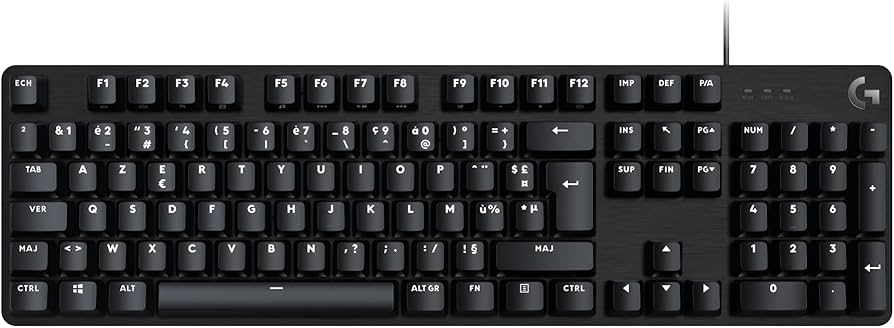
Logitech G413 TKL SE Mechanical Gaming Keyboard
Tactile Mechanical Switches G413 SE comes with full-size layout for peak performance. Gaming-grade tactile mechanical switches deliver subtle feedback through the actuation moment-ideal for split-second decisions in competitive and FPS gaming. PBT Keycaps Durable keycaps are vital for lasting confidence in all your keystrokes. G413 TKL SE keycaps are made with PBT-the most durable material on the market. PBT provides excellent heat and wear resistance for optimal gaming performance over the life of your keyboard. Built To Last G413 SE features a black brushed aircraft-quality 5052 low-carbon aluminum alloy top case, gaming-grade mechanical switches and PBT keycaps for a premium experience and superior durability. LED Lighting Whether you're in a competitive match or playing with friends, focus is a must. G413 SE features white LED lighting thoughtfully designed to enhance concentration and clarity. 6-Key Rollover With Anti-Ghost 6-key rollover with an anti-ghosting gaming matrix provides total control in the heat of the game. Press multiple keys seamlessly and simultaneously.
Tactile Mechanical Switches G413 SE comes with full-size layout for peak performance. Gaming-grade tactile mechanical switches deliver subtle feedback through the actuation moment-ideal for split-second decisions in competitive and FPS gaming. PBT Keycaps Durable keycaps are vital for lasting confidence in all your keystrokes. G413 TKL SE keycaps are made with PBT-the most durable material on the market. PBT provides excellent heat and wear resistance for optimal gaming performance over the life of your keyboard. Built To Last G413 SE features a black brushed aircraft-quality 5052 low-carbon aluminum alloy top case, gaming-grade mechanical switches and PBT keycaps for a premium experience and superior durability. LED Lighting Whether you're in a competitive match or playing with friends, focus is a must. G413 SE features white LED lighting thoughtfully designed to enhance concentration and clarity. 6-Key Rollover With Anti-Ghost 6-key rollover with an anti-ghosting gaming matrix provides total control in the heat of the game. Press multiple keys seamlessly and simultaneously.
Tactile Mechanical Switches G413 SE comes with full-size layout for peak performance. Gaming-grade tactile mechanical switches deliver subtle feedback through the actuation moment-ideal for split-second decisions in competitive and FPS gaming. PBT Keycaps Durable keycaps are vital for lasting confidence in all your keystrokes. G413 TKL SE keycaps are made with PBT-the most durable material on the market. PBT provides excellent heat and wear resistance for optimal gaming performance over the life of your keyboard. Built To Last G413 SE features a black brushed aircraft-quality 5052 low-carbon aluminum alloy top case, gaming-grade mechanical switches and PBT keycaps for a premium experience and superior durability. LED Lighting Whether you're in a competitive match or playing with friends, focus is a must. G413 SE features white LED lighting thoughtfully designed to enhance concentration and clarity. 6-Key Rollover With Anti-Ghost 6-key rollover with an anti-ghosting gaming matrix provides total control in the heat of the game. Press multiple keys seamlessly and simultaneously.
Tactile Mechanical Switches G413 SE comes with full-size layout for peak performance. Gaming-grade tactile mechanical switches deliver subtle feedback through the actuation moment-ideal for split-second decisions in competitive and FPS gaming. PBT Keycaps Durable keycaps are vital for lasting confidence in all your keystrokes. G413 TKL SE keycaps are made with PBT-the most durable material on the market. PBT provides excellent heat and wear resistance for optimal gaming performance over the life of your keyboard. Built To Last G413 SE features a black brushed aircraft-quality 5052 low-carbon aluminum alloy top case, gaming-grade mechanical switches and PBT keycaps for a premium experience and superior durability. LED Lighting Whether you're in a competitive match or playing with friends, focus is a must. G413 SE features white LED lighting thoughtfully designed to enhance concentration and clarity. 6-Key Rollover With Anti-Ghost 6-key rollover with an anti-ghosting gaming matrix provides total control in the heat of the game. Press multiple keys seamlessly and simultaneously.
in 5 offers
The lowest price for Logitech G413 TKL SE Mechanical Gaming Keyboard right now is $79.00 at PLE Computers, compared across 5 retailers.
The all-time low was $25.00 on 16 June 2024 — today's price is 216% above the lowest ever. It has been notably cheaper before — worth setting a price alert.
Prices last updated 4 Oct 2026.
Last updated at 04/10/2026 08:36:51
Logitech G413 TKL SE Mechanical Gaming Keyboard (Tactile)
Delivery between 7–16 Oct $19.98
Logitech G413 TKL SE Mechanical Gaming Keyboard
Free delivery between 7–16 Oct
Logitech 920010448 G G413 TKL SE Mechanical Gaming Keyboard
Delivery between 9–14 Oct $21.20
Logitech G G413 TKL SE Mechanical Gaming Keyboard
Delivery $12.99
Logitech G413 TKL SE Mechanical Gaming Keyboard
Delivery between 8–15 Oct $9.94
originally posted on microcenter.com
I bought this keyboard in 2020. As of this writing, the keyboard has FIVE broken switches, however it is just outside the oh-so-convenient 2 year warranty. This keyboard is also one of the most error prone keyboards I think I have ever used. Constant double taps, finger flops onto the next key, and very unusual key rebound. I let several friends use this keyboard and they immediately noticed how unreliable the key travel and key sensitivity was, causing incessant error during typing. Do NOT waste your time and money on this keyboard, spend an extra 30% and get something with durable switches that will last you at least 5 years, rather than this piece of trash, which is now an $80 paperweight 2.25 years after purchase
originally posted on logitechg.com
Packaging: Is it suitable? The packaging is quiet robust and holds the keyboard still so that it can’t damage itself. The outer box is quiet thin but covers a much thicker stronger cardboard inner to protect it from knocks and bangs. Overall the packaging serve the purpose of protecting the keyboard well, and should be resilient enough to prevent any damage weather it is being transported in your shopping or whether it is being sent to you from a online store via a carrier or the mail service. How it looks? The packaging is quiet attractive and shows the product on the box, the text on the box is very clear and easy to read. The main features of the keyboard are shown on the back of the box along with clear picture of each part as an example. Overall the box is ... MorePackaging: Is it suitable? The packaging is quiet robust and holds the keyboard still so that it can’t damage itself. The outer box is quiet thin but covers a much thicker stronger cardboard inner to protect it from knocks and bangs. Overall the packaging serve the purpose of protecting the keyboard well, and should be resilient enough to prevent any damage weather it is being transported in your shopping or whether it is being sent to you from a online store via a carrier or the mail service. How it looks? The packaging is quiet attractive and shows the product on the box, the text on the box is very clear and easy to read. The main features of the keyboard are shown on the back of the box along with clear picture of each part as an example. Overall the box is designed very well and should be able to make it clear to the customer if the product is appropriate to them. Installation: How easy to install and setup? The keyboard will work as plug and play however not all of the feature are available until you download the additional software. Once the software is installed setting up the keyboard is very easy and can be tailored to your individual tastes and needs, this is very useful as the keyboard is able to be setup with multiple profiles for each game or piece of software you want to us it on, this makes the keyboard very versatile. Settings that can be customised for this keyboard include custom key bindings, and light settings. Within the keyboard software there are premade profile available to download unfortunately these are fairly limited. A problem this keyboard has is that a set of change keys and a tool to use to change them is include in the box however there are no instruction on how to use them included within the box, and the instructions are extremely difficult to find online. There is plenty of wire provided with the keyboard meaning it should easily be able to be plugged into most gaming rigs without needing additional hardware to make the cable longer. The cable is surrounded by braiding which helps to protect the cable meaning that the wire is protected from rubbing through and breaking when it is trailed over the edge of the desk. Performance: How well does it perform? The keyboard responds very quickly and you do not need to press the keys very much for them to respond, this makes the keyboard perfect for a gaming environment where games are constantly increasing the pace they expect you to be able to respond, however this also can pose a problem as it can make the keyboard a little difficult to use for general purposes, also there is no way to turn down the sensitivity of the keys the setup software, the only way I could find to reduce the sensitivity is to reduce the sensitivity of all keyboards in the main windows 10 settings. Is There Any Problems/Faults? The most noticeable thing about this keyboard that the keys are very loud particularly in a quiet room, this can be a problem if you play a lot of multiplayer games as the sound could be picked up on the headset or microphone. Ease Of Use: Is it easy to use? If you have previous experience with pc gaming accessories then the keyboard is relatively easy to use and setup, however it could take a lot of getting used to if you are new to this short of keyboard as it is much more sensitive and responds much quicker then a standard keyboard. The keyboard is quite heavy this a benefit as it makes it less likely to slip about when in use or if you catch with your hand. This is also Ideal if you are typing you have the keyboard sat on your legs as it makes it less likely to slip off of your knee. They keyboard allows you to set both custom keys and macros to any key or key combination on the keyboard this is great for gaming as it allows you to automate actions in games which could otherwise prove difficult or problematic to perform. Is it comfortable to use? The keyboard has reasonable sized buttons which makes typing or pressing key bind combinations easier. The keys are fairly sensitive which means you don’t need to press the key hard to get them to respond. The keyboard is quiet heavy this both good a bad as it means it will stay stable on a desk however the weight also means that after certain length of time it can become uncomfortable if you have it sat on your knee. The keys are a sensible size and in a typical layout which makes the keyboard easily to use and type on, the key smooth and have rounded edges and corners which makes gives them a nice feeling when you are using them and stops you catching several keys at the same time. Despite it having keys that light up the keyboard stays cool even after long periods of use or being switched on a long time. The keyboard is mechanical and has the advantage of remain at the same level of responsiveness as it had when it was first switched on to when it is switched off even after a prolonged period unlike other more conventional electronic keyboards which start to fade a little after a prolonged period of use. How It Compares: This keyboard stands out from other for its compact size yet it maintains sensible sized buttons and layout. With the keyboard being mechanical the keyboard is highly responsive even though it is a compact size. The ability to be able to program custom key binds and macros for different profiles in the software the keyboard uses make it quite versatile to different game types and jobs. I like the fact that it is able to synchronise with other gaming products if you have and other products from the Logitech G Series, this makes your gaming rig look great as all of the peripherals pulse in sequence together. Final Evaluation: I would highly recommend this keyboard to anyone looking for a gaming keyboard as it is a highly versatile product which can be used for many different jobs and game styles. If you have other products from the Logitech G series you should get this keyboard as it uses the same software and can be synchronised with the other peripherals. This will not just ease the setup process for the keyboard but will improve the look of your gaming rig. Once this keyboard is setup it should be easy to use for any type of user from beginner to regular user, although it does take a short while to get used to the sensitivity of the keys. Although the initial setup could be painful this keyboard is well worth the trouble as it make up for these short coming very quickly. At first I was expecting this keyboard to be the same as any other I have used before however after using it for a prolonged period this keyboard is now used as my main keyboard and used for all the different activities . I would also recommend this product if you would like a attractive looking setup on your desk because it has a smooth stylish appearance which makes any pc setup look good. The final reason I would recommend this keyboard is because it is quite heavy and there resists being moved around easily and therefore is very difficult or you or your pet to knock off of the desk. Pros & Cons: To summarise the pros of the keyboard are: • Easy to use • Highly versatile • Plenty of wire • Braided cable • Fast response & high sensitivity • The keyboard is quite heavy this a benefit as it makes it less likely to slip The keyboard is quite heavy this a benefit as it makes it less likely to slip • Can set custom key binds & macros • Multiple profiles • Stays cools even after long periods of use or being switched on a long time • Sensible size keys • Comfortable to use While the cons and difficulties with the keyboard are: • Requires download of additional software • Might not be intuitive to people new to gaming equipment • Limited premade keyboard set up profiles • No instruction on how to use them included within the box, and the instructions are extremely difficult to find online • Keys very loud when used • Difficult to change sensitivity of the keys
originally posted on microcenter.com
Only had it for a few days so far I can't really say for sure its going to last but the over all quality seems very nice. The mechanical (no click) keys feel good, though unlike a membrane keyboard I do hear the keys bottom out. It's also the brightest led backlit mode I've ever seen. (White color only). I just bought K485 online thinking it would be equivalent but its not. That keyboard at its highest is barely 1/4 the brightness. Wish I'd been able to buy this keyboard for my father when his vision was going. I'm heading back to microcenter tomorrow to get another one of these for my other PC.
| Connectivity | Wired |
| Dimensions | 355 x 127 x 36.3 mm |
| Interface | USB 2.0 |
| Mouse Bundle | No |
| Operating System | Windows 10 or later macOS X 10.14 or later |
Logitech G413 TKL SE Mechanical Gaming Keyboard (Tactile)
Delivery between 7–16 Oct $19.98
Logitech G413 TKL SE Mechanical Gaming Keyboard
Free delivery between 7–16 Oct
Logitech 920010448 G G413 TKL SE Mechanical Gaming Keyboard
Delivery between 9–14 Oct $21.20
Logitech G G413 TKL SE Mechanical Gaming Keyboard
Delivery $12.99
Logitech G413 TKL SE Mechanical Gaming Keyboard
Delivery between 8–15 Oct $9.94
I bought this keyboard in 2020. As of this writing, the keyboard has FIVE broken switches, however it is just outside the oh-so-convenient 2 year warranty. This keyboard is also one of the most error prone keyboards I think I have ever used. Constant double taps, finger flops onto the next key, and very unusual key rebound. I let several friends use this keyboard and they immediately noticed how unreliable the key travel and key sensitivity was, causing incessant error during typing. Do NOT waste your time and money on this keyboard, spend an extra 30% and get something with durable switches that will last you at least 5 years, rather than this piece of trash, which is now an $80 paperweight 2.25 years after purchase
Packaging: Is it suitable? The packaging is quiet robust and holds the keyboard still so that it can’t damage itself. The outer box is quiet thin but covers a much thicker stronger cardboard inner to protect it from knocks and bangs. Overall the packaging serve the purpose of protecting the keyboard well, and should be resilient enough to prevent any damage weather it is being transported in your shopping or whether it is being sent to you from a online store via a carrier or the mail service. How it looks? The packaging is quiet attractive and shows the product on the box, the text on the box is very clear and easy to read. The main features of the keyboard are shown on the back of the box along with clear picture of each part as an example. Overall the box is ... MorePackaging: Is it suitable? The packaging is quiet robust and holds the keyboard still so that it can’t damage itself. The outer box is quiet thin but covers a much thicker stronger cardboard inner to protect it from knocks and bangs. Overall the packaging serve the purpose of protecting the keyboard well, and should be resilient enough to prevent any damage weather it is being transported in your shopping or whether it is being sent to you from a online store via a carrier or the mail service. How it looks? The packaging is quiet attractive and shows the product on the box, the text on the box is very clear and easy to read. The main features of the keyboard are shown on the back of the box along with clear picture of each part as an example. Overall the box is designed very well and should be able to make it clear to the customer if the product is appropriate to them. Installation: How easy to install and setup? The keyboard will work as plug and play however not all of the feature are available until you download the additional software. Once the software is installed setting up the keyboard is very easy and can be tailored to your individual tastes and needs, this is very useful as the keyboard is able to be setup with multiple profiles for each game or piece of software you want to us it on, this makes the keyboard very versatile. Settings that can be customised for this keyboard include custom key bindings, and light settings. Within the keyboard software there are premade profile available to download unfortunately these are fairly limited. A problem this keyboard has is that a set of change keys and a tool to use to change them is include in the box however there are no instruction on how to use them included within the box, and the instructions are extremely difficult to find online. There is plenty of wire provided with the keyboard meaning it should easily be able to be plugged into most gaming rigs without needing additional hardware to make the cable longer. The cable is surrounded by braiding which helps to protect the cable meaning that the wire is protected from rubbing through and breaking when it is trailed over the edge of the desk. Performance: How well does it perform? The keyboard responds very quickly and you do not need to press the keys very much for them to respond, this makes the keyboard perfect for a gaming environment where games are constantly increasing the pace they expect you to be able to respond, however this also can pose a problem as it can make the keyboard a little difficult to use for general purposes, also there is no way to turn down the sensitivity of the keys the setup software, the only way I could find to reduce the sensitivity is to reduce the sensitivity of all keyboards in the main windows 10 settings. Is There Any Problems/Faults? The most noticeable thing about this keyboard that the keys are very loud particularly in a quiet room, this can be a problem if you play a lot of multiplayer games as the sound could be picked up on the headset or microphone. Ease Of Use: Is it easy to use? If you have previous experience with pc gaming accessories then the keyboard is relatively easy to use and setup, however it could take a lot of getting used to if you are new to this short of keyboard as it is much more sensitive and responds much quicker then a standard keyboard. The keyboard is quite heavy this a benefit as it makes it less likely to slip about when in use or if you catch with your hand. This is also Ideal if you are typing you have the keyboard sat on your legs as it makes it less likely to slip off of your knee. They keyboard allows you to set both custom keys and macros to any key or key combination on the keyboard this is great for gaming as it allows you to automate actions in games which could otherwise prove difficult or problematic to perform. Is it comfortable to use? The keyboard has reasonable sized buttons which makes typing or pressing key bind combinations easier. The keys are fairly sensitive which means you don’t need to press the key hard to get them to respond. The keyboard is quiet heavy this both good a bad as it means it will stay stable on a desk however the weight also means that after certain length of time it can become uncomfortable if you have it sat on your knee. The keys are a sensible size and in a typical layout which makes the keyboard easily to use and type on, the key smooth and have rounded edges and corners which makes gives them a nice feeling when you are using them and stops you catching several keys at the same time. Despite it having keys that light up the keyboard stays cool even after long periods of use or being switched on a long time. The keyboard is mechanical and has the advantage of remain at the same level of responsiveness as it had when it was first switched on to when it is switched off even after a prolonged period unlike other more conventional electronic keyboards which start to fade a little after a prolonged period of use. How It Compares: This keyboard stands out from other for its compact size yet it maintains sensible sized buttons and layout. With the keyboard being mechanical the keyboard is highly responsive even though it is a compact size. The ability to be able to program custom key binds and macros for different profiles in the software the keyboard uses make it quite versatile to different game types and jobs. I like the fact that it is able to synchronise with other gaming products if you have and other products from the Logitech G Series, this makes your gaming rig look great as all of the peripherals pulse in sequence together. Final Evaluation: I would highly recommend this keyboard to anyone looking for a gaming keyboard as it is a highly versatile product which can be used for many different jobs and game styles. If you have other products from the Logitech G series you should get this keyboard as it uses the same software and can be synchronised with the other peripherals. This will not just ease the setup process for the keyboard but will improve the look of your gaming rig. Once this keyboard is setup it should be easy to use for any type of user from beginner to regular user, although it does take a short while to get used to the sensitivity of the keys. Although the initial setup could be painful this keyboard is well worth the trouble as it make up for these short coming very quickly. At first I was expecting this keyboard to be the same as any other I have used before however after using it for a prolonged period this keyboard is now used as my main keyboard and used for all the different activities . I would also recommend this product if you would like a attractive looking setup on your desk because it has a smooth stylish appearance which makes any pc setup look good. The final reason I would recommend this keyboard is because it is quite heavy and there resists being moved around easily and therefore is very difficult or you or your pet to knock off of the desk. Pros & Cons: To summarise the pros of the keyboard are: • Easy to use • Highly versatile • Plenty of wire • Braided cable • Fast response & high sensitivity • The keyboard is quite heavy this a benefit as it makes it less likely to slip The keyboard is quite heavy this a benefit as it makes it less likely to slip • Can set custom key binds & macros • Multiple profiles • Stays cools even after long periods of use or being switched on a long time • Sensible size keys • Comfortable to use While the cons and difficulties with the keyboard are: • Requires download of additional software • Might not be intuitive to people new to gaming equipment • Limited premade keyboard set up profiles • No instruction on how to use them included within the box, and the instructions are extremely difficult to find online • Keys very loud when used • Difficult to change sensitivity of the keys
Only had it for a few days so far I can't really say for sure its going to last but the over all quality seems very nice. The mechanical (no click) keys feel good, though unlike a membrane keyboard I do hear the keys bottom out. It's also the brightest led backlit mode I've ever seen. (White color only). I just bought K485 online thinking it would be equivalent but its not. That keyboard at its highest is barely 1/4 the brightness. Wish I'd been able to buy this keyboard for my father when his vision was going. I'm heading back to microcenter tomorrow to get another one of these for my other PC.
Gorgeous keyboard! I love the steel top! The lights are so bright and keys are sleek! I have another RGB keyboard with a tool to remove keys, and it’s very easy to change the keys with that if that’s what you wanted. Keycaps made with pbt so they’re heat and wear resistant and with all the computer use we do It’s still the same as they say we received it! My husband has a lot of pc gaming and he really likes it! I type a lot with it and it’s now my favourite keyboard. The lights are bright and clear making it look so crisp against the black! Fn+f12 to change the keyboard pattern 1. Static max brightness 2. Serpent 3. Reactive 4. Random Lights 5. Breathing Fn+ up arrow or down arrow to change the speed! Have fun!
I really like the build quality of this keyboard, it feels reassuredly heavy and solid. The metal plate beneath the keys especially help this feel like a premium product. Logitech's Romer G switches have a decidely clicky feel which I really like and work great for gaming. I think there's a little too much travel when just typing and causes me to misspell a few works when trying to tap out a long search query or reply. I wouldn't want to use this keyboard to write an essay or book as I'd quickly get finger fatigue. There's also some sort of metallic echo noise (you know like when you open a hamster cage) that can get a bit irratiting when typing for extended periods of time. The fabric USB cable is far too thick when you consider the utlity it provides, it has two ... MoreI really like the build quality of this keyboard, it feels reassuredly heavy and solid. The metal plate beneath the keys especially help this feel like a premium product. Logitech's Romer G switches have a decidely clicky feel which I really like and work great for gaming. I think there's a little too much travel when just typing and causes me to misspell a few works when trying to tap out a long search query or reply. I wouldn't want to use this keyboard to write an essay or book as I'd quickly get finger fatigue. There's also some sort of metallic echo noise (you know like when you open a hamster cage) that can get a bit irratiting when typing for extended periods of time. The fabric USB cable is far too thick when you consider the utlity it provides, it has two USBs on the end that you have to plug in to your computer to get the USB port on the keyboard to work. Having USB pass-through for a wireless mouse is great, but because you're plugging in two usbs into your computer, you'd expect it to have a bigger hub on the keyboard. Even adding a second USB port would be great for thumbdrives or headsets. The red backlight is a useful addition, I do wish it was RGB so you can use Logitech's lightsync technology or even just pick a different colour. Also, a little niggle I have is that the backlighting doesn't illuminate the entire key. For the number row, the led is centered on the number so the top portion of the symbol is dimmer than the rest. Most people won't notice this but it does kind of bug me! Overall, a good quality mechanical keyboard. Logitech's Romer G keys feel really nice and solid and make playing games a pleasure, but are less ideal if you also use your computer for long writing sessions.
This Logitech keyboard has a great reactivenes in clicking. I also love the satisfying sound of the clicks. Has amazing responsiveness in timing. I also enjoy the size of the keys. This gaming keyboard is worth the price because you truly get what you buy. I recommend for any avid gamer or just interested in a high quality keyboard that gives satisfying results. It is modern, sturdy, sleek, and dependable.
I purchased this tactile mechanical keyboard for a better typing experience. It was a great first dive into the world of mechanical keyboards. Pros: No RGB lighting Less accidental keystrokes Solid build quality feels heavy F keys have media controls Has 10-keys number pad Neutral: I can hear the keys with my noise cancelling headphones Sony XM2. It doesn't really bother me, but it is noticeably louder than a normal keyboard. Cons: Keys aren't visible without the backlighting. Recommendations: Try the keyboards in the store. I didn't really like the sound of the clicky mechanical boards, so I went with tactile. This is the title of the article that I used to decide what type of mechanical keyboard that would most likely meet my preferences. "How to Choose the Best ... MoreI purchased this tactile mechanical keyboard for a better typing experience. It was a great first dive into the world of mechanical keyboards. Pros: No RGB lighting Less accidental keystrokes Solid build quality feels heavy F keys have media controls Has 10-keys number pad Neutral: I can hear the keys with my noise cancelling headphones Sony XM2. It doesn't really bother me, but it is noticeably louder than a normal keyboard. Cons: Keys aren't visible without the backlighting. Recommendations: Try the keyboards in the store. I didn't really like the sound of the clicky mechanical boards, so I went with tactile. This is the title of the article that I used to decide what type of mechanical keyboard that would most likely meet my preferences. "How to Choose the Best Mechanical Keyboard in 2021"
Pros: easy to use, works well, white backlight, looks really nice Cons: none The G413SE keyboard is really nice! This keyboard is easy to setup, it’s easy to use, and it works really well. This keyboard is much more compact than I am used to, so it has taken some adjustments to use. But it was extremely easy to setup, all I had to do was plug it into my computer and it was ready to use. The backlighting is really nice as well. I like how well the keyboard is illuminated and that it’s not colored, it’s just a white backlight. Another nice thing is that you can choose how bright you want the keyboard, or you can shut off the black lighting entirely. It has a quick start guide basically showing you what buttons are what. However, they are also displayed on the front of ... MorePros: easy to use, works well, white backlight, looks really nice Cons: none The G413SE keyboard is really nice! This keyboard is easy to setup, it’s easy to use, and it works really well. This keyboard is much more compact than I am used to, so it has taken some adjustments to use. But it was extremely easy to setup, all I had to do was plug it into my computer and it was ready to use. The backlighting is really nice as well. I like how well the keyboard is illuminated and that it’s not colored, it’s just a white backlight. Another nice thing is that you can choose how bright you want the keyboard, or you can shut off the black lighting entirely. It has a quick start guide basically showing you what buttons are what. However, they are also displayed on the front of the keys, making it really easy to control. This keyboard also has feet on the bottom, so you can elevate the back of it if you want, but my table was too unleveled to use them. This keyboard is also super stylish with an aluminum top. It looks really nice. All in all, this is a really nice keyboard. It’s very easy to use, it works well, and it looks nice! I would absolutely recommend it!
This seems like a nice enough mechanical keyboard. It has a bit of weight to it, and a brushed metal faceplate. The mechanical keys are quicker to respond than membrane keys, and are backlit with a steady, even white light. When your computer first boots up, the light dances in a cute pattern across the keys. Drawbacks would be that the mechanical keys are louder than membrane keys, the LED lights are only available in white, and the keyboard MUST be lit up for you to be able to see the letters on the keys.
If you’re a gamer looking for a top-of-the-line mechanical keyboard, you need to check out the Logitech G413 SE. They packed this bad boy with all the features you need to take your gameplay to the next level. It’s got tactile mechanical switches, PBT keycaps, and 6-key rollover anti-ghosting performance to give you the precision and control you need to dominate. Execute complex actions and combos without having to worry about your keystrokes not being registered correctly. My APM boosted significantly as soon as I started gaming with this keyboard. Plus, it’s got a sleek black-brushed aluminum top case with white LED lighting that’ll make your setup look seriously cool. And with 12 function key media controls, you can easily adjust your audio and other settings on ... MoreIf you’re a gamer looking for a top-of-the-line mechanical keyboard, you need to check out the Logitech G413 SE. They packed this bad boy with all the features you need to take your gameplay to the next level. It’s got tactile mechanical switches, PBT keycaps, and 6-key rollover anti-ghosting performance to give you the precision and control you need to dominate. Execute complex actions and combos without having to worry about your keystrokes not being registered correctly. My APM boosted significantly as soon as I started gaming with this keyboard. Plus, it’s got a sleek black-brushed aluminum top case with white LED lighting that’ll make your setup look seriously cool. And with 12 function key media controls, you can easily adjust your audio and other settings on the fly. It’s also got reliable USB-corded technology so you never have to worry about running out of charge in the middle of a match. The compact size is perfect for those who don’t have the extra desk space. Tired of mediocre gaming? Then step up with this mechanical keyboard. I’ve been using it to play COD 2, Elden Ring, and GW2. It just makes the gameplay seem so much more fast-paced and fun. So, don’t waste your time or effort with ordinary keyboards that lack the precision and responsiveness needed to take your gaming to the next level - make the switch now and unlock your true potential. And if you’re looking for a gift for gamers or enthusiasts the Logitech G 4163 SE is a solid pick. It’s got all the features you need for meaningful gameplay: durability, tactile feedback, and overall performance. It’s reliable and offers an edge gamers need to perform at their best. If you’re serious about pushing your gaming beyond its limits, this is the only keyboard for you. Highly recommended!
| Connectivity | Wired |
| Dimensions | 355 x 127 x 36.3 mm |
| Interface | USB 2.0 |
| Mouse Bundle | No |
| Operating System | Windows 10 or later macOS X 10.14 or later |

