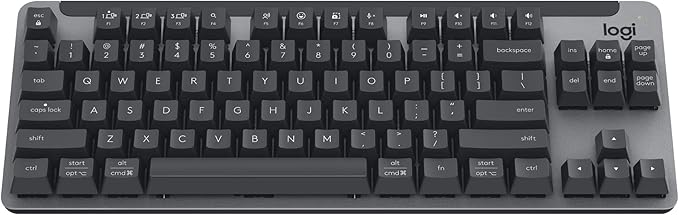
Logitech K650 Signature Comfort Wireless Keyboard (Graphite)
The keyboard is the main input peripheral used by all computers. The keyboard allows for user input and interaction with the computer. Much like many typewriters the keyboard has all the letters of the alphabet, numbers 0 – 9 and additional special operational keys, e.g. for adjusting the volume or going to your inbox directly. There are three different connection types: – USB is the most modern. You can recognize it by the rectangular connector. – PS/2 connectors are round. This type of connection is fairly commonly used by PC’s. – Bluetooth is another modern (wireless) connection method.
The keyboard is the main input peripheral used by all computers. The keyboard allows for user input and interaction with the computer. Much like many typewriters the keyboard has all the letters of the alphabet, numbers 0 – 9 and additional special operational keys, e.g. for adjusting the volume or going to your inbox directly. There are three different connection types: – USB is the most modern. You can recognize it by the rectangular connector. – PS/2 connectors are round. This type of connection is fairly commonly used by PC’s. – Bluetooth is another modern (wireless) connection method.
The keyboard is the main input peripheral used by all computers. The keyboard allows for user input and interaction with the computer. Much like many typewriters the keyboard has all the letters of the alphabet, numbers 0 – 9 and additional special operational keys, e.g. for adjusting the volume or going to your inbox directly. There are three different connection types: – USB is the most modern. You can recognize it by the rectangular connector. – PS/2 connectors are round. This type of connection is fairly commonly used by PC’s. – Bluetooth is another modern (wireless) connection method.
The keyboard is the main input peripheral used by all computers. The keyboard allows for user input and interaction with the computer. Much like many typewriters the keyboard has all the letters of the alphabet, numbers 0 – 9 and additional special operational keys, e.g. for adjusting the volume or going to your inbox directly. There are three different connection types: – USB is the most modern. You can recognize it by the rectangular connector. – PS/2 connectors are round. This type of connection is fairly commonly used by PC’s. – Bluetooth is another modern (wireless) connection method.
in 55 offers
The lowest price for Logitech K650 Signature Comfort Wireless Keyboard (Graphite) right now is $56.00 at Amazon.com.au, compared across 23 retailers.
The all-time low was $20.40 on 11 Mar 2026 — today's price is 175% above the lowest ever. It has been notably cheaper before — worth setting a price alert.
Prices last updated 10 Oct 2026.
Last updated at 10/10/2026 12:07:21
Logitech Signature K650 Wireless Comfort Keyboard with Wrist Rest, Graphite
Free delivery
Affiliate Disclosure: We may receive a small commission for purchases made through this link at no extra cost to you. This helps support our site. Thank you!
Logitech Signature K650 Wireless Keyboard with Palm-rest - Graphite
Delivery between Tue – Fri $19.98
Logitech Signature K650 Wireless Keyboard With Palm-rest - Graphite
Delivery $12.99
Affiliate Disclosure: We may receive a small commission for purchases made through this link at no extra cost to you. This helps support our site. Thank you!
Logitech Signature K650 Wireless Keyboard Graphite English 920 010955 - Keyboards
Delivery $13.69
Logitech Signature K650 Wireless Comfort Keyboard - Graphite
14-day returns
Logitech Signature K650 Wireless Keyboard Graphite
Delivery between Tue – Thu $15
Logitech Signature K650 Wireless Keyboard Graphite
Delivery $9.95
Logitech Signature K650 Wireless Comfort Keyboard - Graphite
Delivery $14
Logitech Signature K650 Keyboard English Grey
Delivery $28.99
Logitech Signature K650 Wireless Keyboard - Graphite English (920-010955)
Delivery between 13–21 Oct $10
originally posted on logitech.com
This is a quality set. The layout is well designed and user friendly and the mouse comfortable. However, I purchased the set hoping I could use the bluetooth to move it between two different computers, work and personal. Unfortunately, it only pairs with one device at a time, and the process is more time consuming than simply moving the dongle.
originally posted on logitech.com
Comfortable keyboard with good build quality. Special icons on some keys are hard to interpret and the documentation lacks details. Also, the print screen key is missing. The new wireless usb interface lacks backward compatability with earlier ones, reqiring use of separate usb dongles for the keyboard and older Logitech mouse.
originally posted on logitech.com
It was packaged very good and i was excited to open it , the set up process was pretty easy just a few second duration! Unfortunately i don't know why sometimes it doesn’t respond to my taps of keys or it gets stuck on a key and endlessly types that particular key. It doesn’t happen often but still… . Anything else works perfectly! Im used to flat keyboards but this one is so delicate that you forget about flatness or anything else haha .
| Included Components | Mouse, Keyboard |
| Number Of Items | 2 pc(s) |
| Accessory Type | Keyboard and Mouse Combo |
| Durability | Spill resistant, Spill-resistant |
| Language Layout | English (US) |

Logitech Signature K650 Wireless Comfort Keyboard with Wrist Rest, Graphite
Free delivery
Affiliate Disclosure: We may receive a small commission for purchases made through this link at no extra cost to you. This helps support our site. Thank you!
Logitech Signature K650 Wireless Keyboard with Palm-rest - Graphite
Delivery between Tue – Fri $19.98
Logitech Signature K650 Wireless Keyboard With Palm-rest - Graphite
Delivery $12.99
Affiliate Disclosure: We may receive a small commission for purchases made through this link at no extra cost to you. This helps support our site. Thank you!
Logitech Signature K650 Wireless Keyboard Graphite English 920 010955 - Keyboards
Delivery $13.69
Logitech Signature K650 Wireless Comfort Keyboard - Graphite
14-day returns
This is a quality set. The layout is well designed and user friendly and the mouse comfortable. However, I purchased the set hoping I could use the bluetooth to move it between two different computers, work and personal. Unfortunately, it only pairs with one device at a time, and the process is more time consuming than simply moving the dongle.
Comfortable keyboard with good build quality. Special icons on some keys are hard to interpret and the documentation lacks details. Also, the print screen key is missing. The new wireless usb interface lacks backward compatability with earlier ones, reqiring use of separate usb dongles for the keyboard and older Logitech mouse.
It was packaged very good and i was excited to open it , the set up process was pretty easy just a few second duration! Unfortunately i don't know why sometimes it doesn’t respond to my taps of keys or it gets stuck on a key and endlessly types that particular key. It doesn’t happen often but still… . Anything else works perfectly! Im used to flat keyboards but this one is so delicate that you forget about flatness or anything else haha .
Overall it's a good keyboard. There is no lag with the wireless connectivity. I dislike that I have to push the function key to make the function keys work (I can't push F12 to save a document, I have to push fn + F12). I am used to the function keys operating on their own without a secondary key and this is slightly bothersome. This is the same for insert and overtype mode which can get annoying, thus the reason for the 4 stars. Otherwise, it's a good keyboard, and much quieter than my other keyboard.
I could give this keyboard a five star rating, but Logitech seems to have gotten so cheap that they can't put a light on the Num Lock key. There is one on the Caps Lock. There needs to be one on the Num Lock. I've see Dell pull this crap on the keyboard for a computer I bought. It's hard to fathom that manufacturers would be this cheap, but I guess that's what goes on these days. Logitech and Dell and whoever else does this needs to pull their heads out of their behinds and stop making moronic design decisions like this!
It’s perfect. This keyboard is comfortable to use, key response is great, smooth, SUPER easy to type. Love the wrist rest. The keyboard is actually full size, so typing after years of having to use cramped keyboards is great. I needed to wait to order the white, since it was sold out whenever I looked- but I’m glad I kept checking back. It was available just a few weeks later, and arrived very quickly. Super happy! Experience using this all day versus my earlier Bluetooth keyboard or MacBook keyboard is night and day- especially as with this keyboard, it’s not difficult to get a response from the keys, unlike other keyboards I’ve used, which after the 100th time it’s happened in a single day will drive you batty. Wish I’d ordered the keys and mouse combo; using this ... MoreIt’s perfect. This keyboard is comfortable to use, key response is great, smooth, SUPER easy to type. Love the wrist rest. The keyboard is actually full size, so typing after years of having to use cramped keyboards is great. I needed to wait to order the white, since it was sold out whenever I looked- but I’m glad I kept checking back. It was available just a few weeks later, and arrived very quickly. Super happy! Experience using this all day versus my earlier Bluetooth keyboard or MacBook keyboard is night and day- especially as with this keyboard, it’s not difficult to get a response from the keys, unlike other keyboards I’ve used, which after the 100th time it’s happened in a single day will drive you batty. Wish I’d ordered the keys and mouse combo; using this makes my Bluetooth mouse feel so sub par! Wonderful product. Could not be happier 😊
At the time of writing, this keyboard shows up in searches on this site for multi-device keyboards. It is NOT a multi-device keyboard, though!! It supports bluetooth OR the logi bolt USB dongle, NOT BOTH. If you wish to switch between those two connection modes, you have to RE-PAIR the keyboard, which is a PAIN. I am giving this keyboard 3/5 because it is a solid keyboard for the price. But beware, it is NOT a multi-device keyboard.
I like the overall feel of this design, and the keypads are smooth and provide a good touch each time I press on the pads. My only issue is the Functional buttons on top, which do not offer the same feature as on my laptop. It's been challenging to use the full screen mode, as the F11 feature doesn't seem to offer the same steps and instead exits out of the page I'm working on at that time. But it is good for the operations I need daily.
Was looking for an alternative keyboard I can have to use for my Mac mini and this one by Logitech fits the bill. There's not many third party keyboards supported on Mac, but I was pleased to find this one during black Friday. I love that it has the 'opt' & 'cmd' keys used on Mac and it also has some other neat hotkeys like ones for media control, emoji, etc. And I love that all are mappable using the logi options+ software. It's comfortable to type on and the built in wrist rest is a nice touch. I do wish the keys were a little more spaced out but this is a perfect keyboard for Mac OS on a budget. If you're like me and don't care for the Magic Mac accessories, you can't go wrong with the K650 from Logitech for Mac. Also, graphite color is very nice and keys are ... MoreWas looking for an alternative keyboard I can have to use for my Mac mini and this one by Logitech fits the bill. There's not many third party keyboards supported on Mac, but I was pleased to find this one during black Friday. I love that it has the 'opt' & 'cmd' keys used on Mac and it also has some other neat hotkeys like ones for media control, emoji, etc. And I love that all are mappable using the logi options+ software. It's comfortable to type on and the built in wrist rest is a nice touch. I do wish the keys were a little more spaced out but this is a perfect keyboard for Mac OS on a budget. If you're like me and don't care for the Magic Mac accessories, you can't go wrong with the K650 from Logitech for Mac. Also, graphite color is very nice and keys are legible despite not being backlit.
Ich wollte die Tastatur mit BT benutzen wegen beschränkter Anzahl USB Ports am Rechner (neuer Lenovo ThinkCentre). Tastatur funktionierte nicht beim Start (Login nur mit Bildschirmtastatur/Maus) und hatte sonst noch ein paar Probleme. Nach einigem Hin- und Her das Schlussstatement vom Logitech Support (direktes Zitat, Hervorhebungen und Verkürzung von mir) I received some recommendation coming from our higher specialist and was advised that LOGITECH WIRELESS KEYBOARDS WILL NOT FUNCTION ON STARTUP VIA BLUETOOTH. When connected via Logi Bolt receiver, we need to consider the following so it will work: · USE your Logitech Unifying or Logi Bolt receiver on a USB 1.X OR 2.X PORT, as some USB 3.x ports on certain motherboards can cause potential issues. · DO NOT CONNECT ... MoreIch wollte die Tastatur mit BT benutzen wegen beschränkter Anzahl USB Ports am Rechner (neuer Lenovo ThinkCentre). Tastatur funktionierte nicht beim Start (Login nur mit Bildschirmtastatur/Maus) und hatte sonst noch ein paar Probleme. Nach einigem Hin- und Her das Schlussstatement vom Logitech Support (direktes Zitat, Hervorhebungen und Verkürzung von mir) I received some recommendation coming from our higher specialist and was advised that LOGITECH WIRELESS KEYBOARDS WILL NOT FUNCTION ON STARTUP VIA BLUETOOTH. When connected via Logi Bolt receiver, we need to consider the following so it will work: · USE your Logitech Unifying or Logi Bolt receiver on a USB 1.X OR 2.X PORT, as some USB 3.x ports on certain motherboards can cause potential issues. · DO NOT CONNECT your Logitech Unifying or Logi Bolt receiver using a USB HUB, DOCK, OR OTHER TYPES OF EXTENDERS, AS THESE MAY PROHIBIT THE CORRECT USE OF YOUR KEYBOARD. · By default LOGITECH KEYBOARDS DO NOT HAVE THE F-KEYS ENABLED. This means that during POST (Power-On Self-Test) if you want to access the BIOS, YOU NEED TO PRESS THE FN+F-KEYS. The F-key would be the key normally assigned to access the BIOS on your computer, usually, this is F2 or F8. · …. · If you're using AN OLDER MOTHERBOARD, PLEASE ENABLE LEGACY USB SUPPORT OR USB KEYBOARD SUPPORT IN THE BIOS SETTINGS. YOU MAY NEED TO CONNECT A DIFFERENT, WIRED KEYBOARD TO ACCESS THE BIOS TO ADJUST THESE SETTINGS. · If your keyboard does not work with your bootloader, such as GRUB, please consult the bootloader documentation to understand how to enable USB HID keyboard support. Most bootloaders will have this enabled by default, but some require manual configuration to enable it.
| Included Components | Mouse, Keyboard |
| Number Of Items | 2 pc(s) |
| Accessory Type | Keyboard and Mouse Combo |
| Durability | Spill resistant, Spill-resistant |
| Language Layout | English (US) |