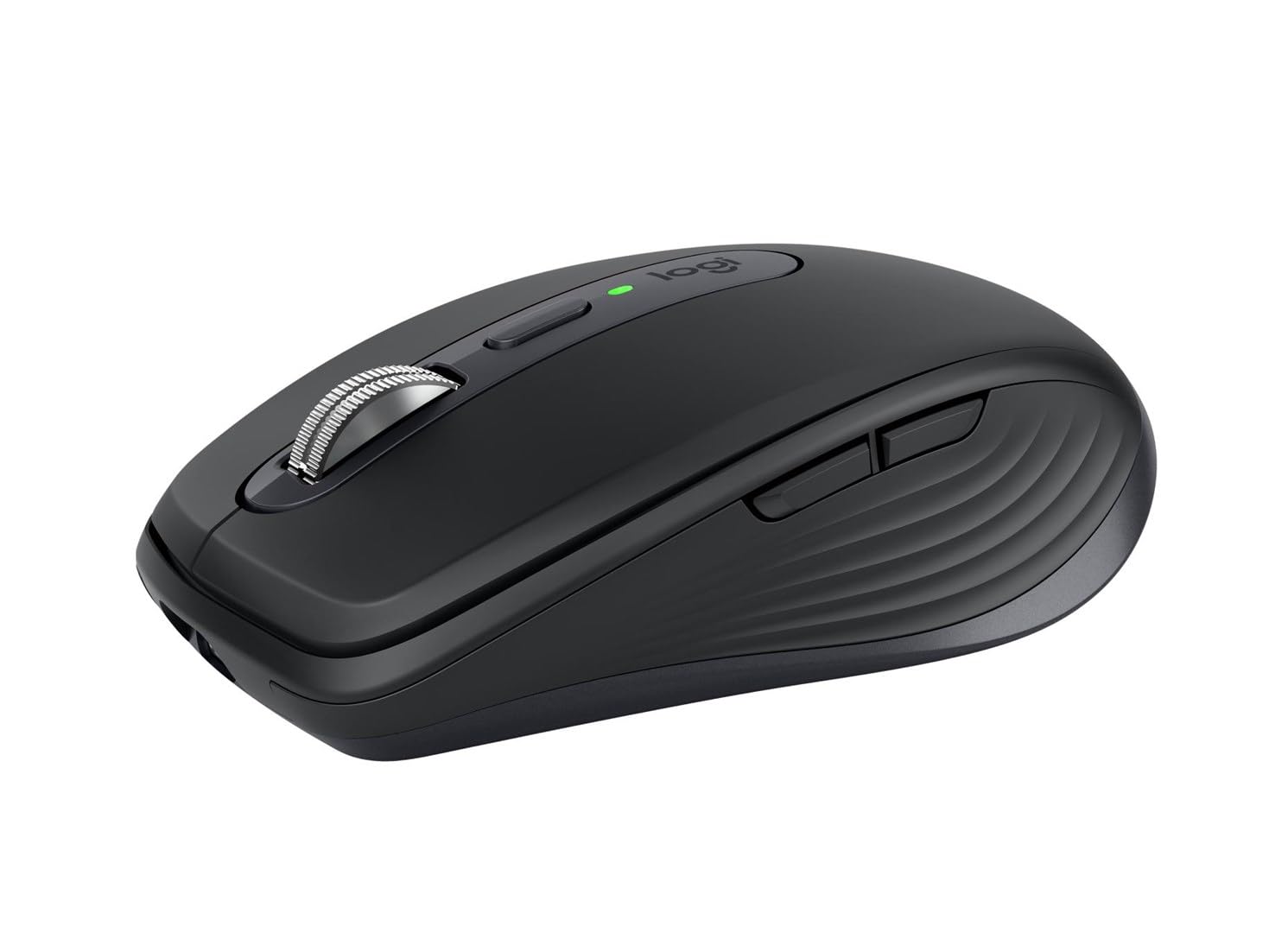
Logitech MX Anywhere 3S for Mac Wireless Mouse Grey
This Logitech MX Anywhere 3S for Mac Wireless Mouse is the perfect addition to your Mac setup. It features Quiet Click buttons that deliver a satisfying tactile feel. Plus, it's been optimised for macOS and iPadOS.
This Logitech MX Anywhere 3S for Mac Wireless Mouse is the perfect addition to your Mac setup. It features Quiet Click buttons that deliver a satisfying tactile feel. Plus, it's been optimised for macOS and iPadOS.
This Logitech MX Anywhere 3S for Mac Wireless Mouse is the perfect addition to your Mac setup. It features Quiet Click buttons that deliver a satisfying tactile feel. Plus, it's been optimised for macOS and iPadOS.
This Logitech MX Anywhere 3S for Mac Wireless Mouse is the perfect addition to your Mac setup. It features Quiet Click buttons that deliver a satisfying tactile feel. Plus, it's been optimised for macOS and iPadOS.
in 51 offers
The lowest price for Logitech MX Anywhere 3S for Mac Wireless Mouse Grey right now is $93.00 at BPC Technology, compared across 36 retailers.
The all-time low was $21.39 on 18 Aug 2026 — today's price is 335% above the lowest ever. It has been notably cheaper before — worth setting a price alert.
Prices last updated 20 Oct 2026.
Last updated at 20/10/2026 22:48:16
Logitech MX Anywhere 3S Compact Wireless Mouse, Pale Grey
Free delivery
Affiliate Disclosure: We may receive a small commission for purchases made through this link at no extra cost to you. This helps support our site. Thank you!
Logitech MX Anywhere 3S Wireless Mouse - Pale Grey
14-day returns
Logitech MX Anywhere 3S Compact Wireless Performance Mouse Pale Grey 910 006933 - Mouse
Delivery $12.96
Logitech MX Anywhere 3S Compact Wireless Performance Mouse Pale Grey 910 006933 - Mouse
Delivery $12
Logitech MX Anywhere 3S Wireless Mouse (Pale Grey)
Free delivery between Thu – Fri
Logitech Mx Anywhere 3s Wireless Mouse (pale Grey) Free Postage
Free delivery
Affiliate Disclosure: We may receive a small commission for purchases made through this link at no extra cost to you. This helps support our site. Thank you!
Logitech MX Anywhere 3S Wireless Mouse (Pale Grey)
Free delivery between Fri – Tue
Logitech MX Anywhere 3S Compact Wireless Mouse (Pale Grey) | Retravision
Delivery between 22–30 Oct $6.79
Logitech MX Anywhere 3S Wireless Mouse Pale Grey
Delivery between Thu – Tue $10
Logitech MX Anywhere 3S Wireless Mouse (Pale Grey, 910-006936)
Delivery $50
originally posted on woolworths.com.au
[This review was collected as part of a promotion. ] **Review of the Logitech MX Anywhere 3 for Mac - Pale Grey**The Logitech MX Anywhere 3 for Mac in Pale Grey is a sleek, portable mouse that perfectly balances style and functionality. Designed specifically for Mac users, it seamlessly integrates with macOS, making it a fantastic companion for both work and casual use. **Design and Build Quality** The Pale Grey finish gives the mouse a modern, sophisticated look, while its compact size makes it easy to carry in a laptop bag. The soft-touch materials provide a premium feel, and the ergonomic shape fits comfortably in the hand, allowing for extended use without discomfort. **Performance** Equipped with Logitech’s Darkfield sensor, the MX Anywhere 3 offers exceptional ... More[This review was collected as part of a promotion. ] **Review of the Logitech MX Anywhere 3 for Mac - Pale Grey**The Logitech MX Anywhere 3 for Mac in Pale Grey is a sleek, portable mouse that perfectly balances style and functionality. Designed specifically for Mac users, it seamlessly integrates with macOS, making it a fantastic companion for both work and casual use. **Design and Build Quality** The Pale Grey finish gives the mouse a modern, sophisticated look, while its compact size makes it easy to carry in a laptop bag. The soft-touch materials provide a premium feel, and the ergonomic shape fits comfortably in the hand, allowing for extended use without discomfort. **Performance** Equipped with Logitech’s Darkfield sensor, the MX Anywhere 3 offers exceptional tracking on various surfaces, including glass. With a DPI range of up to 4000, it’s highly responsive and perfect for tasks that require precision, like graphic design or detailed editing. The scroll wheel is another highlight—smooth and adaptive, it can switch between click-to-click and hyper-fast scrolling with a simple gesture. **Customization and Connectivity** The mouse supports customizable buttons, which can be tailored through the Logitech Options software. You can assign different functions based on your workflow, making it a versatile tool for productivity. Connectivity is a breeze, with options for Bluetooth or USB-C dongle, allowing for a stable connection with minimal lag. **Battery Life** One of the standout features is the impressive battery life. A full charge lasts up to 70 days, and with quick charging capabilities, just a minute of charging provides up to three hours of use. **Conclusion** Overall, the Logitech MX Anywhere 3 for Mac is an excellent investment for anyone seeking a high-performance, portable mouse. Its thoughtful design, exceptional performance, and extensive customization options make it a must-have for Mac users. **Rating: 9/10**
originally posted on bestbuy.com
Let’s face it, there is a good chance that you are using more than one device that can utilize a traditional computer mouse. Desktop and laptop computers are the most obvious, but now even tablets like the iPad can use them. Depending on the work you are doing, a mouse is much easier to use than a trackpad or touchscreen. Fortunately, many mice and keyboards come with what I typically call “channels”. With a button press, you can change the Bluetooth or receiver “channel” to one of three, and each of those can be associated with a different device, meaning you only need one mouse or one keyboard with three devices.The Logi MX Anywhere 3S For Mac mouse is a great choice, especially if you need to pack your mouse in a backpack or bag to take with you. It’s a bit ... MoreLet’s face it, there is a good chance that you are using more than one device that can utilize a traditional computer mouse. Desktop and laptop computers are the most obvious, but now even tablets like the iPad can use them. Depending on the work you are doing, a mouse is much easier to use than a trackpad or touchscreen. Fortunately, many mice and keyboards come with what I typically call “channels”. With a button press, you can change the Bluetooth or receiver “channel” to one of three, and each of those can be associated with a different device, meaning you only need one mouse or one keyboard with three devices.The Logi MX Anywhere 3S For Mac mouse is a great choice, especially if you need to pack your mouse in a backpack or bag to take with you. It’s a bit smaller, so it will fit in the bag easily and not add a lot of weight. That said, it is a little small.First, this mouse works on a Mac, obviously, but also worked on my Windows computer, and Linux computer, and my iPad without any issues. The Bluetooth connection setup was extremely easy and quick. The first time you set this mouse up, all “channels” are unassociated and will automatically be rapid-flashing when you switch to them - this is Bluetooth pairing mode. If you wish to change the associated, simply press and hold the same button (on the bottom of the mouse) for a few seconds until it begins flashing rapidly, and you’ll be back in pairing mode. This makes it easy enough to where you can actually use this mouse with more than 3 devices.On both Mac and Windows, download the Logi Options+ app (yes, this is different than the regular Logi Options app) to configure the mouse. As mentioned, this mouse is a bit small. It’s not at all uncomfortable, but the size and layout of the buttons made the side buttons (traditionally back and forward in the web browser) a bit hard for me to reach because I have long fingers. I used the app to reverse the placement of the back and forth buttons easily, and this made the back button (which I simply cannot live without anymore) much easier to use. You can adjust global mouse settings to make some of the buttons always take the same action, which is helpful for operating system shortcuts. Additionally, this app will allow you to customize the functions of the mouse buttons within specific software applications. For example, are “CMD + Z” or “CTRL + Z” your favorite keyboard shortcut ever??? Program Photoshop or Affinity Photo to use one of the side buttons for this keyboard shortcut. Work a lot in spreadsheets? Use the side buttons for “CMD + C / CTRL + C” and “CMD + V / CTRL + V”, and your cup of coffee never has to leave your hand!In addition to this added functionality, there is also two methods of wheel scrolling - smooth and line-by-line. With line-by-line, you will feel a slight bump each time the mouse wheel moves up or down slightly. This is great for reading long documents. The smooth scrolling has no resistance and makes it easy to use the hyper-scroll that you might use on an Apple trackpad. Note that this does work in certain Windows applications as well, such as modern browsers. Even better, the with enough force (meaning move the wheel rapidly, you can get this hyper-scrolling feature even when you have the line-by-line turned on, and that “bump” you feel can actually be adjusted as well, to be more or less resistant!Note that this is a rechargeable mouse that charges via USB-C, so you won’t need batteries. It comes with a USB-C to USB-C charging cable, but if you don’t have a USB-C port or plug, you’ll need a different cable. With USB-C charging, the mouse charged 6% in under 5 minutes (from 59% to 65%). The mouse button clicks are very quiet. They are audible in a silent room, but quiet enough to where you are unlikely to be disturbing anyone around you. The side buttons do make a bit more noise as they don’t have the same membrane behind them, but they are still not all that noisy. The tracking on this mouse is very precise, although there were a few times where I though it was a bit hyper-sensitive, as scrolling pages in the web browser, especially in Windows, became a bit jittery. However, the tracking speed is also adjustable in the app. The mouse wheel is metal, giving it a quality feel and better precision in your hand.The mouse is sleek looking with the white body and gray accents. However, I imagine the cleaning will be frequent as this will show dirt easily. The sides are a texturized rubber that feels good and allows for a good grip, but I imagine it will discolor quickly.Overall, this is an excellent mouse regardless of the device(s) you want to pair it with. It gives a ton of features and a comfortable and controllable grip, provided that the size is not too small for you.
originally posted on bestbuy.com
Logitech’s MX Anywhere 3S Mac Edition is their latest iteration of the MX Anywhere series; a mouse whose lineage traces all the way back to the original MX Anywhere mouse, released in 2009. I still have that mouse, and the Anywhere MX 2, which surprisingly, despite being my road warrior mice, still work. The latest MX Anywhere 3S is yet another great iteration on the series, bringing the free spinning scroll wheel, multiple device support, and the classic shape that is so petite and comfortable.Inside the MX Anwywhere’s box is the mouse, a cable, and some documentation. Unlike the 3 before it you will not find a USB dongle anymore. That’s probably ok, since I can’t think of the last time a Mac didn’t have bluetooth (I believe the G3 era macs?). That said, it does ... MoreLogitech’s MX Anywhere 3S Mac Edition is their latest iteration of the MX Anywhere series; a mouse whose lineage traces all the way back to the original MX Anywhere mouse, released in 2009. I still have that mouse, and the Anywhere MX 2, which surprisingly, despite being my road warrior mice, still work. The latest MX Anywhere 3S is yet another great iteration on the series, bringing the free spinning scroll wheel, multiple device support, and the classic shape that is so petite and comfortable.Inside the MX Anwywhere’s box is the mouse, a cable, and some documentation. Unlike the 3 before it you will not find a USB dongle anymore. That’s probably ok, since I can’t think of the last time a Mac didn’t have bluetooth (I believe the G3 era macs?). That said, it does have compatibility with the Logi Bolt receiver, however I doubt many will purchase it. The bluetooth is excellent, and despite the MX 3S Mac edition not listing support for anything other than Mac’s, it works flawlessly with Windows machines, being auto detected by Windows before MacOS even picked up on it.Closer inspection of the mouse shows that this is basically the MX 3S with different colors. The Pale Gray is identical, but the Space Gray variant of this mouse better blends with Apple’s space gray color theme. The pale gray though is very much a good aesthetic for use with Apple devices. The retail price of the mouse is the same as the MX 3S, so no Apple tax here, just color scheme changes.Pairing the mouse was easy enough. Simply going to bluetooth settings and clicking the pair button on the MX Anywhere mouse listed got me working quickly. You aren’t prompted to download the Options+ software from Logitech, but it is easily downloadable. Be careful, as you can still download the old Options software that works, but won’t recognize the 3S mouse, or support the Flow mode. Flow is pretty cool - allowing you to move your mouse to the edge of the screen, wait just a moment, and have the mouse automagically switch which computer it’s controlling. It’s pretty awesome, and is great if your workflow requires swapping between a Mac and a PC. Unfortunately you don’t get this sort of flexibility between Mac and iPad. That said, the mouse worked flawlessly with my iPad pro even if it could throw the elastic scrolling into fits with its free spinning wheel.The mouse features 6 buttons: left/right click, middle mouse, mode, and back/forward. A new feature with the 3S is quiet clicking, which differs from its predecessors in that it quietly clicks. It’s surprising the feel it has, reminding me a bit of the magic mouse, but much quieter. The mouse can side scroll if you hold a back/forward button down and start scrolling. I tried out the scroll wheel, and it’s smooth as butter. The mouse automatically will switch to free scroll if you fling it hard enough, but the mode button will get you into free spin. A quick fling of the wheel I could easily make it to row 3500 in Excel. Whether or not such amazing scrolling powers are necessary is up to you, but it’s been a hallmark of this MX series mouse since the beginning. Another interesting feature is the ability of the mouse to change the scroll feel - from its starting point of 50% where the scroll feels pretty clicky to 100% where each click feels visceral, all the way down to just a couple percent where there’s just a faint click per line. It’s fascinating how detailed the control is. This is definitely the ultimate evolution of the Magspeed scroll wheel.The Darkfield sensor has been upgraded to an 8k DPI. I’m not sure how useful that resolution is, as the mouse becomes unusably fast turning on the 8k sensor. Overall I left the mouse at 50% speed, as this seemed natural. The big feature that the darkfield sensor has, is that it can track on practically any surface, glass included. This still holds true, and this is one of the few mice you can use on a glass desk with no mouse pad and it operates like butter. Still one of my favorite features in a travel mouse, where you can’t guarantee a normal mousing surface.One word: this isn’t a gaming mouse, but I”ve had great success with it over the years on the road. The sensor isn’t magical, but the flexibility and accuracy it has means you can adapt to the ism’s of the sensor. I played many first person shooters with this, and a quick round of CS:2 I didn’t feel as though this mouse had lost any of its prowess.Overall, the MX Anywhere 3S Mac edition is a great mouse. I wish they’d include a case in the box, like the OG one had. I’m a huge fan of this series, and if you haven’t tried it, and are looking for a versatile and solid mouse: don’t hesitate to purchase, you’ll be quite pleased.
| Sensor Type | Optical sensor |
| Polling Rate | 88,133 Hz |
| Switches | Quiet Click buttons |
| Connectivity Type | Wireless |
| Interface | USB-C (for charging) |

Logitech MX Anywhere 3S Compact Wireless Mouse, Pale Grey
Free delivery
Affiliate Disclosure: We may receive a small commission for purchases made through this link at no extra cost to you. This helps support our site. Thank you!
Logitech MX Anywhere 3S Wireless Mouse - Pale Grey
14-day returns
Logitech MX Anywhere 3S Compact Wireless Performance Mouse Pale Grey 910 006933 - Mouse
Delivery $12.96
Logitech MX Anywhere 3S Compact Wireless Performance Mouse Pale Grey 910 006933 - Mouse
Delivery $12
Logitech MX Anywhere 3S Wireless Mouse (Pale Grey)
Free delivery between Thu – Fri
[This review was collected as part of a promotion. ] **Review of the Logitech MX Anywhere 3 for Mac - Pale Grey**The Logitech MX Anywhere 3 for Mac in Pale Grey is a sleek, portable mouse that perfectly balances style and functionality. Designed specifically for Mac users, it seamlessly integrates with macOS, making it a fantastic companion for both work and casual use. **Design and Build Quality** The Pale Grey finish gives the mouse a modern, sophisticated look, while its compact size makes it easy to carry in a laptop bag. The soft-touch materials provide a premium feel, and the ergonomic shape fits comfortably in the hand, allowing for extended use without discomfort. **Performance** Equipped with Logitech’s Darkfield sensor, the MX Anywhere 3 offers exceptional ... More[This review was collected as part of a promotion. ] **Review of the Logitech MX Anywhere 3 for Mac - Pale Grey**The Logitech MX Anywhere 3 for Mac in Pale Grey is a sleek, portable mouse that perfectly balances style and functionality. Designed specifically for Mac users, it seamlessly integrates with macOS, making it a fantastic companion for both work and casual use. **Design and Build Quality** The Pale Grey finish gives the mouse a modern, sophisticated look, while its compact size makes it easy to carry in a laptop bag. The soft-touch materials provide a premium feel, and the ergonomic shape fits comfortably in the hand, allowing for extended use without discomfort. **Performance** Equipped with Logitech’s Darkfield sensor, the MX Anywhere 3 offers exceptional tracking on various surfaces, including glass. With a DPI range of up to 4000, it’s highly responsive and perfect for tasks that require precision, like graphic design or detailed editing. The scroll wheel is another highlight—smooth and adaptive, it can switch between click-to-click and hyper-fast scrolling with a simple gesture. **Customization and Connectivity** The mouse supports customizable buttons, which can be tailored through the Logitech Options software. You can assign different functions based on your workflow, making it a versatile tool for productivity. Connectivity is a breeze, with options for Bluetooth or USB-C dongle, allowing for a stable connection with minimal lag. **Battery Life** One of the standout features is the impressive battery life. A full charge lasts up to 70 days, and with quick charging capabilities, just a minute of charging provides up to three hours of use. **Conclusion** Overall, the Logitech MX Anywhere 3 for Mac is an excellent investment for anyone seeking a high-performance, portable mouse. Its thoughtful design, exceptional performance, and extensive customization options make it a must-have for Mac users. **Rating: 9/10**
Let’s face it, there is a good chance that you are using more than one device that can utilize a traditional computer mouse. Desktop and laptop computers are the most obvious, but now even tablets like the iPad can use them. Depending on the work you are doing, a mouse is much easier to use than a trackpad or touchscreen. Fortunately, many mice and keyboards come with what I typically call “channels”. With a button press, you can change the Bluetooth or receiver “channel” to one of three, and each of those can be associated with a different device, meaning you only need one mouse or one keyboard with three devices.The Logi MX Anywhere 3S For Mac mouse is a great choice, especially if you need to pack your mouse in a backpack or bag to take with you. It’s a bit ... MoreLet’s face it, there is a good chance that you are using more than one device that can utilize a traditional computer mouse. Desktop and laptop computers are the most obvious, but now even tablets like the iPad can use them. Depending on the work you are doing, a mouse is much easier to use than a trackpad or touchscreen. Fortunately, many mice and keyboards come with what I typically call “channels”. With a button press, you can change the Bluetooth or receiver “channel” to one of three, and each of those can be associated with a different device, meaning you only need one mouse or one keyboard with three devices.The Logi MX Anywhere 3S For Mac mouse is a great choice, especially if you need to pack your mouse in a backpack or bag to take with you. It’s a bit smaller, so it will fit in the bag easily and not add a lot of weight. That said, it is a little small.First, this mouse works on a Mac, obviously, but also worked on my Windows computer, and Linux computer, and my iPad without any issues. The Bluetooth connection setup was extremely easy and quick. The first time you set this mouse up, all “channels” are unassociated and will automatically be rapid-flashing when you switch to them - this is Bluetooth pairing mode. If you wish to change the associated, simply press and hold the same button (on the bottom of the mouse) for a few seconds until it begins flashing rapidly, and you’ll be back in pairing mode. This makes it easy enough to where you can actually use this mouse with more than 3 devices.On both Mac and Windows, download the Logi Options+ app (yes, this is different than the regular Logi Options app) to configure the mouse. As mentioned, this mouse is a bit small. It’s not at all uncomfortable, but the size and layout of the buttons made the side buttons (traditionally back and forward in the web browser) a bit hard for me to reach because I have long fingers. I used the app to reverse the placement of the back and forth buttons easily, and this made the back button (which I simply cannot live without anymore) much easier to use. You can adjust global mouse settings to make some of the buttons always take the same action, which is helpful for operating system shortcuts. Additionally, this app will allow you to customize the functions of the mouse buttons within specific software applications. For example, are “CMD + Z” or “CTRL + Z” your favorite keyboard shortcut ever??? Program Photoshop or Affinity Photo to use one of the side buttons for this keyboard shortcut. Work a lot in spreadsheets? Use the side buttons for “CMD + C / CTRL + C” and “CMD + V / CTRL + V”, and your cup of coffee never has to leave your hand!In addition to this added functionality, there is also two methods of wheel scrolling - smooth and line-by-line. With line-by-line, you will feel a slight bump each time the mouse wheel moves up or down slightly. This is great for reading long documents. The smooth scrolling has no resistance and makes it easy to use the hyper-scroll that you might use on an Apple trackpad. Note that this does work in certain Windows applications as well, such as modern browsers. Even better, the with enough force (meaning move the wheel rapidly, you can get this hyper-scrolling feature even when you have the line-by-line turned on, and that “bump” you feel can actually be adjusted as well, to be more or less resistant!Note that this is a rechargeable mouse that charges via USB-C, so you won’t need batteries. It comes with a USB-C to USB-C charging cable, but if you don’t have a USB-C port or plug, you’ll need a different cable. With USB-C charging, the mouse charged 6% in under 5 minutes (from 59% to 65%). The mouse button clicks are very quiet. They are audible in a silent room, but quiet enough to where you are unlikely to be disturbing anyone around you. The side buttons do make a bit more noise as they don’t have the same membrane behind them, but they are still not all that noisy. The tracking on this mouse is very precise, although there were a few times where I though it was a bit hyper-sensitive, as scrolling pages in the web browser, especially in Windows, became a bit jittery. However, the tracking speed is also adjustable in the app. The mouse wheel is metal, giving it a quality feel and better precision in your hand.The mouse is sleek looking with the white body and gray accents. However, I imagine the cleaning will be frequent as this will show dirt easily. The sides are a texturized rubber that feels good and allows for a good grip, but I imagine it will discolor quickly.Overall, this is an excellent mouse regardless of the device(s) you want to pair it with. It gives a ton of features and a comfortable and controllable grip, provided that the size is not too small for you.
Logitech’s MX Anywhere 3S Mac Edition is their latest iteration of the MX Anywhere series; a mouse whose lineage traces all the way back to the original MX Anywhere mouse, released in 2009. I still have that mouse, and the Anywhere MX 2, which surprisingly, despite being my road warrior mice, still work. The latest MX Anywhere 3S is yet another great iteration on the series, bringing the free spinning scroll wheel, multiple device support, and the classic shape that is so petite and comfortable.Inside the MX Anwywhere’s box is the mouse, a cable, and some documentation. Unlike the 3 before it you will not find a USB dongle anymore. That’s probably ok, since I can’t think of the last time a Mac didn’t have bluetooth (I believe the G3 era macs?). That said, it does ... MoreLogitech’s MX Anywhere 3S Mac Edition is their latest iteration of the MX Anywhere series; a mouse whose lineage traces all the way back to the original MX Anywhere mouse, released in 2009. I still have that mouse, and the Anywhere MX 2, which surprisingly, despite being my road warrior mice, still work. The latest MX Anywhere 3S is yet another great iteration on the series, bringing the free spinning scroll wheel, multiple device support, and the classic shape that is so petite and comfortable.Inside the MX Anwywhere’s box is the mouse, a cable, and some documentation. Unlike the 3 before it you will not find a USB dongle anymore. That’s probably ok, since I can’t think of the last time a Mac didn’t have bluetooth (I believe the G3 era macs?). That said, it does have compatibility with the Logi Bolt receiver, however I doubt many will purchase it. The bluetooth is excellent, and despite the MX 3S Mac edition not listing support for anything other than Mac’s, it works flawlessly with Windows machines, being auto detected by Windows before MacOS even picked up on it.Closer inspection of the mouse shows that this is basically the MX 3S with different colors. The Pale Gray is identical, but the Space Gray variant of this mouse better blends with Apple’s space gray color theme. The pale gray though is very much a good aesthetic for use with Apple devices. The retail price of the mouse is the same as the MX 3S, so no Apple tax here, just color scheme changes.Pairing the mouse was easy enough. Simply going to bluetooth settings and clicking the pair button on the MX Anywhere mouse listed got me working quickly. You aren’t prompted to download the Options+ software from Logitech, but it is easily downloadable. Be careful, as you can still download the old Options software that works, but won’t recognize the 3S mouse, or support the Flow mode. Flow is pretty cool - allowing you to move your mouse to the edge of the screen, wait just a moment, and have the mouse automagically switch which computer it’s controlling. It’s pretty awesome, and is great if your workflow requires swapping between a Mac and a PC. Unfortunately you don’t get this sort of flexibility between Mac and iPad. That said, the mouse worked flawlessly with my iPad pro even if it could throw the elastic scrolling into fits with its free spinning wheel.The mouse features 6 buttons: left/right click, middle mouse, mode, and back/forward. A new feature with the 3S is quiet clicking, which differs from its predecessors in that it quietly clicks. It’s surprising the feel it has, reminding me a bit of the magic mouse, but much quieter. The mouse can side scroll if you hold a back/forward button down and start scrolling. I tried out the scroll wheel, and it’s smooth as butter. The mouse automatically will switch to free scroll if you fling it hard enough, but the mode button will get you into free spin. A quick fling of the wheel I could easily make it to row 3500 in Excel. Whether or not such amazing scrolling powers are necessary is up to you, but it’s been a hallmark of this MX series mouse since the beginning. Another interesting feature is the ability of the mouse to change the scroll feel - from its starting point of 50% where the scroll feels pretty clicky to 100% where each click feels visceral, all the way down to just a couple percent where there’s just a faint click per line. It’s fascinating how detailed the control is. This is definitely the ultimate evolution of the Magspeed scroll wheel.The Darkfield sensor has been upgraded to an 8k DPI. I’m not sure how useful that resolution is, as the mouse becomes unusably fast turning on the 8k sensor. Overall I left the mouse at 50% speed, as this seemed natural. The big feature that the darkfield sensor has, is that it can track on practically any surface, glass included. This still holds true, and this is one of the few mice you can use on a glass desk with no mouse pad and it operates like butter. Still one of my favorite features in a travel mouse, where you can’t guarantee a normal mousing surface.One word: this isn’t a gaming mouse, but I”ve had great success with it over the years on the road. The sensor isn’t magical, but the flexibility and accuracy it has means you can adapt to the ism’s of the sensor. I played many first person shooters with this, and a quick round of CS:2 I didn’t feel as though this mouse had lost any of its prowess.Overall, the MX Anywhere 3S Mac edition is a great mouse. I wish they’d include a case in the box, like the OG one had. I’m a huge fan of this series, and if you haven’t tried it, and are looking for a versatile and solid mouse: don’t hesitate to purchase, you’ll be quite pleased.
I'm usually not a really big fan of tiny mice but I was surprised by how not tiny this felt in my hands as well as the weight while being such a small mouse. I actually like this one quite a bit. I don't think it'll replace my main gaming mouse as my daily driver but for something that I can move around and use on various machines, I think it's going to work great.Setup was a breeze. There's a power switch on the bottom of the mouse as well as a button for changing which device you want to connect to. Like the rest of the MX Anywhere lineup, you can connect to 3 different bluetooth devices. The first device I tried out was my desktop PC. The mouse started out in pairing mode so all I needed to do was go to my bluetooth settings and select the mouse and it was ... MoreI'm usually not a really big fan of tiny mice but I was surprised by how not tiny this felt in my hands as well as the weight while being such a small mouse. I actually like this one quite a bit. I don't think it'll replace my main gaming mouse as my daily driver but for something that I can move around and use on various machines, I think it's going to work great.Setup was a breeze. There's a power switch on the bottom of the mouse as well as a button for changing which device you want to connect to. Like the rest of the MX Anywhere lineup, you can connect to 3 different bluetooth devices. The first device I tried out was my desktop PC. The mouse started out in pairing mode so all I needed to do was go to my bluetooth settings and select the mouse and it was ready to go. Windows suggested installing the Logi Options+ application automatically and it did that fairly quickly. The app is just used to give you access to some more options and finer control over the mouse. Setup was just as simple on my iPad and my Mac Mini.Using this mouse feels a lot more premium than the form factor usually suggests. Smaller mice, to me, have usually been cheaper options to throw in a bag with your laptop and generally sacrifice comfort and a more premium feel for something that's uncomfortably small and light. While this is a small mouse, it doesn't feel TOO small in my hand. The buttons and scroll wheel also feel really nice. The scroll wheel has a really nice feature I got used to on my main gaming mouse that uses notched scrolling when scrolling slowly but switches to a smooth scrolling when sped up. This mouse takes it a step further by letting you adjust how tactile the notched scrolling is in the Logi Options+ app. Really, the only thing missing that I usually like in a mouse is the ability to swivel the scroll wheel side to side as alternate back/forward buttons (or some people like to use it for horizontal scrolling).Tracking feels good and reliable. I didn't find an option to change the DPI right away without the Logi Options+ app, sadly, but the option does exist inside the app. The bluetooth connection also feels steady.Honestly I don't have a ton more to say about this one. It works well and I'm pleasantly surprised by how much more premium it feels than any other small/portable mouse I've used in the past. Everything feels good and it works easily with up to 3 devices which means I can just move it to another device with the push of a button. It might not be the cheapest mouse in this form factor out there but it also doesn't feel like it either. I recommend it.
Compact, lightweight, and precise, Logitech’ MX Anywhere 3S for Mac is the perfect mouse to take with you anywhere, either at your workspace, your couch, or on the go. With fast, accurate tracking, great battery life, and multi-device capabilities, this is the only mouse you need.Packaged with simply a user manual and a USB-C charging cable, the MX Anywhere 3S is a low-profile, minimally designed mouse. The pale gray color covers the entire mouse. It has two thumb buttons that default as forward and back navigation, and the MagSpeed scroll button spins fast and clean. Bigger hands may need to get used to this small device, and as a right-handed person, I found that it felt a little too symmetrical, meaning it didn’t quite have that ergonomical feel that a larger ... MoreCompact, lightweight, and precise, Logitech’ MX Anywhere 3S for Mac is the perfect mouse to take with you anywhere, either at your workspace, your couch, or on the go. With fast, accurate tracking, great battery life, and multi-device capabilities, this is the only mouse you need.Packaged with simply a user manual and a USB-C charging cable, the MX Anywhere 3S is a low-profile, minimally designed mouse. The pale gray color covers the entire mouse. It has two thumb buttons that default as forward and back navigation, and the MagSpeed scroll button spins fast and clean. Bigger hands may need to get used to this small device, and as a right-handed person, I found that it felt a little too symmetrical, meaning it didn’t quite have that ergonomical feel that a larger mouse does. However, the sacrifice of feel gives way to its very welcomed portability.You can take the MX mouse literally anywhere. This device tracks on any surface, be it your wooden desk, textured couch, or glass dining table. You can even place it on your lap and navigate that way. Its compact size can be transported easily on the go, and it has no excessively protruding buttons or edges that hinder that portability. As a wireless mouse, the MX Anywhere 3S stays powered a long time. I’ve tested it heavily and continuously for a week on its initial, unboxed charge. It advertises for 70 days of battery life, and just as impressive, you can quick charge it for a minute for a three-hour use in a pinch.Finally, what really stands out in this device is its use across multiple devices all at once. Connect up to three devices via Bluetooth (holding down the pairing button alerts your devices automatically if it can search for devices with which to pair). Connect to your MacBook Pro, your iPad Air, and a Windows desktop and seamlessly switch among all of them at the touch of a button. This mouse works on them all and works well.Overall, I have no trouble recommending the MX Anywhere 3S for Mac, a do-it-all mouse with great battery life, a compact, portable design, and accurate, reliable tracking on any surface. A great product.
I spend an equal amount of time at home , in the office and on customer sites so I'm always on the lookout for something to streamline my workflow. Traditionally I've had a discrete setup for each location, which although is nice and adaptable, it does mean I have to mentally change-gears when I change locations. A keyboard is a keyboard whether its external or on the laptop, but how you use and interface with your pointer can really make or break your workflow.I tried every tablet, touch and pointer peripheral you can think of (yes, even a trackball) , but there's something very precise about a traditional mouse, and if you're going to add precision functionality the place to do it is on that mouse.Logitech has been awesome at this over the years, as especially ... MoreI spend an equal amount of time at home , in the office and on customer sites so I'm always on the lookout for something to streamline my workflow. Traditionally I've had a discrete setup for each location, which although is nice and adaptable, it does mean I have to mentally change-gears when I change locations. A keyboard is a keyboard whether its external or on the laptop, but how you use and interface with your pointer can really make or break your workflow.I tried every tablet, touch and pointer peripheral you can think of (yes, even a trackball) , but there's something very precise about a traditional mouse, and if you're going to add precision functionality the place to do it is on that mouse.Logitech has been awesome at this over the years, as especially with the MX series (big fan!) and their full desktop range which is what I base my office around. On the go has always been a challenge , but the MX Anywhere 3s brings full desktop mouse functionality into a portable form factor.At home I have it paired with my Logitech Bolt receiver , but it works equally as well via bluetooth on the go. The scroll wheel on the top lets you customize for smooth or ratchet scroll type feedback, and beyond the obvious left/right click options, there are additional lick options with the scroll wheel itself and some extra side buttonsThere's no denying that there's value in buying into a technology ecosystem - love them or hate them, when you get more things from a particular vendor that work together , it just makes the technology adoption so much easier.The MX Anywhere 3S plays very nicely as you would expect with the Logi Options+ software - so much other than an additional scroll wheel and general physical footprint, there's really hardly any difference with my full-size MX Mouse.Compare this to my previous travel-mouse (the Logitech Pebble) which is a great budget option, but is pretty limited functionality - which if all you need is a point and click device is a great option. As you can see from the photos though, the MX Anywhere 3S is actually smaller (albeit a little taller) that the pebble , which is a little mind bending but also makes the decision a little easier in my mind.If you want desktop functionality and build quality in a mouse, you need to buy the MX Anywhere 3S. To be completely honest, it's so close in feel and function to the full-size 3S mouse , I would have no issue using the Anywhere 3S as my one and only mouse - either at home or on the move.
Having used the previous MX Anywhere 3 on a different computer, this improves in several aspects an already very well designed mouse.While being a travel mouse, this is very comfortable for daily, extended use. It feels comfortable in hand. The ribbed sides provides a good grip.The 'Mac' edition is almost identical to the standard version. Besides the color selection (Mine is in white), it comes with an USB-C charging cable instead of the USB-A cable. Otherwise it provides the same functionality.The improvements from the previous generation (MX Anywhere 3) narrow down to these:- 'S' is for Silent: The mouse buttons provide the same tactile feedback but they are more muted. There's a faint 'toc' instead of the familiar 'Click'. It's much more subtle. Ideal for ... MoreHaving used the previous MX Anywhere 3 on a different computer, this improves in several aspects an already very well designed mouse.While being a travel mouse, this is very comfortable for daily, extended use. It feels comfortable in hand. The ribbed sides provides a good grip.The 'Mac' edition is almost identical to the standard version. Besides the color selection (Mine is in white), it comes with an USB-C charging cable instead of the USB-A cable. Otherwise it provides the same functionality.The improvements from the previous generation (MX Anywhere 3) narrow down to these:- 'S' is for Silent: The mouse buttons provide the same tactile feedback but they are more muted. There's a faint 'toc' instead of the familiar 'Click'. It's much more subtle. Ideal for home offices where silence is valuable.- For the last few years, many professional grade Logitech devices can use the 'Bolt' USB adapter instead of standard Bluetooth, which is not compatible with the older 'Unifying' receivers. These are presented as more secure. I was already using an MX Keys keyboard with the Bolt receiver and the mouse connected via the Bolt receiver with no problem.- It has a newer 8000 DPI sensor, which tracks on practically any surface. The previous version is 1000 DPI, and this is the standard setting on this as well, but can be changed to 8000 DPI via the Options+ application. Needless to say, it works perfectly on my desk.Everything is configurable in this mouse: The scroll wheel is all metal, and knurled. It 'clicks' at low scrolling speeds and automatically changes to a free wheel while scrolling faster. It uses magnets inside to adjust. The transition speed is adjustable as well, and there is a button behind the wheel to change this manually. This button is also configurable to do about anything else. There are also two side buttons that are usually configured for backwards/forward, depending on the application.The mouse can be used while chargingLike other 'MX' mouses and keyboards, it can be simultaneously paired to three devices at the same time (Mac, PC, Android, Chromebook, iPad) be either Bluetooth Smart or with the 'Bolt' USB receiver, which is sold separately and included with some keyboards.The Logitech Options+ software that is also used through the MX line provides customization that goes beyond the control panel. It's very well designed and it's constantly improved.When used with this mouse, the application can be configured to alter the mouse settings depending on the application being used. This includes web browsers, Microsoft Office suite, teams and Zoom. For example, the default template for Zoom is to use the side buttons to mute audio or video.Another standout feature is the 'Flow' mode. This requires that one has a compatible Logitech keyboard, one of the MX series mouses, and two or three computers. Both computers also need to be on the same network (although one can be wired and another wireless as long as they are on the same network), and not on a VPN. When both the keyboard and mouse are simultaneously synced to these computers, Flow allows to switch both the mouse and keyboard automatically between computers (It changes the actual pairing selector on both keyboard and mouse, and also lets share clipboard and drag files between computers (copying from one to another).The latest improvement on the Option+ application is, of course, AI: In this case, one can configure one of the buttons to launch an AI assistant dialog while writing something, that can be used to rephrase or summarize. There's a Logitech Built-in dialog for this, or can launch ChatGPT instead.Another recent and very useful feature is the ability to create macros than can be launched via keystrokes or mouse buttons, and it's very flexible opening applications, entering text, etc.A minor annoyance is that it doesn't work as an USB mouse when plugged via USB-C (But still works while charging). Also I did not appreciate that it doesn't come with the Bolt USB connector. Apple considers the connection via the Bolt adapter as 'Secure' so it works during initial boot (FileVault enabled).Overall, this is a fantastic mouse, like the rest of the MX series. There are not enough differences between the standard and Mac versions. White is the exact same. The 'Space Gray' is not the same as the Black or Graphite on standard versions but it's regardless the same.
Logitech has been in the accessories game for a long time, and their MX line of products are some of the best in the business. I have more than a few Logitech accessories at home and work and have had great luck with all of them.The MX Anywhere 3S is the latest travel-size MX product, with this version being aimed specifically at Apple users. Both colorways compliment Apple’s latest Macs, and the svelte shape makes it ideal for taking on the go. With a bluetooth connection and USB-C charging the MX Anywhere 3S comes with the latest and greatest.The mouse is packaged in a small box and I was pleased to find next-to-no plastic packaging. Logitech advertises 60% or more recycled materials in the mouse so I was happy to see they extended their sustainability to the ... MoreLogitech has been in the accessories game for a long time, and their MX line of products are some of the best in the business. I have more than a few Logitech accessories at home and work and have had great luck with all of them.The MX Anywhere 3S is the latest travel-size MX product, with this version being aimed specifically at Apple users. Both colorways compliment Apple’s latest Macs, and the svelte shape makes it ideal for taking on the go. With a bluetooth connection and USB-C charging the MX Anywhere 3S comes with the latest and greatest.The mouse is packaged in a small box and I was pleased to find next-to-no plastic packaging. Logitech advertises 60% or more recycled materials in the mouse so I was happy to see they extended their sustainability to the packaging as well. The MX Anywhere 3S comes with just a USB-C charging cable in the box, as it’s designed to connect to your Mac via Bluetooth Low Energy. I was happy to see the included cable is USB-C on both ends which makes it more useful now that nearly all devices use this standard connector.Setup was dead-simple: I simply powered the mouse on and it immediately went into pairing mode, after which I selected it from my MacBook Pro’s Bluetooth devices list and it paired instantly. I haven’t had any trouble with the connection since initially pairing it. The mouse about 60% charged and I’ve hardly used any battery over a few days of average use.If you’ve used any of Logitech’s recent products the design of the MX Anywhere 3S should feel very familiar. It’s a mix of hard and soft touch plastic in a modern, attractive design. It fits right in with my other MX-series accessories in terms of appearance and quality. The biggest difference, of course, is that the MX Anywhere is quite a bit smaller than my daily-driver MX 3S mouse. It’s a cute little pebble shape — emphasis on the little. I’m glad to see Logitech still managed to include two side buttons and their excellent MagSpeed scroll wheel despite the diminutive size.Installing Logitech’s Logi Options+ app unlocks the full power of this mouse, allowing you to customize your entire user experience. In addition to the typical scrolling speed and forward/back commands you can assign different commands to the mouse buttons based on the application you’re using. This is really useful for folks who like to integrate as many shortcuts as they can into their workflow, and Logi Options+ supports all the popular productivity apps (Microsoft Office, Adobe Creative Cloud, Google Chrome and more). The app will set up suggested defaults if you allow it, all of which you can change or disable to your liking. I mostly left the settings as they came, with minor adjustments to the scroll wheel behavior.One of the best things about MX-series mice is Logitech’s MagScroll wheel. It has wonderful weight and precision and feels downright luxurious to use. A press of the button immediately behind the scroll wheel changes from ratcheting to smooth scrolling, both of which have their uses. Once you get used to a MagScroll wheel it’s hard to go back to a more basic setup.The same goes for the MX “S” devices, which feature nearly-silent clicks. You still get a nice, tactile click from the left and right mouse buttons, but you hear only a muted click, hardly audible more than a few feet from the mouse. This makes for a delightfully quiet work environment and while perhaps not strictly necessary it, like the MagScroll wheel, makes regular mice feel like a noticeable step down in quality.The MX Anywhere 3S for Mac is a great compact mouse, but as a small, travel-friendly accessory it’s nowhere near as comfortable to use as a full-sized, ergonomic mouse, especially for someone with larger hands like myself. Compared to my standard MX 3S it’s no contest in the comfort department. That being said, this mouse is definitely designed for travel, so I can forgive the comfort sacrifices necessary to make a packable device. Just be cognizant that this isn’t the best all day, every day mouse; it’s made for those one the go who can’t cram a full-sized mouse into their bag every time they leave the house.Size concerns aside I’m really happy with the Logitech MX Anywhere 3S. It’s well-designed, well made and intuitive to use, and feels right at home alongside my other MX-series accessories. Yes, it comes at a higher price point, but it really puts most standard and travel mice to shame (again, the MagScroll wheel is really hard to beat). While it won’t replace a full-size ergo mouse for daily use this will make an excellent travel companion when I’m on the go.
Outside of the Apple ecosystem (the Magic Trackpad and Magic Mouse) this might be the best option for Mac and iPad users. I’ve been extremely impressed by its scroll quality. I own a MX Master Mouse that is compatible with both Windows and Mac, but this feels just perfectly tuned for my MacBook and iPad that I would prefer to use this over the MX most days.Just like the MX this mouse has a little button to toggle between two scrolling types: measured with haptic feedback, and smooth fast scrolling. This is a feature that once you use you probably won’t be able to go back to other mouse from.USB-C charging is awesome, and its located on the front of the mouse and not the bottom like the lightning charger on the Apple Magic Mouse. I love being able to charge my ... MoreOutside of the Apple ecosystem (the Magic Trackpad and Magic Mouse) this might be the best option for Mac and iPad users. I’ve been extremely impressed by its scroll quality. I own a MX Master Mouse that is compatible with both Windows and Mac, but this feels just perfectly tuned for my MacBook and iPad that I would prefer to use this over the MX most days.Just like the MX this mouse has a little button to toggle between two scrolling types: measured with haptic feedback, and smooth fast scrolling. This is a feature that once you use you probably won’t be able to go back to other mouse from.USB-C charging is awesome, and its located on the front of the mouse and not the bottom like the lightning charger on the Apple Magic Mouse. I love being able to charge my mouse instead of searching around the house for double or triple A batteries, and sometimes pulling them out of old TV remotes.The mouse looks great as well. It’s clean, white, and goes perfectly with the Apple ecosystem aesthetic. I’ve grown accustomed to the ‘forward’ and ‘back’ buttons on the side of Logitech mice when browsing the web. Being able to quickly go back to the previous page while browsing is a nice little feature.Also, Logitech is the GOAT when it comes to being able to pair mice and keyboards to multiple devices. Being able to use this basically seamlessly with my MacBook Pro and iPad depending on what device I have with me is fantastic. It’s a feature I loved on my MX Master Mouse and MX Keys, and I’m glad it made its way to this device too.Overall, I’m very impressed with this mouse. It’s nicely tuned and good looking to pair with any Mac and/or iPad. It’s also slightly cheaper than any of the Apple offerings and offers more functionality, in my opinion.
Compared to the MX Anywhere 3 for Mac, which I own, there aren't many differences. However, the improvements that are there make the upgrade worth it for me.First, the optical sensor is now an 8K DPI which means you can use this on nearly any surface. I tested this on a dark wood desk, light granite countertop, white notebook, medium toned couch cushion, and even glass - because, why not. Every surface performed extremely well. There were a few hiccups on the couch cushion, but let's be honest, how often are you using that as your trackpad.The scroll wheel has been improved, but I have to be honest - the MX Anywhere 3 for Mac's scroll wheel was already fantastic and I had a hard time noticing the difference.Hands down, the best improvement is what Logitech ... MoreCompared to the MX Anywhere 3 for Mac, which I own, there aren't many differences. However, the improvements that are there make the upgrade worth it for me.First, the optical sensor is now an 8K DPI which means you can use this on nearly any surface. I tested this on a dark wood desk, light granite countertop, white notebook, medium toned couch cushion, and even glass - because, why not. Every surface performed extremely well. There were a few hiccups on the couch cushion, but let's be honest, how often are you using that as your trackpad.The scroll wheel has been improved, but I have to be honest - the MX Anywhere 3 for Mac's scroll wheel was already fantastic and I had a hard time noticing the difference.Hands down, the best improvement is what Logitech calls the Quiet Click buttons. They aren't kidding. No false advertisement here - the left and right buttons are SUPER QUIET. Not much surprises me when it comes to a computer mouse, but I was genuinely stunned at just how quiet these buttons are. 1000% worth upgrading, or purchasing, if you need or desire less noise from your mouse.All the terrific features you come to expect are still here as well. The fast USB-C charging (still at the front of the mouse), forever and a day battery life (or 70 days per Logitech), portability with the compact size, stellar Bluetooth connection, and the ability to connect up to three devices and switch seamlessly at the push of a button.While advertised and built for Mac, I did test and use this on MacOS, iPadOS, Windows 11, and a Samsung Galaxy Tab S9 Ultra. Every device connected and worked flawlessly.This is now my daily driver mouse. I already loved everything about the original MX Anywhere 3, and the ultra-quiet buttons on the 3S make this my go-to mouse.
| Sensor Type | Optical sensor |
| Polling Rate | 88,133 Hz |
| Switches | Quiet Click buttons |
| Connectivity Type | Wireless |
| Interface | USB-C (for charging) |