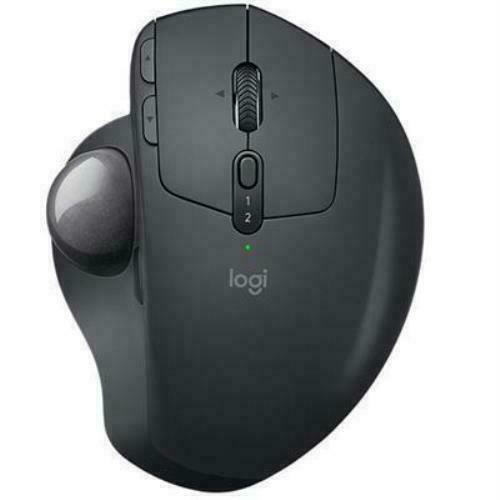
Logitech MX Ergo Wireless Trackball Mouse
Logitech MX ERGO Advanced Wireless Trackball Mouse
Logitech MX ERGO Advanced Wireless Trackball Mouse
Logitech MX ERGO Advanced Wireless Trackball Mouse
Logitech MX ERGO Advanced Wireless Trackball Mouse
in 22 offers
The lowest price for Logitech MX Ergo Wireless Trackball Mouse right now is $53.20 at eBay.com.au, compared across 22 retailers.
The all-time low was $25.00 on 6 July 2024 — today's price is 113% above the lowest ever. It has been notably cheaper before — worth setting a price alert.
Prices last updated 24 Oct 2026.
Last updated at 24/10/2026 21:09:12
Logitech Mx Ergo M-r0065 Rechargeable Ergonomic Design Wireless
Delivery $41.92
Affiliate Disclosure: We may receive a small commission for purchases made through this link at no extra cost to you. This helps support our site. Thank you!
LOGITECH MX ERGO Advanced Wireless Trackball Mouse For Windows PC & Mac | Black
Free next-day delivery
Logitech MX Ergo M575 Trackball
Free delivery between 26 Oct – 2 Nov
Logitech MX Ergo Mouse 910 005180 - Mouse
Delivery $12.17
Logitech MX Ergo Mouse 910 005180 - Mouse
Delivery $11
Logitech MX Ergo S Trackball - Bluetooth - USB Type A - Optical - 8 Button(s) - 6 Programmable Button(s) - Graphite
Delivery between 2–5 Nov $19.95
Logitech MX ERGO Advanced Wireless Trackball Mouse, for Windows PC and Mac | 910-005179 / 910-005177
Delivery between 28 Oct – 4 Nov $34.07
(LS) Logitech MX Ergo Wireless Bluetooth Trackball Mouse Customized Comfort 2048DPI 2.4GHz wireless 8 Buttons Rechargeable battery (~910-007261)
(LS) Logitech MX Ergo Wireless Bluetooth Trackball Mouse Customized Comfort 2048DPI 2.4GHz wireless 8 Buttons Rechargeable battery
Delivery $7.95
Logitech MX Ergo Wireless Trackball Mouse
Delivery $9.85
originally posted on walmart.com
Bought this around a week ago. This trackball works well: ball moves smoothly, buttons are responsive and solid, and the scroll wheel is not too ratchety to impede smooth scrolling (no free-spin mode though). The whole unit seems to be solidly built. It has a solid metal base held in place my strong magnets. When changing mouse/orientation angles, I recommend placing the unit on your work surface and press on the left or right edge while your hand is holding it normally.Having used a traditional mouse for years, it took a little time to get used to this unit; not used to finely manipulating things, my (anyone's) thumb is naturally unstable, but practice should help with that. I find playing card solitaire and Mahjongg Titans helps as an exercise. Yes; your index, ... MoreBought this around a week ago. This trackball works well: ball moves smoothly, buttons are responsive and solid, and the scroll wheel is not too ratchety to impede smooth scrolling (no free-spin mode though). The whole unit seems to be solidly built. It has a solid metal base held in place my strong magnets. When changing mouse/orientation angles, I recommend placing the unit on your work surface and press on the left or right edge while your hand is holding it normally.Having used a traditional mouse for years, it took a little time to get used to this unit; not used to finely manipulating things, my (anyone's) thumb is naturally unstable, but practice should help with that. I find playing card solitaire and Mahjongg Titans helps as an exercise. Yes; your index, middle and ring fingers would have more natural control, but I've used that style of trackball years ago, and I can remember trying keep my fingers off the ball for long periods of time to be tiring (especially if I'm doing a stressful task).As for functionality, there is technically only five buttons; left, right, page-forward, page-backward, and the wheel serving as the middle button. However, the software program, "Logitech Options," (downloaded separately) allows you to program all five plus one more for other things, so you actually have six customizeable buttons. The sixth button is defaulted to "precision mode" for the track ball, but it's not adjustable and is fixed on really fine-tune movements. However(2), in the settings, it can be switched to "trackball sensitivity" (yes; it is a separate custom option) that allows you to adjust two different sensitivity modes.Lastly as a bonus plus, it is not immediately obvious, but there is a small diagram what comes with the included documents that actually shows how the unit can be dismantled with just six screws. It is part of the warning that Logitech verified batteries should be used for replacement. This is great since despite being a lithium rechargeable battery pack, it looks to be a standard form I've seen sold--and even rechargeable lithiums don't last forever. But this is more advantageous because this also means I (or anyone) can take apart the mouse for more thorough cleaning if needed. In the past with every mouse I've ever owned, there always come a time when I wished I could take apart the mouse so I can clean the nooks and crannies I can't reach like the sides of the scroll wheel.
originally posted on ebay.com
Comfortable for long periods of use with easy adjustment using removable magnetic base plate at 0 to 20 degrees angle. DO NOT loose the base plate or the mouse becomes almost unstable and difficult to use on a surface. Easy to switch between laptop and DVR, very useful that unifying dongle works in DVR. The enhanced movement button for slow sensitive controlled cursor is good feature. Had a Logitech wired trackball which gave up after 15 years use and now this Ergo MX appears to be a contender for longevity, time will tell. Only gripe is the left and right buttons either side of the wheel are flush and can loose position on the right button occasionally. The old wired trackball had slight grooves so the fingers rested comfortable in each button but that's not a deal ... MoreComfortable for long periods of use with easy adjustment using removable magnetic base plate at 0 to 20 degrees angle. DO NOT loose the base plate or the mouse becomes almost unstable and difficult to use on a surface. Easy to switch between laptop and DVR, very useful that unifying dongle works in DVR. The enhanced movement button for slow sensitive controlled cursor is good feature. Had a Logitech wired trackball which gave up after 15 years use and now this Ergo MX appears to be a contender for longevity, time will tell. Only gripe is the left and right buttons either side of the wheel are flush and can loose position on the right button occasionally. The old wired trackball had slight grooves so the fingers rested comfortable in each button but that's not a deal breaker. Overall excellent tool. 3-7-2019 3 years later and still working. 1st fault has occurred, the plastic non-slip cover on the bottom of the removable/adjustable base plate has peeled off. A can of spray glue has been bought to fix it back on and it is now drying. It will be interesting to see if this repair works and the plastic cover stays on.
originally posted on logitech.com
I like to give a " first impression review" and then later on an updated review after some use. I am a full time SolidWorks user as an Engineer. I use a standing desk 90% of the day and a regular mouse creates down right awful posture in the hand all the way up to your shoulder blades. It starts to hurt after a long day. the MX ERGO Plus is down right comfortable. in every way. the 3 different adjustments are quick, easy and the placement of each is very sturdy. I use the mouse at the 30 degree angel by setting it to 20degrees and then adding the supplied wedge for the additional 10. the 30 degree rotation REALLY takes the twisting strain off of the body and it is instantly noticeable. I have only had about an hour of use on SolidWorks with it and I'm learning the ... MoreI like to give a " first impression review" and then later on an updated review after some use. I am a full time SolidWorks user as an Engineer. I use a standing desk 90% of the day and a regular mouse creates down right awful posture in the hand all the way up to your shoulder blades. It starts to hurt after a long day. the MX ERGO Plus is down right comfortable. in every way. the 3 different adjustments are quick, easy and the placement of each is very sturdy. I use the mouse at the 30 degree angel by setting it to 20degrees and then adding the supplied wedge for the additional 10. the 30 degree rotation REALLY takes the twisting strain off of the body and it is instantly noticeable. I have only had about an hour of use on SolidWorks with it and I'm learning the track ball quicker than I though I would. I honestly thought I was going to end up returning this but I just had to try it. the shape of the "grip" portion is very natural and fills the hand comfortably, you could say. the speed adjustment with the downloadable software is very nice. I have it on 100 % and I can use the entire screen without lifting my thumb off the ball. I have a 15" on a Lenovo ThinkPad.The programming software has a handful of standard applications pre-loaded but there are LOTS of additional applications that can be added allowing you to customize the buttons for each individual application. and YES it also has SolidWorks as an app :):):)1 con. the speed adjustment button next to the tack ball is a bit to close to the track ball IMO. I end up rolling the ball and moving the cursor out of the desired place when I'm going to switch it the the "precision mode". I just need to learn to lift my thumb up over the ball further. just a very minor thing to deal with until I build the muscle memory. the center wheel is nothing out of the ordinary.I would pay more for the same exact mouse with additional programable buttons on the pinky side of the mouse.overall an great buy and I would do it again. ill be back for a long term review at some point. 4/5 because its new and I need time to give it any better of a review than that.
| General | |
| Device Type | Trackball |
| Wireless Receiver | USB wireless receiver |
| Width | 9.98 cm |
| Depth | 13.25 cm |
Logitech Mx Ergo M-r0065 Rechargeable Ergonomic Design Wireless
Delivery $41.92
Affiliate Disclosure: We may receive a small commission for purchases made through this link at no extra cost to you. This helps support our site. Thank you!
LOGITECH MX ERGO Advanced Wireless Trackball Mouse For Windows PC & Mac | Black
Free next-day delivery
Logitech MX Ergo M575 Trackball
Free delivery between 26 Oct – 2 Nov
Logitech MX Ergo Mouse 910 005180 - Mouse
Delivery $12.17
Logitech MX Ergo Mouse 910 005180 - Mouse
Delivery $11
Bought this around a week ago. This trackball works well: ball moves smoothly, buttons are responsive and solid, and the scroll wheel is not too ratchety to impede smooth scrolling (no free-spin mode though). The whole unit seems to be solidly built. It has a solid metal base held in place my strong magnets. When changing mouse/orientation angles, I recommend placing the unit on your work surface and press on the left or right edge while your hand is holding it normally.Having used a traditional mouse for years, it took a little time to get used to this unit; not used to finely manipulating things, my (anyone's) thumb is naturally unstable, but practice should help with that. I find playing card solitaire and Mahjongg Titans helps as an exercise. Yes; your index, ... MoreBought this around a week ago. This trackball works well: ball moves smoothly, buttons are responsive and solid, and the scroll wheel is not too ratchety to impede smooth scrolling (no free-spin mode though). The whole unit seems to be solidly built. It has a solid metal base held in place my strong magnets. When changing mouse/orientation angles, I recommend placing the unit on your work surface and press on the left or right edge while your hand is holding it normally.Having used a traditional mouse for years, it took a little time to get used to this unit; not used to finely manipulating things, my (anyone's) thumb is naturally unstable, but practice should help with that. I find playing card solitaire and Mahjongg Titans helps as an exercise. Yes; your index, middle and ring fingers would have more natural control, but I've used that style of trackball years ago, and I can remember trying keep my fingers off the ball for long periods of time to be tiring (especially if I'm doing a stressful task).As for functionality, there is technically only five buttons; left, right, page-forward, page-backward, and the wheel serving as the middle button. However, the software program, "Logitech Options," (downloaded separately) allows you to program all five plus one more for other things, so you actually have six customizeable buttons. The sixth button is defaulted to "precision mode" for the track ball, but it's not adjustable and is fixed on really fine-tune movements. However(2), in the settings, it can be switched to "trackball sensitivity" (yes; it is a separate custom option) that allows you to adjust two different sensitivity modes.Lastly as a bonus plus, it is not immediately obvious, but there is a small diagram what comes with the included documents that actually shows how the unit can be dismantled with just six screws. It is part of the warning that Logitech verified batteries should be used for replacement. This is great since despite being a lithium rechargeable battery pack, it looks to be a standard form I've seen sold--and even rechargeable lithiums don't last forever. But this is more advantageous because this also means I (or anyone) can take apart the mouse for more thorough cleaning if needed. In the past with every mouse I've ever owned, there always come a time when I wished I could take apart the mouse so I can clean the nooks and crannies I can't reach like the sides of the scroll wheel.
Comfortable for long periods of use with easy adjustment using removable magnetic base plate at 0 to 20 degrees angle. DO NOT loose the base plate or the mouse becomes almost unstable and difficult to use on a surface. Easy to switch between laptop and DVR, very useful that unifying dongle works in DVR. The enhanced movement button for slow sensitive controlled cursor is good feature. Had a Logitech wired trackball which gave up after 15 years use and now this Ergo MX appears to be a contender for longevity, time will tell. Only gripe is the left and right buttons either side of the wheel are flush and can loose position on the right button occasionally. The old wired trackball had slight grooves so the fingers rested comfortable in each button but that's not a deal ... MoreComfortable for long periods of use with easy adjustment using removable magnetic base plate at 0 to 20 degrees angle. DO NOT loose the base plate or the mouse becomes almost unstable and difficult to use on a surface. Easy to switch between laptop and DVR, very useful that unifying dongle works in DVR. The enhanced movement button for slow sensitive controlled cursor is good feature. Had a Logitech wired trackball which gave up after 15 years use and now this Ergo MX appears to be a contender for longevity, time will tell. Only gripe is the left and right buttons either side of the wheel are flush and can loose position on the right button occasionally. The old wired trackball had slight grooves so the fingers rested comfortable in each button but that's not a deal breaker. Overall excellent tool. 3-7-2019 3 years later and still working. 1st fault has occurred, the plastic non-slip cover on the bottom of the removable/adjustable base plate has peeled off. A can of spray glue has been bought to fix it back on and it is now drying. It will be interesting to see if this repair works and the plastic cover stays on.
I like to give a " first impression review" and then later on an updated review after some use. I am a full time SolidWorks user as an Engineer. I use a standing desk 90% of the day and a regular mouse creates down right awful posture in the hand all the way up to your shoulder blades. It starts to hurt after a long day. the MX ERGO Plus is down right comfortable. in every way. the 3 different adjustments are quick, easy and the placement of each is very sturdy. I use the mouse at the 30 degree angel by setting it to 20degrees and then adding the supplied wedge for the additional 10. the 30 degree rotation REALLY takes the twisting strain off of the body and it is instantly noticeable. I have only had about an hour of use on SolidWorks with it and I'm learning the ... MoreI like to give a " first impression review" and then later on an updated review after some use. I am a full time SolidWorks user as an Engineer. I use a standing desk 90% of the day and a regular mouse creates down right awful posture in the hand all the way up to your shoulder blades. It starts to hurt after a long day. the MX ERGO Plus is down right comfortable. in every way. the 3 different adjustments are quick, easy and the placement of each is very sturdy. I use the mouse at the 30 degree angel by setting it to 20degrees and then adding the supplied wedge for the additional 10. the 30 degree rotation REALLY takes the twisting strain off of the body and it is instantly noticeable. I have only had about an hour of use on SolidWorks with it and I'm learning the track ball quicker than I though I would. I honestly thought I was going to end up returning this but I just had to try it. the shape of the "grip" portion is very natural and fills the hand comfortably, you could say. the speed adjustment with the downloadable software is very nice. I have it on 100 % and I can use the entire screen without lifting my thumb off the ball. I have a 15" on a Lenovo ThinkPad.The programming software has a handful of standard applications pre-loaded but there are LOTS of additional applications that can be added allowing you to customize the buttons for each individual application. and YES it also has SolidWorks as an app :):):)1 con. the speed adjustment button next to the tack ball is a bit to close to the track ball IMO. I end up rolling the ball and moving the cursor out of the desired place when I'm going to switch it the the "precision mode". I just need to learn to lift my thumb up over the ball further. just a very minor thing to deal with until I build the muscle memory. the center wheel is nothing out of the ordinary.I would pay more for the same exact mouse with additional programable buttons on the pinky side of the mouse.overall an great buy and I would do it again. ill be back for a long term review at some point. 4/5 because its new and I need time to give it any better of a review than that.
I would have loved to give a more elaborate review of this product since it is fairly good at replacing a traditional mouse and helped me with a more relaxed and natural wrist pose. Works decently, is intuitive and the trackball feels great, although the software to map the keys is not the best, like in the case of many tools of this kind (mechanical keyboards anyone?).However, this product suffers from a major flaw that at this point, it made me frustrated above all. I used the MX Ergo for more than two years now, daily.This product has THE WORST choice of materials and it is impossible to clean! The top surface is made of a sort of spongy rubber membrane that does not allow your hand to breathe. This means that your hand is going to sweat a lot, which means that ... MoreI would have loved to give a more elaborate review of this product since it is fairly good at replacing a traditional mouse and helped me with a more relaxed and natural wrist pose. Works decently, is intuitive and the trackball feels great, although the software to map the keys is not the best, like in the case of many tools of this kind (mechanical keyboards anyone?).However, this product suffers from a major flaw that at this point, it made me frustrated above all. I used the MX Ergo for more than two years now, daily.This product has THE WORST choice of materials and it is impossible to clean! The top surface is made of a sort of spongy rubber membrane that does not allow your hand to breathe. This means that your hand is going to sweat a lot, which means that the top part is turning out to be very dirty, especially after very long and intense work sessions where sometimes you sit 10 hours and more at your desk for a whole week (I work as a video editor).The dirt literally gets trapped in the spongy surface and it is impossible to get rid of. There is no real way to clean it as you would with anything else since a paper tissue would disintegrate against the surface because of the friction generated by the spongy material, so I understood that the best way is to rub it with a cloth soaked with soap and water. That's right! And even so, I would struggle for at least fifteen minutes of brushing to make the MX Ergo decently cleaned.Cleaning the trackball housing is also a problem since the sensor is located in a hollow aperture that gets easily covered with dirt but it is so tiny that makes the task difficult and frustrating. Not being able to clean the sensor properly would obviously result in a malfunction of the trackball.I don't care if the surface of the Ergo is smooth, I would rather prefer to have a stiff piece of hard plastic that can get easily cleaned after a fair amount of use than a material that requires daily care in order not to look like a gross smudge of dirt. This is a piece of hardware that is supposed to be used every single day and I believe its efficiency relies also on this.
Logitech mice have been the cream of the crop in my opinion. I have used Logitech gaming mice for years for business use. Mainly because I could program simple keyboard shortcuts. For instance, copying, cutting, and pasting made editing documents a breeze. I recently purchase this mouse as I have been having some wrist trouble. Overall, made with quality material and craftsmanship; a lot of research has gone into making this mouse. The previous gaming mice I have used allowed you to edit the configuration, and that configuration could be saved on the mouse. Allowing me to use the mice for business use. Now the reason for my 4 stars, most businesses dont allow you to install software, unless you are an administrator. When downloading the software on my personal ... MoreLogitech mice have been the cream of the crop in my opinion. I have used Logitech gaming mice for years for business use. Mainly because I could program simple keyboard shortcuts. For instance, copying, cutting, and pasting made editing documents a breeze. I recently purchase this mouse as I have been having some wrist trouble. Overall, made with quality material and craftsmanship; a lot of research has gone into making this mouse. The previous gaming mice I have used allowed you to edit the configuration, and that configuration could be saved on the mouse. Allowing me to use the mice for business use. Now the reason for my 4 stars, most businesses dont allow you to install software, unless you are an administrator. When downloading the software on my personal computer and editing the configuration, I was hoping I could then use it for work. I totally understand the software allows for increase functionality of this particular mouse. If at all possible, have users create an account, secure it with multi-factor authentication, and allow users to make configuration changes, without the use of installed software? I know this mouse doesn’t have any onboard storage, or at least any I am aware of. That really is my only complaint.
I work on computers 10 hours per day, and this is my 4th time getting this mouse from logitech. It was recommended 12ish years ago after I had some handelbow issues and its truly saved me from further strain. That being said, the prior model M570 had very smooth edges, large rubber pads on the bottom, and a smoothshiny ball. This M575 has more sharp edges which doesnt make sense as any time a fingerhand rests on one for a few seconds it feels sharp and uncomfy. It has smaller rubber pads on the bottom and seems lighter, so when I unintentionally move my full hand the whole mouse moves whereas the old one stayed in place. The ball seems textured, and makes more noise when rolling it. Its also a tiny bit taller, making for a bit more wrist strain. And I can feel it ... MoreI work on computers 10 hours per day, and this is my 4th time getting this mouse from logitech. It was recommended 12ish years ago after I had some handelbow issues and its truly saved me from further strain. That being said, the prior model M570 had very smooth edges, large rubber pads on the bottom, and a smoothshiny ball. This M575 has more sharp edges which doesnt make sense as any time a fingerhand rests on one for a few seconds it feels sharp and uncomfy. It has smaller rubber pads on the bottom and seems lighter, so when I unintentionally move my full hand the whole mouse moves whereas the old one stayed in place. The ball seems textured, and makes more noise when rolling it. Its also a tiny bit taller, making for a bit more wrist strain. And I can feel it press in my palm more, if that makes sense. I couldnt find the exact specs, but I measured the height of the M575 at 1.75 and the M570 at 1.68. When you already have handwrist strain, you feel that. Still better than a regular mouse. Hopefully the next M580 will be better.
I bought the MX Ergo at the start of the pandemic to optimize the ergonomics of my dining-room-table-turned-office. I've loved everything about this mouse and appreciate its versatility--from how its positioned to the settings. However, two years in, it started acting quirky, so we figured it needed a new battery. The only battery we could find was a generic brand coming out of China; there was nothing from Logitech about battery replacements, so we took the chance and replaced the battery. The battery worked for about six months, and now my mouse has stopped working. Sometimes it gets a slight charge and works; other times, scrolling moves the cursor in any direction except the direction I want it to go; and other times, it stops working altogether. I honestly ... MoreI bought the MX Ergo at the start of the pandemic to optimize the ergonomics of my dining-room-table-turned-office. I've loved everything about this mouse and appreciate its versatility--from how its positioned to the settings. However, two years in, it started acting quirky, so we figured it needed a new battery. The only battery we could find was a generic brand coming out of China; there was nothing from Logitech about battery replacements, so we took the chance and replaced the battery. The battery worked for about six months, and now my mouse has stopped working. Sometimes it gets a slight charge and works; other times, scrolling moves the cursor in any direction except the direction I want it to go; and other times, it stops working altogether. I honestly expected a $100 mouse to have a legitimate battery replacement option and for there to be some indication that the mouse is dying. It seems so wasteful to buy a mouse every 2-3 years. I still love the mouse, though, but I don't know if I'll buy another MX Ergo.
Purchased this mouse with the K780 keyboard and everything was working great until a third device came into play. Previously had my Mouse and keyboard devices paired between a personal PC & Mac, but now I need to pair things with a work laptop and things are not as perfect as they should be. Unlike the K780 keyboard which allows you to pair it with three (3) devices (1USB+2BT), the MX Ergo mouse only pairs with Two (2) devices (1USB+1BT). I'm not sure who on the R&D team figured that was a good idea, but if all your other devices provide connectivity to three (3) devices (1USB+2BT) like the (MX Master3 mouse) & (K780 and MX Keys) Keyboards, I think all the other products should do the same. That said the ergonomics for this mouse is great, battery life is amazing, ... MorePurchased this mouse with the K780 keyboard and everything was working great until a third device came into play. Previously had my Mouse and keyboard devices paired between a personal PC & Mac, but now I need to pair things with a work laptop and things are not as perfect as they should be. Unlike the K780 keyboard which allows you to pair it with three (3) devices (1USB+2BT), the MX Ergo mouse only pairs with Two (2) devices (1USB+1BT). I'm not sure who on the R&D team figured that was a good idea, but if all your other devices provide connectivity to three (3) devices (1USB+2BT) like the (MX Master3 mouse) & (K780 and MX Keys) Keyboards, I think all the other products should do the same. That said the ergonomics for this mouse is great, battery life is amazing, and the only shortcoming is the connectivity to a third device like so many other Logitech keyboards & mice already have. The flow feature work well when I tested it between my personal PC and the Mac, but I don’t always have all my devices on at the same time, so not necessarily a feature I use all the time. Overall if this had the standard 3 devices connection like all the other Logitech devices it would be the perfect trackball mouse.
I really wanted to like this. It's almost impossible to find a vertical trackball, and I was thrilled to see Logitech offer one. It doesn't feel like a finished product, though. I really hope Logitech continues to develop it into a better version.The body is well-built but the most important part, the ball, feels cheap. It's light-weight, and the tracking is a bit sticky and jerky --- definitely not the smooth tracking experience of high-end trackballs. The ball is also very small, which means that it's hard to cover large areas on my monitor while maintaining any ability to do detailed image editing.The buttons are very loud. I really like quite mouse buttons, and the sharp clicks of these drive me nuts.I was delighted to see if offer both USB and bluetooth. But ... MoreI really wanted to like this. It's almost impossible to find a vertical trackball, and I was thrilled to see Logitech offer one. It doesn't feel like a finished product, though. I really hope Logitech continues to develop it into a better version.The body is well-built but the most important part, the ball, feels cheap. It's light-weight, and the tracking is a bit sticky and jerky --- definitely not the smooth tracking experience of high-end trackballs. The ball is also very small, which means that it's hard to cover large areas on my monitor while maintaining any ability to do detailed image editing.The buttons are very loud. I really like quite mouse buttons, and the sharp clicks of these drive me nuts.I was delighted to see if offer both USB and bluetooth. But it's weird that USB mean a dongle and not the USB charging cord. For whatever reason, Logitech decided to not let the mouse connect to the computer through the USB charging cord. Also, there's no space to store the USB dongle in the mouse's body, which doesn't bother me, but could make travel more annoying.Photos show it next to my Mojo MJ-156, which I love.
In the past 3 years I'm now on my third MX Ergo and am again suffering from faulty switches for the left click button.... Each of the mice have lasted about a year, but after that I keep getting phantom clicks or the left click starts to not register at all.Now, I've stuck with the MX Ergo still, because I love the design. I had some searing pain in my hand when I worked until I moved to the Ergo, so it's a beautifully designed mouse that really does help with pain, but man is it an expensive mouse that just doesn't last long. I mean, at this point either myself or the company have shelled out a total of 300+ dollars on these mice. That's kind've ridiculous when you think about it. Now, I do travel with this mouse, but bought a nice hard case for it to protect it ... MoreIn the past 3 years I'm now on my third MX Ergo and am again suffering from faulty switches for the left click button.... Each of the mice have lasted about a year, but after that I keep getting phantom clicks or the left click starts to not register at all.Now, I've stuck with the MX Ergo still, because I love the design. I had some searing pain in my hand when I worked until I moved to the Ergo, so it's a beautifully designed mouse that really does help with pain, but man is it an expensive mouse that just doesn't last long. I mean, at this point either myself or the company have shelled out a total of 300+ dollars on these mice. That's kind've ridiculous when you think about it. Now, I do travel with this mouse, but bought a nice hard case for it to protect it during travel so I don't think I'm abusing the mouse in any way.To give an impression of the phantom clicks, I've now had to restart my typing 9 times writing this review since a phantom click was registered (my hand is not on the mouse, I'm typing). I am going to look for an alternative mouse that hopefully has the same design, but better switches. It's a shame that this mouse doesn't have switches that work in it cause I like just about every other feature of it. It's dumb.
| General | |
| Device Type | Trackball |
| Wireless Receiver | USB wireless receiver |
| Width | 9.98 cm |
| Depth | 13.25 cm |


