Last updated at 01/09/2026 01:54:50
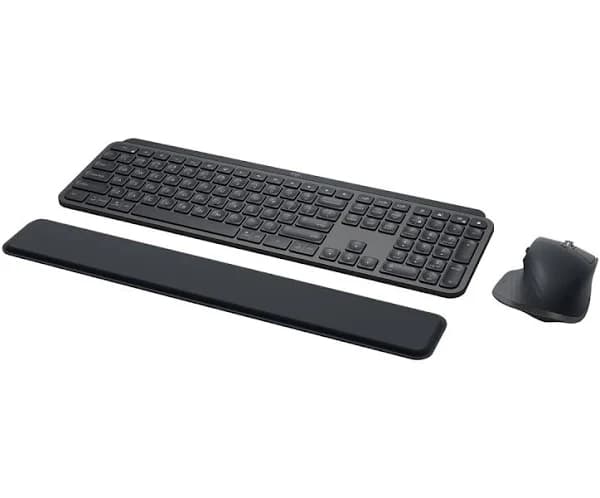
Logitech MX Keys combo for Business Gen 2 keyboard Mouse included RF Wireless + Bluetooth QWERTZ German Graphite
Free delivery
Logitech Mx Keys Gen 2 Wireless Keyboard And Mouse German Silver
Delivery $29.49
Logitech 920-010931. Keyboard Form Factor: Full-size 100%. Keyboard
Free delivery
Affiliate Disclosure: We may receive a small commission for purchases made through this link at no extra cost to you. This helps support our site. Thank you!
Logitech MX Keys Combo
Free delivery between 7–15 Sept
Logitech MX Keys Combo
Delivery between Thu – Mon $12.95
Logitech MX Keys Combo - brisbanetonersupplies.com.au
MX KEYS COMBO FOR BUSINESS | Gen 2, Graphite-920-010937 | Fast IT Solutions Australia
Delivery between 2–11 Sept $22
Logitech MX Keys Combo for Business Keyboard & Mouse - QWERTY - English (US) - USB Scissors Wireless Bluetooth/RF Keyboard - 108 Key - USB Wireless -
Free delivery
Logitech MX Keys Combo for Business Keyboard & Mouse - QWERTY - English (US) - USB Scissors Wireless Bluetooth/RF Keyboard - 108 Key - USB Wireless -
Free delivery
originally posted on logitech.com
Best experience with peripherals I’ve personally had in over a dozen years in a finance function. Horizontal scroll on mouse makes a massive difference plus the additional function button capabilities and gesture control provided. Keyboard is overall the best I’ve used. Personal preference but ideally keys would be 10% more pronounced from the unit, which I think would reduce some incorrect key strokes.
originally posted on logitech.com
DO NOT BUY DIRECTLY FROM LOGITECH. I ordered this keyboard/mouse combo. While it was a nice typing experience, it wasn’t a good fit so I returned it. They received it on Feb 9th. It’s now the 22nd and I have not heard anything nor gotten a refund. Learned my lesson to just buy their stuff at a reputable place like Best Buy, Amazon, or anywhere else where they honor their return policy. Stay away from here!
originally posted on dell.com
Perfect for my needs. The most useful features are the ergonomics of it make it very comfortable to use and the easy pairing and switching between 3 machines is fantastic. Significantly reduced the clutter on my desk. Mouse is the most comfortable that I have ever used. The soft keys bother some people but I actually prefer it over the standard loud click. Tracks perfectly and accurately. Backlight on the keyboard is great. Haven't had any problems with battery life yet.
Logitech MX Keys combo for Business Gen 2 keyboard Mouse included RF Wireless + Bluetooth QWERTZ German Graphite
Free delivery
Logitech Mx Keys Gen 2 Wireless Keyboard And Mouse German Silver
Delivery $29.49
Logitech 920-010931. Keyboard Form Factor: Full-size 100%. Keyboard
Free delivery
Affiliate Disclosure: We may receive a small commission for purchases made through this link at no extra cost to you. This helps support our site. Thank you!
Logitech MX Keys Combo
Free delivery between 7–15 Sept
Logitech MX Keys Combo
Delivery between Thu – Mon $12.95
Best experience with peripherals I’ve personally had in over a dozen years in a finance function. Horizontal scroll on mouse makes a massive difference plus the additional function button capabilities and gesture control provided. Keyboard is overall the best I’ve used. Personal preference but ideally keys would be 10% more pronounced from the unit, which I think would reduce some incorrect key strokes.
DO NOT BUY DIRECTLY FROM LOGITECH. I ordered this keyboard/mouse combo. While it was a nice typing experience, it wasn’t a good fit so I returned it. They received it on Feb 9th. It’s now the 22nd and I have not heard anything nor gotten a refund. Learned my lesson to just buy their stuff at a reputable place like Best Buy, Amazon, or anywhere else where they honor their return policy. Stay away from here!
Perfect for my needs. The most useful features are the ergonomics of it make it very comfortable to use and the easy pairing and switching between 3 machines is fantastic. Significantly reduced the clutter on my desk. Mouse is the most comfortable that I have ever used. The soft keys bother some people but I actually prefer it over the standard loud click. Tracks perfectly and accurately. Backlight on the keyboard is great. Haven't had any problems with battery life yet.
I searched far and wide to find a keyboard mouse combo that would meet my needs for the purpose for which I am using it. The Logitech Keys Combo for Business 2nd Gen is pretty close to what I needed but these are some shortcomings which drew me to the conclusion of leaving a 3 our of 5 star review for this product and my honest experience with it over the past few weeks.1. I use it with multiple devices such as a Windows PC, MacBook (desktop like setup) and sometimes with my iPad. The Windows PC is connected with the Logitech Bolt USB dongle, the MacBook and iPad are connected through Bluetooth. Sometimes when I switch over between one system to another, I have to power the keyboard and mouse, one or the other off, then on again for it to connect.2. I am running ... MoreI searched far and wide to find a keyboard mouse combo that would meet my needs for the purpose for which I am using it. The Logitech Keys Combo for Business 2nd Gen is pretty close to what I needed but these are some shortcomings which drew me to the conclusion of leaving a 3 our of 5 star review for this product and my honest experience with it over the past few weeks.1. I use it with multiple devices such as a Windows PC, MacBook (desktop like setup) and sometimes with my iPad. The Windows PC is connected with the Logitech Bolt USB dongle, the MacBook and iPad are connected through Bluetooth. Sometimes when I switch over between one system to another, I have to power the keyboard and mouse, one or the other off, then on again for it to connect.2. I am running an older version of MacOS (High Sierra) which cannot run the Logitech Software that enables all of the customization features for the mouse and special shortcut keys for the keyboard which make this keyboard and mouse so great. On the PC, I am running Windows 10 and the software is compatible so at least when I want to see how much charge is remaining in my peripherals, I can switch to the PC and open the Logitech bolt application and see how much battery is remaining. I can’t do that on the Mac because the software is not compatible with MacOS High Sierra. I have tried everything including downloading an older version of the Logitech Software but those are all designed to run on the older and less secure Logitech Unifying Receiver so I can’t get it to work with the new Bolt connector.3. The overall experience, especially relating to ergonomics with this mouse and keyboard is great! The keyboard is solid and has some weight to it making you think its cast out of Aluminium but it is actually hard plastic. The mouse feels great in the hand and is very precise. Overall I think for this price point, Logitech really needs to focus on the software and compatibility aspect of things.I hope that Logitech works out some of these software issues and works out the kinks to be able to make everything more cross compatible, especially for devices in their own ecosystem.I was debating whether to return this mouse and keyboard and go back to my old setup especially considering the price point of this keyboard and mouse combo, but the mouse feels so good in my hand and the keyboard feels so nice to type on that I have decided to keep it.
I needed a keyboard for my second home office. My old keyboard suffered a horrible death due to a fall - and the chair rolling over it. It was a k800 that surprisingly still worked but bits were falling off. I had the older MX Keys with the Master 3 mouse for my main office and loved it. The new (Gen 2) keyboard is nearly identical, but the 3S mouse is quieter (and has a higher DPI) but for most practical purposes they are the same - and terrific. The business combo has the Logi Bolt dongle which brings a more secure (and more stable) connection. The only downside is the price, but you get what you pay for and this one should last for many, many years.
The MX keys keyboard and MX Master 3S mouse are great, fit and finish is top notch, the overall feel is fantastic, and usability is above and beyond. The Bolt connector has given no issues and seems to fend off interference better than Bluetooth or the standard 2.4 ghz Unifying receiver that the non-business edition comes with. Battery life is excellent on both. My only complaint on the keyboard, suited for business use, is why would you have an emoji key, it seems silly; you can remap it to a useful function though.
The quality control is really bad on this mouse. The customer support was even worse. I was on the phone for 45 minutes with someone who barely spoke english. They kept repeating we have a process, I finally asked what that process was, at which point he was completely silent and could not answer. I understand things can be defective but the customer support was so bad I will not be buying anything directly from logitech ever again.
Thank you, Logitech, for creating the ultimate keyboarding combo!!Day 1 working with the Logitech MX Keys Combo for Business (Gen 2).A fantastic experience working with the keyboard and mouse! I love that these devices are rechargeable through the USB connector.Keyboard: The keyboard is very responsive, with a wonderful sensory typing feel from the spring action keys, yet it provides a lovely quietness so you don’t disturb coworkers or neighbors. I also greatly appreciate the keyboard backlight, which is helpful even in a bright sunny room. Who knew it would be so beneficial!Mouse: I love, love, love this mouse. It fits my hand perfectly, and the height helps relieve normal typing wrist pain. The mouse is very responsive with the slightest movement; it ... MoreThank you, Logitech, for creating the ultimate keyboarding combo!!Day 1 working with the Logitech MX Keys Combo for Business (Gen 2).A fantastic experience working with the keyboard and mouse! I love that these devices are rechargeable through the USB connector.Keyboard: The keyboard is very responsive, with a wonderful sensory typing feel from the spring action keys, yet it provides a lovely quietness so you don’t disturb coworkers or neighbors. I also greatly appreciate the keyboard backlight, which is helpful even in a bright sunny room. Who knew it would be so beneficial!Mouse: I love, love, love this mouse. It fits my hand perfectly, and the height helps relieve normal typing wrist pain. The mouse is very responsive with the slightest movement; it glides around documents quickly.I contacted Logitech for information about how to set up the combo package. Make sure to download their Logi Options+ software; it is easy to understand to help you set it up as needed. The live tech (not the IA bot) was very helpful in directing me to the S/N #s required for the warranty registration. FYI: the keyboard S/N # is a teeny, hard-to-see label underneath the board on the battery bar edge facing toward the spacebar. The mouse also has small type, but slightly easier to locate.
The Logitech MX Keys Combo for Business - Gen 2 is a top-of-the-line keyboard and mouse set that offers a premium typing experience with an array of advanced features. As a user, I was impressed by the overall design and performance of this combo, and it quickly became my go-to tool for work.Firstly, the MX Keys keyboard is exceptionally well-built, with a sturdy frame that feels both solid and reliable. The keycaps are large and concave, providing a comfortable and satisfying typing experience that is both accurate and fast. The backlighting feature is essential for working at night, and I appreciated the option to adjust the brightness level to suit my preferences.Additionally, the keyboard comes with a wrist rest that is perfectly matched to the keyboard, ... MoreThe Logitech MX Keys Combo for Business - Gen 2 is a top-of-the-line keyboard and mouse set that offers a premium typing experience with an array of advanced features. As a user, I was impressed by the overall design and performance of this combo, and it quickly became my go-to tool for work.Firstly, the MX Keys keyboard is exceptionally well-built, with a sturdy frame that feels both solid and reliable. The keycaps are large and concave, providing a comfortable and satisfying typing experience that is both accurate and fast. The backlighting feature is essential for working at night, and I appreciated the option to adjust the brightness level to suit my preferences.Additionally, the keyboard comes with a wrist rest that is perfectly matched to the keyboard, providing added comfort and support for my wrists during long typing sessions. The mouse, the MX Master 3S, is equally impressive, with a sleek design and a smooth, responsive performance. Compared to my previous mouse, the G602, the MX Master 3S felt like a luxury car while the G602 felt like a basic model.One of the standout features of the MX Keys Combo for Business - Gen 2 is the mouse's ability to connect and control up to three devices simultaneously. I found this to be incredibly useful, as I could easily switch between my laptop, desktop, and tablet with just the click of a button. Additionally, the mouse features Logitech's Darkfield™ tracking technology, which allows it to work on virtually any surface, including glass.In summary, I highly recommend the Logitech MX Keys Combo for Business - Gen 2 to anyone looking for a high-quality keyboard and mouse set for work or personal use. The typing experience is fantastic, the building quality is exceptional, and the backlight and wrist rest add extra convenience and comfort. The MX Master 3S mouse is a great addition, with its sleek design, responsive performance, and ability to control multiple devices. Overall, this combo set is a reliable and advanced choice for anyone in the market for a top-of-the-line keyboard and mouse.
The keyboard is ok for typing, but has some unfortunate drawbacks: the volume-down & mute keys are shared with F11 & F12 instead of having dedicated keys; the labels F1..F12 are small and basically impossible to read (unless the backlight is on (for the whole keyboard), which I'd rather not do); there's no Print Screen key (and the Logi Options+ software doesn't seem to have a way to map another key to that); some of the keys are cluttered with Mac labels, and the Windows key is labeled "start", making it hard to find the key I want; the keyboard is heavy and doesn't slide easily (maybe a benefit in some cases, but I often want to move the keyboard a little).The mouse isn't terrible but isn't as comfortable as the M510; might be a little too big, or the steep ... MoreThe keyboard is ok for typing, but has some unfortunate drawbacks: the volume-down & mute keys are shared with F11 & F12 instead of having dedicated keys; the labels F1..F12 are small and basically impossible to read (unless the backlight is on (for the whole keyboard), which I'd rather not do); there's no Print Screen key (and the Logi Options+ software doesn't seem to have a way to map another key to that); some of the keys are cluttered with Mac labels, and the Windows key is labeled "start", making it hard to find the key I want; the keyboard is heavy and doesn't slide easily (maybe a benefit in some cases, but I often want to move the keyboard a little).The mouse isn't terrible but isn't as comfortable as the M510; might be a little too big, or the steep shape on the left side is too tall; the middle button feels clunky when clicking (I think it takes too much effort); the button to switch computers is underneath the mouse, which isn't convenient; I saw some jitters when moving the mouse, like there's interference, which is weird since my old Unifying Receiver didn't do that and Bolt is supposed to be better.

Logitech MX Keys Combo for Business Gen 2 Keyboard Mouse Included RF Wireless + Bluetooth QWERTZ German Graphite
Our top-of-the-line combo is now paired for even greater performance. The improved MX Master 3S mouse’s Quiet Click technology makes 90% less distracting click noise and its 8000 DPI optical sensor offers precision tracking on high-resolution monitors. The full-size, auto backlit keyboard integrates a metal plate for stability. With the MX Palm Rest as the perfect companion for all-day comfort. The Perfect Stroke keys are spherically dished, matching fingertip shape, for a natural keystroke. The mouse’s shape fits the hand perfectly. This combo addresses increasing IT security needs with Logi Bolt technology for secure, robust connections even in congested wireless environments. And it’s pre-paired to both devices for easy deployment and management. The mouse’s ingenious Mag Speed wheel is our fastest and most precise scrolling experience—this duo is ready for any job.
Our top-of-the-line combo is now paired for even greater performance. The improved MX Master 3S mouse’s Quiet Click technology makes 90% less distracting click noise and its 8000 DPI optical sensor offers precision tracking on high-resolution monitors. The full-size, auto backlit keyboard integrates a metal plate for stability. With the MX Palm Rest as the perfect companion for all-day comfort. The Perfect Stroke keys are spherically dished, matching fingertip shape, for a natural keystroke. The mouse’s shape fits the hand perfectly. This combo addresses increasing IT security needs with Logi Bolt technology for secure, robust connections even in congested wireless environments. And it’s pre-paired to both devices for easy deployment and management. The mouse’s ingenious Mag Speed wheel is our fastest and most precise scrolling experience—this duo is ready for any job.
Our top-of-the-line combo is now paired for even greater performance. The improved MX Master 3S mouse’s Quiet Click technology makes 90% less distracting click noise and its 8000 DPI optical sensor offers precision tracking on high-resolution monitors. The full-size, auto backlit keyboard integrates a metal plate for stability. With the MX Palm Rest as the perfect companion for all-day comfort. The Perfect Stroke keys are spherically dished, matching fingertip shape, for a natural keystroke. The mouse’s shape fits the hand perfectly. This combo addresses increasing IT security needs with Logi Bolt technology for secure, robust connections even in congested wireless environments. And it’s pre-paired to both devices for easy deployment and management. The mouse’s ingenious Mag Speed wheel is our fastest and most precise scrolling experience—this duo is ready for any job.
Our top-of-the-line combo is now paired for even greater performance. The improved MX Master 3S mouse’s Quiet Click technology makes 90% less distracting click noise and its 8000 DPI optical sensor offers precision tracking on high-resolution monitors. The full-size, auto backlit keyboard integrates a metal plate for stability. With the MX Palm Rest as the perfect companion for all-day comfort. The Perfect Stroke keys are spherically dished, matching fingertip shape, for a natural keystroke. The mouse’s shape fits the hand perfectly. This combo addresses increasing IT security needs with Logi Bolt technology for secure, robust connections even in congested wireless environments. And it’s pre-paired to both devices for easy deployment and management. The mouse’s ingenious Mag Speed wheel is our fastest and most precise scrolling experience—this duo is ready for any job.
in 12 offers
The lowest price for Logitech MX Keys Combo for Business Gen 2 Keyboard Mouse Included RF Wireless + Bluetooth QWERTZ German Graphite right now is $238.87 at Playthek.com, compared across 9 retailers.
The all-time low was $230.94 on 27 Aug 2026 — today's price is 3% above the lowest ever. This is at or near its all-time low — a good time to buy.
Prices last updated 1 Sept 2026.