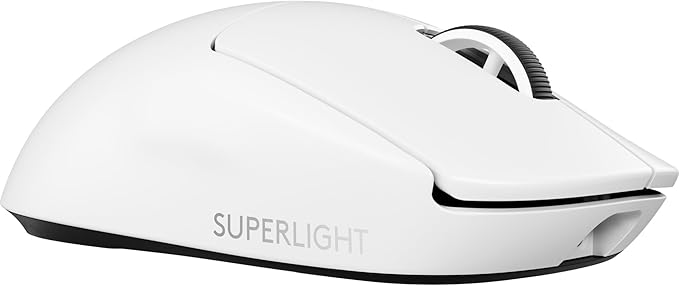
Logitech Signature M650 Mouse Right-hand RF Wireless+Bluetooth Optical 2000 DPI
Upgrade to smarter scrolling, better comfort, and more productivity with the Logitech Signature M650 Wireless Mouse. The versatile mouse features an adaptive scroll SmartWheel that delivers line-by-line precision, and auto-switches to super-fast free spin mode with the flick of a finger. A choice of sizes for medium, larger and left hands means there's a perfect fit for anyone. Seamless wireless connectivity, customizable side buttons, and a comfort shape keep you comfortably productive hour after hour. Logitech's SilentTouch technology delivers silent clicks to keep you focused.
Upgrade to smarter scrolling, better comfort, and more productivity with the Logitech Signature M650 Wireless Mouse. The versatile mouse features an adaptive scroll SmartWheel that delivers line-by-line precision, and auto-switches to super-fast free spin mode with the flick of a finger. A choice of sizes for medium, larger and left hands means there's a perfect fit for anyone. Seamless wireless connectivity, customizable side buttons, and a comfort shape keep you comfortably productive hour after hour. Logitech's SilentTouch technology delivers silent clicks to keep you focused.
Upgrade to smarter scrolling, better comfort, and more productivity with the Logitech Signature M650 Wireless Mouse. The versatile mouse features an adaptive scroll SmartWheel that delivers line-by-line precision, and auto-switches to super-fast free spin mode with the flick of a finger. A choice of sizes for medium, larger and left hands means there's a perfect fit for anyone. Seamless wireless connectivity, customizable side buttons, and a comfort shape keep you comfortably productive hour after hour. Logitech's SilentTouch technology delivers silent clicks to keep you focused.
Upgrade to smarter scrolling, better comfort, and more productivity with the Logitech Signature M650 Wireless Mouse. The versatile mouse features an adaptive scroll SmartWheel that delivers line-by-line precision, and auto-switches to super-fast free spin mode with the flick of a finger. A choice of sizes for medium, larger and left hands means there's a perfect fit for anyone. Seamless wireless connectivity, customizable side buttons, and a comfort shape keep you comfortably productive hour after hour. Logitech's SilentTouch technology delivers silent clicks to keep you focused.
in 48 offers
The lowest price for Logitech Signature M650 Mouse Right-hand RF Wireless+Bluetooth Optical 2000 DPI right now is $37.00 at Amazon.com.au, compared across 18 retailers.
The all-time low was $32.00 on 6 Sept 2026 — today's price is 16% above the lowest ever. That's a little above the best price we've seen.
Prices last updated 18 Oct 2026.
Last updated at 18/10/2026 11:36:30
Logitech Signature M650 Wireless Mouse, Graphite
Free delivery
Affiliate Disclosure: We may receive a small commission for purchases made through this link at no extra cost to you. This helps support our site. Thank you!
Logitech Signature M650 Wireless Mouse Graphite
Delivery $12
Logitech Signature M650 Bluetooth Mouse White 910-006264
Delivery between Wed – Thu $6
Logitech Signature M650 Wireless Mouse - Black - 5450290
Delivery $10
Logitech Signature M650 Wireless Mouse (Rose) | Retravision
Delivery between 20–28 Oct $6.79
Logitech Signature M650 Large Wireless Mouse Graphite
Delivery between Tue – Thu $15
Logitech Signature M650 L Wireless Mouse - Graphite (910-006247)
Delivery between 21–29 Oct $10
Logitech Signature M650 Wireless Mouse - Off White
Delivery between 21–26 Oct $7.95
Logitech Signature M650 Wireless L Left Mouse (Graphite)
Delivery $8.99
Logitech M650 Signature Wireless Mouse (Off White)
Next-day delivery $4
originally posted on logitech.com
The cat who often sleeps on a pillow on my laps is offended by the sound of mouse clicks. Over the years, I have tried three models of silent-clicky mouses, with the M650 being my favorite. I like it because it has soft-ish rubber sides, a rubber-coated scroll wheel that spins silently, and most of all, near-silent finger-button clicks. At first, the smaller size of the mouse seemed weird, but now that I am used to it, the bigger mice seem too big, and I have medium-sized hands for a man. I am glad it does not have an RGB light show, which I find distracting. The thumb buttons on the left-side are useful to have but placed too far back for my thumb to reach them comfortably. If Logitech were to put the silent features into some of their more ergonomic (and ... MoreThe cat who often sleeps on a pillow on my laps is offended by the sound of mouse clicks. Over the years, I have tried three models of silent-clicky mouses, with the M650 being my favorite. I like it because it has soft-ish rubber sides, a rubber-coated scroll wheel that spins silently, and most of all, near-silent finger-button clicks. At first, the smaller size of the mouse seemed weird, but now that I am used to it, the bigger mice seem too big, and I have medium-sized hands for a man. I am glad it does not have an RGB light show, which I find distracting. The thumb buttons on the left-side are useful to have but placed too far back for my thumb to reach them comfortably. If Logitech were to put the silent features into some of their more ergonomic (and expensive) mice, then I would definitely spend my money to upgrade, especially if it was one of their mice with the side-scrolling wheel that is useful for editing video and looking at spreadsheets. As for now, this mouse checks the most important boxes, and I am glad to have this option for a silent mouse.
originally posted on logitech.com
I have a drawer full of Logitech mice. Don't get me wrong - I like them all. But for a perfect business mouse that just works and fades into the background, this finally is the answer. I've tried the pebble mouse, the M330 silent mouse - but each of them had either a lack of features or less than optimal ergonomics. The M650 gets it right and hits that sweet spot. Not too fancy, not too simple, but a mouse that works perfectly, feels great, and handles daily office tasks with ease. I originally purchased the large variant but for the majority of folks, the regular size will be excellent. I use one on my Mac (replacing the torturous Magic Mouse) and one on my work computer. Hopefully, your experience will match mine.
originally posted on logitech.com
I have had this a little over 1 month so I cannot comment on endurance / durability of the sensor or clickers.However, the mouse is extremely silent and has a good weight. I have a medium to large hand (glove size let's say) and it is perfectly adequate. I think if you had larger hands than that it may be a bit disappointing for a large mouse but definitely not terrible like those silly "portable" ones.I do carry this in my hard case and throw it in the backpack for travel and to go to meeting rooms where silent is needed. Definitely happy it is quieter than even the keyboard on the laptop.Never had an issue with connectivity and unlike my Anker mouse, I can place the USB fob about 3-4 ft away no problem.
| Sensor Type | Optical |
| Polling Rate | 125 Hz (fixed) |
| Connectivity Type | Wireless |
| Interface | USB |
| Compatibility | Windows, ChromeOS, Linux, macOS |

Logitech Signature M650 Wireless Mouse, Graphite
Free delivery
Affiliate Disclosure: We may receive a small commission for purchases made through this link at no extra cost to you. This helps support our site. Thank you!
Logitech Signature M650 Wireless Mouse Graphite
Delivery $12
Logitech Signature M650 Bluetooth Mouse White 910-006264
Delivery between Wed – Thu $6
Logitech Signature M650 Wireless Mouse - Black - 5450290
Delivery $10
Logitech Signature M650 Wireless Mouse (Rose) | Retravision
Delivery between 20–28 Oct $6.79
The cat who often sleeps on a pillow on my laps is offended by the sound of mouse clicks. Over the years, I have tried three models of silent-clicky mouses, with the M650 being my favorite. I like it because it has soft-ish rubber sides, a rubber-coated scroll wheel that spins silently, and most of all, near-silent finger-button clicks. At first, the smaller size of the mouse seemed weird, but now that I am used to it, the bigger mice seem too big, and I have medium-sized hands for a man. I am glad it does not have an RGB light show, which I find distracting. The thumb buttons on the left-side are useful to have but placed too far back for my thumb to reach them comfortably. If Logitech were to put the silent features into some of their more ergonomic (and ... MoreThe cat who often sleeps on a pillow on my laps is offended by the sound of mouse clicks. Over the years, I have tried three models of silent-clicky mouses, with the M650 being my favorite. I like it because it has soft-ish rubber sides, a rubber-coated scroll wheel that spins silently, and most of all, near-silent finger-button clicks. At first, the smaller size of the mouse seemed weird, but now that I am used to it, the bigger mice seem too big, and I have medium-sized hands for a man. I am glad it does not have an RGB light show, which I find distracting. The thumb buttons on the left-side are useful to have but placed too far back for my thumb to reach them comfortably. If Logitech were to put the silent features into some of their more ergonomic (and expensive) mice, then I would definitely spend my money to upgrade, especially if it was one of their mice with the side-scrolling wheel that is useful for editing video and looking at spreadsheets. As for now, this mouse checks the most important boxes, and I am glad to have this option for a silent mouse.
I have a drawer full of Logitech mice. Don't get me wrong - I like them all. But for a perfect business mouse that just works and fades into the background, this finally is the answer. I've tried the pebble mouse, the M330 silent mouse - but each of them had either a lack of features or less than optimal ergonomics. The M650 gets it right and hits that sweet spot. Not too fancy, not too simple, but a mouse that works perfectly, feels great, and handles daily office tasks with ease. I originally purchased the large variant but for the majority of folks, the regular size will be excellent. I use one on my Mac (replacing the torturous Magic Mouse) and one on my work computer. Hopefully, your experience will match mine.
I have had this a little over 1 month so I cannot comment on endurance / durability of the sensor or clickers.However, the mouse is extremely silent and has a good weight. I have a medium to large hand (glove size let's say) and it is perfectly adequate. I think if you had larger hands than that it may be a bit disappointing for a large mouse but definitely not terrible like those silly "portable" ones.I do carry this in my hard case and throw it in the backpack for travel and to go to meeting rooms where silent is needed. Definitely happy it is quieter than even the keyboard on the laptop.Never had an issue with connectivity and unlike my Anker mouse, I can place the USB fob about 3-4 ft away no problem.
I never knew I could get so excited over a computer mouse. The last couple of years I have been using the M310 silver over black, Yes the color matters for myself, so this black and graphite was great for me. Everything is a upgrade from the M310 and just feels solid like a well built quality tool. It is (simple to use) feels good in the hand. Someone in a review said the rubber like grip on the sides felt like sandpaper, The detents did feel different for the first few days only than the M310, it is a little firmer rubber on the grips with great detents and I just really like the way it feels now after braking it in. Another review that I seen said the green light by the thumb wheel was not working and was returning it but it is not made to stay on all the ... MoreI never knew I could get so excited over a computer mouse. The last couple of years I have been using the M310 silver over black, Yes the color matters for myself, so this black and graphite was great for me. Everything is a upgrade from the M310 and just feels solid like a well built quality tool. It is (simple to use) feels good in the hand. Someone in a review said the rubber like grip on the sides felt like sandpaper, The detents did feel different for the first few days only than the M310, it is a little firmer rubber on the grips with great detents and I just really like the way it feels now after braking it in. Another review that I seen said the green light by the thumb wheel was not working and was returning it but it is not made to stay on all the time.Note my battery was only 80% but I always put a --- ultimate lithium AA battery in anyway.Logitech Canada has a great instructional video you tube on the M650 and with the US one I was up and running in no time...Using the Signature M650 with windows 10 on a 17inch HP Laptop.Watch the Logitech Canada video before you buy and it will also help guide you to get the regular or large size. I like the smaller one for myself.
The Logitech - Signature M650 L is a full-sized mouse that is aimed at trying to utilize the mouse with those of us with oversized hands while taking undue stress on the hand and wrist. In addition to large hand size, I also have psoriatic arthritis that compounds my problems using a normal-sized mouse. I would have even liked the mouse to have been a bit larger, similar to the old Microsoft stationary trackball mouse I used in the early to mid-1990s. I find I have to rest my use of the machine these days and that is a bit more of a problem since I am currently studying for a doctorate that keeps me online for long periods during the day. Overall, this device is helpful.
I have bought two mice in this series first the M330 and most recently the M650 in April 2022. First, I will say the mouse feels great, is comfortable and is extremely quiet. However, my experience with both mice is that left click button has trouble registering clicks after a few months of use. Once I started noticing the issue, it seemed to get progressively worse. It starts out with missing a click out of every hundred clicks, now it seems like it will miss one out of every 5-10. While the mouse does get used regularly, I would not say it is used heavily and it is well taken care of. My experience is that these have a very short life span, which is a shame because I would surely give this mouse a 5-star rating if it didn't become incredibly frustrating to use and ... MoreI have bought two mice in this series first the M330 and most recently the M650 in April 2022. First, I will say the mouse feels great, is comfortable and is extremely quiet. However, my experience with both mice is that left click button has trouble registering clicks after a few months of use. Once I started noticing the issue, it seemed to get progressively worse. It starts out with missing a click out of every hundred clicks, now it seems like it will miss one out of every 5-10. While the mouse does get used regularly, I would not say it is used heavily and it is well taken care of. My experience is that these have a very short life span, which is a shame because I would surely give this mouse a 5-star rating if it didn't become incredibly frustrating to use and require replacing within a year.
I have had this mouse for about 6 months and liked it, but for the last month it has been dropping the bluetooth connection several times a day. It seems to have a hard time when I am in dialog boxes but it happens other times too. (Mac Catalina). I have replaced the battery and tried a few other fixes, but nothing corrects this, so I have to keep a wired mouse (which I don't really care for) hooked up in case this one drop, which is very frustrating. I don't want a wired mouse. If this M650 didn't drop the connection so often, it would give it 5 stars. It's nice and quiet and works great otherwise, but this is a big issue when I am trying to get things done.
I bought this mouse to replace my M510 because the Logitech site said Options+ did not support it. After receiving this new M650 I knew right away it wasn't going to replace my M510. The M650 felt awful in my hand and tracked like garage. It also was quite a bit lighter than my M510, which made using it feel off. Luckily Logitech offers free returns, however, it took over 6 weeks and 3 different chats with them to get my money back. In the end I found out that Options+ software does support the M510, even though it wasn't listed as supported. Total joke. I use to like their products, but their most recent offers underwhelm.
My previous mouse was the M510, which I loved for the size/shape/side buttons. I bought the M650 L because it looked similar to the M510 but with the soft click - I love it. They're essentially the same shape, so it's very comfortable. The grip/surface materials are really nice. The side buttons are comfortable. I'm very impressed by the soft click - this mouse is practically silent, and the scrolling is more precise. I'm impressed, this feels like a positive upgrade from the M510.
This mouse worked fine for a couple months, and then I started noticing issues with the mouse not being responsive. I'd move the mouse to the right or left and rather than move across the screen it would barely budge a few pixels. What's more perplexing is that navigation up and down is smooth with very little latency, but moving right to left will either not work at all, or be extremely latent/slow. Where I'm having to drag my mouse across my mousepad multiple times to make it across the screen.I've replaced the battery, I've checked drivers, I've inspected the laser to ensure nothing is blocking it. Everything appears to be great. I do know that I have a Logitech keyboard that requires the Logitech g hub software (another garbage experience), and there was an ... MoreThis mouse worked fine for a couple months, and then I started noticing issues with the mouse not being responsive. I'd move the mouse to the right or left and rather than move across the screen it would barely budge a few pixels. What's more perplexing is that navigation up and down is smooth with very little latency, but moving right to left will either not work at all, or be extremely latent/slow. Where I'm having to drag my mouse across my mousepad multiple times to make it across the screen.I've replaced the battery, I've checked drivers, I've inspected the laser to ensure nothing is blocking it. Everything appears to be great. I do know that I have a Logitech keyboard that requires the Logitech g hub software (another garbage experience), and there was an update shortly before I started having these problems.Needless to say I'm pretty irritated and I'm on the lookout for a new brand to support.
| Sensor Type | Optical |
| Polling Rate | 125 Hz (fixed) |
| Connectivity Type | Wireless |
| Interface | USB |
| Compatibility | Windows, ChromeOS, Linux, macOS |