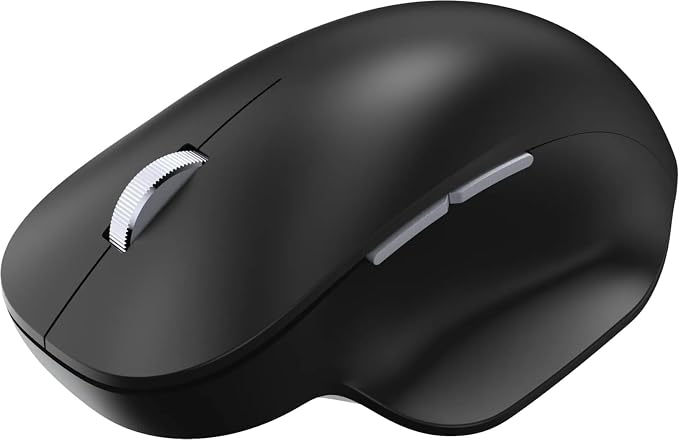
Work with precision and style using the pastel blue-colored Microsoft Wireless Bluetooth Ergonomic Mouse. This right-handed mouse features a compact and ergonomic design that promotes neutral hand positioning in addition to a soft and easy-to-grip thumb rest for added comfort. It can simultaneously connect with up to three Bluetooth 5.0-compatible devices, allowing you to quickly switch control between them. The precise sensor and Teflon base are designed to smoothly navigate and track across a variety of surfaces. Additionally, the durable and stylish mouse also features a machined aluminum scroll wheel. Its two programmable buttons allow you to quickly access your most used features. Two AAA alkaline batteries are included, and the mouse can work for up to 15 months from them depending on use. It has a range of up to 30' in open areas and 15' in typical office environments. Once you're done, you can store the compact mouse in a bag or pocket for easy travel. This mouse works with Windows 10 and 8.1 devices.
Work with precision and style using the pastel blue-colored Microsoft Wireless Bluetooth Ergonomic Mouse. This right-handed mouse features a compact and ergonomic design that promotes neutral hand positioning in addition to a soft and easy-to-grip thumb rest for added comfort. It can simultaneously connect with up to three Bluetooth 5.0-compatible devices, allowing you to quickly switch control between them. The precise sensor and Teflon base are designed to smoothly navigate and track across a variety of surfaces. Additionally, the durable and stylish mouse also features a machined aluminum scroll wheel. Its two programmable buttons allow you to quickly access your most used features. Two AAA alkaline batteries are included, and the mouse can work for up to 15 months from them depending on use. It has a range of up to 30' in open areas and 15' in typical office environments. Once you're done, you can store the compact mouse in a bag or pocket for easy travel. This mouse works with Windows 10 and 8.1 devices.
in 1 offers
The lowest price for Microsoft Bluetooth Ergonomic Mouse, Pastel Blue right now is $89.10 at Newegg.
The all-time low was $57.00 on 25 Aug 2023 — today's price is 56% above the lowest ever. It has been notably cheaper before — worth setting a price alert.
Prices last updated 11 May 2026.
Microsoft Bluetooth Ergonomic Mouse, Pastel Blue
Work with precision and style using the pastel blue-colored Microsoft Wireless Bluetooth Ergonomic Mouse. This right-handed mouse features a compact and ergonomic design that promotes neutral hand positioning in addition to a soft and easy-to-grip thumb rest for added comfort. It can simultaneously connect with up to three Bluetooth 5.0-compatible devices, allowing you to quickly switch control between them. The precise sensor and Teflon base are designed to smoothly navigate and track across a variety of surfaces. Additionally, the durable and stylish mouse also features a machined aluminum scroll wheel. Its two programmable buttons allow you to quickly access your most used features. Two AAA alkaline batteries are included, and the mouse can work for up to 15 months from them depending on use. It has a range of up to 30' in open areas and 15' in typical office environments. Once you're done, you can store the compact mouse in a bag or pocket for easy travel. This mouse works with Windows 10 and 8.1 devices.
Work with precision and style using the pastel blue-colored Microsoft Wireless Bluetooth Ergonomic Mouse. This right-handed mouse features a compact and ergonomic design that promotes neutral hand positioning in addition to a soft and easy-to-grip thumb rest for added comfort. It can simultaneously connect with up to three Bluetooth 5.0-compatible devices, allowing you to quickly switch control between them. The precise sensor and Teflon base are designed to smoothly navigate and track across a variety of surfaces. Additionally, the durable and stylish mouse also features a machined aluminum scroll wheel. Its two programmable buttons allow you to quickly access your most used features. Two AAA alkaline batteries are included, and the mouse can work for up to 15 months from them depending on use. It has a range of up to 30' in open areas and 15' in typical office environments. Once you're done, you can store the compact mouse in a bag or pocket for easy travel. This mouse works with Windows 10 and 8.1 devices.
Last updated at 11/05/2026 12:31:55
Microsoft Bluetooth Ergonomic Mouse - Pastel Blue - with comfortable Ergonomic design, thumb rest, up to 15months battery life. Works with Bluetooth
originally posted on bestbuy.com
The unit was defective. Bluetooth would connect, but left click would not do anything. It was a gift, so had to retrace steps and get original receipt from my son. Then Best Buy said they couldn't do anything, was over 30 days. MS said send unit with receipt, photos. BB receipt had wrong SKU had to start again. Eventually MS replaced unit. This took a good 2 months. Will not buy any device from BB without better warranty.
originally posted on homeessentialsdirect.com
Did not like the default wheel (scrolling) setting, but the driver built into Windows 10 took care of that. The default was 3 lines per click of the wheel, but thought it was perfect for me when set to one line per click. The driver recognized the model of the mouse, and even showed it in it's actual color. The BlueTooth wireless connection has been rock solid, and cursor movements have always been smooth. Really like the thumb rest on this mouse. Great if you are right handed. My hand never gets tired using it. Unlike some, the mouse has an ON/OFF switch to spare battery life when not in use. Also has the ability to switch between three different BlueTooth pairings, so that it can be used with different devices at different times without losing the pairing settings.
originally posted on bestbuy.com
The wireless mouse I previously paired with my mother's desktop became more challenging to operate and manage. Sometimes the pairing would be continuous; other times, that mouse would restart. In addition, the power button was not easy to press, and the quality of the user experience was declining rapidly.To alleviate everyone's frustrations, I got on the Best Buy website and came across the Microsoft-Bluetooth Ergonomic Mouse and read the customer reviews. Immediately, I was encouraged to give this product a try.After nearly one year after buying this product from Best Buy, there are no more frustrations. This purchase was money well spent.
| Number of Batteries Required | 2 |
| Tracking Method | BlueTrack |
| System Requirements | Microsoft Windows 10 / 8.1 |
| Mouse Grip Style | Ergonomic |
| Grip Style | Ergonomic |
Microsoft Bluetooth Ergonomic Mouse - Pastel Blue - with comfortable Ergonomic design, thumb rest, up to 15months battery life. Works with Bluetooth
The unit was defective. Bluetooth would connect, but left click would not do anything. It was a gift, so had to retrace steps and get original receipt from my son. Then Best Buy said they couldn't do anything, was over 30 days. MS said send unit with receipt, photos. BB receipt had wrong SKU had to start again. Eventually MS replaced unit. This took a good 2 months. Will not buy any device from BB without better warranty.
Did not like the default wheel (scrolling) setting, but the driver built into Windows 10 took care of that. The default was 3 lines per click of the wheel, but thought it was perfect for me when set to one line per click. The driver recognized the model of the mouse, and even showed it in it's actual color. The BlueTooth wireless connection has been rock solid, and cursor movements have always been smooth. Really like the thumb rest on this mouse. Great if you are right handed. My hand never gets tired using it. Unlike some, the mouse has an ON/OFF switch to spare battery life when not in use. Also has the ability to switch between three different BlueTooth pairings, so that it can be used with different devices at different times without losing the pairing settings.
The wireless mouse I previously paired with my mother's desktop became more challenging to operate and manage. Sometimes the pairing would be continuous; other times, that mouse would restart. In addition, the power button was not easy to press, and the quality of the user experience was declining rapidly.To alleviate everyone's frustrations, I got on the Best Buy website and came across the Microsoft-Bluetooth Ergonomic Mouse and read the customer reviews. Immediately, I was encouraged to give this product a try.After nearly one year after buying this product from Best Buy, there are no more frustrations. This purchase was money well spent.
Brought on sale around. Very nice and comfortable mouse. Requires 2 AAA batteries included with 1 year of battery life claimed. Installation was easy on windows 10. I could not get to swift pair but then did manual pairing. Turn on the mouse for 3 seconds, open windows bluetooth in settings and the mouse shows up as "Bluetooth ergonomic mouse". I could not get it to connect the 1st time but closed the window, turned off/on the mouse and tried the second time and it worked. Also the different colors look beautiful but I went with glacier because it was available for pickup the same day. No complaints so far.
I switch locations a lot when using my laptop. Sometimes I work in my room, sometimes I work in my office and sometimes I work in the living room. Because of this, I’m this mouse is perfect because it’s wireless and uses Bluetooth to connect. I can even switch between two devices if I need to. Once, I commented it to my iPhone and was able to navigate my phone using the mouse. I just did this for the heck of it so too my surprise, it worked.
I had no problem pairing this mouse with my laptop bluetooth. It is small enough to work on the arm of my recliner with my laptop on my lap. My hands are fairly large and it fit quite well though a bit more height in the build would be perfect. I changed batteries once. I think this was the second one I tried. Can't remember why I had to send the first one back within the return window. The mouse stopped working after eight months which was disappointing since the price then was $10 more than it is now. I am tryng again since it is not easy to find a reliable and enjoyable bluetooth mouse for my situation. Hopefully the next one will last at least a year and not fail much sooner as for some reviewers. The price is better now anyhow.
It's a great mouse, but I'd say it's not worth $50, so wait until it goes on sale. It lives up to its name, it's very ergonomic, it's convenient, and it's responsive. I just got it, so I'm not sure about battery life or anything, but I'm sure it's reasonable. I actually went from a wired gaming mouse to this, so it doesn't feel quite as good, like if you have large hands like I do, your pointer finger and middle finger are gonna go over the front a tiny bit, so you'll kinda have to use a claw grip. The only other thing that I liked better on my gaming mouse was the scroll wheel is a lot lower down inside this mouse, but again, it's not a huge deal. I just wanted a small wireless mouse for work that won't be a hassle, and this delivered, so I would recommend.
Its a great mouse. Very responsive and the bluetooth is flawless. The click is pretty loud after a while, if thats important to you. I would say the only issue is that the on and off switch isnt depressed into the structure so it turns itself off if you put more pressure onto that side as you swipe around. Your hand wont cramp up or tire much either due to its shape.Solid 4.5/5
After seeing so many ergonomic mice having all kinds of shapes and sizes, i did not think this would be as comfortable as it is. I ordered it since it had so many ratings and it was designed by Microsoft. It has been over a month now and I am loving it. The click feels great, i can switch between devices easily, the quality feels great. I had a logitech triathlon and it was very plasticky. But this mouse feels like good quality material.
I purchased this product thinking it might be a good backup to the Logitech MX Master 3. It's not a bad mouse, especially at half the price of the MX Master 3.However, once you've used the MX Master 3, the shortcomings become clear. For instance, the thumb grip is not ridged, and thus is VERY uncomfortable compared to the MX Master 3. I literally got BURNED by using the thumb grip, it was so abrasive on my thumb, compared to the MX Master 3.In addition, there's no side wheel, so I can't scroll horizontally on pages like I can with the MX Master 3.Ultimately, I returned the product and decided to keep the MX Master 3 for my work and home devices since it can seamlessly switch between three devices as well.One thing I will say that I prefer about this device, ... MoreI purchased this product thinking it might be a good backup to the Logitech MX Master 3. It's not a bad mouse, especially at half the price of the MX Master 3.However, once you've used the MX Master 3, the shortcomings become clear. For instance, the thumb grip is not ridged, and thus is VERY uncomfortable compared to the MX Master 3. I literally got BURNED by using the thumb grip, it was so abrasive on my thumb, compared to the MX Master 3.In addition, there's no side wheel, so I can't scroll horizontally on pages like I can with the MX Master 3.Ultimately, I returned the product and decided to keep the MX Master 3 for my work and home devices since it can seamlessly switch between three devices as well.One thing I will say that I prefer about this device, compared to the MX Master 3, is it runs on two AA batteries.I MUCH prefer having control over my batteries, and the MX Master 3 requires you to charge the device.But that's a small price for unmatched comfort and flexibility and function.It's worth mentioning that the clicks are VERY loud on this device. A coworker three offices over said she could hear my clicking!I apologized and told her that this mouse wasn't long for this world, and she shouldn't worry.PLEASE, Microsoft, make quiet mice!And find a way to replicate the Mx Master 3 without breaking the law.It's simply the best.
| Number of Batteries Required | 2 |
| Tracking Method | BlueTrack |
| System Requirements | Microsoft Windows 10 / 8.1 |
| Mouse Grip Style | Ergonomic |
| Grip Style | Ergonomic |