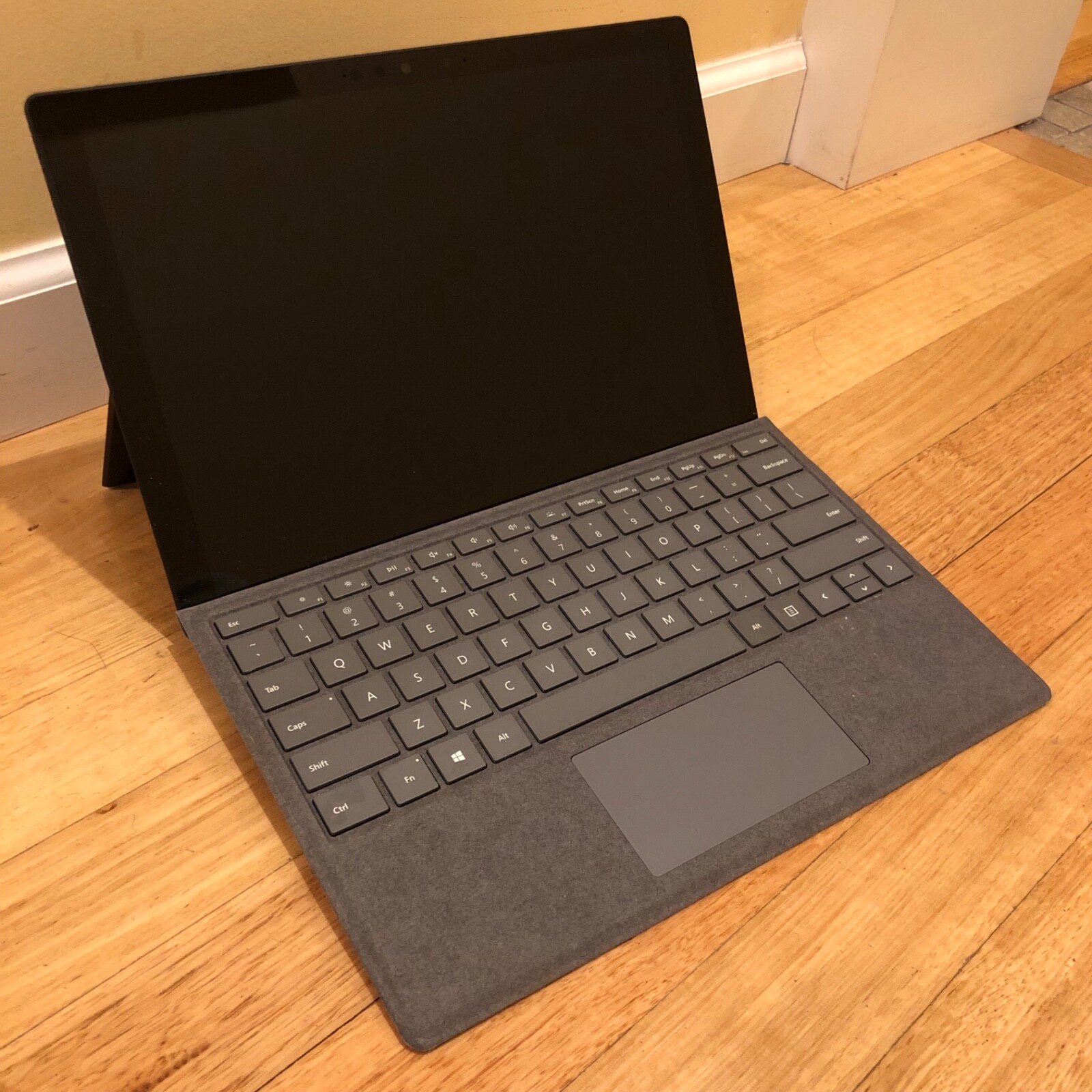
Microsoft Surface Pro 7 i5 (8GB RAM, 128GB, Platinum)
Power to fuel your ideas Wherever you are and whatever you do, Surface Pro 7 stands ready. With an all-day battery, a built-in webcam, and a powerful processor. Laptop, tablet, or creative studio The choice is yours. Surface Pro 7 transforms from laptop to tablet. Get back to work in an instant With fast charging, all-day battery, and Instant On, you can pick up where you left off right now, tonight, or tomorrow. Connect and keep up Video calls and meetings come to life with spectacular audio and video with far-field studio mics, Dolby Audio sound, and cameras. Connect, create, and get comfortable Whatever your office looks like, be it a desk, couch, or dining table, Surface Pro 7 is your endlessly adaptable partner.
Power to fuel your ideas Wherever you are and whatever you do, Surface Pro 7 stands ready. With an all-day battery, a built-in webcam, and a powerful processor. Laptop, tablet, or creative studio The choice is yours. Surface Pro 7 transforms from laptop to tablet. Get back to work in an instant With fast charging, all-day battery, and Instant On, you can pick up where you left off right now, tonight, or tomorrow. Connect and keep up Video calls and meetings come to life with spectacular audio and video with far-field studio mics, Dolby Audio sound, and cameras. Connect, create, and get comfortable Whatever your office looks like, be it a desk, couch, or dining table, Surface Pro 7 is your endlessly adaptable partner.
Power to fuel your ideas Wherever you are and whatever you do, Surface Pro 7 stands ready. With an all-day battery, a built-in webcam, and a powerful processor. Laptop, tablet, or creative studio The choice is yours. Surface Pro 7 transforms from laptop to tablet. Get back to work in an instant With fast charging, all-day battery, and Instant On, you can pick up where you left off right now, tonight, or tomorrow. Connect and keep up Video calls and meetings come to life with spectacular audio and video with far-field studio mics, Dolby Audio sound, and cameras. Connect, create, and get comfortable Whatever your office looks like, be it a desk, couch, or dining table, Surface Pro 7 is your endlessly adaptable partner.
Power to fuel your ideas Wherever you are and whatever you do, Surface Pro 7 stands ready. With an all-day battery, a built-in webcam, and a powerful processor. Laptop, tablet, or creative studio The choice is yours. Surface Pro 7 transforms from laptop to tablet. Get back to work in an instant With fast charging, all-day battery, and Instant On, you can pick up where you left off right now, tonight, or tomorrow. Connect and keep up Video calls and meetings come to life with spectacular audio and video with far-field studio mics, Dolby Audio sound, and cameras. Connect, create, and get comfortable Whatever your office looks like, be it a desk, couch, or dining table, Surface Pro 7 is your endlessly adaptable partner.
in 10 offers
The lowest price for Microsoft Surface Pro 7 i5 (8GB RAM, 128GB, Platinum) right now is $209.00 at Mobile Guru, compared across 6 retailers.
The all-time low was $209.00 on 24 June 2026. That's the lowest price we've ever tracked — a great time to buy.
Prices last updated 24 June 2026.
Last updated at 24/06/2026 09:01:57
Microsoft Surface Pro 7 Wi-Fi - Intel Core i5 - 8GB RAM - Built-in Graphics 128GB Platinum - 24 Months Warranty
Free delivery
Microsoft Surface Pro 7 i5 (8GB 128GB) [Grade B]
Free delivery
Microsoft Surface Pro 7 12.3" Silver - (B Grade Refurbished) Intel Core i5-1035G4 - 8GB RAM - 128GB SSD - 2736x1824 - Win11 Pro - Keyboard not include
Free delivery between 29 June – 4 July
Microsoft Surface Pro 7 12" i5 10th Gen 8GB 128GB @1.10GHz W11 Pro | TechCrazy
Delivery between 26 June – 2 July $20.45
Microsoft Surface Pro 7 12.3-Inch Touchscreen | Intel Core i5 10th Gen 1.10GHz | 8GB RAM 128GB | Windows 11 Pro | TechCrazy
Delivery between 1–6 July $18.99
Surface Pro 7 12.3" Touch-Screen - 10th Gen Intel Core i5 - 8GB Memory - 128GB SSD Platinum with Black Type Cover
Delivery between 30 June – 3 July $29
originally posted on bestbuy.com
Gives me all the functionality and feel of a “proper” keyboard attached laptop, while also giving me much more portability than your traditional one piece laptop.I am always traveling in between school, work, meetings with clients so it’s so great to be able to pick up and go with ease.And the tablet function of this 2 in 1 makes taking quick notes effortless when compared to pulling out a traditional laptop, finding some place to set it down, and then finally typing it out on the keyboard.If you do plan on purchasing this device, I highly recommend buying the pen as well to get the very most out of this device and make it even more versatile.I use it pretty heavily and often so I might not have the most accurate battery life when it comes to your average ... MoreGives me all the functionality and feel of a “proper” keyboard attached laptop, while also giving me much more portability than your traditional one piece laptop.I am always traveling in between school, work, meetings with clients so it’s so great to be able to pick up and go with ease.And the tablet function of this 2 in 1 makes taking quick notes effortless when compared to pulling out a traditional laptop, finding some place to set it down, and then finally typing it out on the keyboard.If you do plan on purchasing this device, I highly recommend buying the pen as well to get the very most out of this device and make it even more versatile.I use it pretty heavily and often so I might not have the most accurate battery life when it comes to your average consumer, however, the laptop fully charged does last me from the morning up until about 7pm until I have to charge it again so I don’t have any complaints there, especially since charging this device is so simple. No big and bulky charger, just a sleek charger which is plenty long and magnetically attaches to the device.The screen quality is great. It is a gloss screen so in direct sunlight you will get some glare and you will see some marks from your fingers or the pen because, after all, it is a touchscreen tablet as well.
originally posted on bestbuy.com
I bought the SP7 256GB i5 8GB RAM just before Christmas 2020 and it has been an overall great experience. I’ve previously had a Surface Pro 2017 which I had limited seat time with because it was stolen after a car break-in not long after I bought it. I’ve also previously had a Surface 3 and Surface Go for years of which both have been excellent devices.The Bad:-Expensive in all configurations at their listed prices-Surface keyboard is expensive and bounces a bit when typing fast. The fake suede covering feels good to the touch but doesn’t seem like it would last long after years of continuous use, especially at the edges. (My Surface Go keyboard started fraying at the edges about a year and a half of daily use, shortly before I accidentally dropped it and I ... MoreI bought the SP7 256GB i5 8GB RAM just before Christmas 2020 and it has been an overall great experience. I’ve previously had a Surface Pro 2017 which I had limited seat time with because it was stolen after a car break-in not long after I bought it. I’ve also previously had a Surface 3 and Surface Go for years of which both have been excellent devices.The Bad:-Expensive in all configurations at their listed prices-Surface keyboard is expensive and bounces a bit when typing fast. The fake suede covering feels good to the touch but doesn’t seem like it would last long after years of continuous use, especially at the edges. (My Surface Go keyboard started fraying at the edges about a year and a half of daily use, shortly before I accidentally dropped it and I believe both are made from the same material.)-It should be obvious but RAM and hard drive are not user replaceable and, even at 256GB, with any bit of productivity software, you go through that disk space very quickly. Especially with Windows 10’s perpetual updates. Which you can’t turn off.-Can generate a bit of heat when streaming videos.-Windows credentials are incredibly finicky and I’ve been kicked off the Windows App Store because Windows couldn’t validate my login. This may seem trivial but mostly all of the free apps (as well as paid) have to go through the App Store.-Clunky form factor if held in the hand and used as a tablet. This thing is heavy and you’ll never mistake this for an iPad.The Good:-Full-blown Windows machine and computer. I’ve gotten the iPad 2 back when Steve Jobs was still alive and to this day my iPad experience has been unrivaled. But I was tired of having to route everything through iTunes just to get it to my iPad. And, unlike the very-limited Surface Go, you can run full-blown apps like Photoshop CC or Visual Studio 2019 with no issues. (I tried using Photoshop CC on my Surface Go but I only was able to run it after clearing out all my downloaded files and run absolutely nothing else in the background. Still it was a harrowing experience.)-The display isn’t 4K but it’s gorgeous and renders great! Yes, it isn’t 120 Hz refresh rate (like the new SP8) but scrolling is decent and, unless you work with graphics, you wouldn’t miss it. I use Acrobat DC to scale and draw links at 200%+ resolution and the scaling and renders are great! You can probably say this about any mid- to high-end device but it’s worth mentioning.-Battery life is decent but you have to be careful that, if you get on an airplane or are going to be out all day and without a power source, you’re going to want to make sure the device is fully turned off and not just in “Sleep” mode. I’ve had more than a handful of times where Windows decided to update itself without an Internet connection and left my tablet on and steaming in a backpack and a drained battery.-This doesn’t have the lightness of the Surface Go, unfortunately, but this is by far the very best in terms of form factor for full on laptops. You can put this in a sack pack and not really notice. I will say this about my dearly departed Surface Go (I dropped it on my driveway face down): I actually used it in my hands while on my treadmill for 2 straight hours without fatigue. That’s something you can’t do or say about any other ultra portable full Windows device.Microsoft has been slow to update the Surface line so there was some fear that the SP line might be axed as a whole. Very thankful that the SP8 came out, which means that you can probably get a good deal on the SP7! The SP7 was a bit overpriced to begin with but if you can save a few hundred dollars off the list price, this tablet becomes an excellent value! Same with the SP8. Wait till Black Friday or possibly next Spring when deals pop up intermittently and without warning.Verdict:If I had to do it again, I probably would’ve gotten at least the 512GB. 1TB was just too much money for the hardware. This tablet is best used on a desk as using it on your lap is plain awkward. If I had to choose something else, it would be the Dell XPS 13 line, QHD or possibly 4K display. When you price it with accessories the comparable Surface Pro is actually more expensive than the comparable XPS 13. And the XPS can be used as a traditional laptop with exceptional build quality. Overall, I highly recommend the SP7, even more so if you can get it on sale.
originally posted on bestbuy.com
I think the Microsoft Surface series has gotten a lot of criticism over the years. Microsoft didn't know how to launch this series. But now, they're getting close to cornering both the Windows tablet and laptop markets. Below are a few things you need to know before buying this.It should be obvious but consumer electronics, especially laptops, are going fast. If you're considering buying this (I hate to say this) but I'd suggest buying it now rather than saving up your money. It's your money but at the same time, I wouldn't be surprised if this is completely gone in a couple of months. I also wouldn't suggest buying through aftermarket, scalper prices.When you buy this you're only getting the screen with a charging brick. That's it. No keyboard, no pen, no SD ... MoreI think the Microsoft Surface series has gotten a lot of criticism over the years. Microsoft didn't know how to launch this series. But now, they're getting close to cornering both the Windows tablet and laptop markets. Below are a few things you need to know before buying this.It should be obvious but consumer electronics, especially laptops, are going fast. If you're considering buying this (I hate to say this) but I'd suggest buying it now rather than saving up your money. It's your money but at the same time, I wouldn't be surprised if this is completely gone in a couple of months. I also wouldn't suggest buying through aftermarket, scalper prices.When you buy this you're only getting the screen with a charging brick. That's it. No keyboard, no pen, no SD card, nothing else. This is one of many criticisms the Surface series launched with years ago. Unfortunately, Microsoft isn't lowering their prices and including what I would consider necessary accessories you're forced to spend extra money on.In saying that, buy the Surface keyboard, an SD card to expand the storage, and, if you think you need it, the surface pen. I would say, get the keyboard first and wait on the other items. SD Card Storage thankfully is inexpensive these days so that shouldn't be an issue. I'd also get an adapter of some kind to expand the I/O. You can find third-party I/O expansion adapters, specifically for this device, that will give you wired ethernet, HDMI out, extra SD card slots, and extra USB-C and USB-A slots. I haven't stress tested the battery but a large, external battery probably wouldn't hurt either.Overall, I wanted a laptop/tablet combo that could handle all the Microsoft-based software I'm throwing at it - below $1,000. It has full Windows 10 and, besides high-ending gaming, basically does what all my other Windows PCs do. Sure, I'm excited for more powerful, lighter, and thinner future versions; but Microsoft should really make these cheaper and include the keyboard and pen.
| General | |
| Product Type | Tablet - no keyboard |
| Operating System | Windows 10 Home |
| Processor / Chipset | |
| CPU | Intel Core i5 (10th Gen) 1035G4 / 1.1 GHz |
Microsoft Surface Pro 7 Wi-Fi - Intel Core i5 - 8GB RAM - Built-in Graphics 128GB Platinum - 24 Months Warranty
Free delivery
Microsoft Surface Pro 7 i5 (8GB 128GB) [Grade B]
Free delivery
Microsoft Surface Pro 7 12.3" Silver - (B Grade Refurbished) Intel Core i5-1035G4 - 8GB RAM - 128GB SSD - 2736x1824 - Win11 Pro - Keyboard not include
Free delivery between 29 June – 4 July
Microsoft Surface Pro 7 12" i5 10th Gen 8GB 128GB @1.10GHz W11 Pro | TechCrazy
Delivery between 26 June – 2 July $20.45
Microsoft Surface Pro 7 12.3-Inch Touchscreen | Intel Core i5 10th Gen 1.10GHz | 8GB RAM 128GB | Windows 11 Pro | TechCrazy
Delivery between 1–6 July $18.99
Gives me all the functionality and feel of a “proper” keyboard attached laptop, while also giving me much more portability than your traditional one piece laptop.I am always traveling in between school, work, meetings with clients so it’s so great to be able to pick up and go with ease.And the tablet function of this 2 in 1 makes taking quick notes effortless when compared to pulling out a traditional laptop, finding some place to set it down, and then finally typing it out on the keyboard.If you do plan on purchasing this device, I highly recommend buying the pen as well to get the very most out of this device and make it even more versatile.I use it pretty heavily and often so I might not have the most accurate battery life when it comes to your average ... MoreGives me all the functionality and feel of a “proper” keyboard attached laptop, while also giving me much more portability than your traditional one piece laptop.I am always traveling in between school, work, meetings with clients so it’s so great to be able to pick up and go with ease.And the tablet function of this 2 in 1 makes taking quick notes effortless when compared to pulling out a traditional laptop, finding some place to set it down, and then finally typing it out on the keyboard.If you do plan on purchasing this device, I highly recommend buying the pen as well to get the very most out of this device and make it even more versatile.I use it pretty heavily and often so I might not have the most accurate battery life when it comes to your average consumer, however, the laptop fully charged does last me from the morning up until about 7pm until I have to charge it again so I don’t have any complaints there, especially since charging this device is so simple. No big and bulky charger, just a sleek charger which is plenty long and magnetically attaches to the device.The screen quality is great. It is a gloss screen so in direct sunlight you will get some glare and you will see some marks from your fingers or the pen because, after all, it is a touchscreen tablet as well.
I bought the SP7 256GB i5 8GB RAM just before Christmas 2020 and it has been an overall great experience. I’ve previously had a Surface Pro 2017 which I had limited seat time with because it was stolen after a car break-in not long after I bought it. I’ve also previously had a Surface 3 and Surface Go for years of which both have been excellent devices.The Bad:-Expensive in all configurations at their listed prices-Surface keyboard is expensive and bounces a bit when typing fast. The fake suede covering feels good to the touch but doesn’t seem like it would last long after years of continuous use, especially at the edges. (My Surface Go keyboard started fraying at the edges about a year and a half of daily use, shortly before I accidentally dropped it and I ... MoreI bought the SP7 256GB i5 8GB RAM just before Christmas 2020 and it has been an overall great experience. I’ve previously had a Surface Pro 2017 which I had limited seat time with because it was stolen after a car break-in not long after I bought it. I’ve also previously had a Surface 3 and Surface Go for years of which both have been excellent devices.The Bad:-Expensive in all configurations at their listed prices-Surface keyboard is expensive and bounces a bit when typing fast. The fake suede covering feels good to the touch but doesn’t seem like it would last long after years of continuous use, especially at the edges. (My Surface Go keyboard started fraying at the edges about a year and a half of daily use, shortly before I accidentally dropped it and I believe both are made from the same material.)-It should be obvious but RAM and hard drive are not user replaceable and, even at 256GB, with any bit of productivity software, you go through that disk space very quickly. Especially with Windows 10’s perpetual updates. Which you can’t turn off.-Can generate a bit of heat when streaming videos.-Windows credentials are incredibly finicky and I’ve been kicked off the Windows App Store because Windows couldn’t validate my login. This may seem trivial but mostly all of the free apps (as well as paid) have to go through the App Store.-Clunky form factor if held in the hand and used as a tablet. This thing is heavy and you’ll never mistake this for an iPad.The Good:-Full-blown Windows machine and computer. I’ve gotten the iPad 2 back when Steve Jobs was still alive and to this day my iPad experience has been unrivaled. But I was tired of having to route everything through iTunes just to get it to my iPad. And, unlike the very-limited Surface Go, you can run full-blown apps like Photoshop CC or Visual Studio 2019 with no issues. (I tried using Photoshop CC on my Surface Go but I only was able to run it after clearing out all my downloaded files and run absolutely nothing else in the background. Still it was a harrowing experience.)-The display isn’t 4K but it’s gorgeous and renders great! Yes, it isn’t 120 Hz refresh rate (like the new SP8) but scrolling is decent and, unless you work with graphics, you wouldn’t miss it. I use Acrobat DC to scale and draw links at 200%+ resolution and the scaling and renders are great! You can probably say this about any mid- to high-end device but it’s worth mentioning.-Battery life is decent but you have to be careful that, if you get on an airplane or are going to be out all day and without a power source, you’re going to want to make sure the device is fully turned off and not just in “Sleep” mode. I’ve had more than a handful of times where Windows decided to update itself without an Internet connection and left my tablet on and steaming in a backpack and a drained battery.-This doesn’t have the lightness of the Surface Go, unfortunately, but this is by far the very best in terms of form factor for full on laptops. You can put this in a sack pack and not really notice. I will say this about my dearly departed Surface Go (I dropped it on my driveway face down): I actually used it in my hands while on my treadmill for 2 straight hours without fatigue. That’s something you can’t do or say about any other ultra portable full Windows device.Microsoft has been slow to update the Surface line so there was some fear that the SP line might be axed as a whole. Very thankful that the SP8 came out, which means that you can probably get a good deal on the SP7! The SP7 was a bit overpriced to begin with but if you can save a few hundred dollars off the list price, this tablet becomes an excellent value! Same with the SP8. Wait till Black Friday or possibly next Spring when deals pop up intermittently and without warning.Verdict:If I had to do it again, I probably would’ve gotten at least the 512GB. 1TB was just too much money for the hardware. This tablet is best used on a desk as using it on your lap is plain awkward. If I had to choose something else, it would be the Dell XPS 13 line, QHD or possibly 4K display. When you price it with accessories the comparable Surface Pro is actually more expensive than the comparable XPS 13. And the XPS can be used as a traditional laptop with exceptional build quality. Overall, I highly recommend the SP7, even more so if you can get it on sale.
I think the Microsoft Surface series has gotten a lot of criticism over the years. Microsoft didn't know how to launch this series. But now, they're getting close to cornering both the Windows tablet and laptop markets. Below are a few things you need to know before buying this.It should be obvious but consumer electronics, especially laptops, are going fast. If you're considering buying this (I hate to say this) but I'd suggest buying it now rather than saving up your money. It's your money but at the same time, I wouldn't be surprised if this is completely gone in a couple of months. I also wouldn't suggest buying through aftermarket, scalper prices.When you buy this you're only getting the screen with a charging brick. That's it. No keyboard, no pen, no SD ... MoreI think the Microsoft Surface series has gotten a lot of criticism over the years. Microsoft didn't know how to launch this series. But now, they're getting close to cornering both the Windows tablet and laptop markets. Below are a few things you need to know before buying this.It should be obvious but consumer electronics, especially laptops, are going fast. If you're considering buying this (I hate to say this) but I'd suggest buying it now rather than saving up your money. It's your money but at the same time, I wouldn't be surprised if this is completely gone in a couple of months. I also wouldn't suggest buying through aftermarket, scalper prices.When you buy this you're only getting the screen with a charging brick. That's it. No keyboard, no pen, no SD card, nothing else. This is one of many criticisms the Surface series launched with years ago. Unfortunately, Microsoft isn't lowering their prices and including what I would consider necessary accessories you're forced to spend extra money on.In saying that, buy the Surface keyboard, an SD card to expand the storage, and, if you think you need it, the surface pen. I would say, get the keyboard first and wait on the other items. SD Card Storage thankfully is inexpensive these days so that shouldn't be an issue. I'd also get an adapter of some kind to expand the I/O. You can find third-party I/O expansion adapters, specifically for this device, that will give you wired ethernet, HDMI out, extra SD card slots, and extra USB-C and USB-A slots. I haven't stress tested the battery but a large, external battery probably wouldn't hurt either.Overall, I wanted a laptop/tablet combo that could handle all the Microsoft-based software I'm throwing at it - below $1,000. It has full Windows 10 and, besides high-ending gaming, basically does what all my other Windows PCs do. Sure, I'm excited for more powerful, lighter, and thinner future versions; but Microsoft should really make these cheaper and include the keyboard and pen.
I bought my surface pro 7 about 15 months ago and am mostly very pleased with it. I also bought the pen and keyboard to go with it, glad I did and am pleased with them as well. I use mine in both tablet and laptop configurations and am not disappointed with either. The reason it is only 4 stars is because of a couple of caveats. the battery doesn't last a long as I would like and sometimes the system temporarily locks up. as far as the battery goes, I only get about 8 hours out of it, which isn't bad but I would like to see it hit the 12 hour mark, although to be fair I usually don't let it go bellow 20 percent. That said, it does charge fast, 20 percent to full less than 2 hours. Then there is the lockup problem, and it is common with these. The system will freeze ... MoreI bought my surface pro 7 about 15 months ago and am mostly very pleased with it. I also bought the pen and keyboard to go with it, glad I did and am pleased with them as well. I use mine in both tablet and laptop configurations and am not disappointed with either. The reason it is only 4 stars is because of a couple of caveats. the battery doesn't last a long as I would like and sometimes the system temporarily locks up. as far as the battery goes, I only get about 8 hours out of it, which isn't bad but I would like to see it hit the 12 hour mark, although to be fair I usually don't let it go bellow 20 percent. That said, it does charge fast, 20 percent to full less than 2 hours. Then there is the lockup problem, and it is common with these. The system will freeze up periodically, usually it is only temporary and will last for up to 15 seconds before resuming normal operations. Occasionally it will stay frozen and you have to hold the start button until it restarts. there are plenty of articles online dealing with how to remedy this problem, although it seems to have gotten better after upgrading to Windows 11. Other than that I absolutely love my Surface pro 7, it has a beautiful screen that is vivid, clear, and bright. It is quick and responsive, and the pen, sold separately, is accurate and responsive as well. Even with these two drawbacks I would still recommend this to my friends or family.
I wanted to love this. I had heard awesome things about it when I was looking into tablets and things for drawing. As far as the way it ran when it was working and not heating up, it wasn't terrible. I purchased the Surface pen with it and the stability and smoothness of the pen was fantastic. It functioned with the drawing programs. But my largest concern was that it heated up WAY past where it should have and often. The first time was when I was setting it up. It heated up so bad when trying to simply set it up that it froze completely and tried to auto turn off, but couldn't seem to unfreeze itself and I had to put a fan on it for fear of it not turning back on if it got any hotter. Despite the first bad impression, After I managed to cool it down and get it set ... MoreI wanted to love this. I had heard awesome things about it when I was looking into tablets and things for drawing. As far as the way it ran when it was working and not heating up, it wasn't terrible. I purchased the Surface pen with it and the stability and smoothness of the pen was fantastic. It functioned with the drawing programs. But my largest concern was that it heated up WAY past where it should have and often. The first time was when I was setting it up. It heated up so bad when trying to simply set it up that it froze completely and tried to auto turn off, but couldn't seem to unfreeze itself and I had to put a fan on it for fear of it not turning back on if it got any hotter. Despite the first bad impression, After I managed to cool it down and get it set up, I tried it out to see how it would do over the return period. It seemed like it couldn't handle things well, especially when you get towards a lower battery. Not only did it continue to heat up, the screen got very flickery when the battery was lower.When charging, it heats up a lot as well and you definitely can't use it while it's charging.Overall, had high hopes and they were dashed really quickly. After giving it a chance, it wasn't worth worrying constantly about overheating, so I returned it. I plan on getting an ipad pro instead because of some of my artist friend's recommendations and good experiences.
***If you need decent battery life, stay away from Microsoft SP computer-tablets***I have owned four SP7s (and two SPXs) and ended up giving them away because of one huge problem. Windows updates killed their battery life. Each of these SP7s and SPXs started out with between 11 to 12 hours of battery life (watching YouTube continuously at 40%, battery saver and wifi on), and after a couple of Windows updates, their battery life always plummeted to 6-7 hours. I'd have to constantly uninstall Windows updates until I found the update that was draining the battery. And due to the process all over again when a new update was released.It is completely unacceptable for a company that designs the hardware and makes the software to have their computer-tablets' batteries ... More***If you need decent battery life, stay away from Microsoft SP computer-tablets***I have owned four SP7s (and two SPXs) and ended up giving them away because of one huge problem. Windows updates killed their battery life. Each of these SP7s and SPXs started out with between 11 to 12 hours of battery life (watching YouTube continuously at 40%, battery saver and wifi on), and after a couple of Windows updates, their battery life always plummeted to 6-7 hours. I'd have to constantly uninstall Windows updates until I found the update that was draining the battery. And due to the process all over again when a new update was released.It is completely unacceptable for a company that designs the hardware and makes the software to have their computer-tablets' batteries last half as long as their OEMs. My 13-inch Samsung Galaxy Book Pro (11th Gen i7, 16 ram, 512 ssd) gets 17 hours of battery life (watching YouTube continuously at 40%, battery saver and wifi on) and my 16-inch Yoga 2-in-1 (12th Gen i7, 16 ram, 512 ssd) that I use as my desktop gets 15 hours of battery life (the 14-inch version also gets 15 hours of battery life).I will never purchase another SP again and I strongly recommend you stay away from SPs until Microsoft gets this battery issue corrected (plenty of complaints on the internet and in Microsoft's own discussion board about SPs battery issues, just Google "Surface Pro" and "battery issues"). You have been warned...
I wanted a 2-in-1 device for college but I've now had the surface pro 7 for about 2 months and often have regrets buying it. It's had issues ever since I first got it but I thought maybe it just needs to start up or update for a bit but the problems haven't gone away.Issues:- keyboard "turns off" after going like 1 min or even less without using it and it takes a few seconds before it turns on for some reason- sometimes when I still have the keyboard attacked but press on the screen to enter a website, the touch keyboard pops up even if I'm not typing and will pop up every time I press on the screen, even if it's just to open a course.- needs updates and to restarted OFTEN. One time I was just sitting 5 mins before I had a zoom meeting and it decided to restart ... MoreI wanted a 2-in-1 device for college but I've now had the surface pro 7 for about 2 months and often have regrets buying it. It's had issues ever since I first got it but I thought maybe it just needs to start up or update for a bit but the problems haven't gone away.Issues:- keyboard "turns off" after going like 1 min or even less without using it and it takes a few seconds before it turns on for some reason- sometimes when I still have the keyboard attacked but press on the screen to enter a website, the touch keyboard pops up even if I'm not typing and will pop up every time I press on the screen, even if it's just to open a course.- needs updates and to restarted OFTEN. One time I was just sitting 5 mins before I had a zoom meeting and it decided to restart and update by itself without giving me a warning. Thankfully it's usually pretty fast about that but still does it too often for my liking.- also lags fairly often. sometimes the whiteboard app will lag a lot and when I try erasing things turns out they weren't erased. It also lags sometimes when I try scrolling, whether it's with the attachable keyboard or the touch screen.- taskbar is also an issue. it changes around the apps/settings on the task bar and sometimes the time disappears altogether and the arrow showing more options won't open if I click it. And the apps that I have pinned on my taskbar will sometimes not all show at once (even though it's not a lot) and it will have me scroll for them.- when I'm watching movies in fullscreen, sometimes when I press on the screen the start menu will open for no reason and it'll block the movie and it takes multiple presses for it to go away and go back to the movie.- also have issues when I use my airpods with it. The volume worked fine at first but after a bit whenever I had my airpods connected I wouldn't be able to raise or lower the volume at all from the keyboard, the tablet buttons, or even the menu at all. Only thing that fixed it would be me completely forgetting the airpods and then connecting again. But then it would go back to not working again in a few days.- Usually loses battery pretty quickly too- Glitches sometimesPros:- pretty good at saving downloads/documentsOverall, due to my personal experiences, I would not recommend. But I do know it works completely fine for others. I will try to take it in to be fixed but considering the fact that it's new, it's already a con that all of these issues occurred to soon. I'm just hoping mine was one of few and that this isn't the norm for surface pros.
I bought a refurbished surface pro 6 - it got stuck in a load in screen loop. I bought a refurbished surface go 3 for my wife. The exact same problem. So I bought a brand new surface pro 7. It has proven itself to stay alive, but the screen flickers no matter what. I promise you, NO MATTER WHAT. I have researched from dozens of websites for help. The Microsoft help service is unreliable. Their surface pen/pencil is not quite accurate. The battery life doesn't even last the whole day. I use this computer primarily for Microsoft Word, some google chrome for school and casual social media, and that is it. No games, no malicious websites, and no grueling software. Please don't buy this. You would be better off either getting a reliable laptop or an actual tablet.
Honestly one of the worst computers I've owned - I needed a windows machine and chose this because I thought it would be nice to have a tablet/laptop combo with a pen. Unfortunately that's not been the case.This thing continually has issues. My charger died within a year and I refuse to spend $75 on a new one when the reliability and reputation of them is so bad. So now I have to use a USB C charger that while providing the correct watts, will only charge the computer when I have it turned off for some reason.The face recognition is nice...until the IR sensor and light get stuck on from some kind of issue. The screen is nice until it starts to flicker because it's set at just the *wrong* brightness where the display driver has problems.I'm not sure it's the ... MoreHonestly one of the worst computers I've owned - I needed a windows machine and chose this because I thought it would be nice to have a tablet/laptop combo with a pen. Unfortunately that's not been the case.This thing continually has issues. My charger died within a year and I refuse to spend $75 on a new one when the reliability and reputation of them is so bad. So now I have to use a USB C charger that while providing the correct watts, will only charge the computer when I have it turned off for some reason.The face recognition is nice...until the IR sensor and light get stuck on from some kind of issue. The screen is nice until it starts to flicker because it's set at just the *wrong* brightness where the display driver has problems.I'm not sure it's the hardware itself, but I don't see these same issues on other windows computers - the start bar won't auto hide and pops up repeatedly while I'm trying to do other work....There are plenty of other minor issues, but in the end here's the gist: this has been incredibly unreliable and has been an unpleasant experience to use. It'll be my last Surface product.
Purchased the Surface Pro 7 type cover combo for in store pick up and the type cover was missing. Took everything back to the store and was told I could do an even exchange for the same bundle to fix the issue. I had the new one sent to my home and it was delivered again WITHOUT the type cover. I will be going back to the store again to try to get the type cover. If I am spending $850, I expect the company to include all of the items purchased. Especially a company like Best Buy. This has been a terrible experience. **In-store associates were helpful and I understand they had no part to play in the type cover missing TWICE. Whoever packages the online bundle deals needs to do better and Best Buy needs to do better with making it right and stop making the in-store ... MorePurchased the Surface Pro 7 type cover combo for in store pick up and the type cover was missing. Took everything back to the store and was told I could do an even exchange for the same bundle to fix the issue. I had the new one sent to my home and it was delivered again WITHOUT the type cover. I will be going back to the store again to try to get the type cover. If I am spending $850, I expect the company to include all of the items purchased. Especially a company like Best Buy. This has been a terrible experience. **In-store associates were helpful and I understand they had no part to play in the type cover missing TWICE. Whoever packages the online bundle deals needs to do better and Best Buy needs to do better with making it right and stop making the in-store associates fix all their mistakes. The online CS associates should be given the ability to send any missing items.
| General | |
| Product Type | Tablet - no keyboard |
| Operating System | Windows 10 Home |
| Processor / Chipset | |
| CPU | Intel Core i5 (10th Gen) 1035G4 / 1.1 GHz |


