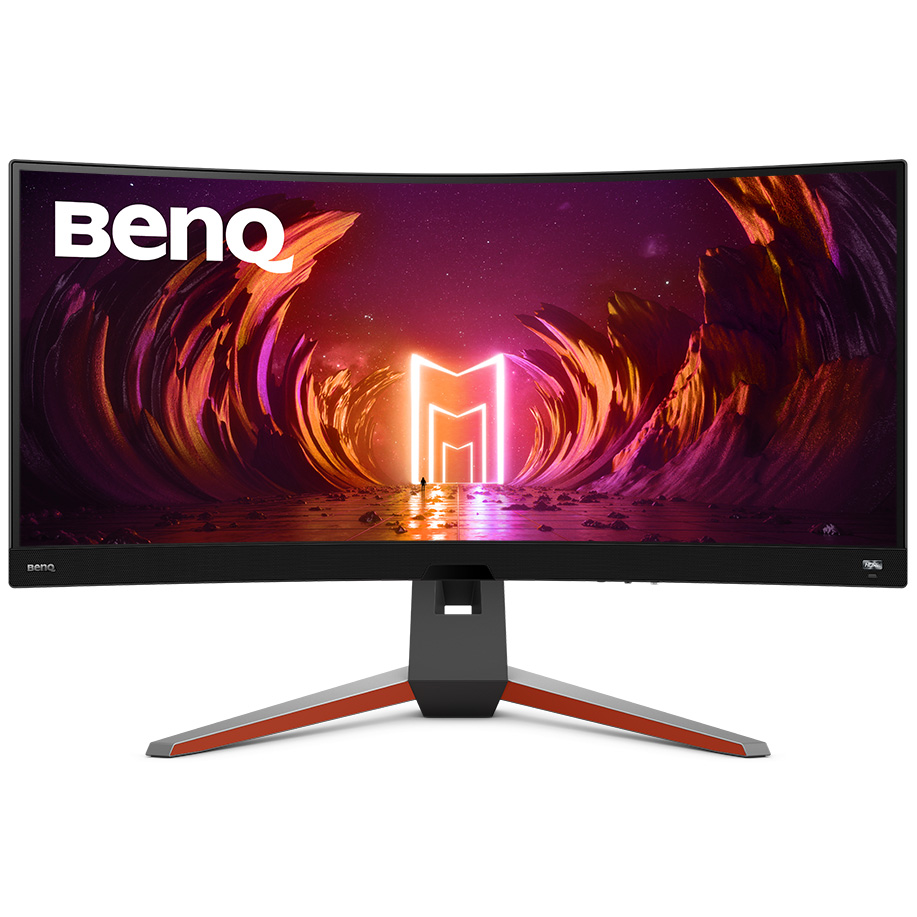
EX3410R 34" Ultrawide Curved Gaming Monitor MOBIUZ
EX3410R 34" Ultrawide Curved Gaming Monitor MOBIUZ
in 3 offers
The lowest price for Monitor BenQ 9H.LKKLA.TBE 34" Led right now is $759.16 at Links, compared across 3 retailers.
The all-time low was $559.00 on 19 Oct 2025 — today's price is 36% above the lowest ever. It has been notably cheaper before — worth setting a price alert.
Prices last updated 6 July 2026.
Monitor BenQ 9H.LKKLA.TBE 34" Led
EX3410R 34" Ultrawide Curved Gaming Monitor MOBIUZ
EX3410R 34" Ultrawide Curved Gaming Monitor MOBIUZ
Last updated at 06/07/2026 08:45:17
Gaming monitor 34" BENQ EX3410R 9H.LKKLA.TBE, UWQHD, VA, 144Hz, 1ms, 350cd/m2, FreeSync, zakrivljeni, zvučnici, crni
BenQ EX3410R - 86.4 cm (34") - 3440 x 1440p Wide Quad HD Monitor
benq mobiuz ex3410r curved gaming monitor (34 inches ultrawide wqhd 144 hz 1 ms hdr 400 freesync premium pro remote control) gray
Delivery between 10–14 July $15.52
originally posted on bestbuy.ca
Awesome value beats alienware and Samsung odyssey. Hdr is a little dark! Love the speakers. Picture quality is stellar.
originally posted on pccasegear.com
I bought two of the se monitors and I'm very pleased with them. The 100R curve is the most acute I've seen and works really well. The included remote controls are a nice touch too.
originally posted on bhphotovideo.com
I ordered this to replace an aging Viewsonic VX2311-4K. I decided to try a curved monitor remembering when I got the Viewsonic feeling 32 was big enough to make a curve appealing. I went with this BenQ because a colleague spoke well of them after installing several at a client's office.It installs easily enough and the stand is very sturdy. The packaging consists of a huge molded block of styrofoam which is an environmental problem I wish they would change.I am using the BenQ as a second monitor with my late 2020 Intel 27 5K iMac connected by an HDMI cable directly to the iMac. The BenQ lights up very quickly after the iMac starts. Many monitors don't with a Mac - a well known issue that was present in the Viewsonic.The quickstart instructions didn't explain ... MoreI ordered this to replace an aging Viewsonic VX2311-4K. I decided to try a curved monitor remembering when I got the Viewsonic feeling 32 was big enough to make a curve appealing. I went with this BenQ because a colleague spoke well of them after installing several at a client's office.It installs easily enough and the stand is very sturdy. The packaging consists of a huge molded block of styrofoam which is an environmental problem I wish they would change.I am using the BenQ as a second monitor with my late 2020 Intel 27 5K iMac connected by an HDMI cable directly to the iMac. The BenQ lights up very quickly after the iMac starts. Many monitors don't with a Mac - a well known issue that was present in the Viewsonic.The quickstart instructions didn't explain anything about the controls. They turn out to be on the bottom right edge. I took the prominent switch on the lower right bezel as 'the' switch and for a while thought I had a bad monitor.Once I figured out where the controls were I began attempting to making it look good. This was not easy. The target customer seems to be the gaming set and many of the presets refer gaming options and uses. Not helpful. The switch on the front allows you to choose various 'modes': HDR, Game HDRi, Cinema HDRi, Display HDR and off.Reading up on HDR and HDRi it really is all about games and gaming. Color balance is hard to achieve and watching video with the Cinema setting is crappy. Aliasing and color banding all over the place.Being side by side with 5K retina the resolution is pretty terrible - especially shows up for smaller fonts. Slide the window to the Mac and it's crisp and readable, slide back to BenQ and it's jangled.Basically I made a mistake. Gaming monitors are purpose built and apparently not suitable outside that envelope. For anyone reading this here I have to say avoid.
| Screen shape | Curved |
| Display number of colours | 16.7 million colours |
| Pixel density | 110 ppi |
| Maximum refresh rate | 144 Hz |
| HD type | Wide Quad HD |
Gaming monitor 34" BENQ EX3410R 9H.LKKLA.TBE, UWQHD, VA, 144Hz, 1ms, 350cd/m2, FreeSync, zakrivljeni, zvučnici, crni
BenQ EX3410R - 86.4 cm (34") - 3440 x 1440p Wide Quad HD Monitor
benq mobiuz ex3410r curved gaming monitor (34 inches ultrawide wqhd 144 hz 1 ms hdr 400 freesync premium pro remote control) gray
Delivery between 10–14 July $15.52
Awesome value beats alienware and Samsung odyssey. Hdr is a little dark! Love the speakers. Picture quality is stellar.
I bought two of the se monitors and I'm very pleased with them. The 100R curve is the most acute I've seen and works really well. The included remote controls are a nice touch too.
I ordered this to replace an aging Viewsonic VX2311-4K. I decided to try a curved monitor remembering when I got the Viewsonic feeling 32 was big enough to make a curve appealing. I went with this BenQ because a colleague spoke well of them after installing several at a client's office.It installs easily enough and the stand is very sturdy. The packaging consists of a huge molded block of styrofoam which is an environmental problem I wish they would change.I am using the BenQ as a second monitor with my late 2020 Intel 27 5K iMac connected by an HDMI cable directly to the iMac. The BenQ lights up very quickly after the iMac starts. Many monitors don't with a Mac - a well known issue that was present in the Viewsonic.The quickstart instructions didn't explain ... MoreI ordered this to replace an aging Viewsonic VX2311-4K. I decided to try a curved monitor remembering when I got the Viewsonic feeling 32 was big enough to make a curve appealing. I went with this BenQ because a colleague spoke well of them after installing several at a client's office.It installs easily enough and the stand is very sturdy. The packaging consists of a huge molded block of styrofoam which is an environmental problem I wish they would change.I am using the BenQ as a second monitor with my late 2020 Intel 27 5K iMac connected by an HDMI cable directly to the iMac. The BenQ lights up very quickly after the iMac starts. Many monitors don't with a Mac - a well known issue that was present in the Viewsonic.The quickstart instructions didn't explain anything about the controls. They turn out to be on the bottom right edge. I took the prominent switch on the lower right bezel as 'the' switch and for a while thought I had a bad monitor.Once I figured out where the controls were I began attempting to making it look good. This was not easy. The target customer seems to be the gaming set and many of the presets refer gaming options and uses. Not helpful. The switch on the front allows you to choose various 'modes': HDR, Game HDRi, Cinema HDRi, Display HDR and off.Reading up on HDR and HDRi it really is all about games and gaming. Color balance is hard to achieve and watching video with the Cinema setting is crappy. Aliasing and color banding all over the place.Being side by side with 5K retina the resolution is pretty terrible - especially shows up for smaller fonts. Slide the window to the Mac and it's crisp and readable, slide back to BenQ and it's jangled.Basically I made a mistake. Gaming monitors are purpose built and apparently not suitable outside that envelope. For anyone reading this here I have to say avoid.
love b@h always ship fast monitor arrived in a new condition product is working as expected.thx very much b@h
| Screen shape | Curved |
| Display number of colours | 16.7 million colours |
| Pixel density | 110 ppi |
| Maximum refresh rate | 144 Hz |
| HD type | Wide Quad HD |