Nacon Revolution x Pro Controller For Xbox Series x | S
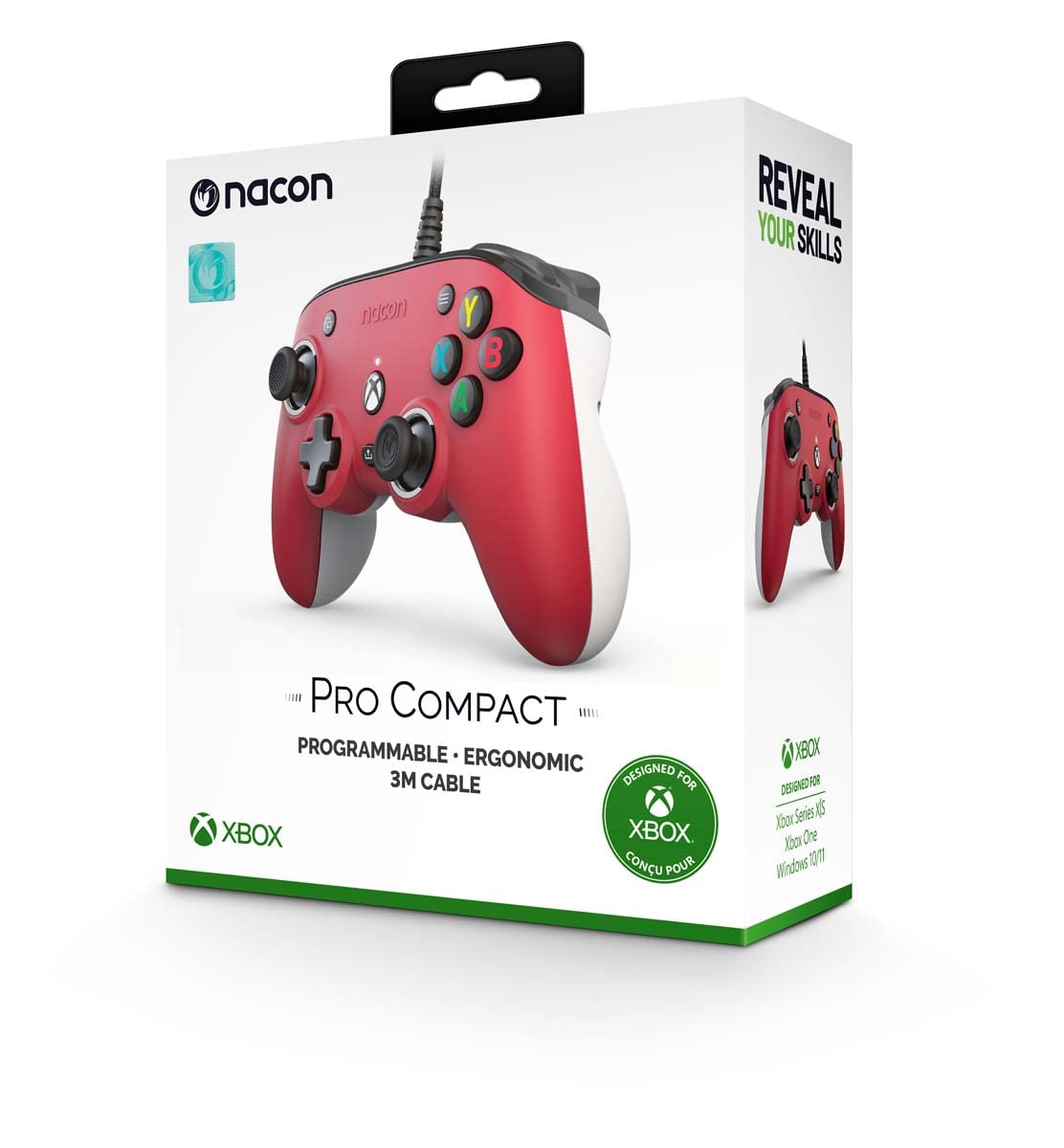
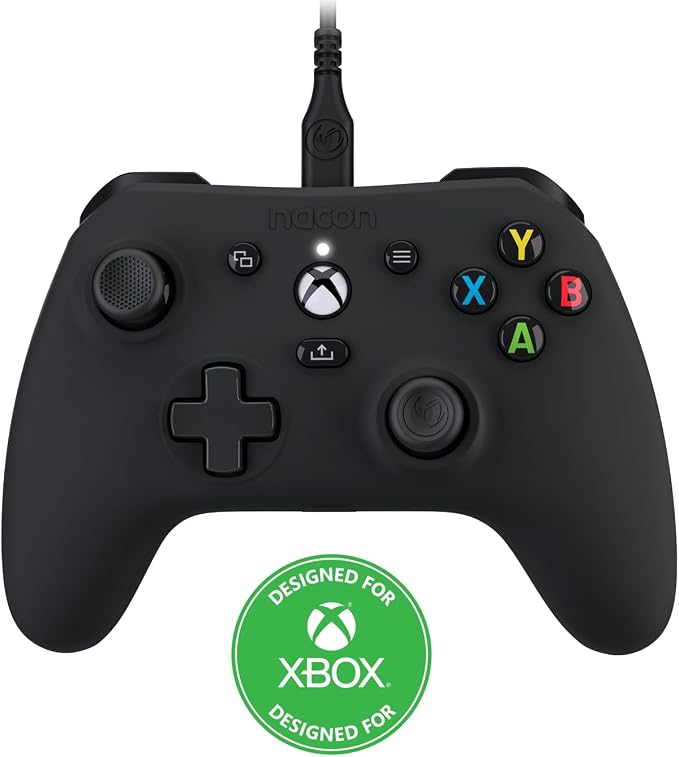
Nacon unveiled two Xbox designed controllers, complete with customisation options and full support for Xbox One and the upcoming next-generation platform Xbox Series X/S. The Revolution series controllers introduce customisation and optimisations designed for the competitive edge in gaming. 4 shortcut keys and button customisation. Customisable joystick angles and heads. 4 or 8 direction cross. 6 additional weights included. Full adjustment of joystick and triggers and adjustment of vibration motors. View, Menu, Nexus and share buttons. Standard or personalised profile via the Revolution X controller app available on Microsoft Store. 4 profiles stored in the controller. Professional controller for Xbox Series X/S, Xbox One and PC (Windows 10). Dolby Atmos included. 3.5mm headphone jack for audio and chat. Xbox one compatible. Xbox series X and S compatible. PC compatible.
Nacon unveiled two Xbox designed controllers, complete with customisation options and full support for Xbox One and the upcoming next-generation platform Xbox Series X/S. The Revolution series controllers introduce customisation and optimisations designed for the competitive edge in gaming. 4 shortcut keys and button customisation. Customisable joystick angles and heads. 4 or 8 direction cross. 6 additional weights included. Full adjustment of joystick and triggers and adjustment of vibration motors. View, Menu, Nexus and share buttons. Standard or personalised profile via the Revolution X controller app available on Microsoft Store. 4 profiles stored in the controller. Professional controller for Xbox Series X/S, Xbox One and PC (Windows 10). Dolby Atmos included. 3.5mm headphone jack for audio and chat. Xbox one compatible. Xbox series X and S compatible. PC compatible.
Nacon unveiled two Xbox designed controllers, complete with customisation options and full support for Xbox One and the upcoming next-generation platform Xbox Series X/S. The Revolution series controllers introduce customisation and optimisations designed for the competitive edge in gaming. 4 shortcut keys and button customisation. Customisable joystick angles and heads. 4 or 8 direction cross. 6 additional weights included. Full adjustment of joystick and triggers and adjustment of vibration motors. View, Menu, Nexus and share buttons. Standard or personalised profile via the Revolution X controller app available on Microsoft Store. 4 profiles stored in the controller. Professional controller for Xbox Series X/S, Xbox One and PC (Windows 10). Dolby Atmos included. 3.5mm headphone jack for audio and chat. Xbox one compatible. Xbox series X and S compatible. PC compatible.
Nacon unveiled two Xbox designed controllers, complete with customisation options and full support for Xbox One and the upcoming next-generation platform Xbox Series X/S. The Revolution series controllers introduce customisation and optimisations designed for the competitive edge in gaming. 4 shortcut keys and button customisation. Customisable joystick angles and heads. 4 or 8 direction cross. 6 additional weights included. Full adjustment of joystick and triggers and adjustment of vibration motors. View, Menu, Nexus and share buttons. Standard or personalised profile via the Revolution X controller app available on Microsoft Store. 4 profiles stored in the controller. Professional controller for Xbox Series X/S, Xbox One and PC (Windows 10). Dolby Atmos included. 3.5mm headphone jack for audio and chat. Xbox one compatible. Xbox series X and S compatible. PC compatible.
in 16 offers
The lowest price for Nacon Revolution x Pro Controller For Xbox Series x | S right now is $62.74 at Playthek.com, compared across 9 retailers.
The all-time low was $41.98 on 2 May 2026 — today's price is 49% above the lowest ever. It has been notably cheaper before — worth setting a price alert.
Prices last updated 19 Oct 2026.
Last updated at 19/10/2026 00:11:53
Revolution X Pro Controller/Xbox Series X
Affiliate Disclosure: We may receive a small commission for purchases made through this link at no extra cost to you. This helps support our site. Thank you!
Bigben Interactive Gmbh NACON Revolution X Pro Controller Black USB Gamepad PC, Xbox One, Xbox One S, Xbox One X, Xbox Series S, Xbox Series X
Free delivery
Nacon Xbox Revolution X Xbox Controller Black
Delivery $29.49
Nacon Revolution x Pro Controller (Xbox X)
Delivery $8.95
Nacon Revolution X Pro Wired Controller Xbox X (pc/xbox One/xbox
Delivery $20.90
Affiliate Disclosure: We may receive a small commission for purchases made through this link at no extra cost to you. This helps support our site. Thank you!
Nacon Revolution X Pro Xbox & PC Wired Controller - Black
Delivery between 26–28 Oct $67.38
Nacon Revolution X Pro Controller for Xbox One/Xbox Series X|S
Delivery $37.04
Bigben NACON Revolution X Pro Controller for Xbox Series X | S (XSX800REVXCONT)
Delivery between 25–28 Oct $29
Nacon Revolution X Pro Xbox Series/PC Controller
Delivery between 21 Oct – 2 Nov $32.18
originally posted on bestbuy.com
Nacon's Revolution X Pro is my first "pro" controller. I play games primarily on PC using standard Xbox wireless controllers, so it's taken me a bit of time to get used to using some of the more advanced features this controller has.But for the moment, let's talk about build quality. The thing is solidly built, and feels like it could take an impact. The L/R trigger buttons and dpad are made from some sort of composite material and feel almost metallic.In terms of design, The Revolution X has a more angular curve than offical Xbox controllers. It's bigger overall. The shell, buttons, sticks and triggers are all bigger. In most cases, this difference is a few milimeters, but the impact is larger than the size difference. After gaming on the Revolution for a ... MoreNacon's Revolution X Pro is my first "pro" controller. I play games primarily on PC using standard Xbox wireless controllers, so it's taken me a bit of time to get used to using some of the more advanced features this controller has.But for the moment, let's talk about build quality. The thing is solidly built, and feels like it could take an impact. The L/R trigger buttons and dpad are made from some sort of composite material and feel almost metallic.In terms of design, The Revolution X has a more angular curve than offical Xbox controllers. It's bigger overall. The shell, buttons, sticks and triggers are all bigger. In most cases, this difference is a few milimeters, but the impact is larger than the size difference. After gaming on the Revolution for a couple of weeks, my Series X model controller feels almost small and uncomfortable.The rear buttons (S1-4) sit right where they need to be. The inner buttons are depressed by your middle finger, and the outer ones by your ring/pinky fingers. It's hard to describe, but it's sort of like "squeezing" the controller handles to click the outer ones. It sounds wonky but it works.Physically, the controller is adjustable in a variety of ways. You can swap the thumbstick pads between convex and concave, and there are two sets of rings you can place around the stick to reduce maximum travel distance, which can be useful for games where the stick inputs direction but not distance. There are two sets of weights you can add to the controller if it feels too light, and the LED ring around the right stick can be adjusted for custom profiles in the software.The controller can switch between "classic" and "advanced" modes, and there's a switch on the back of the controller that allows you to flip between them. If the switch is set to "advanced" then another button on the back will allow you to swap between four different profiles on the fly. This button is far enough out of the way that I've never accidentally hit it, but it's easy to find when you want it.The Revolution X software that you use to program the controller is a bit of a mixed bag. There are a lot of things you can adjust. Every single button can be remapped. The D-pad can be set to 4 or 8 way. You can adjust force feedback intensity. Each thumbstick's sensitivity curve can be indivdually adjusted, and you can even swap the sticks. You can adjust the equalizer on a five band level, and turn 3D audio on and off.The downside to the software is that it's clearly meant to be controlled by the controller itself. Which would be great on a console, but feels weird in windows. It's not unusable or broken or anything, just a little weird.The included carrying case is a nice touch and keeps all the included parts protected and organized.Overall, I've been having a blast using this controller and I'd definitely recommend it to anyone looking for an adjustable controller.
originally posted on bestbuy.com
Between my own custom gaming rig, my daughters' gaming towers, three gaming laptops, and two XBoxes in the family, we've gone through our share of wired and wireless Xbox controllers over the years. At the moment, my personal daily drivers between PC and Xbox are a pair of Elite Wireless v2s while my daughters are just starting to get "serious" enough about gaming to be jealously eying my Elites. When the Nacon Revolution X came along, I thought I would give it shot to see if it was something "elite enough" to replace one of my existing controllers so I could pass one along to my youngest daughter, or maybe see if she would be happy to game with this one as-is. It turns out the latter was true, but not for the reasons I was expecting.Despite seeming a bit large in ... MoreBetween my own custom gaming rig, my daughters' gaming towers, three gaming laptops, and two XBoxes in the family, we've gone through our share of wired and wireless Xbox controllers over the years. At the moment, my personal daily drivers between PC and Xbox are a pair of Elite Wireless v2s while my daughters are just starting to get "serious" enough about gaming to be jealously eying my Elites. When the Nacon Revolution X came along, I thought I would give it shot to see if it was something "elite enough" to replace one of my existing controllers so I could pass one along to my youngest daughter, or maybe see if she would be happy to game with this one as-is. It turns out the latter was true, but not for the reasons I was expecting.Despite seeming a bit large in the hand, physical construction feels a bit light at first--not cheap, just light (more on that later). The matte-finish plastic shell features a subtle grippy texture along the sides and back bottom half of the grips...this is not a controller you're likely to see fly out of your hands even after a long session of heated gaming. A thick, high-quality 10-foot braided USB-A to USB-C cable fits into the deeply recessed USB-C port at the top of the controller--this is a great design feature for avoiding cable strain and should keep the port from developing connection problems even after years of use. Face buttons are large and flat-topped; this makes them *feel* noticeably larger than the Elite controller's domed face buttons. The D-pad is also a hair larger than the Elite's with a slightly "swollen" plus-shape that makes it a little easier to pull off diagonals because there is more D-pad material under your fingertip. D-pad action is solid though the feel is slightly soft or mushy in all directions as opposed to the Elite's more resolute directional clicking action.Similar to the Elite, the Revolution X also features four rear triggers; however, instead of raised paddles, the rear trigger/buttons are integrated into the grips themselves. The upper rear triggers have a trapezoidal shape with smooth curves that hugged the contours of my middle fingers quite nicely; the lower rear triggers are long slivers capped with a textured surface that help both with discerning the two sets of triggers by feel, as well as enhancing grip on the controller itself. Throw on the rear triggers is VERY short and at first I was afraid of accidental trigger presses during gameplay, especially the lower grip triggers because I tend to hold my controller very tightly; but surprisingly, even during a very frantic fighting game, I never once accidentally pressed the rear trigger buttons. The regular shoulder triggers and bumpers are larger than the Elite's; RT/LT have a long smooth throw while RB/LB have short/quick actuation--they do not feel mushy or soft.Up front, the standard select, menu, share, and Xbox buttons are on tap. A white LED glows above the Xbox button when the controllers is active, and an LED ring encircles the right thumbstick--the LEDs are also customizable in the Revolution X app. Thumbstick action is fast with very little resistance offered in any direction--in general, they feel slightly looser than the Elite's thumbsticks, but not sloppy or imprecise. Stock thumbstick toppers are concave and feature textured surfaces for better grip. At the bottom of the controller's face are four LEDs to indicate which of four gaming profiles is selected; a combo 3.5mm audio jack is situated at the very bottom of the controller. The back offers two additional controls, one for profile selection, and one for toggling between "classic" (simple, onboard button programming) and "advanced" (deep, Revolution X customizations and programming) modes of operation. In classic mode, simple button mapping is available if you just want to customize a few functions and be on your way. The deep, almost intimidating customizations are available in the companion Revolution X app.The Revolution X is a tweaker's dream offering an almost dizzying array of software- and hardware-based adjustments and customization. The included carrying case features a mesh pocket for the cable and a smaller clam-shell case with three different sets of grip weights, two additional mushroom thumbstick toppers, and two different sets of thumbstick throw restrictors (there's even a Revolution-X branded cleaning cloth thrown in for good measure). Grip weights (10g, 14g, or 16g) can be added or changed by removing the back grip covers and inserting the tiny dumbbell weights into the recessed tabs; I was surprised at how much of a difference the weight changes actually made for comfort in the hand--my guess is that virtually any gamer of any size/age will find a combination that simply feels right or more reassuring. The thumbstick toppers simply pop off with just a little bit of force though you do have to be careful replacing them because they are slotted in the rear and only fit one way back onto the thumbstick assemblies. The thumbstick restrictor collars are actually a cool bit of engineering...they fit over the existing thubmstick stalks and physically limit how much throw the thumbsticks have; combined with customized dead zones and response curves in the app and you have an incredibly powerful and flexible way to personalize in-game performance and the physical behavior of the controls themselves.The controller supports free access to Dolby Atmos and the process was seamless for us. Once I downloaded the Dolby app, it recognized the controller and immediately enabled Atmos audio enhancements. Unfortunately, this "free" Atmos processing is only available if you use the 3.5mm jack on the controller itself; Atmos will not activate for other headsets or audio dongles unless you have already paid for the license separately. If you are using the Revolution X app, you can make additional adjustments to the onboard audio using a 5-band EQ, turning on/off 3D audio, and setting gain and noise suppression on the mic input.Speaking of the app, it was clearly designed with consoles in mind so PC users take note--adjustments are controller/button-based and while navigation can be accomplished using arrows/keystrokes, values must be selected/changed using the D-pad; you cannot use the keyboard to make numerical changes. Customization starts with basic button mapping using a very large and user-friendly graphical interface. Thumbstick response curve adjustments allow customizing dead zones, sensitivity, reactivity areas, and include several helpful presets to try out including straight linear (for sports or racing games), reactive (FPS), boosted (for sniper-type controls), immediate (for quick-twitch arcade & fighting games), and "ultra reactive" (supposedly for infiltration style games). Trigger responsiveness can also be set based on how much of the full trigger pull you want to utilize, and where the pull starts/stops registering. It's not quite as visceral or immediate as physical trigger stops (like on the Elites) that limit how much actual throw the triggers have under your fingers, but it does allow for greater granular control over in-game trigger functioning. As indicated above, there is a page in the app for personalizing audio performance, and another page of adjustments where you can customize the strength of the grip and trigger vibration motors, change the color and pattern of the right thumbstick's LED ring light, and change the D-pad behavior from 8-way to 4-way...a VERY nice touch for improving responsiveness in games that make no use of the diagonals.WOW...that's a lot of customization options both in physical and software aspects of operation, some of which even rival the pricier Elite 2's capabilities. So, why wasn't this controller a home run for me? In the end, it all came down to the ergonomics around the triggers. As I've indicated elsewhere, this is a slightly bigger controller with some design features seemingly suited to those with slightly larger hands. When I gave the controller to my 11 year-old daughter, she was afraid she wasn't going to be able to use it comfortably because it was so large--however, she got over that feeling REALLY fast and now positively loves the controller. Me...I don't have overly huge hands (I typically wear L or XL in men's gloves), but I have fairly long, slender fingers. I found that I quickly developed a great deal of discomfort near the knuckles and tops of my middle fingers that rested directly beneath the left & right triggers. On the Elites, the portion of the controller shell that overhangs beneath triggers is short and has a gentle slope/curvature that allows my fingers to rest on top of the controller. On the Revolution X, the curvature of the shell beneath the triggers is so steep and abrupt, and the overhang itself is so large, that it was pressing against the tops of my fingers and knuckles HARD--the best way I can describe the feeling is "cramped." Try as I might using varying grip strength and pressure, I simply couldn't get comfortable using the Revolution X and ultimately passed it along to my daughter who simply flipped for all the options and tweaks her new ultra-advanced controller offered.Does that mean the Revolution X is a dud--hardly; it's got deep, extensive, professional/tournament-grade customization options that anyone really serious about their gaming should definitely appreciate. But the fitment and ergonomics were SO problematic for me that I cannot make a blanket recommendation, even if the issues I experienced are likely not going to be common for a bulk of the users out there--definitely recommended, but only after seeing what it feels like in your own hands.
originally posted on bestbuy.com
The Nacon Revolution X controller is my first experience with a "pro-grade" controller and it exceeded my expectations. I love the look and feel (especially with the 16 gram weights installed) and I really liked the included carrying/storage case.As I do most of my gaming on PC, I found the Revolution X was immediately compatible out of the box with my Windows 11 gaming PCs. To customize the controller, you can download an app from the Microsoft store to change pretty much anything you want with the extra 4 buttons or the sensitivity of the controls. I have tried many different controllers over the years, and have until now mainly been using a first party Xbox One wireless controller for living room gaming and a wired Xbox 360 controller for my bonus room. The Rev ... MoreThe Nacon Revolution X controller is my first experience with a "pro-grade" controller and it exceeded my expectations. I love the look and feel (especially with the 16 gram weights installed) and I really liked the included carrying/storage case.As I do most of my gaming on PC, I found the Revolution X was immediately compatible out of the box with my Windows 11 gaming PCs. To customize the controller, you can download an app from the Microsoft store to change pretty much anything you want with the extra 4 buttons or the sensitivity of the controls. I have tried many different controllers over the years, and have until now mainly been using a first party Xbox One wireless controller for living room gaming and a wired Xbox 360 controller for my bonus room. The Rev X improves on the feel of either of those controllers and, being a wired controller, it has much better responsiveness than the wireless Xbox One controller I have. That extra 15-20ms really is noticeable when you have a TV or monitor that has VRR support and a low latency mode.There were some minor quirks with the controller that I feel like I should call out: I had issues with it connecting to the USB ports on one of my laptops - it wouldn't turn on when connected to those ports for some reason. That's the primary reason I can't give it a full 5 stars. It also didn't work when connected to my Shield TV Pro (2019 model) - I thought this was pretty weird since it works perfectly as an Xbox controller on Windows. Since that's not an advertised compatibility, I am just mentioning it here but it didn't affect my rating. Also, not really enough of an issue to affect my rating, but the Windows app is clearly designed as "Xbox first" as it doesn't respond to keyboard and mouse input. Not a dealbreaker, but a quirk for sure.Give the Revolution X a shot if you are wanting to move up to a premium/pro-grade controller and you are able to handle a 3 meter USB cable in your gaming room!
| Compatible OS | Windows 10 |
| Compatible Systems | Xbox One, PC |
| VR Controller? | No |
| Connectivity Type | Wired |
| Connector Type | USB-C |

Revolution X Pro Controller/Xbox Series X
Affiliate Disclosure: We may receive a small commission for purchases made through this link at no extra cost to you. This helps support our site. Thank you!
Bigben Interactive Gmbh NACON Revolution X Pro Controller Black USB Gamepad PC, Xbox One, Xbox One S, Xbox One X, Xbox Series S, Xbox Series X
Free delivery
Nacon Xbox Revolution X Xbox Controller Black
Delivery $29.49
Nacon Revolution x Pro Controller (Xbox X)
Delivery $8.95
Nacon Revolution X Pro Wired Controller Xbox X (pc/xbox One/xbox
Delivery $20.90
Affiliate Disclosure: We may receive a small commission for purchases made through this link at no extra cost to you. This helps support our site. Thank you!
Nacon's Revolution X Pro is my first "pro" controller. I play games primarily on PC using standard Xbox wireless controllers, so it's taken me a bit of time to get used to using some of the more advanced features this controller has.But for the moment, let's talk about build quality. The thing is solidly built, and feels like it could take an impact. The L/R trigger buttons and dpad are made from some sort of composite material and feel almost metallic.In terms of design, The Revolution X has a more angular curve than offical Xbox controllers. It's bigger overall. The shell, buttons, sticks and triggers are all bigger. In most cases, this difference is a few milimeters, but the impact is larger than the size difference. After gaming on the Revolution for a ... MoreNacon's Revolution X Pro is my first "pro" controller. I play games primarily on PC using standard Xbox wireless controllers, so it's taken me a bit of time to get used to using some of the more advanced features this controller has.But for the moment, let's talk about build quality. The thing is solidly built, and feels like it could take an impact. The L/R trigger buttons and dpad are made from some sort of composite material and feel almost metallic.In terms of design, The Revolution X has a more angular curve than offical Xbox controllers. It's bigger overall. The shell, buttons, sticks and triggers are all bigger. In most cases, this difference is a few milimeters, but the impact is larger than the size difference. After gaming on the Revolution for a couple of weeks, my Series X model controller feels almost small and uncomfortable.The rear buttons (S1-4) sit right where they need to be. The inner buttons are depressed by your middle finger, and the outer ones by your ring/pinky fingers. It's hard to describe, but it's sort of like "squeezing" the controller handles to click the outer ones. It sounds wonky but it works.Physically, the controller is adjustable in a variety of ways. You can swap the thumbstick pads between convex and concave, and there are two sets of rings you can place around the stick to reduce maximum travel distance, which can be useful for games where the stick inputs direction but not distance. There are two sets of weights you can add to the controller if it feels too light, and the LED ring around the right stick can be adjusted for custom profiles in the software.The controller can switch between "classic" and "advanced" modes, and there's a switch on the back of the controller that allows you to flip between them. If the switch is set to "advanced" then another button on the back will allow you to swap between four different profiles on the fly. This button is far enough out of the way that I've never accidentally hit it, but it's easy to find when you want it.The Revolution X software that you use to program the controller is a bit of a mixed bag. There are a lot of things you can adjust. Every single button can be remapped. The D-pad can be set to 4 or 8 way. You can adjust force feedback intensity. Each thumbstick's sensitivity curve can be indivdually adjusted, and you can even swap the sticks. You can adjust the equalizer on a five band level, and turn 3D audio on and off.The downside to the software is that it's clearly meant to be controlled by the controller itself. Which would be great on a console, but feels weird in windows. It's not unusable or broken or anything, just a little weird.The included carrying case is a nice touch and keeps all the included parts protected and organized.Overall, I've been having a blast using this controller and I'd definitely recommend it to anyone looking for an adjustable controller.
Between my own custom gaming rig, my daughters' gaming towers, three gaming laptops, and two XBoxes in the family, we've gone through our share of wired and wireless Xbox controllers over the years. At the moment, my personal daily drivers between PC and Xbox are a pair of Elite Wireless v2s while my daughters are just starting to get "serious" enough about gaming to be jealously eying my Elites. When the Nacon Revolution X came along, I thought I would give it shot to see if it was something "elite enough" to replace one of my existing controllers so I could pass one along to my youngest daughter, or maybe see if she would be happy to game with this one as-is. It turns out the latter was true, but not for the reasons I was expecting.Despite seeming a bit large in ... MoreBetween my own custom gaming rig, my daughters' gaming towers, three gaming laptops, and two XBoxes in the family, we've gone through our share of wired and wireless Xbox controllers over the years. At the moment, my personal daily drivers between PC and Xbox are a pair of Elite Wireless v2s while my daughters are just starting to get "serious" enough about gaming to be jealously eying my Elites. When the Nacon Revolution X came along, I thought I would give it shot to see if it was something "elite enough" to replace one of my existing controllers so I could pass one along to my youngest daughter, or maybe see if she would be happy to game with this one as-is. It turns out the latter was true, but not for the reasons I was expecting.Despite seeming a bit large in the hand, physical construction feels a bit light at first--not cheap, just light (more on that later). The matte-finish plastic shell features a subtle grippy texture along the sides and back bottom half of the grips...this is not a controller you're likely to see fly out of your hands even after a long session of heated gaming. A thick, high-quality 10-foot braided USB-A to USB-C cable fits into the deeply recessed USB-C port at the top of the controller--this is a great design feature for avoiding cable strain and should keep the port from developing connection problems even after years of use. Face buttons are large and flat-topped; this makes them *feel* noticeably larger than the Elite controller's domed face buttons. The D-pad is also a hair larger than the Elite's with a slightly "swollen" plus-shape that makes it a little easier to pull off diagonals because there is more D-pad material under your fingertip. D-pad action is solid though the feel is slightly soft or mushy in all directions as opposed to the Elite's more resolute directional clicking action.Similar to the Elite, the Revolution X also features four rear triggers; however, instead of raised paddles, the rear trigger/buttons are integrated into the grips themselves. The upper rear triggers have a trapezoidal shape with smooth curves that hugged the contours of my middle fingers quite nicely; the lower rear triggers are long slivers capped with a textured surface that help both with discerning the two sets of triggers by feel, as well as enhancing grip on the controller itself. Throw on the rear triggers is VERY short and at first I was afraid of accidental trigger presses during gameplay, especially the lower grip triggers because I tend to hold my controller very tightly; but surprisingly, even during a very frantic fighting game, I never once accidentally pressed the rear trigger buttons. The regular shoulder triggers and bumpers are larger than the Elite's; RT/LT have a long smooth throw while RB/LB have short/quick actuation--they do not feel mushy or soft.Up front, the standard select, menu, share, and Xbox buttons are on tap. A white LED glows above the Xbox button when the controllers is active, and an LED ring encircles the right thumbstick--the LEDs are also customizable in the Revolution X app. Thumbstick action is fast with very little resistance offered in any direction--in general, they feel slightly looser than the Elite's thumbsticks, but not sloppy or imprecise. Stock thumbstick toppers are concave and feature textured surfaces for better grip. At the bottom of the controller's face are four LEDs to indicate which of four gaming profiles is selected; a combo 3.5mm audio jack is situated at the very bottom of the controller. The back offers two additional controls, one for profile selection, and one for toggling between "classic" (simple, onboard button programming) and "advanced" (deep, Revolution X customizations and programming) modes of operation. In classic mode, simple button mapping is available if you just want to customize a few functions and be on your way. The deep, almost intimidating customizations are available in the companion Revolution X app.The Revolution X is a tweaker's dream offering an almost dizzying array of software- and hardware-based adjustments and customization. The included carrying case features a mesh pocket for the cable and a smaller clam-shell case with three different sets of grip weights, two additional mushroom thumbstick toppers, and two different sets of thumbstick throw restrictors (there's even a Revolution-X branded cleaning cloth thrown in for good measure). Grip weights (10g, 14g, or 16g) can be added or changed by removing the back grip covers and inserting the tiny dumbbell weights into the recessed tabs; I was surprised at how much of a difference the weight changes actually made for comfort in the hand--my guess is that virtually any gamer of any size/age will find a combination that simply feels right or more reassuring. The thumbstick toppers simply pop off with just a little bit of force though you do have to be careful replacing them because they are slotted in the rear and only fit one way back onto the thumbstick assemblies. The thumbstick restrictor collars are actually a cool bit of engineering...they fit over the existing thubmstick stalks and physically limit how much throw the thumbsticks have; combined with customized dead zones and response curves in the app and you have an incredibly powerful and flexible way to personalize in-game performance and the physical behavior of the controls themselves.The controller supports free access to Dolby Atmos and the process was seamless for us. Once I downloaded the Dolby app, it recognized the controller and immediately enabled Atmos audio enhancements. Unfortunately, this "free" Atmos processing is only available if you use the 3.5mm jack on the controller itself; Atmos will not activate for other headsets or audio dongles unless you have already paid for the license separately. If you are using the Revolution X app, you can make additional adjustments to the onboard audio using a 5-band EQ, turning on/off 3D audio, and setting gain and noise suppression on the mic input.Speaking of the app, it was clearly designed with consoles in mind so PC users take note--adjustments are controller/button-based and while navigation can be accomplished using arrows/keystrokes, values must be selected/changed using the D-pad; you cannot use the keyboard to make numerical changes. Customization starts with basic button mapping using a very large and user-friendly graphical interface. Thumbstick response curve adjustments allow customizing dead zones, sensitivity, reactivity areas, and include several helpful presets to try out including straight linear (for sports or racing games), reactive (FPS), boosted (for sniper-type controls), immediate (for quick-twitch arcade & fighting games), and "ultra reactive" (supposedly for infiltration style games). Trigger responsiveness can also be set based on how much of the full trigger pull you want to utilize, and where the pull starts/stops registering. It's not quite as visceral or immediate as physical trigger stops (like on the Elites) that limit how much actual throw the triggers have under your fingers, but it does allow for greater granular control over in-game trigger functioning. As indicated above, there is a page in the app for personalizing audio performance, and another page of adjustments where you can customize the strength of the grip and trigger vibration motors, change the color and pattern of the right thumbstick's LED ring light, and change the D-pad behavior from 8-way to 4-way...a VERY nice touch for improving responsiveness in games that make no use of the diagonals.WOW...that's a lot of customization options both in physical and software aspects of operation, some of which even rival the pricier Elite 2's capabilities. So, why wasn't this controller a home run for me? In the end, it all came down to the ergonomics around the triggers. As I've indicated elsewhere, this is a slightly bigger controller with some design features seemingly suited to those with slightly larger hands. When I gave the controller to my 11 year-old daughter, she was afraid she wasn't going to be able to use it comfortably because it was so large--however, she got over that feeling REALLY fast and now positively loves the controller. Me...I don't have overly huge hands (I typically wear L or XL in men's gloves), but I have fairly long, slender fingers. I found that I quickly developed a great deal of discomfort near the knuckles and tops of my middle fingers that rested directly beneath the left & right triggers. On the Elites, the portion of the controller shell that overhangs beneath triggers is short and has a gentle slope/curvature that allows my fingers to rest on top of the controller. On the Revolution X, the curvature of the shell beneath the triggers is so steep and abrupt, and the overhang itself is so large, that it was pressing against the tops of my fingers and knuckles HARD--the best way I can describe the feeling is "cramped." Try as I might using varying grip strength and pressure, I simply couldn't get comfortable using the Revolution X and ultimately passed it along to my daughter who simply flipped for all the options and tweaks her new ultra-advanced controller offered.Does that mean the Revolution X is a dud--hardly; it's got deep, extensive, professional/tournament-grade customization options that anyone really serious about their gaming should definitely appreciate. But the fitment and ergonomics were SO problematic for me that I cannot make a blanket recommendation, even if the issues I experienced are likely not going to be common for a bulk of the users out there--definitely recommended, but only after seeing what it feels like in your own hands.
The Nacon Revolution X controller is my first experience with a "pro-grade" controller and it exceeded my expectations. I love the look and feel (especially with the 16 gram weights installed) and I really liked the included carrying/storage case.As I do most of my gaming on PC, I found the Revolution X was immediately compatible out of the box with my Windows 11 gaming PCs. To customize the controller, you can download an app from the Microsoft store to change pretty much anything you want with the extra 4 buttons or the sensitivity of the controls. I have tried many different controllers over the years, and have until now mainly been using a first party Xbox One wireless controller for living room gaming and a wired Xbox 360 controller for my bonus room. The Rev ... MoreThe Nacon Revolution X controller is my first experience with a "pro-grade" controller and it exceeded my expectations. I love the look and feel (especially with the 16 gram weights installed) and I really liked the included carrying/storage case.As I do most of my gaming on PC, I found the Revolution X was immediately compatible out of the box with my Windows 11 gaming PCs. To customize the controller, you can download an app from the Microsoft store to change pretty much anything you want with the extra 4 buttons or the sensitivity of the controls. I have tried many different controllers over the years, and have until now mainly been using a first party Xbox One wireless controller for living room gaming and a wired Xbox 360 controller for my bonus room. The Rev X improves on the feel of either of those controllers and, being a wired controller, it has much better responsiveness than the wireless Xbox One controller I have. That extra 15-20ms really is noticeable when you have a TV or monitor that has VRR support and a low latency mode.There were some minor quirks with the controller that I feel like I should call out: I had issues with it connecting to the USB ports on one of my laptops - it wouldn't turn on when connected to those ports for some reason. That's the primary reason I can't give it a full 5 stars. It also didn't work when connected to my Shield TV Pro (2019 model) - I thought this was pretty weird since it works perfectly as an Xbox controller on Windows. Since that's not an advertised compatibility, I am just mentioning it here but it didn't affect my rating. Also, not really enough of an issue to affect my rating, but the Windows app is clearly designed as "Xbox first" as it doesn't respond to keyboard and mouse input. Not a dealbreaker, but a quirk for sure.Give the Revolution X a shot if you are wanting to move up to a premium/pro-grade controller and you are able to handle a 3 meter USB cable in your gaming room!
The Revolution X controller is a capable, if slightly odd, third party wired-only controller for the Xbox. it's got a decent amount of customization on display with spacers for the sticks, alternative thumbstick caps, configurable weights, and reprogrammable back buttons (configurable via app or on the controller itself. But, as with many of these kinds of controllers, it's certainly not for anyone.Build quality is decent overall. Pretty much everything on the surface is plastic and it feels very light in the hand without the optional weights. The USB-C cables is long and sturdy. And the entire thing comes in a well designed and stylish looking carrying case. The triggers lack the tactile feel of the first party controllers and the paddles feel a little ... MoreThe Revolution X controller is a capable, if slightly odd, third party wired-only controller for the Xbox. it's got a decent amount of customization on display with spacers for the sticks, alternative thumbstick caps, configurable weights, and reprogrammable back buttons (configurable via app or on the controller itself. But, as with many of these kinds of controllers, it's certainly not for anyone.Build quality is decent overall. Pretty much everything on the surface is plastic and it feels very light in the hand without the optional weights. The USB-C cables is long and sturdy. And the entire thing comes in a well designed and stylish looking carrying case. The triggers lack the tactile feel of the first party controllers and the paddles feel a little insubstantial, but once you start playing you tend to stop noticing pretty quickly.Functionally, everything is very good. As expected with a wired controller there are no issues with lag or interference, the sticks center well, and all the buttons are responsive even if the slight differences in design does take a little getting used to. Switching between control profiles (or turning them off completely for a stock experience) is easily accomplished. The audio passthrough is also very good, though to be honest despite it being one of the advertised features on the box I found it to be fairly comparable to the standard controllers. The only issue I really had was getting used to the alternate buttons on the back. Most controllers I've used with this feature have used centrally mounted paddles, while this one has a set of triggers and buttons placed fairly low on the grips. It's very easy to accidentally hit the lower buttons in particular just by holding the controller until you get used to it, and even after a few days I still found myself accidentally throwing grenades in Halo.All in all this is a good choice for a third party controller, particularly for anyone who finds the first party ones a bit too heavy or want to be able to more precisely tune the controller's balance. But if you're very used to using rear paddles, you might not appreciate the change in button placement.
As I have been getting back into PC gaming within the past 6 months, I've basically stuck with the good old keyboard and mouse (been good enough for me for the past 25+ years), although I do play Xbox with our boys often. They do have one of the Xbox controllers set up to use on their gaming PC, so I figured I could get one for mine. I decided to give the RIG - Nacon Revolution X a try.Upfront, I knew that this was a wired controller, which would not be a problem since it would be used on a PC with easily accessible USB ports. Even so, the nice, braided USB-A to C cable is fairly long. The controller comes in a nice, hard-shell zippered case, which also has a slot for storing the plastic "customization case" which contains different weights (in cause you think the ... MoreAs I have been getting back into PC gaming within the past 6 months, I've basically stuck with the good old keyboard and mouse (been good enough for me for the past 25+ years), although I do play Xbox with our boys often. They do have one of the Xbox controllers set up to use on their gaming PC, so I figured I could get one for mine. I decided to give the RIG - Nacon Revolution X a try.Upfront, I knew that this was a wired controller, which would not be a problem since it would be used on a PC with easily accessible USB ports. Even so, the nice, braided USB-A to C cable is fairly long. The controller comes in a nice, hard-shell zippered case, which also has a slot for storing the plastic "customization case" which contains different weights (in cause you think the controller isn't "heavy" enough), two additional thumbsticks (rounded convex ones in case you are tired of the normal concave ones), and two set of two different sized rings to place on the thumbsticks to limit the range of motion (if desired).To do any soft customizations (profiles, button mapping, thumbstick sensitivity or LED color updates), you'll first need to install the Revolution X app from the Microsoft App store. Oh, and while you're in there, install the Dolby Access app as well (if you don't already have it) since it will be activated (with no extra costs) when your headset is plugged into the controller. You can select and/or set up different sound profiles and equalizer settings, which dose make quite a bit of difference, especially if you don't already have an equalizer app. This made one of backup my headsets, which I thought was just barely adequate, sound amazing!! I normally use a USB-connected headset with its control app, so I wouldn't really be using the Dolby Access portion.Sorry, back to the Revolution X app…. Once installed, you'll be able to set up different profiles, all that will be stored in the controller (which is helpful if going between different PCs or the Xbox console). And button can be remapped to any other button by default. Also, the four extra buttons on the back of the controller can be assigned. The response curve/sensitivity for the thumbsticks can also be adjusted in many different ways. There are defaults that can be used as starting points for you adjustments. And, of course, this controller has feedback vibrations, with two motors in the hand grips, and two for the triggers. Each one can be configured separately for the strength of the vibrations.Now, for the overall design on the controller. This is where I do have a couple of items I am not found of. Generally, it has a good feel to it, except for the "groove" just below the RT/LT buttons. They are extremely deep, especially when compared to the Microsoft OEM controllers (see the included comparison picture) For me, it just forces my knuckles/fingers press tightly against the controller a little uncomfortably. Also, I feel it throws the finger alignment out for going between the LT/RT and LB/RB buttons, which is my next issue. The LB and RB buttons are flush to the top of the LT and RT buttons, which calls for extra movement upwards to be aligned to hit them. If you are familiar with the OEM controller, the LB and RB have a bit of an overhang, which I feel makes them a bit easier to hit. This is where the configurable buttons on the back could help out, but can take some retraining of the fingers to hit the right place. As far as the other button placements go (A,B,X,Y), I don't have any issue with them. The movement/feel of the thumbsticks and D-pad are just right as well. And, if you are into it, there is the "Share" button in the middle.While I may not be using this as much as I planned, at least our boys like it enough so it won't just be sitting around unused. If you are looking for a highly soft and hard configurable controller at a decent price, definitely take a look at this one.
TL;DR - The Nacon RIG Revolution X controller is terrific as a controller and a good, wired option for Xbox owners looking for a wired controller that gives you a step up over the standard controllers, though for Windows gamers, the configuration software leaves a lot to be desired. While not as physically flexible as other pro-style controllers with bottom macro buttons, the buttons are easy to reach.First impressions - the controller itself is solid. Buttons all feel good, sticks feel good. The ability to change from concave to convex stick faces is a great added bonus, as some people won't like the convex while others don't like concave sticks. The weights are easy to install into the controller, and the included USB-C controller cable looks and feels great ... MoreTL;DR - The Nacon RIG Revolution X controller is terrific as a controller and a good, wired option for Xbox owners looking for a wired controller that gives you a step up over the standard controllers, though for Windows gamers, the configuration software leaves a lot to be desired. While not as physically flexible as other pro-style controllers with bottom macro buttons, the buttons are easy to reach.First impressions - the controller itself is solid. Buttons all feel good, sticks feel good. The ability to change from concave to convex stick faces is a great added bonus, as some people won't like the convex while others don't like concave sticks. The weights are easy to install into the controller, and the included USB-C controller cable looks and feels great (though the Velcro included to help store the stick is on the wrong end of the cable, but that's easily fixed...) The travel case is also a solid bonus, great for laptop gamers like me.Usage - the controller itself was rather impressive. After I put the 16-gram weights in, it felt great in my hand; there are also lighter 8- and 10-gram weights included. Games new and old controlled perfectly with it. The buttons on the underside were easy to press. Maybe the only drawback of the controller was the bright green lighting behind the right stick. While I was not able to use the Revolution X app in Windows to fix this problem (both Windows 10 and Windows 11), I was able to do so on an XBox Series S without issue.Headphones sound great through this controller. I used a pair of JBL Everest 310s and I could hear everything around me. This controller also supports ATMOS audio.So if you're looking for a high-quality pro-style controller for your XBox console, this is a winner. For Windows gamers, I'd look elsewhere until Nacon fixes the app.
One of the factors that we consider when purchasing a product is the price as we will base our purchase on our budget, well this controller is in a price range above average and it is justified with the accessories included, the protective case and a good quality cable however it seems to me that there are some aspects to consider.In the box is included the controller inside a case where it has a compartment for the cable that is long enough and accessories that are a pair of thumbsitcks, weights and stops for thumbsticks, I do not seem the fundamental accessories but they do their job. The compartments where the weights are placed are on the grips and I must say that one of the corners of the covers of these compartments is very sharp and can be dangerous, I ... MoreOne of the factors that we consider when purchasing a product is the price as we will base our purchase on our budget, well this controller is in a price range above average and it is justified with the accessories included, the protective case and a good quality cable however it seems to me that there are some aspects to consider.In the box is included the controller inside a case where it has a compartment for the cable that is long enough and accessories that are a pair of thumbsitcks, weights and stops for thumbsticks, I do not seem the fundamental accessories but they do their job. The compartments where the weights are placed are on the grips and I must say that one of the corners of the covers of these compartments is very sharp and can be dangerous, I recommend opening it carefully. The buttons on the back can be mapped in two ways, let's say that one is manual and the other from the software, you have to download an app that allows you to completely configure the controller, from the color of the right stick ring, to the dead zone of the joysticks I find it a very complete app. I have big hands and I feel that the back buttons are a little lower than what would be ideal, well at least for me, I also know that it is a matter of getting used to it.The controller fulfills its purpose perfectly, no delay or imput lag is perceived in fact is very accurate, the triggers to my taste are a little long to be a controller designed to play competitively, I emphasize that the performance of the controller is excellent but the design does not end up convincing. The cable as I mentioned is long enough and very resistant. The thumbsticks are a bit slippery in reality I do not feel that my thumbs have a firm grip on both pairs.Despite some important features that make the purchase of this controller attractive, I feel that there are some aspects of the design that do not convince me, it is a good controller for xbox or pc with a fairly long cable and accessories that can improve the experience and a not very high price, perhaps with a discount would be a good choice.
First off, this controller has an "adjustment period." When I first picked it up, it felt wrong in a lot of ways. It didn't really sit in my hands quite right. After I was able to get used to it, though, then I started to actually like it.The software is pretty decent. The fact that this controller automatically enables Dolby Atmos without worrying about buying keys or what profile you're logged into is a MAJOR bonus. I've been able to use it on my normal accounts and on my alternate account I sometimes use for streaming without my sound quality being affected. Additionally, the configuration software works pretty decently, and it doesn't have an ugly user interface. (Though, I don't know if the "update controller" button actually works.) From what I can tell, it ... MoreFirst off, this controller has an "adjustment period." When I first picked it up, it felt wrong in a lot of ways. It didn't really sit in my hands quite right. After I was able to get used to it, though, then I started to actually like it.The software is pretty decent. The fact that this controller automatically enables Dolby Atmos without worrying about buying keys or what profile you're logged into is a MAJOR bonus. I've been able to use it on my normal accounts and on my alternate account I sometimes use for streaming without my sound quality being affected. Additionally, the configuration software works pretty decently, and it doesn't have an ugly user interface. (Though, I don't know if the "update controller" button actually works.) From what I can tell, it doesn't even run in the background, which is great. There's a ton of options for customization without it being overwhelming.The hardware's nice too. My favorite parts are the fact that you can change up the weights inside the controller arms and the fact that they provide customizable sticks where you can switch up the tops and movement radii. It would've been nice if Nacon's manual showed how to actually do that since I kept feeling like I was going to break something, though. I also appreciate that the profiles are stored on the controller and that there is no need to use the software to swap once you've got them all set up. The controller feels sturdy and responsive, no sticks or buttons have got stuck yet, and it's been comfortable enough to use without hurting my hands if I play for a long time. The extra buttons are set in places where they make sense as well, are easy to configure, and don't feel overly sensitive.Overall I'd say I'm pretty happy with it. There's been no difference in functionality between PC and Xbox, there seems to be both a manual and software based way of configuring the controller; and the sound output from the headset jack isn't weak at all. The carrying case is pretty nice too, and feels like it would actually somewhat protect the controller from damage. They even included a cleaning cloth and a storage case for extra weights and controller caps.I do wish the manual had explained a bit more stuff, though, rather than leaving me to figure out how to use it myself. I still don't understand what the point of "advanced mode" is, and I was absolutely convinced I was going to break the controller when I tried swapping the stick caps.
So I received my RIG Nacon Revolution X Controller for Xbox/PC gaming about a week ago and have been putting it through it's paces. Recently over the last few months, I've started to slowly venture into PC Gaming. Before, I was mainly a console gamer (and I use that word loosely, meaning I'm no hardcore gamer), however, being I have a couple of gaming laptops in my household, I've been wanting to try my hand at PC gaming. Using keyboard keys in my opinion can be tiresome, then this Xbox/PC controller came along. This controller is very nice. Starting off with the quality of the build of this controller is solid. It's very sturdy and does not feel cheap at all. I love the heft and the solid feel in my hands.Unboxing the package, you're greeted with a nice sturdy ... MoreSo I received my RIG Nacon Revolution X Controller for Xbox/PC gaming about a week ago and have been putting it through it's paces. Recently over the last few months, I've started to slowly venture into PC Gaming. Before, I was mainly a console gamer (and I use that word loosely, meaning I'm no hardcore gamer), however, being I have a couple of gaming laptops in my household, I've been wanting to try my hand at PC gaming. Using keyboard keys in my opinion can be tiresome, then this Xbox/PC controller came along. This controller is very nice. Starting off with the quality of the build of this controller is solid. It's very sturdy and does not feel cheap at all. I love the heft and the solid feel in my hands.Unboxing the package, you're greeted with a nice sturdy black storage case that house everything and is easy for travel. Inside the storage case comes the Revolution X Wired Controller, grip weights, cleaning cloth, extra concave thumbsticks, USB-C to USB-A cable, and a Dolby Atmos Activation card to get started. Included also is the user documentation to help you get started. Everything in this package including the cable is all of premium quality.For those that are just learning or starting off with PC gaming (or even those who usually do console gaming), there might be a slight learning curve with the controller being this controller has extra buttons underneath. It was a little daunting at first and you just have to know where to place your hands/fingers as there's probably a button near where you would normally place your finger. I will say that while using this controller it was very responsive and all of the controls worked as expected. Although I wish this was a wireless controller, I will say that as soon as you plug the controller into your desktop/laptop, its ready to go.I would not recommend this controller for a beginner. Not that a beginner can't learn it but just that it'll take some time to get used to.
This controller is a definite upgrade from cheaper controllers that tend to break. As soon as you open the box, you can tell that there is a difference in quality and this just has a nice feel to it.Whats in the box: The controller, 12 foot braided cable, extra thumb pads, extra controller and stick weights.Use: This is a highly customizable controller via the app on either the Xbox or PC. You can change a lot of things, from dead zones, curve, axis, vibration intensity and more, and then save up to 4 different profiles. The right thumb stick has a colored circle around it that you can correlate to one of the profiles so a quick glance you know what profile is loaded, and there is a button to quickly switch between the profiles. The included booklet was basic, ... MoreThis controller is a definite upgrade from cheaper controllers that tend to break. As soon as you open the box, you can tell that there is a difference in quality and this just has a nice feel to it.Whats in the box: The controller, 12 foot braided cable, extra thumb pads, extra controller and stick weights.Use: This is a highly customizable controller via the app on either the Xbox or PC. You can change a lot of things, from dead zones, curve, axis, vibration intensity and more, and then save up to 4 different profiles. The right thumb stick has a colored circle around it that you can correlate to one of the profiles so a quick glance you know what profile is loaded, and there is a button to quickly switch between the profiles. The included booklet was basic, but there are plenty of youtube videos out there that show you how to set up and get full "power" out of this controller. The RT and LT buttons are pressure sensitive, and the RB and LB buttons are not. You have the option to plug in headphones and unlock dolby atmos in the headphones, but I don't really use this as I use a home theater system for sound anyway. I'm not a fan of loud headphones, and dolby in headphones just doesn't sound as good to me as even a 5.1 surround system. This option is there for those that want it though.Overall: I ended up not using any of the weights in the controller, as "stock" felt the best for me. I like that you can customize it though. This is a wired only controller, so be aware of that. It is plug and play, and you can use it right out of the box without setting anything up, but you can also go to town customizing it. This didn't get 5 stars because there are some random freezes that it has which need an unplug/plug in to get it working again. Doesn't happen often, but it has a couple times. The included carry case is nice. It is hard sided, and is compact enough to carry around, but large enough to where you don't have to jam the controller in.
| Compatible OS | Windows 10 |
| Compatible Systems | Xbox One, PC |
| VR Controller? | No |
| Connectivity Type | Wired |
| Connector Type | USB-C |