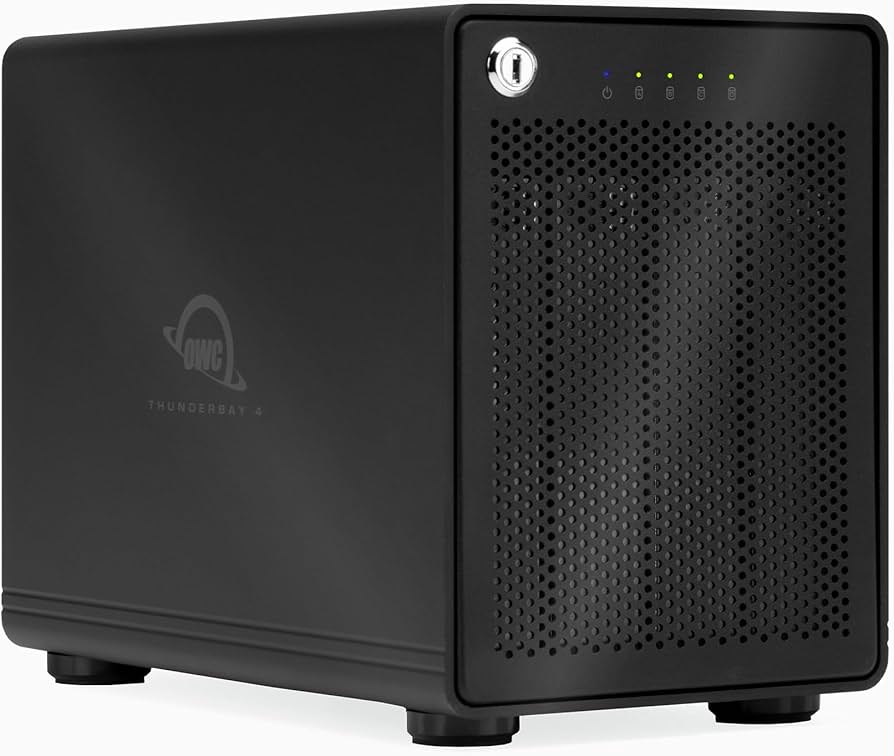
Designed for performance, capacity, and reliability, the four-bay production RAID, powered by the SoftRAID engine, provides the speed and capacity to create workflows without constraints. Available with a phenomenal capacity of up to 48 TB and speeds up to 1527 MB/s, it offers the flexibility to support multiple Streams with 4K video. With two Thunderbolt 3 ports, ThunderBay 4 supports daisy-chaining of additional Thunderbolt devices and displays for unlimited expansion. Housed in a flow-through aluminum enclosure with an intelligent fan and vibration dampening, ThunderBay 4 not only looks great, but operates cool, quiet and vibration-free.
Designed for performance, capacity, and reliability, the four-bay production RAID, powered by the SoftRAID engine, provides the speed and capacity to create workflows without constraints. Available with a phenomenal capacity of up to 48 TB and speeds up to 1527 MB/s, it offers the flexibility to support multiple Streams with 4K video. With two Thunderbolt 3 ports, ThunderBay 4 supports daisy-chaining of additional Thunderbolt devices and displays for unlimited expansion. Housed in a flow-through aluminum enclosure with an intelligent fan and vibration dampening, ThunderBay 4 not only looks great, but operates cool, quiet and vibration-free.
in 1 offers
The lowest price for OWC ThunderBay 4 56TB 4-Bay Thunderbolt 3 RAID 5 Array 4 x 14TB, JBOD 0 01, 7200 RPM, Spindle Drive, Desktop, Buffer 26MB right now is $3,669.99 at Macfixit Australia.
The all-time low was $3,669.99 on 30 July 2025. That's the lowest price we've ever tracked — a great time to buy.
Prices last updated 2 Mar 2026.
OWC ThunderBay 4 56TB 4-Bay Thunderbolt 3 RAID 5 Array 4 x 14TB, JBOD 0 01, 7200 RPM, Spindle Drive, Desktop, Buffer 26MB
Designed for performance, capacity, and reliability, the four-bay production RAID, powered by the SoftRAID engine, provides the speed and capacity to create workflows without constraints. Available with a phenomenal capacity of up to 48 TB and speeds up to 1527 MB/s, it offers the flexibility to support multiple Streams with 4K video. With two Thunderbolt 3 ports, ThunderBay 4 supports daisy-chaining of additional Thunderbolt devices and displays for unlimited expansion. Housed in a flow-through aluminum enclosure with an intelligent fan and vibration dampening, ThunderBay 4 not only looks great, but operates cool, quiet and vibration-free.
Designed for performance, capacity, and reliability, the four-bay production RAID, powered by the SoftRAID engine, provides the speed and capacity to create workflows without constraints. Available with a phenomenal capacity of up to 48 TB and speeds up to 1527 MB/s, it offers the flexibility to support multiple Streams with 4K video. With two Thunderbolt 3 ports, ThunderBay 4 supports daisy-chaining of additional Thunderbolt devices and displays for unlimited expansion. Housed in a flow-through aluminum enclosure with an intelligent fan and vibration dampening, ThunderBay 4 not only looks great, but operates cool, quiet and vibration-free.
Last updated at 02/03/2026 18:51:12
56TB OWC ThunderBay 4 Four-Drive Thunderbolt External Storage Solution with SoftRAID
Delivery between 6–13 Mar $12
originally posted on bhphotovideo.com
Haven't had the drive on for two weeks. Just tried turning it on. Amber light comes on. Nothing else happens. Drive is powered and is connected to my Mac M1 Max via cable you provided. Also tried a different cable. I need this drive to work whenever I turn it on. Should I apply for a refund? Had problems with it from the get go when it only showed 60TB available when it is actually an 80TB drive. Got that fixed. Then your software said one of the four drives would probably fail within 6 months. Are guys just putting junk out there??? Someone contact me immediately please. You are hindering my ability to work.
originally posted on macsales.com
Love the hardware. Great stuff and working well. Great to have Thunderbolt speeds on a 32 TB RAID drive. Been backing up old files nonstop for a few days.The instructions . . . yuck. Tells you that you need to load software, but there is no installer. Gives you links to web sites that advertise other products. Then there are other links. Some have videos. There are instructions - but they begin when the software has loaded, but it doesn't load - you need to install it. Using that non-existent installer.Ultimately if you hunt through enough pages, web searches, and videos, you learn to download the free version that will cost you money after 14 days and that your password for it is located on the bottom of your drive. Simply turn over the NAS drive (I had given mine ... MoreLove the hardware. Great stuff and working well. Great to have Thunderbolt speeds on a 32 TB RAID drive. Been backing up old files nonstop for a few days.The instructions . . . yuck. Tells you that you need to load software, but there is no installer. Gives you links to web sites that advertise other products. Then there are other links. Some have videos. There are instructions - but they begin when the software has loaded, but it doesn't load - you need to install it. Using that non-existent installer.Ultimately if you hunt through enough pages, web searches, and videos, you learn to download the free version that will cost you money after 14 days and that your password for it is located on the bottom of your drive. Simply turn over the NAS drive (I had given mine a nice home so that was an adventure to break it loose again) and use that serial number to register the free version of the software that you don't need to download because there is no installer. Am I making no sense? Then you're ready for this wonderful experience to be yours, too. I don't mean to knock it - it's a great system once you find your way through that rate maze, but it's not a cheap product and any customer should be given clearer guidance on how to get the RAID functions ready and running.
originally posted on macsales.com
The thunderBay 4 is actually my second Thunderbay. I also have a ThunderBay 8. The unit functions flawlessly and is quieter than I have read in some reviews. It took a little reading and a couple YouTube videos to feel comfortable setting it up. Since I already had one Thunderbay, I didn't need a second SoftRAID license.My only complaint is that you cannot change the drive size once you have set it up. If a 3TB drive starts to fail, you can only replace it with a drive of the same size or larger, AND if you use a larger drive, say 8Tb, it will only recognize it as a 3Tb. As a former DROBO user, I loved being able to change from a 3Tb to an 8Tb to increase my total memory capacity. Had I known that, I would have opted for two ThunderBay 4's. That is the only reason ... MoreThe thunderBay 4 is actually my second Thunderbay. I also have a ThunderBay 8. The unit functions flawlessly and is quieter than I have read in some reviews. It took a little reading and a couple YouTube videos to feel comfortable setting it up. Since I already had one Thunderbay, I didn't need a second SoftRAID license.My only complaint is that you cannot change the drive size once you have set it up. If a 3TB drive starts to fail, you can only replace it with a drive of the same size or larger, AND if you use a larger drive, say 8Tb, it will only recognize it as a 3Tb. As a former DROBO user, I loved being able to change from a 3Tb to an 8Tb to increase my total memory capacity. Had I known that, I would have opted for two ThunderBay 4's. That is the only reason for 4 stars instead of 5.It does exactly what it is supposed to do, and I like it!Tom L
| General | |
| Device Type | Hard drive array |
| Chassis | |
| Installed Devices / Modules Qty | 4 |
| Supported Devices / Modules Qty | 4 |
56TB OWC ThunderBay 4 Four-Drive Thunderbolt External Storage Solution with SoftRAID
Delivery between 6–13 Mar $12
Haven't had the drive on for two weeks. Just tried turning it on. Amber light comes on. Nothing else happens. Drive is powered and is connected to my Mac M1 Max via cable you provided. Also tried a different cable. I need this drive to work whenever I turn it on. Should I apply for a refund? Had problems with it from the get go when it only showed 60TB available when it is actually an 80TB drive. Got that fixed. Then your software said one of the four drives would probably fail within 6 months. Are guys just putting junk out there??? Someone contact me immediately please. You are hindering my ability to work.
Love the hardware. Great stuff and working well. Great to have Thunderbolt speeds on a 32 TB RAID drive. Been backing up old files nonstop for a few days.The instructions . . . yuck. Tells you that you need to load software, but there is no installer. Gives you links to web sites that advertise other products. Then there are other links. Some have videos. There are instructions - but they begin when the software has loaded, but it doesn't load - you need to install it. Using that non-existent installer.Ultimately if you hunt through enough pages, web searches, and videos, you learn to download the free version that will cost you money after 14 days and that your password for it is located on the bottom of your drive. Simply turn over the NAS drive (I had given mine ... MoreLove the hardware. Great stuff and working well. Great to have Thunderbolt speeds on a 32 TB RAID drive. Been backing up old files nonstop for a few days.The instructions . . . yuck. Tells you that you need to load software, but there is no installer. Gives you links to web sites that advertise other products. Then there are other links. Some have videos. There are instructions - but they begin when the software has loaded, but it doesn't load - you need to install it. Using that non-existent installer.Ultimately if you hunt through enough pages, web searches, and videos, you learn to download the free version that will cost you money after 14 days and that your password for it is located on the bottom of your drive. Simply turn over the NAS drive (I had given mine a nice home so that was an adventure to break it loose again) and use that serial number to register the free version of the software that you don't need to download because there is no installer. Am I making no sense? Then you're ready for this wonderful experience to be yours, too. I don't mean to knock it - it's a great system once you find your way through that rate maze, but it's not a cheap product and any customer should be given clearer guidance on how to get the RAID functions ready and running.
The thunderBay 4 is actually my second Thunderbay. I also have a ThunderBay 8. The unit functions flawlessly and is quieter than I have read in some reviews. It took a little reading and a couple YouTube videos to feel comfortable setting it up. Since I already had one Thunderbay, I didn't need a second SoftRAID license.My only complaint is that you cannot change the drive size once you have set it up. If a 3TB drive starts to fail, you can only replace it with a drive of the same size or larger, AND if you use a larger drive, say 8Tb, it will only recognize it as a 3Tb. As a former DROBO user, I loved being able to change from a 3Tb to an 8Tb to increase my total memory capacity. Had I known that, I would have opted for two ThunderBay 4's. That is the only reason ... MoreThe thunderBay 4 is actually my second Thunderbay. I also have a ThunderBay 8. The unit functions flawlessly and is quieter than I have read in some reviews. It took a little reading and a couple YouTube videos to feel comfortable setting it up. Since I already had one Thunderbay, I didn't need a second SoftRAID license.My only complaint is that you cannot change the drive size once you have set it up. If a 3TB drive starts to fail, you can only replace it with a drive of the same size or larger, AND if you use a larger drive, say 8Tb, it will only recognize it as a 3Tb. As a former DROBO user, I loved being able to change from a 3Tb to an 8Tb to increase my total memory capacity. Had I known that, I would have opted for two ThunderBay 4's. That is the only reason for 4 stars instead of 5.It does exactly what it is supposed to do, and I like it!Tom L
I've owned quite a few OWC drive enclosures over the years, frankly I've had some bad experiences with more than one product. The 4 Bay Thunderbay Thunderbolt 2 has been stellar. I suspec the same will be the case with this Thunderbay 4 / Thunderbolt 3 version. They have been solid and dependable and have become the backbone of my data storage. The Thunderbolt 2 version is still rocking on for heavy video file storage. This Thunderbolt 3 version will become primary and the TB2 version will become a backup storage unit.While I have had a great experience with these drive enclosures, I have given up on Softraid software. It has been a bag of hurt that is no longer worth my time or hassle. User authentication and updates were typically a big pain in the a@#, causing ... MoreI've owned quite a few OWC drive enclosures over the years, frankly I've had some bad experiences with more than one product. The 4 Bay Thunderbay Thunderbolt 2 has been stellar. I suspec the same will be the case with this Thunderbay 4 / Thunderbolt 3 version. They have been solid and dependable and have become the backbone of my data storage. The Thunderbolt 2 version is still rocking on for heavy video file storage. This Thunderbolt 3 version will become primary and the TB2 version will become a backup storage unit.While I have had a great experience with these drive enclosures, I have given up on Softraid software. It has been a bag of hurt that is no longer worth my time or hassle. User authentication and updates were typically a big pain in the a@#, causing me un-needed time and stress. Also, the liccense only covers one OWC product, requring a separate license for each OWC unit. I have two Thunderbays, one Thnderbay mini and a Express 4M2- I'm not paying a for a license for each. Likewise, switching the drive to a backup computer becomes prohibitive and burdensome. My Thunderbays are now used primarily as non-raid enclosures fwiw. That said, my primary editing drives are NvME's in a OWC Express 4M2 unit, striped in a RAID 0 config, using Apples RAID assistant rather than Softraid. Although ultimate performance capability is not achieved, it is more than good enough and I don't have to deal with Softraid. it's more than worth it.Long story short, the Thunderbays are great, the Softraid software... not so much.
I recently had a head crash on one of my external disk drives. I had a backup of it so no data loss. So I checked on purchase date to see how old it was: more than 7 years ago. Oh my: has it really been that long? Wow. So I check on my others. Geez: they were even older. Props to Western Digital for making good external drives. With the age of these drives, the others were prime for failure in the near future. I had to do something else.I've used OWC products many, many times over the years. They were always well made, well supported. I was reluctant to spend north of $2K on the 48 TB configuration; after all, that is expensive. But when I looked at the cost of doing individual drives again at that capacity, they would have cost me about that but with no failure ... MoreI recently had a head crash on one of my external disk drives. I had a backup of it so no data loss. So I checked on purchase date to see how old it was: more than 7 years ago. Oh my: has it really been that long? Wow. So I check on my others. Geez: they were even older. Props to Western Digital for making good external drives. With the age of these drives, the others were prime for failure in the near future. I had to do something else.I've used OWC products many, many times over the years. They were always well made, well supported. I was reluctant to spend north of $2K on the 48 TB configuration; after all, that is expensive. But when I looked at the cost of doing individual drives again at that capacity, they would have cost me about that but with no failure redundancy. So I opted to bite the bullet and ordered the array. This was on a Saturday when OWC is closed. Somebody was in, noticed the order, and got it shipped out within a few hours of me placing the order. Wow: talk about good customer service.The array arrived on Monday; that was even more amazing. I had ordered the 2m TB4 cable as the 0.8m one included was too short. Got it hooked up to my MacBook Pro M3 running Sonoma 14.6 at the time. Downloaded and installed the soft RAID app. It asked for a license key. I looked thru the paperwork. No license key. Damn. So I contacted OWC tech support online. Took less than 1 minute to get someone to help. He said, "Look on the bottom of the array. There is a sticker there with the license key." I had looked thru the paper work, array back/sides/front, email with order confirmation, but never thought to look on the bottom. Makes sense once you know this; just wasn't obvious.So on my Mac, I went into Disk Management, figuring I had to do something to get it going. Turns out, that was not necessary. I saw the 4 drives in the array but not the RAID-5 disk. Oh, it was already setup for me and ready to use. No config or fussin' around with it needed. Nice.So I spent many hours transferring all my files off of the older WD external drives onto this new array. That actually went pretty fast. Those external drives are the 5400 rpm versions; the array uses 7200 rpm drives. This was noticeably faster. Once all the directory tree were on the array, I did some housekeeping and rearranging figuring it was a good time to do that. Now into production, the first thing I noticed was that the array was super busy for many hours. I wasn't doing anything with it but the disks were all active. That eventually settled down. So I did a number of activities that I would normally do previously on the external WD drives. My very first impression was that these disks were fast; actually, quite fast vis-a-vis the previous external drives. Nice. Stuff that had taken Carbon Copy Cloner many hours to do were down to maybe 1/4th the time. I had never realized how much faster this could be. I tried a number of other disk intensive tasks like backing up our Google Workspace shared drives from my copy on my Mac out to the array. Things literally just flew out super fast. Again, nice.The array has been in use now for over 1 month. I wanted to give me time to use it, see what it was like, see if there were any hiccups. It has worked perfectly; not a single error or glitch of any kind.My only negative is that you can hear the drives spinning as they never stop. This is normal and expected. But the noise level is subdued, more akin to white noise than anything else. I'd say that within 5 minutes of sitting down to work, that noise fades off into the background. I simply do not hear it. It is not loud or obnoxious but it is there. Just be aware and expect this.Overall, I highly recommend this array to anyone considering it.
Consider buying this enclosure with hard drives. It extended my SoftRaid subscription from 1 to 3 years. I bought it last year when OWC was clearing out the four 1TB drives. Now you get a 5 year SoftRaid subscription with drives included along with a 5 year warranty. I have it piggybacked to my OWC U.2. Mercury Elite SSD enclosure to save on Thunderbolt 3 slots. It definitely works better than the USB 4 drive enclosure.
I have owned a ThunderBay 4 using Thunderbolt 2 technology. I've used that since 2016 with my 27" iMac. I've recently bought the Mac Studio and also purchased the OWC ThunderBay 4 using Thunderbolt 3 technology. I moved my disks from the old ThunderBay 4 to the new ThunderBay 4. The mechanics of that change were simple and went well. After connecting the ThunderBay 4 to my Mac Studio and powering it up, all the disks read properly.I have 2 points I would like to mention and put them into the disappointed category. They are not show stoppers.1. The ThunderBay 4 cable: The ThunderBay 4 with Thunderbolt 3 technology came with a 3 foot Thunderbolt 2 cable. That was just long enough to connect to my computer provided that I built a little mounting box to get it off the ... MoreI have owned a ThunderBay 4 using Thunderbolt 2 technology. I've used that since 2016 with my 27" iMac. I've recently bought the Mac Studio and also purchased the OWC ThunderBay 4 using Thunderbolt 3 technology. I moved my disks from the old ThunderBay 4 to the new ThunderBay 4. The mechanics of that change were simple and went well. After connecting the ThunderBay 4 to my Mac Studio and powering it up, all the disks read properly.I have 2 points I would like to mention and put them into the disappointed category. They are not show stoppers.1. The ThunderBay 4 cable: The ThunderBay 4 with Thunderbolt 3 technology came with a 3 foot Thunderbolt 2 cable. That was just long enough to connect to my computer provided that I built a little mounting box to get it off the floor. This keeps it out of some of the dust and permits the 3' cable to connect. I put it under my desk to keep the noise from the fan in the ThunderBay masked a little. Now, with the ThunderBay 4 with Thunderbolt 3 technology the cable is just of 2', so I need to rework the mounting for the new ThunderBay 4. I didn't think I was going to have to do that. Now that I see the high prices on Thunderbolt 3-4 cables, I understand why OWC kept the length short. Still, it was a bit of pain that I wasn't expecting.2. The ThunderBay 4 fan: I hoped that, since 2016, the ThunderBay 4 could have been designed/manufactured with a quieter fan. Unfortunately, it has the same noise. I guess some folks don't mind that on their desktop, but I don't like it.....at all. I've paid a premium to get the Mac Studio that is quiet as a mouse. Even though the ThunderBay 4 is underneath my work table, the sound of the fan is annoying. I certainly wouldn't place it on my desktop and beside my computer set up. Sitting on the table top will just amplify the fan noise & vibration. If anybody can suggest a fan that is probably more expensive, but quieter, and will fit in the ThunderBay 4 enclosure, I'd be thrilled to hear about it.That's it from me.Jack
This drive is decent, however the software license that comes with it is terrible. I bought this and had to keep it in the box for a few months when I was able to purchase 4 Hard drives at a reasonable price. The software license that comes with it, that you need to set up the raid drives begins when you buy the enclosure, not when you activate it. So when I activated it I had 4 months left on the license which very recently expired. A few days ago I downloaded Catalina- and it shouldn't have been a surprise that now the software was incompatible with the new OS. Anyway this is a terrible way to do software licenses, as now I have to buy a new license if I ever have problems with the drive or need to reformat. That said the enclosure is kind of noisy, so I have to ... MoreThis drive is decent, however the software license that comes with it is terrible. I bought this and had to keep it in the box for a few months when I was able to purchase 4 Hard drives at a reasonable price. The software license that comes with it, that you need to set up the raid drives begins when you buy the enclosure, not when you activate it. So when I activated it I had 4 months left on the license which very recently expired. A few days ago I downloaded Catalina- and it shouldn't have been a surprise that now the software was incompatible with the new OS. Anyway this is a terrible way to do software licenses, as now I have to buy a new license if I ever have problems with the drive or need to reformat. That said the enclosure is kind of noisy, so I have to turn it off when I need to do voice over work- so keep this in mind since thunderbolt has a limited reach- this is not a fault of the enclosure though since it needs fans. You would buy a NAS if you wanted to hide the drive elsewhere away from your PC. Anyway the sort of scammy software subscription business model will keep me from purchasing another OWC enclosure in the future. I fully understand that I can use other software- but I also paid an extra for the model with the license- so it was a waste of money. I did not understand how the software worked when purchasing it. Don't be me.
Advertised as a 80TB hard drive. This is no entirely true. Arrived with only 60TB available. Reinitialized to 80TB after OWC (the manufacture) support recommended that the unit be initialized as a single drive in order to use the full 80TB. Manufacturer's software then showed a warning that one of the 4 drives was predicted to fail. Asked OWC support to replace. OWC said that because the drive was no longer raided, all 80 TB would have to be back up elsewhere in order to replace the one failing drive. No where on the BH listing nor the OWC website does it state that 20TB has to be held in reserve, so this is really a 60TB drive. Additionally, unit powers down constantly (I'm on a Mac M1 Max) despite the OS settings being on Never Power Down as well as a third party ... MoreAdvertised as a 80TB hard drive. This is no entirely true. Arrived with only 60TB available. Reinitialized to 80TB after OWC (the manufacture) support recommended that the unit be initialized as a single drive in order to use the full 80TB. Manufacturer's software then showed a warning that one of the 4 drives was predicted to fail. Asked OWC support to replace. OWC said that because the drive was no longer raided, all 80 TB would have to be back up elsewhere in order to replace the one failing drive. No where on the BH listing nor the OWC website does it state that 20TB has to be held in reserve, so this is really a 60TB drive. Additionally, unit powers down constantly (I'm on a Mac M1 Max) despite the OS settings being on Never Power Down as well as a third party awake app (Amphetamine) being used. And to top is all off, several times the unit would only power up to a standby state.
Good airflow. The front cover is perforated and uses a larger 92mm sized fan which is welcomed. Drive vibration nicely dampened.Though in the era of Apple silicon Macs with silent or quiet idle noise, the stock Sunon fan is unacceptable. It has an annoying and noticeable whining noise from the fan motor. Spec sheet on the OWC website states it's a temperature controlled fan, I don't believe this to be true since the fan speed is at constant max from the moment it's turned on.I did what a previous reviewer did and bought a 3rd-party fan (Noctua NF-A9 FLX). However, I went one step further and also bought the Noctua NA-SRC10 low noise adapters which are pre-made voltage resistor cables. The NF-A9 FLX comes with one ultra low noise and one low noise adapter.You ... MoreGood airflow. The front cover is perforated and uses a larger 92mm sized fan which is welcomed. Drive vibration nicely dampened.Though in the era of Apple silicon Macs with silent or quiet idle noise, the stock Sunon fan is unacceptable. It has an annoying and noticeable whining noise from the fan motor. Spec sheet on the OWC website states it's a temperature controlled fan, I don't believe this to be true since the fan speed is at constant max from the moment it's turned on.I did what a previous reviewer did and bought a 3rd-party fan (Noctua NF-A9 FLX). However, I went one step further and also bought the Noctua NA-SRC10 low noise adapters which are pre-made voltage resistor cables. The NF-A9 FLX comes with one ultra low noise and one low noise adapter.You just need two screwdriver sizes and some steady hands to change out the fan. Unscrew the two, top most screws first.Connect 3 low noise and 1 'ultra' low noise cables between the fan and enclosure connection for 500RPM fan speed which will be nearly silent or use 4 low noise cables for 600RPM.If you are constantly writing to the hard drives than I probably wouldn't want to go lower than 1,000RPM which you can get by using just the 'ultra' low noise cable included with the fan purchase. I can hear the rushing air at 1,000RPM but this would be okay under a desk or photoshoot noise environment.Oh, and I would recommend velcro or plastic zip ties to tidy up the long cable connection for 500-600RPM to prevent the plastic adapter ends from touching the metal enclosure so it doesn't amplify vibration noise.OWC if you're reading this. Add a PWM version of the Noctua fan with a smart temperature controlled system to control fan speed.
| General | |
| Device Type | Hard drive array |
| Chassis | |
| Installed Devices / Modules Qty | 4 |
| Supported Devices / Modules Qty | 4 |

