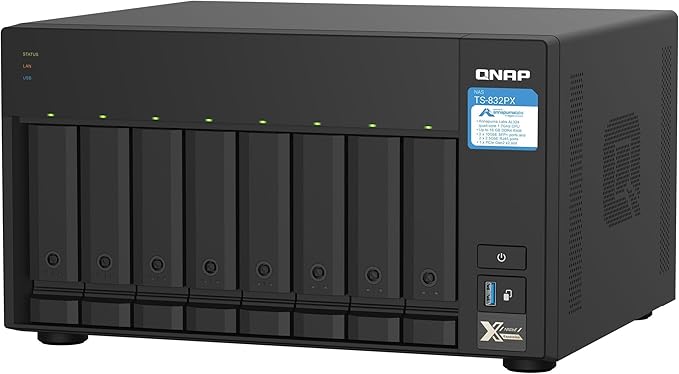
QNAP TS-251D-4G 2-Bay Celeron J4005 4GB RAM NAS
The TS-251D integrates secure data storage and multimedia entertainment into one device. Featuring a PCIe slot, the TS-251D allows you to flexibly extend NAS functionality and potential applications. You can enhance overall system performance by installing a QNAP QM2 card for M.2 SSD caching/10GbE connectivity combined with Qtier auto-tiering storage and installing a 10GbE/5GbE/2.5GbE network expansion card. In addition, TS-251D can be used with QNAP's smart AI photo management application, QuMagie, which integrates AI image recognition to group similar photos together in album "People", "Things" and "Places". The TS-251D features an HDMI slot to stream multimedia throughout your home. The TS-251D supports dual-channel hardware decoding and transcoding, allowing you to view NAS media files smoothly across various devices. PCIe port The PCIe port supports the installation of a 10GbE/5GbE/2.5GbE/ network expansion card, a QM2 card, a USB 3.1 Gen 2 (10Gbps) card, or a wireless network card. 4K media playback Provide 4K media playback and online transcoding, while enabling cross-device multimedia viewing via HDMI output or streaming applications. Snapshots fully record the system status and data If files are accidentally deleted or modified, you can quickly restore previously-recorded data. QNAP QNAP provides a wide range of multimedia applications. You can manage all apps through the Multimedia Console to simplify management.
The TS-251D integrates secure data storage and multimedia entertainment into one device. Featuring a PCIe slot, the TS-251D allows you to flexibly extend NAS functionality and potential applications. You can enhance overall system performance by installing a QNAP QM2 card for M.2 SSD caching/10GbE connectivity combined with Qtier auto-tiering storage and installing a 10GbE/5GbE/2.5GbE network expansion card. In addition, TS-251D can be used with QNAP's smart AI photo management application, QuMagie, which integrates AI image recognition to group similar photos together in album "People", "Things" and "Places". The TS-251D features an HDMI slot to stream multimedia throughout your home. The TS-251D supports dual-channel hardware decoding and transcoding, allowing you to view NAS media files smoothly across various devices. PCIe port The PCIe port supports the installation of a 10GbE/5GbE/2.5GbE/ network expansion card, a QM2 card, a USB 3.1 Gen 2 (10Gbps) card, or a wireless network card. 4K media playback Provide 4K media playback and online transcoding, while enabling cross-device multimedia viewing via HDMI output or streaming applications. Snapshots fully record the system status and data If files are accidentally deleted or modified, you can quickly restore previously-recorded data. QNAP QNAP provides a wide range of multimedia applications. You can manage all apps through the Multimedia Console to simplify management.
The TS-251D integrates secure data storage and multimedia entertainment into one device. Featuring a PCIe slot, the TS-251D allows you to flexibly extend NAS functionality and potential applications. You can enhance overall system performance by installing a QNAP QM2 card for M.2 SSD caching/10GbE connectivity combined with Qtier auto-tiering storage and installing a 10GbE/5GbE/2.5GbE network expansion card. In addition, TS-251D can be used with QNAP's smart AI photo management application, QuMagie, which integrates AI image recognition to group similar photos together in album "People", "Things" and "Places". The TS-251D features an HDMI slot to stream multimedia throughout your home. The TS-251D supports dual-channel hardware decoding and transcoding, allowing you to view NAS media files smoothly across various devices. PCIe port The PCIe port supports the installation of a 10GbE/5GbE/2.5GbE/ network expansion card, a QM2 card, a USB 3.1 Gen 2 (10Gbps) card, or a wireless network card. 4K media playback Provide 4K media playback and online transcoding, while enabling cross-device multimedia viewing via HDMI output or streaming applications. Snapshots fully record the system status and data If files are accidentally deleted or modified, you can quickly restore previously-recorded data. QNAP QNAP provides a wide range of multimedia applications. You can manage all apps through the Multimedia Console to simplify management.
The TS-251D integrates secure data storage and multimedia entertainment into one device. Featuring a PCIe slot, the TS-251D allows you to flexibly extend NAS functionality and potential applications. You can enhance overall system performance by installing a QNAP QM2 card for M.2 SSD caching/10GbE connectivity combined with Qtier auto-tiering storage and installing a 10GbE/5GbE/2.5GbE network expansion card. In addition, TS-251D can be used with QNAP's smart AI photo management application, QuMagie, which integrates AI image recognition to group similar photos together in album "People", "Things" and "Places". The TS-251D features an HDMI slot to stream multimedia throughout your home. The TS-251D supports dual-channel hardware decoding and transcoding, allowing you to view NAS media files smoothly across various devices. PCIe port The PCIe port supports the installation of a 10GbE/5GbE/2.5GbE/ network expansion card, a QM2 card, a USB 3.1 Gen 2 (10Gbps) card, or a wireless network card. 4K media playback Provide 4K media playback and online transcoding, while enabling cross-device multimedia viewing via HDMI output or streaming applications. Snapshots fully record the system status and data If files are accidentally deleted or modified, you can quickly restore previously-recorded data. QNAP QNAP provides a wide range of multimedia applications. You can manage all apps through the Multimedia Console to simplify management.
in 3 offers
The lowest price for QNAP TS-251D-4G 2-Bay Celeron J4005 4GB RAM NAS right now is $553.03 at microless.com, compared across 3 retailers.
The all-time low was $499.00 on 12 Dec 2024 — today's price is 11% above the lowest ever. That's a little above the best price we've seen.
Prices last updated 9 Sept 2026.
Last updated at 09/09/2026 21:25:38
QNAP TS-251D-2G 2-Bay NAS Enclosure, Intel Celeron 2.0 GHz Dual-Core CPU, 2GB DDR4 RAM, 2 x USB 3.1 Gen 1 + 3 x USB 2.0 Ports | TS-251D-2G
Delivery between 14–21 Sept $119.42
QNAP TS-251D-4G 2-Bay Diskless NAS Celeron J4005 Dual-Core 2.0GHz CPU 4GB RAM
Free delivery between 12–19 Sept
QNAP TS-251D-4G 2 bay NAS Intel Celeron J4005 2.0GHz Dual Core (up to 2.70GHz) 4GB DDR4 SODIMM RAM (1x4GB 2 DIMM slots max 8GB total) 2YR wty
Delivery $16.50
originally posted on homeessentialsdirect.com
- Lots of good apps available and they are updated regularly. The apps often have lots of options and configurability, but this can cause a steep learning curve. - I use their Hybrid Backup Sync app to backup my OneDrive every night, and QSync to keep a copy of all my files synchronized on each of my computers and the NAS. - I use their QVR Pro app to record my Reolink security cameras and it works well enough. You get 8 camera licenses included, while Synology only includes 2 licenses. - QVR Pro uses over 2GB of RAM on its own, and you'll probably be running other big apps, so upgrading the RAM is a must. I got an ADATA 8GB DDR4 SODIMM https://www.Home Essentials Direct.com/gp/product/B06WD4P6MT/ to go along with the original 2GB for a total of 10GB. - Note that ... More- Lots of good apps available and they are updated regularly. The apps often have lots of options and configurability, but this can cause a steep learning curve. - I use their Hybrid Backup Sync app to backup my OneDrive every night, and QSync to keep a copy of all my files synchronized on each of my computers and the NAS. - I use their QVR Pro app to record my Reolink security cameras and it works well enough. You get 8 camera licenses included, while Synology only includes 2 licenses. - QVR Pro uses over 2GB of RAM on its own, and you'll probably be running other big apps, so upgrading the RAM is a must. I got an ADATA 8GB DDR4 SODIMM https://www.Home Essentials Direct.com/gp/product/B06WD4P6MT/ to go along with the original 2GB for a total of 10GB. - Note that the standard gigabit Ethernet port will bottleneck your transfer speeds at 112MB/s. HDDs can peak at 180MB/s and SSDs at 500MB/s. But the TS-251D has a PCIe slot where you can install a faster network card. I got the QNAP QXG-10G1T 10GbE card for both my NAS and desktop computer. - My first unit actually had a faulty rear USB 3.0 port which fried a flash drive and an external drive bay. I had to pay to ship it back to QNAP, and they sent me a whole new unit. - Overall I'm happy with it. It gets a bit pricey once you add in the RAM, 10GbE Ethernet card and HDDs, but it's a very comprehensive and powerful storage device so I still think it's worth it.
originally posted on homeessentialsdirect.com
Bought this to replace having a giant computer as a NAS and my Emby Media Server. The fact that memory is expandable and it does true hardware transcoding of videos was an absolute bonus! I will def be buying an expansion bay soon!
originally posted on homeessentialsdirect.com
Finally got my Plex server running there is a little bit of a learning curve but YouTube is your friend and it finally clicked as to how this thing is setup. Once setup it’s very good no issues
| General | |
| Device Type | NAS server |
| Host Connectivity | Gigabit Ethernet |
| Total Storage Capacity | 0 GB |
| Installed Devices / Modules Qty | 0 (installed) / 2 (max) |
QNAP TS-251D-2G 2-Bay NAS Enclosure, Intel Celeron 2.0 GHz Dual-Core CPU, 2GB DDR4 RAM, 2 x USB 3.1 Gen 1 + 3 x USB 2.0 Ports | TS-251D-2G
Delivery between 14–21 Sept $119.42
QNAP TS-251D-4G 2-Bay Diskless NAS Celeron J4005 Dual-Core 2.0GHz CPU 4GB RAM
Free delivery between 12–19 Sept
QNAP TS-251D-4G 2 bay NAS Intel Celeron J4005 2.0GHz Dual Core (up to 2.70GHz) 4GB DDR4 SODIMM RAM (1x4GB 2 DIMM slots max 8GB total) 2YR wty
Delivery $16.50
- Lots of good apps available and they are updated regularly. The apps often have lots of options and configurability, but this can cause a steep learning curve. - I use their Hybrid Backup Sync app to backup my OneDrive every night, and QSync to keep a copy of all my files synchronized on each of my computers and the NAS. - I use their QVR Pro app to record my Reolink security cameras and it works well enough. You get 8 camera licenses included, while Synology only includes 2 licenses. - QVR Pro uses over 2GB of RAM on its own, and you'll probably be running other big apps, so upgrading the RAM is a must. I got an ADATA 8GB DDR4 SODIMM https://www.Home Essentials Direct.com/gp/product/B06WD4P6MT/ to go along with the original 2GB for a total of 10GB. - Note that ... More- Lots of good apps available and they are updated regularly. The apps often have lots of options and configurability, but this can cause a steep learning curve. - I use their Hybrid Backup Sync app to backup my OneDrive every night, and QSync to keep a copy of all my files synchronized on each of my computers and the NAS. - I use their QVR Pro app to record my Reolink security cameras and it works well enough. You get 8 camera licenses included, while Synology only includes 2 licenses. - QVR Pro uses over 2GB of RAM on its own, and you'll probably be running other big apps, so upgrading the RAM is a must. I got an ADATA 8GB DDR4 SODIMM https://www.Home Essentials Direct.com/gp/product/B06WD4P6MT/ to go along with the original 2GB for a total of 10GB. - Note that the standard gigabit Ethernet port will bottleneck your transfer speeds at 112MB/s. HDDs can peak at 180MB/s and SSDs at 500MB/s. But the TS-251D has a PCIe slot where you can install a faster network card. I got the QNAP QXG-10G1T 10GbE card for both my NAS and desktop computer. - My first unit actually had a faulty rear USB 3.0 port which fried a flash drive and an external drive bay. I had to pay to ship it back to QNAP, and they sent me a whole new unit. - Overall I'm happy with it. It gets a bit pricey once you add in the RAM, 10GbE Ethernet card and HDDs, but it's a very comprehensive and powerful storage device so I still think it's worth it.
Bought this to replace having a giant computer as a NAS and my Emby Media Server. The fact that memory is expandable and it does true hardware transcoding of videos was an absolute bonus! I will def be buying an expansion bay soon!
Finally got my Plex server running there is a little bit of a learning curve but YouTube is your friend and it finally clicked as to how this thing is setup. Once setup it’s very good no issues
I have watched several YouTube videos in search of making the wisest NAS purchase in the $150-300 USD range. I was reading Home Essentials Direct reviews under the QNAP TS251D and was surprised at the number of (verified purchase) negative comments, especially when some comments date back to 2016 and the product was not released until Jan 2020. I am LEANING toward the TS251D at $309 USD but also considering the TD251+ at $299 USD and the Synology DS220+ ALSO at $299 USD. Although I have YET to make the buy I will rate the unit a 4 based on tech reviews and will UPDATE it should I have personal experience.
The setup was easy and up and running in less than 4 hours. Beside the helpful user guide there are a great series of YouTube videos that really helped.
easy to get started with NAS
not sure about this unit. seeems to not able to setup. install new drives and cannot log in. working with forums on resolution
| General | |
| Device Type | NAS server |
| Host Connectivity | Gigabit Ethernet |
| Total Storage Capacity | 0 GB |
| Installed Devices / Modules Qty | 0 (installed) / 2 (max) |