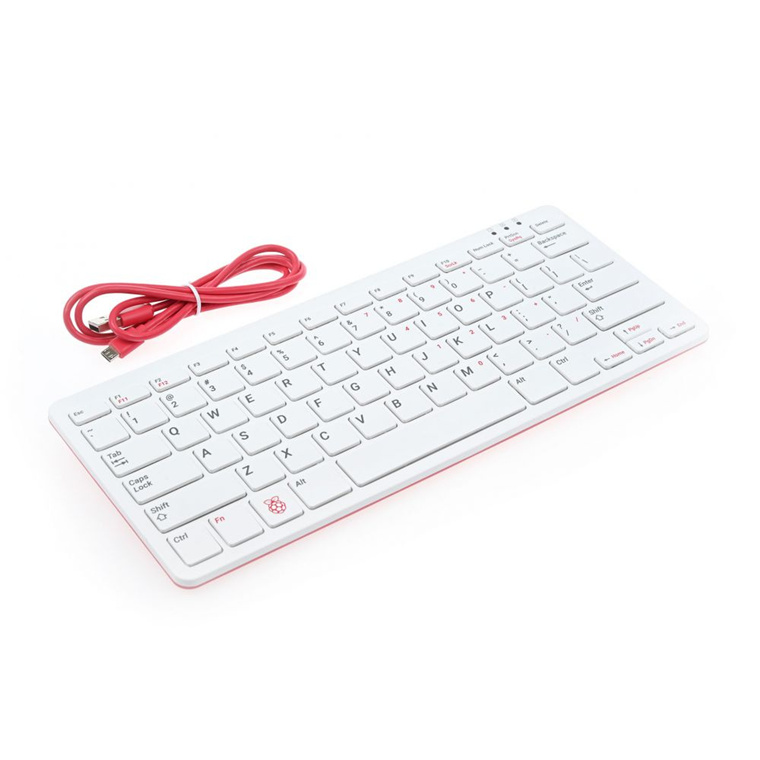
Raspberry Pi 400 Complete Kit US Layout
The Raspberry Pi 400 is an all new form factor from Raspberry Pi. It features all the power of a Raspberry Pi 4 model B built into a keyboard. On the back 3 full size USB ports allow you to connect mice cameras and other peripherals. A 2x40 header breaks out all the pins present on a standard Raspberry Pi 4 model B allowing you to access GPOI and power pins for HATs or other electronics. Two Micro HDMI ports allow you to connect dual 4k monitors. The quad- core BCM2711 and 4gb of RAM provide plenty of power for basic computing tasks and the VideoCore VI ensures smooth video output. In addition to the 3 USB ports and 2x40 header the Raspberry Pi 400 features Bluetooth 5.0 and WiFi for additional connectivity.
The Raspberry Pi 400 is an all new form factor from Raspberry Pi. It features all the power of a Raspberry Pi 4 model B built into a keyboard. On the back 3 full size USB ports allow you to connect mice cameras and other peripherals. A 2x40 header breaks out all the pins present on a standard Raspberry Pi 4 model B allowing you to access GPOI and power pins for HATs or other electronics. Two Micro HDMI ports allow you to connect dual 4k monitors. The quad- core BCM2711 and 4gb of RAM provide plenty of power for basic computing tasks and the VideoCore VI ensures smooth video output. In addition to the 3 USB ports and 2x40 header the Raspberry Pi 400 features Bluetooth 5.0 and WiFi for additional connectivity.
The Raspberry Pi 400 is an all new form factor from Raspberry Pi. It features all the power of a Raspberry Pi 4 model B built into a keyboard. On the back 3 full size USB ports allow you to connect mice cameras and other peripherals. A 2x40 header breaks out all the pins present on a standard Raspberry Pi 4 model B allowing you to access GPOI and power pins for HATs or other electronics. Two Micro HDMI ports allow you to connect dual 4k monitors. The quad- core BCM2711 and 4gb of RAM provide plenty of power for basic computing tasks and the VideoCore VI ensures smooth video output. In addition to the 3 USB ports and 2x40 header the Raspberry Pi 400 features Bluetooth 5.0 and WiFi for additional connectivity.
The Raspberry Pi 400 is an all new form factor from Raspberry Pi. It features all the power of a Raspberry Pi 4 model B built into a keyboard. On the back 3 full size USB ports allow you to connect mice cameras and other peripherals. A 2x40 header breaks out all the pins present on a standard Raspberry Pi 4 model B allowing you to access GPOI and power pins for HATs or other electronics. Two Micro HDMI ports allow you to connect dual 4k monitors. The quad- core BCM2711 and 4gb of RAM provide plenty of power for basic computing tasks and the VideoCore VI ensures smooth video output. In addition to the 3 USB ports and 2x40 header the Raspberry Pi 400 features Bluetooth 5.0 and WiFi for additional connectivity.
in 10 offers
The lowest price for Raspberry Pi 400 Complete Kit US Layout right now is $102.76 at jakelectronics.com, compared across 7 retailers.
The all-time low was $88.20 on 13 May 2026 — today's price is 17% above the lowest ever. That's a little above the best price we've seen.
Prices last updated 29 June 2026.
Last updated at 29/06/2026 22:33:40
Raspberry Pi SC0384
Delivery between Wed – Mon $72.61
Raspberry Pi 400 Starter Kit | Afterpay & ZipPay Available | Click & Collect | RASPBERRY PI
Free delivery between Thu – Mon
SC0386 - Embedded Box Computers Pi400FR, desktop computer kit
SC0387 - Embedded Box Computers Pi400IT, desktop computer kit
SC0385 - Embedded Box Computers Pi400DE, desktop computer kit
SC0388 - Embedded Box Computers Pi400ES, desktop computer kit
Raspberry Pi 400 Kit
Delivery $17.60
Raspberry Pi 400 Kit AU BCM2711 ARM Cortex-A72 64bit 4GB RAM Personal Computer
Free delivery
Raspberry Pi 400 Kit Au Bcm2711 Arm Cortex-a72 64bit 4gb Ram Personal
Free delivery
Affiliate Disclosure: We may receive a small commission for purchases made through this link at no extra cost to you. This helps support our site. Thank you!
New Raspberry pi 400 personal computer kit with compact keyboard with built-in computer
Free delivery
originally posted on pbtech.co.nz
I've been using my Raspberry Pi 400 for about a week now, and it's awesome. It's like carrying around a tiny portable desktop PC (seriously, it weighs about as much as a pocket calculator), and I can slap it down wherever, hook it up to a monitor or TV via the HDMI cable, plug in the mouse, and BOOM... instant desktop.Granted, it's not going win any awards for raw power, graphics capabilities, or aesthetics, and if you're allergic to Linux, Raspberry Pi OS might require some adjustment (using the terminal isn't mandatory, so don't panic), but getting a desktop PC in a tiny portable format like this, for the price you pay for it, is nothing short of amazing. And that's not factoring in the GPIO header you can attach all manner of programmable hardware to, complete ... MoreI've been using my Raspberry Pi 400 for about a week now, and it's awesome. It's like carrying around a tiny portable desktop PC (seriously, it weighs about as much as a pocket calculator), and I can slap it down wherever, hook it up to a monitor or TV via the HDMI cable, plug in the mouse, and BOOM... instant desktop.Granted, it's not going win any awards for raw power, graphics capabilities, or aesthetics, and if you're allergic to Linux, Raspberry Pi OS might require some adjustment (using the terminal isn't mandatory, so don't panic), but getting a desktop PC in a tiny portable format like this, for the price you pay for it, is nothing short of amazing. And that's not factoring in the GPIO header you can attach all manner of programmable hardware to, complete with a full colour manual covering everything from initial setup, OS use, basic coding in Scratch and Python, attaching hardware, and various other bits and pieces. The word 'bargain' doesn't begin to describe it.The keyboard, despite being tiny, is really comfortable to type on (once my giant man-hands adjusted to it), the mouse isn't going to blow your mind, but it does exactly what a mouse is supposed to do, which is more than sufficient for the price. Raspberry Pi OS is the Pi Foundation's custom-built Linux distribution (installed on the supplied SD card). It comes with an impressive selection of software (Chromium, LibreOffice, VLC Media Player, and even a version of Minecraft), and you can effortlessly install more. I'm running Emacs, Visual Studio Code, and Discord, and the little machine has coped with all of it without complaint. Opening 57 tabs simultaneously in Chromium would probably be overly ambitious, but it's fairly accommodating.You can run dual monitors at 4K if you're so inclined, and you can even charge your phone via the three USB ports on the rear (1 USB 2.0, and 2 USB 3.0). Ethernet? Check. Bluetooth and WiFi? Check. If you have a little person at home who would like to learn about computers, or more specifically, how to code, the Raspberry Pi is the perfect solution. If you're an electronics nerd into robotics or other hardware related shenanigans, you'll love the Raspberry Pi. It's tiny, portable, flexible, capable, and as cheap as chips.Why wouldn't you buy one?
originally posted on microcenter.com
I bought this to use as a server for my Ender 3V2 printer which was also purchased at Microcenter.I also wanted to learn about Linux which is what the little Pi uses as an operating system.Very impressed with the actual computing capability of this little machine especially for what it cost me.Included with the kit is a USB C power supply, a micro HDMI cable and a corded mouse, oh well you can't have everything ;>).The operating system and all the apps run off the included 16G SD card, I upgraded it to a 32G card for more space.There is a full suite of productivity apps included as well as an internet browser. Lots of free apps for it, as easy to install as windows.I was surprised how well YouTube video's played also, no stutter, the processor is ... MoreI bought this to use as a server for my Ender 3V2 printer which was also purchased at Microcenter.I also wanted to learn about Linux which is what the little Pi uses as an operating system.Very impressed with the actual computing capability of this little machine especially for what it cost me.Included with the kit is a USB C power supply, a micro HDMI cable and a corded mouse, oh well you can't have everything ;>).The operating system and all the apps run off the included 16G SD card, I upgraded it to a 32G card for more space.There is a full suite of productivity apps included as well as an internet browser. Lots of free apps for it, as easy to install as windows.I was surprised how well YouTube video's played also, no stutter, the processor is surprisingly fast.The audio is via the HDMI or built-in Bluetooth, no direct audio output. There are two 4K micro HDMI outputs, two 3.0 USB ports, a standard 2.0 USB port as well as gigabit ethernet.The installed OS is 32 bit, but it is easy to upgrade to the latest 64 bit version. I tried this but had to revert to the original since Octoprint wouldn't run on it.This would be a great little machine for a student since it can run web based content and has the Libre productivity suite already installed.
originally posted on microcenter.com
I hesitated in getting the Pi 400 keyboard computer because my prior experience with the Pi official keyboard (on which it was based) was not so good. Though sleek and light, reliable actuation of the keys proved elusive for a serious typist. Double strikes and misses occurred not infrequently, as I discovered when trying to use it as my main keyboard for a week (I didn't make it past a few days).I've not spent as much time on the 400's keyboard, but I did type a few pages of documents, and thus far, the experience has been much better.That said, striking keys in the dead center is more important on this keyboard than others.If you're going for a Pi desktop, this is IMO currently the best option. Compared to the 4B, dissipating heat (via throttling of speed ... MoreI hesitated in getting the Pi 400 keyboard computer because my prior experience with the Pi official keyboard (on which it was based) was not so good. Though sleek and light, reliable actuation of the keys proved elusive for a serious typist. Double strikes and misses occurred not infrequently, as I discovered when trying to use it as my main keyboard for a week (I didn't make it past a few days).I've not spent as much time on the 400's keyboard, but I did type a few pages of documents, and thus far, the experience has been much better.That said, striking keys in the dead center is more important on this keyboard than others.If you're going for a Pi desktop, this is IMO currently the best option. Compared to the 4B, dissipating heat (via throttling of speed and/or fans, heatsink cases, etc) is a non-factor, necessary firmware updates and tweaks are minimal, it effectively already comes with a case and the sometimes-elusive micro HDMI cable. The included mouse and power supply are fine/good.For desktop replacement use, one might end up wanting to add an HDD or SSD, and if so, a powered USB hub is advisable. With such a hub, serious typists (and those who need a dedicated numeric keypad) might want to connect their preferred keyboard, which would address the main potential shortcoming of this product.
| Processor Brand | Broadcom |
| Processor Type | ARM Cortex A72 |
| Frequency | 1.8 GHz |
| Installed RAM | 4 GB |
| Operating Supply Voltage | 5 V |
Raspberry Pi SC0384
Delivery between Wed – Mon $72.61
Raspberry Pi 400 Starter Kit | Afterpay & ZipPay Available | Click & Collect | RASPBERRY PI
Free delivery between Thu – Mon
SC0386 - Embedded Box Computers Pi400FR, desktop computer kit
SC0387 - Embedded Box Computers Pi400IT, desktop computer kit
SC0385 - Embedded Box Computers Pi400DE, desktop computer kit
I've been using my Raspberry Pi 400 for about a week now, and it's awesome. It's like carrying around a tiny portable desktop PC (seriously, it weighs about as much as a pocket calculator), and I can slap it down wherever, hook it up to a monitor or TV via the HDMI cable, plug in the mouse, and BOOM... instant desktop.Granted, it's not going win any awards for raw power, graphics capabilities, or aesthetics, and if you're allergic to Linux, Raspberry Pi OS might require some adjustment (using the terminal isn't mandatory, so don't panic), but getting a desktop PC in a tiny portable format like this, for the price you pay for it, is nothing short of amazing. And that's not factoring in the GPIO header you can attach all manner of programmable hardware to, complete ... MoreI've been using my Raspberry Pi 400 for about a week now, and it's awesome. It's like carrying around a tiny portable desktop PC (seriously, it weighs about as much as a pocket calculator), and I can slap it down wherever, hook it up to a monitor or TV via the HDMI cable, plug in the mouse, and BOOM... instant desktop.Granted, it's not going win any awards for raw power, graphics capabilities, or aesthetics, and if you're allergic to Linux, Raspberry Pi OS might require some adjustment (using the terminal isn't mandatory, so don't panic), but getting a desktop PC in a tiny portable format like this, for the price you pay for it, is nothing short of amazing. And that's not factoring in the GPIO header you can attach all manner of programmable hardware to, complete with a full colour manual covering everything from initial setup, OS use, basic coding in Scratch and Python, attaching hardware, and various other bits and pieces. The word 'bargain' doesn't begin to describe it.The keyboard, despite being tiny, is really comfortable to type on (once my giant man-hands adjusted to it), the mouse isn't going to blow your mind, but it does exactly what a mouse is supposed to do, which is more than sufficient for the price. Raspberry Pi OS is the Pi Foundation's custom-built Linux distribution (installed on the supplied SD card). It comes with an impressive selection of software (Chromium, LibreOffice, VLC Media Player, and even a version of Minecraft), and you can effortlessly install more. I'm running Emacs, Visual Studio Code, and Discord, and the little machine has coped with all of it without complaint. Opening 57 tabs simultaneously in Chromium would probably be overly ambitious, but it's fairly accommodating.You can run dual monitors at 4K if you're so inclined, and you can even charge your phone via the three USB ports on the rear (1 USB 2.0, and 2 USB 3.0). Ethernet? Check. Bluetooth and WiFi? Check. If you have a little person at home who would like to learn about computers, or more specifically, how to code, the Raspberry Pi is the perfect solution. If you're an electronics nerd into robotics or other hardware related shenanigans, you'll love the Raspberry Pi. It's tiny, portable, flexible, capable, and as cheap as chips.Why wouldn't you buy one?
I bought this to use as a server for my Ender 3V2 printer which was also purchased at Microcenter.I also wanted to learn about Linux which is what the little Pi uses as an operating system.Very impressed with the actual computing capability of this little machine especially for what it cost me.Included with the kit is a USB C power supply, a micro HDMI cable and a corded mouse, oh well you can't have everything ;>).The operating system and all the apps run off the included 16G SD card, I upgraded it to a 32G card for more space.There is a full suite of productivity apps included as well as an internet browser. Lots of free apps for it, as easy to install as windows.I was surprised how well YouTube video's played also, no stutter, the processor is ... MoreI bought this to use as a server for my Ender 3V2 printer which was also purchased at Microcenter.I also wanted to learn about Linux which is what the little Pi uses as an operating system.Very impressed with the actual computing capability of this little machine especially for what it cost me.Included with the kit is a USB C power supply, a micro HDMI cable and a corded mouse, oh well you can't have everything ;>).The operating system and all the apps run off the included 16G SD card, I upgraded it to a 32G card for more space.There is a full suite of productivity apps included as well as an internet browser. Lots of free apps for it, as easy to install as windows.I was surprised how well YouTube video's played also, no stutter, the processor is surprisingly fast.The audio is via the HDMI or built-in Bluetooth, no direct audio output. There are two 4K micro HDMI outputs, two 3.0 USB ports, a standard 2.0 USB port as well as gigabit ethernet.The installed OS is 32 bit, but it is easy to upgrade to the latest 64 bit version. I tried this but had to revert to the original since Octoprint wouldn't run on it.This would be a great little machine for a student since it can run web based content and has the Libre productivity suite already installed.
I hesitated in getting the Pi 400 keyboard computer because my prior experience with the Pi official keyboard (on which it was based) was not so good. Though sleek and light, reliable actuation of the keys proved elusive for a serious typist. Double strikes and misses occurred not infrequently, as I discovered when trying to use it as my main keyboard for a week (I didn't make it past a few days).I've not spent as much time on the 400's keyboard, but I did type a few pages of documents, and thus far, the experience has been much better.That said, striking keys in the dead center is more important on this keyboard than others.If you're going for a Pi desktop, this is IMO currently the best option. Compared to the 4B, dissipating heat (via throttling of speed ... MoreI hesitated in getting the Pi 400 keyboard computer because my prior experience with the Pi official keyboard (on which it was based) was not so good. Though sleek and light, reliable actuation of the keys proved elusive for a serious typist. Double strikes and misses occurred not infrequently, as I discovered when trying to use it as my main keyboard for a week (I didn't make it past a few days).I've not spent as much time on the 400's keyboard, but I did type a few pages of documents, and thus far, the experience has been much better.That said, striking keys in the dead center is more important on this keyboard than others.If you're going for a Pi desktop, this is IMO currently the best option. Compared to the 4B, dissipating heat (via throttling of speed and/or fans, heatsink cases, etc) is a non-factor, necessary firmware updates and tweaks are minimal, it effectively already comes with a case and the sometimes-elusive micro HDMI cable. The included mouse and power supply are fine/good.For desktop replacement use, one might end up wanting to add an HDD or SSD, and if so, a powered USB hub is advisable. With such a hub, serious typists (and those who need a dedicated numeric keypad) might want to connect their preferred keyboard, which would address the main potential shortcoming of this product.
All in one form factor is stylish and useful. Powered up straight away into OS setup. HDMI cable is a little too stiff and heavy compared to the Raspberry pi 400 keyboard unit's weight. It's certainly fast enough computer. The manual packaged with the computer is excellent. There are call out sections in light blue color specifically for pi 400 notes and special instructions. One very helpful note was for connecting GPIO.Tested Physical Computing section using Scratch 3, Python, and Node-Red during on and off an LED. Comes preloaded with Node-Red version 1.10, I believe. To upgrade to Node-Red version 2 takes a lot of manual 3rd party steps but works great. I am surprised how well Node-Re runs on this unit. Maybe a nice little home IoT station.I have an old Sense ... MoreAll in one form factor is stylish and useful. Powered up straight away into OS setup. HDMI cable is a little too stiff and heavy compared to the Raspberry pi 400 keyboard unit's weight. It's certainly fast enough computer. The manual packaged with the computer is excellent. There are call out sections in light blue color specifically for pi 400 notes and special instructions. One very helpful note was for connecting GPIO.Tested Physical Computing section using Scratch 3, Python, and Node-Red during on and off an LED. Comes preloaded with Node-Red version 1.10, I believe. To upgrade to Node-Red version 2 takes a lot of manual 3rd party steps but works great. I am surprised how well Node-Re runs on this unit. Maybe a nice little home IoT station.I have an old Sense Hat version 1 which worked after manually enabling it as autodetect did not work for me.It's perfect for what I wanted it for, teaching kids how to program.Add ons that are needed for Physical Computing section is breadboard with cable and some electronic components.https://vilros.com/products/vilros-broken-out-breadboard-for-raspberry-pi?_pos=6&_sid=895128dff&_ss=rhttps://www.amazon.com/Keywish-Electronic-Component-Breadboard-Potentiometer/dp/B071FYS7MF/ref=asc_df_B071FYS7MF/?tag=hyprod-20&linkCode=df0&hvadid=312157384256&hvpos=&hvnetw=g&hvrand=18144526180215286356&hvpone=&hvptwo=&hvqmt=&hvdev=c&hvdvcmdl=&hvlocint=&hvlocphy=9010522&hvtargid=pla-525598694854&psc=1Electronic component kits for Arduino are pretty good.A Sense Hat is another OK to have. This has all the code already installed. Could do the same thing with individual electronic parts and much more required programming.https://vilros.com/products/raspberry-pi-sense-hat
I bought this for my 6yo son who has an interest in programming, computers, and (more importantly) robots. While he has a long way to go I felt this was an excellent start. Chose Vilros because they were local and the only group I found that included a mouse in the description. Shipping was great with a tracking number delivered the day it was shipped. Packaging was good and everything was worked. Only issue that I found was the product itself, it does not come with an audio jack. It does have Bluetooth capabilities but I expected an audio jack. That is neither a Vilros problem nor a huge issue with the RasPi 400. Definitely a five star transaction. He is happy, I am happy, and we both look forward to this next stage in learning.
Absolutely incredible product and service! So far I've primarily used the Pi 400 as an emulation machine, and there's a notable performance increase from the regular Pi 4 model. In addition, the passive cooling of this device is outstanding. The fit and finish of all products in this bundle is just staggering, especially for the price. My only complaints are a very short mouse cable, and the spacing/layout of the keys feels cramped.But I'm absolutely blown away by how fast and responsive Pimoroni were with my order. Next-day shipping, confirmation e-mails aplenty, everything neat and accounted for. Phenomenal service overall, will definitely use them to fuel my Raspberry Pi obsession!
Amazing bundle; Raspberry Pi finally has a form factor that makes it as approachable as the micro computers that inspired it.The unit itself is small but feels rugged, and boots from the included SD card in a few seconds. The included mouse matches the design and colour scheme and is perfectly adequate for its needs. The bundled software is, of course, a fully functional Linux distribution, so if you were just after a small, keyboard-sized computer for general office and web-browsing needs it'll suffice completely, but if you wanted to explore the vast swathes of open source software available, that opportunity is also catered for...... but the real magic comes in the accompanying book, and the bundling of all of this together. It covers, in an accessible and ... MoreAmazing bundle; Raspberry Pi finally has a form factor that makes it as approachable as the micro computers that inspired it.The unit itself is small but feels rugged, and boots from the included SD card in a few seconds. The included mouse matches the design and colour scheme and is perfectly adequate for its needs. The bundled software is, of course, a fully functional Linux distribution, so if you were just after a small, keyboard-sized computer for general office and web-browsing needs it'll suffice completely, but if you wanted to explore the vast swathes of open source software available, that opportunity is also catered for...... but the real magic comes in the accompanying book, and the bundling of all of this together. It covers, in an accessible and practical way, plenty of basic computer science with practical programming exercises, and goes on to expand on simple electronics projects that can be built out quite cheaply to attach to the GPIO header and see the RPi making 'real' things happen. I'm now seriously considering buying several of these bundles for nephews and nieces this year. I was fortunate to grow up in a time when home computer magazines, rather than trying to sell you the latest graphics card, would e.g. explain the differences between the differences between sorting algorithms; this is the first product I've seen which I believe can convey the same level of enthusiasm for general computing.
Fantastic value. Using it to run Raspberry Pi OS as well as Ubuntu and Manjaro. I just have each OS on a separate Micro SD card. All three OSs work well. Ubuntu is a little slow but Manjaro and Raspberry Pi OS run really well. Can't fault it for the money and Pimoroni had one in stock which was a bonus given how hard they are to find at the moment. I've hooked it up to a Full HD monitor via HDMI. Cracking bit of kit. I had a couple of issues; the OE mouse scroll wheel did not work but I had a spare Logitech which is nicer anyway. Also, With Raspberry PI OS you must force an update straight away as there are some issues on the stock OS that the update fixes. Out of the box with the stock OS, the Wi-Fi connection is flakey but after the update it is rock solid. ... MoreFantastic value. Using it to run Raspberry Pi OS as well as Ubuntu and Manjaro. I just have each OS on a separate Micro SD card. All three OSs work well. Ubuntu is a little slow but Manjaro and Raspberry Pi OS run really well. Can't fault it for the money and Pimoroni had one in stock which was a bonus given how hard they are to find at the moment. I've hooked it up to a Full HD monitor via HDMI. Cracking bit of kit. I had a couple of issues; the OE mouse scroll wheel did not work but I had a spare Logitech which is nicer anyway. Also, With Raspberry PI OS you must force an update straight away as there are some issues on the stock OS that the update fixes. Out of the box with the stock OS, the Wi-Fi connection is flakey but after the update it is rock solid. Basically, if you have a monitor, you get a fully functional desktop PC for under £100. It's perfect for general productivity and browsing but a bit lacking for media and great for starting out learning to code or master Linux. Recommended.
Basically a Raspberry Pi 4, but put into the size of a keyboard. Currently using it as my network server rack admin panel. The fact that its so low profile and everything just plugs into the keyboard is amazing. Dont need any extra anything, plug up power, plug up a monitor and mouse, and you're basically good to go. Really keeps clutter down. Love the official RPi power adapter it comes with.Kinda wish there was a power switch on these things, but thats just me.Probably even better for kids and children if you want just something really simple and non-expensive for them to play on. Does come with Minecraft Pi.
I was bit skeptical of the Pi 400 at first, as I had used an 8GB Pi 4 which has twice the memory of the 400, but the all-in-one keyboard form factor and the more powerful processor were too hard to pass up. The keyboard is quite satisfying to use, very reminiscent of early 2010s iMac keyboards. Setting it up is a breeze; it includes an sd card with already installed Raspberry Pi OS and many utilities pre-installed. The downloadable Raspberry Pi image software makes it easy to install other operating systems with ease, free of charge.As far as performance goes, this won't be able to run modern games or applications that require a powerhouse graphics card, but it works really well for the basic tasks of web browsing, email etc. Additionally, there are tons of ports ... MoreI was bit skeptical of the Pi 400 at first, as I had used an 8GB Pi 4 which has twice the memory of the 400, but the all-in-one keyboard form factor and the more powerful processor were too hard to pass up. The keyboard is quite satisfying to use, very reminiscent of early 2010s iMac keyboards. Setting it up is a breeze; it includes an sd card with already installed Raspberry Pi OS and many utilities pre-installed. The downloadable Raspberry Pi image software makes it easy to install other operating systems with ease, free of charge.As far as performance goes, this won't be able to run modern games or applications that require a powerhouse graphics card, but it works really well for the basic tasks of web browsing, email etc. Additionally, there are tons of ports of older games as well as emulators for older game consoles and computers that make this an endlessly entertaining machine for users of a certain age who are looking for their nostalgic kick. The added power of the CPU compared to other Raspberry Pi models does make a noticeable difference, especially if overclocked, for some of the newer console emulators available. All-in-all, it's a wonderful little device, and by far my favorite Raspberry Pi.
| Processor Brand | Broadcom |
| Processor Type | ARM Cortex A72 |
| Frequency | 1.8 GHz |
| Installed RAM | 4 GB |
| Operating Supply Voltage | 5 V |