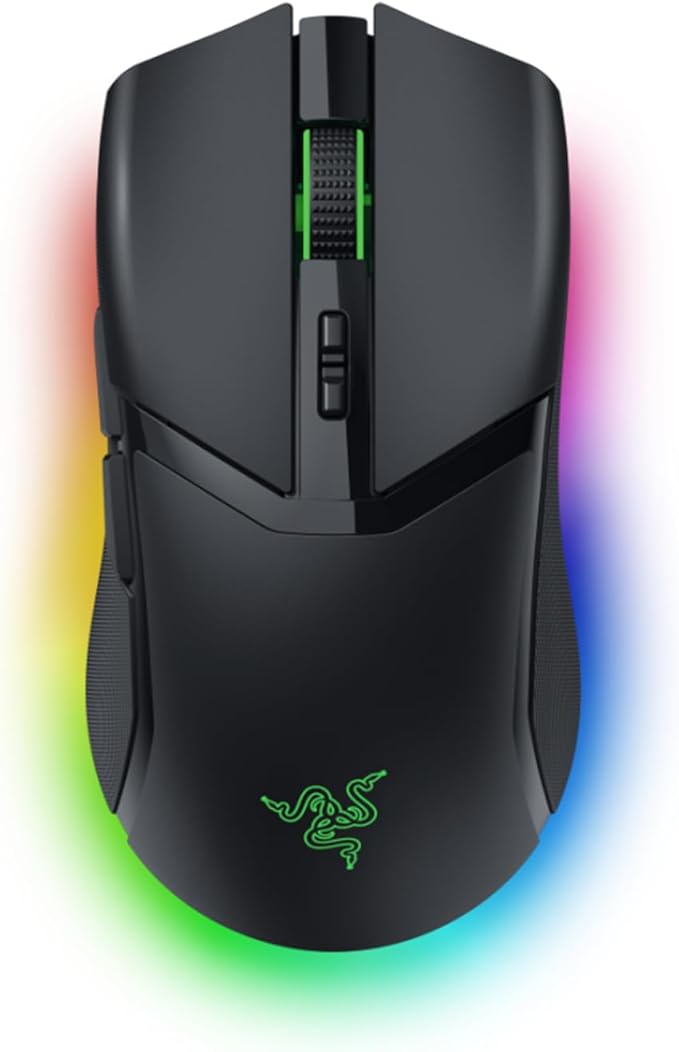
Razer Cobra Pro - Ambidextrous Wired/Wireless Gaming Mouse
From essential commands to complex macros, enjoy a greater degree of control and remap important keys. Customize each zone with 16.8 million colors and countless lighting effects, creating a more immersive gaming experience as the lights react dynamically with hundreds of Chroma-integrated games. Provides flawless tracking performance on a wider variety of surfaces, including glass supported by intelligent functions, it enhances aim and control. Enjoy ultra-responsive gaming with speeds faster than other wireless tech. Unrivalled durability and speed with switches that have an extended 90 million click lifecycle and eliminate double-clicking issues, boasting a blistering 0.2ms actuation time without debounce delay.
From essential commands to complex macros, enjoy a greater degree of control and remap important keys. Customize each zone with 16.8 million colors and countless lighting effects, creating a more immersive gaming experience as the lights react dynamically with hundreds of Chroma-integrated games. Provides flawless tracking performance on a wider variety of surfaces, including glass supported by intelligent functions, it enhances aim and control. Enjoy ultra-responsive gaming with speeds faster than other wireless tech. Unrivalled durability and speed with switches that have an extended 90 million click lifecycle and eliminate double-clicking issues, boasting a blistering 0.2ms actuation time without debounce delay.
From essential commands to complex macros, enjoy a greater degree of control and remap important keys. Customize each zone with 16.8 million colors and countless lighting effects, creating a more immersive gaming experience as the lights react dynamically with hundreds of Chroma-integrated games. Provides flawless tracking performance on a wider variety of surfaces, including glass supported by intelligent functions, it enhances aim and control. Enjoy ultra-responsive gaming with speeds faster than other wireless tech. Unrivalled durability and speed with switches that have an extended 90 million click lifecycle and eliminate double-clicking issues, boasting a blistering 0.2ms actuation time without debounce delay.
From essential commands to complex macros, enjoy a greater degree of control and remap important keys. Customize each zone with 16.8 million colors and countless lighting effects, creating a more immersive gaming experience as the lights react dynamically with hundreds of Chroma-integrated games. Provides flawless tracking performance on a wider variety of surfaces, including glass supported by intelligent functions, it enhances aim and control. Enjoy ultra-responsive gaming with speeds faster than other wireless tech. Unrivalled durability and speed with switches that have an extended 90 million click lifecycle and eliminate double-clicking issues, boasting a blistering 0.2ms actuation time without debounce delay.
in 6 offers
The lowest price for Razer Cobra Pro - Ambidextrous Wired/Wireless Gaming Mouse right now is $167.00 at Ubuy Australia, compared across 5 retailers.
The all-time low was $77.16 on 11 Feb 2026 — today's price is 116% above the lowest ever. It has been notably cheaper before — worth setting a price alert.
Prices last updated 26 Oct 2026.
Last updated at 26/10/2026 04:17:52
Razer Cobra Pro Wireless Gaming Mouse, 2.4 Ghz, 170 Hr Battery, Black
Delivery $39.36
Cobra Pro Wireless Gaming Mouse, 2.4 Ghz, 170 Hr Battery, Black
Free delivery between 4–6 Nov
Cobra Pro Wireless Gaming Mouse, 2.4 Ghz, 170 Hr Battery, Black
Delivery between 1–4 Nov $29
Cobra Pro Customizable Wireless Gaming Mouse: 30K Optical Sensor - Chroma RGB Lighting - Black
Razer Cobra Pro Wireless Gaming Mouse | Part # RZ01-04660100-R3U1 (RZ0104660100R3U1)
originally posted on bestbuy.com
THIS… is the Razer Cobra Pro Wireless and it has slotted itself in a weird place amongst mice, the price of superlights without being superlight, wireless, cool rgb… where does this mouse belong? In the era of superlights, is a bit of heft a dealbreaker? Let's take a look at the Razer Cobra Pro Wireless and see if this mouse stacks up to its 77g worth of HEFT and the tech that Razer was able to shove in it.Lighting===========The lighting on this mouse is some of the best I have seen on a mouse, with wrap-around underglow lighting on the mouse as well as accent lighting on the top as well as around the scroll wheel. The lighting is absolutely phenomenal and really looks great at night where the underglow makes its presence known. This is all, of course, ... MoreTHIS… is the Razer Cobra Pro Wireless and it has slotted itself in a weird place amongst mice, the price of superlights without being superlight, wireless, cool rgb… where does this mouse belong? In the era of superlights, is a bit of heft a dealbreaker? Let's take a look at the Razer Cobra Pro Wireless and see if this mouse stacks up to its 77g worth of HEFT and the tech that Razer was able to shove in it.Lighting===========The lighting on this mouse is some of the best I have seen on a mouse, with wrap-around underglow lighting on the mouse as well as accent lighting on the top as well as around the scroll wheel. The lighting is absolutely phenomenal and really looks great at night where the underglow makes its presence known. This is all, of course, controlled through Razers lighting software called Razer Chroma. The app itself is good, not groundbreaking, but I have never had any hiccups or bumps with it. The underglow is individually addressable to create color zones as well. This is absolutely part of the weight added to the mouse, and for me personally, I think it is worth it.Performance===========With a proven 30k sensor and a price that supports it, razer means business. With a max acceleration of 70g, max IPS speed of 750 and 30,000 dpi from its ‘Focus Pro 30k optical sensor’ you are certainly not missing any features as far as performance goes. This is also the same sensor found in the Viper Pro V2 and The DeathAdder V3 Pro. Something to note is that this mouse does come with wireless charging should you get the mousepad to support it, and it does work on my logitech powerplay wireless charging pad, however, I am certain Razer would say to use only razer products for wireless charging.Weight===========Now this is where all the hate is coming from, as this mouse does come in 77g which… doesnt sound like a lot? The Logitech G Pro Superlight is ~63g and the Death Adder at ~59g… this is essentially just a luxurious DeathAdder. I mean seriously, this is almost the exact same mouse just with RGB and a few more buttons. The exact same sensor and layout. This just isn’t what Razer is using to compete on the superlight pro scene, given by the RGB alone… so to judge this mouse (and to be fair it is still light) on an extra 12-13g is excessive.Conclusion===========This is another great entry by Razer and something that really most people are looking at anyways. A light, good looking mouse with decent software at a price that doesn't want to make you resell it. I really enjoyed testing this mouse next to the likes of the superlight, deathadder and the likes because it reminded me that we can still have good looking mice that still perform and don’t have to be lighter than air. I game competitively, but I also like a good looking setup… and I think this is that gray area that needed to be serviced and Razer just killed it with this mouse. As always, Bestbuy has an excellent return policy and even better customer service, so you never have to worry about buying a product that you don’t like… so why not test it out?!
originally posted on bestbuy.com
I bought this to replace my 2020 Razer Viper Ultimate mainly for the following reasons: smaller shape to better match my hand size, Bluetooth connectivity to avoid having to relocate my adapter between devices or plug in via a cable, and USB-C charging to reduce the number of cables on my desk. It succeeds on all of those fronts.I do notice the slight weight increase from the Viper Ultimate despite being physically smaller, but personally the size difference more than offsets that weight.The biggest problem with this mouse for me is the scroll wheel. Within the first few weeks of ownership, it developed an issue where it would occasionally scroll in the wrong direction. I reached out to Razer who suggested a few fixes, which reduced but did not completely ... MoreI bought this to replace my 2020 Razer Viper Ultimate mainly for the following reasons: smaller shape to better match my hand size, Bluetooth connectivity to avoid having to relocate my adapter between devices or plug in via a cable, and USB-C charging to reduce the number of cables on my desk. It succeeds on all of those fronts.I do notice the slight weight increase from the Viper Ultimate despite being physically smaller, but personally the size difference more than offsets that weight.The biggest problem with this mouse for me is the scroll wheel. Within the first few weeks of ownership, it developed an issue where it would occasionally scroll in the wrong direction. I reached out to Razer who suggested a few fixes, which reduced but did not completely eliminate the problem. I was then provided a replacement, which I currently use, but that also developed the infrequent incorrect scrolling direction issue. I've decided to stick with the mouse for now as it's infrequent and non-problematic for my use case when it does happen. But if you think it's something that might bother you, or you notice weird scrolling with yours from time to time, it may be worth trying to get it fixed or replaced.3 years of my Viper were flawless. It's unfortunately not the case with this Cobra.
originally posted on bestbuy.com
In our house, our couple of teenagers, along with myself, do quite a bit of gaming (Ok, maybe more for them than me) and one thing we deal with a lot is the mouse. Reliability and longevity are important, and unfortunately, we've all gone through quite a few with some having various failures. Sometimes, you get what you pay for does seem to fit in. After the left button started to wear out on one mouse, it came time to replace it. After looking at sever different brands and the choices with them, we decided to get the Razer Cobra Pro Wireless Gaming Mouse a try.After unboxing, then plugging in the braided USB cable, USB Dongle Adapter along with the USB Dongle (which can be plugged directly into the computer, but I always like to have those as close to the mouse ... MoreIn our house, our couple of teenagers, along with myself, do quite a bit of gaming (Ok, maybe more for them than me) and one thing we deal with a lot is the mouse. Reliability and longevity are important, and unfortunately, we've all gone through quite a few with some having various failures. Sometimes, you get what you pay for does seem to fit in. After the left button started to wear out on one mouse, it came time to replace it. After looking at sever different brands and the choices with them, we decided to get the Razer Cobra Pro Wireless Gaming Mouse a try.After unboxing, then plugging in the braided USB cable, USB Dongle Adapter along with the USB Dongle (which can be plugged directly into the computer, but I always like to have those as close to the mouse or keyboard as possible), it immediately prompted to install Razer Synapse app and optionally other Razer apps, which them required restarting the computer after installation.For connectivity, there are three options. First is their HyperSpeed 2.4GHz wireless. Then Bluetooth (which I haven't tried yet but looks to be easy to pair) as well as wired (using the included cable). The wired mode allows it to charge and be used at the same time (if the battery has died while playing).Once the restart was complete, I turned the mouse on (to 2.4) and opened the Synapse app to look at the configuration choices. Like most mice and keyboards, you can create different profiles that can be stored directly in the mouse (for when changing to a different computer and keeping the same settings). The different buttons can have different actions mapped as desired.In Performance, 2 to 5 Sensitivity Stages (using 100 to 30,000 DPI) can be set along with the Polling rate (125/500/1000 Hz). In the Lighting menu, there are some preset effects (which each have a few settings, such as color(s), duration, etc.) or select Advanced Effects, then Chroma Studio to have much more control, along with being able to set each individual light section to a specific color (using Static). However, the lighting setup will not be saved to the profile on the mouse. Around the bottom edge, there is a thin "halo" lighting which is a little neat looking. Personally, I don't care about the RGB effects, I just want a working mouse (or keyboard, or computer, or anything they seem to throw RGB onto nowadays), so I will keep it off (my sons have a more positive feeling for it than myself). Then there are settings for Mouse Mat Surface calibration and Power (Power saving and Low Power Mode).The feel of the design pleasantly surprised me. While I am used to my right-handed contoured mouse that is decently wide with a higher profile (which fits my hand perfectly) I use for work, this isn't as bad to hold and move around as I was expecting. The right side has just enough of a curve/angle to let my last two finger rest comfortably. The textured, rubber coated sides make it easy to grip. The "sunken" contour of the buttons allow the fingers to sit in nicely, making it somewhat easier to click without the possibility of slipping off (if anyone has such an issue). Compared to a couple of models from a different brand we have used recently, this definitely has a much better feel.It doesn't have a lot of configurable buttons, just the two on the left for the thumb, clickable scroll-wheel, and two buttons just below the scroll that by default are for quickly setting the active Sensitivity stage.Using it, it is just great. Some look for a specific weight, thinking the lighter, the better (easier to move around). This one is 77g, which is extremely light to me compared to my work mouse that I have been using for many years. The glide pads are extremely smooth with a curved bevel at the edges, so it has minimal friction). That, and the large pad I have, it moves with extreme ease. The main buttons are using their GEN-3 Optical switches with 0.2ms actuation for accurate clicks. I had no problem with it, and they are expected to have up to a 90-million click lifespan.Overall, this seems to be a well-designed, easy to use mouse. Unfortunately, I already lost count of the clicks, so I won't be exactly sure it made it to the 90 million, but we're hoping to get a lot of use out of it.
| Sensor | Focus Pro 30K Optical Sensor |
| Max Speed (IPS) | 750 |
| Max Acceleration (G) | 70 |
| Programmable Buttons | 8 |
| Switch Type | Optical Mouse Switches Gen-3 |
Razer Cobra Pro Wireless Gaming Mouse, 2.4 Ghz, 170 Hr Battery, Black
Delivery $39.36
Cobra Pro Wireless Gaming Mouse, 2.4 Ghz, 170 Hr Battery, Black
Free delivery between 4–6 Nov
Cobra Pro Wireless Gaming Mouse, 2.4 Ghz, 170 Hr Battery, Black
Delivery between 1–4 Nov $29
Cobra Pro Customizable Wireless Gaming Mouse: 30K Optical Sensor - Chroma RGB Lighting - Black
Razer Cobra Pro Wireless Gaming Mouse | Part # RZ01-04660100-R3U1 (RZ0104660100R3U1)
THIS… is the Razer Cobra Pro Wireless and it has slotted itself in a weird place amongst mice, the price of superlights without being superlight, wireless, cool rgb… where does this mouse belong? In the era of superlights, is a bit of heft a dealbreaker? Let's take a look at the Razer Cobra Pro Wireless and see if this mouse stacks up to its 77g worth of HEFT and the tech that Razer was able to shove in it.Lighting===========The lighting on this mouse is some of the best I have seen on a mouse, with wrap-around underglow lighting on the mouse as well as accent lighting on the top as well as around the scroll wheel. The lighting is absolutely phenomenal and really looks great at night where the underglow makes its presence known. This is all, of course, ... MoreTHIS… is the Razer Cobra Pro Wireless and it has slotted itself in a weird place amongst mice, the price of superlights without being superlight, wireless, cool rgb… where does this mouse belong? In the era of superlights, is a bit of heft a dealbreaker? Let's take a look at the Razer Cobra Pro Wireless and see if this mouse stacks up to its 77g worth of HEFT and the tech that Razer was able to shove in it.Lighting===========The lighting on this mouse is some of the best I have seen on a mouse, with wrap-around underglow lighting on the mouse as well as accent lighting on the top as well as around the scroll wheel. The lighting is absolutely phenomenal and really looks great at night where the underglow makes its presence known. This is all, of course, controlled through Razers lighting software called Razer Chroma. The app itself is good, not groundbreaking, but I have never had any hiccups or bumps with it. The underglow is individually addressable to create color zones as well. This is absolutely part of the weight added to the mouse, and for me personally, I think it is worth it.Performance===========With a proven 30k sensor and a price that supports it, razer means business. With a max acceleration of 70g, max IPS speed of 750 and 30,000 dpi from its ‘Focus Pro 30k optical sensor’ you are certainly not missing any features as far as performance goes. This is also the same sensor found in the Viper Pro V2 and The DeathAdder V3 Pro. Something to note is that this mouse does come with wireless charging should you get the mousepad to support it, and it does work on my logitech powerplay wireless charging pad, however, I am certain Razer would say to use only razer products for wireless charging.Weight===========Now this is where all the hate is coming from, as this mouse does come in 77g which… doesnt sound like a lot? The Logitech G Pro Superlight is ~63g and the Death Adder at ~59g… this is essentially just a luxurious DeathAdder. I mean seriously, this is almost the exact same mouse just with RGB and a few more buttons. The exact same sensor and layout. This just isn’t what Razer is using to compete on the superlight pro scene, given by the RGB alone… so to judge this mouse (and to be fair it is still light) on an extra 12-13g is excessive.Conclusion===========This is another great entry by Razer and something that really most people are looking at anyways. A light, good looking mouse with decent software at a price that doesn't want to make you resell it. I really enjoyed testing this mouse next to the likes of the superlight, deathadder and the likes because it reminded me that we can still have good looking mice that still perform and don’t have to be lighter than air. I game competitively, but I also like a good looking setup… and I think this is that gray area that needed to be serviced and Razer just killed it with this mouse. As always, Bestbuy has an excellent return policy and even better customer service, so you never have to worry about buying a product that you don’t like… so why not test it out?!
I bought this to replace my 2020 Razer Viper Ultimate mainly for the following reasons: smaller shape to better match my hand size, Bluetooth connectivity to avoid having to relocate my adapter between devices or plug in via a cable, and USB-C charging to reduce the number of cables on my desk. It succeeds on all of those fronts.I do notice the slight weight increase from the Viper Ultimate despite being physically smaller, but personally the size difference more than offsets that weight.The biggest problem with this mouse for me is the scroll wheel. Within the first few weeks of ownership, it developed an issue where it would occasionally scroll in the wrong direction. I reached out to Razer who suggested a few fixes, which reduced but did not completely ... MoreI bought this to replace my 2020 Razer Viper Ultimate mainly for the following reasons: smaller shape to better match my hand size, Bluetooth connectivity to avoid having to relocate my adapter between devices or plug in via a cable, and USB-C charging to reduce the number of cables on my desk. It succeeds on all of those fronts.I do notice the slight weight increase from the Viper Ultimate despite being physically smaller, but personally the size difference more than offsets that weight.The biggest problem with this mouse for me is the scroll wheel. Within the first few weeks of ownership, it developed an issue where it would occasionally scroll in the wrong direction. I reached out to Razer who suggested a few fixes, which reduced but did not completely eliminate the problem. I was then provided a replacement, which I currently use, but that also developed the infrequent incorrect scrolling direction issue. I've decided to stick with the mouse for now as it's infrequent and non-problematic for my use case when it does happen. But if you think it's something that might bother you, or you notice weird scrolling with yours from time to time, it may be worth trying to get it fixed or replaced.3 years of my Viper were flawless. It's unfortunately not the case with this Cobra.
In our house, our couple of teenagers, along with myself, do quite a bit of gaming (Ok, maybe more for them than me) and one thing we deal with a lot is the mouse. Reliability and longevity are important, and unfortunately, we've all gone through quite a few with some having various failures. Sometimes, you get what you pay for does seem to fit in. After the left button started to wear out on one mouse, it came time to replace it. After looking at sever different brands and the choices with them, we decided to get the Razer Cobra Pro Wireless Gaming Mouse a try.After unboxing, then plugging in the braided USB cable, USB Dongle Adapter along with the USB Dongle (which can be plugged directly into the computer, but I always like to have those as close to the mouse ... MoreIn our house, our couple of teenagers, along with myself, do quite a bit of gaming (Ok, maybe more for them than me) and one thing we deal with a lot is the mouse. Reliability and longevity are important, and unfortunately, we've all gone through quite a few with some having various failures. Sometimes, you get what you pay for does seem to fit in. After the left button started to wear out on one mouse, it came time to replace it. After looking at sever different brands and the choices with them, we decided to get the Razer Cobra Pro Wireless Gaming Mouse a try.After unboxing, then plugging in the braided USB cable, USB Dongle Adapter along with the USB Dongle (which can be plugged directly into the computer, but I always like to have those as close to the mouse or keyboard as possible), it immediately prompted to install Razer Synapse app and optionally other Razer apps, which them required restarting the computer after installation.For connectivity, there are three options. First is their HyperSpeed 2.4GHz wireless. Then Bluetooth (which I haven't tried yet but looks to be easy to pair) as well as wired (using the included cable). The wired mode allows it to charge and be used at the same time (if the battery has died while playing).Once the restart was complete, I turned the mouse on (to 2.4) and opened the Synapse app to look at the configuration choices. Like most mice and keyboards, you can create different profiles that can be stored directly in the mouse (for when changing to a different computer and keeping the same settings). The different buttons can have different actions mapped as desired.In Performance, 2 to 5 Sensitivity Stages (using 100 to 30,000 DPI) can be set along with the Polling rate (125/500/1000 Hz). In the Lighting menu, there are some preset effects (which each have a few settings, such as color(s), duration, etc.) or select Advanced Effects, then Chroma Studio to have much more control, along with being able to set each individual light section to a specific color (using Static). However, the lighting setup will not be saved to the profile on the mouse. Around the bottom edge, there is a thin "halo" lighting which is a little neat looking. Personally, I don't care about the RGB effects, I just want a working mouse (or keyboard, or computer, or anything they seem to throw RGB onto nowadays), so I will keep it off (my sons have a more positive feeling for it than myself). Then there are settings for Mouse Mat Surface calibration and Power (Power saving and Low Power Mode).The feel of the design pleasantly surprised me. While I am used to my right-handed contoured mouse that is decently wide with a higher profile (which fits my hand perfectly) I use for work, this isn't as bad to hold and move around as I was expecting. The right side has just enough of a curve/angle to let my last two finger rest comfortably. The textured, rubber coated sides make it easy to grip. The "sunken" contour of the buttons allow the fingers to sit in nicely, making it somewhat easier to click without the possibility of slipping off (if anyone has such an issue). Compared to a couple of models from a different brand we have used recently, this definitely has a much better feel.It doesn't have a lot of configurable buttons, just the two on the left for the thumb, clickable scroll-wheel, and two buttons just below the scroll that by default are for quickly setting the active Sensitivity stage.Using it, it is just great. Some look for a specific weight, thinking the lighter, the better (easier to move around). This one is 77g, which is extremely light to me compared to my work mouse that I have been using for many years. The glide pads are extremely smooth with a curved bevel at the edges, so it has minimal friction). That, and the large pad I have, it moves with extreme ease. The main buttons are using their GEN-3 Optical switches with 0.2ms actuation for accurate clicks. I had no problem with it, and they are expected to have up to a 90-million click lifespan.Overall, this seems to be a well-designed, easy to use mouse. Unfortunately, I already lost count of the clicks, so I won't be exactly sure it made it to the 90 million, but we're hoping to get a lot of use out of it.
The short version - This mouse is both nicely weighted and with not too distracting lighting. Razer Synapse isn't overly intrusive and complicated compared to other RGB management tools, and it pairs well with third party smart lighting systems like Govee, Twinkly, and Hue. Bluetooth and the proprietary HyperSpeed Wireless connection are both every bit as fast as a wired connection, and the tracking is superbly accurate. While the included charge cable (USB-C), receiver, and receiver to cable adapter were all nice pack-ins, it would have been nice to include the Qi wireless charging puck that's available optionally.The long version - This is packaged nicely and efficiently. You'll find the mouse, the charge cable, a receiver, and an adapter that allows you to use ... MoreThe short version - This mouse is both nicely weighted and with not too distracting lighting. Razer Synapse isn't overly intrusive and complicated compared to other RGB management tools, and it pairs well with third party smart lighting systems like Govee, Twinkly, and Hue. Bluetooth and the proprietary HyperSpeed Wireless connection are both every bit as fast as a wired connection, and the tracking is superbly accurate. While the included charge cable (USB-C), receiver, and receiver to cable adapter were all nice pack-ins, it would have been nice to include the Qi wireless charging puck that's available optionally.The long version - This is packaged nicely and efficiently. You'll find the mouse, the charge cable, a receiver, and an adapter that allows you to use the charge cable with the receiver on your desktop, minimizing the chance for interference.Install the Razer Chroma software and you're off. You can set the mouse to however you want it to look like - I chose green for the logo and rainbow for everything else. I also paired it to Twinkly, which matched what some light strips I have did to the computer itself.It was extremely smooth to use. The mouse has the kind of weight I look for, and it did very well with tracking motion during a few fragfests in Doom Eternal. It also did well as a productivity mouse, with its accuracy carrying over to Photoshop.The Bluetooth mode was easy to pair to a laptop and remained accurate and fast, though I noticed that after a longer period of inactivity, the mouse took a quick moment to wake up.Only negative? There's a puck under the mouse that can be removed and used for either a charging dock or a Qi wireless charging puck. For what the mouse cost, the Qi option could have been included.All in all, if you want a solid gaming mouse with almost no shortcomings, the Razer Cobra Pro is it.
Trying out Razer’s newest customizable wireless gaming mouse called the Cobra Pro, I am more impressed with this mouse than I ever thought I would be using any mouse period. Simple to connect, simple to use, and very stylish.Made of high-quality plasticsand high end optic, everything about this wireless gaming mouse, feels premium. Any gaming mouse can have RGB lights these days, but the lighting on this mouse is on another level, I’m especially impressed by what Razer calls the underglow. The only way I can describe this underglow is if you’ve ever seen ambient lighting on a high end vehicle, that ambient lighting is what this resembles, underneath the mouse.With 10 programmable controls, the great lighting effects that I talked about and a 30k optical sensor, ... MoreTrying out Razer’s newest customizable wireless gaming mouse called the Cobra Pro, I am more impressed with this mouse than I ever thought I would be using any mouse period. Simple to connect, simple to use, and very stylish.Made of high-quality plasticsand high end optic, everything about this wireless gaming mouse, feels premium. Any gaming mouse can have RGB lights these days, but the lighting on this mouse is on another level, I’m especially impressed by what Razer calls the underglow. The only way I can describe this underglow is if you’ve ever seen ambient lighting on a high end vehicle, that ambient lighting is what this resembles, underneath the mouse.With 10 programmable controls, the great lighting effects that I talked about and a 30k optical sensor, this gaming mouses, super fast, super sleek and overall just a great gaming mouse.It can be connected in one of three ways, wired with the provided cable, and may I add that the cable is really nice, It’s got like a nylon braided pattern to it, it’s long enough to reach. Across your whole desk.The second way is wirelessly, which, in my opinion is the best way to go. Insert the wireless USB dongle to the back of your PC or keyboard (if supported) turn on the mouse, by flicking the switch, which is located at the bottom of the mouse, and you’re good to go. The third way is also wireless, but this time you connect the wireless USB dongle to the included USB dongle adapter, then to the USB cable and that’s it! If all this seems complicated, it’s really not. Literally plug and play, if only everything else could be this simple.I really recommend this gaming mouse, it’s got everything you need at a good price, I think you’ll be really happy with it.
INTRO:In the wireless mouse industry, Razer is known for having some excellent offerings. And while many folks have been asking for a new wireless Viper Mini, Razer has decidedly gone the route of creating the Cobra Pro—a versatile “jack of all trades” lightweight gaming mouse that sets out to achieve many of the competing desires from gamers by accepting tradeoffs in the process.UNBOXING:Razer keeps the unboxing experience simple. Inside, you’ll get the warranty and manual, a USB-A HyperSpeed wireless dongle, a USB-A to USB-C cable for charging and connectivity, and a USB-A to USB-C adapter so that you can use the cable as an extension for the dongle.It’s important to note that you do not get the wireless charging puck in the box, as that is sold ... MoreINTRO:In the wireless mouse industry, Razer is known for having some excellent offerings. And while many folks have been asking for a new wireless Viper Mini, Razer has decidedly gone the route of creating the Cobra Pro—a versatile “jack of all trades” lightweight gaming mouse that sets out to achieve many of the competing desires from gamers by accepting tradeoffs in the process.UNBOXING:Razer keeps the unboxing experience simple. Inside, you’ll get the warranty and manual, a USB-A HyperSpeed wireless dongle, a USB-A to USB-C cable for charging and connectivity, and a USB-A to USB-C adapter so that you can use the cable as an extension for the dongle.It’s important to note that you do not get the wireless charging puck in the box, as that is sold separately.BUILD / CONSTRUCTION:As an owner of the Razer Viper Ultimate (non v2 Pro), I immediately noticed that this mouse was very familiar in some ways while also making some changes that may have some controversy.Like the Viper Ultimate, it has a rubberized textured grip for the sides while using a matte plastic on the top of the mouse. The matte plastic isn’t as diffused as the Viper Ultimate, but I don’t think it’s better or worse.With the dongles detached, the Cobra Pro weighed in at 77g on my scale which is more than the 75g of my Viper Ultimate. So it weighs slightly more, but there are also additional features which we’ll touch on later.Despite weighing slightly more, the Cobra Pro is slightly more compact than the Viper Ultimate with a length of 119.6mm compared to 127mm, a width of 62.5mm compared to 66mm, while the height remains practically unchanged. While I don’t think this will be a game-changer for those looking for more compact mice for portability, I think Viper Ultimate owners will feel right at home but with a slimmer profile.When compared to the Viper Mini, the Cobra Pro is much closer in terms of its form factor, but it also weighs much more compared to the ~61g of the Viper Mini, making it an unfit replacement for those looking for a wireless Viper Mini without paying the cost of the Viper Mini Signature Edition.As for the bottom of the mouse, you have the wireless mode toggle switch, a profile button, and a removable puck under which the dongle can be stowed away for transport or when not in use. Another change is that the gliding feet on the Cobra Pro have increased surface area. This means there’s less overall friction compared to the Viper Ultimate.And lastly, the Razer Chroma RGB is actually pretty appealing. I’m not a big fan of RGB in general, but I like the ambient underglow and the mouse wheel lighting. The Razer logo itself isn’t my favorite, but I think the mouse looks pretty good even with it lit up.COMFORT / GRIP:Given that the Cobra Pro borrows from the DNA of the Viper Ultimate, it will share a lot of similarity. However, the slimmer profile does mean that it fills out your hand a bit less, so owners of a Viper Ultimate might not find it as ergonomically fit. That being said, while I feel the difference, I still find it to be comfortable; it’s similar enough to the Viper Ultimate that I feel at home with it.If you’re a left-handed mouse user, you were probably disappointed when the Viper V2 Pro omitted the ambidextrous thumb buttons. Unfortunately, the Cobra Pro still omits this, but it does still retain a symmetrical design.BUTTONS:Another noticeable difference is that the switches in the Cobra Pro use Razer’s 3rd generation optical switches. The primary left and right clicks are slightly higher-pitched, while the thumb buttons and mouse wheel button are significantly dampened compared to my Viper Ultimate. Despite this, they do still retain a tactile click and are slightly easier to press before the click sound registers.I do also like the addition of the 2 small DPI switch buttons on top of the mouse. This makes the Cobra Pro more versatile for those who switch multiple between DPI profiles for more granular control.WIRELESS VERSATILITY & BATTERY:If you’re using the Cobra Pro through the HyperSpeed wireless dongle, you’ll be able to achieve up to a 1000Hz polling rate for fluid mouse motion for up to 100 hours of use at constant motion, and as low as 125Hz for those who don’t need the fluidity and would rather sustain a higher battery life.You can also pair this mouse with Razer’s Mouse Dock Pro (purchased separately) which enables wireless charging and also a 4000Hz polling rate, but will yield up to 33 hours of use at constant motion. Alternatively, you can omit the wireless charging and simply purchase the HyperPolling dongle to achieve the 4000Hz polling rate.Another addition to the Cobra Pro is Bluetooth connectivity. Personally, I find this quite useful if I’m in a pinch and want to use the Cobra Pro for productivity tasks, non-competitive gaming or if I simply want to leave my dongle plugged in at home. And the mouse itself can always be used in wired mode if I forget the dongle and need the high polling rate. Razer doesn’t advertise the battery life or polling rate over Bluetooth, but I would guess 125Hz based on my testing and comparisons to other mice.SOFTWARE:Razer Synapse has to be my least favorite peripheral software in existence. It consumes too much memory, takes way too much time to update, and tries to do too many things that I don’t need it to do.That being said, if you want to customize the RGB zones, change your DPI settings, or customize the functionality of the buttons, Razer Synapse is how you’ll achieve that.CONCLUSION:So here’s the thing—this isn’t a Viper Mini replacement if you care about weight. The Cobra Pro isn’t advertised as a wireless Viper Mini, and it’s clear to me that Razer isn’t targeting the same crowd of people who want a super low weight compact mouse. Rather, they are targeting the gamer who wants an all-rounder compact wireless mouse—one with RGB, wireless/bluetooth versatility, and optional wireless charging capabilities.But look around at the reception of this mouse and you’ll see the community saying “who asked for this?”, and it’s honestly a good question that I don’t really have an answer to. But if I have to evaluate the mouse without that bias, I do think it’s quite a good all-rounder compact mouse.It’s certainly not going to replace the Viper Mini for a lot of folks, but I think there are others like myself who quite liked the Viper Ultimate, but would also enjoy a more versatile compact mouse. So while many folks would love to see a more price-conscious wireless Viper Mini, this simply isn’t that, nor is Razer making that claim. But for those who don’t mind the weight of the Viper Ultimate with a more compact form factor and some additional features, I think this could be a good versatile pick.
I heard Razer was coming out with the new Razer Cobra Pro this summer so I had to check it out.Note: I have been using the Razer Viper V2 Pro for the last year and have been happy with it's performance and wanted to mention that, so anyone interested in purchasing might get a better understanding of what I experienced when I put the new Cobra Pro to the test and compared the two.First I want to say I don't know why, but I I have always been a fan of RGB. Not having that on the last two pro mouses was not a deal breaker, but it was nice to see it on the Razer Cobra Pro. Which by the way, has customizable lighting zones.Let's talk about the the look and feel: smaller and slightly narrower than the Viper V2 Pro. My hands being large, didn't feel as comfortable. ... MoreI heard Razer was coming out with the new Razer Cobra Pro this summer so I had to check it out.Note: I have been using the Razer Viper V2 Pro for the last year and have been happy with it's performance and wanted to mention that, so anyone interested in purchasing might get a better understanding of what I experienced when I put the new Cobra Pro to the test and compared the two.First I want to say I don't know why, but I I have always been a fan of RGB. Not having that on the last two pro mouses was not a deal breaker, but it was nice to see it on the Razer Cobra Pro. Which by the way, has customizable lighting zones.Let's talk about the the look and feel: smaller and slightly narrower than the Viper V2 Pro. My hands being large, didn't feel as comfortable. The other difference I immediately noticed was the weight seemed heavier, especially on the back end. A way different feel than what I am currently used to with the lighter weighted Pro mouses. These two physical differences were definitely something I had to get used to which made my first day of game play a little uneasy. As I crept into day two of game play I started getting more use to the feel and weight of it. To be honest this reminds me more of heavier version of the Razer Viper mini.As far as game play, I had no issues whatsoever. It's response time was immediate showing off it's superb sensor latency performance. I ran smoothly through many nightmare dungeons with my Rogue slashing away at my enemies.There is a cool charging feature on this mouse which offers the ability to be charged on a mouse charging dock which is sold separately. Would have been nice to have that included.I feel that this is a solid performing mouse that most gamers would enjoy and would recommend. Just not 100% sure if it belongs in the Pro series with its size and weight.
| Sensor | Focus Pro 30K Optical Sensor |
| Max Speed (IPS) | 750 |
| Max Acceleration (G) | 70 |
| Programmable Buttons | 8 |
| Switch Type | Optical Mouse Switches Gen-3 |




