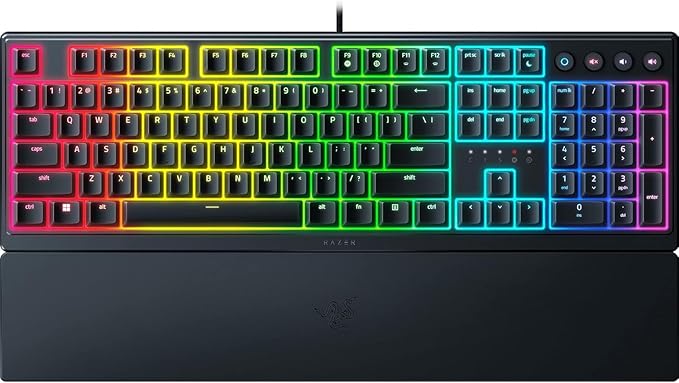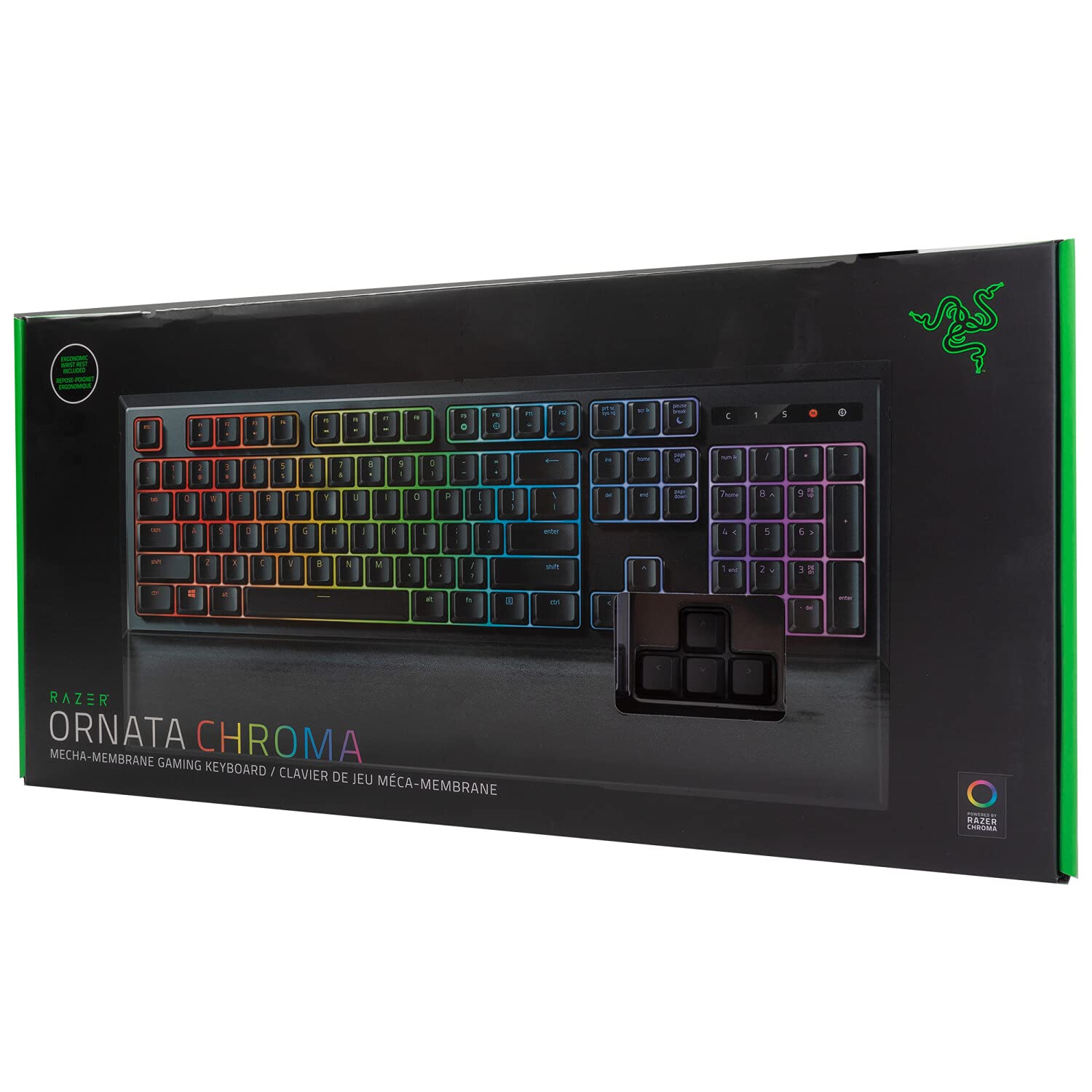
Razer RZ03-02040100 Ornata Chroma Membrane Mechanical Gaming Keyboard
Razer Ornata Chroma | RZ03-02043 Support & FAQs
Razer Ornata Chroma | RZ03-02043 Support & FAQs
Razer Ornata Chroma | RZ03-02043 Support & FAQs
Razer Ornata Chroma | RZ03-02043 Support & FAQs
in 31 offers
The lowest price for Razer RZ03-02040100 Ornata Chroma Membrane Mechanical Gaming Keyboard right now is $20.00 at CeX, compared across 11 retailers.
The all-time low was $20.00 on 26 Sept 2026. That's the lowest price we've ever tracked — a great time to buy.
Prices last updated 14 Oct 2026.
Last updated at 14/10/2026 10:20:53
Razer Ornata Chroma Wired Mecha-Membrane USB Gaming Keyboard, B
Delivery $4
Razer Rz03-02040200-r3u1 Ornata Chroma Wired Gaming Mecha-membrane
Free delivery
Affiliate Disclosure: We may receive a small commission for purchases made through this link at no extra cost to you. This helps support our site. Thank you!
Razer Ornata V3 Low-profile Ergonomic RGB Gaming Keyboard Full-Size - [As New - Refurbished]
Free delivery
Razer Ornata V3 Low-profile Ergonomic RGB Gaming Keyboard Full-Size - [As New - Refurbished]
Free delivery
RAZER Gaming Keyboard ORNATA CHROMA
Delivery $79.23
Razer Ornata V3 Gaming Keyboard: Low-Profile Keys - Mecha-Membrane Switches - UV-Coated Keycaps
Delivery $28.52
Razer Ornata V3 Gaming Keyboard: Low-Profile Keys - Mecha-Membrane Switches - UV-Coated Keycaps (Renewed)
Free delivery between 23–28 Oct
Razer Ornata V3 Gaming Keyboard: Low-Profile Keys - Mecha-Membrane Switches - UV-Coated Keycaps (Renewed)
Free delivery between 23–28 Oct
Razer Ornata V3 Gaming Keyboard, Low-Profile Keys, Black
Delivery $72.16
Razer Ornata V3 Low Profile Gaming Keyboard
Delivery between 17–25 Oct $10
originally posted on influenster.com
I recently got the Ornata keyboard, and I absolutely love it. The hybrid mechanical switches provide a satisfying tactile feel without being too loud. The RGB lighting is customizable and adds a nice touch to my setup. It's comfortable for long typing sessions, and the wrist rest is a great bonus. Overall, it's a fantastic keyboard for both work and gaming. Highly recommend!
originally posted on influenster.com
This product was given to me as part of a promotion to review, however all opinions are my own true honest opinions. This keyboard really does live up to the hype and popularity. I will be honest, I never imagined I would own this gorgeous keyboard because I didn’t know it was as nice as it is. However, the colors are deep and vibrant, and my favorite thing about it is surprisingly the clacking sounds when I type. It’s just a very pleasing sound that makes even me—somebody who works in front of a monitor all day—excited and giddy to hear. Having a career where I have to type on a computer constantly, I had become very disinterested using computers at home. But not even exaggerating, this keyboard has changed that for me. I feel almost cool while typing on this ... MoreThis product was given to me as part of a promotion to review, however all opinions are my own true honest opinions. This keyboard really does live up to the hype and popularity. I will be honest, I never imagined I would own this gorgeous keyboard because I didn’t know it was as nice as it is. However, the colors are deep and vibrant, and my favorite thing about it is surprisingly the clacking sounds when I type. It’s just a very pleasing sound that makes even me—somebody who works in front of a monitor all day—excited and giddy to hear. Having a career where I have to type on a computer constantly, I had become very disinterested using computers at home. But not even exaggerating, this keyboard has changed that for me. I feel almost cool while typing on this keyboard. I’m excited to use it in my day-to-day life for home and for work, and can’t wait to use it more for gaming which this keyboard has worked excellent for. I’m ecstatic to use this for more gaming purposes. If you’re hesitating on purchasing this keyboard, I say take the plunge. It works great, looks even better, and sounds amazing as well.
originally posted on walmart.com
This Razer Ornata Chroma keyboard is marketed as a gaming keyboard, but it could be for typists, writers, programmers—anyone who spends a good deal of time on the computer and requires responsiveness from every keystroke.If packaging is an indicator as to the quality of the product within, then what’s inside the Razer box must be pure magic because the exterior is impressive. Stylish, clean and understated, the black and bright green color scheme still manages to grab attention. I appreciate the small window opening that allows a user to test the feel of the keys right at the store.The keyboard has rubber feet to keep it in place, adjustable back legs and features a braided cable with gold USB connector that can be channeled under the keyboard as needed. The ... MoreThis Razer Ornata Chroma keyboard is marketed as a gaming keyboard, but it could be for typists, writers, programmers—anyone who spends a good deal of time on the computer and requires responsiveness from every keystroke.If packaging is an indicator as to the quality of the product within, then what’s inside the Razer box must be pure magic because the exterior is impressive. Stylish, clean and understated, the black and bright green color scheme still manages to grab attention. I appreciate the small window opening that allows a user to test the feel of the keys right at the store.The keyboard has rubber feet to keep it in place, adjustable back legs and features a braided cable with gold USB connector that can be channeled under the keyboard as needed. The wrist rest bundled with this keyboard is wide, solid and surprisingly more comfortable than it looks. The rest attaches to the front of the keyboard by magnets and can be added or removed easily. No little plastic pieces to snap off or break. Love this idea!Mecha-membrane with mid-height keycaps marries the best features of the click-clack mechanical keyboards with the softer touch of the membrane keyboards. What it boils down to is you still get a quick response from your keystrokes, but the sound is now slightly muted. Not enough for me and likely not enough not to irritate someone nearby so this is not a keyboard you would want in a work environment. Or at home in the same room where someone is trying to sleep. The keyboard states its ergonomic, however the keys are set in straight lines. My old ergonomic keyboard has a slight curve to the body as well as the keys which I find to be more natural than this. As with any new keyboard, it just takes some getting used to and my fingers were soon flying over the keys as I typed an email. It’s not just the keys themselves that illuminate, but the backing as well making the keys appear to “hover” over the board. The font on the keys resembles any office keyboard which I like, but gamers may long for something larger and easier to see. One thing I noticed immediately is the matte black keys show finger oils badly which I didn’t expect from such a surface.In order to configure the lights, settings and gaming profiles, you’ll have to download the Razer Synapse software. The software did not download automatically for me as the instructions stated it might. I had to set up an account with a username/password in order to download it which I felt was completely unnecessary and made me question whether I even wanted to deal with it. After downloading, updating and rebooting, I was finally able to play around with the light settings.Razer states there are 16.8 million colors this keyboard is capable of creating and after playing with the software a bit, I believe them. It is here where you can choose from such light patterns as ripple, wave and breathing as well as several other preconfigured effects including turning the lights off completely. I liked Fire which uses orange, yellow and red in a slow flickering pattern reminiscent of flames. Starlight randomly lights up different keys in various colors which is just kind of fun to watch. You can also configure your own lighting effects, brightness and even customize colors and patterns of individual keys to indicate keys used specifically for certain games, etc. Color Cycle which is the keyboard’s default became my favorite of the effects. It gradually cycles through every color in sequence and is rather calming. I find this less distracting while typing than many of the others.All in all, the Razer Ornata Chroma is a solid product with only a couple of minor cons. I’m not a gamer so I can’t say if this keyboard will give you an edge over your opponents, but if you just like being able to customize your system down to the last key cap, you should definitely consider this model. The $99.00 original price is a bit steep, but if you can find it on sale for around $20 less, it’s a good purchase in line with similar keyboards of its kind.
| Brand | Razer |
| Model Name | Ornata Chroma |
| Series | Ornata |
| Form Factor | Gaming |
| Keyboard Subtype | Gaming keyboard |
Razer Ornata Chroma Wired Mecha-Membrane USB Gaming Keyboard, B
Delivery $4
Razer Rz03-02040200-r3u1 Ornata Chroma Wired Gaming Mecha-membrane
Free delivery
Affiliate Disclosure: We may receive a small commission for purchases made through this link at no extra cost to you. This helps support our site. Thank you!
Razer Ornata V3 Low-profile Ergonomic RGB Gaming Keyboard Full-Size - [As New - Refurbished]
Free delivery
Razer Ornata V3 Low-profile Ergonomic RGB Gaming Keyboard Full-Size - [As New - Refurbished]
Free delivery
RAZER Gaming Keyboard ORNATA CHROMA
Delivery $79.23
I recently got the Ornata keyboard, and I absolutely love it. The hybrid mechanical switches provide a satisfying tactile feel without being too loud. The RGB lighting is customizable and adds a nice touch to my setup. It's comfortable for long typing sessions, and the wrist rest is a great bonus. Overall, it's a fantastic keyboard for both work and gaming. Highly recommend!
This product was given to me as part of a promotion to review, however all opinions are my own true honest opinions. This keyboard really does live up to the hype and popularity. I will be honest, I never imagined I would own this gorgeous keyboard because I didn’t know it was as nice as it is. However, the colors are deep and vibrant, and my favorite thing about it is surprisingly the clacking sounds when I type. It’s just a very pleasing sound that makes even me—somebody who works in front of a monitor all day—excited and giddy to hear. Having a career where I have to type on a computer constantly, I had become very disinterested using computers at home. But not even exaggerating, this keyboard has changed that for me. I feel almost cool while typing on this ... MoreThis product was given to me as part of a promotion to review, however all opinions are my own true honest opinions. This keyboard really does live up to the hype and popularity. I will be honest, I never imagined I would own this gorgeous keyboard because I didn’t know it was as nice as it is. However, the colors are deep and vibrant, and my favorite thing about it is surprisingly the clacking sounds when I type. It’s just a very pleasing sound that makes even me—somebody who works in front of a monitor all day—excited and giddy to hear. Having a career where I have to type on a computer constantly, I had become very disinterested using computers at home. But not even exaggerating, this keyboard has changed that for me. I feel almost cool while typing on this keyboard. I’m excited to use it in my day-to-day life for home and for work, and can’t wait to use it more for gaming which this keyboard has worked excellent for. I’m ecstatic to use this for more gaming purposes. If you’re hesitating on purchasing this keyboard, I say take the plunge. It works great, looks even better, and sounds amazing as well.
This Razer Ornata Chroma keyboard is marketed as a gaming keyboard, but it could be for typists, writers, programmers—anyone who spends a good deal of time on the computer and requires responsiveness from every keystroke.If packaging is an indicator as to the quality of the product within, then what’s inside the Razer box must be pure magic because the exterior is impressive. Stylish, clean and understated, the black and bright green color scheme still manages to grab attention. I appreciate the small window opening that allows a user to test the feel of the keys right at the store.The keyboard has rubber feet to keep it in place, adjustable back legs and features a braided cable with gold USB connector that can be channeled under the keyboard as needed. The ... MoreThis Razer Ornata Chroma keyboard is marketed as a gaming keyboard, but it could be for typists, writers, programmers—anyone who spends a good deal of time on the computer and requires responsiveness from every keystroke.If packaging is an indicator as to the quality of the product within, then what’s inside the Razer box must be pure magic because the exterior is impressive. Stylish, clean and understated, the black and bright green color scheme still manages to grab attention. I appreciate the small window opening that allows a user to test the feel of the keys right at the store.The keyboard has rubber feet to keep it in place, adjustable back legs and features a braided cable with gold USB connector that can be channeled under the keyboard as needed. The wrist rest bundled with this keyboard is wide, solid and surprisingly more comfortable than it looks. The rest attaches to the front of the keyboard by magnets and can be added or removed easily. No little plastic pieces to snap off or break. Love this idea!Mecha-membrane with mid-height keycaps marries the best features of the click-clack mechanical keyboards with the softer touch of the membrane keyboards. What it boils down to is you still get a quick response from your keystrokes, but the sound is now slightly muted. Not enough for me and likely not enough not to irritate someone nearby so this is not a keyboard you would want in a work environment. Or at home in the same room where someone is trying to sleep. The keyboard states its ergonomic, however the keys are set in straight lines. My old ergonomic keyboard has a slight curve to the body as well as the keys which I find to be more natural than this. As with any new keyboard, it just takes some getting used to and my fingers were soon flying over the keys as I typed an email. It’s not just the keys themselves that illuminate, but the backing as well making the keys appear to “hover” over the board. The font on the keys resembles any office keyboard which I like, but gamers may long for something larger and easier to see. One thing I noticed immediately is the matte black keys show finger oils badly which I didn’t expect from such a surface.In order to configure the lights, settings and gaming profiles, you’ll have to download the Razer Synapse software. The software did not download automatically for me as the instructions stated it might. I had to set up an account with a username/password in order to download it which I felt was completely unnecessary and made me question whether I even wanted to deal with it. After downloading, updating and rebooting, I was finally able to play around with the light settings.Razer states there are 16.8 million colors this keyboard is capable of creating and after playing with the software a bit, I believe them. It is here where you can choose from such light patterns as ripple, wave and breathing as well as several other preconfigured effects including turning the lights off completely. I liked Fire which uses orange, yellow and red in a slow flickering pattern reminiscent of flames. Starlight randomly lights up different keys in various colors which is just kind of fun to watch. You can also configure your own lighting effects, brightness and even customize colors and patterns of individual keys to indicate keys used specifically for certain games, etc. Color Cycle which is the keyboard’s default became my favorite of the effects. It gradually cycles through every color in sequence and is rather calming. I find this less distracting while typing than many of the others.All in all, the Razer Ornata Chroma is a solid product with only a couple of minor cons. I’m not a gamer so I can’t say if this keyboard will give you an edge over your opponents, but if you just like being able to customize your system down to the last key cap, you should definitely consider this model. The $99.00 original price is a bit steep, but if you can find it on sale for around $20 less, it’s a good purchase in line with similar keyboards of its kind.
The Razer Ornata Chroma keyboard is a keyboard for gamers, and it has many features that are useful.The keyboard has good response time.The keyboard allows tons of customization when you pair it with the Razor Synapse application. This application allows full and detailed customization over the functions of the keys. This application also can pair up with other Razor products such as a mouse, albeit the customization varies from product to product, but still retain similar features like lights and rebind ability.You can have lots of profiles that can be active when you are running certain applications. For an example you could have a profile only be active when you run your preferred web browser and have another profile active with other programs. ... MoreThe Razer Ornata Chroma keyboard is a keyboard for gamers, and it has many features that are useful.The keyboard has good response time.The keyboard allows tons of customization when you pair it with the Razor Synapse application. This application allows full and detailed customization over the functions of the keys. This application also can pair up with other Razor products such as a mouse, albeit the customization varies from product to product, but still retain similar features like lights and rebind ability.You can have lots of profiles that can be active when you are running certain applications. For an example you could have a profile only be active when you run your preferred web browser and have another profile active with other programs. Unfortunately you cannot have one profile linked to many different profiles, but you can have copy a profile with all its settings.In each profile you can customize the lights in great detail having multiple different effects bound to each key. You could have the escape key glowing a solid color, rotate through all the colors, etc. On top of the lighting customization you can also rebind all the keys (but the Windows button) to any bind you’d like, you can also create macros for each profile and have buttons bound to activate the macros, or just make them do the extended binds that Synapse offers.Not only is there profiles, but some applications may have a Razor Synapse addon which is activated by default when that program is running, a good example is Overwatch which has a custom addon that runs when Overwatch is active and has unique functionality to the keyboard such as glowing colors based off what hero you are and certain buttons glowing when cooldowns are up. The downside to the addons is that they cannot be modified, however you can still have a profile active which at the least lets you have custom keybinds.The keys on the keyboard are smooth, but allow for good grip and have a quick response time along with a nice responsive click on keypress. The keys raise quickly and do not get stuck. The keyboard is comfortable for long term use and is not oversized so it can fit on a smaller space and allow for more mouse space.Overall this product is good quality for the price you pay, and only gets better when you have the Razor Synapse application installed and working, I would recommend this product to others if they are into gaming for long periods of time.YouTube video: https://youtu.be/sEH1NikjUJ0
This is my first mechanical gaming keyboard. I bought it a couple of days ago in store. The quality feels great and with or without the wrist support it is comfortable to use. The clicky keys provide excellent tactile feedback. They are intentionally designed to make a "click" with each keystroke, so do not buy this if you want a silent typing experience. I cannot comment on durability as I have not had the keyboard very long, but it feels like good solid construction and I really like that the connector cable is covered in a braided material to protect it and to help with untangling when necessary. After downloading the free Razer Synapse software it has been very easy to synch the RGB lighting with my Razer mouse. There are various possible colour and movement ... MoreThis is my first mechanical gaming keyboard. I bought it a couple of days ago in store. The quality feels great and with or without the wrist support it is comfortable to use. The clicky keys provide excellent tactile feedback. They are intentionally designed to make a "click" with each keystroke, so do not buy this if you want a silent typing experience. I cannot comment on durability as I have not had the keyboard very long, but it feels like good solid construction and I really like that the connector cable is covered in a braided material to protect it and to help with untangling when necessary. After downloading the free Razer Synapse software it has been very easy to synch the RGB lighting with my Razer mouse. There are various possible colour and movement options for the lighting settings. There is also the option to synch with Phillips Hue smart lights, but I do not have any. The one caution I have is that the wrist support connects to the base of the keyboard with a weak magnet. This keeps the support form wandering during gameplay, but I would be cautious about holding this part of the keyboard or wrist support near any other electronics. Based on my experience so far, I would purchase this product again.
This keyboard, while designed for gamers, is great for touch/speed typists. Its keys are a soft matte-finish instead of the slick plastic finish on most keyboards, which increases your typing speed because your fingers more easily stay on the keys instead of slipping off. The touch feels like a combination of a mechanical (“click-click”) keyboard and a membrane keyboard; the keys are sensitive and substantially less pressure is required than on a regular keyboard, thereby alleviating typing fatigue and enabling longer typing (and gaming) sessions. This is labeled as an ergonomic keyboard; however, instead of being split in the center and the keys set at an angle as other ergonomic keyboards are, the rows are straight across. (User tip: If you are used to the “split” ... MoreThis keyboard, while designed for gamers, is great for touch/speed typists. Its keys are a soft matte-finish instead of the slick plastic finish on most keyboards, which increases your typing speed because your fingers more easily stay on the keys instead of slipping off. The touch feels like a combination of a mechanical (“click-click”) keyboard and a membrane keyboard; the keys are sensitive and substantially less pressure is required than on a regular keyboard, thereby alleviating typing fatigue and enabling longer typing (and gaming) sessions. This is labeled as an ergonomic keyboard; however, instead of being split in the center and the keys set at an angle as other ergonomic keyboards are, the rows are straight across. (User tip: If you are used to the “split” type of ergonomic keyboard, this may require some time for you to become accustomed to the straight rows.)Setup was lightning fast – simply plug the keyboard into a USB port and drivers are automatically installed. From plug-in to operation was less than 60 seconds. There is a padded wrist rest that is secured to the front of the keyboard with built-in magnets to keep it from separating from the keyboard; simply press the two surfaces together and the wrist rest is installed.What grabs your attention, though, even before the tactile advantages, is the LED backlighting. The plastic support on which each individual key rests is translucent, and gives the illusion that the keys are floating above the lighted surface. Through “Razer Synapse”, there are a number of lighting effects which can be individually configured. For example, the Spectrum Cycling causes the backlighting to cycle indefinitely between 16.8 million colors. You can choose Wave, where the lighting will scroll in either direction; Static, where the backlighting stays in one color; Breathing, where the lighting fades in and out; Reactive, where a key will light up when pressed, Ripple, where light will ripple away from the pressed key; Starlight, with random time and duration; and Fire, with red, yellow and orange motion. There are more advanced customization features available on the Chroma Configurator, accessible through Razer Synapse. (A word on Razer Synapse: In order to take advantage of these features, it’s necessary to create an account with Razer and agree to their terms and conditions. This may be an issue if privacy is a concern, and I think this should not be necessary when setting up a purchased piece of equipment. However, Razer Synapse offers other advantages such as tracking and review of gameplay, such as clicks and mouse movements with statistics and heatmaps; promotions, giveaways, etc.)There are other controls available as well. Function keys can control speaker volume, play or skip tracks, increase/decrease the brightness of the LEDs, as well as a power-saving feature. Macro recording allows you to set up a scheme to enable multiple keystrokes from a single instruction. You can also easily switch between gaming mode and Windows mode, and back, through minimal keystrokes.On the downside, I found some of these lighting effects to be somewhat distracting when attempting to concentrate on composing or typing a document. For example, the Reactive effect completely blacks out each key until pressed; if you tend to look down at the keyboard when typing, you might find the lack of labeling of each key to be an issue. The flickering Fire effect drew my eyes away from the screen, even when I attempted to ignore it. I now have it set to Spectrum Cycling, which seems to be the least distracting. Perhaps over time this distraction issue may resolve itself.All in all, this is a high-end keyboard, well-designed for heavy-duty gaming or typing usage and for minimization of fatigue. The customizable lighting features are a visual bonus. Five stars, highly recommended (and would be a great gift!).
If you care about keyboard feel, then you’ll always want to try a keyboard before buying. That being said, this has a lightly springy touch, a medium-depth keythrow, and a really crisp, quiet audible and tactile click. The hybrid keys have a membrane switch, which keeps the touch light. The key caps themselves have a just slightly grippy texture, a deluxe feel. The detachable wrist rest connects magnetically, a really nice touch.But whether or not you care about the tactile stuff: The color lighting is stunning. Intense and extremely configurable. The Razer software provides a ton of options for color selection and animation patterns. Looking at this, especially when combined with a chroma mouse like the Basilisk V3 — the software actually links color patterns ... MoreIf you care about keyboard feel, then you’ll always want to try a keyboard before buying. That being said, this has a lightly springy touch, a medium-depth keythrow, and a really crisp, quiet audible and tactile click. The hybrid keys have a membrane switch, which keeps the touch light. The key caps themselves have a just slightly grippy texture, a deluxe feel. The detachable wrist rest connects magnetically, a really nice touch.But whether or not you care about the tactile stuff: The color lighting is stunning. Intense and extremely configurable. The Razer software provides a ton of options for color selection and animation patterns. Looking at this, especially when combined with a chroma mouse like the Basilisk V3 — the software actually links color patterns between keyboard and mouse for a continuous effect across your whole desk — seriously, it makes me happy to have something this beautiful in front of me. And, of course, all the opaque parts are black, which you can’t beat.With games that have chroma support, the look of this keyboard is just incredible. Absolutely wild.
I've been a PC gamer since I was a young teen, (I'm in my late 20s now).I always thought that mechanical keyboards were the way to go, but this keyboard showed me otherwise.My Ornata Chroma recently broke (I spilled vodka on it )= ). And since then I've realized that it was the best keyboard I ever had.I've had to fall back on my old Razer Black Widow. I bought the Ornata because at the time I was living with my mom (as you would expect of a gamer), and I needed something that wasn't quite as noisy as a mechanical keyboard, but still felt better than your average Dell keyboard. Not only did I find what I wanted, but I found more.The Ornata provides the tactile sensation (the "clickiness") of a mechanical keyboard, but won't keep everyone in the house awake ... MoreI've been a PC gamer since I was a young teen, (I'm in my late 20s now).I always thought that mechanical keyboards were the way to go, but this keyboard showed me otherwise.My Ornata Chroma recently broke (I spilled vodka on it )= ). And since then I've realized that it was the best keyboard I ever had.I've had to fall back on my old Razer Black Widow. I bought the Ornata because at the time I was living with my mom (as you would expect of a gamer), and I needed something that wasn't quite as noisy as a mechanical keyboard, but still felt better than your average Dell keyboard. Not only did I find what I wanted, but I found more.The Ornata provides the tactile sensation (the "clickiness") of a mechanical keyboard, but won't keep everyone in the house awake because of its clickiness. It's the perfect combination of tactile feedback and loudness.I recommend this keyboard to anyone and everyone who games on PC. Even though my overly expensive Razer Black Widow is still 100% functional, I hope to get another Ornata soon, because it is by far my favorite keyboard, it's far more comfortable (IMO), than any other keyboard, (I've had to correct so many typos in this review because of the keyboard I'm using now, this wouldn't be an issue if I still had my Ornata).TLDR; Do you want a keyboard that feels mechanical but won't wake up everyone in the house? Get the Ornata. It's fantastic. It feels great, and it isn't too loud or too quiet. I give it 6 stars.
The Razor Ornata Chroma Gaming Keyboard came packaged in an extremely snug well designed sleek looking box. The instructions pamphlet is standard Razor keyboard manual easy to understand and comes with 2 holo stickers. It is a simple and attractive gaming keyboard. The keyboard is solidly constructed with a high quality black matte plastic on the outside and frosted/white plastic accent internals with absolutely no flex what so ever. It is a full size gaming keyboard and about 3 times taller with relatively no slope, than the wireless Logitech K800 which has shallow, spongy membrane keys which I have been using for a long time. It is incredible responsive and absolutely day and night improvement. The bottom of the keyboard has rubber textured feet that grip very ... MoreThe Razor Ornata Chroma Gaming Keyboard came packaged in an extremely snug well designed sleek looking box. The instructions pamphlet is standard Razor keyboard manual easy to understand and comes with 2 holo stickers. It is a simple and attractive gaming keyboard. The keyboard is solidly constructed with a high quality black matte plastic on the outside and frosted/white plastic accent internals with absolutely no flex what so ever. It is a full size gaming keyboard and about 3 times taller with relatively no slope, than the wireless Logitech K800 which has shallow, spongy membrane keys which I have been using for a long time. It is incredible responsive and absolutely day and night improvement. The bottom of the keyboard has rubber textured feet that grip very well and does not slide or separate from the wrist pad. The detachable wrist pad is made of the same black mate plastic with a very comfortable soft faux leather cushioned padding, that is about 1/8" thick and attaches magnetically. The magnets are strong enough to slide the keyboard but not break loose. The wrist pad is an absolute must, as to how tall the keyboard is, even when the rear feet are kicked up. Razor has a proprietary Mecha membrane designed key which simulates around the stiffness just like a Cherry MX red (switch design), with a nice audible click but still uses a membrane switch with a medium like travel. The keyboard has an anti-ghosting technology which allows you to press 10 keys at the same time. The cord is a 7' braided USB 2.0 and has under keyboard left/right/center routing slots. The Razor Synapse 2.0 downloadable software drivers are incredibly easy to use it gives you presets for most AAA game titles and endless customize RGB (red, green, blue) lighting. A mild gripe and inconvenience, it is lacking a calculator and some punctuation symbols are inverted ([ is over {), unlike any other keyboard I have seen. All in all the Razor Ornata Chroma Gaming Keyboard is top notch with a Superior design.
i bought this keyboard on sale a few months ago and it seemed alright from the start. but as time went on the Razer Synapse software you have to download in order to do anything with the keyboard settings started never loading on launch, or i would have to restart my computer multiple times in order for it to work. without Synapse, the Ornata keyboard very annoyingly flickers through various bright colors on the keyboard, without any way to turn them off. i dont know why whoever engineered this didnt think to include a physical button to turn off the lights. Razor also asks to you install a bunch of other useless software in addition, just taking up processing power for what seems to be nothing more than spyware. needless to say i wont be buying another razer ... Morei bought this keyboard on sale a few months ago and it seemed alright from the start. but as time went on the Razer Synapse software you have to download in order to do anything with the keyboard settings started never loading on launch, or i would have to restart my computer multiple times in order for it to work. without Synapse, the Ornata keyboard very annoyingly flickers through various bright colors on the keyboard, without any way to turn them off. i dont know why whoever engineered this didnt think to include a physical button to turn off the lights. Razor also asks to you install a bunch of other useless software in addition, just taking up processing power for what seems to be nothing more than spyware. needless to say i wont be buying another razer product anytime soon.
| Brand | Razer |
| Model Name | Ornata Chroma |
| Series | Ornata |
| Form Factor | Gaming |
| Keyboard Subtype | Gaming keyboard |