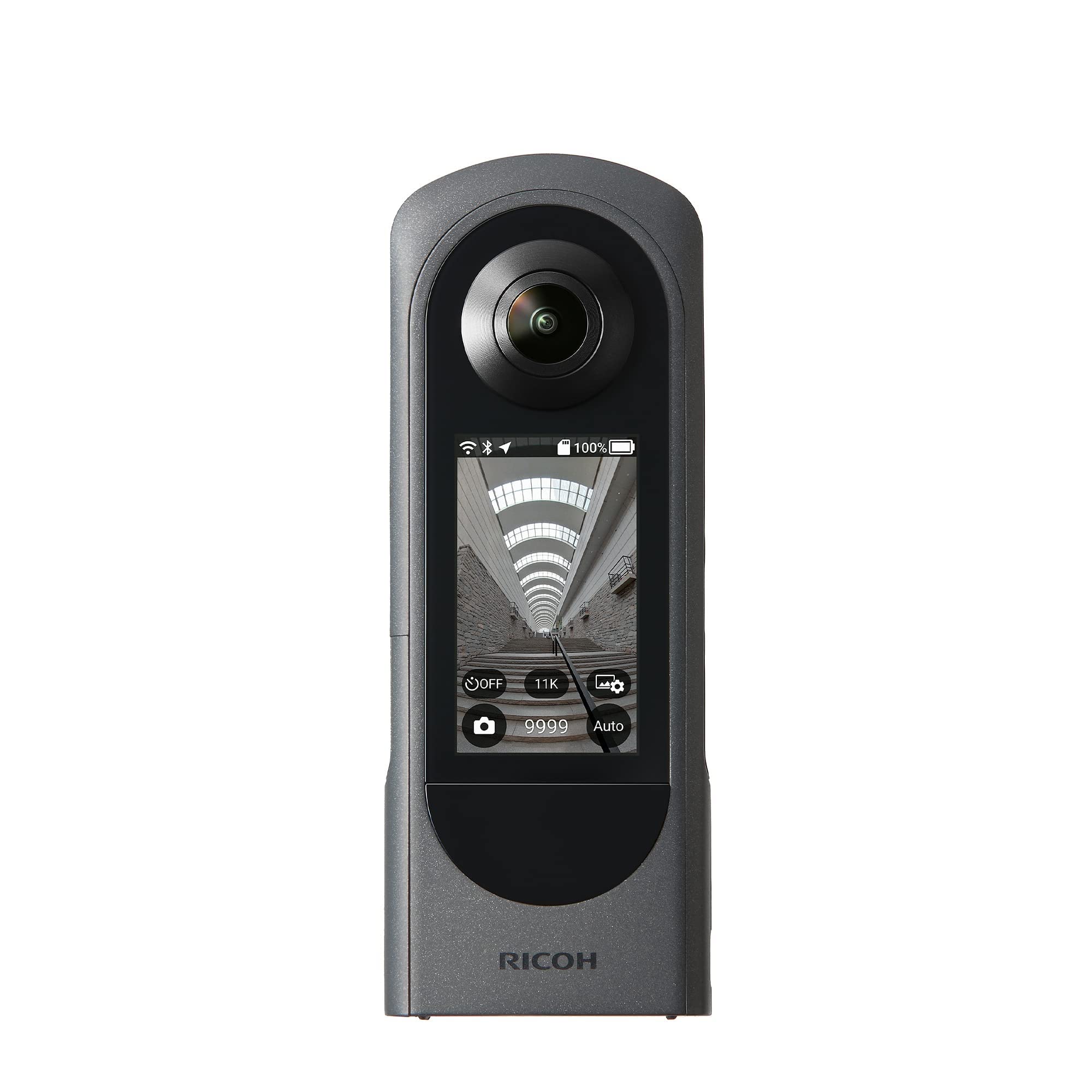
Ricoh Theta Z1 51GB 360 Camera
Ricoh's flagship THETA Z1 360° Camera offers high quality 360° imaging in a compact, easy-to-use form. Using dual 1"-type back-illuminated CMOS sensors and a revamped processing algorithm, the THETA Z1 provides highly realistic spherical images with improved noise reduction and low-light performance. The THETA Z1 can record or live stream up to 4K video or capture 23MP raw and/or JPEG photos. The THETA Z1's dual 23MP sensors and twin lenses capture two wide-angle images and automatically stitches them into one complete image. Automatic DR (dynamic range) compensation helps to reduce blown-out highlights and increases details in shadowed areas. Its lens system offers selectable f2.1, 3.5, and 5.6 apertures for increasing your depth-of-field and increasing resolution. The optical system also features reduced ghosting, fringing and flares for more accurate image reproduction. Video capture has been improved with 3-axis image stabilization for smoother shots and built-in microphones capture audio from four independent directions for realistic sound. Take advantage of raw photo editing using Ricoh's THETA Stitcher and your Photoshop Lightroom Classic CC platform. Live stream to social media platforms or the Theta 360 dedicated website, upload still photos to Google Maps or use the Remote Playback plug-in and a separate wireless receiver to display your content on a larger screen. Additional functions like USB data transfer and more are available through the use of optional Ricoh or third-party plug-ins. The THETA Z1 provides 19GB of internal memory and records up to 5-minute clips in 4K and up to 25 minutes in 2K with respective storage totals of 40 minutes and 130 minutes. The robust THETA Z1 is constructed from a magnesium alloy with a textured finish and incorporates a 0.93" OLED status display panel with a function control button.
Ricoh's flagship THETA Z1 360° Camera offers high quality 360° imaging in a compact, easy-to-use form. Using dual 1"-type back-illuminated CMOS sensors and a revamped processing algorithm, the THETA Z1 provides highly realistic spherical images with improved noise reduction and low-light performance. The THETA Z1 can record or live stream up to 4K video or capture 23MP raw and/or JPEG photos. The THETA Z1's dual 23MP sensors and twin lenses capture two wide-angle images and automatically stitches them into one complete image. Automatic DR (dynamic range) compensation helps to reduce blown-out highlights and increases details in shadowed areas. Its lens system offers selectable f2.1, 3.5, and 5.6 apertures for increasing your depth-of-field and increasing resolution. The optical system also features reduced ghosting, fringing and flares for more accurate image reproduction. Video capture has been improved with 3-axis image stabilization for smoother shots and built-in microphones capture audio from four independent directions for realistic sound. Take advantage of raw photo editing using Ricoh's THETA Stitcher and your Photoshop Lightroom Classic CC platform. Live stream to social media platforms or the Theta 360 dedicated website, upload still photos to Google Maps or use the Remote Playback plug-in and a separate wireless receiver to display your content on a larger screen. Additional functions like USB data transfer and more are available through the use of optional Ricoh or third-party plug-ins. The THETA Z1 provides 19GB of internal memory and records up to 5-minute clips in 4K and up to 25 minutes in 2K with respective storage totals of 40 minutes and 130 minutes. The robust THETA Z1 is constructed from a magnesium alloy with a textured finish and incorporates a 0.93" OLED status display panel with a function control button.
Ricoh's flagship THETA Z1 360° Camera offers high quality 360° imaging in a compact, easy-to-use form. Using dual 1"-type back-illuminated CMOS sensors and a revamped processing algorithm, the THETA Z1 provides highly realistic spherical images with improved noise reduction and low-light performance. The THETA Z1 can record or live stream up to 4K video or capture 23MP raw and/or JPEG photos. The THETA Z1's dual 23MP sensors and twin lenses capture two wide-angle images and automatically stitches them into one complete image. Automatic DR (dynamic range) compensation helps to reduce blown-out highlights and increases details in shadowed areas. Its lens system offers selectable f2.1, 3.5, and 5.6 apertures for increasing your depth-of-field and increasing resolution. The optical system also features reduced ghosting, fringing and flares for more accurate image reproduction. Video capture has been improved with 3-axis image stabilization for smoother shots and built-in microphones capture audio from four independent directions for realistic sound. Take advantage of raw photo editing using Ricoh's THETA Stitcher and your Photoshop Lightroom Classic CC platform. Live stream to social media platforms or the Theta 360 dedicated website, upload still photos to Google Maps or use the Remote Playback plug-in and a separate wireless receiver to display your content on a larger screen. Additional functions like USB data transfer and more are available through the use of optional Ricoh or third-party plug-ins. The THETA Z1 provides 19GB of internal memory and records up to 5-minute clips in 4K and up to 25 minutes in 2K with respective storage totals of 40 minutes and 130 minutes. The robust THETA Z1 is constructed from a magnesium alloy with a textured finish and incorporates a 0.93" OLED status display panel with a function control button.
Ricoh's flagship THETA Z1 360° Camera offers high quality 360° imaging in a compact, easy-to-use form. Using dual 1"-type back-illuminated CMOS sensors and a revamped processing algorithm, the THETA Z1 provides highly realistic spherical images with improved noise reduction and low-light performance. The THETA Z1 can record or live stream up to 4K video or capture 23MP raw and/or JPEG photos. The THETA Z1's dual 23MP sensors and twin lenses capture two wide-angle images and automatically stitches them into one complete image. Automatic DR (dynamic range) compensation helps to reduce blown-out highlights and increases details in shadowed areas. Its lens system offers selectable f2.1, 3.5, and 5.6 apertures for increasing your depth-of-field and increasing resolution. The optical system also features reduced ghosting, fringing and flares for more accurate image reproduction. Video capture has been improved with 3-axis image stabilization for smoother shots and built-in microphones capture audio from four independent directions for realistic sound. Take advantage of raw photo editing using Ricoh's THETA Stitcher and your Photoshop Lightroom Classic CC platform. Live stream to social media platforms or the Theta 360 dedicated website, upload still photos to Google Maps or use the Remote Playback plug-in and a separate wireless receiver to display your content on a larger screen. Additional functions like USB data transfer and more are available through the use of optional Ricoh or third-party plug-ins. The THETA Z1 provides 19GB of internal memory and records up to 5-minute clips in 4K and up to 25 minutes in 2K with respective storage totals of 40 minutes and 130 minutes. The robust THETA Z1 is constructed from a magnesium alloy with a textured finish and incorporates a 0.93" OLED status display panel with a function control button.
in 13 offers
The lowest price for Ricoh Theta Z1 51GB 360 Camera right now is $627.39 at eBay.com.au, compared across 9 retailers.
The all-time low was $228.41 on 9 Sept 2026 — today's price is 175% above the lowest ever. It has been notably cheaper before — worth setting a price alert.
Prices last updated 11 Oct 2026.
Last updated at 11/10/2026 07:47:12
Ricoh Theta Z1 Black 360 Degrees Camera 51gb 23mp 4k Wi-fi Oled Tested
Free delivery
Affiliate Disclosure: We may receive a small commission for purchases made through this link at no extra cost to you. This helps support our site. Thank you!
Ricoh THETA Z1 51GB 360 Camera
Delivery $4.90
Ricoh Theta Z1 360° Camera (51GB)
Ricoh Theta Z1 (51GB) 360 Camera
7-day returns
Ricoh THETA Z1 51GB 360 Camera
Ricoh Theta Z1 360 Degree Camera 51GB 1.0-Type Back Illuminated CMOS Sensor 23MP 4K 360 Video Stabilisation
Delivery $9.95
Ricoh Theta Z1 51GB Black 360 Camera, Two 1.0-inch Back-Illuminated CMOS sensors,
Delivery $247.64
Ricoh THETA Z1 51GB 360 Camera at Etoren
Delivery $49
Ricoh THETA Z1 360 Camera (51GB)
7-day returns
originally posted on bhphotovideo.com
Pros: 1 sensor; best in class image quality; very good single shot dynamic range; 5 dedicated buttons; daylight visible screen; good phone app for controlling camera remotely; outstanding camera plug-ins downloadable from Ricoh website; Ricoh Theta Stitcher plugin for Lightroom CCCons: Limited internal memory (19mb); short battery life; less than class standard video (4k vs 5.7k Insta360 One X and now 8k/10bit with the Qoocam; h.264 vs h.265); digital video stabilization is not as good as competitors (GoPro, Insta360).Details: The Ricoh Theta Z1 is an excellent camera for creating 360 photos with good detail. Clearly better than the Insta360 One X that I also shoot with but not as good at video. The shortcomings of small onboard memory can be overcome somewhat by ... MorePros: 1 sensor; best in class image quality; very good single shot dynamic range; 5 dedicated buttons; daylight visible screen; good phone app for controlling camera remotely; outstanding camera plug-ins downloadable from Ricoh website; Ricoh Theta Stitcher plugin for Lightroom CCCons: Limited internal memory (19mb); short battery life; less than class standard video (4k vs 5.7k Insta360 One X and now 8k/10bit with the Qoocam; h.264 vs h.265); digital video stabilization is not as good as competitors (GoPro, Insta360).Details: The Ricoh Theta Z1 is an excellent camera for creating 360 photos with good detail. Clearly better than the Insta360 One X that I also shoot with but not as good at video. The shortcomings of small onboard memory can be overcome somewhat by direct transfer of the files USB-C storage devices using the Data Transfer camera plug-in available in the latest firmware upgrade. I've done many transfers in the field to a Samsung T5 SSD and it's worked seamlessly and clears the camera memory as part of the process. Other camera plug-ins from the Ricoh website help greatly to set the Z1 apart from the competition. The DualFisheye Plugin by Hirota enables the capture of up to +/- 4ev HDR images. The images are automatically compiled within camera to produce single ~50MB, 16 bit HDR-DNG files (accompanied by a 0ev DNG capture) which can be processed in LR using the Ricoh Theta Stitcher plug-in for LR. Ghosting in the OOC files is well controlled. The exposure latitude and low shadow noise of the files are remarkable for a camera of this size. I've lifted the exposure 4 stops routinely in these images without issue. The Z1 is my preferred camera for photos and desktop workflow but the One X is preferred for video especially the superior mobile workflow of Insta360.
originally posted on bhphotovideo.com
I bought my Theta V about two years ago when we were selling our house and I wanted to help my realtor create a virtual tour, and the Theta V and original Theta Z1 were the only cameras that worked with the Zillow app at that time. The Theta V was a cool novelty for my photography, but the lack of image sharpness in the Theta V was always incredibly disappointing to me. This new Z1 definitely fixes that...the image sharpness makes me happy now. The onboard status display is also a big improvement.HOWEVER, I struggled to give it a 4 star rating (I was seriously considering a 3) because the Theta app for iOS is incredibly disappointing. The first thing I did when setting up the Z1 on the Theta app was change the wifi password on the camera, and just like with the ... MoreI bought my Theta V about two years ago when we were selling our house and I wanted to help my realtor create a virtual tour, and the Theta V and original Theta Z1 were the only cameras that worked with the Zillow app at that time. The Theta V was a cool novelty for my photography, but the lack of image sharpness in the Theta V was always incredibly disappointing to me. This new Z1 definitely fixes that...the image sharpness makes me happy now. The onboard status display is also a big improvement.HOWEVER, I struggled to give it a 4 star rating (I was seriously considering a 3) because the Theta app for iOS is incredibly disappointing. The first thing I did when setting up the Z1 on the Theta app was change the wifi password on the camera, and just like with the Theta V, that was a mistake. Sometimes the new password works, sometimes it doesn't, and there is no figuring out why. When it won't connect and gives me invalid password errors, I have to shut everything down (iPhone and camera) and try again a little while later.I am also very disappointed in the overall design of the app. I started my professional career as an IT programmer, and the app reminds me of what I create when I am early stages of a new project and just trying to get the code to work without any concern for an intuitive end user experience. I was actually okay with this awkwardness two years ago, but Ricoh has not tried to make this any more intuitive during that time! Why are so many features buried in the awkward plug-in part of the app? And why are there still so many dropped connections regardless of if I am connected via Bluetooth, Wifi, or Wifi LAN? I even bought the Ricoh remote control hoping that would negate the need to use the app, and the remote control also struggles to connect and stay connected to either the Theta V or my new Theta Z1.Overall, with the much improved image quality of the new Z1, I expect I will be much more willing to deal with the awkwardness of the app. If there was a better app for controlling the camera, I would give the Z1 5 stars, but I cannot rate the app more than 2 stars, so a combined 4 stars is generous.
originally posted on bhphotovideo.com
I am delighted by this camera. The image quality is excellent, both for still and video.I did not try the live streaming feature yet, so I can t comment on it.I also did not try any bluetooth feature.The wifi link is very easy to setup and very flexible. The camera can have its own SSID to connect an app or computer, but it can also connect to an existing network. This is extremely useful when you have more than one camera to control (I have 3). Also, the API is very well documented so I was able to automate the control with a simple script using the http rest api. Very very useful. No vendor lock-in, this is appreciated.For video, you can get raw un-stitched side-by-side fisheye video, which you can stitch yourself, or get the stitched (equirectangular) ... MoreI am delighted by this camera. The image quality is excellent, both for still and video.I did not try the live streaming feature yet, so I can t comment on it.I also did not try any bluetooth feature.The wifi link is very easy to setup and very flexible. The camera can have its own SSID to connect an app or computer, but it can also connect to an existing network. This is extremely useful when you have more than one camera to control (I have 3). Also, the API is very well documented so I was able to automate the control with a simple script using the http rest api. Very very useful. No vendor lock-in, this is appreciated.For video, you can get raw un-stitched side-by-side fisheye video, which you can stitch yourself, or get the stitched (equirectangular) video through the app.For still images, you always get stitched images, unless you activate a plugin to get unstiched raw (and hdr bracketed) images for manual stitching.The in camera stitching is, in my opinion, very good. Since raw images are available, manual high quality stitching will always be able to follow improvements of stitching software.Overall, I consider this camera to be the best option for immersive capture today.
| Internal/External Stitching | Internal, External Stitching |
| Image Sensor | 1"-Type CMOS |
| Internal Storage | 51 GB |
| Built-In Mic | Yes |
| Tripod Mounting Thread | 1/4"-20 Female |
Ricoh Theta Z1 Black 360 Degrees Camera 51gb 23mp 4k Wi-fi Oled Tested
Free delivery
Affiliate Disclosure: We may receive a small commission for purchases made through this link at no extra cost to you. This helps support our site. Thank you!
Ricoh THETA Z1 51GB 360 Camera
Delivery $4.90
Ricoh Theta Z1 360° Camera (51GB)
Ricoh Theta Z1 (51GB) 360 Camera
7-day returns
Ricoh THETA Z1 51GB 360 Camera
Pros: 1 sensor; best in class image quality; very good single shot dynamic range; 5 dedicated buttons; daylight visible screen; good phone app for controlling camera remotely; outstanding camera plug-ins downloadable from Ricoh website; Ricoh Theta Stitcher plugin for Lightroom CCCons: Limited internal memory (19mb); short battery life; less than class standard video (4k vs 5.7k Insta360 One X and now 8k/10bit with the Qoocam; h.264 vs h.265); digital video stabilization is not as good as competitors (GoPro, Insta360).Details: The Ricoh Theta Z1 is an excellent camera for creating 360 photos with good detail. Clearly better than the Insta360 One X that I also shoot with but not as good at video. The shortcomings of small onboard memory can be overcome somewhat by ... MorePros: 1 sensor; best in class image quality; very good single shot dynamic range; 5 dedicated buttons; daylight visible screen; good phone app for controlling camera remotely; outstanding camera plug-ins downloadable from Ricoh website; Ricoh Theta Stitcher plugin for Lightroom CCCons: Limited internal memory (19mb); short battery life; less than class standard video (4k vs 5.7k Insta360 One X and now 8k/10bit with the Qoocam; h.264 vs h.265); digital video stabilization is not as good as competitors (GoPro, Insta360).Details: The Ricoh Theta Z1 is an excellent camera for creating 360 photos with good detail. Clearly better than the Insta360 One X that I also shoot with but not as good at video. The shortcomings of small onboard memory can be overcome somewhat by direct transfer of the files USB-C storage devices using the Data Transfer camera plug-in available in the latest firmware upgrade. I've done many transfers in the field to a Samsung T5 SSD and it's worked seamlessly and clears the camera memory as part of the process. Other camera plug-ins from the Ricoh website help greatly to set the Z1 apart from the competition. The DualFisheye Plugin by Hirota enables the capture of up to +/- 4ev HDR images. The images are automatically compiled within camera to produce single ~50MB, 16 bit HDR-DNG files (accompanied by a 0ev DNG capture) which can be processed in LR using the Ricoh Theta Stitcher plug-in for LR. Ghosting in the OOC files is well controlled. The exposure latitude and low shadow noise of the files are remarkable for a camera of this size. I've lifted the exposure 4 stops routinely in these images without issue. The Z1 is my preferred camera for photos and desktop workflow but the One X is preferred for video especially the superior mobile workflow of Insta360.
I bought my Theta V about two years ago when we were selling our house and I wanted to help my realtor create a virtual tour, and the Theta V and original Theta Z1 were the only cameras that worked with the Zillow app at that time. The Theta V was a cool novelty for my photography, but the lack of image sharpness in the Theta V was always incredibly disappointing to me. This new Z1 definitely fixes that...the image sharpness makes me happy now. The onboard status display is also a big improvement.HOWEVER, I struggled to give it a 4 star rating (I was seriously considering a 3) because the Theta app for iOS is incredibly disappointing. The first thing I did when setting up the Z1 on the Theta app was change the wifi password on the camera, and just like with the ... MoreI bought my Theta V about two years ago when we were selling our house and I wanted to help my realtor create a virtual tour, and the Theta V and original Theta Z1 were the only cameras that worked with the Zillow app at that time. The Theta V was a cool novelty for my photography, but the lack of image sharpness in the Theta V was always incredibly disappointing to me. This new Z1 definitely fixes that...the image sharpness makes me happy now. The onboard status display is also a big improvement.HOWEVER, I struggled to give it a 4 star rating (I was seriously considering a 3) because the Theta app for iOS is incredibly disappointing. The first thing I did when setting up the Z1 on the Theta app was change the wifi password on the camera, and just like with the Theta V, that was a mistake. Sometimes the new password works, sometimes it doesn't, and there is no figuring out why. When it won't connect and gives me invalid password errors, I have to shut everything down (iPhone and camera) and try again a little while later.I am also very disappointed in the overall design of the app. I started my professional career as an IT programmer, and the app reminds me of what I create when I am early stages of a new project and just trying to get the code to work without any concern for an intuitive end user experience. I was actually okay with this awkwardness two years ago, but Ricoh has not tried to make this any more intuitive during that time! Why are so many features buried in the awkward plug-in part of the app? And why are there still so many dropped connections regardless of if I am connected via Bluetooth, Wifi, or Wifi LAN? I even bought the Ricoh remote control hoping that would negate the need to use the app, and the remote control also struggles to connect and stay connected to either the Theta V or my new Theta Z1.Overall, with the much improved image quality of the new Z1, I expect I will be much more willing to deal with the awkwardness of the app. If there was a better app for controlling the camera, I would give the Z1 5 stars, but I cannot rate the app more than 2 stars, so a combined 4 stars is generous.
I am delighted by this camera. The image quality is excellent, both for still and video.I did not try the live streaming feature yet, so I can t comment on it.I also did not try any bluetooth feature.The wifi link is very easy to setup and very flexible. The camera can have its own SSID to connect an app or computer, but it can also connect to an existing network. This is extremely useful when you have more than one camera to control (I have 3). Also, the API is very well documented so I was able to automate the control with a simple script using the http rest api. Very very useful. No vendor lock-in, this is appreciated.For video, you can get raw un-stitched side-by-side fisheye video, which you can stitch yourself, or get the stitched (equirectangular) ... MoreI am delighted by this camera. The image quality is excellent, both for still and video.I did not try the live streaming feature yet, so I can t comment on it.I also did not try any bluetooth feature.The wifi link is very easy to setup and very flexible. The camera can have its own SSID to connect an app or computer, but it can also connect to an existing network. This is extremely useful when you have more than one camera to control (I have 3). Also, the API is very well documented so I was able to automate the control with a simple script using the http rest api. Very very useful. No vendor lock-in, this is appreciated.For video, you can get raw un-stitched side-by-side fisheye video, which you can stitch yourself, or get the stitched (equirectangular) video through the app.For still images, you always get stitched images, unless you activate a plugin to get unstiched raw (and hdr bracketed) images for manual stitching.The in camera stitching is, in my opinion, very good. Since raw images are available, manual high quality stitching will always be able to follow improvements of stitching software.Overall, I consider this camera to be the best option for immersive capture today.
Hardware:- Lens are good- Memory absolutely a weak spot. If you are going to bracketing photos, which is a real must for real estate photos in getting the light balanced from outside to inside. Shooting Raw +jpeg means 4-10 projects before having to transfer images, not great.- Battery life is bad. Each photo is 1% of battery life, then you include communicating with the mobile device and setting adjustments also does a number on the battery. Given there is no Preview screen on the device, battery life should not be an issue but it is with this camera.Software/firmware:- The image stitching is great-Bracketing can use some improvement as it only take 2 images. There are are also some problems with converting Raw Bracketed photos into lightroom using the ... MoreHardware:- Lens are good- Memory absolutely a weak spot. If you are going to bracketing photos, which is a real must for real estate photos in getting the light balanced from outside to inside. Shooting Raw +jpeg means 4-10 projects before having to transfer images, not great.- Battery life is bad. Each photo is 1% of battery life, then you include communicating with the mobile device and setting adjustments also does a number on the battery. Given there is no Preview screen on the device, battery life should not be an issue but it is with this camera.Software/firmware:- The image stitching is great-Bracketing can use some improvement as it only take 2 images. There are are also some problems with converting Raw Bracketed photos into lightroom using the Theta Stitcher.exe- There are not many options only a 2 photo bracket where the setting are set blindly. With most cameras as you are setting up bracketing there are previews for over exposure and under exposure. Not the case here. You have to take the photos, review then adjust. Final merging is done in lightroom so you may have to go back if exposure is not correct.Wish List for future models:Hardware:- External memory card- Better Battery Life- more PixelsSoftware/firmware:- Bracketing with 3 and 5 shot options- live adjustments on over/under exposure for bracketing- Photo shows camera set up and a typical Pano before editing.
This camera is quite decent for the real estate virtual tour platform. I have used the very expensive Matterport cameras for 6 years and got this for a specific job. It took a little practice and a couple of accessories to get the camera far enough above the tripod and leveling head to keep the views as clean as I want, but it is a small and light camera so it does not require heavy-duty extensions. The thin 1/4-20 extensions allow use of an external battery pack - that will be needed on tours over about 5K SF. Keeping the camera level is most important. On the Matterport platform, if stitching is a little off it may be best to delete a couple of scans and go back - look at the results as you go along, it's not quite as good at aligning as the newest of those ... MoreThis camera is quite decent for the real estate virtual tour platform. I have used the very expensive Matterport cameras for 6 years and got this for a specific job. It took a little practice and a couple of accessories to get the camera far enough above the tripod and leveling head to keep the views as clean as I want, but it is a small and light camera so it does not require heavy-duty extensions. The thin 1/4-20 extensions allow use of an external battery pack - that will be needed on tours over about 5K SF. Keeping the camera level is most important. On the Matterport platform, if stitching is a little off it may be best to delete a couple of scans and go back - look at the results as you go along, it's not quite as good at aligning as the newest of those branded expensive cameras. For the positive part - the images are good, quite good even in low light. Capture time is quicker, and an audio cue lets you know that you can move the camera position before the software says it's OK. Placing the camera in front of a mirror is far superior, just align it to capture the side of the camera and it's not so intrusive [see image]. Copying files for back-up is a bit cumbersome on a Mac, but at least you can! Just a great all-around camera - I have not used it as a movie camera yet but that should be fun with VR goggles.
I bought this 360 camera to do 360 virtual tours for real estate. I have no prior experience with other 360 cameras, as this is my first. I also have never done a workflow with dual fisheye images or spherical panoramas. This camera was easy to use and produced high quality HDR images. On the advice of YouTube video The BEST Pro Virtual Tours HDR Workflow: Theta Z1 from Zero to Hero 2020 Guide from CreatorUp, I downloaded the DualFisheye plugin from the Ricoh store and configured it to take 9 images per HDR output. After pressing a few buttons to engage the plugin at the start of a shoot, using the plugin and producing great HDR images is a breeze ... just press the shutter button and hide in another room for 1 minutes (until the beeping stops). With the settings I ... MoreI bought this 360 camera to do 360 virtual tours for real estate. I have no prior experience with other 360 cameras, as this is my first. I also have never done a workflow with dual fisheye images or spherical panoramas. This camera was easy to use and produced high quality HDR images. On the advice of YouTube video The BEST Pro Virtual Tours HDR Workflow: Theta Z1 from Zero to Hero 2020 Guide from CreatorUp, I downloaded the DualFisheye plugin from the Ricoh store and configured it to take 9 images per HDR output. After pressing a few buttons to engage the plugin at the start of a shoot, using the plugin and producing great HDR images is a breeze ... just press the shutter button and hide in another room for 1 minutes (until the beeping stops). With the settings I used, the camera takes 9 images, each at a different exposure, automatically merges the images into a final HDR image, and stores the HDR image in internal storage. The HDR images are then imported to Lightroom for a normal workflow to adjust exposure and other tone settings. The video mentioned above covers all the settings and the whole workflow from camera, to Lightroom, to Ricoh Stitcher, to Photoshop, including removing the tripod from the nadir. This camera is solidly built, easy to operate, especially when coupled with available free plugins, and it produces high quality, high resolution images. There are two downsides, however: 1) the images produced do have a little noise. I easily clean this up in Topaz DeNoise, which produces a noise-free and sharp image. 2) the camera has a non-removable battery, which doesn't last very long on a charge. On a recent shoot where I took 23 HDR images over an hour timespan, I was left with only 13% battery remaining. Of course, that was after 207 images taken (9 exposures X 23 HDR images) plus a lot of processing to do all the merging. There were other spaces in the house that I didn't shoot, so I could potentially have run out of battery before being done. The battery does recharge quickly, so in the future I'll be taking a charger with me, so I can do some 360 shots at the beginning of a shoot, put it on the charger while capturing standard still shots or video, and then resume 360 shooting later in the shoot, if needed. Of course, as I get better at this, I may move more quickly and use less battery as I go. I do enjoy this camera and highly recommend it.
First off, the image quality from this camera is amazing. My clients love it and it is significantly better than the Insta 360 One X I was using before. That alone makes it worthwhile.I also like that when you plug it into your PC it just shows up as a disk straight away.However, for a $1,000 camera, it is missing some pretty obvious things.1. You cannot swap the battery. Seriously? You have to charge it and hope it doesn't run out, or find a way to plug in an external power source, which leads to...2. The USB power slot is too close to the tripod mounting. This means that you cannot plug in a power source (see above) if it is on a tripod...which it almost always is. You can buy extenders to allow it to fit - even then it is tight. This is just bad design.3. ... MoreFirst off, the image quality from this camera is amazing. My clients love it and it is significantly better than the Insta 360 One X I was using before. That alone makes it worthwhile.I also like that when you plug it into your PC it just shows up as a disk straight away.However, for a $1,000 camera, it is missing some pretty obvious things.1. You cannot swap the battery. Seriously? You have to charge it and hope it doesn't run out, or find a way to plug in an external power source, which leads to...2. The USB power slot is too close to the tripod mounting. This means that you cannot plug in a power source (see above) if it is on a tripod...which it almost always is. You can buy extenders to allow it to fit - even then it is tight. This is just bad design.3. No SD card slot. Again, seriously? It only has a small amount of memory - ~20gb. In today's world that is not enough and there is no excuse. Again, just bad design4. It is missing key features. Such as - if I am taking a 3 bracket HDR photo I want the option to blend that manually later. HDR takes 3 photos, blends them in the camera and that is all you get. There is NO option to take automatic bracket pictures. OK. there is an option for multi-bracket, but it literally has no automation what so ever. Each picture must be individually set (ISO, SS, A, WB) for each of the shots with no accounting for the light in the room. You can't for example, say you want 3 shots, +/-2EV and let it figure out the middle - nope...have to do it ALL by hand. So, basically, useless unless you have all the time in the world.Overall, the quality of the image makes it worthwhile. But it could be SO much better with just a few simple tweaks that other cameras already have.
After having used this 360 camera to create fast and easy Matterport Tours for over two years, I can assuredly say that this camera is an infuriating hellscape to use for any professional purposes. I have never used a piece of equipment that has made me want to physically destroy it on the job as much as this worthless 360 camera.EVERY SINGLE TIME that I try to scan a property with it, I have constant scan alignment issues. Often times having 20-30 failed alignments in a row despite being within a foot of the last scan. The ONLY way I can get this resolved is to do 50-60 scans within a single inch of the last one, which doubles, or even triples the length of the shoot.I am beyond fed up with this system. I absolutely hate this camera with all my heart. The ... MoreAfter having used this 360 camera to create fast and easy Matterport Tours for over two years, I can assuredly say that this camera is an infuriating hellscape to use for any professional purposes. I have never used a piece of equipment that has made me want to physically destroy it on the job as much as this worthless 360 camera.EVERY SINGLE TIME that I try to scan a property with it, I have constant scan alignment issues. Often times having 20-30 failed alignments in a row despite being within a foot of the last scan. The ONLY way I can get this resolved is to do 50-60 scans within a single inch of the last one, which doubles, or even triples the length of the shoot.I am beyond fed up with this system. I absolutely hate this camera with all my heart. The amount of stress, frustration, and constant headaches this thing has given me, is absolutely unacceptable.In addition to the horrible user experience, the quality of the scans, for being the most expensive 360 camera that they make, is horrendous. It is a soft, fussy, blurry, low resolution mess. Do yourself a favor, and steer far clear of this low quality brand.
I am a real estate professional and I was looking for something that produced better quality 3D tours than the Insta360 ONEX. I am using the Matterport platform.I consider myself very tech savvy and it was extremely difficult to get the camera connected to my iphone. After getting it to connect at home it failed to connect at my first in the field use and I had to resort back to my Insta360 ONEX which has always worked flawlessly.On my second attempt I was able to use the camera but the scans were taking 3-5 minutes. This is compared to 10-15 seconds for my Insta360 ONEX. Some scans would never go through and I would have to restart the camera. As other reviewers have noted the battery life is terrible. When fully charged the next time I turned it on it went ... MoreI am a real estate professional and I was looking for something that produced better quality 3D tours than the Insta360 ONEX. I am using the Matterport platform.I consider myself very tech savvy and it was extremely difficult to get the camera connected to my iphone. After getting it to connect at home it failed to connect at my first in the field use and I had to resort back to my Insta360 ONEX which has always worked flawlessly.On my second attempt I was able to use the camera but the scans were taking 3-5 minutes. This is compared to 10-15 seconds for my Insta360 ONEX. Some scans would never go through and I would have to restart the camera. As other reviewers have noted the battery life is terrible. When fully charged the next time I turned it on it went down to 93% and I hadn't performed any actions. The scans were taking so long I almost didn't make it through an 1800 sq. ft. home.The quality of the images are significantly better however the performance is so poor I can't use it.As always THANKS B&H for your return policy.
I use this Ricoh Theta V 360 4K Spherical VR Camera for my 3D Virtual Tour projects. I upgraded from Theta S which was the best performing camera I had over Insta 360, and GoPro Fusion. The image quality is best, and the stitching is more seamless. Ricoh Theta offers also the best pocketable size and most sleek form. This is also the 2nd best I guess after the bigger sensor Theta Z. I bought this model only because the Z is back ordered and unavailable at the time of my shooting. I removed 1 star because the WiFi connection to the smartphone is not a 1-click start kind of situation. It is delaying the shooting trying to get the two devices talk to each other. The ease of use is also a main consideration like it is almost the standard gear in my 3D shooting system. ... MoreI use this Ricoh Theta V 360 4K Spherical VR Camera for my 3D Virtual Tour projects. I upgraded from Theta S which was the best performing camera I had over Insta 360, and GoPro Fusion. The image quality is best, and the stitching is more seamless. Ricoh Theta offers also the best pocketable size and most sleek form. This is also the 2nd best I guess after the bigger sensor Theta Z. I bought this model only because the Z is back ordered and unavailable at the time of my shooting. I removed 1 star because the WiFi connection to the smartphone is not a 1-click start kind of situation. It is delaying the shooting trying to get the two devices talk to each other. The ease of use is also a main consideration like it is almost the standard gear in my 3D shooting system. You don't need a separate stitching program (like PTGui), a separate image correction software (Lightroom), and of course the complicated 3D mounting system for my DSLR-fisheye professional system. When you will just use phones and tablets to view images, Ricoh Theta 360 cameras are very much the go to gears that anybody can use. As I always say, you have to bring a back up camera all the time during professional work. This is a perfect back up. Matterport and Theta Z could be the primary 3D camera gears for ultimate pro results.
| Internal/External Stitching | Internal, External Stitching |
| Image Sensor | 1"-Type CMOS |
| Internal Storage | 51 GB |
| Built-In Mic | Yes |
| Tripod Mounting Thread | 1/4"-20 Female |