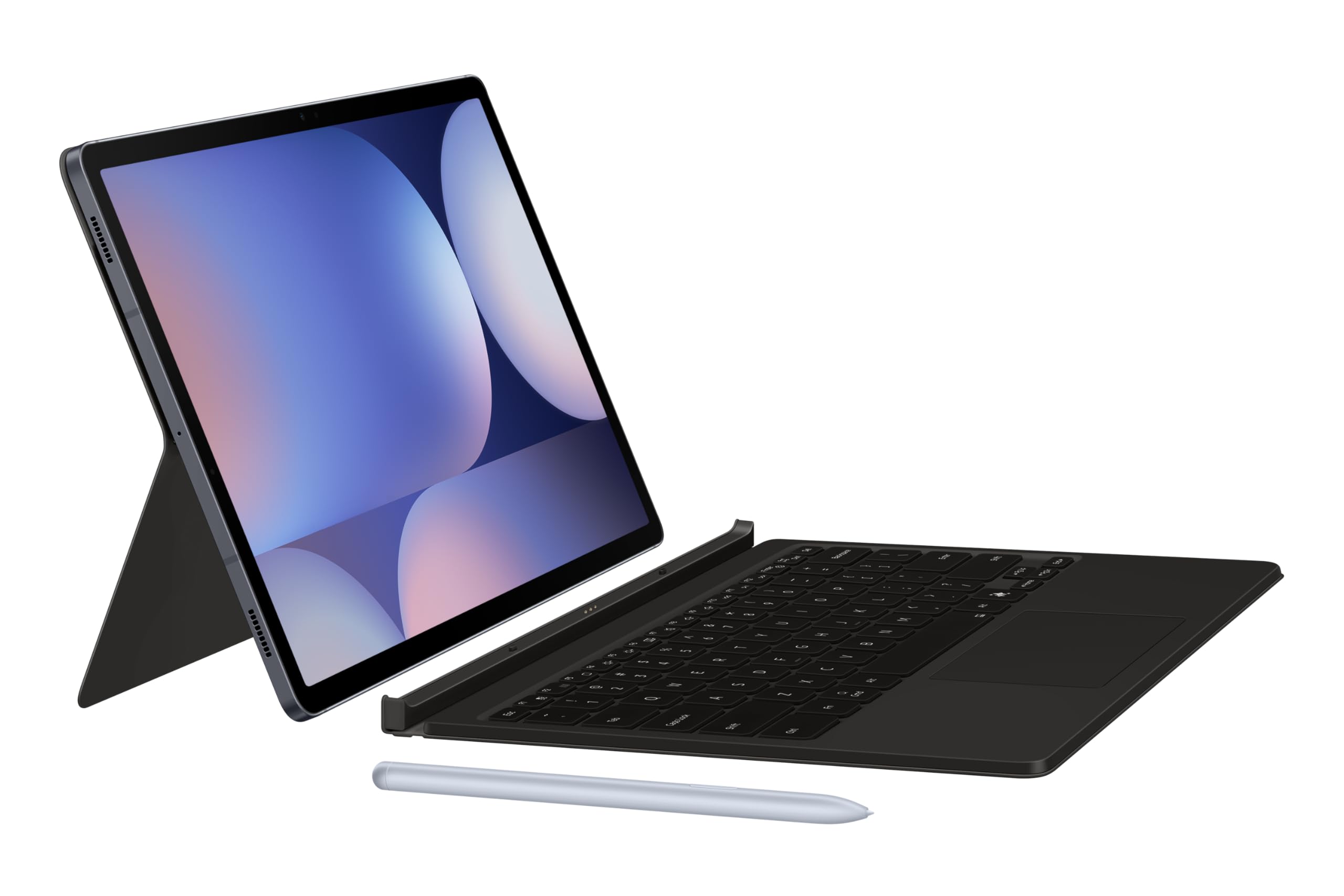
Samsung Galaxy Tab S9 Book Cover Keyboard — AI Key (Black)
Your key to instant AI access The Galaxy AI Key gives you easy access to AI-powered assistant, Bixby. Simply tap the dedicated key and let your AI assistant handle your query — it's that simple to get things done. PC-like experience with a single tap Get things done easily with the Book Cover Keyboard. The full-size keycaps, function keys and trackpad, combined with DeX mode, deliver a PC-like experience with a single tap. Magnetically attachable for easy replacement With its magnetic design, you can easily attach and detach the back cover to personalize your device. Replace it according to your preference to fit your everyday needs. Effortless comes in 150° Take it all the way back to 150° for a new level of freedom with the Book Cover Keyboard. Adjust the angle on the back easily to find your perfect position to send emails, blog, study — you name it. Enhance your productivity with wireless sharing With Wireless Keyboard Sharing, you can easily connect to your other Galaxy devices and smoothly type or navigate on them. Switch between devices with ease and take control of your phone as you would on your tablet.
Your key to instant AI access The Galaxy AI Key gives you easy access to AI-powered assistant, Bixby. Simply tap the dedicated key and let your AI assistant handle your query — it's that simple to get things done. PC-like experience with a single tap Get things done easily with the Book Cover Keyboard. The full-size keycaps, function keys and trackpad, combined with DeX mode, deliver a PC-like experience with a single tap. Magnetically attachable for easy replacement With its magnetic design, you can easily attach and detach the back cover to personalize your device. Replace it according to your preference to fit your everyday needs. Effortless comes in 150° Take it all the way back to 150° for a new level of freedom with the Book Cover Keyboard. Adjust the angle on the back easily to find your perfect position to send emails, blog, study — you name it. Enhance your productivity with wireless sharing With Wireless Keyboard Sharing, you can easily connect to your other Galaxy devices and smoothly type or navigate on them. Switch between devices with ease and take control of your phone as you would on your tablet.
Your key to instant AI access The Galaxy AI Key gives you easy access to AI-powered assistant, Bixby. Simply tap the dedicated key and let your AI assistant handle your query — it's that simple to get things done. PC-like experience with a single tap Get things done easily with the Book Cover Keyboard. The full-size keycaps, function keys and trackpad, combined with DeX mode, deliver a PC-like experience with a single tap. Magnetically attachable for easy replacement With its magnetic design, you can easily attach and detach the back cover to personalize your device. Replace it according to your preference to fit your everyday needs. Effortless comes in 150° Take it all the way back to 150° for a new level of freedom with the Book Cover Keyboard. Adjust the angle on the back easily to find your perfect position to send emails, blog, study — you name it. Enhance your productivity with wireless sharing With Wireless Keyboard Sharing, you can easily connect to your other Galaxy devices and smoothly type or navigate on them. Switch between devices with ease and take control of your phone as you would on your tablet.
Your key to instant AI access The Galaxy AI Key gives you easy access to AI-powered assistant, Bixby. Simply tap the dedicated key and let your AI assistant handle your query — it's that simple to get things done. PC-like experience with a single tap Get things done easily with the Book Cover Keyboard. The full-size keycaps, function keys and trackpad, combined with DeX mode, deliver a PC-like experience with a single tap. Magnetically attachable for easy replacement With its magnetic design, you can easily attach and detach the back cover to personalize your device. Replace it according to your preference to fit your everyday needs. Effortless comes in 150° Take it all the way back to 150° for a new level of freedom with the Book Cover Keyboard. Adjust the angle on the back easily to find your perfect position to send emails, blog, study — you name it. Enhance your productivity with wireless sharing With Wireless Keyboard Sharing, you can easily connect to your other Galaxy devices and smoothly type or navigate on them. Switch between devices with ease and take control of your phone as you would on your tablet.
in 54 offers
The lowest price for Samsung Galaxy Tab S9 Book Cover Keyboard — AI Key (Black) right now is $197.27 at MegaBuy, compared across 36 retailers.
The all-time low was $59.34 on 14 June 2026 — today's price is 232% above the lowest ever. It has been notably cheaper before — worth setting a price alert.
Prices last updated 2 Oct 2026.
Last updated at 02/10/2026 00:47:13
Samsung Galaxy Tab Book Cover Keyboard for Samsung S10 FE, S10 Lite, S9, S9 FE, Black
Free delivery
Affiliate Disclosure: We may receive a small commission for purchases made through this link at no extra cost to you. This helps support our site. Thank you!
[EF-DX725UBEGWW] Samsung Galaxy Tab S10 Lite / S10 FE / S9 / S9 FE Book Cover Keyboard AI Key - Black
7-day returns
Samsung Galaxy Tab S10 Lite / S10 FE / S9 / S9 FE Book Cover Keyboard - AI Key--Black
Delivery $16.50
Samsung Book Cover Keyboard (EF-DX725) w/ AI Key for Tab S10 FE/S9 - Black
Free delivery
Samsung Galaxy Tab S10 Lite / S10 FE / Tab S9 / S9 FE Book Cover Keyboard - Black(EF-DX725UBEGWW), Effortless Comes In 150, AI Key, 6 Months Warranty
Delivery $13
Samsung Galaxy Tab S10 Lite S10 FE S9 S9 FE Book Cover Keyboard Black AI Key
Delivery between Wed – Thu $15
Samsung Galaxy Tab S10 Lite / S10 FE / Tab S9 / S9 FE Book Cover Keyboard - Black(EF-DX725UBEGWW), Effortless Comes In 150°, AI Key, 6 Months Warranty
Delivery between 7–12 Oct $9.70
Samsung Galaxy Tab S10 Lite / S10 FE / Tab S9 / S9 FE Book Cover Keyboard - Black(EF-DX725UBEGWW), Effortless Comes In 150°, AI Key, 6 Months Warranty
Delivery by Tue $12.95
Samsung Galaxy Tab S10 FE ,Tab S9 ,S9 FE Book Cover Keyboard Black - Magnetic - EF-DX725UBEGWW
Delivery $14.99
Samsung Galaxy Tab S10 FE/ S10 Lite /S9 FE / S9 Book Cover Keyboard with AI Key - Black
Delivery between 7–12 Oct $9
originally posted on samsung.com
The Book Cover Keyboard of Tab S9 can transform it into a productivity machine. Its spacious keys and trackpad offer a satisfying laptop-like experience, making it perfect for prolonged typing sessions. With the Dex Mode integration, you can enjoy powerful multitasking capabilities. The magnetic attachment and S Pen holder add convenience to its usage. However, the price tag is high, and the bulkiness makes it heavy to carry around. The device is a powerhouse for serious users, but casual typists should consider the trade-offs before making a purchase decision.
originally posted on samsung.com
An exquisite piece of true Garbage. If the beautiful Galaxy S9 Tab Ultra fails in the Marketplace, it will be because of this keyboard. I retired my Apple M1 iPad with its beautifully crafted Apple Magic Keyboard for the same price as the Samsung. The difference is more than night and day. Samsung went to great links to make this the worst design keyboard on planet earth. Think I’m just picky? Look at the number of one star ratings; not only on here but everywhere else on the Internet.
originally posted on samsung.com
This is a decent accessory, but absolutely over priced. I'll just list the cons right away before addressing what I like about it:1. No backlit keys, despite the Tab S9 Ultra version having this feature. Unacceptable at this price point.2. The F keys are combined with the number keys, instead of being separate (the Tab S9 Plus and Tab S9 Ultra have separate F keys). This makes using them cumbersome.3. Will not protect the tablet from drops. To be fair, it does make taking it off fast since it's a magnetized case, and it allows the keyboard to attach and detach easily. Just keep in mind that this doesn't protect the sides of the tablet at all, and won't absorb shock well - especially on the back of the tablet.4. As I've already said, but just to make it clear - ... MoreThis is a decent accessory, but absolutely over priced. I'll just list the cons right away before addressing what I like about it:1. No backlit keys, despite the Tab S9 Ultra version having this feature. Unacceptable at this price point.2. The F keys are combined with the number keys, instead of being separate (the Tab S9 Plus and Tab S9 Ultra have separate F keys). This makes using them cumbersome.3. Will not protect the tablet from drops. To be fair, it does make taking it off fast since it's a magnetized case, and it allows the keyboard to attach and detach easily. Just keep in mind that this doesn't protect the sides of the tablet at all, and won't absorb shock well - especially on the back of the tablet.4. As I've already said, but just to make it clear - it is overpriced.Having said that, here are the things I like about this accessory:1. The keyboard is easy to attach/detach with the magnet to the bottom of the tablet, and the kickstand on the back is fairly rigid/stable with a great range of angles to adjust to.2. There's also the fact that it draws power from the tablet, so there's no need to charge it separately.
| Interface | POGO |
| Keys Quantity | 65 |
| Touch Pad, Touch Screen | Touch Pad |
| Dimension (WxHxD) | 173.7x254.9x14.8 mm |
| Compatible Models | Galaxy Tab S9, Galaxy Tab S9 FE |

Samsung Galaxy Tab Book Cover Keyboard for Samsung S10 FE, S10 Lite, S9, S9 FE, Black
Free delivery
Affiliate Disclosure: We may receive a small commission for purchases made through this link at no extra cost to you. This helps support our site. Thank you!
[EF-DX725UBEGWW] Samsung Galaxy Tab S10 Lite / S10 FE / S9 / S9 FE Book Cover Keyboard AI Key - Black
7-day returns
Samsung Galaxy Tab S10 Lite / S10 FE / S9 / S9 FE Book Cover Keyboard - AI Key--Black
Delivery $16.50
Samsung Book Cover Keyboard (EF-DX725) w/ AI Key for Tab S10 FE/S9 - Black
Free delivery
Samsung Galaxy Tab S10 Lite / S10 FE / Tab S9 / S9 FE Book Cover Keyboard - Black(EF-DX725UBEGWW), Effortless Comes In 150, AI Key, 6 Months Warranty
Delivery $13
The Book Cover Keyboard of Tab S9 can transform it into a productivity machine. Its spacious keys and trackpad offer a satisfying laptop-like experience, making it perfect for prolonged typing sessions. With the Dex Mode integration, you can enjoy powerful multitasking capabilities. The magnetic attachment and S Pen holder add convenience to its usage. However, the price tag is high, and the bulkiness makes it heavy to carry around. The device is a powerhouse for serious users, but casual typists should consider the trade-offs before making a purchase decision.
An exquisite piece of true Garbage. If the beautiful Galaxy S9 Tab Ultra fails in the Marketplace, it will be because of this keyboard. I retired my Apple M1 iPad with its beautifully crafted Apple Magic Keyboard for the same price as the Samsung. The difference is more than night and day. Samsung went to great links to make this the worst design keyboard on planet earth. Think I’m just picky? Look at the number of one star ratings; not only on here but everywhere else on the Internet.
This is a decent accessory, but absolutely over priced. I'll just list the cons right away before addressing what I like about it:1. No backlit keys, despite the Tab S9 Ultra version having this feature. Unacceptable at this price point.2. The F keys are combined with the number keys, instead of being separate (the Tab S9 Plus and Tab S9 Ultra have separate F keys). This makes using them cumbersome.3. Will not protect the tablet from drops. To be fair, it does make taking it off fast since it's a magnetized case, and it allows the keyboard to attach and detach easily. Just keep in mind that this doesn't protect the sides of the tablet at all, and won't absorb shock well - especially on the back of the tablet.4. As I've already said, but just to make it clear - ... MoreThis is a decent accessory, but absolutely over priced. I'll just list the cons right away before addressing what I like about it:1. No backlit keys, despite the Tab S9 Ultra version having this feature. Unacceptable at this price point.2. The F keys are combined with the number keys, instead of being separate (the Tab S9 Plus and Tab S9 Ultra have separate F keys). This makes using them cumbersome.3. Will not protect the tablet from drops. To be fair, it does make taking it off fast since it's a magnetized case, and it allows the keyboard to attach and detach easily. Just keep in mind that this doesn't protect the sides of the tablet at all, and won't absorb shock well - especially on the back of the tablet.4. As I've already said, but just to make it clear - it is overpriced.Having said that, here are the things I like about this accessory:1. The keyboard is easy to attach/detach with the magnet to the bottom of the tablet, and the kickstand on the back is fairly rigid/stable with a great range of angles to adjust to.2. There's also the fact that it draws power from the tablet, so there's no need to charge it separately.
My biggest issue with it is the responsiveness of the keys. I'm very used to tablet size keyboards. I don't know if it's software or hardware but it has an extremely annoying habit of doubling or tripling letters if you're typing fast. I don't have this issue with any other keyboard. It makes it very frustrating to use for any extended writing.Second, I owned this item's predecessors for the S7 & 8. Those keyboard cases had a textured feel, like plastic trying to imitate leather. This model however is smooth plastic, and besides being a little slippery also picks up fingerprints and any slightest amount of dirt. It feels cheap.Additionally, this has been traveling in my laptop bag for 6 months and the corners are turning white.Totally not worth it for the ... MoreMy biggest issue with it is the responsiveness of the keys. I'm very used to tablet size keyboards. I don't know if it's software or hardware but it has an extremely annoying habit of doubling or tripling letters if you're typing fast. I don't have this issue with any other keyboard. It makes it very frustrating to use for any extended writing.Second, I owned this item's predecessors for the S7 & 8. Those keyboard cases had a textured feel, like plastic trying to imitate leather. This model however is smooth plastic, and besides being a little slippery also picks up fingerprints and any slightest amount of dirt. It feels cheap.Additionally, this has been traveling in my laptop bag for 6 months and the corners are turning white.Totally not worth it for the price.The only plus, and reason I'm still using it, is I like the foldout stand on the back and hate the off-brands with the triangular folding stand.
It is very compact and lightweight. I also enjoy the click-clack sound as I type. The keyboard magnetically attaches to the tablet like the S pen. There's also plenty of spaces on the outside to decorate with stickers and etc. The size of the keys on the keyboard might be too small for those used to a more physical keyboard. Those looking for a more ergonomic option, this is not made for that. To protect the tablet screen from scratches and light falls, this does the job. Overall, I am happy with this purchase even though the default color is black. That just means more room to decorate however you like :)
I'll start with the one negative I have with the cover keyboard - The back cover has a feature to securely hold you S Pen. The holder completely covers the pen and you won't ever lose the pen carrying the tablet. That said, The new Galaxy S Pen Creator Edition is too long to fit in the holder.Is this a problem with the case or the pen? You decide.The case otherwise is perfect.It does not add any bulk to the tablet.It attaches to the tablet magnetically and the magnets are STRONG!The keyboard detaches from the tablet and cover and magnetically snaps back in place to reattach.The built-in back rest is strong and firmly holds the in the tilt position you want.The keyboard sits flat on the work surface the keystokes have a very nice, tactile feels.If you want to ... MoreI'll start with the one negative I have with the cover keyboard - The back cover has a feature to securely hold you S Pen. The holder completely covers the pen and you won't ever lose the pen carrying the tablet. That said, The new Galaxy S Pen Creator Edition is too long to fit in the holder.Is this a problem with the case or the pen? You decide.The case otherwise is perfect.It does not add any bulk to the tablet.It attaches to the tablet magnetically and the magnets are STRONG!The keyboard detaches from the tablet and cover and magnetically snaps back in place to reattach.The built-in back rest is strong and firmly holds the in the tilt position you want.The keyboard sits flat on the work surface the keystokes have a very nice, tactile feels.If you want to protect your Galaxy Tab S9 / Tab S9 FE this is a very good choice
For what you are getting it's clearly over priced. Samsung needs to integrate the kick stand into the tablet. Especially for one as large as the ultra. It's effectively unusable without one. Which requires you to buy this pricey keyboard case.The stand works well enough, lots of adjustment, sturdy, strong magnets hold it to the back, and safe storage for the pen.The keyboard is long and a bit flimsy. Won't work on your lap and the table surface needs to be completely flat. Keys are responsive as is the touchpad. Is large and smooth. The backlight is a nice touch.The biggest negative is the touchpad/keyboard will intermittently stop responding while charging. This has happened with multiple Samsung tablets and keyboards.Otherwise it's still the best keyboard ... MoreFor what you are getting it's clearly over priced. Samsung needs to integrate the kick stand into the tablet. Especially for one as large as the ultra. It's effectively unusable without one. Which requires you to buy this pricey keyboard case.The stand works well enough, lots of adjustment, sturdy, strong magnets hold it to the back, and safe storage for the pen.The keyboard is long and a bit flimsy. Won't work on your lap and the table surface needs to be completely flat. Keys are responsive as is the touchpad. Is large and smooth. The backlight is a nice touch.The biggest negative is the touchpad/keyboard will intermittently stop responding while charging. This has happened with multiple Samsung tablets and keyboards.Otherwise it's still the best keyboard for the galaxy tablets, it just needs more improvement if it wants to justify the price and catch up to the iPads quality and functionality.
I love love love this screen protector, it's the same type from Samsung I have on my phone and makes the S pen feel great to use. I was dubious to get it because at £30 I didn't know if it would be the same. It was actually reviews complaining about those pesky lines that made me realise it's the same so I thank them.Those lines absolutely come out. It's just air. I just push them out from the centre to the edge along the line like you would any other air bubble. It's not hard to do and adds a little time to install but they do come out and for me the feel and sensitivity is worth it. I tried a shop fitted glass one on my phone and came back to the samsung ones within weeks. Don't use anything too sharp, I just push them out with dust rag and my (soft short) nail ... MoreI love love love this screen protector, it's the same type from Samsung I have on my phone and makes the S pen feel great to use. I was dubious to get it because at £30 I didn't know if it would be the same. It was actually reviews complaining about those pesky lines that made me realise it's the same so I thank them.Those lines absolutely come out. It's just air. I just push them out from the centre to the edge along the line like you would any other air bubble. It's not hard to do and adds a little time to install but they do come out and for me the feel and sensitivity is worth it. I tried a shop fitted glass one on my phone and came back to the samsung ones within weeks. Don't use anything too sharp, I just push them out with dust rag and my (soft short) nail or the edge of the card.Bad points, dust stickers and cloth are too small for size of tab imo which make it harder to clean up (especially with nosey needy cats around) and slow going. You might get those air linesGood points, I love the feel and sensitivity and it's pretty much invisible once you've spent a little time on it. Does not affect sensitiviy at all. Genius install guide worked a treat. I'd buy again if needed.Even better, if you have just bought the ultra and wait a few days, you can use any loyalty points you earned to get the protector a bit cheaper.Hope this helps. I didn't receive anything for this, I just wanted to save some people from removing the protector
This product is disappointingly flimsy and overpriced at $50. The screen protector is a very thin film sandwiched in two thicker layers of plastic. The outer plastic is to be peeled off in sections before the application. However, the outer plastic does not come off easily and the fragile screen protector got stretched and creased in areas in the process. This caused it to not sit flat on the screen, leaving permanent large bubbles. This is unacceptable for a $50 screen protector and judging by the reviews, I'm not the only one having issues. Unfortunately, Samsung customer service denied return for this subpar product after spending 2.5 hours on chat because of their "policy" on screen protectors. If you purchased a poorly designed/made porduct, you are out of luck ... MoreThis product is disappointingly flimsy and overpriced at $50. The screen protector is a very thin film sandwiched in two thicker layers of plastic. The outer plastic is to be peeled off in sections before the application. However, the outer plastic does not come off easily and the fragile screen protector got stretched and creased in areas in the process. This caused it to not sit flat on the screen, leaving permanent large bubbles. This is unacceptable for a $50 screen protector and judging by the reviews, I'm not the only one having issues. Unfortunately, Samsung customer service denied return for this subpar product after spending 2.5 hours on chat because of their "policy" on screen protectors. If you purchased a poorly designed/made porduct, you are out of luck and have to eat the loss. I guess it is my fault I pre-ordered this product before reviews were available.
I followed the video to apply. I instantly got bubble in it, which apparently easily squeedgy out, but i couldn't get them out, then scratched the protector trying. it's a waste of $45, i took it off before i even used got a chance to use it, it was that ruined. No idea if it actually protects or reduces glare because i wasn't able to get far enough through the installation to see. Oh and it half covered the camera too, so i imagine that would have been bad.Just upset me, to the point where i tried to get a refund, but wasn't able to.also, sidenote, doesn't mention when you buy it, but not compatable with fingerprint locking either.(i love samsung, but this product was the worst)
| Interface | POGO |
| Keys Quantity | 65 |
| Touch Pad, Touch Screen | Touch Pad |
| Dimension (WxHxD) | 173.7x254.9x14.8 mm |
| Compatible Models | Galaxy Tab S9, Galaxy Tab S9 FE |