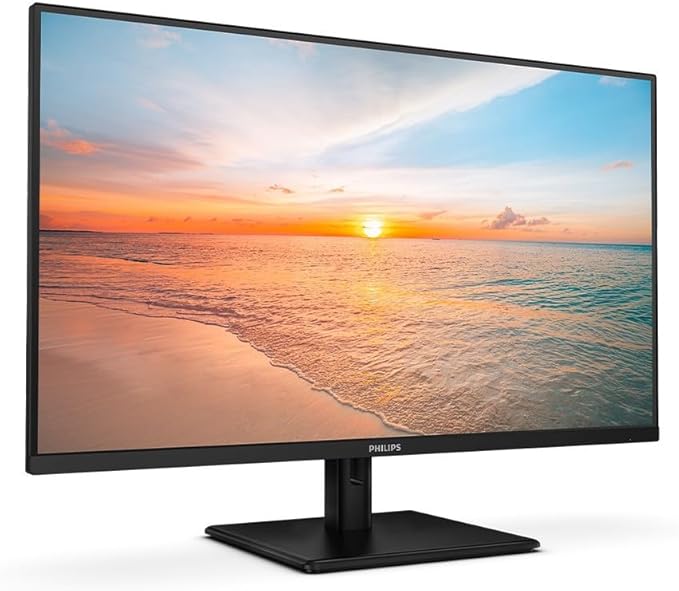
Samsung LS32A700NWEXXY 32inch S7 4K UHD VA Monitor
Crystal clear colour quality from 178° all around viewing angle in vivid and vibrant colour Near limitless hues and HDR10 for 1 billion colours with incredible depth Uninterrupted concentration for optimum productivity with a virtually borderless design Experience bigger picture, deeper detail UHD resolution Explore and immerse yourself in every detail. With 4x the pixels of Full HD, every detail is viewed in enhanced depth, while more screen real estate provides space to view multiple tools, applications and programs during the day – creating a 4K cinematic content viewing experience night and day. njoy amazing colours with incredible depth Amazing colours with HDR10 Enjoy any content in stunning colour accuracy and detail. With a wide range of colours, near limitless hues and HDR10, which makes dark colours dark and the brightest colours bright, every piece of content becomes a joy to look at and can be experienced exactly as the creator intended. Uninterrupted focus for optimum productivity With a virtually borderless design, stay focused on your work with minimum distractions. Or with dual-monitors, scan between multiple apps, emails or documents without breaking focus with near gapless continuity, complemented by the slim metal stand to meet any aesthetic needs. Plug and see Auto Source Switch With Automatic Source Switch, your monitor detects newly connected devices as soon they're plugged in, and displays the correct signal. No more switching around and searching for the right input on the menu.
Crystal clear colour quality from 178° all around viewing angle in vivid and vibrant colour Near limitless hues and HDR10 for 1 billion colours with incredible depth Uninterrupted concentration for optimum productivity with a virtually borderless design Experience bigger picture, deeper detail UHD resolution Explore and immerse yourself in every detail. With 4x the pixels of Full HD, every detail is viewed in enhanced depth, while more screen real estate provides space to view multiple tools, applications and programs during the day – creating a 4K cinematic content viewing experience night and day. njoy amazing colours with incredible depth Amazing colours with HDR10 Enjoy any content in stunning colour accuracy and detail. With a wide range of colours, near limitless hues and HDR10, which makes dark colours dark and the brightest colours bright, every piece of content becomes a joy to look at and can be experienced exactly as the creator intended. Uninterrupted focus for optimum productivity With a virtually borderless design, stay focused on your work with minimum distractions. Or with dual-monitors, scan between multiple apps, emails or documents without breaking focus with near gapless continuity, complemented by the slim metal stand to meet any aesthetic needs. Plug and see Auto Source Switch With Automatic Source Switch, your monitor detects newly connected devices as soon they're plugged in, and displays the correct signal. No more switching around and searching for the right input on the menu.
Crystal clear colour quality from 178° all around viewing angle in vivid and vibrant colour Near limitless hues and HDR10 for 1 billion colours with incredible depth Uninterrupted concentration for optimum productivity with a virtually borderless design Experience bigger picture, deeper detail UHD resolution Explore and immerse yourself in every detail. With 4x the pixels of Full HD, every detail is viewed in enhanced depth, while more screen real estate provides space to view multiple tools, applications and programs during the day – creating a 4K cinematic content viewing experience night and day. njoy amazing colours with incredible depth Amazing colours with HDR10 Enjoy any content in stunning colour accuracy and detail. With a wide range of colours, near limitless hues and HDR10, which makes dark colours dark and the brightest colours bright, every piece of content becomes a joy to look at and can be experienced exactly as the creator intended. Uninterrupted focus for optimum productivity With a virtually borderless design, stay focused on your work with minimum distractions. Or with dual-monitors, scan between multiple apps, emails or documents without breaking focus with near gapless continuity, complemented by the slim metal stand to meet any aesthetic needs. Plug and see Auto Source Switch With Automatic Source Switch, your monitor detects newly connected devices as soon they're plugged in, and displays the correct signal. No more switching around and searching for the right input on the menu.
Crystal clear colour quality from 178° all around viewing angle in vivid and vibrant colour Near limitless hues and HDR10 for 1 billion colours with incredible depth Uninterrupted concentration for optimum productivity with a virtually borderless design Experience bigger picture, deeper detail UHD resolution Explore and immerse yourself in every detail. With 4x the pixels of Full HD, every detail is viewed in enhanced depth, while more screen real estate provides space to view multiple tools, applications and programs during the day – creating a 4K cinematic content viewing experience night and day. njoy amazing colours with incredible depth Amazing colours with HDR10 Enjoy any content in stunning colour accuracy and detail. With a wide range of colours, near limitless hues and HDR10, which makes dark colours dark and the brightest colours bright, every piece of content becomes a joy to look at and can be experienced exactly as the creator intended. Uninterrupted focus for optimum productivity With a virtually borderless design, stay focused on your work with minimum distractions. Or with dual-monitors, scan between multiple apps, emails or documents without breaking focus with near gapless continuity, complemented by the slim metal stand to meet any aesthetic needs. Plug and see Auto Source Switch With Automatic Source Switch, your monitor detects newly connected devices as soon they're plugged in, and displays the correct signal. No more switching around and searching for the right input on the menu.
in 3 offers
The lowest price for Samsung LS32A700NWEXXY 32inch S7 4K UHD VA Monitor right now is $399.00 at Umart, compared across 3 retailers.
The all-time low was $109.76 on 20 Nov 2024 — today's price is 264% above the lowest ever. It has been notably cheaper before — worth setting a price alert.
Prices last updated 21 July 2026.
Last updated at 21/07/2026 01:37:06
Samsung S7 32in 4K UHD LED Monitor (LS32A700NWEXXY)
30-day returns
Samsung S7 32in 4K UHD LED Monitor (LS32A700NWEXXY)
30-day returns
Samsung S7 31.5"/32" 4K UHD 60Hz HDR10 VA panels Monitor 3840x2160 5ms DisplayPort HDMI 3xUSB Tilt Pivot VESA PiP PbP Game Mode | Torstar
originally posted on samsung.com
use this monitor as my main monitor for editing photos, videos, and playing the occasional video game. I have been very impressed with the color and clarity it produces for each of these tasks. The detail you get when playing the video games on ultra settings is amazing. When editing the photos I am able to clearly see the details that I need to edit and with the color accuracy I'm able to ensure that I have my white balance set correctly. I only wish I had come across this monitor sooner.The packaging: The monitor was packaged in a way that was easy to open and pull the monitor out of.Setup: The stand for the monitor was easy to assemble and even provided a channel for the cables to run through so that you can keep your desk clean.Use: Using this monitor for ... Moreuse this monitor as my main monitor for editing photos, videos, and playing the occasional video game. I have been very impressed with the color and clarity it produces for each of these tasks. The detail you get when playing the video games on ultra settings is amazing. When editing the photos I am able to clearly see the details that I need to edit and with the color accuracy I'm able to ensure that I have my white balance set correctly. I only wish I had come across this monitor sooner.The packaging: The monitor was packaged in a way that was easy to open and pull the monitor out of.Setup: The stand for the monitor was easy to assemble and even provided a channel for the cables to run through so that you can keep your desk clean.Use: Using this monitor for photo and video editing is solid. For its price point you can't beat the size, color, and clarity.If your in the market for a monitor that you can use to edit photos, videos, and you like to play video games, this one won't disappoint.
originally posted on samsung.com
A lot bigger than I thought. It was on sale so I didn't even consider the 27 inch. Great second monitor for M1 MacBook Pro. Haven't accessed all the features yet--but I have simple needs for screen real estate and open windows for spreadsheets and a monstrous music composing program. The 4K is a great eye upgrade from older PC monitors that pixelated with the MacBook Pro Display settings. It's like having a HUGE sheet of paper available.
originally posted on samsung.com
First one was faulty as had a dead pixel bottom left of screen and visible finger print marks under protection tape. Service menu showed only the time I used it, so wasn't used but looked used. Just very bad quality control from factory. Second screen seems ok so far. Just annoying as had a distance to drive to exchange it and wont get fuel money back! Very good monitor otherwise, just make sure quality control is sorted Samsung as i've been a fan for many years and it has dropped below acceptable levels for tvs and monitors the last couple years.
| Display | |
| Screen shape | Flat |
| High Dynamic Range (HDR) supported | Y |
| High Dynamic Range (HDR) technology | High Dynamic Range 10 (HDR10) |
| Maximum refresh rate | 60 Hz |
Samsung S7 32in 4K UHD LED Monitor (LS32A700NWEXXY)
30-day returns
Samsung S7 32in 4K UHD LED Monitor (LS32A700NWEXXY)
30-day returns
Samsung S7 31.5"/32" 4K UHD 60Hz HDR10 VA panels Monitor 3840x2160 5ms DisplayPort HDMI 3xUSB Tilt Pivot VESA PiP PbP Game Mode | Torstar
use this monitor as my main monitor for editing photos, videos, and playing the occasional video game. I have been very impressed with the color and clarity it produces for each of these tasks. The detail you get when playing the video games on ultra settings is amazing. When editing the photos I am able to clearly see the details that I need to edit and with the color accuracy I'm able to ensure that I have my white balance set correctly. I only wish I had come across this monitor sooner.The packaging: The monitor was packaged in a way that was easy to open and pull the monitor out of.Setup: The stand for the monitor was easy to assemble and even provided a channel for the cables to run through so that you can keep your desk clean.Use: Using this monitor for ... Moreuse this monitor as my main monitor for editing photos, videos, and playing the occasional video game. I have been very impressed with the color and clarity it produces for each of these tasks. The detail you get when playing the video games on ultra settings is amazing. When editing the photos I am able to clearly see the details that I need to edit and with the color accuracy I'm able to ensure that I have my white balance set correctly. I only wish I had come across this monitor sooner.The packaging: The monitor was packaged in a way that was easy to open and pull the monitor out of.Setup: The stand for the monitor was easy to assemble and even provided a channel for the cables to run through so that you can keep your desk clean.Use: Using this monitor for photo and video editing is solid. For its price point you can't beat the size, color, and clarity.If your in the market for a monitor that you can use to edit photos, videos, and you like to play video games, this one won't disappoint.
A lot bigger than I thought. It was on sale so I didn't even consider the 27 inch. Great second monitor for M1 MacBook Pro. Haven't accessed all the features yet--but I have simple needs for screen real estate and open windows for spreadsheets and a monstrous music composing program. The 4K is a great eye upgrade from older PC monitors that pixelated with the MacBook Pro Display settings. It's like having a HUGE sheet of paper available.
First one was faulty as had a dead pixel bottom left of screen and visible finger print marks under protection tape. Service menu showed only the time I used it, so wasn't used but looked used. Just very bad quality control from factory. Second screen seems ok so far. Just annoying as had a distance to drive to exchange it and wont get fuel money back! Very good monitor otherwise, just make sure quality control is sorted Samsung as i've been a fan for many years and it has dropped below acceptable levels for tvs and monitors the last couple years.
I mainly use this monitor for my day to day college work. Screen is good at the price I paid but it has issues of connectivity. It has a lag while displaying my laptop screen. Once I connect this with my laptop it takes some time to display and some time I need to press manual buttons on my monitor for it to get active. I have tried both windows and Mac but faces same issues
Purchased New. Monitor looks great. Great Color, Great Resolution.... BUT the screen Randomly turns BLANK! I thought this was just a bad screen, so I returned to store and exchanged the 1st screen for a 2nd of the same model. It Continues to randomly go BLANK. Sometimes for a second, sometimes for 30-60 seconds. NO indication on screen stating "no signal from device". Just BLANK!! Two of this model with the same problem???? NOT a coincidence! FYI: I used three separate HDMI cords... SAME PROBLEM! So, I finally hooked up to my previous monitor and ... Surprise! NO Issues with previous monitor. Also, while it was Blank, I pushed the Power button on the monitor and No Response! Just a BAD DESIGN. Too bad. I really liked the monitor. I DO NOT RECOMMEND THIS MONITOR! ... MorePurchased New. Monitor looks great. Great Color, Great Resolution.... BUT the screen Randomly turns BLANK! I thought this was just a bad screen, so I returned to store and exchanged the 1st screen for a 2nd of the same model. It Continues to randomly go BLANK. Sometimes for a second, sometimes for 30-60 seconds. NO indication on screen stating "no signal from device". Just BLANK!! Two of this model with the same problem???? NOT a coincidence! FYI: I used three separate HDMI cords... SAME PROBLEM! So, I finally hooked up to my previous monitor and ... Surprise! NO Issues with previous monitor. Also, while it was Blank, I pushed the Power button on the monitor and No Response! Just a BAD DESIGN. Too bad. I really liked the monitor. I DO NOT RECOMMEND THIS MONITOR! Maybe it is simply Not compatible with the high end Apple technology. Very Disappointed.
This monitor is very good for the price point! I am by no means a tech nerd so I don't really understand the nuances that some people like to pick apart on these things. I do know that this a decent monitor and you get what you pay for. It's big (to me) 27 screen gives me lots of real estate to work with. It has great and pretty accurate colors. I like that there's zero bezel on it. I'm not sure I'm a big fan of it's eye protection software as it constantly changes tone on me from bright white to a yellowish tint. But you can easily turn this off in the settings. It does seem to keen to one side so it looks as though the monitor is tilted to the left. This monitor does tilt up and down but not side to side. Overall I really like this monitor. You get quite a bit at ... MoreThis monitor is very good for the price point! I am by no means a tech nerd so I don't really understand the nuances that some people like to pick apart on these things. I do know that this a decent monitor and you get what you pay for. It's big (to me) 27 screen gives me lots of real estate to work with. It has great and pretty accurate colors. I like that there's zero bezel on it. I'm not sure I'm a big fan of it's eye protection software as it constantly changes tone on me from bright white to a yellowish tint. But you can easily turn this off in the settings. It does seem to keen to one side so it looks as though the monitor is tilted to the left. This monitor does tilt up and down but not side to side. Overall I really like this monitor. You get quite a bit at this price point. I'm not disappointed and I would buy it again if I needed to.
The set up of the monitor was simple enough, thank goodness because the instructions were unclear. Annoyingly, the instructions seemed to imply a wall mount set up, which is what I wanted, but was not included in the delivered parts.Unfortunately there was also some kind of buggy interaction with the monitor and my pc, but I haven't managed to diagnose the issue, just the solution. The bug that occurred was causing both screens to freeze up/stop working, and sometimes distort the picture on this monitor. Since finding a solution, it hasn't reoccurred.
Unfortunately I'm a little disappointed with this monitor. I like the minimal bezels and the contrast / colours seem good, but the viewing angle is poor. Even a small movement of the head changes the colours visible and the corners of the screen look more washed out. The screen has a kind of anti-glare finish which I like, but it also makes it look like there's a filter over the screen and gives the image a slightly grainy appearance. Another negative is that it takes ages to wake up after switching off due to energy saving functions (I have two smaller Samsung monitors either side of this and they are also very slow at waking up). I didn't have this problem with my older monitors in the same set-up so I think this must be a Samsung firmware issue.
I had planned to use this as a second external display for work from home connected to my MacBook Pro. The display is crystal clear with perfect colors, but would not stay connected to my Mac. It continuously blinks and keeps re-adjusting at any resolution that I have tried. The other Display is a non-Samsung and it seems to be doing much better. Was also sent to Samsung Care for in-warranty repair, but it came back still defective. I am totally unhappy with my purchase and would be very cautious on another Samsung purchase in future. I have also tried with 2 other MacBook's & one Windows PC - all with same results - this keeps going dark in-and-out.
| Display | |
| Screen shape | Flat |
| High Dynamic Range (HDR) supported | Y |
| High Dynamic Range (HDR) technology | High Dynamic Range 10 (HDR10) |
| Maximum refresh rate | 60 Hz |