Last updated at 05/09/2026 05:00:10
SanDisk 64GB Ultra USB Type-C Flash Drive - USB3.1
Delivery between 10–19 Sept $12
SanDisk 64GB Ultra USB 3.1 Type-C Flash Drive
SanDisk Ultra USB-C Flash Drive CZ460 64GB
Delivery between Tue – Fri $10
Sandisk Type C Usb 3.1 32gb 64g 128g 256g Ultra Dual Luxe Go Flash
Free delivery
Affiliate Disclosure: We may receive a small commission for purchases made through this link at no extra cost to you. This helps support our site. Thank you!
SanDisk 64GB Ultra USB 3.1 Type-C Flash Drive Slim Retractable Design Fast 150MBs Read
Free delivery between 8–15 Sept
SanDisk Ultra USB Type-C Flash Drive, CZ460 64GB, USB Type C 3.1, Black, Super-thin Retractable, 5Y
Delivery between Tue – Fri $20
Sandisk
Delivery between 15–18 Sept $11.16
64GB SanDisk Ultra USB Type C 3.1 Flash Drive CZ460 Black SDCZ460-064G-G46 | Best Online Computer Store
Delivery between 10–18 Sept $9.90
SanDisk USB Ultra 64GB Type-C Flash Drive Memory Stick SDCZ460-064G
Delivery $3.95
SanDisk Ultra USB-C Flash Drive 64GB 150MB/s
Delivery $9.95
originally posted on bestbuy.com
Now that USB-C ports are so common on Windows computers, Macs, and many smartphones, drives with a USB-C connector are great for backing up files from -- and moving files between -- a wide variety of devices. That’s why I was excited to give this SanDisk Ultra USB 3.0 flash drive a try.As far as functionality goes, this flash drive does what it’s supposed to do. I was able to use it to read and write files on a Windows computer, a Mac, and my Android phone easily and quickly – just plug in and go. I am getting read speeds that are at or even a bit higher than the 150 mb/sec that SanDisk advertises for this drive. Write speeds have generally been between 65 and 75 mb/sec. To put that into real-life terms: I have a 10-minute FHD/1080p video that I recorded with an ... MoreNow that USB-C ports are so common on Windows computers, Macs, and many smartphones, drives with a USB-C connector are great for backing up files from -- and moving files between -- a wide variety of devices. That’s why I was excited to give this SanDisk Ultra USB 3.0 flash drive a try.As far as functionality goes, this flash drive does what it’s supposed to do. I was able to use it to read and write files on a Windows computer, a Mac, and my Android phone easily and quickly – just plug in and go. I am getting read speeds that are at or even a bit higher than the 150 mb/sec that SanDisk advertises for this drive. Write speeds have generally been between 65 and 75 mb/sec. To put that into real-life terms: I have a 10-minute FHD/1080p video that I recorded with an action camera (1.45 gb). I copied it to the SanDisk Ultra USB 3.0 flash drive in about 25 seconds, then copied it from there to another computer in about 10 seconds. Overall, these seem pretty fast for a flash drive, and are certainly good enough for me, although I know there are (and more expensive) options out there on the market.Another good thing about this flash drive is the compact form factor. It’s narrow -- just a bit wider than the USB-C connector itself – so it should fit into ports even when the neighboring one is occupied by something wider.This drive is also very lightweight. That could be a good thing, but for me it just drew attention to something I don’t like: The outer housing of this drive is plastic, and feels very thin and delicate. It doesn’t give off a rugged or durable feeling at all. Since it will mostly live in a small compartment of my laptop bag, I’m hoping this won’t be an issue for me. Despite the loop for attaching to a keychain or lanyard, I would not be confident keeping this drive in my pocket, on a keychain, or anywhere else it might get bumped around often.Another thing that’s disappointing is the slider to retract the USB-C connector when it’s not in use. When I first got the flash drive, the mechanism was downright difficult to use. It didn’t glide smoothly at all. Instead, it sort-of stuttered along as I held the drive firmly with one hand and forced the slider button down and over with my other. Now, after a few days of working it in, the slider seems to have loosened up a bit. I can at least extend and retract the connector using one hand, but it still feels like I’m having to apply way too much force to a device that feels so delicate.Overall, this is a fast, functional flash drive stuck in an unfortunately mediocre shell. If you don’t mind a thin plastic housing and a slightly hard to use slider, it could be a decent option. I personally would have preferred something that had external construction that was as good as the internal electronics.
originally posted on bestbuy.com
Having just moved, finding my thumb drives and accessories has been a chore, so this came at just the right time. When this 256G thumb drive hit my doorstep and I opened the package, I was shocked to see how thin it was; so much so that I had to go try to find an old thumb drive for comparison.I must say, this is my first USB-C thumb drive and I like the fact that I don’t have to use an adapter for most of the machines I’m using these days.Unlike other brands, there isn’t a usb protector cap you slide over the end, but it’s built into the case itself. I find sliding the case is a bit difficult when you put pressure in the wrong place.The matte style case is noticeably not slippery and has a distinct different feel to other glossy thumb drives. The Red activity ... MoreHaving just moved, finding my thumb drives and accessories has been a chore, so this came at just the right time. When this 256G thumb drive hit my doorstep and I opened the package, I was shocked to see how thin it was; so much so that I had to go try to find an old thumb drive for comparison.I must say, this is my first USB-C thumb drive and I like the fact that I don’t have to use an adapter for most of the machines I’m using these days.Unlike other brands, there isn’t a usb protector cap you slide over the end, but it’s built into the case itself. I find sliding the case is a bit difficult when you put pressure in the wrong place.The matte style case is noticeably not slippery and has a distinct different feel to other glossy thumb drives. The Red activity LED can be seen from both sides of the thumb drive when in use. The plastic seems a bit thin, so I’m not keen on the idea of throwing a keychain ring around it.It comes with “Memory Zone” software for phone backup. I used Memory Zone with my S10+ (don’t laugh) for about two hours at first and it didn’t seem to progress over 80% even running in the foreground (vs background) and everything got super hot. Running it days later seems to do a ‘don’t back up the files again if they already exist’ style (incremental) backup and eventually finished as I’d have expected in the first place - but this time well under 2 hours. Once completed, it gives me a restore option, which is pretty cool. Backing up my SD card is a different process and is more of a copy/paste action of the app and can’t be run in the background.I also tested simple drag/drop speeds but I don’t use benchmark tests because I find them to be unrealistic as there’s overhead depending on the filesystem that the device is formatted with. If you don’t care about files over 2GB, then the ‘out of the box’ FAT32 is fine for you, but going to NTFS for large file support will drop android/Mac ease of use.As for the speeds … you’re always as fast as the slowest component. USB bus, extender, spinning disk, NVME, M.2, SSD - all contribute to how fast this can be.My tests were perfectly fine from my perspective - and this is coming from a guy that works on Enterprise Storage for a living and where IOPS and Throughput mean different things.If I had to suggest improvements, it’d be a better slide mechanism and a keychain loop that feels a bit more sturdy.Overall, a nice drive and will make it part of my EDC.
originally posted on bestbuy.com
This USB drive provides 256GB of storage with a 3.1 Gen 1 USB Type-C interface (backward compatible with USB 2.0) that claims speeds up to 150 Mbps on file transfers. Has encryption software to protect your files and a 1-year subscription for RescuePro file recoveryThe USB is small and lightweight with build quality being plastic that feels a bit flimsy, it has a slider that covers the USB C port when you pull down on the button and a loophole to attach your keychain to. I would have felt better if the outer case were made from metal or a more durable plastic before I would attach this to my keys.Could not achieve any were near the advertised 150 Mbsp on file transfers that averaged around 60 Mbsp on my tests (pictured) when trying on two different computers. ... MoreThis USB drive provides 256GB of storage with a 3.1 Gen 1 USB Type-C interface (backward compatible with USB 2.0) that claims speeds up to 150 Mbps on file transfers. Has encryption software to protect your files and a 1-year subscription for RescuePro file recoveryThe USB is small and lightweight with build quality being plastic that feels a bit flimsy, it has a slider that covers the USB C port when you pull down on the button and a loophole to attach your keychain to. I would have felt better if the outer case were made from metal or a more durable plastic before I would attach this to my keys.Could not achieve any were near the advertised 150 Mbsp on file transfers that averaged around 60 Mbsp on my tests (pictured) when trying on two different computers. Also tried older USB Type-A drives on the same computers and got speeds over 100 Mbsp on them, so it is strange that the newer Sandisk does not get these speeds?Software wise the drive has a PDF with instructions on how to install the Android app (SanDisk Memory Zone) on your phone that lets you browse, backup, organize and store files between internal memory, microSD cards and SanDisk Drives. Memory Zone provides access to popular online storage services allowing users to easily move files between local storage and cloud storage locations. It also has an APK file on drive to install the software directly to your phone. There is no mention on how to get the advertised encryption software. I had to Google search (or in my case Duckduckgo) to the download page for SanDisk SecureAccess 3.02: https://kb.sandisk.com/app/answers/detail/a_id/2399/~/sandisk-secureaccess-3.02-support-information-and-download-page You run the software from within the flash drive and it provides 128-bit AES encryption which I use to encrypt my personnel and work files. It is easy to set up and very nice overall.My final thought on this product is that it is a bit slow for a newer USB, but I may just a have faulty drive? The software makes up for the faults of the flash drive with backing up your phone and encryption options.
| Capacity | 32GB 64GB 128GB 256GB |
| Interface | USB 3.1 Gen 1 |
| Connector | USB-C |
| Dimensions (L x W x H) | 2.34" x 0.49" x 0.34" |
| Sequential Read Performance | Up to 150MB/s |
SanDisk 64GB Ultra USB Type-C Flash Drive - USB3.1
Delivery between 10–19 Sept $12
SanDisk 64GB Ultra USB 3.1 Type-C Flash Drive
SanDisk Ultra USB-C Flash Drive CZ460 64GB
Delivery between Tue – Fri $10
Sandisk Type C Usb 3.1 32gb 64g 128g 256g Ultra Dual Luxe Go Flash
Free delivery
Affiliate Disclosure: We may receive a small commission for purchases made through this link at no extra cost to you. This helps support our site. Thank you!
SanDisk 64GB Ultra USB 3.1 Type-C Flash Drive Slim Retractable Design Fast 150MBs Read
Free delivery between 8–15 Sept
Now that USB-C ports are so common on Windows computers, Macs, and many smartphones, drives with a USB-C connector are great for backing up files from -- and moving files between -- a wide variety of devices. That’s why I was excited to give this SanDisk Ultra USB 3.0 flash drive a try.As far as functionality goes, this flash drive does what it’s supposed to do. I was able to use it to read and write files on a Windows computer, a Mac, and my Android phone easily and quickly – just plug in and go. I am getting read speeds that are at or even a bit higher than the 150 mb/sec that SanDisk advertises for this drive. Write speeds have generally been between 65 and 75 mb/sec. To put that into real-life terms: I have a 10-minute FHD/1080p video that I recorded with an ... MoreNow that USB-C ports are so common on Windows computers, Macs, and many smartphones, drives with a USB-C connector are great for backing up files from -- and moving files between -- a wide variety of devices. That’s why I was excited to give this SanDisk Ultra USB 3.0 flash drive a try.As far as functionality goes, this flash drive does what it’s supposed to do. I was able to use it to read and write files on a Windows computer, a Mac, and my Android phone easily and quickly – just plug in and go. I am getting read speeds that are at or even a bit higher than the 150 mb/sec that SanDisk advertises for this drive. Write speeds have generally been between 65 and 75 mb/sec. To put that into real-life terms: I have a 10-minute FHD/1080p video that I recorded with an action camera (1.45 gb). I copied it to the SanDisk Ultra USB 3.0 flash drive in about 25 seconds, then copied it from there to another computer in about 10 seconds. Overall, these seem pretty fast for a flash drive, and are certainly good enough for me, although I know there are (and more expensive) options out there on the market.Another good thing about this flash drive is the compact form factor. It’s narrow -- just a bit wider than the USB-C connector itself – so it should fit into ports even when the neighboring one is occupied by something wider.This drive is also very lightweight. That could be a good thing, but for me it just drew attention to something I don’t like: The outer housing of this drive is plastic, and feels very thin and delicate. It doesn’t give off a rugged or durable feeling at all. Since it will mostly live in a small compartment of my laptop bag, I’m hoping this won’t be an issue for me. Despite the loop for attaching to a keychain or lanyard, I would not be confident keeping this drive in my pocket, on a keychain, or anywhere else it might get bumped around often.Another thing that’s disappointing is the slider to retract the USB-C connector when it’s not in use. When I first got the flash drive, the mechanism was downright difficult to use. It didn’t glide smoothly at all. Instead, it sort-of stuttered along as I held the drive firmly with one hand and forced the slider button down and over with my other. Now, after a few days of working it in, the slider seems to have loosened up a bit. I can at least extend and retract the connector using one hand, but it still feels like I’m having to apply way too much force to a device that feels so delicate.Overall, this is a fast, functional flash drive stuck in an unfortunately mediocre shell. If you don’t mind a thin plastic housing and a slightly hard to use slider, it could be a decent option. I personally would have preferred something that had external construction that was as good as the internal electronics.
Having just moved, finding my thumb drives and accessories has been a chore, so this came at just the right time. When this 256G thumb drive hit my doorstep and I opened the package, I was shocked to see how thin it was; so much so that I had to go try to find an old thumb drive for comparison.I must say, this is my first USB-C thumb drive and I like the fact that I don’t have to use an adapter for most of the machines I’m using these days.Unlike other brands, there isn’t a usb protector cap you slide over the end, but it’s built into the case itself. I find sliding the case is a bit difficult when you put pressure in the wrong place.The matte style case is noticeably not slippery and has a distinct different feel to other glossy thumb drives. The Red activity ... MoreHaving just moved, finding my thumb drives and accessories has been a chore, so this came at just the right time. When this 256G thumb drive hit my doorstep and I opened the package, I was shocked to see how thin it was; so much so that I had to go try to find an old thumb drive for comparison.I must say, this is my first USB-C thumb drive and I like the fact that I don’t have to use an adapter for most of the machines I’m using these days.Unlike other brands, there isn’t a usb protector cap you slide over the end, but it’s built into the case itself. I find sliding the case is a bit difficult when you put pressure in the wrong place.The matte style case is noticeably not slippery and has a distinct different feel to other glossy thumb drives. The Red activity LED can be seen from both sides of the thumb drive when in use. The plastic seems a bit thin, so I’m not keen on the idea of throwing a keychain ring around it.It comes with “Memory Zone” software for phone backup. I used Memory Zone with my S10+ (don’t laugh) for about two hours at first and it didn’t seem to progress over 80% even running in the foreground (vs background) and everything got super hot. Running it days later seems to do a ‘don’t back up the files again if they already exist’ style (incremental) backup and eventually finished as I’d have expected in the first place - but this time well under 2 hours. Once completed, it gives me a restore option, which is pretty cool. Backing up my SD card is a different process and is more of a copy/paste action of the app and can’t be run in the background.I also tested simple drag/drop speeds but I don’t use benchmark tests because I find them to be unrealistic as there’s overhead depending on the filesystem that the device is formatted with. If you don’t care about files over 2GB, then the ‘out of the box’ FAT32 is fine for you, but going to NTFS for large file support will drop android/Mac ease of use.As for the speeds … you’re always as fast as the slowest component. USB bus, extender, spinning disk, NVME, M.2, SSD - all contribute to how fast this can be.My tests were perfectly fine from my perspective - and this is coming from a guy that works on Enterprise Storage for a living and where IOPS and Throughput mean different things.If I had to suggest improvements, it’d be a better slide mechanism and a keychain loop that feels a bit more sturdy.Overall, a nice drive and will make it part of my EDC.
This USB drive provides 256GB of storage with a 3.1 Gen 1 USB Type-C interface (backward compatible with USB 2.0) that claims speeds up to 150 Mbps on file transfers. Has encryption software to protect your files and a 1-year subscription for RescuePro file recoveryThe USB is small and lightweight with build quality being plastic that feels a bit flimsy, it has a slider that covers the USB C port when you pull down on the button and a loophole to attach your keychain to. I would have felt better if the outer case were made from metal or a more durable plastic before I would attach this to my keys.Could not achieve any were near the advertised 150 Mbsp on file transfers that averaged around 60 Mbsp on my tests (pictured) when trying on two different computers. ... MoreThis USB drive provides 256GB of storage with a 3.1 Gen 1 USB Type-C interface (backward compatible with USB 2.0) that claims speeds up to 150 Mbps on file transfers. Has encryption software to protect your files and a 1-year subscription for RescuePro file recoveryThe USB is small and lightweight with build quality being plastic that feels a bit flimsy, it has a slider that covers the USB C port when you pull down on the button and a loophole to attach your keychain to. I would have felt better if the outer case were made from metal or a more durable plastic before I would attach this to my keys.Could not achieve any were near the advertised 150 Mbsp on file transfers that averaged around 60 Mbsp on my tests (pictured) when trying on two different computers. Also tried older USB Type-A drives on the same computers and got speeds over 100 Mbsp on them, so it is strange that the newer Sandisk does not get these speeds?Software wise the drive has a PDF with instructions on how to install the Android app (SanDisk Memory Zone) on your phone that lets you browse, backup, organize and store files between internal memory, microSD cards and SanDisk Drives. Memory Zone provides access to popular online storage services allowing users to easily move files between local storage and cloud storage locations. It also has an APK file on drive to install the software directly to your phone. There is no mention on how to get the advertised encryption software. I had to Google search (or in my case Duckduckgo) to the download page for SanDisk SecureAccess 3.02: https://kb.sandisk.com/app/answers/detail/a_id/2399/~/sandisk-secureaccess-3.02-support-information-and-download-page You run the software from within the flash drive and it provides 128-bit AES encryption which I use to encrypt my personnel and work files. It is easy to set up and very nice overall.My final thought on this product is that it is a bit slow for a newer USB, but I may just a have faulty drive? The software makes up for the faults of the flash drive with backing up your phone and encryption options.
I wanted to get a large flash drive to backup all my important files and photos Ive amassed a lot, and saw the prices of flash drives has come way down. I started using flashthumb drives for work back when the 1gb was considered a large drive, and when they announced a 4gb drive we all though whos going to put that much stuff on a thumb drive.Ive also used about every brand of flash drive available and still have a few of the old 1gb ones laying around and the only ones still working are the SanDisk branded ones, one in particular is the SanDisk Cruzer Titanium 1gb, the super heavy duty all metal bodied drive you wont ever see again, and it still works perfectly.Physical ImpressionsThis 256gb drive is physically the size thumb drive have pretty much been for quite a ... MoreI wanted to get a large flash drive to backup all my important files and photos Ive amassed a lot, and saw the prices of flash drives has come way down. I started using flashthumb drives for work back when the 1gb was considered a large drive, and when they announced a 4gb drive we all though whos going to put that much stuff on a thumb drive.Ive also used about every brand of flash drive available and still have a few of the old 1gb ones laying around and the only ones still working are the SanDisk branded ones, one in particular is the SanDisk Cruzer Titanium 1gb, the super heavy duty all metal bodied drive you wont ever see again, and it still works perfectly.Physical ImpressionsThis 256gb drive is physically the size thumb drive have pretty much been for quite a while now, the USB plug is retractable keeping it safe and secure when retracted. There isnt an activity light so you wont know if its doing anything, not important for me as its on the back of my desktop computer.SpeedThe flash drive is USB 3 and backwards compatible. Speed wise using Crystal Disk Mark Im getting around 116MBs Seq read, and 50MBs Seq write, not bad at all and Ive attached a screen shot of the test.Included SoftwareThe really nice thing is the software thats included with the flash drive. You get one year of Rescue Pro Deluxe, the key is inside the packaging and with it you can recover lost and accidentally erased files. It works for everything not just this thumb drive. I took a file folder with photos in it, about 1gb worth on the SanDisk drive, deleted it, emptied the recycle bin, and then had the software scan to recover it. Now it does take a while to scan this drive, its big so sit back or do something else while it goes about its business. After about an hour it was able to recover all the files in the test folder I created, now this will depend greatly on if youve written files to the drive after losingaccidentally deleting files. For the most accurate and thorough recovery you dont want to be using the media you are doing the recovery on till after youve recovered your files. Youll also have to rename your recovered files after it has finished running, but you can click on them to view in the recovery window so you know what you are renaming.Also under the flash drives main directory is the SanDisk Secure Access application. When you run it the first time it will ask that you set up an account and password for the secure folder. After entering your password you will be greeted with a simple file manager window. Just drag and drop files into the top secure area and it will encrypt all the files. If you view the drive with a standard file manager like the one in Windows 10 you will see the folder name but theres nothing in them to view, you will have to use the Secure Access application to view and unencrypt these files and folders. The whole process is reasonably fast too. I copied all my important stuff, about 175gb, in a couple hours, not bad for that much data.There is an upgrade option for the standard software, you can get a lifetime license for 15, I think thats reasonable just havent done it yet. It gets you 1024 bit encryption, automatic backup, syncing between devices, and sharing with others. Ill probably be upgrading to this in the future as it adds a lot of for low cost.Im keeping all my medical files on this as I do have some health issues and like to keep my entire medical easily portable if I happen to go see a new specialist. This way I can always have a backup of my records and theres plenty of space on this drive for xrays and, MRIs, CT scans and Ultrasounds. Plus with everything being encrypted I used a very secure password I wont worry much about someone getting my personal information if I do happen to lose the drive.OpinionThis is an excellent thumb drive, theres plenty of space for a lot of files, and I mean a lot. The included software allows you to encrypt your sensitive data so you wont have to worry about it falling into the wrong hands and the recovery software makes it pretty easy to recover any file you may have accidentally lost. The new flash drives from SanDisk are a real value.
The SanDisk Ultra USB 3.0 flash drive is exactly that, a 256GB flash drive in the basic portable format. I wouldnt call it rugged but the USB connector can be recessed into the housing to protect it. This necessarily increases the size of the drive a bit, but useful for something that youd essentially toss into bags, sit on in your back pocket, and generally abuse the way keys get abused on a day to day basis. Unlike keys which are typically made of metal and are both easy and cheap to copy, this drive is not so having builtin protection for this everyday device is nice to have.The 256GB capacity is nice. In fact, its almost hilarious thinking just how not too long ago, having a 256GB spinning platter drive was amazing in itself and certainly not something youd ... MoreThe SanDisk Ultra USB 3.0 flash drive is exactly that, a 256GB flash drive in the basic portable format. I wouldnt call it rugged but the USB connector can be recessed into the housing to protect it. This necessarily increases the size of the drive a bit, but useful for something that youd essentially toss into bags, sit on in your back pocket, and generally abuse the way keys get abused on a day to day basis. Unlike keys which are typically made of metal and are both easy and cheap to copy, this drive is not so having builtin protection for this everyday device is nice to have.The 256GB capacity is nice. In fact, its almost hilarious thinking just how not too long ago, having a 256GB spinning platter drive was amazing in itself and certainly not something youd casually toss in your bag when heading out the door. Its an amazing amount of storage when you consider that typical drives in home computers are barely breaking 2TB. This means you have 25 to 100 or more of the typical storage available on an entire computer. The great news this can serve as ad adhoc complete backup for most home applications as there is likely few files too large for this drive.The drive does come with some features softwarefirmware that puts it above a basic drive. Namely backup software always a plus and a secure access vault pretty much encrypted storage for your files. This is the biggest selling point for me. Secure storage that covers a significant amount of my personal machine capacity thats easy to move around is awesome. Generally, I dont access such files as often so it is nice to have them stored and not taking up space on my main machine. Because I have large files that need to be stored encrypted, accessing them across a couple different machines can be a pain due to the bandwidth requirements necessary to bridge machines via cloud storage, storage needs on the cloud, and then keeping encryption software synchronized on multiple machines. This provides a onestop shop for such files. Now, to be clear, I still maintain yet another backup on my large network storage at home as due to the size and mobility, this drive is more likely to be lost.SanDisks software also has its own cloud backup feature. It works, but then youre tied to SanDisks ecosystem. Normally, this results in me dropping a star in the rating, however, given that youre completely free to use your own, no harm no foul.
I built a custom desktop for myself in 2013. At the time, I was a poor college student redundant, I know but using some gift money and the whole DIYinsteadofprebuilt thing I was able to put together a system that wasnt totally terrible. It ran Windows an objectively superior operating system and also Premiere an objectively accessible nonlinear editing program for someone using an objectively superior operating system sorry, AVID, which was really what I cared about, because I was a film student. Oh, how I lusted over the BH catalogue in those days. For much of that time, I used an SD card to transfer files between my system and others, because my camera used SD cards I was shooting mostly on a T2i that I had bought from BH several years prior, which was good enough ... MoreI built a custom desktop for myself in 2013. At the time, I was a poor college student redundant, I know but using some gift money and the whole DIYinsteadofprebuilt thing I was able to put together a system that wasnt totally terrible. It ran Windows an objectively superior operating system and also Premiere an objectively accessible nonlinear editing program for someone using an objectively superior operating system sorry, AVID, which was really what I cared about, because I was a film student. Oh, how I lusted over the BH catalogue in those days. For much of that time, I used an SD card to transfer files between my system and others, because my camera used SD cards I was shooting mostly on a T2i that I had bought from BH several years prior, which was good enough for the most part, though Ill admit that it wasnt perfect, but I was in college and it was better than the Panasonic camcorders they were trying to shove onto us I care about shallow depth of field because I am knowledgable about cinematic language and techniques and read internet blogs about how to make movies on budgets, and my laptop that I also acquired at some point during this time had an SD card reader, so it was easy. Sometimes, I had wished that I was using a flash drive, but... it just never happened. Flash forward to 2016. I have a job that pays me enough per hour that I could buy at least one flash drive every single week if I wanted to, but instead of doing that, I decided to take the logical extension of that and upgrade my custombuilt PC with some new hard drives. And by hard drives, I mean solid state drives. My 128 GB primary SSD simply wasnt big enough to fit all of the things I wanted, so I bought a new SSD. And then I remembered, Oh no Im going to have to create a backup or something I dont know how this works, exactly on probably a USB Flash Drive in order to transfer my OS to a new drive without having to buy a new version of the OS. The internet and by that I mean Microsoft said that I should get a 16 GB hard drive, but as a blueblooded American, I knew that supersize was the only size. But, as I said, I get paid enough for one per week, so I didnt go crazy. I got a 64 GB drive. Honestly, if I need more than that, Ill use a real external hard drive, which I wont be able to afford for several more months, but I intend to eventually get anyway. Ive been told they are very important for film shoots, though I wouldnt know because no one ever wants me to be on their set, which makes me sad but isnt relevant to this review. Anyways, so I bought this flash drive, went to the internet, followed the instructions on how to setup a bootable USB drive, booted from it, installed the OS, and now I have Windows 10 lovely, beautiful Windows 10 on a new solid state drive that is significantly larger than my old one, so I should be all good, which I am happy about. Without this drive, it would have probably been a bad day. But it wasnt, so I think four out of five stars are in order. Id give it five, but Im probably going to lose it because its small, and I wont be really sad when it gets lost because I dont Love it like five stars requires I just like it, which is what four stars is. tldr see title of this review
Overview The performance of the drive is decent, generally matching what is advertised, and fitting well with the price point. I found the valueadding software to be quite disappointing, and not something Id recommend using. While usage of this software is optional, and I wouldnt usually take them into consideration when purchasing or recommending this type of product, as a Tech Insider, Ive been asked to focus my review on this software, which includes Flashback and SecureAccess. As a result, my overall rating gives significant consideration to this software. Flashback The Flashback software and service are designed to automatically backup files that are on the flash drive, to the cloud. While it is perhaps misleadingly indicated that you get Flashback with these ... MoreOverview The performance of the drive is decent, generally matching what is advertised, and fitting well with the price point. I found the valueadding software to be quite disappointing, and not something Id recommend using. While usage of this software is optional, and I wouldnt usually take them into consideration when purchasing or recommending this type of product, as a Tech Insider, Ive been asked to focus my review on this software, which includes Flashback and SecureAccess. As a result, my overall rating gives significant consideration to this software. Flashback The Flashback software and service are designed to automatically backup files that are on the flash drive, to the cloud. While it is perhaps misleadingly indicated that you get Flashback with these drives, as found on the Flashback landing page, it is important to note that what youre actually getting is a oneyear trial period of the service, after which a scaled fee is charged based on the storage capacity of the drive. While the promotional materials direct users to the Flashback landing page sandisk.comflashback to create an account and download the software, I was unable to find a means of achieving either from this page. I had to go out of my way to search the web for the download page sandisk.comflashbackapps.Once downloaded, installation of the software was quick and simple, and directed me through the required account creation process. The software automatically detected my flash drive, at which point the automatic backups were working. The software quickly detects new files as well as file changes, and by default displays a notification that a backup is underway. This notification, thankfully, can be disabled. The flashback service site is clean and easy to navigate, allowing users to quickly find files that have been deleted or lost, as well as shareunshare, preview, and download individual files. Sharing a file provides a URL that can be used by anyone to preview the file for supported file types, as well as download it. While the ability to download all backed up content was included, its implementation is rather clunky, where an email is sent containing a download linkURL for the archive Both the software and service are quite basic, missing many features found in competing productsservices. Noticeably lacking are file versioning, which would allow you to viewdownload old versions of backed up files, control over which filesfolders get backed up, as well as integrated clientside encryption. Granted, you can still perform encryption independently, with either Sandisks own SecureAccess software or similar thirdparty software.Unfortunately, the Flashback software has what I consider to be a critical flaw, making it rather unwieldy to use. While the Flashback software is running, the flash drive is locked such that using the safe removal or ejection features of Windows fails, and the Flashback software doesnt seem to provide its own safe removal option. This means that in order to safely remove the drive, I must terminate the Flashback process. I then must remember to manually launch Flashback once Ive reinserted the flash drive, if I want the automatic backups to resume. SecureAccess SecureAccess is a way of storing and backing up files in encrypted form. This is basically sharewarecrippleware used to promote a paid product that goes by a different name. Setup is quick and easy, and usage is fairly straightforward, if a bit clunky. The features provided are a small fraction of what can be found in free competing products. Features such as singlefile containers, being able to mount a vault as this software calls it as a drive, having choice of encryption algorithm used, and integration with any type of backup service even Sandisks own are all noticeably missing. Hardware The outer design of this drive isnt great. The thin, tapered notch used for the mechanical sliding action is particularly bad, worse than those found on any other similar drive Ive owned, including several Sandisk Cruzers that each have different slide designs. On the potentially positive side, the case has a hole that allows attachment to a keyring with reasonable ease, whereas most other USB flash drives Ive owned are only designed for attachment to lanyards.The drive benchmarks well, backing up the advertised speeds as reasonable. These speeds are considerably faster than much cheaper drives while falling short of higher end drives that charge a premium for increased speeds particularly write speeds, putting this drive in a comfortable middle zone. The good capacity and performance to cost ratio should serve most people well. Conclusion My experience with Sandisks flash media have been mostly positive its a brand I trust. I find this drives capacity and performance at this price point to be a good value. The optional valueadding software is not great, and I wouldnt recommend their use. I would, however, recommend the device itself.
I really like that the Sandisk USB 3.0 256gb flash drive has plenty of space for all of my music files, videos, and documents. Even though it is stated as 256gb drive, actual available storage space is 233gb. Build quality on the drive is poor. The all plastic enclosure is loose and wobbly and it gives the impression that it can break off if inserted or removed with force. Youll need to handle this drive with care.I performed a nonscientific test of write speed. I transferred 27 gb of music files to the flash drive and it took 27 minutes, so 1gbmin. The drive does become warm during file transfer, but the amount of heat generated appears normal.The flash drive comes with two useful software to enable file security and access. The first is Sandisks Secure Access ... MoreI really like that the Sandisk USB 3.0 256gb flash drive has plenty of space for all of my music files, videos, and documents. Even though it is stated as 256gb drive, actual available storage space is 233gb. Build quality on the drive is poor. The all plastic enclosure is loose and wobbly and it gives the impression that it can break off if inserted or removed with force. Youll need to handle this drive with care.I performed a nonscientific test of write speed. I transferred 27 gb of music files to the flash drive and it took 27 minutes, so 1gbmin. The drive does become warm during file transfer, but the amount of heat generated appears normal.The flash drive comes with two useful software to enable file security and access. The first is Sandisks Secure Access Vault which is a file encryption software. You simply create a password and encrypt your files by dropping them into the Sandisk Vault. They are then electronically locked or encrypted. Nobody will be able to access your files without the decryption password. The only way to access the files is to enter your password in the Vault.Another handy tool is Sandisk Flashback. Flashback automates the backup process by transferring the entire contents in the flash drive to Sandisks Cloud. Youll be able to view and download the contents in the flash drive online without having the flash drive physically present. This becomes handy if you either left your flash drive at home or, worse, lost your flash drive entirely. You can recover all of your backed up content online. You can also share files with anyone by simply sending them a link to access the files in your Sandisk Cloud without having to attach large files onto an email.In order for all of this to function, Flashback software needs to be installed locally on your desktop or laptop computer to upload files to Sandisks Cloud server. Youll also need to create an account on the Sandisk Flashback website to access your files in Sandisks Cloud server. Flashback is free for the 1st year, after that youll need to pay an annual subscription fee to continue access to your backed up files in the Sandisk Cloud. Ive attached a picture showing the subscription pricing at the time of my review.One limitation of the cloud backup feature is that backing up to the Sandisk cloud only works if you have the flash drive connected to a computer that has the Flashback software installed. In practice, there are numerous instances where youll be using the drive at a workstation, say at work computer or a friends computer, where the Flashback software isnt installed. The flash drive becomes a regular, run of the mill storage drive. Theres nothing wrong with this, you just simply need to be aware that no Cloud back up is being performed until you plug the flash drive back into your computer that has the Flashback software installed.Another limitation is that if you have files encrypted in the Sandisk Vault, those encrypted files will naturally remain encrypted, as they should, when backed up to the Sandisk Cloud. However, there is no way for you to access the encrypted files online in the Sandisk Cloud website since you wont be able to decrypt the files without the Sandisk Vault. The encrypted files can only be decrypted locally from within the flashdrive.All in all, this is a decent high capacity flash drive with some extra bonus features for securing your files and automatically backing up your flash drive to the cloud. I would recommend the flash drive.
I have been an avid SanDisk drive fan, whether it be SSD, compact flash, SD, or their older USB drives. However, over the past few years, I have found their USB drives lacking, and getting worse. Previously, I purchased some USB 2.0 Cruzer Glide drives, and found them painfully slow when writing compared to others I had from other companies. This week, I wanted to give them another try by buying the newer USB 3.0 Ultra SBCZ48032G and 128G the price was very attractive when on sale.Bottom line, I am returning the Ultra drives. They are still too painfully slow to use. I bought USB 3.0 drives and expect to get somewhere near that speed I do not expect USB 2.0 flash drive speeds with a USB 3.0 device.Comparing these drives to a PNY 128GB USB 3.0 drive I purchased a few ... MoreI have been an avid SanDisk drive fan, whether it be SSD, compact flash, SD, or their older USB drives. However, over the past few years, I have found their USB drives lacking, and getting worse. Previously, I purchased some USB 2.0 Cruzer Glide drives, and found them painfully slow when writing compared to others I had from other companies. This week, I wanted to give them another try by buying the newer USB 3.0 Ultra SBCZ48032G and 128G the price was very attractive when on sale.Bottom line, I am returning the Ultra drives. They are still too painfully slow to use. I bought USB 3.0 drives and expect to get somewhere near that speed I do not expect USB 2.0 flash drive speeds with a USB 3.0 device.Comparing these drives to a PNY 128GB USB 3.0 drive I purchased a few years ago, I did some testingbenchmarking. My tests were simple1 Use CrystalDiskMark 7.0.0f to benchmark the drives this is a commonly used tool.2 Copy 15 files, 8.62 GB total from a Corsair MP600 NVMe drive to selected USB Drives all using USB 3.0 ports, and as a checkpoint, to my local NAS this latter to ensure the MP600 NVMe drive was not the bottleneck.Summary see attached picture as well The PNY drive performed well and within what I expected regarding speed. It copied the files quickly, roughly 88 MBs consistently, taking approximately 1 minute, 41 seconds. The Ultra128 ran the benchmarks OK, but when it came to real world usage, it fell on its face after what appears to be that its internal cache was filled it went from roughly 78 MBs down to about 12 MBs after a few seconds of copying. It took approximately 3 minutes, 50 seconds to copy the same data to the Ultra128, more than twice the time required by the PNY. The Ultra32 ran the benchmarks fairly, but its internal cache appears to be smaller, and the 1GB benchmarks picked up on it. Unfortunately, the drive died become read only and I could no longer test it. And for those tech savvy folks out there, yes I did try DiskPart and other tools to fix it. From untimed tests, the 32G drive performed slightly worse than the 128GB drive.These benchmarkstests were performed with a home assembled machine Windows 10 Pro Asus TUF Gaming X570 WiFi motherboard AMD 3800X CPU Corsair MP600 NVMe 1TB Drive Corsair Vengeance memory, running at 3200MHz.SanDisk, time to pick up your game, or someone else will come along and beat you at it. If your SD cards are now able to handle up to 170MBs write speeds, why can your USB flash drives not handle even half of that Yes, I know, comparing apples and oranges.
I used to love the Western Digital USB thumb drives. They had such easy functionality - they were sturdy without being stiff, light without being flimsy. You never had the feeling you were accidentally going to break the thing. I also really liked their book series of portable drives.SanDisk won me over with their Extreme Portable SSD series which has a much nicer feel and much smaller surface area over the WD Book series, no moving pieces, and great design/UX with space for a clip or keychain hook, so when I heard SanDisk was doing USB-C flash drives, I was PSYCHED.This SanDisk flash drive is fantastic from the perspective of having a HUGE storage presence and the ability to connect easily to phones or tablets because of the USB-C interface. I've been hoping ... MoreI used to love the Western Digital USB thumb drives. They had such easy functionality - they were sturdy without being stiff, light without being flimsy. You never had the feeling you were accidentally going to break the thing. I also really liked their book series of portable drives.SanDisk won me over with their Extreme Portable SSD series which has a much nicer feel and much smaller surface area over the WD Book series, no moving pieces, and great design/UX with space for a clip or keychain hook, so when I heard SanDisk was doing USB-C flash drives, I was PSYCHED.This SanDisk flash drive is fantastic from the perspective of having a HUGE storage presence and the ability to connect easily to phones or tablets because of the USB-C interface. I've been hoping for a really good USB-C flash drive since Apple made USB-C ports standard on MacBooks and it seems like the market is finally catching up.In terms of a flash drive: it's fast and connects easily without any need for additional software or drivers or anything else. It's good to go.In terms of the physical design: I nearly broke the thing several times just trying to get the "slide" to work. Because of how the retracting USB-C port works, you have to grip the side or the back, and there's no real "grip". I suppose you could just leave the USB-C port out, but... since these tend to get shoved in pockets and such, not the best option. I still haven't figured out how to do this well. The lack of an included keychain attachment also is a huge gap as these can sometimes make tricky/sticky physical interfaces a lot easier to manage.While transferring large files over time, the flash drive also generated a LOT of heat. As in: it was physically hot to the touch after only 15 minutes of use transferring 2 multi-gig files.All in all: wait for a different physical case for this model. It works exactly as you'd expect a flash drive to work, but the physical limitations of the design are just so frustrating you'll probably wish you'd spent your money elsewhere. When SanDisk brings this flash drive up to the level of design as the rest of their smaller drives, dive in without hesitation.
| Capacity | 32GB 64GB 128GB 256GB |
| Interface | USB 3.1 Gen 1 |
| Connector | USB-C |
| Dimensions (L x W x H) | 2.34" x 0.49" x 0.34" |
| Sequential Read Performance | Up to 150MB/s |
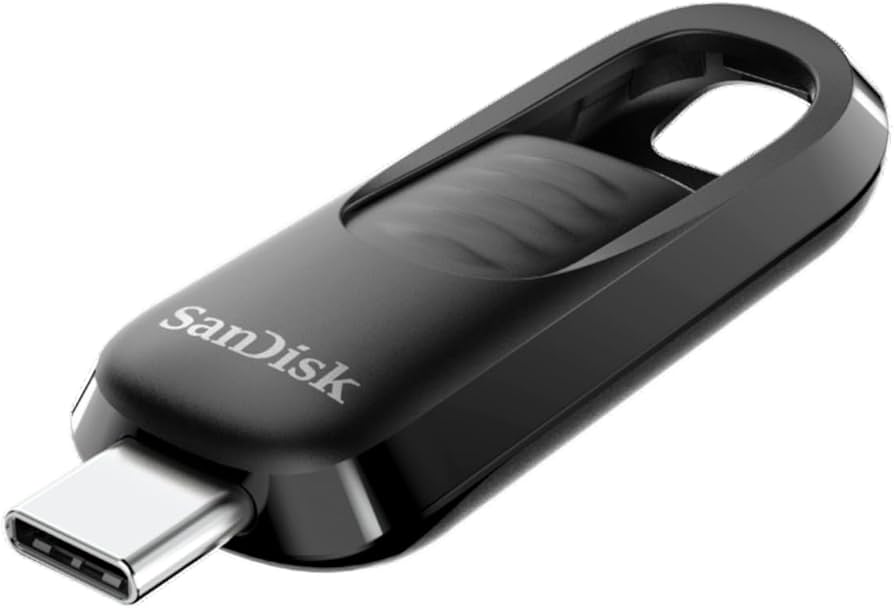
SanDisk USB 64GB Ultra Type-C Flash Drive
The SanDisk Ultra Slider is a high-performance USB flash drive designed to meet the needs of users who demand speed and portability. Featuring a USB-C 3.2 Gen 1 interface, it offers fast data transfer speeds, making it ideal for transferring large files quickly and efficiently. The drive's innovative retractable connector protects the interface and makes it easy to use, eliminating the need for a protective cap. With its durable design, it can operate in temperatures ranging from 0 °C to 45 °C, ensuring your data is safe in various conditions. Additionally, the inclusion of a key ring loop allows for easy attachment to keys or bags, ensuring your important files are always within reach. Whether you're a professional on-the-move or a student in need of reliable storage, the SanDisk Ultra Slider is a smart choice for your data storage needs.
The SanDisk Ultra Slider is a high-performance USB flash drive designed to meet the needs of users who demand speed and portability. Featuring a USB-C 3.2 Gen 1 interface, it offers fast data transfer speeds, making it ideal for transferring large files quickly and efficiently. The drive's innovative retractable connector protects the interface and makes it easy to use, eliminating the need for a protective cap. With its durable design, it can operate in temperatures ranging from 0 °C to 45 °C, ensuring your data is safe in various conditions. Additionally, the inclusion of a key ring loop allows for easy attachment to keys or bags, ensuring your important files are always within reach. Whether you're a professional on-the-move or a student in need of reliable storage, the SanDisk Ultra Slider is a smart choice for your data storage needs.
The SanDisk Ultra Slider is a high-performance USB flash drive designed to meet the needs of users who demand speed and portability. Featuring a USB-C 3.2 Gen 1 interface, it offers fast data transfer speeds, making it ideal for transferring large files quickly and efficiently. The drive's innovative retractable connector protects the interface and makes it easy to use, eliminating the need for a protective cap. With its durable design, it can operate in temperatures ranging from 0 °C to 45 °C, ensuring your data is safe in various conditions. Additionally, the inclusion of a key ring loop allows for easy attachment to keys or bags, ensuring your important files are always within reach. Whether you're a professional on-the-move or a student in need of reliable storage, the SanDisk Ultra Slider is a smart choice for your data storage needs.
The SanDisk Ultra Slider is a high-performance USB flash drive designed to meet the needs of users who demand speed and portability. Featuring a USB-C 3.2 Gen 1 interface, it offers fast data transfer speeds, making it ideal for transferring large files quickly and efficiently. The drive's innovative retractable connector protects the interface and makes it easy to use, eliminating the need for a protective cap. With its durable design, it can operate in temperatures ranging from 0 °C to 45 °C, ensuring your data is safe in various conditions. Additionally, the inclusion of a key ring loop allows for easy attachment to keys or bags, ensuring your important files are always within reach. Whether you're a professional on-the-move or a student in need of reliable storage, the SanDisk Ultra Slider is a smart choice for your data storage needs.
in 53 offers
The lowest price for SanDisk USB 64GB Ultra Type-C Flash Drive right now is $19.80 at TechBuy.com.au, compared across 46 retailers.
The all-time low was $18.95 on 24 May 2026 — today's price is 4% above the lowest ever. This is at or near its all-time low — a good time to buy.
Prices last updated 5 Sept 2026.

