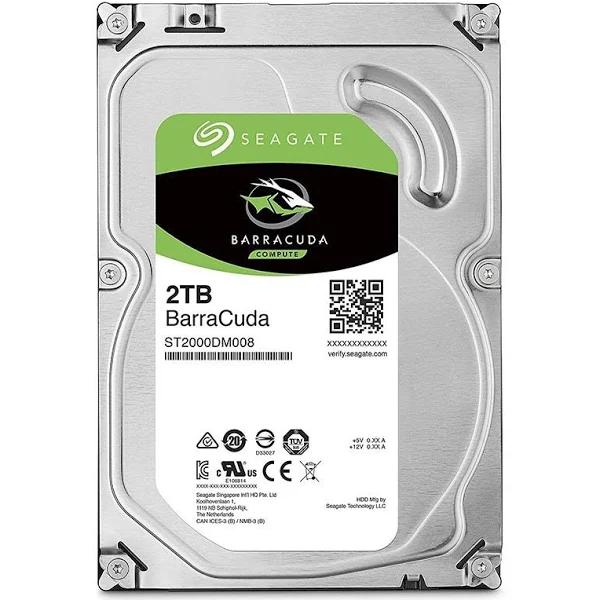
Play faster, work smarter. FireCuda drives meld the advanced SSD technology with a standard hard drive for a compact blend of capacity and faster speeds. FireCuda blends SSD technology and a standard HDD, resulting in performance similar to an SSD but with all the capacity you expect from an HDD. It's the perfect upgrade for gamers, creative professionals and PC enthusiasts. With a spacious storage, FireCuda makes deleting games and files - to free up disk space - a thing of the past. It is perfect for gamers and creative professionals who want it all, now.
Play faster, work smarter. FireCuda drives meld the advanced SSD technology with a standard hard drive for a compact blend of capacity and faster speeds. FireCuda blends SSD technology and a standard HDD, resulting in performance similar to an SSD but with all the capacity you expect from an HDD. It's the perfect upgrade for gamers, creative professionals and PC enthusiasts. With a spacious storage, FireCuda makes deleting games and files - to free up disk space - a thing of the past. It is perfect for gamers and creative professionals who want it all, now.
in 1 offers
The lowest price for Seagate 2TB FireCuda 3.5" Internal SSHD SATA Drive ST2000DX002 right now is $189.00 at JW Computers.
The all-time low was $189.00 on 10 Oct 2025. That's the lowest price we've ever tracked — a great time to buy.
Prices last updated 15 May 2026.
Seagate 2TB FireCuda 3.5" Internal SSHD SATA Drive ST2000DX002
Play faster, work smarter. FireCuda drives meld the advanced SSD technology with a standard hard drive for a compact blend of capacity and faster speeds. FireCuda blends SSD technology and a standard HDD, resulting in performance similar to an SSD but with all the capacity you expect from an HDD. It's the perfect upgrade for gamers, creative professionals and PC enthusiasts. With a spacious storage, FireCuda makes deleting games and files - to free up disk space - a thing of the past. It is perfect for gamers and creative professionals who want it all, now.
Play faster, work smarter. FireCuda drives meld the advanced SSD technology with a standard hard drive for a compact blend of capacity and faster speeds. FireCuda blends SSD technology and a standard HDD, resulting in performance similar to an SSD but with all the capacity you expect from an HDD. It's the perfect upgrade for gamers, creative professionals and PC enthusiasts. With a spacious storage, FireCuda makes deleting games and files - to free up disk space - a thing of the past. It is perfect for gamers and creative professionals who want it all, now.
Last updated at 15/05/2026 02:19:21
Seagate 2TB FireCuda 3.5" SATA3 8GB NAND Desktop SSHD
7-day returns
originally posted on neweggbusiness.com
It is deceptive, and I doubt it will ever stop, but 1.81GB is not 2TB. • If you are looking for a non-SSD HDD, this one is hard to beat. • Makes my “fast” Western Digital WD VelociRaptor WD3000HLFS look really slow. • Idle Temp: Didn’t notice that much of a temperature difference when idle, as others have reported. Mine was 1 degree C higher than my Seagate ST4000NC000-1FR168. Both drives are case fan cooled. Idle temp range from 20-23C. • Load Temp: Under extreme stress (using burn in utility) the drive went from 23C to 25C • Did not notice any bump in noise with this drive when idle or under stress. Comparison is as follows to show how this drive stacks up against other disks on my system. Testing performed on both empty and full drive (filled with disk utility ... MoreIt is deceptive, and I doubt it will ever stop, but 1.81GB is not 2TB. • If you are looking for a non-SSD HDD, this one is hard to beat. • Makes my “fast” Western Digital WD VelociRaptor WD3000HLFS look really slow. • Idle Temp: Didn’t notice that much of a temperature difference when idle, as others have reported. Mine was 1 degree C higher than my Seagate ST4000NC000-1FR168. Both drives are case fan cooled. Idle temp range from 20-23C. • Load Temp: Under extreme stress (using burn in utility) the drive went from 23C to 25C • Did not notice any bump in noise with this drive when idle or under stress. Comparison is as follows to show how this drive stacks up against other disks on my system. Testing performed on both empty and full drive (filled with disk utility “FillDisk”) Date : 2016/11/27 20:56:14 OS : Windows 10 Professional [10.0 Build 14965] (x64) CrystalDiskMark 5.0.2 x64 (C) 2007-2015 Test: Sequential Read (Q= 32,T= 1) FIRECUDA - EMPTY - FORMATTED ------------------------ 197.022 FIRECUDA – DRIVE FILLED WITH DISK UTILITY (FILLDISK)- 151.227 SAMSUNG 830 SSD ------------------------------------- 244.505 WDC Western Digital WD VelociRaptor WD3000HLFS ------ 89.898 Seagate ST4000NC000-1FR168 -------------------------- 119.846 Test: Sequential Write (Q= 32,T= 1) FIRECUDA - EMPTY - FORMATTED ------------------------ 214.303 FIRECUDA – DRIVE FILLED WITH DISK UTILITY (FILLDISK)- 207.882 SAMSUNG 830 SSD ------------------------------------- 230.539 WDC Western Digital WD VelociRaptor WD3000HLFS ------ 92.413 Seagate ST4000NC000-1FR168 -------------------------- 117.993 Test: Random Read 4KiB (Q= 32,T= 1) FIRECUDA - EMPTY - FORMATTED ------------------------ 0.665 FIRECUDA – DRIVE FILLED WITH DISK UTILITY (FILLDISK)- 0.693 SAMSUNG 830 SSD ------------------------------------- 29.767 WDC Western Digital WD VelociRaptor WD3000HLFS ------ 0.830 Seagate ST4000NC000-1FR168 -------------------------- 0.480 Test: Random Write 4KiB (Q= 32,T= 1) FIRECUDA - EMPTY - FORMATTED ------------------------ 4.840 FIRECUDA – DRIVE FILLED WITH DISK UTILITY (FILLDISK)- 4.866 SAMSUNG 830 SSD ------------------------------------- 68.725 WDC Western Digital WD VelociRaptor WD3000HLFS ------ 1.600 Seagate ST4000NC000-1FR168 -------------------------- 0.928 Test: Sequential Read (T= 1) FIRECUDA - EMPTY - FORMATTED ------------------------ 216.657 FIRECUDA – DRIVE FILLED WITH DISK UTILITY (FILLDISK)- 187.079 SAMSUNG 830 SSD ------------------------------------- 242.218 WDC Western Digital WD VelociRaptor WD3000HLFS ------ 90.184 Seagate ST4000NC000-1FR168 -------------------------- 122.268 Test: Random Read 4KiB (Q= 1,T= 1) FIRECUDA - EMPTY - FORMATTED ------------------------ 1.281 FIRECUDA – DRIVE FILLED WITH DISK UTILITY (FILLDISK)- 1.309 SAMSUNG 830 SSD ------------------------------------- 25.677 WDC Western Digital WD VelociRaptor WD3000HLFS ------ 0.628 Seagate ST4000NC000-1FR168 -------------------------- 0.315 Test: Random Write 4KiB (Q= 1,T= 1) FIRECUDA - EMPTY - FORMATTED ------------------------ 4.867 FIRECUDA – DRIVE FILLED WITH DISK UTILITY (FILLDISK)- 4.876 SAMSUNG 830 SSD ------------------------------------- 46.575 WDC Western Digital WD VelociRaptor WD3000HLFS ------ 1.454 Seagate ST4000NC000-1FR168 -------------------------- 0.842 If you found my product review helpful, please click “Yes” button below. Thanks!
originally posted on neweggbusiness.com
I am a big fan of pure SSD drives, however this drive is good for when you need more disk space than you get with a pure SSD. I definitely am happy with this Seagate Firecuda and would buy another if I need it. The speed gets better with each reboot of your computer, as it learns which files are being accessed the most. I noticed the icons on my desktop were slow appearing the first time I booted up, but eventually after some reboots the icons started appearing instantly. I think it will be fine as an operating system drive, or just as a gaming drive to speed things up. Below are two different benchmarks I used testing this drive. I tested this on my Desktop PC, which has an MSI Gaming 7 motherboard, Intel i7-4771 CPU, 16GB of ram. The first benchmark is HDTune, ... MoreI am a big fan of pure SSD drives, however this drive is good for when you need more disk space than you get with a pure SSD. I definitely am happy with this Seagate Firecuda and would buy another if I need it. The speed gets better with each reboot of your computer, as it learns which files are being accessed the most. I noticed the icons on my desktop were slow appearing the first time I booted up, but eventually after some reboots the icons started appearing instantly. I think it will be fine as an operating system drive, or just as a gaming drive to speed things up. Below are two different benchmarks I used testing this drive. I tested this on my Desktop PC, which has an MSI Gaming 7 motherboard, Intel i7-4771 CPU, 16GB of ram. The first benchmark is HDTune, where I ran it the first time when the drive is brand new, then ran the same test again soon after that. The results were very close to the same, EXCEPT the Access Time greatly improved on the 2nd benchmark using HDTune. Most likely due to the drive indexing the files. Transfer Rate Minimum: 99.2 MB/sec Transfer Rate Maximum: 209.0 MB/sec Transfer Rate Average: 166.9 MB/sec Access Time: 12.1ms (on the 2nd test this access time displayed 1.3ms) Burst Rate: 151.7 MB/sec ---------------------------------------- BOOTRACER BENCHMARK: I then ran a benchmark testing the boot-up time of my Windows 10. The benchmark I used is a program called BootRacer. I found this test very interesting as it definitely shows that the drive is putting the most active files or indexing them on the SSD portion of the drive. The benchmarks were improving after each reboot. *They are listed in order of my first boot, to my last reboot* The first time is the boot time to the Windows 10 login prompt. The 2nd time is the logon time to finish booting to the desktop. Time to the Logon prompt ------- Logon Time To The Desktop 71 seconds 83 seconds 67 seconds 141 seconds 39 seconds 57 seconds 31 seconds 69 seconds 26 seconds 66 seconds 18 seconds 44 seconds 17 seconds 42 seconds
originally posted on newegg.com
The Seagate FireCuda is a normal 2.5” form factor mechanical hard drive that uses 8GB of NAND flash to cache the most accessed data on the drive. This helps speed the drive up over normal mechanical hard drives. This does NOT make it nearly as fast as a full SSD but the price is much lower. It also has 128 MB of cache with multi-tier caching technology (MTC). MTC technology adds various caching layers to further improve both read and write performances. NAND flash is used to store most-often-read data to increase read performance while media cache is used to merge small block writes. Since the NAND flash size is in the order of gigabytes compared to the hundreds of megabytes found on DRAM, cache hit is higher by order of 100 times. For fragmented write operations, ... MoreThe Seagate FireCuda is a normal 2.5” form factor mechanical hard drive that uses 8GB of NAND flash to cache the most accessed data on the drive. This helps speed the drive up over normal mechanical hard drives. This does NOT make it nearly as fast as a full SSD but the price is much lower. It also has 128 MB of cache with multi-tier caching technology (MTC). MTC technology adds various caching layers to further improve both read and write performances. NAND flash is used to store most-often-read data to increase read performance while media cache is used to merge small block writes. Since the NAND flash size is in the order of gigabytes compared to the hundreds of megabytes found on DRAM, cache hit is higher by order of 100 times. For fragmented write operations, media cache boosts performance as DRAM reaches its limit. Media cache can sustain a near-sequential data rate of up to scores of gigabytes to better handle burst workloads. All user data are protected and moved in and out of the main store storage without host intervention, making the MTC Technology completely transparent to the user. Installing this in to your PS4 isn’t very hard but you should look for instructions either on playstation’s site or use google to find a walkthrough. Some things you will need are a screwdriver, a USB storage device with enough free space to back-up your current data, a PC to download the PS4 software, and a PS4 controller connected via a USB cable. After installing the drive I did see marginally better load times than the stock hard drive and it seemed quieter than the stock one as well. The biggest benefit of upgrading the drive is to increase the storage space on your PS4. Before this upgrade I was using the full space of my 500GB drive, now I have 2TB and should be good for a while before I need to upgrade again. If you need more space on your console then the Seagate FireCuda is a good place to start. The price is relatively cheap and performance is good overall.
| General | |
| Device Type | Hybrid hard drive - internal |
| Capacity | 2 TB |
| Flash Memory Capacity | 8 GB |
| NAND Flash Memory Type | Multi-level cell (MLC) |
Seagate 2TB FireCuda 3.5" SATA3 8GB NAND Desktop SSHD
7-day returns
It is deceptive, and I doubt it will ever stop, but 1.81GB is not 2TB. • If you are looking for a non-SSD HDD, this one is hard to beat. • Makes my “fast” Western Digital WD VelociRaptor WD3000HLFS look really slow. • Idle Temp: Didn’t notice that much of a temperature difference when idle, as others have reported. Mine was 1 degree C higher than my Seagate ST4000NC000-1FR168. Both drives are case fan cooled. Idle temp range from 20-23C. • Load Temp: Under extreme stress (using burn in utility) the drive went from 23C to 25C • Did not notice any bump in noise with this drive when idle or under stress. Comparison is as follows to show how this drive stacks up against other disks on my system. Testing performed on both empty and full drive (filled with disk utility ... MoreIt is deceptive, and I doubt it will ever stop, but 1.81GB is not 2TB. • If you are looking for a non-SSD HDD, this one is hard to beat. • Makes my “fast” Western Digital WD VelociRaptor WD3000HLFS look really slow. • Idle Temp: Didn’t notice that much of a temperature difference when idle, as others have reported. Mine was 1 degree C higher than my Seagate ST4000NC000-1FR168. Both drives are case fan cooled. Idle temp range from 20-23C. • Load Temp: Under extreme stress (using burn in utility) the drive went from 23C to 25C • Did not notice any bump in noise with this drive when idle or under stress. Comparison is as follows to show how this drive stacks up against other disks on my system. Testing performed on both empty and full drive (filled with disk utility “FillDisk”) Date : 2016/11/27 20:56:14 OS : Windows 10 Professional [10.0 Build 14965] (x64) CrystalDiskMark 5.0.2 x64 (C) 2007-2015 Test: Sequential Read (Q= 32,T= 1) FIRECUDA - EMPTY - FORMATTED ------------------------ 197.022 FIRECUDA – DRIVE FILLED WITH DISK UTILITY (FILLDISK)- 151.227 SAMSUNG 830 SSD ------------------------------------- 244.505 WDC Western Digital WD VelociRaptor WD3000HLFS ------ 89.898 Seagate ST4000NC000-1FR168 -------------------------- 119.846 Test: Sequential Write (Q= 32,T= 1) FIRECUDA - EMPTY - FORMATTED ------------------------ 214.303 FIRECUDA – DRIVE FILLED WITH DISK UTILITY (FILLDISK)- 207.882 SAMSUNG 830 SSD ------------------------------------- 230.539 WDC Western Digital WD VelociRaptor WD3000HLFS ------ 92.413 Seagate ST4000NC000-1FR168 -------------------------- 117.993 Test: Random Read 4KiB (Q= 32,T= 1) FIRECUDA - EMPTY - FORMATTED ------------------------ 0.665 FIRECUDA – DRIVE FILLED WITH DISK UTILITY (FILLDISK)- 0.693 SAMSUNG 830 SSD ------------------------------------- 29.767 WDC Western Digital WD VelociRaptor WD3000HLFS ------ 0.830 Seagate ST4000NC000-1FR168 -------------------------- 0.480 Test: Random Write 4KiB (Q= 32,T= 1) FIRECUDA - EMPTY - FORMATTED ------------------------ 4.840 FIRECUDA – DRIVE FILLED WITH DISK UTILITY (FILLDISK)- 4.866 SAMSUNG 830 SSD ------------------------------------- 68.725 WDC Western Digital WD VelociRaptor WD3000HLFS ------ 1.600 Seagate ST4000NC000-1FR168 -------------------------- 0.928 Test: Sequential Read (T= 1) FIRECUDA - EMPTY - FORMATTED ------------------------ 216.657 FIRECUDA – DRIVE FILLED WITH DISK UTILITY (FILLDISK)- 187.079 SAMSUNG 830 SSD ------------------------------------- 242.218 WDC Western Digital WD VelociRaptor WD3000HLFS ------ 90.184 Seagate ST4000NC000-1FR168 -------------------------- 122.268 Test: Random Read 4KiB (Q= 1,T= 1) FIRECUDA - EMPTY - FORMATTED ------------------------ 1.281 FIRECUDA – DRIVE FILLED WITH DISK UTILITY (FILLDISK)- 1.309 SAMSUNG 830 SSD ------------------------------------- 25.677 WDC Western Digital WD VelociRaptor WD3000HLFS ------ 0.628 Seagate ST4000NC000-1FR168 -------------------------- 0.315 Test: Random Write 4KiB (Q= 1,T= 1) FIRECUDA - EMPTY - FORMATTED ------------------------ 4.867 FIRECUDA – DRIVE FILLED WITH DISK UTILITY (FILLDISK)- 4.876 SAMSUNG 830 SSD ------------------------------------- 46.575 WDC Western Digital WD VelociRaptor WD3000HLFS ------ 1.454 Seagate ST4000NC000-1FR168 -------------------------- 0.842 If you found my product review helpful, please click “Yes” button below. Thanks!
I am a big fan of pure SSD drives, however this drive is good for when you need more disk space than you get with a pure SSD. I definitely am happy with this Seagate Firecuda and would buy another if I need it. The speed gets better with each reboot of your computer, as it learns which files are being accessed the most. I noticed the icons on my desktop were slow appearing the first time I booted up, but eventually after some reboots the icons started appearing instantly. I think it will be fine as an operating system drive, or just as a gaming drive to speed things up. Below are two different benchmarks I used testing this drive. I tested this on my Desktop PC, which has an MSI Gaming 7 motherboard, Intel i7-4771 CPU, 16GB of ram. The first benchmark is HDTune, ... MoreI am a big fan of pure SSD drives, however this drive is good for when you need more disk space than you get with a pure SSD. I definitely am happy with this Seagate Firecuda and would buy another if I need it. The speed gets better with each reboot of your computer, as it learns which files are being accessed the most. I noticed the icons on my desktop were slow appearing the first time I booted up, but eventually after some reboots the icons started appearing instantly. I think it will be fine as an operating system drive, or just as a gaming drive to speed things up. Below are two different benchmarks I used testing this drive. I tested this on my Desktop PC, which has an MSI Gaming 7 motherboard, Intel i7-4771 CPU, 16GB of ram. The first benchmark is HDTune, where I ran it the first time when the drive is brand new, then ran the same test again soon after that. The results were very close to the same, EXCEPT the Access Time greatly improved on the 2nd benchmark using HDTune. Most likely due to the drive indexing the files. Transfer Rate Minimum: 99.2 MB/sec Transfer Rate Maximum: 209.0 MB/sec Transfer Rate Average: 166.9 MB/sec Access Time: 12.1ms (on the 2nd test this access time displayed 1.3ms) Burst Rate: 151.7 MB/sec ---------------------------------------- BOOTRACER BENCHMARK: I then ran a benchmark testing the boot-up time of my Windows 10. The benchmark I used is a program called BootRacer. I found this test very interesting as it definitely shows that the drive is putting the most active files or indexing them on the SSD portion of the drive. The benchmarks were improving after each reboot. *They are listed in order of my first boot, to my last reboot* The first time is the boot time to the Windows 10 login prompt. The 2nd time is the logon time to finish booting to the desktop. Time to the Logon prompt ------- Logon Time To The Desktop 71 seconds 83 seconds 67 seconds 141 seconds 39 seconds 57 seconds 31 seconds 69 seconds 26 seconds 66 seconds 18 seconds 44 seconds 17 seconds 42 seconds
The Seagate FireCuda is a normal 2.5” form factor mechanical hard drive that uses 8GB of NAND flash to cache the most accessed data on the drive. This helps speed the drive up over normal mechanical hard drives. This does NOT make it nearly as fast as a full SSD but the price is much lower. It also has 128 MB of cache with multi-tier caching technology (MTC). MTC technology adds various caching layers to further improve both read and write performances. NAND flash is used to store most-often-read data to increase read performance while media cache is used to merge small block writes. Since the NAND flash size is in the order of gigabytes compared to the hundreds of megabytes found on DRAM, cache hit is higher by order of 100 times. For fragmented write operations, ... MoreThe Seagate FireCuda is a normal 2.5” form factor mechanical hard drive that uses 8GB of NAND flash to cache the most accessed data on the drive. This helps speed the drive up over normal mechanical hard drives. This does NOT make it nearly as fast as a full SSD but the price is much lower. It also has 128 MB of cache with multi-tier caching technology (MTC). MTC technology adds various caching layers to further improve both read and write performances. NAND flash is used to store most-often-read data to increase read performance while media cache is used to merge small block writes. Since the NAND flash size is in the order of gigabytes compared to the hundreds of megabytes found on DRAM, cache hit is higher by order of 100 times. For fragmented write operations, media cache boosts performance as DRAM reaches its limit. Media cache can sustain a near-sequential data rate of up to scores of gigabytes to better handle burst workloads. All user data are protected and moved in and out of the main store storage without host intervention, making the MTC Technology completely transparent to the user. Installing this in to your PS4 isn’t very hard but you should look for instructions either on playstation’s site or use google to find a walkthrough. Some things you will need are a screwdriver, a USB storage device with enough free space to back-up your current data, a PC to download the PS4 software, and a PS4 controller connected via a USB cable. After installing the drive I did see marginally better load times than the stock hard drive and it seemed quieter than the stock one as well. The biggest benefit of upgrading the drive is to increase the storage space on your PS4. Before this upgrade I was using the full space of my 500GB drive, now I have 2TB and should be good for a while before I need to upgrade again. If you need more space on your console then the Seagate FireCuda is a good place to start. The price is relatively cheap and performance is good overall.
Well, I've bought the older Seagate SSHD's (3.5" models from a few years ago) and those were decent performers and ran fairly cool. They also had a lot more SSD cache. I noted on the reviews that many complained about heat and early death when put in a console or laptop. Which told me there might be a heat issue with the product. I tried it in a tablo DVR I had just bought that can take an internal sata drive. Unfortunately the tablo had heat issues on its own, and this drive wasn't helping. Many folks on the tablo forums said they had to put a fan on the unit or a laptop cooler under it. Half that problem was the ridiculous observation that the tablo's internals were built upside down, and apparently they haven't figured that out yet. Big heat sink on the bottom, ... MoreWell, I've bought the older Seagate SSHD's (3.5" models from a few years ago) and those were decent performers and ran fairly cool. They also had a lot more SSD cache. I noted on the reviews that many complained about heat and early death when put in a console or laptop. Which told me there might be a heat issue with the product. I tried it in a tablo DVR I had just bought that can take an internal sata drive. Unfortunately the tablo had heat issues on its own, and this drive wasn't helping. Many folks on the tablo forums said they had to put a fan on the unit or a laptop cooler under it. Half that problem was the ridiculous observation that the tablo's internals were built upside down, and apparently they haven't figured that out yet. Big heat sink on the bottom, no fan. So the tablo went back and with a choice of adding this to an i7 laptop as a second drive or a mid tower desktop, I decided to avoid adding heat to the laptop. I installed this as a second drive in place of a very old sandisk sata SSD that was more about access time than read/write. Since it was off by itself attached to a big metal drive cage and well away from the cpu/gpu, the heat is manageable. But don't put this in something confined that creates a lot of heat. Performance? Well, maybe as a primary drive the ssd cache might eventually accelerate a common app or game a bit, once it sees that you're using it a lot. Its my Steam drive, apps and library. In this application its slower in every way vs the old sandisk SSD. I was pretty surprised that the drive couldn't beat the old SSD on writes. In fact, it wasn't even in the ballpark. About 1/8th the read performance, 1/2 the write performance. Well, it was a cheap 2tb drive with an ssd cache... TL;DR: Hot, slow, and an overall poor performer. Ignore the "gaming" and "fire" stuff, the only "fire" is happening inside the drive. Buy it for the price/TB. Don't expect a performance boost.
I was finally able to use my ASUS Rog gaming laptop that quit working in 2019m only 3 years after I bought it. ASUS wanted $600.00 to diagnose it, so I just gave up on it until recently, when I took the old hard drive out and hooked it up in my desktop. That's when I found out that it didn't work, and I ordered this new SSHD. It did the trick, and I'm now able to use my laptop again!
I adore this drive, Who wants a clunky 3½ HDD when a 2½-inch HDD does the same job? EXCEPT inside a desktop PC. HOWEVER, I wish Seagate made it 7200 RPM? One desktop PC runs on a 500 GB notebook drive at 7200 RPM in a PC with Windows XP SP3 AND three of my laptops have the same SEAGATE 500 GB notebook 7200 RPM drive. I put it where the 3½-inch floppy ought to go with a pair of Kingston's BR35/2... brackets, and it is very quick! Notebook HDDS at any capacity is OLD SCHOOL,(past history) at 5400 RPM and at USB3.0 speed, (If the PC has USB3.0 SATA ports?) IF I had more money I would exclusively buy this drive. However they are very good as an external drive in the Sabrent EC-STUK enclosure with a Startech 2½ to 3½-inch adaptor. (See these reviews also). The higher ... MoreI adore this drive, Who wants a clunky 3½ HDD when a 2½-inch HDD does the same job? EXCEPT inside a desktop PC. HOWEVER, I wish Seagate made it 7200 RPM? One desktop PC runs on a 500 GB notebook drive at 7200 RPM in a PC with Windows XP SP3 AND three of my laptops have the same SEAGATE 500 GB notebook 7200 RPM drive. I put it where the 3½-inch floppy ought to go with a pair of Kingston's BR35/2... brackets, and it is very quick! Notebook HDDS at any capacity is OLD SCHOOL,(past history) at 5400 RPM and at USB3.0 speed, (If the PC has USB3.0 SATA ports?) IF I had more money I would exclusively buy this drive. However they are very good as an external drive in the Sabrent EC-STUK enclosure with a Startech 2½ to 3½-inch adaptor. (See these reviews also). The higher cost is worth the higher performance. NOTING that any SATA III has or needs twice the bandwidth to operate properly. Bandwidth is the variance of transmission speed between the PC and the HDD. For the older PCs I have, the SATA ports are SATA II internally and I do not get any more than 3 GB/Sec. If I got a 2½-inch HDD instead of a 3½-inch desktop HDD, I would not complain about it, like duhwhome below, I use it as is where I need it. It is my expertise to get as many partitions as I want in 26 per bank! I just got my Dell PC mini tower going again after a HDD screw fell out onto the motherboard. This PC runs with 65 partitions with Win 7 32-bit, as I bought it to do! I had to put back in its original 305 Watt power supply and make the FDD connector as a IDE Molex connector as to support the second case fan at 12 volts by pigtail connectors. And a few PCI cards to add 10 more USB ports... And that is the tip of the iceberg whit I do I just do not play games I fix them up for myself to use better than an empty shell what the factory sells to the public.
I first installed this drive as my primary with Windows 10. The load times were very similar to my existing SSD that I took out. The issue I had was the SSD in this drive was only 8GB, not enough for me. I eventually reformatted it and used it as a secondary drive, only installing video games on it. That worked out great for me! I installed both Tom Clancy's Rainbow Six and Fallout 4 on the SSD and directed any additional data + DL content onto the 2TGB hard drive. I've logged over 100+ hours of playing video games so far, sometimes my PC is on for 3-4 days at a time and the FirecCuda is still running just as fast as day one. I've had it installed for over 2 weeks now and I haven't had a single issue with it. I originally had a 3TB Seagate BarraCuda HDD running my ... MoreI first installed this drive as my primary with Windows 10. The load times were very similar to my existing SSD that I took out. The issue I had was the SSD in this drive was only 8GB, not enough for me. I eventually reformatted it and used it as a secondary drive, only installing video games on it. That worked out great for me! I installed both Tom Clancy's Rainbow Six and Fallout 4 on the SSD and directed any additional data + DL content onto the 2TGB hard drive. I've logged over 100+ hours of playing video games so far, sometimes my PC is on for 3-4 days at a time and the FirecCuda is still running just as fast as day one. I've had it installed for over 2 weeks now and I haven't had a single issue with it. I originally had a 3TB Seagate BarraCuda HDD running my games and I've noticed with this FireCuda hard drive the games start much faster although I didn't notice much difference with the save times and in-game load times. I also do mild graphic designing with Photoshop and Illustrator and I use some of the 2TB to store my work. I have noticed that saves and transfer speeds are equivalent to my other Seagate 3TB hard drive. I'm guessing because the storage is running the same 7200RPM on both drives, which is why it's the same speeds transferring and accessing files. Overall, I would highly recommend this hard drive especially with the 5-year warranty and built-in 8GB SSD! I am fairly impressed with this hard drive. I've used SSD's as my primary drive just for Windows 10 + programs and an SSD's as my secondary drive for just video games along with a regular hard drive. I can say that during the time I've used it, this SSHD can perform just as well as having separate SSD + HD combo. I still use it daily till this day. Here are my specs on my new PC: Corsair Obsidian 750D Case 3x Rosewill 120mm Red Fans Corsair RM6500X 650W Modular PSU (80Plus Gold) Asus Z97-PRO MOBO LGA 1150 Intel i5 4690k 3.5Ghz Quad Core Corsair Hydro H11Si Liquid CPU Cooler Corsair Vengeance 16GB DDR 4 PC2133 EVGA Nvidia GeForce GTX 980 6GB graphics Card TP-Link T8E WiFi Card - PCI Express Seagate FireCuda 2TB SSHD (8GB SSD) Crucial M500 240GB SSD Silicon Power Slim S55 480GB SSD Seagate 3TB Barracuda 3.5" 7200RPM HDD G Skill Ripjaws KM780 Red Mechanical Keyboard SteelSeries Rival 100 Black Mouse
Update 3/21/2019: After a week of using this drive, and swapping it with my old WD Blue drive to run some speed tests of Windows bootup with an actual stopwatch, here are my results. Note: These drives are clones of one another, so everything is identical. WD Blue. Time to boot to Windows login screen = 45 seconds Time to boot to Windows desktop = 1 minute 15 seconds Time to fully load into Windows (HDD light no longer blinking) = 3 minutes 25 seconds Firecuda. Time to boot to Windows login screen = 1 minute 15 seconds Time to boot to Windows desktop = 3 minute 10 seconds Time to fully load into Windows (HDD light no longer blinking) = 5 minutes 10 seconds I also notice that Macrium Reflect (the tool I use for image backups and hard drive clones) takes about 3x ... MoreUpdate 3/21/2019: After a week of using this drive, and swapping it with my old WD Blue drive to run some speed tests of Windows bootup with an actual stopwatch, here are my results. Note: These drives are clones of one another, so everything is identical. WD Blue. Time to boot to Windows login screen = 45 seconds Time to boot to Windows desktop = 1 minute 15 seconds Time to fully load into Windows (HDD light no longer blinking) = 3 minutes 25 seconds Firecuda. Time to boot to Windows login screen = 1 minute 15 seconds Time to boot to Windows desktop = 3 minute 10 seconds Time to fully load into Windows (HDD light no longer blinking) = 5 minutes 10 seconds I also notice that Macrium Reflect (the tool I use for image backups and hard drive clones) takes about 3x longer to clone the Firecuda even though both drives have identical data. The Firecuda has got to be one of the slowest desktop 7200 RPM hard drive I've ever used. I've run all of the Seagate Seatools diagnostics, and all show the drive working fine. But, if this is fine, I want nothing to do with it. I'm going to return it ASAP and go back to Western Digital. I'm leaving my rating at 2 stars because for the price, you do get a good size drive that is nice and quiet. And if you aren't in need of fast load times, you might be happy with this drive.
This new Seagate 1 TB FireCuda Hybrid SSHD was easy to physically install in the computer at my second hard drive location. First of course I removed my second hard drive prior to installing the Fire Cuda SSHD. At this point I made a total reproduction copy of the "C" hard drive using the Seagate software found on their site for this purpose, Then I removed the original hard drive and installed the newly loaded FireCuda in the "C" drive position, plus installed the second hard drive back into its original position. Turned on the computer and it worked correctly right from turn on. Started up various programs that I often use in order to teach the new hard drive what information to store in the SS portion of the drive. After a few days of using the computer it ... MoreThis new Seagate 1 TB FireCuda Hybrid SSHD was easy to physically install in the computer at my second hard drive location. First of course I removed my second hard drive prior to installing the Fire Cuda SSHD. At this point I made a total reproduction copy of the "C" hard drive using the Seagate software found on their site for this purpose, Then I removed the original hard drive and installed the newly loaded FireCuda in the "C" drive position, plus installed the second hard drive back into its original position. Turned on the computer and it worked correctly right from turn on. Started up various programs that I often use in order to teach the new hard drive what information to store in the SS portion of the drive. After a few days of using the computer it continued to increase its speed. This SSHD Hybrid drive is a great improvement over the standard 7200 rpm hard drives, especially when using it for the primary "C" drive. This is the second Seagate Hybrid SSDD that I have recently installed, and both installation went along smoothly. Also I find these Seagate 1 & 2 TB Hybrid SSHD's to be very quiet in operation. Don't be afraid to upgrade your existing computer with one of these Hybrid SSHD's, because they are easy to physically install and the Seagate installationsoftware works very well. The question that was asked of me is if this is a reliable product, well it has been for the first two weeks and only time will tell.
I feel like 200 gigs is a bad idea to allocate sectors, 300 gigs would be much better since many hard drive allocate more for use in bad sectors, this means once the hard drive runs out of space to put bad sectors in, it then starts to break down and you wind up losing data, and if it's on your OS then it could crash and you lose everything. I personally allocate around 500 gigs for a hard drive of this size if I am running on an OS with it and this includes the already 200 being allocated. However, I dont recommend allocating anything if this is a side hard drive not on your OS, even if you use important data on it. Unless you plan on using it for more than 2 years I recommend instead just upgrading or adding another hard drive and reallocate all important data to ... MoreI feel like 200 gigs is a bad idea to allocate sectors, 300 gigs would be much better since many hard drive allocate more for use in bad sectors, this means once the hard drive runs out of space to put bad sectors in, it then starts to break down and you wind up losing data, and if it's on your OS then it could crash and you lose everything. I personally allocate around 500 gigs for a hard drive of this size if I am running on an OS with it and this includes the already 200 being allocated. However, I dont recommend allocating anything if this is a side hard drive not on your OS, even if you use important data on it. Unless you plan on using it for more than 2 years I recommend instead just upgrading or adding another hard drive and reallocate all important data to that one until you get an SSD to allocate all important data on. Since an SSD will generally last about... Lets say your kids will still be using it once ya die. Happy thoughts. Anyway, HDD or HD are NOT a good place to store important data, use an SSD for it, I recommend you allocate around 1/5 of the hard drives space for bad sectors ONLY if you have the space and extra hard drives to do so. Dont go above 1/5 because it is almost never worth it unless you have important stuff on it, then 1/4 just in case. Keep in mind allocating more space for sectors wont make your hard drive always last longer, sometimes the disk can become suddenly damage beyond repair due to many possible reasons, allocating more sectors is only a safety net, sometimes life can bust in with a sword, say, "SURPRISE MOTHER F@CKER." and just destroy everything.
| General | |
| Device Type | Hybrid hard drive - internal |
| Capacity | 2 TB |
| Flash Memory Capacity | 8 GB |
| NAND Flash Memory Type | Multi-level cell (MLC) |