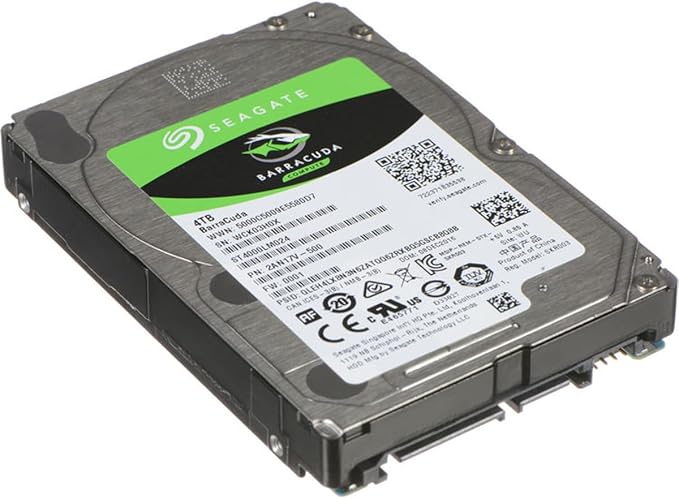
The Seagate 4TB Desktop HDD.15 Internal Hard Drive is the one drive for every need, supported by 30 years of trusted performance, reliability and simplicity. Seagate AcuTrac technology maximizes HDD storage densities. Maximize HDD Storage Densities Seagate Desktop HDD, 1TB-per-disk technology incorporates 340,000 unique tracks in the width of a single inch. This incredible storage density drives new capacity possibilities and lowers your total storage costs. Seagate AcuTrac technology enables storage densities with accurate reading and writing to nano-sized tracks only 75 nanometers wide. That is about 500 times smaller than the full stop at the end of this sentence.
The Seagate 4TB Desktop HDD.15 Internal Hard Drive is the one drive for every need, supported by 30 years of trusted performance, reliability and simplicity. Seagate AcuTrac technology maximizes HDD storage densities. Maximize HDD Storage Densities Seagate Desktop HDD, 1TB-per-disk technology incorporates 340,000 unique tracks in the width of a single inch. This incredible storage density drives new capacity possibilities and lowers your total storage costs. Seagate AcuTrac technology enables storage densities with accurate reading and writing to nano-sized tracks only 75 nanometers wide. That is about 500 times smaller than the full stop at the end of this sentence.
in 3 offers
The lowest price for Seagate St4000dm000 4TB Barracuda Desktop HDD 3.5 5900RPM right now is $125.28 at eBay.com.au.
The all-time low was $125.28 on 23 June 2026. That's the lowest price we've ever tracked — a great time to buy.
Prices last updated 23 June 2026.
Seagate St4000dm000 4TB Barracuda Desktop HDD 3.5 5900RPM
The Seagate 4TB Desktop HDD.15 Internal Hard Drive is the one drive for every need, supported by 30 years of trusted performance, reliability and simplicity. Seagate AcuTrac technology maximizes HDD storage densities. Maximize HDD Storage Densities Seagate Desktop HDD, 1TB-per-disk technology incorporates 340,000 unique tracks in the width of a single inch. This incredible storage density drives new capacity possibilities and lowers your total storage costs. Seagate AcuTrac technology enables storage densities with accurate reading and writing to nano-sized tracks only 75 nanometers wide. That is about 500 times smaller than the full stop at the end of this sentence.
The Seagate 4TB Desktop HDD.15 Internal Hard Drive is the one drive for every need, supported by 30 years of trusted performance, reliability and simplicity. Seagate AcuTrac technology maximizes HDD storage densities. Maximize HDD Storage Densities Seagate Desktop HDD, 1TB-per-disk technology incorporates 340,000 unique tracks in the width of a single inch. This incredible storage density drives new capacity possibilities and lowers your total storage costs. Seagate AcuTrac technology enables storage densities with accurate reading and writing to nano-sized tracks only 75 nanometers wide. That is about 500 times smaller than the full stop at the end of this sentence.
Last updated at 23/06/2026 14:07:14
St4000dm000 Seagate 4tb 5900rpm Sata 6gb/s 3.5in Desktop Hdd Dell
Free delivery
Affiliate Disclosure: We may receive a small commission for purchases made through this link at no extra cost to you. This helps support our site. Thank you!
Seagate St4000dm000 4tb 3.5" Sata Iii Desktop Hard Drive
Delivery $396.44
Affiliate Disclosure: We may receive a small commission for purchases made through this link at no extra cost to you. This helps support our site. Thank you!
Seagate St4000dm000 1f2168-501 Cc54 (s301) Su China 4.0tb 3.5" Sata
Free delivery
Affiliate Disclosure: We may receive a small commission for purchases made through this link at no extra cost to you. This helps support our site. Thank you!
originally posted on ebay.com
The drive cannot simply be inserted into your system without performing a file system conversion MBS to GPT for Windows 7 and Window 10 PC's. The steps can be found by Googling "MBS to GPT" and not that difficult to follow. Without the conversion process your 4TB drive will only be able to use 2TB of the actual 3735 MB on the 4TB drive. Once converted and you perform the format and naming of the drive, assign it a drive letter it will be usable (perform using Disk Management under Windows). So, far the drive has worked great. Always have had good luck with Seagate Barracuda Internal drives.
originally posted on bhphotovideo.com
Seagate drives have a pretty bad reputation and I would probably never trust my data to them individually, but I used them with RAID systems with no problem. That is to say, when one failed after 3 years of careful service (12 hours a day with drives spinning down when not in use) I was ready with another drive to replace it. I chose, however, not to get another Seagate as the even the small risk of a second drive in my RAID set up failing simultaneously, however remote, was too great a risk. They are the cheapest drives around, but they are probably the least reliable. On the other hand, some of the most reliable drives (like Hitachi) cost not that much more. To me the math looks like this: twice the reliability for a 10-15% boost in price. Easy call.
originally posted on newegg.com
DO NOT USE THIS IN A RAID OR NAS!!! These drives are not intended to be used for that. The very nature of SMR means that these drives will not work properly in RAID arrays and NAS devices. If you use these drives in a RAID array or a NAS device, there is a very good chance they will falsely be labeled as failed. Because SMR is very slow to respond to write commands once the write buffer is filled, RAID arrays and NAS devices will give up on the drive and assume it has failed. This is not a fault of the drive, this is the nature of SMR and will be an issue with any drive that uses SMR. These drives are also not meant to be used as your primary system drive. Again, SMR does not work well in that usage. This too is because of the very slow write speeds. They will work ... MoreDO NOT USE THIS IN A RAID OR NAS!!! These drives are not intended to be used for that. The very nature of SMR means that these drives will not work properly in RAID arrays and NAS devices. If you use these drives in a RAID array or a NAS device, there is a very good chance they will falsely be labeled as failed. Because SMR is very slow to respond to write commands once the write buffer is filled, RAID arrays and NAS devices will give up on the drive and assume it has failed. This is not a fault of the drive, this is the nature of SMR and will be an issue with any drive that uses SMR. These drives are also not meant to be used as your primary system drive. Again, SMR does not work well in that usage. This too is because of the very slow write speeds. They will work for a while, but if you fill up the write buffer, the entire system will slow down to a halt while it waits for the drive to completely write commands. These drives are intended to be used as archival drives. That is all SMR drives are good for. They are designed for data that is written one time and not changed very often. And when used in this manner, these drives work perfectly. The reason I took an egg off is because the description of these drives do not make it clear that they are SMR drives. And this model is also very difficult to find on Seagate's website. So researching the intended use of these drives before purchase is difficult. The product page on newegg makes these drives seem like they are normal hard drives, not SMR drives.
| Storage Capacity | 4 TB |
| Platform Supported | Mac,PC |
| Maximum External Data Transfer Rate | 6144 MB/s (48 Gbit/s) |
| Spindle Speed (rpm) | 5900 |
| Buffer | 64 MB |
St4000dm000 Seagate 4tb 5900rpm Sata 6gb/s 3.5in Desktop Hdd Dell
Free delivery
Affiliate Disclosure: We may receive a small commission for purchases made through this link at no extra cost to you. This helps support our site. Thank you!
Seagate St4000dm000 4tb 3.5" Sata Iii Desktop Hard Drive
Delivery $396.44
Affiliate Disclosure: We may receive a small commission for purchases made through this link at no extra cost to you. This helps support our site. Thank you!
Seagate St4000dm000 1f2168-501 Cc54 (s301) Su China 4.0tb 3.5" Sata
Free delivery
Affiliate Disclosure: We may receive a small commission for purchases made through this link at no extra cost to you. This helps support our site. Thank you!
The drive cannot simply be inserted into your system without performing a file system conversion MBS to GPT for Windows 7 and Window 10 PC's. The steps can be found by Googling "MBS to GPT" and not that difficult to follow. Without the conversion process your 4TB drive will only be able to use 2TB of the actual 3735 MB on the 4TB drive. Once converted and you perform the format and naming of the drive, assign it a drive letter it will be usable (perform using Disk Management under Windows). So, far the drive has worked great. Always have had good luck with Seagate Barracuda Internal drives.
Seagate drives have a pretty bad reputation and I would probably never trust my data to them individually, but I used them with RAID systems with no problem. That is to say, when one failed after 3 years of careful service (12 hours a day with drives spinning down when not in use) I was ready with another drive to replace it. I chose, however, not to get another Seagate as the even the small risk of a second drive in my RAID set up failing simultaneously, however remote, was too great a risk. They are the cheapest drives around, but they are probably the least reliable. On the other hand, some of the most reliable drives (like Hitachi) cost not that much more. To me the math looks like this: twice the reliability for a 10-15% boost in price. Easy call.
DO NOT USE THIS IN A RAID OR NAS!!! These drives are not intended to be used for that. The very nature of SMR means that these drives will not work properly in RAID arrays and NAS devices. If you use these drives in a RAID array or a NAS device, there is a very good chance they will falsely be labeled as failed. Because SMR is very slow to respond to write commands once the write buffer is filled, RAID arrays and NAS devices will give up on the drive and assume it has failed. This is not a fault of the drive, this is the nature of SMR and will be an issue with any drive that uses SMR. These drives are also not meant to be used as your primary system drive. Again, SMR does not work well in that usage. This too is because of the very slow write speeds. They will work ... MoreDO NOT USE THIS IN A RAID OR NAS!!! These drives are not intended to be used for that. The very nature of SMR means that these drives will not work properly in RAID arrays and NAS devices. If you use these drives in a RAID array or a NAS device, there is a very good chance they will falsely be labeled as failed. Because SMR is very slow to respond to write commands once the write buffer is filled, RAID arrays and NAS devices will give up on the drive and assume it has failed. This is not a fault of the drive, this is the nature of SMR and will be an issue with any drive that uses SMR. These drives are also not meant to be used as your primary system drive. Again, SMR does not work well in that usage. This too is because of the very slow write speeds. They will work for a while, but if you fill up the write buffer, the entire system will slow down to a halt while it waits for the drive to completely write commands. These drives are intended to be used as archival drives. That is all SMR drives are good for. They are designed for data that is written one time and not changed very often. And when used in this manner, these drives work perfectly. The reason I took an egg off is because the description of these drives do not make it clear that they are SMR drives. And this model is also very difficult to find on Seagate's website. So researching the intended use of these drives before purchase is difficult. The product page on newegg makes these drives seem like they are normal hard drives, not SMR drives.
I use this as a backup drive which I slot in to an Icy Dock hot swap bay on the front panel of my case (MB171SP-B) and then store in a fire safe. Because of my intended use the 5900rpm does not bother me, in fact it may help it run cooler and live longer – so it’s actually a plus for my intended use. I chose this model after reading many reviews and realising that (at least currently, Sept2015) there is no good choice to make on large capacity drives (for my intended use). Yes, Seagate has the worst reliability statistically when you look at data centre failure rates. However, all models and brands have reports of DOAs and deaths soon after buying them when you look at end user feedback. At one point I was considering enterprise models that are nearly double the ... MoreI use this as a backup drive which I slot in to an Icy Dock hot swap bay on the front panel of my case (MB171SP-B) and then store in a fire safe. Because of my intended use the 5900rpm does not bother me, in fact it may help it run cooler and live longer – so it’s actually a plus for my intended use. I chose this model after reading many reviews and realising that (at least currently, Sept2015) there is no good choice to make on large capacity drives (for my intended use). Yes, Seagate has the worst reliability statistically when you look at data centre failure rates. However, all models and brands have reports of DOAs and deaths soon after buying them when you look at end user feedback. At one point I was considering enterprise models that are nearly double the price, but even those seem to get plenty of failures. I concluded that paying much more does not guarantee you won’t have problems, so I instead focused on the cheapest cost per GB (across all brands) this was best value with only the 8TB model beating it. I went for this rather than the 8TB because the 8 had non-std mounting holes and extended backup times. So far this drive has worked fine for me. I have a 1st gen i5 with comparably old mobo, so had to manually partition with GPD (you can’t use NTFS) and ended up having to update the drivers for my sata controller also as initially it would only partition to a 1.6TB GPD partition. Users with newer systems and operating system should experience less problems, but I'm still using Windows 7 (by choice).Scan put some layers of bubble wrap around the drive (as I expected they would) and this is the reason I purchased from them rather than a large retailer named after a river which has a reputation for posting drives with no padding which results in many arriving dead due to shock during transit.
Every hard drive is like this because of how space is reported. You DO have a 4 terabyte drive. But it reports in tebibytes. So, that 4TB drive will be reported as 3.63TiB.The actual capacity is 4,000,650,883,072 bytes. That is 4TBs, which is reported in a different unit. Terabytes vs tebibytes.Think of it like this: you bought a stretch of land that is sold as 1 kilometer long. But your computer reports it in miles, so it comes out to 0.62 mile long. While it seems like you got a smaller piece of land, it's actually the same size, just being reported in a different unit.
These are factory refurbished drives. I've owned several, and know what to look for. For example, the label says "refurbished" and there is factory printing on the edge of the drive that says "refurbished". These are NOT pulls being sold by some 3rd party. These are SMR drives (shingled magnetic recording) - look it up if you don't know what that means. SMR drives have a PMR write cache area of the disk, so initial writes are fast as you would expect, but when that cache gets full, the drive must flush that cache - it reads the cached area and writes it to the shingled area. This is why you see SEVERE write performance slowdown with large writes. This is NORMAL for SMR drives. Remember, SMR is for ARCHIVE USE ONLY - fill them up slowly, read them often, but do not ... MoreThese are factory refurbished drives. I've owned several, and know what to look for. For example, the label says "refurbished" and there is factory printing on the edge of the drive that says "refurbished". These are NOT pulls being sold by some 3rd party. These are SMR drives (shingled magnetic recording) - look it up if you don't know what that means. SMR drives have a PMR write cache area of the disk, so initial writes are fast as you would expect, but when that cache gets full, the drive must flush that cache - it reads the cached area and writes it to the shingled area. This is why you see SEVERE write performance slowdown with large writes. This is NORMAL for SMR drives. Remember, SMR is for ARCHIVE USE ONLY - fill them up slowly, read them often, but do not rewrite them. In other words, absolutely NOT for use as a system drive, and a very bad idea for use in a NAS/RAID. They will work in a NAS/RAID, but come rebuild time, where it must write the entire drive, you'll be looking at weeks not hours, and risking losing another drive in the process due to all the stress these drives will undergo during a rebuild. With that said, I'm using 4 of these in an external RAID-5 configuration, and it's working fine (as expected). All my backup sets are RAID-5, just so I can still access my data if a drive crashes - extra insurance. If needed, once the backup set is read from a degraded RAID, I'll wipe the RAID and start over rather than rebuild. If you do a large write, after an hour or two, write performance will TANK - you'll see periods of zero bytes/second as the drive is flushing the write cache to the shingled area of the disk. These drives are meant to be filled slowly over time, with files you expect to keep for a very long time, not constantly changing/updating existing files on the drive. Know how SMR drives work and you won't be disappointed. -1 egg for the seller not letting people know these are SMR drives, and what that really means.
UPDATE: So it's been 3+ years now and never had a problem with either drive. Still have one full of media, and I back it up once a month into the other one. All good. The only reason I decided to take a risk on refurb'd drives was that on my media PC that runs a Plex server as well as serving up data a few other ways, and two Minecraft servers for the kids, since Day One I have had the main media storage in a RAID 1 configuration. I know me, I'm lazy, and no way am I going to do careful, regular backups of all that media. So the RAID 1 was the next best option. Started with 2 2TB's, then up to 2 3TB's when that was full, and this time up to the 5TB pair. It's been a week and they haven't crashed and burned yet, but we'll see how this works over the long...they're ... MoreUPDATE: So it's been 3+ years now and never had a problem with either drive. Still have one full of media, and I back it up once a month into the other one. All good. The only reason I decided to take a risk on refurb'd drives was that on my media PC that runs a Plex server as well as serving up data a few other ways, and two Minecraft servers for the kids, since Day One I have had the main media storage in a RAID 1 configuration. I know me, I'm lazy, and no way am I going to do careful, regular backups of all that media. So the RAID 1 was the next best option. Started with 2 2TB's, then up to 2 3TB's when that was full, and this time up to the 5TB pair. It's been a week and they haven't crashed and burned yet, but we'll see how this works over the long...they're going to be running 24/7 for at least 2 years before I fill up another 2TB, will they both last? We shall see.
So I saw all the reviews about how these hard drives were pulled from out of certain enclosures etc etc. I decided to take the risk and order a pair. Now my main need for these were for backup and media drives to store my movies for my media center. Now the biggest issue I saw was that when I was backing up (Full backup) 2.5 TB data to one of drives after roughly 1.5 TB of data went over the write rate dramatically decreased from 100MB/s to around 15MB/s. This added an extra 16 hrs or so to my backup time. Just to note. I was suspect that the data on my backup drive was good so i wiped my source drive and did a restore and to my surprised everything restored back fine. I just dont understand why the write rate fall of so much. I have not had this issue again cause ... MoreSo I saw all the reviews about how these hard drives were pulled from out of certain enclosures etc etc. I decided to take the risk and order a pair. Now my main need for these were for backup and media drives to store my movies for my media center. Now the biggest issue I saw was that when I was backing up (Full backup) 2.5 TB data to one of drives after roughly 1.5 TB of data went over the write rate dramatically decreased from 100MB/s to around 15MB/s. This added an extra 16 hrs or so to my backup time. Just to note. I was suspect that the data on my backup drive was good so i wiped my source drive and did a restore and to my surprised everything restored back fine. I just dont understand why the write rate fall of so much. I have not had this issue again cause all my backups since then has been incremental. I use the other drive as storage for my MKV movies for my media center and no issues at all. So far the drives do work apart from the write rate fall off I cant find anything else that's an issue. Taking away two stars for the write rate issue
Just my frustration in advertising these days. I looked all over the product information to find out if this is a true 4TB drive and could not find anything to the contrary. Even the label on the front of the drive says "4TB". However, This drive is actually only slightly more than 3.5 TB after partitioning. Doesn't really matter to me as it is sufficiently large for what I need to do with it. But, if you need a true 4 TB, this is not it.Otherwise, this is a great drive. reads fast and is very quiet. Had no trouble with formatting, partitioning, and overall setup. Does NOT come with any instructions. This is the drive only.
I purchased these four drives for use in a Synology 1511+ NAS station. The NAS is used primarily for backup so speed wasn't terribly important. What I needed was cheap storage space. I was upgrading from a mix of 2-3TB drives. I got five drives and one out of the five drives was DOA. I sent it right back to B&H within the 30days and they got me a new one. Besides the dead drive things have been well. Generally my experience with Seagate is that they are hit or miss. The Seagate manufacturer warranty leaves much to be desired. It is generally only 12 months from date of purchase. I just had a one year old 3TB Seagate die. I spent some time on the phone and sending in proofs of purchase before Seagate agreeded to give me a 15 month warranty. They gave me an RMA for ... MoreI purchased these four drives for use in a Synology 1511+ NAS station. The NAS is used primarily for backup so speed wasn't terribly important. What I needed was cheap storage space. I was upgrading from a mix of 2-3TB drives. I got five drives and one out of the five drives was DOA. I sent it right back to B&H within the 30days and they got me a new one. Besides the dead drive things have been well. Generally my experience with Seagate is that they are hit or miss. The Seagate manufacturer warranty leaves much to be desired. It is generally only 12 months from date of purchase. I just had a one year old 3TB Seagate die. I spent some time on the phone and sending in proofs of purchase before Seagate agreeded to give me a 15 month warranty. They gave me an RMA for the dead drive and sent me a replacement. I still had to pay for shipping the drive back to Seagate. I would highly recommend getting the Square Trade protection plan for these drives!!!
| Storage Capacity | 4 TB |
| Platform Supported | Mac,PC |
| Maximum External Data Transfer Rate | 6144 MB/s (48 Gbit/s) |
| Spindle Speed (rpm) | 5900 |
| Buffer | 64 MB |