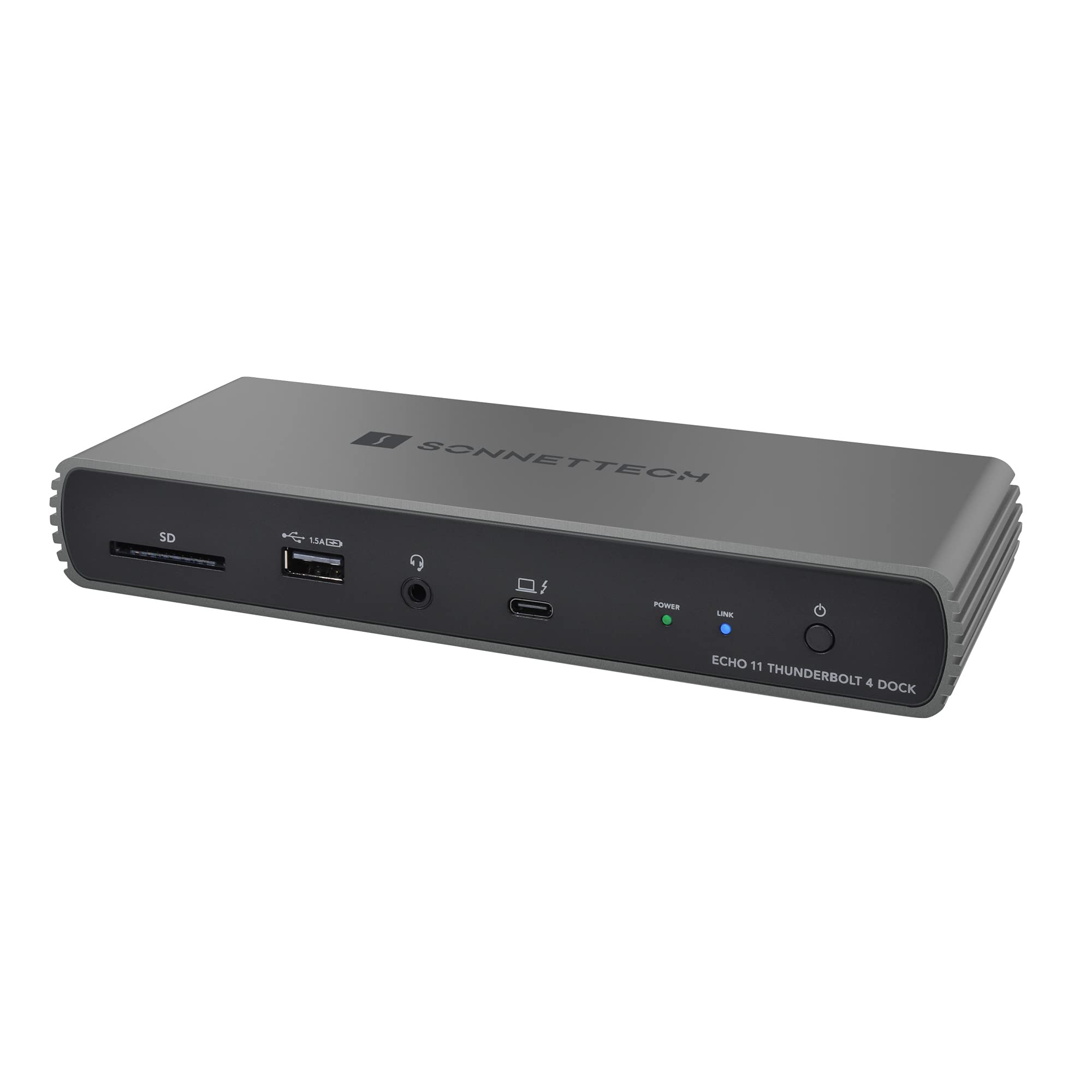
Sonnet Echo 11 Thunderbolt 4 Dock ECHODK11T4
The Sonnet Echo 11 Thunderbolt 4 HDMI Docking Station lets you expand the ports of your compatible Apple M1 Mac, Apple Intel Mac with Thunderbolt 3, or Windows computer with Thunderbolt 4. The Echo 11 connects to your laptop or computer via Thunderbolt 4, which can also provide up to 100W of charging power. There are two Thunderbolt 4 ports you can use to directly attach Thunderbolt peripherals, and daisy chain up to a total of five devices. A HDMI port is also available for video, so there's no need for an adapter. There are also four USB-A 3.2 Gen 2 ports, providing up to 10 Gb/s data transfer rate. One of the USB-A ports provides charging. A 3.5mm headphone and microphone combo jack allows you to plug in a headset while the SD card slot can read SD, SDHC, and SDXC cards. Thunderbolt 4 Thunderbolt 4 is a hardware interface that utilizes the reversible USB-C connector and features a maximum throughput of 40 Gb/s when used with compatible devices. The connector also transmits data via USB4 at up to 20 Gb/s, and dual-bandwidth allows you to connect up to two 4K displays simultaneously or a single 8K display. Additionally, you can daisy chain up to six devices from a single Thunderbolt 4 port. Two Thunderbolt 4 Ports for Peripherals Connect two Thunderbolt peripherals directly (with support for daisy chaining additional peripherals). It also supports USB4 and USB 3 devices. USB-A 3.2 Gen 2 Ports There are four USB-A 3.2 Gen 2 ports for connecting Support for 4K, 5K, 6K, and 8K @ 60Hz Displays Depending on your computer, the Echo 11 supports up to two 5K displays or a single 4K, 5K, 6K, or 8K display. Many Display Interfaces Supported Connect Thunderbolt 3 and USB-C displays directly. It also supports HDMI, DP, DVI, and other displays with a Thunderbolt 3 compatible adapter (sold separately).
The Sonnet Echo 11 Thunderbolt 4 HDMI Docking Station lets you expand the ports of your compatible Apple M1 Mac, Apple Intel Mac with Thunderbolt 3, or Windows computer with Thunderbolt 4. The Echo 11 connects to your laptop or computer via Thunderbolt 4, which can also provide up to 100W of charging power. There are two Thunderbolt 4 ports you can use to directly attach Thunderbolt peripherals, and daisy chain up to a total of five devices. A HDMI port is also available for video, so there's no need for an adapter. There are also four USB-A 3.2 Gen 2 ports, providing up to 10 Gb/s data transfer rate. One of the USB-A ports provides charging. A 3.5mm headphone and microphone combo jack allows you to plug in a headset while the SD card slot can read SD, SDHC, and SDXC cards. Thunderbolt 4 Thunderbolt 4 is a hardware interface that utilizes the reversible USB-C connector and features a maximum throughput of 40 Gb/s when used with compatible devices. The connector also transmits data via USB4 at up to 20 Gb/s, and dual-bandwidth allows you to connect up to two 4K displays simultaneously or a single 8K display. Additionally, you can daisy chain up to six devices from a single Thunderbolt 4 port. Two Thunderbolt 4 Ports for Peripherals Connect two Thunderbolt peripherals directly (with support for daisy chaining additional peripherals). It also supports USB4 and USB 3 devices. USB-A 3.2 Gen 2 Ports There are four USB-A 3.2 Gen 2 ports for connecting Support for 4K, 5K, 6K, and 8K @ 60Hz Displays Depending on your computer, the Echo 11 supports up to two 5K displays or a single 4K, 5K, 6K, or 8K display. Many Display Interfaces Supported Connect Thunderbolt 3 and USB-C displays directly. It also supports HDMI, DP, DVI, and other displays with a Thunderbolt 3 compatible adapter (sold separately).
The Sonnet Echo 11 Thunderbolt 4 HDMI Docking Station lets you expand the ports of your compatible Apple M1 Mac, Apple Intel Mac with Thunderbolt 3, or Windows computer with Thunderbolt 4. The Echo 11 connects to your laptop or computer via Thunderbolt 4, which can also provide up to 100W of charging power. There are two Thunderbolt 4 ports you can use to directly attach Thunderbolt peripherals, and daisy chain up to a total of five devices. A HDMI port is also available for video, so there's no need for an adapter. There are also four USB-A 3.2 Gen 2 ports, providing up to 10 Gb/s data transfer rate. One of the USB-A ports provides charging. A 3.5mm headphone and microphone combo jack allows you to plug in a headset while the SD card slot can read SD, SDHC, and SDXC cards. Thunderbolt 4 Thunderbolt 4 is a hardware interface that utilizes the reversible USB-C connector and features a maximum throughput of 40 Gb/s when used with compatible devices. The connector also transmits data via USB4 at up to 20 Gb/s, and dual-bandwidth allows you to connect up to two 4K displays simultaneously or a single 8K display. Additionally, you can daisy chain up to six devices from a single Thunderbolt 4 port. Two Thunderbolt 4 Ports for Peripherals Connect two Thunderbolt peripherals directly (with support for daisy chaining additional peripherals). It also supports USB4 and USB 3 devices. USB-A 3.2 Gen 2 Ports There are four USB-A 3.2 Gen 2 ports for connecting Support for 4K, 5K, 6K, and 8K @ 60Hz Displays Depending on your computer, the Echo 11 supports up to two 5K displays or a single 4K, 5K, 6K, or 8K display. Many Display Interfaces Supported Connect Thunderbolt 3 and USB-C displays directly. It also supports HDMI, DP, DVI, and other displays with a Thunderbolt 3 compatible adapter (sold separately).
The Sonnet Echo 11 Thunderbolt 4 HDMI Docking Station lets you expand the ports of your compatible Apple M1 Mac, Apple Intel Mac with Thunderbolt 3, or Windows computer with Thunderbolt 4. The Echo 11 connects to your laptop or computer via Thunderbolt 4, which can also provide up to 100W of charging power. There are two Thunderbolt 4 ports you can use to directly attach Thunderbolt peripherals, and daisy chain up to a total of five devices. A HDMI port is also available for video, so there's no need for an adapter. There are also four USB-A 3.2 Gen 2 ports, providing up to 10 Gb/s data transfer rate. One of the USB-A ports provides charging. A 3.5mm headphone and microphone combo jack allows you to plug in a headset while the SD card slot can read SD, SDHC, and SDXC cards. Thunderbolt 4 Thunderbolt 4 is a hardware interface that utilizes the reversible USB-C connector and features a maximum throughput of 40 Gb/s when used with compatible devices. The connector also transmits data via USB4 at up to 20 Gb/s, and dual-bandwidth allows you to connect up to two 4K displays simultaneously or a single 8K display. Additionally, you can daisy chain up to six devices from a single Thunderbolt 4 port. Two Thunderbolt 4 Ports for Peripherals Connect two Thunderbolt peripherals directly (with support for daisy chaining additional peripherals). It also supports USB4 and USB 3 devices. USB-A 3.2 Gen 2 Ports There are four USB-A 3.2 Gen 2 ports for connecting Support for 4K, 5K, 6K, and 8K @ 60Hz Displays Depending on your computer, the Echo 11 supports up to two 5K displays or a single 4K, 5K, 6K, or 8K display. Many Display Interfaces Supported Connect Thunderbolt 3 and USB-C displays directly. It also supports HDMI, DP, DVI, and other displays with a Thunderbolt 3 compatible adapter (sold separately).
in 4 offers
The lowest price for Sonnet Echo 11 Thunderbolt 4 Dock ECHODK11T4 right now is $402.61 at Amazon.com.au, compared across 4 retailers.
The all-time low was $297.24 on 24 Jan 2026 — today's price is 35% above the lowest ever. It has been notably cheaper before — worth setting a price alert.
Prices last updated 24 June 2026.
Last updated at 24/06/2026 19:59:25
Sonnet Technologies Echo 11 Thunderbolt 4 Dock ECHO-DK11-T4
Free delivery
Affiliate Disclosure: We may receive a small commission for purchases made through this link at no extra cost to you. This helps support our site. Thank you!
Sonnet Echo 11 Thunderbolt 4 Dock
Delivery between 27 June – 3 July $12
Sonnet Echo 11 Thunderbolt 4 Dock
Delivery $25
Sonnet Echo 11 Thunderbolt 4 Docking Station
Delivery between Fri – Tue $16
originally posted on bhphotovideo.com
For the first week, this dock worked pretty well with my M1 Max MacBook Pro. There was also an audible high pitched squealing coming it occasionally. Then I started work one morning, and my Thunderbolt devices wouldn't connect. USB worked, just not Thunderbolt. I spent quite a bit of time troubleshooting myself and also going back and forth with Sonnet support as they had me try various tests - all of which proved unsuccessful. They agreed the device was not working properly, so I returned it.I replaced it with a CalDigit Element Hub. Had to buy a separate USB to ethernet dongle, but this dock has been working great for me.
originally posted on bhphotovideo.com
I was a bit hesitant to purchase the Sonnet Echo 11 at first being i had watched so many youtube videos and research so many thunderbolt docks and was originally going with the caldigit but it was out of stock everywhere. I got this guy in the mail a few days ago and i was like ok here goes. I'm a photographer and wanted to clean my setup and eliminate a lot of cables everywhere (coming from a pc desktop setup) and i must say when i plugged it in it just worked no issues as some other M1 users have had it recognized my 32 monitors and all. I just want to say this was a great purchase and am in love with it already one cable into my M1 and everything else into the dock! Simple and efficient!
originally posted on bhphotovideo.com
I use three different MacBook Pros with a bunch of peripherals (mic, kb, mouse, phone, etc.). Now when I need to switch from one MB to the other, I only have to unplug and replug ONE CABLE to access everything (and keep charging my machine). This is a revelation. Thanks to B&H staff for helping me find the Echo 11: my agent was top-notch. I am 100% satisfied with B&H and this product.
| Thunderbolt | 3 x Thunderbolt 4 |
| Ethernet | 1 x RJ45 (10/100/1000 Mb/s) |
| Audio | 1 x 1/8" / 3.5 mm Headphone/Microphone Combo |
| Memory Card Slots | 1 x SDXC (UHS-II [312 MB/s]) |
| System Connection | 1 x Thunderbolt 4 Female |
Sonnet Technologies Echo 11 Thunderbolt 4 Dock ECHO-DK11-T4
Free delivery
Affiliate Disclosure: We may receive a small commission for purchases made through this link at no extra cost to you. This helps support our site. Thank you!
Sonnet Echo 11 Thunderbolt 4 Dock
Delivery between 27 June – 3 July $12
Sonnet Echo 11 Thunderbolt 4 Dock
Delivery $25
Sonnet Echo 11 Thunderbolt 4 Docking Station
Delivery between Fri – Tue $16
For the first week, this dock worked pretty well with my M1 Max MacBook Pro. There was also an audible high pitched squealing coming it occasionally. Then I started work one morning, and my Thunderbolt devices wouldn't connect. USB worked, just not Thunderbolt. I spent quite a bit of time troubleshooting myself and also going back and forth with Sonnet support as they had me try various tests - all of which proved unsuccessful. They agreed the device was not working properly, so I returned it.I replaced it with a CalDigit Element Hub. Had to buy a separate USB to ethernet dongle, but this dock has been working great for me.
I was a bit hesitant to purchase the Sonnet Echo 11 at first being i had watched so many youtube videos and research so many thunderbolt docks and was originally going with the caldigit but it was out of stock everywhere. I got this guy in the mail a few days ago and i was like ok here goes. I'm a photographer and wanted to clean my setup and eliminate a lot of cables everywhere (coming from a pc desktop setup) and i must say when i plugged it in it just worked no issues as some other M1 users have had it recognized my 32 monitors and all. I just want to say this was a great purchase and am in love with it already one cable into my M1 and everything else into the dock! Simple and efficient!
I use three different MacBook Pros with a bunch of peripherals (mic, kb, mouse, phone, etc.). Now when I need to switch from one MB to the other, I only have to unplug and replug ONE CABLE to access everything (and keep charging my machine). This is a revelation. Thanks to B&H staff for helping me find the Echo 11: my agent was top-notch. I am 100% satisfied with B&H and this product.
I'm one of the users who is eagerly awaiting delivery of a new M1Max-based MacBook Pro, but am using this dock with a 2017 MBP as a way to test it. So far, it's working exactly as expected (flawlessly in all respects). Initially, the new MBP will replace the iMac that is my video editing workhorse (using all Adobe Creative Cloud applications).The iMac has well over 100TB of fast RAID storage and an LTO archive system connected via Thunderbolt 2.If necessary, I will update this review after using the dock for a week, or two, with the new system...Pete
Not sure if I've got the same unit as the other 2-star review. Unit emits a high-pitched coil whine that you can hear from a different room. It had a few scratches from the box even though packaging looked new. Looks like the Ethernet interface wasn't programmed properly, it's showing and working as a USB 10/100 LAN interface on macOS and Linux, testing no faster than 20mbps. Ethernet frequently drops and won't connect until I disconnect the power supply from the unit, while the rest of the unit works. Sometimes it won't link to the laptop without power cycling either.That said, it charges the laptop properly and when it decides to work, both USB and Thunderbolt ports work well. A nice plus, the audio interface only appears to the system when there's something ... MoreNot sure if I've got the same unit as the other 2-star review. Unit emits a high-pitched coil whine that you can hear from a different room. It had a few scratches from the box even though packaging looked new. Looks like the Ethernet interface wasn't programmed properly, it's showing and working as a USB 10/100 LAN interface on macOS and Linux, testing no faster than 20mbps. Ethernet frequently drops and won't connect until I disconnect the power supply from the unit, while the rest of the unit works. Sometimes it won't link to the laptop without power cycling either.That said, it charges the laptop properly and when it decides to work, both USB and Thunderbolt ports work well. A nice plus, the audio interface only appears to the system when there's something connected to the headset port. It won't interfere with anything if you don't use it.Ethernet port and coil whine both look like manufacturing issues. I'm not sure if competitors' docks are any better, as it looks like they're almost all using the exact same design in a different box.
I was a little wary of spending this much on a dock, but it has been a great performer!I'm use it for as the central hub for my 16 M1 Max :2x 4k 60hz 32" BenQs over usb-c to DisplayPort,USB-C 10G Sonnet ethernet adapterusb 3 ssd sata readerExcellon 10 port powered 10 port usb 3 hub (running: keyboard, timemachine, resolve dongle, sd card multi-reader reader, a couple usb chargers)Only issue I had was having to take the ssd sata reader off the usb hub and put it on a dedicated dock port-connection wasn't solid to the Mac. Fixed when it was moved to the dock.I run my CFexpress card reader and Samsung T7 on one of the other Mbp thunderbolt ports when needed.Super easy to plug this in to my Mac everyday, and when I'm not running a heavy workload it even ... MoreI was a little wary of spending this much on a dock, but it has been a great performer!I'm use it for as the central hub for my 16 M1 Max :2x 4k 60hz 32" BenQs over usb-c to DisplayPort,USB-C 10G Sonnet ethernet adapterusb 3 ssd sata readerExcellon 10 port powered 10 port usb 3 hub (running: keyboard, timemachine, resolve dongle, sd card multi-reader reader, a couple usb chargers)Only issue I had was having to take the ssd sata reader off the usb hub and put it on a dedicated dock port-connection wasn't solid to the Mac. Fixed when it was moved to the dock.I run my CFexpress card reader and Samsung T7 on one of the other Mbp thunderbolt ports when needed.Super easy to plug this in to my Mac everyday, and when I'm not running a heavy workload it even charges the battery without the charger MagSafe connected.
I did a lot of research before buying the Sonnet. I was getting tired of plugging and unplugging USB's to access my 4 external hard drives 2 at a time. Also dragging my power supply with me from bedroom station to office station (two large screens) was getting old. My son told me about the Sonnet Echo 11 that he uses and loves so I got one and the feelings were mutual!! I really love my home office now - all drives, two 27 screens connected simultaneously to my happily 85 watt powered computer thru by Thunderbolt!! You will love it too!
Have had it for 2 weeks and glad I purchased this dock. Using the Sonnet Echo 11 Thunderbolt 4 Dock to expand my connectivity with a Macbook Pro. Have not used the ports for any displays, only external hard drives and speakers. Really plug and play.
Supplies power to my new MacBook along with connectivity for a 2nd screen, several disks and two USB (A) hubs supporting other external drives and devices. My only wish was that there was a utility to eject the dock to quickly carry away the MacBook. I have disconnected/reconnected the dock without any issues, but never feel comfortable.
I bought this dock to use it with my 16 M1 Max MacBook Pro (64 GB of RAM). My home internet connection is around 600+ Mbps. I was quite baffled when I saw internet speeds drop to just 50-100 Mbps when connecting online via a LAN cable connected to the ethernet port on this dock. Next day, I tried everything I could think of (different CAT6 LAN cables, resetting my router, unplugging other LAN connected devices, etc.), but there was no improvement on internet speeds.I was ready to pack and return this otherwise great dock, and it occurred to me turning off Private Relay under my iCloud+ settings in macOS System Settings. Immediately, internet speeds shot back to the normal 600-800 Mbps. No need to return the dock anymore.I don't know if there's an incompatibility ... MoreI bought this dock to use it with my 16 M1 Max MacBook Pro (64 GB of RAM). My home internet connection is around 600+ Mbps. I was quite baffled when I saw internet speeds drop to just 50-100 Mbps when connecting online via a LAN cable connected to the ethernet port on this dock. Next day, I tried everything I could think of (different CAT6 LAN cables, resetting my router, unplugging other LAN connected devices, etc.), but there was no improvement on internet speeds.I was ready to pack and return this otherwise great dock, and it occurred to me turning off Private Relay under my iCloud+ settings in macOS System Settings. Immediately, internet speeds shot back to the normal 600-800 Mbps. No need to return the dock anymore.I don't know if there's an incompatibility (firmware?) issue between this dock and Apple's Private Relay service, or if Private Relay is just working slowly today. All I know is that turning it off solved my internet speed problem when using this dock.If you're a macOS user experiencing this same issue when connecting this dock to your Mac, try seeing if turning Private Relay off solves your internet speed problems.
| Thunderbolt | 3 x Thunderbolt 4 |
| Ethernet | 1 x RJ45 (10/100/1000 Mb/s) |
| Audio | 1 x 1/8" / 3.5 mm Headphone/Microphone Combo |
| Memory Card Slots | 1 x SDXC (UHS-II [312 MB/s]) |
| System Connection | 1 x Thunderbolt 4 Female |

