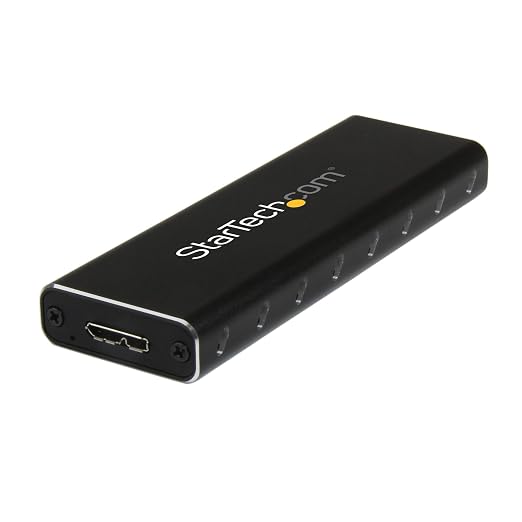
StarTech External USB 3.0 SATA M.2 SSD Enclosure
Get higher external performance by using an M.2 SSD in place of a platter drive, harnessing the full potential of your USB 3.0 computer system. The enclosure supports UASP, enabling you to achieve transfer speeds up to 70% faster than traditional USB 3.0 when used with a UASP-enabled host computer. This slim, pocket-sized SSD enclosure has been specifically engineered for mobility. The enclosure features a lightweight yet durable design, which fits easily into your pocket or laptop bag. For further convenience, the enclosure is powered entirely using the USB host bus and requires no external power adapter.
Get higher external performance by using an M.2 SSD in place of a platter drive, harnessing the full potential of your USB 3.0 computer system. The enclosure supports UASP, enabling you to achieve transfer speeds up to 70% faster than traditional USB 3.0 when used with a UASP-enabled host computer. This slim, pocket-sized SSD enclosure has been specifically engineered for mobility. The enclosure features a lightweight yet durable design, which fits easily into your pocket or laptop bag. For further convenience, the enclosure is powered entirely using the USB host bus and requires no external power adapter.
Get higher external performance by using an M.2 SSD in place of a platter drive, harnessing the full potential of your USB 3.0 computer system. The enclosure supports UASP, enabling you to achieve transfer speeds up to 70% faster than traditional USB 3.0 when used with a UASP-enabled host computer. This slim, pocket-sized SSD enclosure has been specifically engineered for mobility. The enclosure features a lightweight yet durable design, which fits easily into your pocket or laptop bag. For further convenience, the enclosure is powered entirely using the USB host bus and requires no external power adapter.
Get higher external performance by using an M.2 SSD in place of a platter drive, harnessing the full potential of your USB 3.0 computer system. The enclosure supports UASP, enabling you to achieve transfer speeds up to 70% faster than traditional USB 3.0 when used with a UASP-enabled host computer. This slim, pocket-sized SSD enclosure has been specifically engineered for mobility. The enclosure features a lightweight yet durable design, which fits easily into your pocket or laptop bag. For further convenience, the enclosure is powered entirely using the USB host bus and requires no external power adapter.
in 52 offers
The lowest price for StarTech External USB 3.0 SATA M.2 SSD Enclosure right now is $38.66 at PB Tech, compared across 40 retailers.
The all-time low was $19.69 on 16 Aug 2026 — today's price is 96% above the lowest ever. It has been notably cheaper before — worth setting a price alert.
Prices last updated 21 Sept 2026.
Last updated at 21/09/2026 07:08:05
StarTech.com M.2 SATA External SSD Enclosure - USB 3.0 with UASP
Affiliate Disclosure: We may receive a small commission for purchases made through this link at no extra cost to you. This helps support our site. Thank you!
StarTech.com SM2NGFFMBU33 External USB3.0 SATA M.2 SSD Enclosure
7-day returns
StarTech Portable M.2 SATA SSD to USB 3.0 USB-A Enclosure / Adapter
Delivery between 24–29 Sept $13.95
Startech M.2 Ssd Hdd/ssd External Case Black
Delivery $19.99
[SM2NGFFMBU33] StarTech STARTECH.COM M.2 SSD ENCLOSURE FOR M.2 SATA SSD, USB3.0, USB to MICRO-B CABLE, 2YR
7-day returns
StarTech External USB 3.0 SATA M.2 SSD Enclosure | SM2NGFFMBU33 USB 3.0 with UASP External Hard Drive Enclosures
Delivery between 24 Sept – 2 Oct $12.95
StarTech.com M.2 SSD Enclosure for M.2 SATA SSDs - USB 3.0 (5Gbps) with UASP - TAA
Delivery $19
StarTech.com M.2 SSD Aluminum Enclosure to USB 3.0 (5Gbps) with UASP - Black - M.2 NGFF SATA with B Key & B+M Key - External M.2 Portable Enclosure -
Delivery $11.25
STARTECH M.2 SSD Aluminum Enclosure to USB 3.0 (5Gbps) with UASP - Black - M.2 NGFF SATA with B Key & B+M Key - External M.2 Portable Enclosure - Not
Free delivery
Startech External USB 3.0 SATA M.2 SSD Enclosure
Delivery $16.50
originally posted on pbtech.co.nz
Unit arrived quickly. This is a little expensive for what it is but other options were not available in the timeframe I required. It is just an external case for what is usually an internal component of a laptop and it will take various size (physical dimensions) of the M2 drives.Assembly was quick and easy, even using the supplied small screwdriver (barely adequate but still worked).Once assembled, the unit was plugged into a laptop using the USB3 lead supplied and it worked perfectly.Componentry seems to be of decent quality.
originally posted on pbtech.co.nz
Very solid metal construction. Classy design. Could do with some breather vents but it didn't overheat despite some massive transfers. Comes with USB-C to USB-C and USB-C to USB-3. Nice.
originally posted on homeessentialsdirect.com
As of June 2017, this is the only review of the Dual SATA M.2 Enclosure. Benchmarks below. It comes with 2 USB cables, one with a Type-A to Micro USB 3.0 and one with a Type-C to Micro USB 3.0. When I tested the drive on my USB 3.0 port (USB 3.1 Gen 1), there was no problem transfering a 10GB video file to and from the drive. When I tested the drive on my USB 3.1 Gen 2 port it would freeze in the middle of a file transfer of the same 10GB video file. I resolved this by switching the cable to the USB Type-C cable and port. Not sure why it works with the Type-C and not the Type-A, but I digress. My PC has the following specs: Windows 7 Pro x64 w/SP1 Intel Core i7 4770k Processor (Running @ 4.0GHZ) Asus Maximus VI Hero w/Z87 Chipset 32GB DDR3 Memory (Running @ 800MHZ) ... MoreAs of June 2017, this is the only review of the Dual SATA M.2 Enclosure. Benchmarks below. It comes with 2 USB cables, one with a Type-A to Micro USB 3.0 and one with a Type-C to Micro USB 3.0. When I tested the drive on my USB 3.0 port (USB 3.1 Gen 1), there was no problem transfering a 10GB video file to and from the drive. When I tested the drive on my USB 3.1 Gen 2 port it would freeze in the middle of a file transfer of the same 10GB video file. I resolved this by switching the cable to the USB Type-C cable and port. Not sure why it works with the Type-C and not the Type-A, but I digress. My PC has the following specs: Windows 7 Pro x64 w/SP1 Intel Core i7 4770k Processor (Running @ 4.0GHZ) Asus Maximus VI Hero w/Z87 Chipset 32GB DDR3 Memory (Running @ 800MHZ) Samsung 840 Pro 512GB Hard Drive - SATA-III 4x Native USB 3.0 Ports Startech USB 3.1 Gen 2 PCIe Card (1x USB Type-A Port - 1x USB Type-C Port) This enclosure 2x WD Blue M.2 SATA Drives 500GB Each in RAID 0 It appears that this card is using a SATA-III to USB 3.1 Gen 2 interface. Apparently you are limited to the speed of the SATA interface which is 6Gbps and not the 10Gbps the USB 3.1 Gen 2 standard is capable of. This is from judging by the benchmark speeds. I thought possibly since it was RAID it would use a seperate pipeline for each drive and be capable of using the full 10Gbps speed, but that doesn't appear to be the case. I also benchmarked one drive alone with USB 3.0 and got the same speed when I benchmarked two drives in RAID 0. This means if you only have a USB 3.0(USB 3.1 Gen 1) slot then you will not see any advantage by running 2x drives, go for the single drive enclosure in that instance. If you have USB 3.1 Gen 2 port then you will see a speed bump by running a RAID. Pros: Fast Includes Necessary Screws Includes 2x Cables Does RAID 0 / RAID 1 / JBOD / BIG Does TRIM Sturdy Aluminum Construction Cheaper Than A Sandisk Extreme 900 & Probably Just As Fast Cons: Locks up with the Type-A cable but works with the Type-C cable on USB 3.1 Gen 2 In conclusion, I am satisfied with the speed I am getting and I do like this enclosure. If you have a USB 3.1 Gen 2 Port and are looking for top speed using 2x drives in RAID 0, I would definitely recommend this enclosure. If you have USB 3.0 go with the single enclosure and drive. Note: It includes all of the screws necessary to install 2x M.2 drives and to keep it closed plus 1 extra screw.
| General | |
| Device Type | Storage enclosure - external |
| Hard Drive Form Factor Compatibility | M.2 |
| Host Bus | USB 3.0 |
| Product Material | Aluminium |

StarTech.com M.2 SATA External SSD Enclosure - USB 3.0 with UASP
Affiliate Disclosure: We may receive a small commission for purchases made through this link at no extra cost to you. This helps support our site. Thank you!
StarTech.com SM2NGFFMBU33 External USB3.0 SATA M.2 SSD Enclosure
7-day returns
StarTech Portable M.2 SATA SSD to USB 3.0 USB-A Enclosure / Adapter
Delivery between 24–29 Sept $13.95
Startech M.2 Ssd Hdd/ssd External Case Black
Delivery $19.99
[SM2NGFFMBU33] StarTech STARTECH.COM M.2 SSD ENCLOSURE FOR M.2 SATA SSD, USB3.0, USB to MICRO-B CABLE, 2YR
7-day returns
Unit arrived quickly. This is a little expensive for what it is but other options were not available in the timeframe I required. It is just an external case for what is usually an internal component of a laptop and it will take various size (physical dimensions) of the M2 drives.Assembly was quick and easy, even using the supplied small screwdriver (barely adequate but still worked).Once assembled, the unit was plugged into a laptop using the USB3 lead supplied and it worked perfectly.Componentry seems to be of decent quality.
Very solid metal construction. Classy design. Could do with some breather vents but it didn't overheat despite some massive transfers. Comes with USB-C to USB-C and USB-C to USB-3. Nice.
As of June 2017, this is the only review of the Dual SATA M.2 Enclosure. Benchmarks below. It comes with 2 USB cables, one with a Type-A to Micro USB 3.0 and one with a Type-C to Micro USB 3.0. When I tested the drive on my USB 3.0 port (USB 3.1 Gen 1), there was no problem transfering a 10GB video file to and from the drive. When I tested the drive on my USB 3.1 Gen 2 port it would freeze in the middle of a file transfer of the same 10GB video file. I resolved this by switching the cable to the USB Type-C cable and port. Not sure why it works with the Type-C and not the Type-A, but I digress. My PC has the following specs: Windows 7 Pro x64 w/SP1 Intel Core i7 4770k Processor (Running @ 4.0GHZ) Asus Maximus VI Hero w/Z87 Chipset 32GB DDR3 Memory (Running @ 800MHZ) ... MoreAs of June 2017, this is the only review of the Dual SATA M.2 Enclosure. Benchmarks below. It comes with 2 USB cables, one with a Type-A to Micro USB 3.0 and one with a Type-C to Micro USB 3.0. When I tested the drive on my USB 3.0 port (USB 3.1 Gen 1), there was no problem transfering a 10GB video file to and from the drive. When I tested the drive on my USB 3.1 Gen 2 port it would freeze in the middle of a file transfer of the same 10GB video file. I resolved this by switching the cable to the USB Type-C cable and port. Not sure why it works with the Type-C and not the Type-A, but I digress. My PC has the following specs: Windows 7 Pro x64 w/SP1 Intel Core i7 4770k Processor (Running @ 4.0GHZ) Asus Maximus VI Hero w/Z87 Chipset 32GB DDR3 Memory (Running @ 800MHZ) Samsung 840 Pro 512GB Hard Drive - SATA-III 4x Native USB 3.0 Ports Startech USB 3.1 Gen 2 PCIe Card (1x USB Type-A Port - 1x USB Type-C Port) This enclosure 2x WD Blue M.2 SATA Drives 500GB Each in RAID 0 It appears that this card is using a SATA-III to USB 3.1 Gen 2 interface. Apparently you are limited to the speed of the SATA interface which is 6Gbps and not the 10Gbps the USB 3.1 Gen 2 standard is capable of. This is from judging by the benchmark speeds. I thought possibly since it was RAID it would use a seperate pipeline for each drive and be capable of using the full 10Gbps speed, but that doesn't appear to be the case. I also benchmarked one drive alone with USB 3.0 and got the same speed when I benchmarked two drives in RAID 0. This means if you only have a USB 3.0(USB 3.1 Gen 1) slot then you will not see any advantage by running 2x drives, go for the single drive enclosure in that instance. If you have USB 3.1 Gen 2 port then you will see a speed bump by running a RAID. Pros: Fast Includes Necessary Screws Includes 2x Cables Does RAID 0 / RAID 1 / JBOD / BIG Does TRIM Sturdy Aluminum Construction Cheaper Than A Sandisk Extreme 900 & Probably Just As Fast Cons: Locks up with the Type-A cable but works with the Type-C cable on USB 3.1 Gen 2 In conclusion, I am satisfied with the speed I am getting and I do like this enclosure. If you have a USB 3.1 Gen 2 Port and are looking for top speed using 2x drives in RAID 0, I would definitely recommend this enclosure. If you have USB 3.0 go with the single enclosure and drive. Note: It includes all of the screws necessary to install 2x M.2 drives and to keep it closed plus 1 extra screw.
I bought this enclosure (SM2NGFFMBU33) two months ago to transfer files from a PC with a dead motherboard. The enclosure worked fine and did exactly what I needed. I did check and double-check the M.2 SSD connector BEFORE I ordered it to make sure it would fit properly. My SSD was pulled from an older PC and I did see enclosures on the market where it would not fit the connector. Apparently all M.2 connectors are not the same or have changed slightly over time despite an assumed standard.Pros: Aluminum construction for durability, good build quality - solid and everything fits together the way it was designed, no external power required, all parts were included in my kit, file transfer speeds were fastCons: the screws are tiny and really hard to work with, the ... MoreI bought this enclosure (SM2NGFFMBU33) two months ago to transfer files from a PC with a dead motherboard. The enclosure worked fine and did exactly what I needed. I did check and double-check the M.2 SSD connector BEFORE I ordered it to make sure it would fit properly. My SSD was pulled from an older PC and I did see enclosures on the market where it would not fit the connector. Apparently all M.2 connectors are not the same or have changed slightly over time despite an assumed standard.Pros: Aluminum construction for durability, good build quality - solid and everything fits together the way it was designed, no external power required, all parts were included in my kit, file transfer speeds were fastCons: the screws are tiny and really hard to work with, the SSD mounting screw causes a slight bend in the SSD board, and the SSD mounting screw comes loose and requires retightening periodicallySubject to the cons described above I would both recommend this product and purchase it again.
This is a good quality enclosure as far as function and overall build.The instructions are poor and what should be a mindless install had me stumped for a bit.The instructions talk of a standoff installed...Mine was in the bag and I thought it was to screw the m.2 down.I was missing the screws for the end of the enclosure as none were provided.This should be a fast install but wow for some reason I had to read and figure this out. Then I looked at other reviews and found out that this is common. The screw is too short....no its the right length you need to screw down the stand off with the nut and then the other screw ...screws in the standoff.The enclosure works well but I still found it frustrating that what should take zero instructions took me time to ... MoreThis is a good quality enclosure as far as function and overall build.The instructions are poor and what should be a mindless install had me stumped for a bit.The instructions talk of a standoff installed...Mine was in the bag and I thought it was to screw the m.2 down.I was missing the screws for the end of the enclosure as none were provided.This should be a fast install but wow for some reason I had to read and figure this out. Then I looked at other reviews and found out that this is common. The screw is too short....no its the right length you need to screw down the stand off with the nut and then the other screw ...screws in the standoff.The enclosure works well but I still found it frustrating that what should take zero instructions took me time to figure out...and the poor instructions made thing even more difficult to understand. On top of that missing screws ...well thats an incomplete product.Good and bad with this but function is what really matters and for that it is okI reviewed this product in exchange for an unbiased review.
This product includes the USB 3.0 to M.2 NGFF SSD enclosure, a USB 3.0 cable, the SSD screw kit and Mini screw driver.The assembly was relatively quick, but a little difficult due to the tiny screw sizes. The enclosure is able accept different drive lengths by moving the drive mounting stand.The enclosure is aluminum and light weight, perfect for throwing into your laptop bag. Its sturdy construction ensures that the contained drive will not get damaged. It also has ventilation holes on both sides to prevent overheating.This enclosure is perfect for turning your M.2 SSD into a portable unit.I received this product in exchange for an unbiased review.
I bought one of these a year or so ago to use as a tiny, portable travel enclosure for a Samsung 850 EVO 500 GB SSD to use for storing and processing photos when I'm o the road. It is indeed a tiny, portable enclosure and it does indeed transfer files pretty quickly. Where it consistently falls short is it constantly drops connection with the PC it's hooked up to. I've had this problem on two laptops with a total of six USB ports between them. I recently replaced the cable I was using to connect the enclosure to my computer and that helped a bit, but it still drops connection at random when transferring large batches of files and is far too inconsistent for use as a drive from which to work on projects in Lightroom. It does still work as a storage solution, so it's ... MoreI bought one of these a year or so ago to use as a tiny, portable travel enclosure for a Samsung 850 EVO 500 GB SSD to use for storing and processing photos when I'm o the road. It is indeed a tiny, portable enclosure and it does indeed transfer files pretty quickly. Where it consistently falls short is it constantly drops connection with the PC it's hooked up to. I've had this problem on two laptops with a total of six USB ports between them. I recently replaced the cable I was using to connect the enclosure to my computer and that helped a bit, but it still drops connection at random when transferring large batches of files and is far too inconsistent for use as a drive from which to work on projects in Lightroom. It does still work as a storage solution, so it's not the end of the world, but it's not a perfect enclosure to solve all your portable drive needs.
Requires very small screwdriver to take apart. Once apart I could not get my harddrive to be read by the device despite calling in my IT guys. Had to return it as it wouldn't work. There are better ones out there that are easier to set up and they actually work!!
I bought this mistake on CDW. All over CDW it is stated to use your M2 drive. I have one. It doesn't work. Only after owning the "product" do you learn of the B-key requirement. From the instructions. So no, the statement of wide M2 SSD compatibility is false. I notice no where do star tech themselves ever state any compatible model numbers. Do a search for M2 SSD with B key. Tons of useless adapters. No drives. Go ahead startech, list some models from major manufacturers that function with SM2NGFFMBU33. We will all wait here. Tons of bad reviews from people like me that bought this "adapter" that claims "wide compatibility with all of the common M.2 solid state drives. Yup another samsung owner. samsung. common. very common. Yup the samsung works in everything that ... MoreI bought this mistake on CDW. All over CDW it is stated to use your M2 drive. I have one. It doesn't work. Only after owning the "product" do you learn of the B-key requirement. From the instructions. So no, the statement of wide M2 SSD compatibility is false. I notice no where do star tech themselves ever state any compatible model numbers. Do a search for M2 SSD with B key. Tons of useless adapters. No drives. Go ahead startech, list some models from major manufacturers that function with SM2NGFFMBU33. We will all wait here. Tons of bad reviews from people like me that bought this "adapter" that claims "wide compatibility with all of the common M.2 solid state drives. Yup another samsung owner. samsung. common. very common. Yup the samsung works in everything that is not this adapter.
Supported TRIM perfectly BUT only after a search for the correct ASM 1153E firmware file - 140509_A1_82_40.bin then update with a third party MPtool application. This was done at my own risk - I do not recommend other users do this as they may render the unit non-functional. Perhaps I had an unit with older firmware. Suggestion - maybe provide the ASM1153E firmware which supports TRIM directly on the startech website rather than have to search at least an hour to fix it. TRIM is important for optimal SSD function. Build quality etc is good but only 3 star for this reason.
| General | |
| Device Type | Storage enclosure - external |
| Hard Drive Form Factor Compatibility | M.2 |
| Host Bus | USB 3.0 |
| Product Material | Aluminium |


