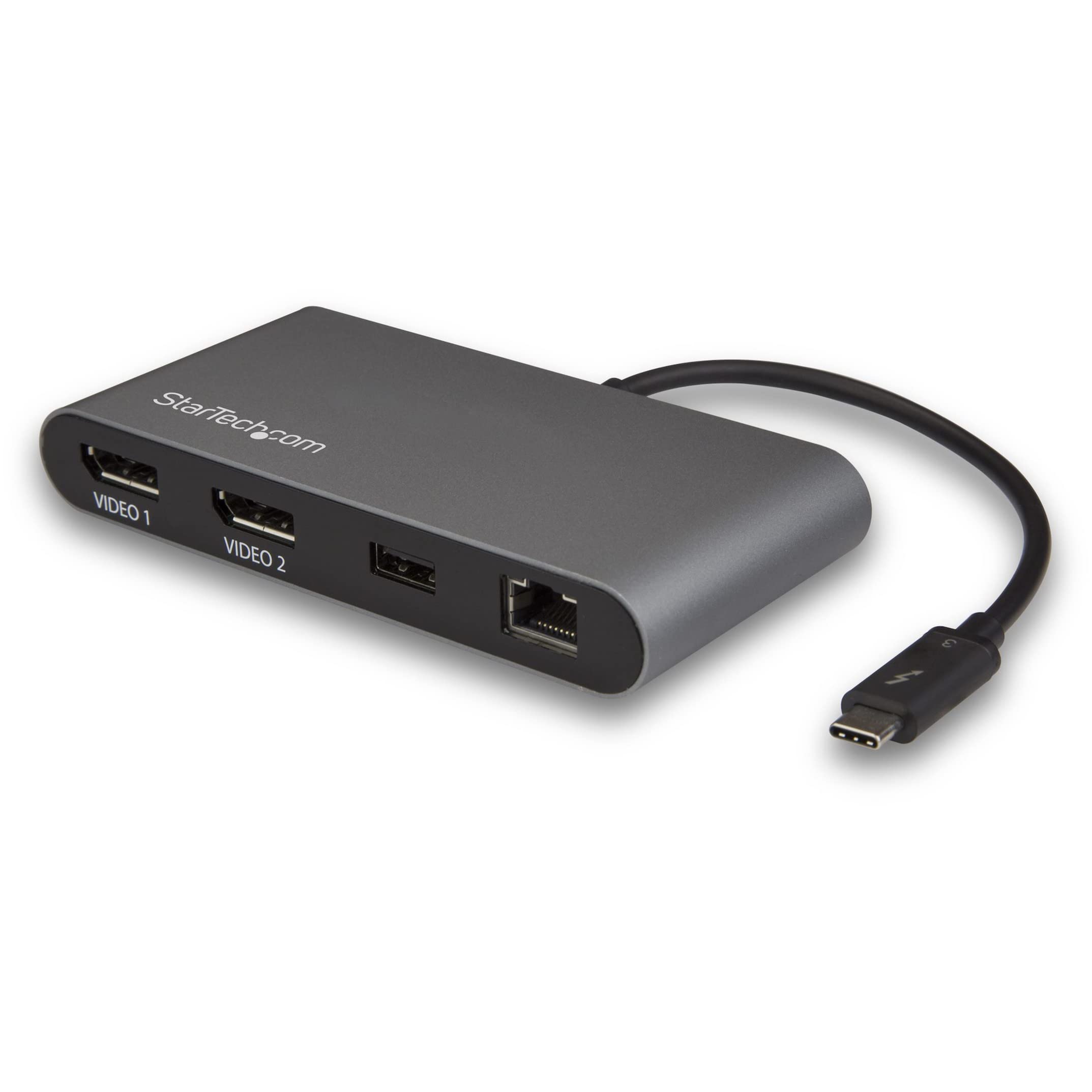
StarTech TB3DK2DPPD Dock - Thunderbolt 3 Dual 4K 85W PD
Easily transform your Thunderbolt 3 equipped MacBook Pro or Windows laptop into a dual-4K workstation with up to 40Gbps of throughput. Great for video editing and other Ultra HD tasks, this dual-4K monitor docking station supports 40Gbps speeds and 4K resolution on two monitors. Run resource-demanding applications on two independent displays, without draining system resources. Connect your laptop to: 1 x 4K monitor via the DP Port, 1 x 4K monitor via the TB3 USB-C Port (1.8 m cable included), or 1 x 5K monitor via the DP & TB3 USB-C port. Simply connect the TB3 dock to your laptop with included TB3 cable and start working immediately. No time-consuming driver installations are required. With three USB 3.0 ports, the Thunderbolt 3 docking station gives you plenty of ports for the latest and legacy devices. Connect USB devices like flash drives using the two Type-A ports. Keep your mobile device charged with the dock's Fast-Charge and sync port. Connect a USB-C device with the USB-C port (5Gbps - data only). This eliminates the need to use two separate power adapters for your laptop and dock.
Easily transform your Thunderbolt 3 equipped MacBook Pro or Windows laptop into a dual-4K workstation with up to 40Gbps of throughput. Great for video editing and other Ultra HD tasks, this dual-4K monitor docking station supports 40Gbps speeds and 4K resolution on two monitors. Run resource-demanding applications on two independent displays, without draining system resources. Connect your laptop to: 1 x 4K monitor via the DP Port, 1 x 4K monitor via the TB3 USB-C Port (1.8 m cable included), or 1 x 5K monitor via the DP & TB3 USB-C port. Simply connect the TB3 dock to your laptop with included TB3 cable and start working immediately. No time-consuming driver installations are required. With three USB 3.0 ports, the Thunderbolt 3 docking station gives you plenty of ports for the latest and legacy devices. Connect USB devices like flash drives using the two Type-A ports. Keep your mobile device charged with the dock's Fast-Charge and sync port. Connect a USB-C device with the USB-C port (5Gbps - data only). This eliminates the need to use two separate power adapters for your laptop and dock.
Easily transform your Thunderbolt 3 equipped MacBook Pro or Windows laptop into a dual-4K workstation with up to 40Gbps of throughput. Great for video editing and other Ultra HD tasks, this dual-4K monitor docking station supports 40Gbps speeds and 4K resolution on two monitors. Run resource-demanding applications on two independent displays, without draining system resources. Connect your laptop to: 1 x 4K monitor via the DP Port, 1 x 4K monitor via the TB3 USB-C Port (1.8 m cable included), or 1 x 5K monitor via the DP & TB3 USB-C port. Simply connect the TB3 dock to your laptop with included TB3 cable and start working immediately. No time-consuming driver installations are required. With three USB 3.0 ports, the Thunderbolt 3 docking station gives you plenty of ports for the latest and legacy devices. Connect USB devices like flash drives using the two Type-A ports. Keep your mobile device charged with the dock's Fast-Charge and sync port. Connect a USB-C device with the USB-C port (5Gbps - data only). This eliminates the need to use two separate power adapters for your laptop and dock.
Easily transform your Thunderbolt 3 equipped MacBook Pro or Windows laptop into a dual-4K workstation with up to 40Gbps of throughput. Great for video editing and other Ultra HD tasks, this dual-4K monitor docking station supports 40Gbps speeds and 4K resolution on two monitors. Run resource-demanding applications on two independent displays, without draining system resources. Connect your laptop to: 1 x 4K monitor via the DP Port, 1 x 4K monitor via the TB3 USB-C Port (1.8 m cable included), or 1 x 5K monitor via the DP & TB3 USB-C port. Simply connect the TB3 dock to your laptop with included TB3 cable and start working immediately. No time-consuming driver installations are required. With three USB 3.0 ports, the Thunderbolt 3 docking station gives you plenty of ports for the latest and legacy devices. Connect USB devices like flash drives using the two Type-A ports. Keep your mobile device charged with the dock's Fast-Charge and sync port. Connect a USB-C device with the USB-C port (5Gbps - data only). This eliminates the need to use two separate power adapters for your laptop and dock.
in 23 offers
The lowest price for StarTech TB3DK2DPPD Dock - Thunderbolt 3 Dual 4K 85W PD right now is $162.00 at eBay.com.au, compared across 15 retailers.
The all-time low was $39.03 on 13 Mar 2026 — today's price is 315% above the lowest ever. It has been notably cheaper before — worth setting a price alert.
Prices last updated 26 Aug 2026.
Last updated at 26/08/2026 17:40:16
StarTech.com Thunderbolt 3 Dual Monitor 4K 60Hz Laptop Docking Station with DisplayPort, 85W Power Delivery, Black
Affiliate Disclosure: We may receive a small commission for purchases made through this link at no extra cost to you. This helps support our site. Thank you!
Startech Thunderbolt 3 Dock, Dual Monitor 4k 60hz Docking Station
Free delivery
Affiliate Disclosure: We may receive a small commission for purchases made through this link at no extra cost to you. This helps support our site. Thank you!
Startech.com Thunderbolt 3 Daul 4k Docking Station With 85w Power
Delivery $11
Affiliate Disclosure: We may receive a small commission for purchases made through this link at no extra cost to you. This helps support our site. Thank you!
Startech.com Thunderbolt 3 Daul 4k Docking Station With 85w Power
Free delivery
Affiliate Disclosure: We may receive a small commission for purchases made through this link at no extra cost to you. This helps support our site. Thank you!
Startech Thunderbolt 3 Dock - Dual Monitor 4K 60Hz TB3 Laptop Docking StationTB3DOCK2DPPD
Delivery $22
Startech Thunderbolt 3 Dock - Dual Monitor 4K 60Hz Laptop Docking Station TB3DK2DPPD
Delivery $22
Startech [TB3DK2DPPD] Dual-4K Monitor Thunderbolt 3 Dock with DisplayPort *Last Unit* Clearance
StarTech.com Thunderbolt 3 Daul 4K Docking Station with 85W Power Delivery 1x DP - 2x Thunderbolt 3 - 2x USB 3.0 - 1x RJ45 - 1x 3.55mm Audio-in - 1x 3
Free delivery between 31 Aug – 5 Sept
StarTech.com Thunderbolt 3 Daul 4K Docking Station with 85W Power Delivery 1x DP
Delivery $10
Thunderbolt 3 Dock, Dual Monitor 4K 60Hz TB3 Laptop Docking Station, DisplayPort, 85W PD, 3x USB, GbE
originally posted on startech.com
I bought this to use with my Macbook Pro 15, 2017. After reading the issues that primarily involved (Windows) drivers and cabling, I paired it with a Nekteck TB3 cable to the dock, and a Club3d CAC-1066 DP cable to a ThinkVision L27q (4k, 60Hz). Plus a Cat6 cable and a Logitech wireless USB receiver. Audio jacks are recognized and work fine. Can't speak to dual displays, but if you do, watch what HDMI port you use on your monitor, not all of them support 4k60Hz. (Ran into that with a Samsung 4k monitor + Radeon Pro card.)Here's my gripe, and I'm not sure where the breakdown is: The USB 3.0 ports on the monitor do not work unless the monitor is driven by the USB 3.0 connection, not DP. When both DP and USB cables are connected, the MBP thinks there are three ... MoreI bought this to use with my Macbook Pro 15, 2017. After reading the issues that primarily involved (Windows) drivers and cabling, I paired it with a Nekteck TB3 cable to the dock, and a Club3d CAC-1066 DP cable to a ThinkVision L27q (4k, 60Hz). Plus a Cat6 cable and a Logitech wireless USB receiver. Audio jacks are recognized and work fine. Can't speak to dual displays, but if you do, watch what HDMI port you use on your monitor, not all of them support 4k60Hz. (Ran into that with a Samsung 4k monitor + Radeon Pro card.)Here's my gripe, and I'm not sure where the breakdown is: The USB 3.0 ports on the monitor do not work unless the monitor is driven by the USB 3.0 connection, not DP. When both DP and USB cables are connected, the MBP thinks there are three displays, even though I only have one selected (obviously). Maybe its a firmware issue with the L27u, maybe the Dock, maybe the MBP. Not sure. This means that I can't plug in my factory USB soundbar, the Logitech receiver, or anything else into the 4 USB ports on the monitor. And since there's only 2 USB 2.0 ports on the dock, it limits the number of devices I can use at once.Just something to think about, but overall its a very good dock. Looks great on my desk too!
originally posted on startech.com
I have had this for about six months. This makes it very easy to support my macBook Pro. I now have a single USB-C connection for my macBook that does it all; charges MacBook, drives 2 displays, provides wired network, connects WebCam, supports lightening cable for charging touchpad/keyboard/iPhone/iPadI via USB-A connection.This makes it really easy to unplug laptop and take it traveling and when I return literally takes seconds to plug into port and be back up and running with wired network and 2 external monitors.Need to be careful with which ports are used, not all ports support charging or pass through displays.I have had problems with the network adapter. At times it becomes unstable. I tested it by firing continuous requests to another Mac on the same ... MoreI have had this for about six months. This makes it very easy to support my macBook Pro. I now have a single USB-C connection for my macBook that does it all; charges MacBook, drives 2 displays, provides wired network, connects WebCam, supports lightening cable for charging touchpad/keyboard/iPhone/iPadI via USB-A connection.This makes it really easy to unplug laptop and take it traveling and when I return literally takes seconds to plug into port and be back up and running with wired network and 2 external monitors.Need to be careful with which ports are used, not all ports support charging or pass through displays.I have had problems with the network adapter. At times it becomes unstable. I tested it by firing continuous requests to another Mac on the same wired network and saw repeated brownouts lasting for seconds at a time. Those problems do not occur when using wired ethernet adapter directly with MacBook. Turning it off and turning it on again (the hub not the MacBook) seems to help.
originally posted on startech.com
I was provided this dock by my company to handle the external monitors they provided. I am unable to use this with a DisplayPort cable from my monitor, the image becomes unstable. I am able to utilize an HDMI cable with an adapter but each day I have to unplug and replug the adapter. I have tried multiple different active adapters and they all have the same issue.So the dock works, but there are better docks out there for the same price point that function flawlessly.
| General | |
| Product Type | Docking station |
| Width | 8 cm |
| Depth | 22 cm |
| Height | 2.7 cm |

StarTech.com Thunderbolt 3 Dual Monitor 4K 60Hz Laptop Docking Station with DisplayPort, 85W Power Delivery, Black
Affiliate Disclosure: We may receive a small commission for purchases made through this link at no extra cost to you. This helps support our site. Thank you!
Startech Thunderbolt 3 Dock, Dual Monitor 4k 60hz Docking Station
Free delivery
Affiliate Disclosure: We may receive a small commission for purchases made through this link at no extra cost to you. This helps support our site. Thank you!
Startech.com Thunderbolt 3 Daul 4k Docking Station With 85w Power
Delivery $11
Affiliate Disclosure: We may receive a small commission for purchases made through this link at no extra cost to you. This helps support our site. Thank you!
Startech.com Thunderbolt 3 Daul 4k Docking Station With 85w Power
Free delivery
Affiliate Disclosure: We may receive a small commission for purchases made through this link at no extra cost to you. This helps support our site. Thank you!
Startech Thunderbolt 3 Dock - Dual Monitor 4K 60Hz TB3 Laptop Docking StationTB3DOCK2DPPD
Delivery $22
I bought this to use with my Macbook Pro 15, 2017. After reading the issues that primarily involved (Windows) drivers and cabling, I paired it with a Nekteck TB3 cable to the dock, and a Club3d CAC-1066 DP cable to a ThinkVision L27q (4k, 60Hz). Plus a Cat6 cable and a Logitech wireless USB receiver. Audio jacks are recognized and work fine. Can't speak to dual displays, but if you do, watch what HDMI port you use on your monitor, not all of them support 4k60Hz. (Ran into that with a Samsung 4k monitor + Radeon Pro card.)Here's my gripe, and I'm not sure where the breakdown is: The USB 3.0 ports on the monitor do not work unless the monitor is driven by the USB 3.0 connection, not DP. When both DP and USB cables are connected, the MBP thinks there are three ... MoreI bought this to use with my Macbook Pro 15, 2017. After reading the issues that primarily involved (Windows) drivers and cabling, I paired it with a Nekteck TB3 cable to the dock, and a Club3d CAC-1066 DP cable to a ThinkVision L27q (4k, 60Hz). Plus a Cat6 cable and a Logitech wireless USB receiver. Audio jacks are recognized and work fine. Can't speak to dual displays, but if you do, watch what HDMI port you use on your monitor, not all of them support 4k60Hz. (Ran into that with a Samsung 4k monitor + Radeon Pro card.)Here's my gripe, and I'm not sure where the breakdown is: The USB 3.0 ports on the monitor do not work unless the monitor is driven by the USB 3.0 connection, not DP. When both DP and USB cables are connected, the MBP thinks there are three displays, even though I only have one selected (obviously). Maybe its a firmware issue with the L27u, maybe the Dock, maybe the MBP. Not sure. This means that I can't plug in my factory USB soundbar, the Logitech receiver, or anything else into the 4 USB ports on the monitor. And since there's only 2 USB 2.0 ports on the dock, it limits the number of devices I can use at once.Just something to think about, but overall its a very good dock. Looks great on my desk too!
I have had this for about six months. This makes it very easy to support my macBook Pro. I now have a single USB-C connection for my macBook that does it all; charges MacBook, drives 2 displays, provides wired network, connects WebCam, supports lightening cable for charging touchpad/keyboard/iPhone/iPadI via USB-A connection.This makes it really easy to unplug laptop and take it traveling and when I return literally takes seconds to plug into port and be back up and running with wired network and 2 external monitors.Need to be careful with which ports are used, not all ports support charging or pass through displays.I have had problems with the network adapter. At times it becomes unstable. I tested it by firing continuous requests to another Mac on the same ... MoreI have had this for about six months. This makes it very easy to support my macBook Pro. I now have a single USB-C connection for my macBook that does it all; charges MacBook, drives 2 displays, provides wired network, connects WebCam, supports lightening cable for charging touchpad/keyboard/iPhone/iPadI via USB-A connection.This makes it really easy to unplug laptop and take it traveling and when I return literally takes seconds to plug into port and be back up and running with wired network and 2 external monitors.Need to be careful with which ports are used, not all ports support charging or pass through displays.I have had problems with the network adapter. At times it becomes unstable. I tested it by firing continuous requests to another Mac on the same wired network and saw repeated brownouts lasting for seconds at a time. Those problems do not occur when using wired ethernet adapter directly with MacBook. Turning it off and turning it on again (the hub not the MacBook) seems to help.
I was provided this dock by my company to handle the external monitors they provided. I am unable to use this with a DisplayPort cable from my monitor, the image becomes unstable. I am able to utilize an HDMI cable with an adapter but each day I have to unplug and replug the adapter. I have tried multiple different active adapters and they all have the same issue.So the dock works, but there are better docks out there for the same price point that function flawlessly.
Use it mainly with my Macbook. Tested with a friend's Dell. In both cases, it just worked.Small, flat, hardly noticable. Feeds power through just fine, drives 4k via DP without an issue. Added 2nd HDMI monitor via adapter cable, and that was no issue either!Sometimes on the Macbook, after coming out of sleep, I need to disconnect the dock and reconnect, and then all is well. But it's not consistent, and not frequent.What I'd like to see is Mac compatible docks that have an option in the driver to tell OSX to disable/dim the built-in screen. But that's a wishlist, not a fault of this little beastie.Power pass through is appreciated, as I can leave my adapter in the bag, drop the computer on the desk and connect ONE cable.Would like to see an additional ... MoreUse it mainly with my Macbook. Tested with a friend's Dell. In both cases, it just worked.Small, flat, hardly noticable. Feeds power through just fine, drives 4k via DP without an issue. Added 2nd HDMI monitor via adapter cable, and that was no issue either!Sometimes on the Macbook, after coming out of sleep, I need to disconnect the dock and reconnect, and then all is well. But it's not consistent, and not frequent.What I'd like to see is Mac compatible docks that have an option in the driver to tell OSX to disable/dim the built-in screen. But that's a wishlist, not a fault of this little beastie.Power pass through is appreciated, as I can leave my adapter in the bag, drop the computer on the desk and connect ONE cable.Would like to see an additional USB-C and USB-A on the front of the dock, as I tend to connect a thumb-drive and charge my phone, but I can work around that. Just a 'nice to have'.If there was a way to make this backward compatible with TB2... THEN it would be perfect. :)Overall though, SOLID build, decent port placement, great size, and near flawless performance (other than the reconnect/sleep thing I mentioned).I received this product in exchange for an unbiased review. And have already purchased an additional one for the Mrs.!!
What a great little dock!So the first thing you will notice that that this dock has some weight to it. I have tried some competitors docks before and some are much lighter. Now I prefer the fact that this has some weight and I found it helped to keep all the cables etc where I want them and not where the cables wanted to go.This dock offers multiple thunderbolt 3 ports, Displayport, Usb-3.0, ethernet and audio in/out along with power delivery.I tested this with my MacBook pro and found it worked like a charm. I tested with my external monitor and had no issues at all. Now I could not test at 4k as my monitor does not support it. But at 1080P this unit worked perfectly.This is a great options for people who want to leave all the cables hooked up and just plug ... MoreWhat a great little dock!So the first thing you will notice that that this dock has some weight to it. I have tried some competitors docks before and some are much lighter. Now I prefer the fact that this has some weight and I found it helped to keep all the cables etc where I want them and not where the cables wanted to go.This dock offers multiple thunderbolt 3 ports, Displayport, Usb-3.0, ethernet and audio in/out along with power delivery.I tested this with my MacBook pro and found it worked like a charm. I tested with my external monitor and had no issues at all. Now I could not test at 4k as my monitor does not support it. But at 1080P this unit worked perfectly.This is a great options for people who want to leave all the cables hooked up and just plug the laptop in and off we go!I would recommend this unit to anyone looking for a well built and solid dock. Far better then most of the competition."I received this product in exchange for an unbiased review"
I have used this docking station for a few weeks with just my Lenovo T470 laptop and it works very well. I have attempted to connect other devices (that don't have Thunderbolt 3) but none of them work.The dock comes in a box about the size and weight of a brick. It was much heavier than I expected. Both the dock itself and the large power supply are equally heavy. The dock is made of medal and is very study and nicely built. The doc is about the same size as a large laptop power brick, which it comes with to power itself and the host device. I very much like the look of this dock on my desk. It has both a USB-C and USB-A 3.0 port on the front as well on the back it has these two ports again plus network, display port and headphone out then power, microphone and ... MoreI have used this docking station for a few weeks with just my Lenovo T470 laptop and it works very well. I have attempted to connect other devices (that don't have Thunderbolt 3) but none of them work.The dock comes in a box about the size and weight of a brick. It was much heavier than I expected. Both the dock itself and the large power supply are equally heavy. The dock is made of medal and is very study and nicely built. The doc is about the same size as a large laptop power brick, which it comes with to power itself and the host device. I very much like the look of this dock on my desk. It has both a USB-C and USB-A 3.0 port on the front as well on the back it has these two ports again plus network, display port and headphone out then power, microphone and USB-C in.The doc connects very quickly when Windows has started. Only a couple of seconds and everything is working great. The docking station was able to keep my computer charged without any problem. My complaint with this product is it pretty much doesn't work with anything that does not have Thunderbolt 3. I tried using it with many other USB-C devices but nothing would work (charging, display, USB or network). I can get all of these working with single purpose USB-C adaptors but not this dock.This docking station does a very good job and looks very nice. It will likely replace every docking station in my office at some point in the future once all laptops support Thunderbolt 3. I received this product in exchange for an unbiased review.
Update: 4/5/19. I am upping this product from 1 star to 4 stars. It would normally be 5 stars, but my problem was not explained in the instructions. Are you experiencing a problem with kernel_task consuming an excessive amount of power while this is plugged in? Is your laptop so incredibly slow that it eventually shuts off? Maybe you can't get Ethernet to work either? Scroll to the last sentence to fix your problem if this is TL;DR. You probably double-checked and noted that you purchased the "Laptop Charging" feature, and it does state that it's supposed to be able to do it. However, the battery slowly drains even though it shows the power charging. Eventually, your macbook restarts. The reason that's happening is that this dock cannot provide enough power on the ... MoreUpdate: 4/5/19. I am upping this product from 1 star to 4 stars. It would normally be 5 stars, but my problem was not explained in the instructions. Are you experiencing a problem with kernel_task consuming an excessive amount of power while this is plugged in? Is your laptop so incredibly slow that it eventually shuts off? Maybe you can't get Ethernet to work either? Scroll to the last sentence to fix your problem if this is TL;DR. You probably double-checked and noted that you purchased the "Laptop Charging" feature, and it does state that it's supposed to be able to do it. However, the battery slowly drains even though it shows the power charging. Eventually, your macbook restarts. The reason that's happening is that this dock cannot provide enough power on the WRONG USB-C port (the one with one "Lightning" icon and nothing else) to charge a Macbook while also providing all of the features it promises in the description, such as dual 4K @ 60Hz, Ethernet, USB, USB-C and others. Even with a short 40Gb/s USB-C cable, it cannot work. So it just slowly drains your battery while providing everything EXCEPT Ethernet and charging. The reason is that you're plugging the power cord into the wrong slot like me (D'oh!). Make sure you're plugging in the USB-C power cord into the USB-C outlet with the Laptop icon! There are two power icons, and one with power and a laptop. Use the one with power and a laptop. That will also fix your Ethernet problem. A true PEBKAC error that could've been avoided with better instructions and/or design.
I've used this docking station for almost two years now. When it does work, its fine. But I get a plethora of graphical issues if I ever disconnect and reconnect my laptop (even though its the main function of the device). It has issues constantly not recognizing monitors, giving me black screens. pixel jarring, I've had to work entire days with a single monitor because nothing I tried got it to recognize the second one (restarting, switching out cables, updating drivers, using a different workstation, NOTHING works). The PC constantly gives me popups that the "USB device not recognized" even thought it was recognized 10 minutes before. Honestly, I'd avoid this docking station if I were you.
I'm a huge fan of this dock, and have purchased two for my WFH set up. I use an Apple MBP with the USB-C ports, driving a 32-inch ViewSonic monitor. Brilliant all around. The problem is that the dock seems to fail when it gets hot -- around 2pm each day. I thought it was related to my laptop, but I have swapped out different laptops and have the same issue. Perhaps something faulty with these? I looked for firmware updates, but there was nothing listed for Macs. When it works, it is magic and wonderful, but having to unplug it from the external monitor (and keyboard, etc.) several times each day reduces its utility by a lot.
I've used this for over a year now with dual monitors connected to my MacBook Pro, and everything works as intended - the wired ethernet, dual monitors, power passthru at full charging speed, all on a single cable.My two minor issues with it:1) The cable provided with it is about 2 inches too short for the orientation I want to use. I replaced it with a high-quality cable (note: cheap ones cause lots of problems, but I can't fault this dock for that).2) The 1/8" audio jacks on the back work well (are detected as USB audio codec) EXCEPT the on-wire volume controls don't work, nor does the microphone on a single 4-connector 1/8" jack. The manual does explicitly refer to the headphone port as output only, but fixing this so it works as well as the MacBook's ... MoreI've used this for over a year now with dual monitors connected to my MacBook Pro, and everything works as intended - the wired ethernet, dual monitors, power passthru at full charging speed, all on a single cable.My two minor issues with it:1) The cable provided with it is about 2 inches too short for the orientation I want to use. I replaced it with a high-quality cable (note: cheap ones cause lots of problems, but I can't fault this dock for that).2) The 1/8" audio jacks on the back work well (are detected as USB audio codec) EXCEPT the on-wire volume controls don't work, nor does the microphone on a single 4-connector 1/8" jack. The manual does explicitly refer to the headphone port as output only, but fixing this so it works as well as the MacBook's onboard jack (which supports both the controls and the mic) would be nice.
| General | |
| Product Type | Docking station |
| Width | 8 cm |
| Depth | 22 cm |
| Height | 2.7 cm |