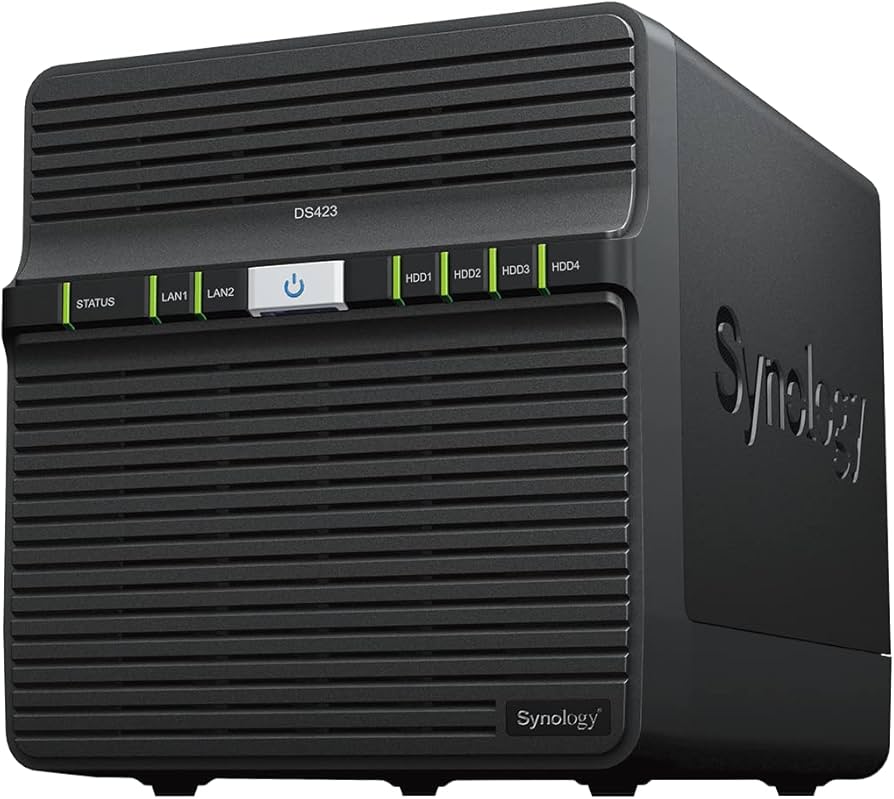
Synology DiskStation DS923+ 4GB 4 Bay NAS
Flexible File Sharing and Storage for Homes and Small Business The Synology DS923+ is a capable 4-bay NAS solution that can be adjusted and expanded as your needs change, with optional support for up to nine drives, faster networking, and NVMe SSDs for caching or additional storage pools. Powered by Synology DiskStation Manager (DSM), it offers a flexible all-in-one solution for data sharing, synchronization, backup, and surveillance. Storage That Fits your Needs Is your data scattered across external drives and public cloud accounts? With DS923+, you can consolidate your data with over 50 TB across 4 bays. Need more space? Expand with DX517 for over 120 TB of storage. The Performance you Need Reduce transfer times with DS923+, designed to accelerate your workloads. Easily add faster networking and NVMe drives to further boost performance. Store, Share, and Protect Manage all your documents, photos, and other files, back up applications and devices, and protect your physical assets with professional video surveillance. Private Cloud Storage Access files from all your devices and protect them with smart versioning. Manage, share, and sync your data across locations. Multi-Layered Backup Back up files, folders, physical devices, VMs, and SaaS applications with free solutions, and protect your NAS with built-in technologies. Smart Surveillance Transform your Synology device into a full-featured video management system for a wide range of compatible IP cameras. Get More with DiskStation Manager Take advantage of a host of native productivity, management, and security solutions available in the web-based Synology DSM operating system.
Flexible File Sharing and Storage for Homes and Small Business The Synology DS923+ is a capable 4-bay NAS solution that can be adjusted and expanded as your needs change, with optional support for up to nine drives, faster networking, and NVMe SSDs for caching or additional storage pools. Powered by Synology DiskStation Manager (DSM), it offers a flexible all-in-one solution for data sharing, synchronization, backup, and surveillance. Storage That Fits your Needs Is your data scattered across external drives and public cloud accounts? With DS923+, you can consolidate your data with over 50 TB across 4 bays. Need more space? Expand with DX517 for over 120 TB of storage. The Performance you Need Reduce transfer times with DS923+, designed to accelerate your workloads. Easily add faster networking and NVMe drives to further boost performance. Store, Share, and Protect Manage all your documents, photos, and other files, back up applications and devices, and protect your physical assets with professional video surveillance. Private Cloud Storage Access files from all your devices and protect them with smart versioning. Manage, share, and sync your data across locations. Multi-Layered Backup Back up files, folders, physical devices, VMs, and SaaS applications with free solutions, and protect your NAS with built-in technologies. Smart Surveillance Transform your Synology device into a full-featured video management system for a wide range of compatible IP cameras. Get More with DiskStation Manager Take advantage of a host of native productivity, management, and security solutions available in the web-based Synology DSM operating system.
Flexible File Sharing and Storage for Homes and Small Business The Synology DS923+ is a capable 4-bay NAS solution that can be adjusted and expanded as your needs change, with optional support for up to nine drives, faster networking, and NVMe SSDs for caching or additional storage pools. Powered by Synology DiskStation Manager (DSM), it offers a flexible all-in-one solution for data sharing, synchronization, backup, and surveillance. Storage That Fits your Needs Is your data scattered across external drives and public cloud accounts? With DS923+, you can consolidate your data with over 50 TB across 4 bays. Need more space? Expand with DX517 for over 120 TB of storage. The Performance you Need Reduce transfer times with DS923+, designed to accelerate your workloads. Easily add faster networking and NVMe drives to further boost performance. Store, Share, and Protect Manage all your documents, photos, and other files, back up applications and devices, and protect your physical assets with professional video surveillance. Private Cloud Storage Access files from all your devices and protect them with smart versioning. Manage, share, and sync your data across locations. Multi-Layered Backup Back up files, folders, physical devices, VMs, and SaaS applications with free solutions, and protect your NAS with built-in technologies. Smart Surveillance Transform your Synology device into a full-featured video management system for a wide range of compatible IP cameras. Get More with DiskStation Manager Take advantage of a host of native productivity, management, and security solutions available in the web-based Synology DSM operating system.
Flexible File Sharing and Storage for Homes and Small Business The Synology DS923+ is a capable 4-bay NAS solution that can be adjusted and expanded as your needs change, with optional support for up to nine drives, faster networking, and NVMe SSDs for caching or additional storage pools. Powered by Synology DiskStation Manager (DSM), it offers a flexible all-in-one solution for data sharing, synchronization, backup, and surveillance. Storage That Fits your Needs Is your data scattered across external drives and public cloud accounts? With DS923+, you can consolidate your data with over 50 TB across 4 bays. Need more space? Expand with DX517 for over 120 TB of storage. The Performance you Need Reduce transfer times with DS923+, designed to accelerate your workloads. Easily add faster networking and NVMe drives to further boost performance. Store, Share, and Protect Manage all your documents, photos, and other files, back up applications and devices, and protect your physical assets with professional video surveillance. Private Cloud Storage Access files from all your devices and protect them with smart versioning. Manage, share, and sync your data across locations. Multi-Layered Backup Back up files, folders, physical devices, VMs, and SaaS applications with free solutions, and protect your NAS with built-in technologies. Smart Surveillance Transform your Synology device into a full-featured video management system for a wide range of compatible IP cameras. Get More with DiskStation Manager Take advantage of a host of native productivity, management, and security solutions available in the web-based Synology DSM operating system.
in 21 offers
The lowest price for Synology DiskStation DS923+ 4GB 4 Bay NAS right now is $999.00 at PCByte AU, compared across 12 retailers.
The all-time low was $529.00 on 18 July 2024 — today's price is 89% above the lowest ever. It has been notably cheaper before — worth setting a price alert.
Prices last updated 27 Oct 2026.
Last updated at 27/10/2026 04:08:06
Synology DiskStation 4 Bay Ryzen R1600 Dual Core 4GB NAS (DS923+)
Synology DiskStation 4 Bay Ryzen R1600 Dual Core 4GB NAS (DS923+)
30-day returns
Synology DiskStation 4 Bay Ryzen R1600 Dual Core 4GB NAS (DS923+)
30-day returns
Storage Synology DiskStation DS923+ 4-Bay AMD Dual Core CPU, 4GB RAM, 2xGbE NAS 2 x USB3.2, 1 x eSATA, 3Y WTY (DS920+ Replacement) - AMT Electronics
Synology Disk Station Ds923+ 4 Bay Amd Dual Core Cpu, 4 Gb Ram, 2x Gb E Nas 2 X Usb3.2, 1 X E Sata, 3 Y Wty (Ds920+ Replacement)
Delivery $30
Synology DiskStation DS923+ 4-Bay AMD Dual Core CPU, 4GB RAM, 2xGbE NAS 2 x USB3.2, 1 x eSATA, 3Y WTY (DS920+ Replacement)
Free delivery
Synology Diskstation Ds923+ 4-bay NAS/Storage Server Tower - 50TB Capacity, Ethernet LAN, Expandable to 9 Drives, Synology Diskstation Manager
Delivery between Thu – Mon $13
Synology DiskStation DS923+ 4-Bay 3.5" Diskless NAS
Free delivery
Synology DS923+ 4-Bay NAS Enclosure (Enclosure Only)
Synology 16TB DiskStation DS923+ 4-bay SATA NAS Server
originally posted on box.co.uk
Pros: This replaces a QNAP which was honestly just a pain to set up very simple stuff on. Given I'm a software engineer and administer a network, I was surprised at this but had the Synology doing far more than the TS464 in less than an hour. I failed with the QNAP after 6 weeks!I realise that the QNAP allegedly does more overall (I'm not sure it does really), however I feel that I would be much more comfortable setting those things up in a real server environment with proper enterprise tools. For the point and click NAS environment I think that Synology does far better and equally has far better desktop apps.Cons: I still feel that a lot of these NAS things are pretty expensive for what they offer. As a software engineer, I realise that a lot of the value is in ... MorePros: This replaces a QNAP which was honestly just a pain to set up very simple stuff on. Given I'm a software engineer and administer a network, I was surprised at this but had the Synology doing far more than the TS464 in less than an hour. I failed with the QNAP after 6 weeks!I realise that the QNAP allegedly does more overall (I'm not sure it does really), however I feel that I would be much more comfortable setting those things up in a real server environment with proper enterprise tools. For the point and click NAS environment I think that Synology does far better and equally has far better desktop apps.Cons: I still feel that a lot of these NAS things are pretty expensive for what they offer. As a software engineer, I realise that a lot of the value is in the software but software is not as valuable as it once was (take a look at the cost of Windows or Office these days compared to 2005).Whilst the software makes the NAS diverse, I am only using 3-8% of what is available and I could easily do this with a small server for a lower cost.
originally posted on digitec.ch
I returned the NAS, too much hardware and software limitations for now for MY usage but you may be very happy with it. I keep my DS1815+You can not use the SSD m2 slot for storage pools if not from synology https://www.digitec.ch/fr/search?q=synology%20ssdNon Synology SSD can only be used for caching :-(Mounting Nvme drive also do not work with https://www.digitec.ch/fr/s1/product/icy-box-m2-pcie-nvme-zu-25-adapter-m2-25-boitiers-pour-disques-durs-20637273Work well with non synology RAM likehttps://www.digitec.ch/fr/s1/product/kingston-ksm26sed816hd-1-x-16gb-2666-mhz-ram-ddr4-so-dimm-memoire-vive-13953675?supplier=406802
originally posted on scorptec.com.au
Relatively easy to set up. This version doesn't have a dedicated gpu but works well with Shield TV Pro. There's better hardware around for this price but Synology's software is excellent, making this choice easy.
| Brand | Synology |
| RAID Level | RAID 0, RAID 1, RAID 5, RAID 6, RAID 1+0 |
| Without Hard Drive | Yes |
| Hot Swappable | Yes |
| Type | NAS |
Synology DiskStation 4 Bay Ryzen R1600 Dual Core 4GB NAS (DS923+)
Synology DiskStation 4 Bay Ryzen R1600 Dual Core 4GB NAS (DS923+)
30-day returns
Synology DiskStation 4 Bay Ryzen R1600 Dual Core 4GB NAS (DS923+)
30-day returns
Storage Synology DiskStation DS923+ 4-Bay AMD Dual Core CPU, 4GB RAM, 2xGbE NAS 2 x USB3.2, 1 x eSATA, 3Y WTY (DS920+ Replacement) - AMT Electronics
Synology Disk Station Ds923+ 4 Bay Amd Dual Core Cpu, 4 Gb Ram, 2x Gb E Nas 2 X Usb3.2, 1 X E Sata, 3 Y Wty (Ds920+ Replacement)
Delivery $30
Pros: This replaces a QNAP which was honestly just a pain to set up very simple stuff on. Given I'm a software engineer and administer a network, I was surprised at this but had the Synology doing far more than the TS464 in less than an hour. I failed with the QNAP after 6 weeks!I realise that the QNAP allegedly does more overall (I'm not sure it does really), however I feel that I would be much more comfortable setting those things up in a real server environment with proper enterprise tools. For the point and click NAS environment I think that Synology does far better and equally has far better desktop apps.Cons: I still feel that a lot of these NAS things are pretty expensive for what they offer. As a software engineer, I realise that a lot of the value is in ... MorePros: This replaces a QNAP which was honestly just a pain to set up very simple stuff on. Given I'm a software engineer and administer a network, I was surprised at this but had the Synology doing far more than the TS464 in less than an hour. I failed with the QNAP after 6 weeks!I realise that the QNAP allegedly does more overall (I'm not sure it does really), however I feel that I would be much more comfortable setting those things up in a real server environment with proper enterprise tools. For the point and click NAS environment I think that Synology does far better and equally has far better desktop apps.Cons: I still feel that a lot of these NAS things are pretty expensive for what they offer. As a software engineer, I realise that a lot of the value is in the software but software is not as valuable as it once was (take a look at the cost of Windows or Office these days compared to 2005).Whilst the software makes the NAS diverse, I am only using 3-8% of what is available and I could easily do this with a small server for a lower cost.
I returned the NAS, too much hardware and software limitations for now for MY usage but you may be very happy with it. I keep my DS1815+You can not use the SSD m2 slot for storage pools if not from synology https://www.digitec.ch/fr/search?q=synology%20ssdNon Synology SSD can only be used for caching :-(Mounting Nvme drive also do not work with https://www.digitec.ch/fr/s1/product/icy-box-m2-pcie-nvme-zu-25-adapter-m2-25-boitiers-pour-disques-durs-20637273Work well with non synology RAM likehttps://www.digitec.ch/fr/s1/product/kingston-ksm26sed816hd-1-x-16gb-2666-mhz-ram-ddr4-so-dimm-memoire-vive-13953675?supplier=406802
Relatively easy to set up. This version doesn't have a dedicated gpu but works well with Shield TV Pro. There's better hardware around for this price but Synology's software is excellent, making this choice easy.
Pros: My 4th Synology DiskStation. So much more power than the previous models. Running as a NAS, media server, Roon Core, Node-Red server.........Cons: Nothing I can think of.
My first NAS, zero previous experience. Installation was very quick and easy, and the OS provides a good experience.The amount of apps from Synology is extensive, and also works well from my mobile.I started with two HD’s, however the additional bays make it easy to expand in the future.Overall, happy with the purchase, however I lack the knowledge to compare to others.
Pros: Works well, and very easy to set it up.Cons: I could use some more folder flexibility from the apps.
Pros: Good build quality. Rich user interface with a huge array of functions.Cons: Slight fan noise - not ideal to work next to it. Lacks built in 2.5 or 10GBE (10GBE is an add on option).
Pros: It's seems to work well once familiarity improves. There are a lot of features which woukd be used fir a small office with multiple users rather than home use. Maybe a suggestion is to have that option when starting up systemCons: Setup is a bit hit or miss on that you are asked multiple question & are unsure if the impact
| Brand | Synology |
| RAID Level | RAID 0, RAID 1, RAID 5, RAID 6, RAID 1+0 |
| Without Hard Drive | Yes |
| Hot Swappable | Yes |
| Type | NAS |