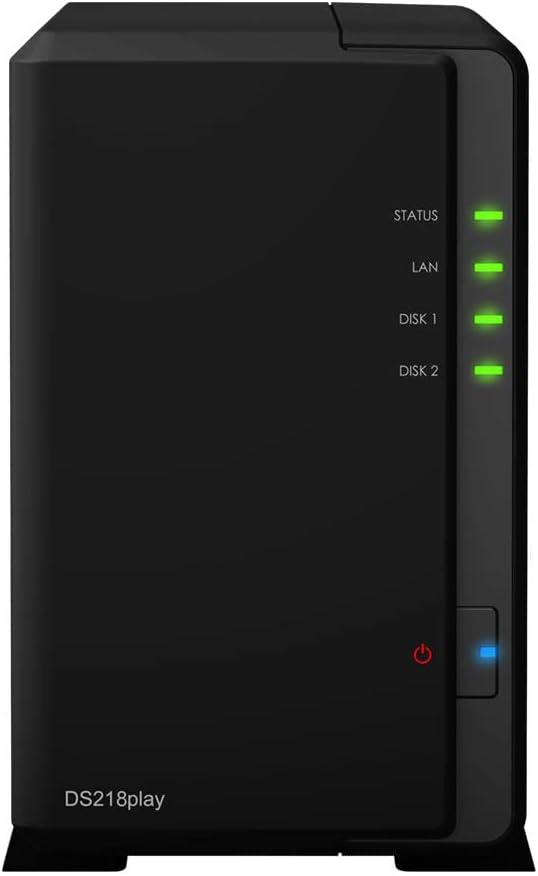
Synology DS218PLAY DiskStation 2-Bay NAS
Download Center - DS218play
Download Center - DS218play
Download Center - DS218play
Download Center - DS218play
in 5 offers
The lowest price for Synology DS218PLAY DiskStation 2-Bay NAS right now is $245.00 at CeX, compared across 5 retailers.
The all-time low was $245.00 on 26 Apr 2026. That's the lowest price we've ever tracked — a great time to buy.
Prices last updated 1 Oct 2026.
Last updated at 01/10/2026 19:23:46
Synology DiskStation DS218Play 2-Bay NAS Enclosure (Diskless)
Free delivery
Synology DiskStation DS218PLAY 2-Bay 3.5" 1xGbE NAS, Realtek RTD1296 quad-core 1.4GHz,1GB RAM, USB3.0 x 2 - Winner Australian PC Awards -Best Hom
Free delivery between 7–13 Oct
Synology DiskStation DS218Play 2 Bay Diskless NAS Quad Core CPU 1GB RAM
Delivery $11.99
Synology DiskStation DS218PLAY NAS Server
Synology DiskStation DS218PLAY 2-Bay 3.5' Diskless 1xGbE NAS (HMB), Realtek RTD1296 quad-core 1.4GHz, 1GB RAM, USB3.0 x 2 - 2 Year Warranty
Delivery $18
originally posted on bhphotovideo.com
I bought this because BOTH the Plex site and the Synology website said that it worked with Plex. It does not.That said, it's a pretty solid product. The native apps work well. The file name editing is very well though out. And Synology's tech Support actually responds to inquiries, unlike Plex.Very disappointed that I need to run two media servers now, Plex for everything (because I've used it for years) and Synology for video. This stuff should just work. Super frustrating experience.
originally posted on bhphotovideo.com
I've had a DS211j for almost 7 years and just upgraded to the DS218Play. WOW!I just had 5 computers syncing with the DS218Play while the DS218Play was uploading encrypted files to a cloud server, while also copying files from the DS218Play to a USB drive. CPU usage was 37% and memory was 42%. Moving between the different pages of DSM 6.1 was almost instantaneous while all this was happening. I'm so glad I upgraded. The DS211j still handled MOST of my needs but this DS218Play is a monster by comparison. I considered getting the DS218+ or the DS718+ but now I can see that the DS218Play is more than enough as a file server for home use.
originally posted on ebay.com
Had some difficulty setting it up in Windows 10, took a few days and lots of searching, but in the end managed to get it to go, Setting up could be made much simpler with working examples and how to get past common recognition errors when setting up the Network to use Windows Explorer. Mapping the drives was most difficult to set up, seems it's a universal problem in Windows 10 for NAS devices. Sometimes its device dependent, several Laptops recognized the NAS instantly while desktops were much more difficult to set up. Overall data transfer is fast at around 100MB for my setup, but still learning how to use effectively. Not set up as RAID that's next. My setup is 2 off 2GB drives sufficient for now, but in hindsight should have purchased the 4 bay unit for later ... MoreHad some difficulty setting it up in Windows 10, took a few days and lots of searching, but in the end managed to get it to go, Setting up could be made much simpler with working examples and how to get past common recognition errors when setting up the Network to use Windows Explorer. Mapping the drives was most difficult to set up, seems it's a universal problem in Windows 10 for NAS devices. Sometimes its device dependent, several Laptops recognized the NAS instantly while desktops were much more difficult to set up. Overall data transfer is fast at around 100MB for my setup, but still learning how to use effectively. Not set up as RAID that's next. My setup is 2 off 2GB drives sufficient for now, but in hindsight should have purchased the 4 bay unit for later expansion. Silent operation, takes a few minutes to boot, have not explored the various software packages that come with as I'm primarily interested as a file server and universal backup unit.
| General | |
| Device Type | NAS server |
| Host Connectivity | Gigabit Ethernet |
| Total Storage Capacity | 0 GB |
| Max Supported Capacity | 20 TB |
Synology DiskStation DS218Play 2-Bay NAS Enclosure (Diskless)
Free delivery
Synology DiskStation DS218PLAY 2-Bay 3.5" 1xGbE NAS, Realtek RTD1296 quad-core 1.4GHz,1GB RAM, USB3.0 x 2 - Winner Australian PC Awards -Best Hom
Free delivery between 7–13 Oct
Synology DiskStation DS218Play 2 Bay Diskless NAS Quad Core CPU 1GB RAM
Delivery $11.99
Synology DiskStation DS218PLAY NAS Server
Synology DiskStation DS218PLAY 2-Bay 3.5' Diskless 1xGbE NAS (HMB), Realtek RTD1296 quad-core 1.4GHz, 1GB RAM, USB3.0 x 2 - 2 Year Warranty
Delivery $18
I bought this because BOTH the Plex site and the Synology website said that it worked with Plex. It does not.That said, it's a pretty solid product. The native apps work well. The file name editing is very well though out. And Synology's tech Support actually responds to inquiries, unlike Plex.Very disappointed that I need to run two media servers now, Plex for everything (because I've used it for years) and Synology for video. This stuff should just work. Super frustrating experience.
I've had a DS211j for almost 7 years and just upgraded to the DS218Play. WOW!I just had 5 computers syncing with the DS218Play while the DS218Play was uploading encrypted files to a cloud server, while also copying files from the DS218Play to a USB drive. CPU usage was 37% and memory was 42%. Moving between the different pages of DSM 6.1 was almost instantaneous while all this was happening. I'm so glad I upgraded. The DS211j still handled MOST of my needs but this DS218Play is a monster by comparison. I considered getting the DS218+ or the DS718+ but now I can see that the DS218Play is more than enough as a file server for home use.
Had some difficulty setting it up in Windows 10, took a few days and lots of searching, but in the end managed to get it to go, Setting up could be made much simpler with working examples and how to get past common recognition errors when setting up the Network to use Windows Explorer. Mapping the drives was most difficult to set up, seems it's a universal problem in Windows 10 for NAS devices. Sometimes its device dependent, several Laptops recognized the NAS instantly while desktops were much more difficult to set up. Overall data transfer is fast at around 100MB for my setup, but still learning how to use effectively. Not set up as RAID that's next. My setup is 2 off 2GB drives sufficient for now, but in hindsight should have purchased the 4 bay unit for later ... MoreHad some difficulty setting it up in Windows 10, took a few days and lots of searching, but in the end managed to get it to go, Setting up could be made much simpler with working examples and how to get past common recognition errors when setting up the Network to use Windows Explorer. Mapping the drives was most difficult to set up, seems it's a universal problem in Windows 10 for NAS devices. Sometimes its device dependent, several Laptops recognized the NAS instantly while desktops were much more difficult to set up. Overall data transfer is fast at around 100MB for my setup, but still learning how to use effectively. Not set up as RAID that's next. My setup is 2 off 2GB drives sufficient for now, but in hindsight should have purchased the 4 bay unit for later expansion. Silent operation, takes a few minutes to boot, have not explored the various software packages that come with as I'm primarily interested as a file server and universal backup unit.
If you're not a network admin there is a pretty big learning curve but I'm sure it'll be much easier for the younger users. That said, I managed to get it set up and working the first few hours I owned it. Uploaded photos, that didnt go well. About half the photos had errors and could not be viewed. Had to spend a day + going through more than 8000 photos deleting and reuploading one by one. A google search proved this to be a very common problem though possibly, at least partially, self created. I cant be sure. Working on sharing now, thats not going so well either. I'm not really knocking the product, I believe the problems are mostly due to my aged brain and a little ADD ! Just know, it's not like just plugging in an external drive. Your gonna have to do some ... MoreIf you're not a network admin there is a pretty big learning curve but I'm sure it'll be much easier for the younger users. That said, I managed to get it set up and working the first few hours I owned it. Uploaded photos, that didnt go well. About half the photos had errors and could not be viewed. Had to spend a day + going through more than 8000 photos deleting and reuploading one by one. A google search proved this to be a very common problem though possibly, at least partially, self created. I cant be sure. Working on sharing now, thats not going so well either. I'm not really knocking the product, I believe the problems are mostly due to my aged brain and a little ADD ! Just know, it's not like just plugging in an external drive. Your gonna have to do some homework. There is a lot this thing can do and I'm looking forward to the day I get it all figured out but it's gonna be a while. I wish it came with a manual. I downloaded one and printed it out. You may want to do that as well.
I've being using it for more than 4 years now and I haven't had any issues other than noises. The picture shows that it's sitting horizontally with rubber legs I put under it because I found that it makes less noise this way. However, the noise could be caused by the hard drive (WD Red NAS Hard Drive 6TB). Because it didn't make such noises with the hard drive I used with it before.
Pros: Very quiet. DSM provides good browser access and control via downloadable apps.Cons: Be patient when installing the DSM OS on first start up. I had to reinstall.Also do careful research on compatibility of routers if you wish to set up external access to your NAS from the internet. The install wizard failed to do this using a common BT Hub and a Netgear router and despite attempting to follow port forwarding rules you may like me find that basic knowledge is not enough
I have one of these loaded up with a pair of 4tb WD red drives in a RAID 1 configuration, for maximum safety. After bad experiences with a couple of other Nas devices I was very happy to find this one. The others all had some serious drawback. The Western Digital ran hot and got noisey under even moderate loads. A couple of others spontaneously started showing errors. This Synology unit is on 24/7 and so far nothing to complain about. It runs quiet, cool and fast.... which is all I need. Some noise has been made about this unit having a "cheap CPU" and to that I say ... It does the job, so what's the problem?
I purchased this Synology NAS to replace an old 1-bay unit I had for several years. My decision was based on the ability to use it not only as a backup device but also as a media server, and to stay within the budget I had to work with. To my surprise, it plays my media library well with no hesitation. This may be due to that I use the 1080P resolution and may not work well on higher resolutions. The setup was not very clear and the default HDD is a Hybrid mode - sort of a Raid 1 setup except that it uses 1 of the HDD's as the primary and then the second one is a direct backup - basically like a raid 1 except you can access both HDD's which I did not want. A better description would be like writing a file to 1 HDD, then copying it to a second which means that if you ... MoreI purchased this Synology NAS to replace an old 1-bay unit I had for several years. My decision was based on the ability to use it not only as a backup device but also as a media server, and to stay within the budget I had to work with. To my surprise, it plays my media library well with no hesitation. This may be due to that I use the 1080P resolution and may not work well on higher resolutions. The setup was not very clear and the default HDD is a Hybrid mode - sort of a Raid 1 setup except that it uses 1 of the HDD's as the primary and then the second one is a direct backup - basically like a raid 1 except you can access both HDD's which I did not want. A better description would be like writing a file to 1 HDD, then copying it to a second which means that if you have 2 - 2TB HDD's, you basically only have 1 - 1.8TB availability for media and files. I wanted to set it up as a Raid 0 which took some trial and errors to set it up that way. All in all, not a bad unit.
Bought as a replacement of an older Synology 2-Bay NAS. By swapping over the existing hard drives the migration process was a fairly simple process. Although Ive used a NAS for a while Im certainly no IT expert but I find the DS218 play quicker and more responsive than the one it replaces. I use it mainly as a music file store and server and backups and cant vouch its use a video media server but would definitely recommend it for general domestic or home office use.
I've been using this for 2 days. I was a Network Engineer for a decade, so I knew how to get to it without any documentation. Hint, finds it's IP address and type it in your browser. Once you're there, there's decent help, but for the fact it's blocking your browser so you can't execute the help while help is on the screen. Seek out the User Guide or even the Hardware Guide, which even lists how to connect with the NAS. I don't think I've returned more than 1 thing to NewEgg. This is a candidate. I'm not sure why I bought this, I should have built my own that better suited future needs.
| General | |
| Device Type | NAS server |
| Host Connectivity | Gigabit Ethernet |
| Total Storage Capacity | 0 GB |
| Max Supported Capacity | 20 TB |

