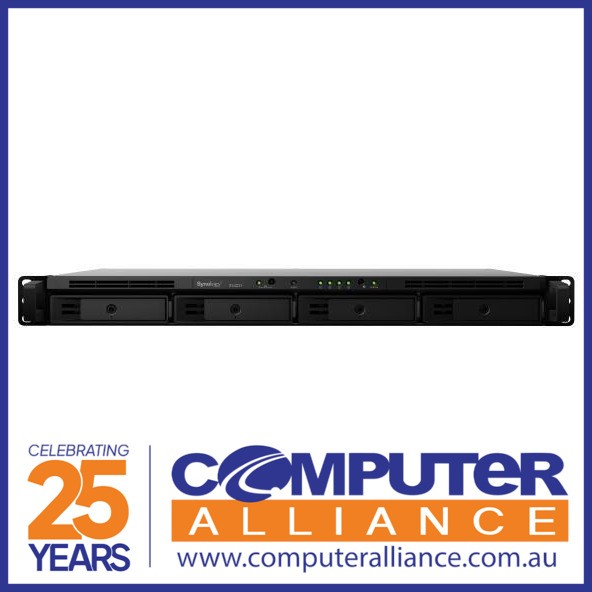
Synology RackStation RS1221+ 8 Bay NAS
If you're an SME or IT specialist, you can manage and spread your data safely within the domain of your business with the Synology RS1221+. This compact NAS is optimized for server racks and has 8 slots for hard drives. With a depth of only 30.66cm, the device is suitable for smaller rack-mount cases. Thanks to the AMD Ryzen V1500B processor, you can reach higher writing speeds of up to 1147MB/s. The 4-Gigabit Ethernet ports ensure that you can connect the directly connected modem via multiple network cables. This all results in better performances with data management, faster networks, and a high storage capacity. You can easily create various RAID setups. With the Synology DiskStation Manager, you make a backup of the IT infrastructure of your business or host your own local private cloud. In addition, the RS1221+ has space for 2 M.2 NVMe SSDs to make your drives run twenty times faster.
If you're an SME or IT specialist, you can manage and spread your data safely within the domain of your business with the Synology RS1221+. This compact NAS is optimized for server racks and has 8 slots for hard drives. With a depth of only 30.66cm, the device is suitable for smaller rack-mount cases. Thanks to the AMD Ryzen V1500B processor, you can reach higher writing speeds of up to 1147MB/s. The 4-Gigabit Ethernet ports ensure that you can connect the directly connected modem via multiple network cables. This all results in better performances with data management, faster networks, and a high storage capacity. You can easily create various RAID setups. With the Synology DiskStation Manager, you make a backup of the IT infrastructure of your business or host your own local private cloud. In addition, the RS1221+ has space for 2 M.2 NVMe SSDs to make your drives run twenty times faster.
If you're an SME or IT specialist, you can manage and spread your data safely within the domain of your business with the Synology RS1221+. This compact NAS is optimized for server racks and has 8 slots for hard drives. With a depth of only 30.66cm, the device is suitable for smaller rack-mount cases. Thanks to the AMD Ryzen V1500B processor, you can reach higher writing speeds of up to 1147MB/s. The 4-Gigabit Ethernet ports ensure that you can connect the directly connected modem via multiple network cables. This all results in better performances with data management, faster networks, and a high storage capacity. You can easily create various RAID setups. With the Synology DiskStation Manager, you make a backup of the IT infrastructure of your business or host your own local private cloud. In addition, the RS1221+ has space for 2 M.2 NVMe SSDs to make your drives run twenty times faster.
If you're an SME or IT specialist, you can manage and spread your data safely within the domain of your business with the Synology RS1221+. This compact NAS is optimized for server racks and has 8 slots for hard drives. With a depth of only 30.66cm, the device is suitable for smaller rack-mount cases. Thanks to the AMD Ryzen V1500B processor, you can reach higher writing speeds of up to 1147MB/s. The 4-Gigabit Ethernet ports ensure that you can connect the directly connected modem via multiple network cables. This all results in better performances with data management, faster networks, and a high storage capacity. You can easily create various RAID setups. With the Synology DiskStation Manager, you make a backup of the IT infrastructure of your business or host your own local private cloud. In addition, the RS1221+ has space for 2 M.2 NVMe SSDs to make your drives run twenty times faster.
in 24 offers
The lowest price for Synology RackStation RS1221+ 8 Bay NAS right now is $2,399.00 at Umart, compared across 20 retailers.
The all-time low was $1,248.99 on 15 Nov 2025 — today's price is 92% above the lowest ever. It has been notably cheaper before — worth setting a price alert.
Prices last updated 1 Oct 2026.
Last updated at 01/10/2026 09:05:00
Synology Rackstation 2U Rackmount 8 Bay Quad Core Nas (RS1221+)
30-day returns
Synology RackStation RS1221+ NAS/storage server Rack (2U) Ethernet LAN Black V1500B
Free delivery
Synology Rs1221 Plus 8 Bays Nas Black
Delivery $223.99
[RS1221+] Synology RackStation RS1221+ 8-Bay 3.5" Diskless 4xGbE NAS (2U Rack), AMD Ryzen Quad Core 2.2GHz, 4GB RAM, 2xUSB3, 3 year Wty - Short Depth
7-day returns
Synology RS1221+,RackStation, NAS Server, 2U Rack-Mount , 8Bay 3.5", Diskless NAS, AMD Ryzen Quad Core 2.2GHz, 4GB RAM, 2xUSB3, 4xGbE, PCIe expansion
Synology RackStation RS1221+ 8 Bay NAS AMD RyzenTM V1500B quad-core 2.2 GHz 4G DDR4 Hot swappable 2xUSB 3.2xExpansion port 2U 4 x 1GbE 1x4-lanex8 slot
Synology Diskstation RS1221+ 8-Bay Diskless NAS Quad Core 2.2GHz 4GB
Delivery $12.99
Synology RackStation RS1221+ ,8-Bay AMD Ryzen V1500B 4-core 2.2GHz ,4GB DDR4 ,Diskless NAS ,1 x Gen3 x8 slot (x4 link)
Delivery $19.99
Synology DiskStation RS1221+ 8-Bay Ryzen V1500B Quad-Core Diskless NAS
Delivery between 6–9 Oct $22.64
Synology RS1221+ 2U Rackmount 8 Bay NAS, Ryzen V1500B, 4GB
Delivery $27
originally posted on bhphotovideo.com
8 bays give lots of capacity, short depth means it's easy to mount without rails. I'm a big fan of DSM software which is really user friendly.
originally posted on bhphotovideo.com
This product is so much better than the QNAP NAS that I had. This is my first Synology server so I'm still learning all that it has to offer. The rackmount enclosure is great and works well with my Unifi equipment. I would highly recommend buying this product!
originally posted on bhphotovideo.com
We have purchased two of these so far to use primarily as NVRs for a large number of IP cameras on a school campus.Licensing costs aside, Synology Surveillance Station does a really nice job making it easy to set up and scale with the number of cameras you have. We linked two together, making one the primary and the other a secondary target for recordings.Surveillance Station records direct-to-disk, and does a decent job of adjusting camera settings directly using ONVIF.We have about 50+ cameras running at resolutions from 1280x720 up to 2560x1600, some PTZ, some ceiling-mount fisheyes, mostly wide angle fixed, and everything works pretty well. We were even able to use the manual camera configuration to use some uncommon double-lens cameras.With about 26 ... MoreWe have purchased two of these so far to use primarily as NVRs for a large number of IP cameras on a school campus.Licensing costs aside, Synology Surveillance Station does a really nice job making it easy to set up and scale with the number of cameras you have. We linked two together, making one the primary and the other a secondary target for recordings.Surveillance Station records direct-to-disk, and does a decent job of adjusting camera settings directly using ONVIF.We have about 50+ cameras running at resolutions from 1280x720 up to 2560x1600, some PTZ, some ceiling-mount fisheyes, mostly wide angle fixed, and everything works pretty well. We were even able to use the manual camera configuration to use some uncommon double-lens cameras.With about 26 cameras assigned to each RS422+, we see about 20-25% CPU on each on average during a typical day. We can comfortably handle 32 per unit, and supposedly up to 40 if needed. With x4 6TB drives in each set in SHR-1 (equivalent to RAID5) we have about a month or so of footage retention.The licensing is a little pricey at $50 per camera (unless you buy in bulk from some european IP camera shops...), but it is perpetual and I think worth the expense.Using two of these units, 8 cheap drives from eBay (luckily these do not suffer from the Synology whitelist) and a bunch of camera licenses, for around under $5000 I was able to build and set up a really easy to use and reliable NVR system with plenty of future expandability. 2-3 users are regularly connected on their desktops without issue.
| General | |
| Device Type | NAS server |
| Host Connectivity | Gigabit Ethernet |
| Enclosure Type | Rack-mountable - 2U |
| Total Storage Capacity | 0 GB |
Synology Rackstation 2U Rackmount 8 Bay Quad Core Nas (RS1221+)
30-day returns
Synology RackStation RS1221+ NAS/storage server Rack (2U) Ethernet LAN Black V1500B
Free delivery
Synology Rs1221 Plus 8 Bays Nas Black
Delivery $223.99
[RS1221+] Synology RackStation RS1221+ 8-Bay 3.5" Diskless 4xGbE NAS (2U Rack), AMD Ryzen Quad Core 2.2GHz, 4GB RAM, 2xUSB3, 3 year Wty - Short Depth
7-day returns
Synology RS1221+,RackStation, NAS Server, 2U Rack-Mount , 8Bay 3.5", Diskless NAS, AMD Ryzen Quad Core 2.2GHz, 4GB RAM, 2xUSB3, 4xGbE, PCIe expansion
8 bays give lots of capacity, short depth means it's easy to mount without rails. I'm a big fan of DSM software which is really user friendly.
This product is so much better than the QNAP NAS that I had. This is my first Synology server so I'm still learning all that it has to offer. The rackmount enclosure is great and works well with my Unifi equipment. I would highly recommend buying this product!
We have purchased two of these so far to use primarily as NVRs for a large number of IP cameras on a school campus.Licensing costs aside, Synology Surveillance Station does a really nice job making it easy to set up and scale with the number of cameras you have. We linked two together, making one the primary and the other a secondary target for recordings.Surveillance Station records direct-to-disk, and does a decent job of adjusting camera settings directly using ONVIF.We have about 50+ cameras running at resolutions from 1280x720 up to 2560x1600, some PTZ, some ceiling-mount fisheyes, mostly wide angle fixed, and everything works pretty well. We were even able to use the manual camera configuration to use some uncommon double-lens cameras.With about 26 ... MoreWe have purchased two of these so far to use primarily as NVRs for a large number of IP cameras on a school campus.Licensing costs aside, Synology Surveillance Station does a really nice job making it easy to set up and scale with the number of cameras you have. We linked two together, making one the primary and the other a secondary target for recordings.Surveillance Station records direct-to-disk, and does a decent job of adjusting camera settings directly using ONVIF.We have about 50+ cameras running at resolutions from 1280x720 up to 2560x1600, some PTZ, some ceiling-mount fisheyes, mostly wide angle fixed, and everything works pretty well. We were even able to use the manual camera configuration to use some uncommon double-lens cameras.With about 26 cameras assigned to each RS422+, we see about 20-25% CPU on each on average during a typical day. We can comfortably handle 32 per unit, and supposedly up to 40 if needed. With x4 6TB drives in each set in SHR-1 (equivalent to RAID5) we have about a month or so of footage retention.The licensing is a little pricey at $50 per camera (unless you buy in bulk from some european IP camera shops...), but it is perpetual and I think worth the expense.Using two of these units, 8 cheap drives from eBay (luckily these do not suffer from the Synology whitelist) and a bunch of camera licenses, for around under $5000 I was able to build and set up a really easy to use and reliable NVR system with plenty of future expandability. 2-3 users are regularly connected on their desktops without issue.
This is my first ever NAS and I love it! I wanted something rack mountable and after some research landed on this. I'm sure it's way overkill for my needs, but plenty of room to grow and some great software to use and grow into.I made an install/setup video for this and some of the other components (including the PCI card to add 10Gb and NVMe cache). It's on my YouTube channel, Help Me DIY, if you want to check it out.My 4 major use cases for this NAS are:1. Editing my videos using FCPX directly from my NAS2. Running a Plex server3. Backup storage space for my MacBook Pro and my Mac.4. Running a web server.So far I have everything working, and I even got my web server Dockerized on the NAZ!
Compact and Configurable. Fans could be a bit quieter.
This is a decent upgrade from an Synology NAS. For a small rack with limited depth, this fits perfectly. 8 bays is exactly what I needed with capabilities for memory expansion and redundant power. I'm glad it cam back in stock.
I was looking for an efficient, short depth, 1u NAS, and that's exactly what this is. Idle power draw is low, it's reasonably quiet, and the Synology software was a breeze to work with. Super pleased with this purchase.
I was very surprised at how speedy this NAS is for RSYNC and Windows transfers, one of my faster NAS's, even over some of the 4-core X20 series models. The things I'd say to think about are the use cases for the NAS. First, if you are using it in a home environment, it is definitely not the quietest NAS I have, even on quiet mode. The desktop NAS's are always quieter. Secondly, be prepared to buy very specific hard drives for this if you want any data loss supported by Synology. Their compatibility list is extremely short and leans towards Toshiba drives now (some of the loudest drives IMO). Not many Seagates or WD's on the list. Lastly, if yo u are planning on using this for VM's, it only has 2GB of RAM and two cores on the CPU, so there are better options in the ... MoreI was very surprised at how speedy this NAS is for RSYNC and Windows transfers, one of my faster NAS's, even over some of the 4-core X20 series models. The things I'd say to think about are the use cases for the NAS. First, if you are using it in a home environment, it is definitely not the quietest NAS I have, even on quiet mode. The desktop NAS's are always quieter. Secondly, be prepared to buy very specific hard drives for this if you want any data loss supported by Synology. Their compatibility list is extremely short and leans towards Toshiba drives now (some of the loudest drives IMO). Not many Seagates or WD's on the list. Lastly, if yo u are planning on using this for VM's, it only has 2GB of RAM and two cores on the CPU, so there are better options in the same price range. My use case is purely a centralized backup for other Synology NAS's and it works great. Again, I'm not slamming the NAS with the comments above, just trying to help everyone what use cases might fit it.Pros: Speedy transfer, fast bootup, 1U takes little space, DSM is awesome, reliable, I have never lost data on a Synology, scheduled startup and shutdown, ability to wake up other WOL devices on the network, encrypted rsync to remote location, full SMB supportThink about: fairly noisy for home environment, 2GB memory with no expansion, no NVME slots for cache, needs specific hard drives from a small compatibility list to have data loss supported by Synology
It really comes down to having all your data at your fingertips. Synology has really done well. This 8-bay unit should have been out a year ago. I waited. Made the upgrade, also added the E10M20-T1 10GbE combo card, and populated it with 8 12TB drives. Things are working great.
Worth it ! I had few Regular DS with 4 disk then i bought the Synology 8 bay RackStation RS1221+ even if i was not really sure of the price difference worth it. It really does! When i received, I opened it and added RAM. It was really easy because everything is well designed and placed inside. The cooling system is basic but efficient. We are doing an extensive use and everything is stable.
| General | |
| Device Type | NAS server |
| Host Connectivity | Gigabit Ethernet |
| Enclosure Type | Rack-mountable - 2U |
| Total Storage Capacity | 0 GB |