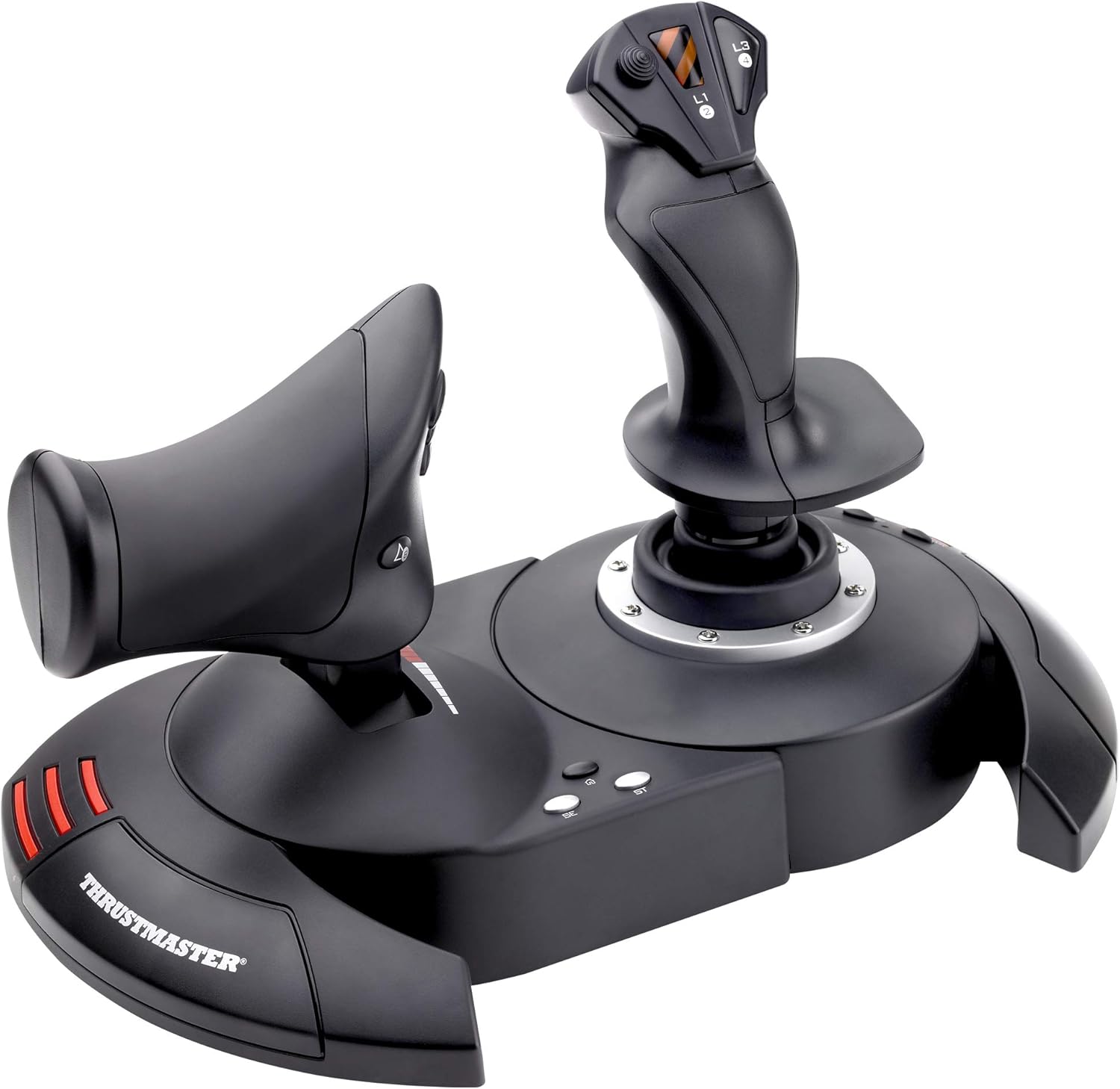
Thrustmaster T.Flight HOTAS 4 Joystick for PC & PS4
T.Flight Hotas 4 -
T.Flight Hotas 4 -
T.Flight Hotas 4 -
T.Flight Hotas 4 -
in 11 offers
The lowest price for Thrustmaster T.Flight HOTAS 4 Joystick for PC & PS4 right now is $78.59 at Sweet Basket, compared across 8 retailers.
The all-time low was $49.99 on 29 July 2023 — today's price is 57% above the lowest ever. It has been notably cheaper before — worth setting a price alert.
Prices last updated 29 Sept 2026.
Last updated at 29/09/2026 12:25:58
Thrustmaster T.Flight HOTAS 4 - Compatible with PS5, PS4 and PC
Affiliate Disclosure: We may receive a small commission for purchases made through this link at no extra cost to you. This helps support our site. Thank you!
Thrustmaster T.Flight Hotas 4 joystick designed for PlayStation and PC.
Thrustmaster T-Flight Hotas 4 Flight Stick Joystick for PlayStation PC Tested
Affiliate Disclosure: We may receive a small commission for purchases made through this link at no extra cost to you. This helps support our site. Thank you!
Thrustmaster T.flight Hotas 4 Flight Stick For Ps4 & Pc Wired
Delivery $28.95
Affiliate Disclosure: We may receive a small commission for purchases made through this link at no extra cost to you. This helps support our site. Thank you!
Thrustmaster T.flight Hotas 4 Flight Stick Joystick Throttle Ps4 Ps5
Delivery $14.95
Affiliate Disclosure: We may receive a small commission for purchases made through this link at no extra cost to you. This helps support our site. Thank you!
Thrustmaster Thrustmaster 4 Hotas 4 Black Joystick - PC
Delivery $9.75
Thrustmaster T-Flight Hotas PS4
30-day returns
Thrustmaster T.Flight HOTAS 4 for PS5, PS4, PC
Delivery between 2–7 Oct $10
Thrustmaster T.Flight Hotas 4 Flight Sim Joystick Game Controller For PS4/PC
Free delivery between 2–7 Oct
Thrustmaster T.Flight Hotas 4 Joystick Wired for PS5 PS4 PC Detachable Throttle
Delivery between 3–8 Oct $41
originally posted on bestbuy.com
I've been wanting to get Flight Sticks to use in various games. This was on sale and I decided to give it a try. After using it for a couple of weeks, I can say my experience has varied from game to game.This device is not too heavy, can separate in two for better ergonomics but the cable is too short. I've seen multiple reviews cutting the wire and extending it with 2 ethernet CAT cords. I'm not ready to void my warranty yet so I've been playing with the sticks attached together. There are mounting points underneath for attaching them to a chair, which is neat.Make sure to download the drivers if you intend to use them on PC. I haven't tried it on PlayStation as I don't have any games on that platform that could benefit from this controller.The best game it ... MoreI've been wanting to get Flight Sticks to use in various games. This was on sale and I decided to give it a try. After using it for a couple of weeks, I can say my experience has varied from game to game.This device is not too heavy, can separate in two for better ergonomics but the cable is too short. I've seen multiple reviews cutting the wire and extending it with 2 ethernet CAT cords. I'm not ready to void my warranty yet so I've been playing with the sticks attached together. There are mounting points underneath for attaching them to a chair, which is neat.Make sure to download the drivers if you intend to use them on PC. I haven't tried it on PlayStation as I don't have any games on that platform that could benefit from this controller.The best game it has worked with so far is Star Wars Squadron. It picked it up immediately and I could play without any configuring. The game also supports VR, which I tried with the Oculus Quest but be wary that it could make you motion sick any time you look around your cockpit.War Thunder worked once you figure out how to select the brand and model of HOTAS you are using. After that I was able to play a few missions.DCS so far has not worked too great but I have a friend who's working with me on getting this setup. I think it'll work great once it's setup properly.Battlefield 2042 is the worst game to date. Flight sticks don't work at all. My character was stuck looking down at the ground for as long as the flight sticks were plugged in. Looking online, there is no support at all for HOTAS controls. Another reason to avoid that game.I'm sure there are other games to try and I will find them. Maybe in the future I'll get something fancier but for now I am satisfied with this.
originally posted on bestbuy.com
ATTENTION FSX, PC Users.I am using this with FSX Steam Ed. It took a minute to find, download and install the firmware and drivers update. Afterward I simply restarted my Win 10 PC, launched FSX SE and bingo it worked immediately. It was also very easy to assign the buttons to my preferences. I’ve had a T Flight HOTAS before and it lasted me 12 years! I do agree with other reviewers that the throttle is too loose and cannot be adjusted. The midway detent is annoying and I’ve never understood what it’s even for? For the money and having a good experience with an old version of this same HOTAS I’d still say it’s great and highly recommended. You could buy something cheaper but how many times do you want to do that over the years? These things just last and last.
originally posted on walmart.com
Worth the $40 for a novice/average flight stick. I like the tensioner on the bottom for the stick resistance, but why not for throttle? The preset Throttle tension is bad. I needed to go to Thrustmaster website to download drivers because the rudder and throttle would not work with MFS 2020. Which was bit of let down since this is a newer stick with a newer game. Stick seems well built and other then he mentioned issues, I am happy with the purchase.
| Compatibility | PC & PS4 |
| Joystick | 1 |
| Throttle | 1 |
| Allen key | 1 |
| User manual | 1 |

Thrustmaster T.Flight HOTAS 4 - Compatible with PS5, PS4 and PC
Affiliate Disclosure: We may receive a small commission for purchases made through this link at no extra cost to you. This helps support our site. Thank you!
Thrustmaster T.Flight Hotas 4 joystick designed for PlayStation and PC.
Thrustmaster T-Flight Hotas 4 Flight Stick Joystick for PlayStation PC Tested
Affiliate Disclosure: We may receive a small commission for purchases made through this link at no extra cost to you. This helps support our site. Thank you!
Thrustmaster T.flight Hotas 4 Flight Stick For Ps4 & Pc Wired
Delivery $28.95
Affiliate Disclosure: We may receive a small commission for purchases made through this link at no extra cost to you. This helps support our site. Thank you!
Thrustmaster T.flight Hotas 4 Flight Stick Joystick Throttle Ps4 Ps5
Delivery $14.95
Affiliate Disclosure: We may receive a small commission for purchases made through this link at no extra cost to you. This helps support our site. Thank you!
I've been wanting to get Flight Sticks to use in various games. This was on sale and I decided to give it a try. After using it for a couple of weeks, I can say my experience has varied from game to game.This device is not too heavy, can separate in two for better ergonomics but the cable is too short. I've seen multiple reviews cutting the wire and extending it with 2 ethernet CAT cords. I'm not ready to void my warranty yet so I've been playing with the sticks attached together. There are mounting points underneath for attaching them to a chair, which is neat.Make sure to download the drivers if you intend to use them on PC. I haven't tried it on PlayStation as I don't have any games on that platform that could benefit from this controller.The best game it ... MoreI've been wanting to get Flight Sticks to use in various games. This was on sale and I decided to give it a try. After using it for a couple of weeks, I can say my experience has varied from game to game.This device is not too heavy, can separate in two for better ergonomics but the cable is too short. I've seen multiple reviews cutting the wire and extending it with 2 ethernet CAT cords. I'm not ready to void my warranty yet so I've been playing with the sticks attached together. There are mounting points underneath for attaching them to a chair, which is neat.Make sure to download the drivers if you intend to use them on PC. I haven't tried it on PlayStation as I don't have any games on that platform that could benefit from this controller.The best game it has worked with so far is Star Wars Squadron. It picked it up immediately and I could play without any configuring. The game also supports VR, which I tried with the Oculus Quest but be wary that it could make you motion sick any time you look around your cockpit.War Thunder worked once you figure out how to select the brand and model of HOTAS you are using. After that I was able to play a few missions.DCS so far has not worked too great but I have a friend who's working with me on getting this setup. I think it'll work great once it's setup properly.Battlefield 2042 is the worst game to date. Flight sticks don't work at all. My character was stuck looking down at the ground for as long as the flight sticks were plugged in. Looking online, there is no support at all for HOTAS controls. Another reason to avoid that game.I'm sure there are other games to try and I will find them. Maybe in the future I'll get something fancier but for now I am satisfied with this.
ATTENTION FSX, PC Users.I am using this with FSX Steam Ed. It took a minute to find, download and install the firmware and drivers update. Afterward I simply restarted my Win 10 PC, launched FSX SE and bingo it worked immediately. It was also very easy to assign the buttons to my preferences. I’ve had a T Flight HOTAS before and it lasted me 12 years! I do agree with other reviewers that the throttle is too loose and cannot be adjusted. The midway detent is annoying and I’ve never understood what it’s even for? For the money and having a good experience with an old version of this same HOTAS I’d still say it’s great and highly recommended. You could buy something cheaper but how many times do you want to do that over the years? These things just last and last.
Worth the $40 for a novice/average flight stick. I like the tensioner on the bottom for the stick resistance, but why not for throttle? The preset Throttle tension is bad. I needed to go to Thrustmaster website to download drivers because the rudder and throttle would not work with MFS 2020. Which was bit of let down since this is a newer stick with a newer game. Stick seems well built and other then he mentioned issues, I am happy with the purchase.
Bought this since I can't seem to make up my mind whether to play Elite Dangerous on PS4 or PC. This HOTAS is compatible with both, so no need to worry about it! I've only used it on PC so far but it's been a great experience. Initial driver and software install was quick from Thrustmaster's website and the firmware update was easy as well. The stick feels very solid, no drift, and the adjustable resistance works well. The throttle is sometimes a little too easily pushed but it does hold its position everywhere throughout the forward and reverse range. Overall a great choice if you're just getting into the HOTAS realm and aren't looking to break the bank.
I bought this for a great price on a sale. If you have the space and setting for it, it can be very fun and the flying simulation can feel more realistic. I would recommend it only if you have a desk or table close to where your PS4 is. Since I don’t have that, I have to unfold my plastic table every time I want to use it and it gets tedious. It can be a bit bulky to store as well. I only wish it had vibration or haptic feedback and it would have been perfect. Also, do your research and look for compatible games. It won’t work with every flying game. I wish the instructions were more detailed as well. I still haven’t figured how to switch to alternate weapons in Ace Combat 7.
With the price point of this product I was unsure how it would compare in quality to more expensive HOTAS setups. Overall I'm quite happy with it so far. Lots of plastic, of course, and not as many buttons as some, but enough to be quite useful for most games. Throttle action is lighter than I might like but quite smooth, and the stick feels nice. Sure, it ain't a VKB setup, but I didn't have to get a loan for it either. :)
I purchased Squadrons VR for PS4 and attempted to use the standard PS4 controller to play it, which is rather confusing as there are A LOT of buttons, which made it not so much fun to play as most of the time was spent figuring out the controls.With everyone being home during this pandemic, Flight Sticks are hard to find or pricey on Amazon as you don’t have much of a choice there as everyone is raising the prices. This particular flight stick is 2x the amount at Best Buy. TWICE THE PRICE for the same product!!!Luckily, Best Buy doesn’t overcharge during these times, but stock is limited, as it took me 2 weeks to be able to purchase, but worth it.Using the flight stick made Squadrons VR a lot more intuitive. There are specific /recommended button ... MoreI purchased Squadrons VR for PS4 and attempted to use the standard PS4 controller to play it, which is rather confusing as there are A LOT of buttons, which made it not so much fun to play as most of the time was spent figuring out the controls.With everyone being home during this pandemic, Flight Sticks are hard to find or pricey on Amazon as you don’t have much of a choice there as everyone is raising the prices. This particular flight stick is 2x the amount at Best Buy. TWICE THE PRICE for the same product!!!Luckily, Best Buy doesn’t overcharge during these times, but stock is limited, as it took me 2 weeks to be able to purchase, but worth it.Using the flight stick made Squadrons VR a lot more intuitive. There are specific /recommended button configurations (which can be found on the website) to make the game you want to play (Squadrons, Combat Aces, Flight Sim). It takes some time to map it, but the 20 mins spent on button mapping is worth it, and now I enjoy playing Squadrons VR.The flight stick comes as 2 separate pieces (connected with a cable) so you can play it in whichever way you feel comfortable, but it also comes with an allenwrench and screw to attach them together (as pictured) which makes it easy to simply put on your lap and play that way.There are plenty of other flight sticks that can have MORE buttons, and other features, but those triple/quadruple the price of this “entry level” flight stick. I’m pretty happy with this particular flight stick, especially at the Bestbuy price point.
I'm actually very impressed by this HOTAS so far. I've used the Thrustmaster F-22 Pro, F-16 TQS, and rudders for most of my flight simming over the past 25 years. While this isn't nearly as solid and doesn't offer the number of buttons/switches or the customization that those more serious Thrustmaster products do, this T.Flight HOTAS does exactly what I need it to do for the PS4. My game experience on Star Wars: Squadrons vastly improved as soon as I plugged this baby in! I play with the unit locked together on my lap. It's solid enough that even when I'm yanking and banking in a dogfight it stays planted on my lap. I wish there was a way to dial up the resistance on the throttle a little bit just like you can on the stick, but it's manageable with the resistance it ... MoreI'm actually very impressed by this HOTAS so far. I've used the Thrustmaster F-22 Pro, F-16 TQS, and rudders for most of my flight simming over the past 25 years. While this isn't nearly as solid and doesn't offer the number of buttons/switches or the customization that those more serious Thrustmaster products do, this T.Flight HOTAS does exactly what I need it to do for the PS4. My game experience on Star Wars: Squadrons vastly improved as soon as I plugged this baby in! I play with the unit locked together on my lap. It's solid enough that even when I'm yanking and banking in a dogfight it stays planted on my lap. I wish there was a way to dial up the resistance on the throttle a little bit just like you can on the stick, but it's manageable with the resistance it has out of the box. Another slight gripe that took a little bit of wrapping my brain around is that the L1, L3, and R3 buttons are on the stick, which is on the right, and the R2 and L2 buttons are on the throttle, which is on the left. Why couldn't they just make the R buttons on the stick and L buttons on the throttle so that your brain doesn't have to do mental gymnastics? At least in Squadrons the button layout is fully customizable so you can assign any button to any action.
Let me start off by saying. If you are like me and maybe playing with a controller and aren't doing bad but think just maybe if you got one of these you are magically going to be a lot better pilot.. It didn't work out that way for me lol.I was doing decent with my xbox controller. Got one one of these and... I was all over the place.. It did not feel natural. I could fly relatedly smooth on a controller but was all over the place with this stick. Maybe I would be better off with a Yoke setup.. Maybe I just prefer my controller and keyboard.Aside from that I was actually surprised by build quality the plastic feels hefty. Also very comfy to grip. The part connecting the stick to the base looked cheap. Stick movement didn't feel very smooth at all. The throttle ... MoreLet me start off by saying. If you are like me and maybe playing with a controller and aren't doing bad but think just maybe if you got one of these you are magically going to be a lot better pilot.. It didn't work out that way for me lol.I was doing decent with my xbox controller. Got one one of these and... I was all over the place.. It did not feel natural. I could fly relatedly smooth on a controller but was all over the place with this stick. Maybe I would be better off with a Yoke setup.. Maybe I just prefer my controller and keyboard.Aside from that I was actually surprised by build quality the plastic feels hefty. Also very comfy to grip. The part connecting the stick to the base looked cheap. Stick movement didn't feel very smooth at all. The throttle moves a little too fast for my liking. I was expecting it to feel more slow when pushing it up and down.. The notch in the middle didnt bother me at all.
I got this for my boys to use with MS Flight Sim and thought that the T.Flight Hotas 4 was a newer version of the T.Flight Hotas One; in reality, while both models work with a PC, the Hota 4 is not a newer model, but one that works with PlayStation vs. the Hotas One with XBox. If I purchased again, I would have gotten the Hotas One as MS Flight Sim identifies the buttons more clearly for the Hotas One.Aside from the button labeling not being clear in MSFS, I have no complaints - build quality seems good and has made flying much easier!
| Compatibility | PC & PS4 |
| Joystick | 1 |
| Throttle | 1 |
| Allen key | 1 |
| User manual | 1 |