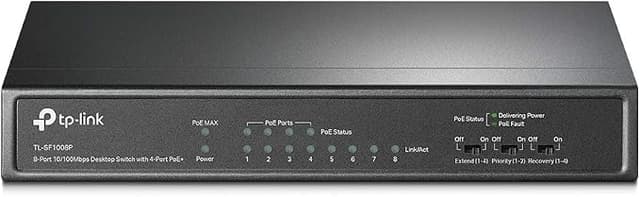
TP-Link 8-Port PoE Switch 4 PoE Ports
The TL-SF1008P 8-port 10/100M Desktop PoE Switch provides the seamless network connection. It integrates 100Mbps Fast Ethernet and 10Mbps Ethernet network capabilities. 4 of the 8 Auto-Negotiation RJ45 ports (port-1 to port-4) of the switch support Power over Ethernet (PoE) function. These PoE ports can automatically detect and supply power with those IEEE 802.3af compliant Powered Devices (PDs). In this situation, the electrical power is transmitted along with data in one single cable allowing you to expand your network where there are no power lines or outlets, where you wish to fix devices such as APs, IP Cameras or IP Phones, etc. TL-SF1008P has the priority * function which will help protect the system when the system power is overloaded. If all PoE PDs power consumption is >= 53W, a priority will be arranged among the PoE ports, then the system will cut off the power of the lowest-priority port. TL-SF1008P is easy to install and use. It requires no configuration and installation. With desktop design, outstanding performance and quality, the TP-link TL-SF1008P 8-port 10/100M Desktop PoE Switch is a great selection for expanding your home or office network.
The TL-SF1008P 8-port 10/100M Desktop PoE Switch provides the seamless network connection. It integrates 100Mbps Fast Ethernet and 10Mbps Ethernet network capabilities. 4 of the 8 Auto-Negotiation RJ45 ports (port-1 to port-4) of the switch support Power over Ethernet (PoE) function. These PoE ports can automatically detect and supply power with those IEEE 802.3af compliant Powered Devices (PDs). In this situation, the electrical power is transmitted along with data in one single cable allowing you to expand your network where there are no power lines or outlets, where you wish to fix devices such as APs, IP Cameras or IP Phones, etc. TL-SF1008P has the priority * function which will help protect the system when the system power is overloaded. If all PoE PDs power consumption is >= 53W, a priority will be arranged among the PoE ports, then the system will cut off the power of the lowest-priority port. TL-SF1008P is easy to install and use. It requires no configuration and installation. With desktop design, outstanding performance and quality, the TP-link TL-SF1008P 8-port 10/100M Desktop PoE Switch is a great selection for expanding your home or office network.
The TL-SF1008P 8-port 10/100M Desktop PoE Switch provides the seamless network connection. It integrates 100Mbps Fast Ethernet and 10Mbps Ethernet network capabilities. 4 of the 8 Auto-Negotiation RJ45 ports (port-1 to port-4) of the switch support Power over Ethernet (PoE) function. These PoE ports can automatically detect and supply power with those IEEE 802.3af compliant Powered Devices (PDs). In this situation, the electrical power is transmitted along with data in one single cable allowing you to expand your network where there are no power lines or outlets, where you wish to fix devices such as APs, IP Cameras or IP Phones, etc. TL-SF1008P has the priority * function which will help protect the system when the system power is overloaded. If all PoE PDs power consumption is >= 53W, a priority will be arranged among the PoE ports, then the system will cut off the power of the lowest-priority port. TL-SF1008P is easy to install and use. It requires no configuration and installation. With desktop design, outstanding performance and quality, the TP-link TL-SF1008P 8-port 10/100M Desktop PoE Switch is a great selection for expanding your home or office network.
The TL-SF1008P 8-port 10/100M Desktop PoE Switch provides the seamless network connection. It integrates 100Mbps Fast Ethernet and 10Mbps Ethernet network capabilities. 4 of the 8 Auto-Negotiation RJ45 ports (port-1 to port-4) of the switch support Power over Ethernet (PoE) function. These PoE ports can automatically detect and supply power with those IEEE 802.3af compliant Powered Devices (PDs). In this situation, the electrical power is transmitted along with data in one single cable allowing you to expand your network where there are no power lines or outlets, where you wish to fix devices such as APs, IP Cameras or IP Phones, etc. TL-SF1008P has the priority * function which will help protect the system when the system power is overloaded. If all PoE PDs power consumption is >= 53W, a priority will be arranged among the PoE ports, then the system will cut off the power of the lowest-priority port. TL-SF1008P is easy to install and use. It requires no configuration and installation. With desktop design, outstanding performance and quality, the TP-link TL-SF1008P 8-port 10/100M Desktop PoE Switch is a great selection for expanding your home or office network.
in 7 offers
The lowest price for TP-Link 8-Port PoE Switch 4 PoE Ports right now is $61.48 at yourtelcoshop.com.au, compared across 7 retailers.
The all-time low was $44.11 on 27 Dec 2025 — today's price is 39% above the lowest ever. It has been notably cheaper before — worth setting a price alert.
Prices last updated 2 Sept 2026.
Last updated at 02/09/2026 00:20:11
TP-Link TL-SF1008P 8-Port 10/100Mbps Desktop Unmanaged Switch
Delivery by Tue $18
TP-Link TL-SF1008P 8-Port 10/100Mbps Desktop Unmanaged Switch 4-Port PoE 57W IEEE 802.3af, Fanless
Delivery between 4–12 Sept $10
TP-Link TL-SF1008P 8-port 10/100M PoE Switch, 8 10/100M RJ45
Delivery between 5–16 Sept $12
TP-LINK TL-SF 1008 P 8-port PoE Switch
Affiliate Disclosure: We may receive a small commission for purchases made through this link at no extra cost to you. This helps support our site. Thank you!
TP-Link TL-SF1008P 8-Port 10/100Mbps Desktop Unmanaged Switch 4-Port PoE 57W IEEE 802.3af, Fanless
Delivery between 7–15 Sept $15
UNMANAGED NETWORK SWITCH WITH PoE - TP-LINK TL-SF1008P
Delivery $18.95
Switch de 8 puertos 10/100 POE+ 66W TL-SF1008P Marca: TP-LINK
Delivery $132.92
originally posted on newegg.com
A compelling argument for buying an all-in-one PoE powered switch is two (quality) PoE Injectors cost more than this switch, which has four (4) PoE Ports; only “one” power supply and simpler cable install versus numerous independent add-ons. The way I look at a smart switch is; it’s the business end of an extension cord consolidating many terminuses - and – it’s about that easy to use. Using two switches, is essentially like using two extension cords with ends which can be distant from one another or have different dedicated uses, in this instance PoE functionality. I don’t know how you could go wrong, aggravation-free setup (no configuration required), five-year warranty and 24/7 technical support which I seriously doubt you’ll need. This falls out of the generic ... MoreA compelling argument for buying an all-in-one PoE powered switch is two (quality) PoE Injectors cost more than this switch, which has four (4) PoE Ports; only “one” power supply and simpler cable install versus numerous independent add-ons. The way I look at a smart switch is; it’s the business end of an extension cord consolidating many terminuses - and – it’s about that easy to use. Using two switches, is essentially like using two extension cords with ends which can be distant from one another or have different dedicated uses, in this instance PoE functionality. I don’t know how you could go wrong, aggravation-free setup (no configuration required), five-year warranty and 24/7 technical support which I seriously doubt you’ll need. This falls out of the generic category; with its PoE enhancement, kudos to TP-Link, job well done!
originally posted on newegg.com
PoE isn’t something typical in the consumer market but since PoE cameras and VoIP phones are becoming more common, this TP-LINK switch makes a lot of sense. It’s a great way for the consumer to get into such devices at a very good price point. The next cheapest PoE switch is a D-Link at nearly 40% more and only one PoE port. Combine it with a PoE splitter and you could power all kinds of devices! One note, the device does support 100 Mbps full duplex (i.e. 200 Mbps), but it does not auto-negotiate to that speed. The speeds results shown below were on full auto mode with two PCs, and did get nearly the full expected speed of 100 Mbps. The warranty on this one is two years, which is less than other TP-LINK products I’ve reviewed. Actual speed test results: 300 MB file ... MorePoE isn’t something typical in the consumer market but since PoE cameras and VoIP phones are becoming more common, this TP-LINK switch makes a lot of sense. It’s a great way for the consumer to get into such devices at a very good price point. The next cheapest PoE switch is a D-Link at nearly 40% more and only one PoE port. Combine it with a PoE splitter and you could power all kinds of devices! One note, the device does support 100 Mbps full duplex (i.e. 200 Mbps), but it does not auto-negotiate to that speed. The speeds results shown below were on full auto mode with two PCs, and did get nearly the full expected speed of 100 Mbps. The warranty on this one is two years, which is less than other TP-LINK products I’ve reviewed. Actual speed test results: 300 MB file = 25 seconds 2.2 GB file = 192 seconds
originally posted on homeessentialsdirect.com
Great little PoE switch sits on the top of my desk connected to a Powerline adapter. It's always handy having close proximity wired network connections, even better when you can power small devices from it! Combined with a PoE network/microusb splitter, this does wonders of keeping my Raspberry Pi powered without the need of more plug sockets!
| Number of ports | 8 |
| Compatible devices | Desktop, Camera |
| Switch type | Switch |
| Platform | Windows |
| Voltage | 48 Volts |
TP-Link TL-SF1008P 8-Port 10/100Mbps Desktop Unmanaged Switch
Delivery by Tue $18
TP-Link TL-SF1008P 8-Port 10/100Mbps Desktop Unmanaged Switch 4-Port PoE 57W IEEE 802.3af, Fanless
Delivery between 4–12 Sept $10
TP-Link TL-SF1008P 8-port 10/100M PoE Switch, 8 10/100M RJ45
Delivery between 5–16 Sept $12
TP-LINK TL-SF 1008 P 8-port PoE Switch
Affiliate Disclosure: We may receive a small commission for purchases made through this link at no extra cost to you. This helps support our site. Thank you!
TP-Link TL-SF1008P 8-Port 10/100Mbps Desktop Unmanaged Switch 4-Port PoE 57W IEEE 802.3af, Fanless
Delivery between 7–15 Sept $15
A compelling argument for buying an all-in-one PoE powered switch is two (quality) PoE Injectors cost more than this switch, which has four (4) PoE Ports; only “one” power supply and simpler cable install versus numerous independent add-ons. The way I look at a smart switch is; it’s the business end of an extension cord consolidating many terminuses - and – it’s about that easy to use. Using two switches, is essentially like using two extension cords with ends which can be distant from one another or have different dedicated uses, in this instance PoE functionality. I don’t know how you could go wrong, aggravation-free setup (no configuration required), five-year warranty and 24/7 technical support which I seriously doubt you’ll need. This falls out of the generic ... MoreA compelling argument for buying an all-in-one PoE powered switch is two (quality) PoE Injectors cost more than this switch, which has four (4) PoE Ports; only “one” power supply and simpler cable install versus numerous independent add-ons. The way I look at a smart switch is; it’s the business end of an extension cord consolidating many terminuses - and – it’s about that easy to use. Using two switches, is essentially like using two extension cords with ends which can be distant from one another or have different dedicated uses, in this instance PoE functionality. I don’t know how you could go wrong, aggravation-free setup (no configuration required), five-year warranty and 24/7 technical support which I seriously doubt you’ll need. This falls out of the generic category; with its PoE enhancement, kudos to TP-Link, job well done!
PoE isn’t something typical in the consumer market but since PoE cameras and VoIP phones are becoming more common, this TP-LINK switch makes a lot of sense. It’s a great way for the consumer to get into such devices at a very good price point. The next cheapest PoE switch is a D-Link at nearly 40% more and only one PoE port. Combine it with a PoE splitter and you could power all kinds of devices! One note, the device does support 100 Mbps full duplex (i.e. 200 Mbps), but it does not auto-negotiate to that speed. The speeds results shown below were on full auto mode with two PCs, and did get nearly the full expected speed of 100 Mbps. The warranty on this one is two years, which is less than other TP-LINK products I’ve reviewed. Actual speed test results: 300 MB file ... MorePoE isn’t something typical in the consumer market but since PoE cameras and VoIP phones are becoming more common, this TP-LINK switch makes a lot of sense. It’s a great way for the consumer to get into such devices at a very good price point. The next cheapest PoE switch is a D-Link at nearly 40% more and only one PoE port. Combine it with a PoE splitter and you could power all kinds of devices! One note, the device does support 100 Mbps full duplex (i.e. 200 Mbps), but it does not auto-negotiate to that speed. The speeds results shown below were on full auto mode with two PCs, and did get nearly the full expected speed of 100 Mbps. The warranty on this one is two years, which is less than other TP-LINK products I’ve reviewed. Actual speed test results: 300 MB file = 25 seconds 2.2 GB file = 192 seconds
Great little PoE switch sits on the top of my desk connected to a Powerline adapter. It's always handy having close proximity wired network connections, even better when you can power small devices from it! Combined with a PoE network/microusb splitter, this does wonders of keeping my Raspberry Pi powered without the need of more plug sockets!
I eagerly purchased this item when its price dropped recently but later realized it is a 10/100 speed device (not Gigabit). While it would have been OK for my use (to connect a few Amcrest POE security cameras), I decided to return and replace it with a Gigabit capable device basically for future proofing my system. Luckily I did because now I plan on attaching a WiFi access point to the switch. This would have slowed down my WiFi speed if I kept this switch. To users not needing Gigabit speed, this device will be great!
I have been powering a Hikvision DS-2CD3332 POE camera for ~4 years using this switch. As it's an 802.3af switch I figured I would easily upgrade the camera to an Amcrest IP8M-T2499EW-28mm unit. The Amcrest will not power on with this switch. Using the new camera's 12v/1a direct DC power option and plugged into this switch (not POE) the camera works (but I wanted it POE powered). The new camera is 802.3af POE, not working on this switch.
It works good. This one is the TL-SF1016DS - the S after the D designates steel case. It includes a couple of brackets. Indicator light array is off to the left side of the ports and a bit small to see in actual use. It uses a standard pc style power cord - the older kind which are a bit stiff and bulky. The power cord exits out the opposite side of the network cables and has to go straight for a ways, 4 or 5 inches, before bending in another direction. There is no fan so it is perfectly quiet. This looked like a good value in a 16-port router to me and I have not been disappointed in any way. I got this switch so I could more easily move my main router into another room to provide better wireless coverage. Everything that was plugged directly into my router #1 and ... MoreIt works good. This one is the TL-SF1016DS - the S after the D designates steel case. It includes a couple of brackets. Indicator light array is off to the left side of the ports and a bit small to see in actual use. It uses a standard pc style power cord - the older kind which are a bit stiff and bulky. The power cord exits out the opposite side of the network cables and has to go straight for a ways, 4 or 5 inches, before bending in another direction. There is no fan so it is perfectly quiet. This looked like a good value in a 16-port router to me and I have not been disappointed in any way. I got this switch so I could more easily move my main router into another room to provide better wireless coverage. Everything that was plugged directly into my router #1 and an 8-port switch are now moved over to this 16-port switch - TP-Link unmanaged in steel case (with black powder coating). When I first hooked it up, my router #2 stopped working. Router #1 and #2 are both netgear R6400. Previously, router #2 was wired directly into router #1 but is now wired into this TP-Link switch instead. Problem turned out to be a bad RJ-45 connection on one of the cables and moving it over to the new switch caused it to act up. Symptom was that only wireless connections off router #1 were working but no wired connections and not the router #2 wireless either. Once I solved that issue by replacing that one cable I have had no problems. This switch is pretty nice mounted on a wall out of sight, not too far from the cable modem (which is where my router #1 used to be but now its in another room)
As I don't have ANY PoE Devices in our house, I really couldn't test this feature out, so I can't say if it'll work or not. I imagine it does, BUT I don't know for sure. Some other reviewers have claimed that the PoE Max Rating (53 Watts) is wrong, but as I didn't check this out I can't say whether or not this is true or not. Sorry, but you'll just have to try it out for yourself. Would I buy this item for myself??? NO. For the simple reason that I REQUIRE a Gigabyte Switch AND ALSO that we DO NOT have ANY PoE Devices in our house. At least, not yet anyway... Would I recommend this unit to others??? Probably not! For the simple fact that MOSTLY ALL of my customers REQUIRE Gigabyte Switches (LIKE ME) and if they have ANY PoE Devices they would probably find a ... MoreAs I don't have ANY PoE Devices in our house, I really couldn't test this feature out, so I can't say if it'll work or not. I imagine it does, BUT I don't know for sure. Some other reviewers have claimed that the PoE Max Rating (53 Watts) is wrong, but as I didn't check this out I can't say whether or not this is true or not. Sorry, but you'll just have to try it out for yourself. Would I buy this item for myself??? NO. For the simple reason that I REQUIRE a Gigabyte Switch AND ALSO that we DO NOT have ANY PoE Devices in our house. At least, not yet anyway... Would I recommend this unit to others??? Probably not! For the simple fact that MOSTLY ALL of my customers REQUIRE Gigabyte Switches (LIKE ME) and if they have ANY PoE Devices they would probably find a Gigabyte Switch that has the PoE option built-in. Sorry TP-Link, BUT leaving the Gigabyte out of this unit was the deal breaker. One FINAL thought to everyone! IF you don't REQUIRE a Gigabyte Switch, OR if you do have any PoE Devices in your House/Office, then this is a GOOD choice for a fairly cheap (AND WELL MADE) 8 Port Switch. To TP-Link I say this. If you had made this unit in an 8 Port PoE configuration WITH the Gigabyte speed option, (for about the SAME price) then you would have had a definite winner here. I'm sorry to say that it's back to the drawing board.
This is a nice, simple, easy and as described product. I'm using it to network a pi stack and works exactly as described. My only complaint (knowing this going into it) is that it uses a small barrel connector for power (5V .6A) in a world where USB is standard. Why doesn't this just use a standard Micro USB power connector like the rest of everything else in existence today? It's going to when I'm done with it :), but it's added effort when I could just be off to the races.
If you need to expand a network to enable some PoE devices, or just to extend your network of traditional networked devices, the TL-SF1008P is an excellent 8-port solution. While the 100BASE-TX ports are not enough to handle massive data transfers across this switch, the speeds are perfectly sufficient to stream HD content, game, web surfing, and use PoE devices. If you have a need for 1000BASE-T speeds for moving lots of data around the network then spend the extra cash to get a gigabit Ethernet capable switch; otherwise, the TL-SF1008P is a great option to consider. While the 802.3af PoE standard will allow some low powered devices to work with Cat3 cabling, it's recommended to use at least Cat5 cable for PoE devices. Box contents include the switch, user guide, ... MoreIf you need to expand a network to enable some PoE devices, or just to extend your network of traditional networked devices, the TL-SF1008P is an excellent 8-port solution. While the 100BASE-TX ports are not enough to handle massive data transfers across this switch, the speeds are perfectly sufficient to stream HD content, game, web surfing, and use PoE devices. If you have a need for 1000BASE-T speeds for moving lots of data around the network then spend the extra cash to get a gigabit Ethernet capable switch; otherwise, the TL-SF1008P is a great option to consider. While the 802.3af PoE standard will allow some low powered devices to work with Cat3 cabling, it's recommended to use at least Cat5 cable for PoE devices. Box contents include the switch, user guide, and power adapter – and I actually find it strange that TP-LINK did not include at least one Ethernet cable. I have used many recent iterations of TP-LINK products and they have all included one or more Ethernet cables in the box. This is not a negative being that one can purchase cables for very little cost, just a strange departure (in my opinion) from what I’ve traditionally seen TP-LINK do. You would be hard pressed to find an 8-port PoE capable switch on the market for such a great price. TP-LINK has done a fantastic job with the TL-SF1008P and I personally look forward to getting several years of PoE device happiness within my home network.
i purchased 3 of these for security camera systems I needed to set up at 3 different locations. I set each location up with a computer running blue iris. It works so much better than a NVR based system i purchased a year ago. the computers were older ones I wasn't using, so i didn't need to go out and purchase new top of the line computers for each location. If you have extra computers or one that will be on all the time, i would definitely recommend using this and purchasing some cameras over purchasing an entire security camera kit. I haven't tried the kits but i can vouch that this method works perfectly. You can custom build your security system with your cameras you can find a great prices but I would recommend doing your research to find the best cameras you ... Morei purchased 3 of these for security camera systems I needed to set up at 3 different locations. I set each location up with a computer running blue iris. It works so much better than a NVR based system i purchased a year ago. the computers were older ones I wasn't using, so i didn't need to go out and purchase new top of the line computers for each location. If you have extra computers or one that will be on all the time, i would definitely recommend using this and purchasing some cameras over purchasing an entire security camera kit. I haven't tried the kits but i can vouch that this method works perfectly. You can custom build your security system with your cameras you can find a great prices but I would recommend doing your research to find the best cameras you can afford (hint hint --- can get them directly from china)
| Number of ports | 8 |
| Compatible devices | Desktop, Camera |
| Switch type | Switch |
| Platform | Windows |
| Voltage | 48 Volts |