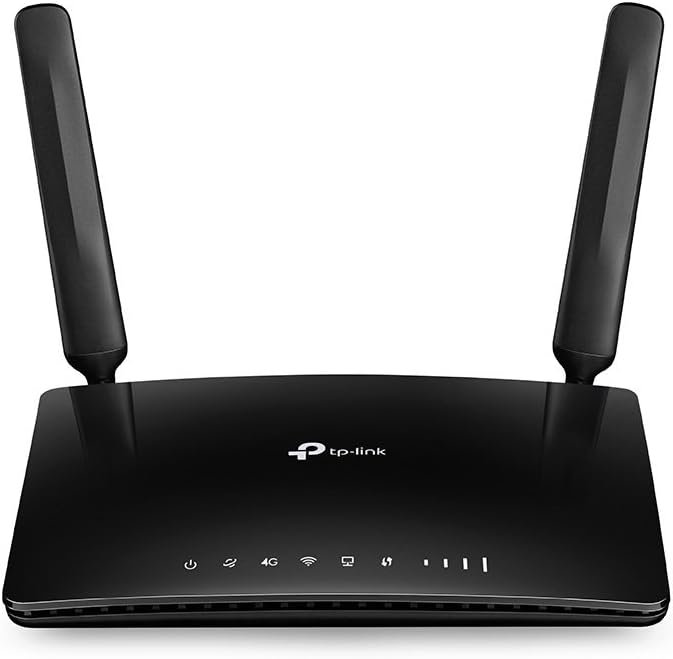
TP-Link AC1200 Wireless Dual Band Router C50
AC-WLAN speeds TP-Link Archer C50 offers you with the AC standard is the next-generation WLAN. This is up to 3 times faster than the N-Standard. With its dual-band WLAN reaches the device up to 300 Mbit/s on the 2.4 GHz and up to 867 Mbit/s on the 5 GHZ-band. Demanding applications such as 4k video streaming and online gaming are a pleasure. 1.2 Gbit/s dual band connection Thanks to the use of both WLAN frequencies (2.4 GHZ and 5 ghz band), the best possible wireless performance. The dual-band WLAN allows you the flexibility of two dedicated networks. Simple applications like the sending of e-mails and surfing are handled via the 2.4 ghz band, while data-hungry apply as 4k video streaming and online gaming via the 5 GHZ-band. Innovative antenna design and maximum cover Thanks to the four external antennas, you also have in hard to reach areas in your home a good Wi-Fi connection. A high-performance amplifier increases your WLAN performance during low-noise antennas increase the WLAN range. This text is machine translated.
AC-WLAN speeds TP-Link Archer C50 offers you with the AC standard is the next-generation WLAN. This is up to 3 times faster than the N-Standard. With its dual-band WLAN reaches the device up to 300 Mbit/s on the 2.4 GHz and up to 867 Mbit/s on the 5 GHZ-band. Demanding applications such as 4k video streaming and online gaming are a pleasure. 1.2 Gbit/s dual band connection Thanks to the use of both WLAN frequencies (2.4 GHZ and 5 ghz band), the best possible wireless performance. The dual-band WLAN allows you the flexibility of two dedicated networks. Simple applications like the sending of e-mails and surfing are handled via the 2.4 ghz band, while data-hungry apply as 4k video streaming and online gaming via the 5 GHZ-band. Innovative antenna design and maximum cover Thanks to the four external antennas, you also have in hard to reach areas in your home a good Wi-Fi connection. A high-performance amplifier increases your WLAN performance during low-noise antennas increase the WLAN range. This text is machine translated.
AC-WLAN speeds TP-Link Archer C50 offers you with the AC standard is the next-generation WLAN. This is up to 3 times faster than the N-Standard. With its dual-band WLAN reaches the device up to 300 Mbit/s on the 2.4 GHz and up to 867 Mbit/s on the 5 GHZ-band. Demanding applications such as 4k video streaming and online gaming are a pleasure. 1.2 Gbit/s dual band connection Thanks to the use of both WLAN frequencies (2.4 GHZ and 5 ghz band), the best possible wireless performance. The dual-band WLAN allows you the flexibility of two dedicated networks. Simple applications like the sending of e-mails and surfing are handled via the 2.4 ghz band, while data-hungry apply as 4k video streaming and online gaming via the 5 GHZ-band. Innovative antenna design and maximum cover Thanks to the four external antennas, you also have in hard to reach areas in your home a good Wi-Fi connection. A high-performance amplifier increases your WLAN performance during low-noise antennas increase the WLAN range. This text is machine translated.
AC-WLAN speeds TP-Link Archer C50 offers you with the AC standard is the next-generation WLAN. This is up to 3 times faster than the N-Standard. With its dual-band WLAN reaches the device up to 300 Mbit/s on the 2.4 GHz and up to 867 Mbit/s on the 5 GHZ-band. Demanding applications such as 4k video streaming and online gaming are a pleasure. 1.2 Gbit/s dual band connection Thanks to the use of both WLAN frequencies (2.4 GHZ and 5 ghz band), the best possible wireless performance. The dual-band WLAN allows you the flexibility of two dedicated networks. Simple applications like the sending of e-mails and surfing are handled via the 2.4 ghz band, while data-hungry apply as 4k video streaming and online gaming via the 5 GHZ-band. Innovative antenna design and maximum cover Thanks to the four external antennas, you also have in hard to reach areas in your home a good Wi-Fi connection. A high-performance amplifier increases your WLAN performance during low-noise antennas increase the WLAN range. This text is machine translated.
in 8 offers
The lowest price for TP-Link AC1200 Wireless Dual Band Router C50 right now is $37.13 at microless.com, compared across 8 retailers.
The all-time low was $16.82 on 25 Nov 2024 — today's price is 121% above the lowest ever. It has been notably cheaper before — worth setting a price alert.
Prices last updated 20 Oct 2026.
Last updated at 20/10/2026 05:36:11
TP-Link Archer C50 AC1200 Wireless Dual Band Router, Dual-Band 2.4GHz & 5GHz, 4x Fixed Antennas with Signal-Boosting Array, Up to 867 Mbps WiFi Speed,
Delivery between 23–30 Oct $37.45
Tp-link Archerc50 Router White EU Plug 220V
Delivery $24.49
TP-Link WiFi Wireless LAN Router Archer C50 11ac AC1200 867 + 300Mbps Dual-band Compatible with iPad, iPad Pro Wireless LAN Router Wi-Fi Router
Delivery between 24–28 Oct $41
TP-Link AC1200 Wireless Dual Band Router C50
Free delivery between Wed – Thu
TP-Link AC1200 Wireless Dual Band Router C50
Free delivery between 22–31 Oct
TP-Link AC1200 Wireless Dual Band Wi-Fi 5 Router | Retravision
Delivery between 21–29 Oct $11.66
TP-Link Archer C50
Free delivery
Tp-link Ac1200 Wireless Dual Band Wi-fi Router, Wi-fi Speed Up To 867
Free delivery
Affiliate Disclosure: We may receive a small commission for purchases made through this link at no extra cost to you. This helps support our site. Thank you!
originally posted on neweggbusiness.com
TP-Link continues to make some of the best home routers. If a family or friend comes looking for a router, they are who I steer them towards. Their routers are inexpensive, have good range, easy to use, and most importantly, they are very stable. My parents have been running a basic wireless N 300 mbps version for almost two years now and I’ve not heard a word about them needing to reboot it, and it only took about 45 seconds to set up. I even remoted into theirs a few weeks ago to set a dhcp reservation for a wireless printer, and that was also a quick task. This model, like the others I have used is more of the same, with one exception: 100 mbps wired ethernet ports. In today’s age, it’s woefully inadequate. I regularly get 400+ mbps out of my AC access points in ... MoreTP-Link continues to make some of the best home routers. If a family or friend comes looking for a router, they are who I steer them towards. Their routers are inexpensive, have good range, easy to use, and most importantly, they are very stable. My parents have been running a basic wireless N 300 mbps version for almost two years now and I’ve not heard a word about them needing to reboot it, and it only took about 45 seconds to set up. I even remoted into theirs a few weeks ago to set a dhcp reservation for a wireless printer, and that was also a quick task. This model, like the others I have used is more of the same, with one exception: 100 mbps wired ethernet ports. In today’s age, it’s woefully inadequate. I regularly get 400+ mbps out of my AC access points in my house, limiting a router that has N and AC to 100 mbps seems silly. I know it’s built to a price, and I appreciate it for that, but the extra $5 to make the wired ports gigabit would have been totally worthwhile. My ISP has guaranteed that all customers will have access to 1gbps service within 1.5 years (cable provider), if you bought this router today, you’d have to be very sure that you don’t need more than the 100 mbps in the near future, or you need to go up to the next TP link in the line (but it should be a TP link unless you are looking to separate the router/switch/access point roles). For me? This will go on the shelf as a spare, and I’ve re-activated the wireless on my Ubiquiti access points, and re-installed my Ubiquiti edgerouter as my firewall. I missed my band steering/vlans/gigabit ports too much!
originally posted on newegg.com
The one I got is the V2 of this router. So it should have most of the bugs worked out of the firmware by this point. This line of routers has been around for a couple years at least, so it's good to see they're still supporting their firmware with updates. I can still recommend all TP Link devices, including this one. I just recommend you use your network to stream media and transfer files and not the USB ports on the router. Streaming media between network devices is much easier if you're using the same operating system on the two devices you wish to stream between. I recently upgraded my HTPC to Windows 10, with my gaming PC having Win 10 for a few months now. Streaming has finally become as simple as playing a file from your hard drive. This is a great mid range ... MoreThe one I got is the V2 of this router. So it should have most of the bugs worked out of the firmware by this point. This line of routers has been around for a couple years at least, so it's good to see they're still supporting their firmware with updates. I can still recommend all TP Link devices, including this one. I just recommend you use your network to stream media and transfer files and not the USB ports on the router. Streaming media between network devices is much easier if you're using the same operating system on the two devices you wish to stream between. I recently upgraded my HTPC to Windows 10, with my gaming PC having Win 10 for a few months now. Streaming has finally become as simple as playing a file from your hard drive. This is a great mid range router with a lot of options. Although, I personally recommend the TP Link AC1750 C8 which doesn't cost much more than this one. It has USB 3.0 ports, with much better bandwidth than the USB 2.0 ports on this router. It also has a third antenna and improved overall range. However, if you don't intend to use your USB ports for anything other than a network printer. Any of the models in this line of routers would be fine as long as they meet your maximum bandwidth requirements. For the average user, this model will be fine. But for the advanced user, the AC1750 is the superior router both in terms of performance and value.
originally posted on homeessentialsdirect.com
I've had this router for about 2 years. It's worked very reliably. We have a small house so signal strength has never been an issue for us. Initially I did notice it ran very slowly, but after going into the settings and prioritizing/limiting bandwidth with devices, the bottlenecking stopped and all the devices on the network ran much faster. It's a very simple process to do, videos can be found on YouTube on how to do it. I recommend this router to anyone who isn't a heavy streaming house... under 6 devices, needing less than 300-500mbps. It's also perfect to use as a secondary access point to extend the Wifi range of your current network. Which is what I currently set mine up for. Since I upgraded my primary network I now have WiFi coverage on my entire property, ... MoreI've had this router for about 2 years. It's worked very reliably. We have a small house so signal strength has never been an issue for us. Initially I did notice it ran very slowly, but after going into the settings and prioritizing/limiting bandwidth with devices, the bottlenecking stopped and all the devices on the network ran much faster. It's a very simple process to do, videos can be found on YouTube on how to do it. I recommend this router to anyone who isn't a heavy streaming house... under 6 devices, needing less than 300-500mbps. It's also perfect to use as a secondary access point to extend the Wifi range of your current network. Which is what I currently set mine up for. Since I upgraded my primary network I now have WiFi coverage on my entire property, not just my house.
| Max Transfer Rate | 1.2 Gbps (combined wireless) |
| Wireless Speed Rating | AC1200 |
| Wireless Standard | 802.11ac |
| Wireless Band Count | Dual band |
| Wireless Highlights | Wi-Fi Protected Setup (WPS) |
TP-Link Archer C50 AC1200 Wireless Dual Band Router, Dual-Band 2.4GHz & 5GHz, 4x Fixed Antennas with Signal-Boosting Array, Up to 867 Mbps WiFi Speed,
Delivery between 23–30 Oct $37.45
Tp-link Archerc50 Router White EU Plug 220V
Delivery $24.49
TP-Link WiFi Wireless LAN Router Archer C50 11ac AC1200 867 + 300Mbps Dual-band Compatible with iPad, iPad Pro Wireless LAN Router Wi-Fi Router
Delivery between 24–28 Oct $41
TP-Link AC1200 Wireless Dual Band Router C50
Free delivery between Wed – Thu
TP-Link AC1200 Wireless Dual Band Router C50
Free delivery between 22–31 Oct
TP-Link continues to make some of the best home routers. If a family or friend comes looking for a router, they are who I steer them towards. Their routers are inexpensive, have good range, easy to use, and most importantly, they are very stable. My parents have been running a basic wireless N 300 mbps version for almost two years now and I’ve not heard a word about them needing to reboot it, and it only took about 45 seconds to set up. I even remoted into theirs a few weeks ago to set a dhcp reservation for a wireless printer, and that was also a quick task. This model, like the others I have used is more of the same, with one exception: 100 mbps wired ethernet ports. In today’s age, it’s woefully inadequate. I regularly get 400+ mbps out of my AC access points in ... MoreTP-Link continues to make some of the best home routers. If a family or friend comes looking for a router, they are who I steer them towards. Their routers are inexpensive, have good range, easy to use, and most importantly, they are very stable. My parents have been running a basic wireless N 300 mbps version for almost two years now and I’ve not heard a word about them needing to reboot it, and it only took about 45 seconds to set up. I even remoted into theirs a few weeks ago to set a dhcp reservation for a wireless printer, and that was also a quick task. This model, like the others I have used is more of the same, with one exception: 100 mbps wired ethernet ports. In today’s age, it’s woefully inadequate. I regularly get 400+ mbps out of my AC access points in my house, limiting a router that has N and AC to 100 mbps seems silly. I know it’s built to a price, and I appreciate it for that, but the extra $5 to make the wired ports gigabit would have been totally worthwhile. My ISP has guaranteed that all customers will have access to 1gbps service within 1.5 years (cable provider), if you bought this router today, you’d have to be very sure that you don’t need more than the 100 mbps in the near future, or you need to go up to the next TP link in the line (but it should be a TP link unless you are looking to separate the router/switch/access point roles). For me? This will go on the shelf as a spare, and I’ve re-activated the wireless on my Ubiquiti access points, and re-installed my Ubiquiti edgerouter as my firewall. I missed my band steering/vlans/gigabit ports too much!
The one I got is the V2 of this router. So it should have most of the bugs worked out of the firmware by this point. This line of routers has been around for a couple years at least, so it's good to see they're still supporting their firmware with updates. I can still recommend all TP Link devices, including this one. I just recommend you use your network to stream media and transfer files and not the USB ports on the router. Streaming media between network devices is much easier if you're using the same operating system on the two devices you wish to stream between. I recently upgraded my HTPC to Windows 10, with my gaming PC having Win 10 for a few months now. Streaming has finally become as simple as playing a file from your hard drive. This is a great mid range ... MoreThe one I got is the V2 of this router. So it should have most of the bugs worked out of the firmware by this point. This line of routers has been around for a couple years at least, so it's good to see they're still supporting their firmware with updates. I can still recommend all TP Link devices, including this one. I just recommend you use your network to stream media and transfer files and not the USB ports on the router. Streaming media between network devices is much easier if you're using the same operating system on the two devices you wish to stream between. I recently upgraded my HTPC to Windows 10, with my gaming PC having Win 10 for a few months now. Streaming has finally become as simple as playing a file from your hard drive. This is a great mid range router with a lot of options. Although, I personally recommend the TP Link AC1750 C8 which doesn't cost much more than this one. It has USB 3.0 ports, with much better bandwidth than the USB 2.0 ports on this router. It also has a third antenna and improved overall range. However, if you don't intend to use your USB ports for anything other than a network printer. Any of the models in this line of routers would be fine as long as they meet your maximum bandwidth requirements. For the average user, this model will be fine. But for the advanced user, the AC1750 is the superior router both in terms of performance and value.
I've had this router for about 2 years. It's worked very reliably. We have a small house so signal strength has never been an issue for us. Initially I did notice it ran very slowly, but after going into the settings and prioritizing/limiting bandwidth with devices, the bottlenecking stopped and all the devices on the network ran much faster. It's a very simple process to do, videos can be found on YouTube on how to do it. I recommend this router to anyone who isn't a heavy streaming house... under 6 devices, needing less than 300-500mbps. It's also perfect to use as a secondary access point to extend the Wifi range of your current network. Which is what I currently set mine up for. Since I upgraded my primary network I now have WiFi coverage on my entire property, ... MoreI've had this router for about 2 years. It's worked very reliably. We have a small house so signal strength has never been an issue for us. Initially I did notice it ran very slowly, but after going into the settings and prioritizing/limiting bandwidth with devices, the bottlenecking stopped and all the devices on the network ran much faster. It's a very simple process to do, videos can be found on YouTube on how to do it. I recommend this router to anyone who isn't a heavy streaming house... under 6 devices, needing less than 300-500mbps. It's also perfect to use as a secondary access point to extend the Wifi range of your current network. Which is what I currently set mine up for. Since I upgraded my primary network I now have WiFi coverage on my entire property, not just my house.
Easy setup with my AT&T NVG510 Modem router.Works well for my needs.The 5Ghz band covers most of the house a 1 story 4 bedroom approximate 2100sqft.The Router is setup in the front of the house and the 5Ghz band is week in the back bedroom.The 2.4Ghz band covers the whole house very well and strong signal.For the cost I can not complain.As I learned more about Routers I rather have a router with more antennas and removable antennas that can be changed out if needed for higher dBm.I would have purchased a router with the latest 802.11ax rather than then the 802.11ac.I am pleased with this purchase. I have not had any dropped signals or anything like that. I do advise with any new hardware you add to your pc always go to manufactures website and download the ... MoreEasy setup with my AT&T NVG510 Modem router.Works well for my needs.The 5Ghz band covers most of the house a 1 story 4 bedroom approximate 2100sqft.The Router is setup in the front of the house and the 5Ghz band is week in the back bedroom.The 2.4Ghz band covers the whole house very well and strong signal.For the cost I can not complain.As I learned more about Routers I rather have a router with more antennas and removable antennas that can be changed out if needed for higher dBm.I would have purchased a router with the latest 802.11ax rather than then the 802.11ac.I am pleased with this purchase. I have not had any dropped signals or anything like that. I do advise with any new hardware you add to your pc always go to manufactures website and download the latest Firmware to update. Never use a disc that some hardware's ship with.
Lower performance routers such as the TP-Link AC1200 still have a place in well connected homes. Mesh routers have enormous benefits, especially ease of set up. But there are still performance and cost advantages to setting up traditional access points and routers for modern homes. In my particular situation, my home includes plenty of ethernet ports throughout the house and so a handful of access points is an optimal way to handle the needs of many wireless devices, including tablets, phones, and IoT devices which are not particularly bandwidth hungry while media streamers and PC's stay on wired connections. This may not match everyone's situation, but if it does, this is an ideal product. Rather than hopping on board the latest 802.11-whatever standard which most ... MoreLower performance routers such as the TP-Link AC1200 still have a place in well connected homes. Mesh routers have enormous benefits, especially ease of set up. But there are still performance and cost advantages to setting up traditional access points and routers for modern homes. In my particular situation, my home includes plenty of ethernet ports throughout the house and so a handful of access points is an optimal way to handle the needs of many wireless devices, including tablets, phones, and IoT devices which are not particularly bandwidth hungry while media streamers and PC's stay on wired connections. This may not match everyone's situation, but if it does, this is an ideal product. Rather than hopping on board the latest 802.11-whatever standard which most devices can't exhaust, having solid 802.11g/n coverage (even at, gasp, 2.4g frequencies) with two or three access points is both cheaper and more likely to create good connections to more devices. This in turn is more likely to make more home users happy. It's easy to forget that even 802.11/n is decently fast for most users, and there is no difficulty connecting streaming video or VPN's when an access point is always nearby. At the time of writing, this access point is only $30, meaning that for less than the cost of one mid-to-high end router or any number of mesh systems, one can cover a house with three of these, providing solid connections for everyone. If your home situation is similar, consider access point quantity as a replacement for access point quality, which this product can provide easily.
My little home network was being choked by a 10 year old Zyxel router that just couldn't handle the speeds we needed for streaming nowadays. We finally settled on this very inexpensive solution and boy, am I glad we did! This is a great little router for a small home or office. It has multiple LAN ports for wired connections and an on/off switch if you have to reset it, but I haven't had to reset it once since I got it three months ago. The build quality feels a little on the cheap side compared to much more expensive routers with the same technology, but it doesn't put out to much heat and seems to function flawlessly. There's no reason to spend more on this technology. Upgrade your router with confidence. This little baby rocks!
Simple but still technically sophisticated, all the normal settings. I'd beware of setting a specific channel on this or any other router. If your neighborhood is packed with others a fixed channel will get you dropped from your own router dye to conflicts with nearby strong signals. This unit set up easily and functioned flawlessly. Place high up on a wall so no interior items (mirrors, furniture, metal file cabinets) block line of sight. If there's solid metal between a user and the router, the user won't connect easily, if at all. Mine is dix feet up the wall, and I can walk 250' to my outdoor mailbox and still have a "good" rated signal. I get "excellent" signals everywhere within my home. With radio signals (wifi is radio), higher is always better. And I'd you ... MoreSimple but still technically sophisticated, all the normal settings. I'd beware of setting a specific channel on this or any other router. If your neighborhood is packed with others a fixed channel will get you dropped from your own router dye to conflicts with nearby strong signals. This unit set up easily and functioned flawlessly. Place high up on a wall so no interior items (mirrors, furniture, metal file cabinets) block line of sight. If there's solid metal between a user and the router, the user won't connect easily, if at all. Mine is dix feet up the wall, and I can walk 250' to my outdoor mailbox and still have a "good" rated signal. I get "excellent" signals everywhere within my home. With radio signals (wifi is radio), higher is always better. And I'd you have mirrors, signals get blocked or reflected, and play havoc with WiFi. Take down all unnecessary mirrors. It's like lining your walls with Faraday cages, not good.
Works fine for most of the things you want it to do. For required tasks, the WiFi connection is dropped for a split second every ten minutes or so. For gaming, you may be dropped from a game. This happens once every 30 minutes or so. At other times, you will see a slight lag or glich for a split second. For streaming video on Roku and Home Essentials Direct Fire stick, you will see the video freeze for a second or two. Once every ten minutes, you may lose the stream and the Roku/Fire will take you back to the main menu. This is really annoying if you are trying to watch a movie, or a Basketball/football game, and the signal drops. Since I have multiple sources wired to a switch (2x game consoles, Roku, AppleTV) when the signal drops, the switch cycles through and ... MoreWorks fine for most of the things you want it to do. For required tasks, the WiFi connection is dropped for a split second every ten minutes or so. For gaming, you may be dropped from a game. This happens once every 30 minutes or so. At other times, you will see a slight lag or glich for a split second. For streaming video on Roku and Home Essentials Direct Fire stick, you will see the video freeze for a second or two. Once every ten minutes, you may lose the stream and the Roku/Fire will take you back to the main menu. This is really annoying if you are trying to watch a movie, or a Basketball/football game, and the signal drops. Since I have multiple sources wired to a switch (2x game consoles, Roku, AppleTV) when the signal drops, the switch cycles through and searches for a new signal and land on the second streaming device (for example, I will be watching Roku and it will automatically swap to AppleTV, or vice versa) and I would need to manually switch it back. Slightly annoying... so when I have a gathering, I unplug all the other sources and only have the Roku plugged in. Even if the signal is dropped, the switch stays on the Roku since it has no other sources plugged in. (This happens with both a Roku media player and a Home Essentials Direct Fire stick so I know it is not the device). Like I said - Slightly annoying.
I really like this router, of course there is some sacrifices by the price you pay, namely the wired ports are 10/100M and the USB is 2.0, but this is clearly stated in the specs section (at least in newegg) so no surprises there unless you don't pay attention. Setting up was relatively easy , tested the USB sharing capabilities, simple but really good so far. Range is good and stable for a small to medium apartment/office but be aware of obstacles and location of the router for using the 5GHz band. Great for a budget initiation to the ac1200 world with some simple but useful media server/usb sharing capabilities. Edited because, recently, after a little "shifting" at the office, we are using the Printer share capabilities. So far works great with an all-in-one HP ... MoreI really like this router, of course there is some sacrifices by the price you pay, namely the wired ports are 10/100M and the USB is 2.0, but this is clearly stated in the specs section (at least in newegg) so no surprises there unless you don't pay attention. Setting up was relatively easy , tested the USB sharing capabilities, simple but really good so far. Range is good and stable for a small to medium apartment/office but be aware of obstacles and location of the router for using the 5GHz band. Great for a budget initiation to the ac1200 world with some simple but useful media server/usb sharing capabilities. Edited because, recently, after a little "shifting" at the office, we are using the Printer share capabilities. So far works great with an all-in-one HP printer. Only a little extra step for using the scanner (you have to "capture" the printer using their app, this happens automatically for printing) and the app itself is very simple (great for not eating your OS resources). The bad side is that such app is for Windows and Mac only (so far). and since seems like a proprietary comm protocol between the app and the router to simulate the USB-Network bridge, there is no manual configuration nor app/driver for linux :(
I've been reviewing for Newegg.com now for a few years and they tend to send me a lot of networking components and I must say I end up keeping some and selling some that just don't need or are not up to the performance of the last item they sent me. This router is a very good router, easy setup and just works as it should but, its not up to the performance of the last one they sent me from Netgear. This one is priced much better and is half the size and I'd be keeping it if it wasn't for the netgear. To me most of the Wi-Fi router manufacturers STILL don't get it. When it comes to setup we don't need some random numbers and letters for logon. We want a simple word combination we can easily remember to logon the system instead of some thing we need to go look at all ... MoreI've been reviewing for Newegg.com now for a few years and they tend to send me a lot of networking components and I must say I end up keeping some and selling some that just don't need or are not up to the performance of the last item they sent me. This router is a very good router, easy setup and just works as it should but, its not up to the performance of the last one they sent me from Netgear. This one is priced much better and is half the size and I'd be keeping it if it wasn't for the netgear. To me most of the Wi-Fi router manufacturers STILL don't get it. When it comes to setup we don't need some random numbers and letters for logon. We want a simple word combination we can easily remember to logon the system instead of some thing we need to go look at all the time for new devices. I can hear you all saying that's easy to change, yes but why should I have to go through that and then 6 months later when I want to connect a new device I've forgotten the password and need to setup all over again. The WiFi app, I used the one for android, is ok. It has all the bells and whistles most people would want but the color choice is terrible, light green background and white lettering? Why not use a dark background and white lettering to make it easy to see? The app itself is a mystery to use at first. Hidden pages found by accident is my best description, sweep up from near the bottom. The router direct login site to me is much easier to navigate and see what you can do, which is a lot down to automatically turning WiFi on and off at different times and days. Just think about turning the Wi-Fi off when the kids get home so they can start their homework and an hour later turning it back on so they can finish online homework then turning it off at bedtime. Nice feature with easy online setup. Final thought? Good unit, better units are available but at twice the price. This will pay for itself in a year over renting from your internet provider.
| Max Transfer Rate | 1.2 Gbps (combined wireless) |
| Wireless Speed Rating | AC1200 |
| Wireless Standard | 802.11ac |
| Wireless Band Count | Dual band |
| Wireless Highlights | Wi-Fi Protected Setup (WPS) |