Last updated at 02/09/2026 21:50:22
Tp-Link Ax50 WiFi Range Extender
Delivery $24.25
tp-link AX3000 Dual Band Gigabit Wi-Fi 6 Router AX50
Delivery between Sat – Tue $6
TP-Link AX3000 Dual-Band Wi-Fi 6 Smart Router | Archer AX50
Delivery between 8–14 Sept $35.16
TP-Link Archer AX50 AX3000 802.11ax Gigabit Wi-Fi 6 Router
Delivery $18.32
TP Link AX3000 Dual Band Gigabit Wi Fi 6 Router Archer AX50 - Routers
Delivery $15.35
TP Link AX3000 Dual Band Gigabit Wi Fi 6 Router Archer AX50 - Routers
Delivery $13
TP-Link Archer AX50 Dual Band Wi-Fi 6 Wireless Router, with Dual-Core CPU, 2402Mbps at 5GHz + 574Mbps at 2.4GHz, 5 Gigabit Ports,1 USB 3.0, 4 Antennas
Delivery $260.23
originally posted on pbtech.co.nz
Great router for future proofing your devices with Wifi 6.The QoS and onboard security features inside of the app are really neat.When buying them I didn't think I would use them much, and am very against being reliant on installing mobile apps nowadays for setups.However the app is pretty helpful and gives you some great realtime options.Only issue with this router is (you will hear a few people talk about this online aswell) the heat it produces.Too powerful for its own good. A solution is getting a USB cable connection to a PC fan, and letting the routers empty USB slot power a fan it can sit on.This made a huge difference. Even if the router is in a cold area of the house it gets pretty warm without a fan, would highly recommend some sort of cooling ... MoreGreat router for future proofing your devices with Wifi 6.The QoS and onboard security features inside of the app are really neat.When buying them I didn't think I would use them much, and am very against being reliant on installing mobile apps nowadays for setups.However the app is pretty helpful and gives you some great realtime options.Only issue with this router is (you will hear a few people talk about this online aswell) the heat it produces.Too powerful for its own good. A solution is getting a USB cable connection to a PC fan, and letting the routers empty USB slot power a fan it can sit on.This made a huge difference. Even if the router is in a cold area of the house it gets pretty warm without a fan, would highly recommend some sort of cooling solution when purchasing this router.
originally posted on walmart.com
I’ve had this router for just under a year and up til a week ago, I had no issues. Suddenly every laptop in my house can’t get over 1 mbps speed download. I’ve tried factory reset, tweaking settings, looking up all advice on Google and YouTube. Nothing works. 3 laptops, two of which with new Wi-Fi 6 Intel AX200 and AX210 adapters in them. Took them to work and download speeds are great, so I figured it had to be my router. Even on an older laptop that I replaced the Wi-Fi adapter card in-still less than 1mbps. Every other device gets higher speeds. I finally pulled out my older Wi-Fi 5 AC1900 router tonite and voila, now the laptops all get top download speed. For the life of me, I have no idea why it’s doing this. I have tried everything I know to try and I’m ... MoreI’ve had this router for just under a year and up til a week ago, I had no issues. Suddenly every laptop in my house can’t get over 1 mbps speed download. I’ve tried factory reset, tweaking settings, looking up all advice on Google and YouTube. Nothing works. 3 laptops, two of which with new Wi-Fi 6 Intel AX200 and AX210 adapters in them. Took them to work and download speeds are great, so I figured it had to be my router. Even on an older laptop that I replaced the Wi-Fi adapter card in-still less than 1mbps. Every other device gets higher speeds. I finally pulled out my older Wi-Fi 5 AC1900 router tonite and voila, now the laptops all get top download speed. For the life of me, I have no idea why it’s doing this. I have tried everything I know to try and I’m pretty good at diagnosing network issues. So why would it only affect the laptops? This issue came up about a week ago when I noticed unusually slow update times and file downloads. I would love to return the router because I was forced to use my old one and can’t take advantage of Wi-Fi 6 speeds now. I have fiber optic 300 mbps speed and having all 3 laptops choked off on download speed is a real inconvenience. As a side note, I did a modem reset and I have factory reset the router now 3 times with the same result.
originally posted on microcenter.com
I upgraded my internet speed to 600mb with Comcast. The ethernet speed easily exceeded 650mb on average. The TP Link AX1800 router I purchased from Microcenter a few months ago, was only giving me about 320mb from the wi-fi, right next to the antenna. So because of good reviews I purchased this TP Link AX3000, expecting faster wi-fi speed. Measuring signal strength from different parts of the house, the AX3000 has a stronger signal. However, the wifi speed was only slightly (about 5 to 10%) faster, than the AX1800. So if you have an old router and need an upgrade, I would recommend this AX3000. But if you have a relatively new router like the AX1800, then there's no need to replace it. At $99 this is a good router.
| General | |
| Device Type | Wireless router - 4-port switch (integrated) |
| Enclosure Type | Desktop |
| Connectivity Technology | Wireless, wired |
| Data Link Protocol | Ethernet, Fast Ethernet, Gigabit Ethernet, IEEE 802.11b, IEEE 802.11a, IEEE 802.11g, IEEE 802.11n, IEEE 802.11ac, IEEE 802.11ax (Wi-Fi 6) |
Tp-Link Ax50 WiFi Range Extender
Delivery $24.25
tp-link AX3000 Dual Band Gigabit Wi-Fi 6 Router AX50
Delivery between Sat – Tue $6
TP-Link AX3000 Dual-Band Wi-Fi 6 Smart Router | Archer AX50
Delivery between 8–14 Sept $35.16
TP-Link Archer AX50 AX3000 802.11ax Gigabit Wi-Fi 6 Router
Delivery $18.32
TP Link AX3000 Dual Band Gigabit Wi Fi 6 Router Archer AX50 - Routers
Delivery $15.35
Great router for future proofing your devices with Wifi 6.The QoS and onboard security features inside of the app are really neat.When buying them I didn't think I would use them much, and am very against being reliant on installing mobile apps nowadays for setups.However the app is pretty helpful and gives you some great realtime options.Only issue with this router is (you will hear a few people talk about this online aswell) the heat it produces.Too powerful for its own good. A solution is getting a USB cable connection to a PC fan, and letting the routers empty USB slot power a fan it can sit on.This made a huge difference. Even if the router is in a cold area of the house it gets pretty warm without a fan, would highly recommend some sort of cooling ... MoreGreat router for future proofing your devices with Wifi 6.The QoS and onboard security features inside of the app are really neat.When buying them I didn't think I would use them much, and am very against being reliant on installing mobile apps nowadays for setups.However the app is pretty helpful and gives you some great realtime options.Only issue with this router is (you will hear a few people talk about this online aswell) the heat it produces.Too powerful for its own good. A solution is getting a USB cable connection to a PC fan, and letting the routers empty USB slot power a fan it can sit on.This made a huge difference. Even if the router is in a cold area of the house it gets pretty warm without a fan, would highly recommend some sort of cooling solution when purchasing this router.
I’ve had this router for just under a year and up til a week ago, I had no issues. Suddenly every laptop in my house can’t get over 1 mbps speed download. I’ve tried factory reset, tweaking settings, looking up all advice on Google and YouTube. Nothing works. 3 laptops, two of which with new Wi-Fi 6 Intel AX200 and AX210 adapters in them. Took them to work and download speeds are great, so I figured it had to be my router. Even on an older laptop that I replaced the Wi-Fi adapter card in-still less than 1mbps. Every other device gets higher speeds. I finally pulled out my older Wi-Fi 5 AC1900 router tonite and voila, now the laptops all get top download speed. For the life of me, I have no idea why it’s doing this. I have tried everything I know to try and I’m ... MoreI’ve had this router for just under a year and up til a week ago, I had no issues. Suddenly every laptop in my house can’t get over 1 mbps speed download. I’ve tried factory reset, tweaking settings, looking up all advice on Google and YouTube. Nothing works. 3 laptops, two of which with new Wi-Fi 6 Intel AX200 and AX210 adapters in them. Took them to work and download speeds are great, so I figured it had to be my router. Even on an older laptop that I replaced the Wi-Fi adapter card in-still less than 1mbps. Every other device gets higher speeds. I finally pulled out my older Wi-Fi 5 AC1900 router tonite and voila, now the laptops all get top download speed. For the life of me, I have no idea why it’s doing this. I have tried everything I know to try and I’m pretty good at diagnosing network issues. So why would it only affect the laptops? This issue came up about a week ago when I noticed unusually slow update times and file downloads. I would love to return the router because I was forced to use my old one and can’t take advantage of Wi-Fi 6 speeds now. I have fiber optic 300 mbps speed and having all 3 laptops choked off on download speed is a real inconvenience. As a side note, I did a modem reset and I have factory reset the router now 3 times with the same result.
I upgraded my internet speed to 600mb with Comcast. The ethernet speed easily exceeded 650mb on average. The TP Link AX1800 router I purchased from Microcenter a few months ago, was only giving me about 320mb from the wi-fi, right next to the antenna. So because of good reviews I purchased this TP Link AX3000, expecting faster wi-fi speed. Measuring signal strength from different parts of the house, the AX3000 has a stronger signal. However, the wifi speed was only slightly (about 5 to 10%) faster, than the AX1800. So if you have an old router and need an upgrade, I would recommend this AX3000. But if you have a relatively new router like the AX1800, then there's no need to replace it. At $99 this is a good router.
Really have been enjoying this router so far, it was a big upgrade from a different brand router that was having many issues. It has been very stable and easy to tinker with. Although I enjoy messing with advanced settings, I feel this would also be very easy for anyone to set up regardless of their level of technology literacy. There is an easy phone app to set up and control the router. I am slightly disappointed with the antennas on the unit, which are not only a bit smaller than preferred but also permanently attached to the unit meaning I can't replace them with higher gain antennas. The thermal design of this router is disappointing. I am utilizing a cheap laptop cooling pad in order to keep it cool, and although I did not run into any thermal issues, it does ... MoreReally have been enjoying this router so far, it was a big upgrade from a different brand router that was having many issues. It has been very stable and easy to tinker with. Although I enjoy messing with advanced settings, I feel this would also be very easy for anyone to set up regardless of their level of technology literacy. There is an easy phone app to set up and control the router. I am slightly disappointed with the antennas on the unit, which are not only a bit smaller than preferred but also permanently attached to the unit meaning I can't replace them with higher gain antennas. The thermal design of this router is disappointing. I am utilizing a cheap laptop cooling pad in order to keep it cool, and although I did not run into any thermal issues, it does run hot and I worry about the longevity of the components inside. There should be open vents on top to allow for hot air to rise off of the components and TP-LINK did make this change in many other models after this one. The 2.4ghz range has been fine and the 5ghz range has also been acceptable, but it is a bit weaker than expected for a router in this price range. I am in a condo and the materials of the walls is notorious for absorbing WiFi signals, but I've seen better coverage from other routers I've tested. It is still perfectly fine for working from home and gaming at the same time. Wifi 6, also known as 802.11ax, is a wonderful upgrade and really refines the wifi protocol overall. It is also backwards compatible with basically any older device. So the newer devices in my home benefit with more efficient performance overall, and battery savings with phones that support Wi-Fi 6.
For an affordable dual band router, this was a great upgrade. We're consistently getting download and upload speeds that are twice as fast as our 5-year-old tri-band Netgear router, and even with one less antenna, the issues with devices with being dropped from the network or connectivity crawling to a snails pace because the network gets overwhelmed have virtually disappeared. Now, we are two people living in a 2-bedroom apartment with gig internet via fiber in a well-connected urban area. We both work from home and have had several meetings with six people using the home's connection all at once, and the router has handled all that capably. I've been able to have video calls while five people are working in the kitchen, no problem. However, we've noticed a ... MoreFor an affordable dual band router, this was a great upgrade. We're consistently getting download and upload speeds that are twice as fast as our 5-year-old tri-band Netgear router, and even with one less antenna, the issues with devices with being dropped from the network or connectivity crawling to a snails pace because the network gets overwhelmed have virtually disappeared. Now, we are two people living in a 2-bedroom apartment with gig internet via fiber in a well-connected urban area. We both work from home and have had several meetings with six people using the home's connection all at once, and the router has handled all that capably. I've been able to have video calls while five people are working in the kitchen, no problem. However, we've noticed a significant drop-off in signal strength in the bedroom, so I imagine this router would be unsuitable for a larger space (honestly, it wasn't designed for that). But for getting into 6th-gen internet for under $130, you'd be hard-pressed to do better.
Connected fairly seamlessly to Exetel HFC NBN - I just made sure I copied over the details accurately from the old router to the new router. Wifi strength is way better than what I had with the Exetel-supplied device - it just about covers my entire property, almost rendering my second wifi hotspot redundant. Port forwarding, IPv6 and custom DNS was easy enough to set up. User interface is about what you would expect for a budget router - not amazing but it gets the job done. I think my only gripe is that it doesn't support WPA3, but considering most of your traffic will also be encrypted with SSL, that's really not a huge problem. Ping times and upload/download speeds are about 10% better than the Exetel-supplied router. We have no dramas running multiple Zoom ... MoreConnected fairly seamlessly to Exetel HFC NBN - I just made sure I copied over the details accurately from the old router to the new router. Wifi strength is way better than what I had with the Exetel-supplied device - it just about covers my entire property, almost rendering my second wifi hotspot redundant. Port forwarding, IPv6 and custom DNS was easy enough to set up. User interface is about what you would expect for a budget router - not amazing but it gets the job done. I think my only gripe is that it doesn't support WPA3, but considering most of your traffic will also be encrypted with SSL, that's really not a huge problem. Ping times and upload/download speeds are about 10% better than the Exetel-supplied router. We have no dramas running multiple Zoom sessions/Netflix streams/downloads/etc. It also has a really good Quality of Service setting so you can prioritise traffic from particular devices if you need to. Overall I would definitely recommend this product for someone who is simply looking for a good quality, budget-priced router to replace their ISP-supplied device with - something they can just set and forget!
I bought this router to replace the router my cable company supplied to me. I use smart light bulbs and need a router that has both 2.4 and 5 availability. The router the cable company supplied did not. I read reviews before purchasing and the router seemed to be what I needed. Besides being able to use my lights again, my son is a gamer and was constantly losing connection with our old router. This router was rated by others as good for gaming and it is. The router was extremely easy to set up. The app is easy to use. The directions are clear and easy to understand. Setting up the router took 15 minutes (maybe) and then we were in business. My son first connected to the 2.4 network and said the wifi was no better, but when he switched to the 5 his wifi/gaming ... MoreI bought this router to replace the router my cable company supplied to me. I use smart light bulbs and need a router that has both 2.4 and 5 availability. The router the cable company supplied did not. I read reviews before purchasing and the router seemed to be what I needed. Besides being able to use my lights again, my son is a gamer and was constantly losing connection with our old router. This router was rated by others as good for gaming and it is. The router was extremely easy to set up. The app is easy to use. The directions are clear and easy to understand. Setting up the router took 15 minutes (maybe) and then we were in business. My son first connected to the 2.4 network and said the wifi was no better, but when he switched to the 5 his wifi/gaming experience improved greatly. He said there is no more lag and downloading and uploading speeds are much improved. On top of that, my light bulbs now work and Alexa can turn them on and off for my children afraid to walk into a dark room. I am very happy I chose this router, it works well and the price was fair. Very satisfied with my purchase and I would definitely recommend to anyone looking to buy a new router.
The Archer TP Link AX3000 gets very warm to hot. Using a watt meter I determined that it uses 94 KWHs per year, about twice more than our old Netgear consolidated modem/WiFi unit, and other household electronic appliances including small LED TVs which are mostly off when not in use. As a modem/WiFi product, it works about as well as the old Netgear unit it replaced when it was new. The new modem used with it is a highly rated Motorola unit. We were shopping for the highly rated TP Link AX50 which the Fairfax Micro Center showed in its inventory, but the store service rep could not find one and recommended the AX3000 as the AX50's successor model. Indeed a Google search confirms that claim as accurate. I may return the unit or replace it later this year with one that ... MoreThe Archer TP Link AX3000 gets very warm to hot. Using a watt meter I determined that it uses 94 KWHs per year, about twice more than our old Netgear consolidated modem/WiFi unit, and other household electronic appliances including small LED TVs which are mostly off when not in use. As a modem/WiFi product, it works about as well as the old Netgear unit it replaced when it was new. The new modem used with it is a highly rated Motorola unit. We were shopping for the highly rated TP Link AX50 which the Fairfax Micro Center showed in its inventory, but the store service rep could not find one and recommended the AX3000 as the AX50's successor model. Indeed a Google search confirms that claim as accurate. I may return the unit or replace it later this year with one that is designed to operate normally as in warm not hot, but it is work and time consuming to set these things up, not like returning a defective item to a grocery or home-center store. So I feel stuck with it due to the nature of modems and WiFi units. Archer's "Next Gen WiFi" claim rings hollow and irresponsible when efficiency is the key to meeting the challenges of climate change that young Americans face. I read where other buyers on other forums have complained about the excessive heat released from this AX3000 model. Had a responsibly designed power supply been used, Archer could probably have cut the wasted energy consumption by better than 50%. Running so hot also implies a shorter product life.
Bought this as an upgrade over a Netgear AC1750 (R6350). I liked the Nighthawk app but this plus the Tether app are much easier to use in my opinion. Between ethernet and WiFi I have at least 25 devices connect at all times (Cable Internet-Cox, 500mbs down service, no Fiber optic available in my area currently) and never have any lag/latency even with streaming on usually 4 devices at all times. The similar Smart Connect feature of the Linksys never worked but on this, works flawlessly. Was able to change the SSID settings to what the Netgear used and everything reconnected without any intervention on my part. Very good router and easy to use. Would definitely recommend this to anyone looking for a good budget home networking WiFi router.
TP Link is putting out the wrong versions of the products in the box. Apparently, I have purchased the AX3000 router on 01/12/2023 from Microcenter. The router "hardware version" on the box says V1.6 (see picture, had to red out S/N and P/N for Microcenters privacy purposes). When I went to update the firmware online, the hardware version is getting shown as V1.0. I called the TP link customer service and gave them the serial number and part number to confirm the real version, and it was confirmed to be V1.0. Now, you might be wondering what could happen as long as it works. Here could be the potential problems: 1. TP link considers this product as V1.0 and might stop sending updated firmware in the future or essentially end its support. 2. As as end user, if you ... MoreTP Link is putting out the wrong versions of the products in the box. Apparently, I have purchased the AX3000 router on 01/12/2023 from Microcenter. The router "hardware version" on the box says V1.6 (see picture, had to red out S/N and P/N for Microcenters privacy purposes). When I went to update the firmware online, the hardware version is getting shown as V1.0. I called the TP link customer service and gave them the serial number and part number to confirm the real version, and it was confirmed to be V1.0. Now, you might be wondering what could happen as long as it works. Here could be the potential problems: 1. TP link considers this product as V1.0 and might stop sending updated firmware in the future or essentially end its support. 2. As as end user, if you get tempted to update the routers firmware to any of the 1.6 versions, then you might do irreparable damage to the router which might void your warranty. TP link needs to apologize to Microcenter and its customers for misleading information.
| General | |
| Device Type | Wireless router - 4-port switch (integrated) |
| Enclosure Type | Desktop |
| Connectivity Technology | Wireless, wired |
| Data Link Protocol | Ethernet, Fast Ethernet, Gigabit Ethernet, IEEE 802.11b, IEEE 802.11a, IEEE 802.11g, IEEE 802.11n, IEEE 802.11ac, IEEE 802.11ax (Wi-Fi 6) |
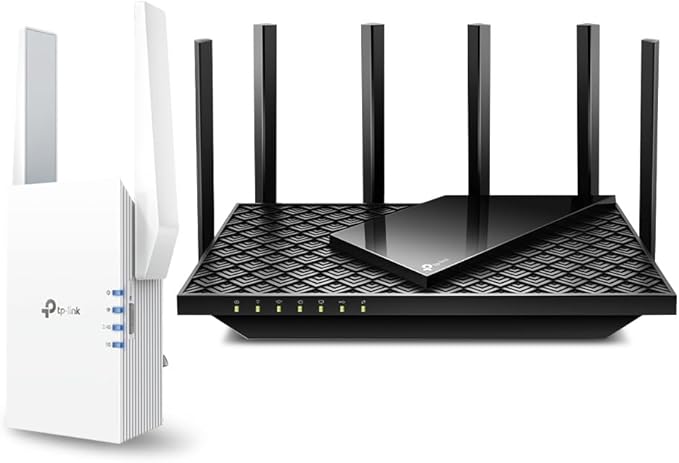
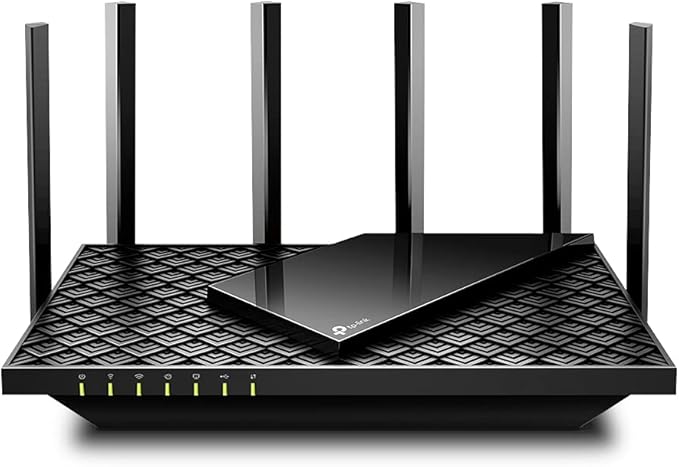
TP-Link Archer AX50 AX3000 Dual Band Gigabit Wi-Fi 6 Router
With blazing-fast Wi-Fi 6, the TP-LINK Archer AX50 router empowers your home with cutting-edge connectivity for super smooth 4K streaming, online gaming, and more. This dual band router delivers speeds up to 3Gbps across your devices using the latest 802.11ax standard, while 4 fixed external antennas provide expansive coverage throughout your home. The dual-core CPU enables low latency and reliable performance even when multiple devices are connected. With 6 Gigabit ports, the Archer AX50 offers versatile wired connectivity. Advanced security protocols like WPA3 keep your network and data safe. Parents can manage content and control access through flexible controls. With a sleek black design that blends into any decor, the Archer AX50 brings next-gen wireless performance home. Experience the future of Wi-Fi now with the Archer AX50. The manufacturer's part number for this product is ARCHER AX50.
With blazing-fast Wi-Fi 6, the TP-LINK Archer AX50 router empowers your home with cutting-edge connectivity for super smooth 4K streaming, online gaming, and more. This dual band router delivers speeds up to 3Gbps across your devices using the latest 802.11ax standard, while 4 fixed external antennas provide expansive coverage throughout your home. The dual-core CPU enables low latency and reliable performance even when multiple devices are connected. With 6 Gigabit ports, the Archer AX50 offers versatile wired connectivity. Advanced security protocols like WPA3 keep your network and data safe. Parents can manage content and control access through flexible controls. With a sleek black design that blends into any decor, the Archer AX50 brings next-gen wireless performance home. Experience the future of Wi-Fi now with the Archer AX50. The manufacturer's part number for this product is ARCHER AX50.
With blazing-fast Wi-Fi 6, the TP-LINK Archer AX50 router empowers your home with cutting-edge connectivity for super smooth 4K streaming, online gaming, and more. This dual band router delivers speeds up to 3Gbps across your devices using the latest 802.11ax standard, while 4 fixed external antennas provide expansive coverage throughout your home. The dual-core CPU enables low latency and reliable performance even when multiple devices are connected. With 6 Gigabit ports, the Archer AX50 offers versatile wired connectivity. Advanced security protocols like WPA3 keep your network and data safe. Parents can manage content and control access through flexible controls. With a sleek black design that blends into any decor, the Archer AX50 brings next-gen wireless performance home. Experience the future of Wi-Fi now with the Archer AX50. The manufacturer's part number for this product is ARCHER AX50.
With blazing-fast Wi-Fi 6, the TP-LINK Archer AX50 router empowers your home with cutting-edge connectivity for super smooth 4K streaming, online gaming, and more. This dual band router delivers speeds up to 3Gbps across your devices using the latest 802.11ax standard, while 4 fixed external antennas provide expansive coverage throughout your home. The dual-core CPU enables low latency and reliable performance even when multiple devices are connected. With 6 Gigabit ports, the Archer AX50 offers versatile wired connectivity. Advanced security protocols like WPA3 keep your network and data safe. Parents can manage content and control access through flexible controls. With a sleek black design that blends into any decor, the Archer AX50 brings next-gen wireless performance home. Experience the future of Wi-Fi now with the Archer AX50. The manufacturer's part number for this product is ARCHER AX50.
in 7 offers
The lowest price for TP-Link Archer AX50 AX3000 Dual Band Gigabit Wi-Fi 6 Router right now is $49.99 at Cash Converters, compared across 7 retailers.
The all-time low was $29.00 on 29 July 2026 — today's price is 72% above the lowest ever. It has been notably cheaper before — worth setting a price alert.
Prices last updated 2 Sept 2026.

