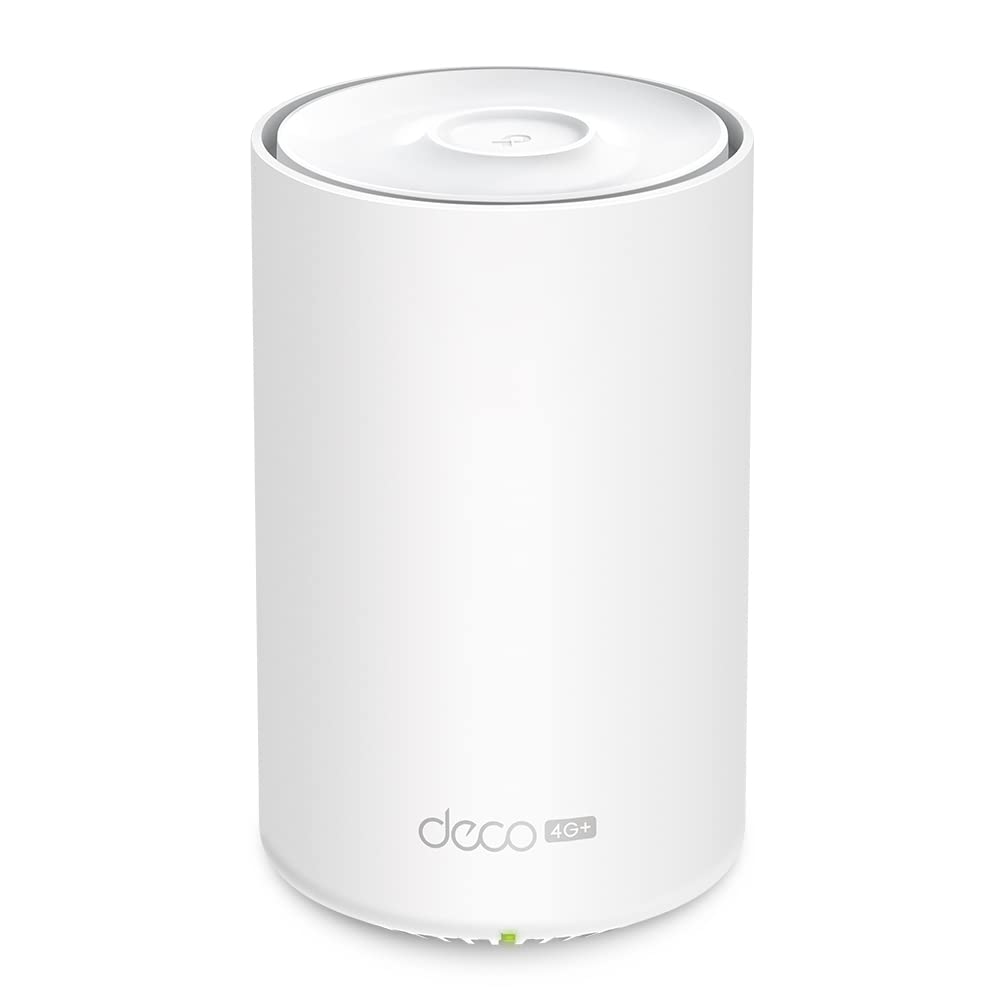
TP-Link Deco X50-DSL(1-pack) AX3000 VDSL Whole Home Mesh Wifi 6 Router
The TP-Link AX3000 VDSL Whole Home Mesh WiFi 6 Router offers advanced connectivity with its dual-band capabilities, operating on both 2.4 GHz and 5 GHz frequencies. It supports a wide range of Wi-Fi standards including 802.11a, 802.11b, 802.11g, Wi-Fi 4 (802.11n), Wi-Fi 5 (802.11ac), and Wi-Fi 6 (802.11ax), ensuring compatibility with a multitude of devices while providing the benefits of the latest Wi-Fi 6 technology. Designed with internal antennas and housed in a sleek white casing, this mesh router seamlessly blends into any home decor. It is capable of covering an area up to 230 square meters, making it suitable for medium to large-sized homes. The device maintains security with an SPI firewall and supports TP-Link ID for cloud services, enhancing user control and management of the network. The router operates efficiently with an AC adapter input voltage of 100 - 240 V and a frequency of 50/60 Hz. Dimensions are compact, measuring 105 mm in width, 105 mm in depth, and 167 mm in height, which facilitates easy placement around your home without occupying much space.
The TP-Link AX3000 VDSL Whole Home Mesh WiFi 6 Router offers advanced connectivity with its dual-band capabilities, operating on both 2.4 GHz and 5 GHz frequencies. It supports a wide range of Wi-Fi standards including 802.11a, 802.11b, 802.11g, Wi-Fi 4 (802.11n), Wi-Fi 5 (802.11ac), and Wi-Fi 6 (802.11ax), ensuring compatibility with a multitude of devices while providing the benefits of the latest Wi-Fi 6 technology. Designed with internal antennas and housed in a sleek white casing, this mesh router seamlessly blends into any home decor. It is capable of covering an area up to 230 square meters, making it suitable for medium to large-sized homes. The device maintains security with an SPI firewall and supports TP-Link ID for cloud services, enhancing user control and management of the network. The router operates efficiently with an AC adapter input voltage of 100 - 240 V and a frequency of 50/60 Hz. Dimensions are compact, measuring 105 mm in width, 105 mm in depth, and 167 mm in height, which facilitates easy placement around your home without occupying much space.
The TP-Link AX3000 VDSL Whole Home Mesh WiFi 6 Router offers advanced connectivity with its dual-band capabilities, operating on both 2.4 GHz and 5 GHz frequencies. It supports a wide range of Wi-Fi standards including 802.11a, 802.11b, 802.11g, Wi-Fi 4 (802.11n), Wi-Fi 5 (802.11ac), and Wi-Fi 6 (802.11ax), ensuring compatibility with a multitude of devices while providing the benefits of the latest Wi-Fi 6 technology. Designed with internal antennas and housed in a sleek white casing, this mesh router seamlessly blends into any home decor. It is capable of covering an area up to 230 square meters, making it suitable for medium to large-sized homes. The device maintains security with an SPI firewall and supports TP-Link ID for cloud services, enhancing user control and management of the network. The router operates efficiently with an AC adapter input voltage of 100 - 240 V and a frequency of 50/60 Hz. Dimensions are compact, measuring 105 mm in width, 105 mm in depth, and 167 mm in height, which facilitates easy placement around your home without occupying much space.
The TP-Link AX3000 VDSL Whole Home Mesh WiFi 6 Router offers advanced connectivity with its dual-band capabilities, operating on both 2.4 GHz and 5 GHz frequencies. It supports a wide range of Wi-Fi standards including 802.11a, 802.11b, 802.11g, Wi-Fi 4 (802.11n), Wi-Fi 5 (802.11ac), and Wi-Fi 6 (802.11ax), ensuring compatibility with a multitude of devices while providing the benefits of the latest Wi-Fi 6 technology. Designed with internal antennas and housed in a sleek white casing, this mesh router seamlessly blends into any home decor. It is capable of covering an area up to 230 square meters, making it suitable for medium to large-sized homes. The device maintains security with an SPI firewall and supports TP-Link ID for cloud services, enhancing user control and management of the network. The router operates efficiently with an AC adapter input voltage of 100 - 240 V and a frequency of 50/60 Hz. Dimensions are compact, measuring 105 mm in width, 105 mm in depth, and 167 mm in height, which facilitates easy placement around your home without occupying much space.
in 55 offers
The lowest price for TP-Link Deco X50-DSL(1-pack) AX3000 VDSL Whole Home Mesh Wifi 6 Router right now is $239.00 at Centre Com, compared across 24 retailers.
The all-time low was $75.00 on 10 May 2026 — today's price is 219% above the lowest ever. It has been notably cheaper before — worth setting a price alert.
Prices last updated 24 Aug 2026.
Last updated at 24/08/2026 18:04:46
TP-Link Deco X50-DSL AX3000 VDSL Whole Home Mesh Wi-Fi 6 Modem Router (1-pack)
Free delivery between Wed – Sat
TP Link Deco AX3000 VDSL Whole Home Mesh WiFi 6 Modem Router Deco X50 DSL 1 pack - Modem Routers
Delivery $17.83
TP Link Deco AX3000 VDSL Whole Home Mesh WiFi 6 Modem Router Deco X50 DSL 1 pack - Modem Routers
Delivery $15
TP-Link Deco X50-DSL AX3000 VDSL 3.0 Gbps MU-MIMO OFDMA WiFi 6 Modem Router
Delivery $9.90
Tp-link Deco X50-dsl(1-pack) Ax3000 Vdsl Whole Home Mesh Wifi 6
Free delivery
Affiliate Disclosure: We may receive a small commission for purchases made through this link at no extra cost to you. This helps support our site. Thank you!
Tp-link Deco X50-dsl(1-pack) Ax3000 Vdsl Whole Home Mesh Wifi 6 Router
Free delivery
Affiliate Disclosure: We may receive a small commission for purchases made through this link at no extra cost to you. This helps support our site. Thank you!
Tp-link Deco X50-dsl(1-pack) Ax3000 Vdsl Whole Home Mesh Wifi 6 Router
Free delivery
Affiliate Disclosure: We may receive a small commission for purchases made through this link at no extra cost to you. This helps support our site. Thank you!
Tp-link Deco X50-dsl(1-pack) Ax3000 Vdsl Whole Home Mesh Wifi 6 Router
Free delivery
Affiliate Disclosure: We may receive a small commission for purchases made through this link at no extra cost to you. This helps support our site. Thank you!
Tp-link Deco X50-dsl(1-pack) Ax3000 Vdsl Whole Home Mesh Wifi 6 Router
Free delivery
Affiliate Disclosure: We may receive a small commission for purchases made through this link at no extra cost to you. This helps support our site. Thank you!
Tp-link Deco X50-dsl(1-pack) Ax3000 Dual Band Wi-fi 6 Mesh Wi-fi, Wpa3
Free delivery
Affiliate Disclosure: We may receive a small commission for purchases made through this link at no extra cost to you. This helps support our site. Thank you!
originally posted on pbtech.co.nz
We've used the TP-Link Deco M5 mesh for over 2 years so were familiar with the app and setup. We needed to upgrade as more of our devices run WiFi 6 AX protocol. Bought this Deco X55 and used the Ethernet wiring in the house as backhaul. Wow! Now getting >800 mpbs Internet speeed in most living spaces on newer phones. Used the spare M5 units to extend coverage to the granny flat and a spare room. Very fast and even the free version of the Homeshield app offers basic parental controls and network management. Has 3 Ethernet ports which us great. Only con is it could have 4 or more ports on one unit that us used as the master. However very reliable and performs better than more expensive AX mesh systems. Highly recommend this model.
originally posted on pbtech.co.nz
This is a great Wifi6 Mesh network. I chose this for my wife moving to a working from home environment and my eldest son needing a better connection for gaming. The 3 ethernet ports for each unit was a deciding factor over other units which only had 2 ethernet ports.Results Before the mesh network.I have 100 year old bungalow with 4 rooms, 2 bathrooms, 2 stories and a basement.Close to the router was getting around 170mbps down/30 upOne room was getting 30Mbps up/down another bathrooms had no connection.Results with Wireless backhaul of this 2 pack:Upto 230mbps down/90 up when close over the weekend with many other devices connected and streaming netflix.The affected rooms mentioned above get on average 180mbps up/downResults with wired backhaul,Upto ... MoreThis is a great Wifi6 Mesh network. I chose this for my wife moving to a working from home environment and my eldest son needing a better connection for gaming. The 3 ethernet ports for each unit was a deciding factor over other units which only had 2 ethernet ports.Results Before the mesh network.I have 100 year old bungalow with 4 rooms, 2 bathrooms, 2 stories and a basement.Close to the router was getting around 170mbps down/30 upOne room was getting 30Mbps up/down another bathrooms had no connection.Results with Wireless backhaul of this 2 pack:Upto 230mbps down/90 up when close over the weekend with many other devices connected and streaming netflix.The affected rooms mentioned above get on average 180mbps up/downResults with wired backhaul,Upto 360mbps down/200 up with other devices connected.Your results will vary. But this really works for me.
originally posted on pbtech.co.nz
I was struggling with good wifi reception inside the house (+/-50mbs) as our modem/router is situated in the garage. After a very easy installation I now run around 280mbs in most areas of the double story house. Just a little hint, I thought I could get away without using the router but couldn't get any internet connection that way. I still have to use the router, thus modem connected to router and Deco connected to router. After this I still has low wifi strength and after a bit of googling found that I have to disable the routers own wifi to reduce wifi traffic. I love these units and only regret not purchasing some earlier.
| Wireless Type | 802.11n, 802.11ax, 802.11ac |
| Special feature | Access Point Mode, WPS |
| Frequency band class | Dual-Band |
| Wireless communication standard | 802.11n, 802.11ax, 802.11ac |
| Frequency | 5 GHz |
TP-Link Deco X50-DSL AX3000 VDSL Whole Home Mesh Wi-Fi 6 Modem Router (1-pack)
Free delivery between Wed – Sat
TP Link Deco AX3000 VDSL Whole Home Mesh WiFi 6 Modem Router Deco X50 DSL 1 pack - Modem Routers
Delivery $17.83
TP Link Deco AX3000 VDSL Whole Home Mesh WiFi 6 Modem Router Deco X50 DSL 1 pack - Modem Routers
Delivery $15
TP-Link Deco X50-DSL AX3000 VDSL 3.0 Gbps MU-MIMO OFDMA WiFi 6 Modem Router
Delivery $9.90
Tp-link Deco X50-dsl(1-pack) Ax3000 Vdsl Whole Home Mesh Wifi 6
Free delivery
Affiliate Disclosure: We may receive a small commission for purchases made through this link at no extra cost to you. This helps support our site. Thank you!
We've used the TP-Link Deco M5 mesh for over 2 years so were familiar with the app and setup. We needed to upgrade as more of our devices run WiFi 6 AX protocol. Bought this Deco X55 and used the Ethernet wiring in the house as backhaul. Wow! Now getting >800 mpbs Internet speeed in most living spaces on newer phones. Used the spare M5 units to extend coverage to the granny flat and a spare room. Very fast and even the free version of the Homeshield app offers basic parental controls and network management. Has 3 Ethernet ports which us great. Only con is it could have 4 or more ports on one unit that us used as the master. However very reliable and performs better than more expensive AX mesh systems. Highly recommend this model.
This is a great Wifi6 Mesh network. I chose this for my wife moving to a working from home environment and my eldest son needing a better connection for gaming. The 3 ethernet ports for each unit was a deciding factor over other units which only had 2 ethernet ports.Results Before the mesh network.I have 100 year old bungalow with 4 rooms, 2 bathrooms, 2 stories and a basement.Close to the router was getting around 170mbps down/30 upOne room was getting 30Mbps up/down another bathrooms had no connection.Results with Wireless backhaul of this 2 pack:Upto 230mbps down/90 up when close over the weekend with many other devices connected and streaming netflix.The affected rooms mentioned above get on average 180mbps up/downResults with wired backhaul,Upto ... MoreThis is a great Wifi6 Mesh network. I chose this for my wife moving to a working from home environment and my eldest son needing a better connection for gaming. The 3 ethernet ports for each unit was a deciding factor over other units which only had 2 ethernet ports.Results Before the mesh network.I have 100 year old bungalow with 4 rooms, 2 bathrooms, 2 stories and a basement.Close to the router was getting around 170mbps down/30 upOne room was getting 30Mbps up/down another bathrooms had no connection.Results with Wireless backhaul of this 2 pack:Upto 230mbps down/90 up when close over the weekend with many other devices connected and streaming netflix.The affected rooms mentioned above get on average 180mbps up/downResults with wired backhaul,Upto 360mbps down/200 up with other devices connected.Your results will vary. But this really works for me.
I was struggling with good wifi reception inside the house (+/-50mbs) as our modem/router is situated in the garage. After a very easy installation I now run around 280mbs in most areas of the double story house. Just a little hint, I thought I could get away without using the router but couldn't get any internet connection that way. I still have to use the router, thus modem connected to router and Deco connected to router. After this I still has low wifi strength and after a bit of googling found that I have to disable the routers own wifi to reduce wifi traffic. I love these units and only regret not purchasing some earlier.
The TP-Link AX3000 dual band Wifi Deco with 6000 mesh was just what the doctor ordered for the connectivity issues in our home. In a 3000 Square foot home with 7 people (including children), connecting to the router (and with so many devices), we needed a solution to prevent the dead spots and speed issues that have been occurring. This home mesh system solved the problems we've been noticing (and more) and was super simple to set up. It's literally like 1, 2, 3 Tada!You download the app, connect the Wifi Deco according to the instructions, wait for the blue light to turn green and you're almost there.The Wifi Deco application is entirely user friendly and comes with robust anti malware tools; a malicious content filter that blocks malicious websites, an ... MoreThe TP-Link AX3000 dual band Wifi Deco with 6000 mesh was just what the doctor ordered for the connectivity issues in our home. In a 3000 Square foot home with 7 people (including children), connecting to the router (and with so many devices), we needed a solution to prevent the dead spots and speed issues that have been occurring. This home mesh system solved the problems we've been noticing (and more) and was super simple to set up. It's literally like 1, 2, 3 Tada!You download the app, connect the Wifi Deco according to the instructions, wait for the blue light to turn green and you're almost there.The Wifi Deco application is entirely user friendly and comes with robust anti malware tools; a malicious content filter that blocks malicious websites, an intrusion prevention system and an infected device quarantine that prevents any infected device from sending any sensitive information out to clients outside of your network.The parental controls allow you to monitor and manage internet usage for each member on your network. This is great for filtering content based on the age groups in your home or completely blocking particular apps or websites. It also allows for time limits so you can define how much time your family is spending online. Last but not least, you can set priorities for devices and applications for faster performance, (like games, streaming, chatting etc) All of this at the touch of your fingers and providing far more information and control than you had with a regular modem/router in your home. For me, this is really a plus.If that isn't enough, the system is also compatible with Alexa! Now you can use voice control to manage the Wifi!They state that you can also connect more Wifi Decos if you needed to extend your coverage beyond 5000 feet.Add to this the fact that they're simply attractive and blend in with any decor.It's a highly economical solution to what could be much more expensive and in my opinion, it's a lot of value for a very affordable price.
Ez setup, great performance, seems good quality.The ease of setup here can’t be overstated. I’ve literally setup dozens over many years and this is by far my best experience. No laptop/computer console, no default password, no confusing menu, no ssid reconfiguration and no repeat resets to get it right. I believe even the tech challenged will be happy and successful. I chose this one, in part, due to Ethernet Backbone. This means you can connect the other mesh devices by wire or wireless. This is handy as we have a detached studio next to our house. Basically shut down your old router and modem, power this and your modem up, download the app and follow on screen instructions. The setup and administration app works well on my phone. There are probably some advanced ... MoreEz setup, great performance, seems good quality.The ease of setup here can’t be overstated. I’ve literally setup dozens over many years and this is by far my best experience. No laptop/computer console, no default password, no confusing menu, no ssid reconfiguration and no repeat resets to get it right. I believe even the tech challenged will be happy and successful. I chose this one, in part, due to Ethernet Backbone. This means you can connect the other mesh devices by wire or wireless. This is handy as we have a detached studio next to our house. Basically shut down your old router and modem, power this and your modem up, download the app and follow on screen instructions. The setup and administration app works well on my phone. There are probably some advanced menus but I have no need.Performance is great, but I also am coming from a 5yr old and failing tp-link router Archer C3000. That had WiFi 5 AC. I was happy and don’t regret that purchase. This has WiFi 6 AX. Performance on download doubled and jitter decreased by about 14%. I have a 1gbps Comcast line and was getting average of 200-400 down, 20-25 up, 20ms latency, 2.5ms jitter. The download doubled to 600-700, the jitter had a noticeable improvement to 2.1ms. Latency and upload seemed about the same next to the unit but I think they were much better further away. I ran several tests. It’s not placed optimally due to a shorter power cord but still performs well across my house. WiFi coverage is greatly improved with just one unit in the house and one in the studio. The back bedroom where WiFi used to only barely work is now responsive and getting 137mbps down/ 15 up/ 25ms latency.Hardware and packaging is good. The package was moderately wasteful but protective and easy to open. The unit seems sturdy and appropriately weighty. Connections seem good. The status lights aren’t busy with just one glowing downward facing. It comes with a power cord 1/2 the size of my last one. About 6ft so you may need a extension cord. 12 hours after setup it’s warm but not hot. I don’t know if I’d call it a manual that was included in the box. It isn’t good for much other than status lights. But you don’t really need it either.I paid $151 yesterday fir the 2 unit kit. I’m impressed by the quality, features and price. I really didn’t expect this to work this well for the money. I was willing to spend twice that.Overall it seems to be good quality and great performance. The real treat here, though, is the incredibly painless setup.
Saw this on sale after doing a lot of research. Narrowed down between this and the Eero 6 for my 2000 sq foot home.. I have a ranch with a basement with the modem in the utility room.Easy to setup, I talked my wife through the setup while out of town. She is non technical and has minimal issues setting the main deco. The other Deco took me some time to seup, eventually I had to factory reset it to get it to work.Both units are wired by Ethernet. One in the basement and other one first floor. Signal strength is excellent throughout the house. I'm getting over 400mbps speed test from Spectrum 400mbps service everywhere. App is simple to use and has basisc and very little advanced features but nothing I missed from my Asus router.Only con, is the app shows ... MoreSaw this on sale after doing a lot of research. Narrowed down between this and the Eero 6 for my 2000 sq foot home.. I have a ranch with a basement with the modem in the utility room.Easy to setup, I talked my wife through the setup while out of town. She is non technical and has minimal issues setting the main deco. The other Deco took me some time to seup, eventually I had to factory reset it to get it to work.Both units are wired by Ethernet. One in the basement and other one first floor. Signal strength is excellent throughout the house. I'm getting over 400mbps speed test from Spectrum 400mbps service everywhere. App is simple to use and has basisc and very little advanced features but nothing I missed from my Asus router.Only con, is the app shows devices that are offline but are really online.Happy with W6000 system and TP Link so far My whole network is TP link gear with two switches and a power line extenders.
I've had a TP-Link Deco X60 for about a year using it with satellite internet and it has been very successful. Just recently we changed our satellite over to a mobile router and I needed to reconfigure the Deco X60 to get coverage around our house. I was having difficulty doing it on my own, due to the fact there were a number of devices of different brands and thus no direct instructions for this set up. I contacted TP-Link tech support and without a long wait was talking to an expert in the Deco X60 product. She was most helpful and very patient with me. We methodically worked through the issues over about 40 minutes and with her suggestions on what to check, I was able to locate the problem and later I had the system working. I want to add that the issue ended up ... MoreI've had a TP-Link Deco X60 for about a year using it with satellite internet and it has been very successful. Just recently we changed our satellite over to a mobile router and I needed to reconfigure the Deco X60 to get coverage around our house. I was having difficulty doing it on my own, due to the fact there were a number of devices of different brands and thus no direct instructions for this set up. I contacted TP-Link tech support and without a long wait was talking to an expert in the Deco X60 product. She was most helpful and very patient with me. We methodically worked through the issues over about 40 minutes and with her suggestions on what to check, I was able to locate the problem and later I had the system working. I want to add that the issue ended up not being the Deco X60, but rather the setting on the mobile router to allow Ethernet connection to be used (for Deco X60 #1 main unit) which then made the correct connection for WiFi to be broadcast from the mesh Deco X60 units. The product is very good, and importantly the tech support is fantastic.
This TP-Link mesh router has way out performed the D-Link DEL 2020 I had previously installed. These routers broadcast both 2.4 and 5ghz on the same network rather than two separate networks, one 2.4 and the other 5. My wifi thermostat and my printer didn't work reliably with the single network of the D-Link so I had to split it into two networks, which then worked. The D-Link died after 16 months and I replaced it with this TP-Link Mesh router with 2 nodes. My thermostat and printer now work with the single broadcast network, which is a good thing since TP-Link doesn't allow you to split it into two networks. The single network implementation of TP-Link must be better than D-Link since it actually works. Also the TP-Link warranty is 2 years instead of the 1 year ... MoreThis TP-Link mesh router has way out performed the D-Link DEL 2020 I had previously installed. These routers broadcast both 2.4 and 5ghz on the same network rather than two separate networks, one 2.4 and the other 5. My wifi thermostat and my printer didn't work reliably with the single network of the D-Link so I had to split it into two networks, which then worked. The D-Link died after 16 months and I replaced it with this TP-Link Mesh router with 2 nodes. My thermostat and printer now work with the single broadcast network, which is a good thing since TP-Link doesn't allow you to split it into two networks. The single network implementation of TP-Link must be better than D-Link since it actually works. Also the TP-Link warranty is 2 years instead of the 1 year D-Link warranty. I had better signal strength on the main floor because with the mesh. I had the main router in the lower level and the other node on the main level which worked very well. The more traditional D-Link broadcast wifi from the lower level and the signal was not as strong in some areas of the main floor. I'm so happy!!
Just installed in my house. As compared to the standard COX Panoramic WiFi, AT&T Arris, Linksys E4200, & Motorola NVG589 routers, this solution way outperforms anything I have ever had in my house.It even way outperforms my Linksys E6800 AC1750 Wireless Range Extender solution.All three mesh devices were configured as AP's Access Points, and hardwired ethernet to the primary AT&T U-verse Arris Router. I turned off all WiFi from the AT&T Arris Router and only used the 2.4G & 5G WiFi from the TP-Link Mesh Devices. I thought about using the DHCP routing functions from the TP-Link Mesh, but I needed a few more ethernet ports on them. I also have my AT&T Router connected to two 32-port switches which provide Hardwired Ethernet connections throughout my house. There ... MoreJust installed in my house. As compared to the standard COX Panoramic WiFi, AT&T Arris, Linksys E4200, & Motorola NVG589 routers, this solution way outperforms anything I have ever had in my house.It even way outperforms my Linksys E6800 AC1750 Wireless Range Extender solution.All three mesh devices were configured as AP's Access Points, and hardwired ethernet to the primary AT&T U-verse Arris Router. I turned off all WiFi from the AT&T Arris Router and only used the 2.4G & 5G WiFi from the TP-Link Mesh Devices. I thought about using the DHCP routing functions from the TP-Link Mesh, but I needed a few more ethernet ports on them. I also have my AT&T Router connected to two 32-port switches which provide Hardwired Ethernet connections throughout my house. There are about 40 hardwired devices and 20 WiFi devices at this location. I try to keep most of devices hardwired due to better dependability and faster connection speed. Maybe there is a better way, but his is working very well for me now.No more WiFi no-connection and low speed issues throughout my house. From now on I will always recommend a Mesh solution. And this product is a very good solution.
Pros: It works. Seriously. Plugged device one in. Connected to the app. The Wifi network appeared. Woohoo. Devices 2 and 3 were the same. Replaced the patchy wifi in my house and get great throughput with full bandwidth everywhere.I am very impressed with the product.Cons: Using Zoom with this device on the extended mesh results in patchy connections. I am not sure if this is the way my nodes are distributed or something to do with Zoom. I am yet to try a Zoom call from close to the unit that plugs into the modem. A competitor product works well using both the native app and the Web version. I also use Collaborate for a university course and have not experienced any connection problems.This seems odd to me and this is why I have provided a low score on reliability. ... MorePros: It works. Seriously. Plugged device one in. Connected to the app. The Wifi network appeared. Woohoo. Devices 2 and 3 were the same. Replaced the patchy wifi in my house and get great throughput with full bandwidth everywhere.I am very impressed with the product.Cons: Using Zoom with this device on the extended mesh results in patchy connections. I am not sure if this is the way my nodes are distributed or something to do with Zoom. I am yet to try a Zoom call from close to the unit that plugs into the modem. A competitor product works well using both the native app and the Web version. I also use Collaborate for a university course and have not experienced any connection problems.This seems odd to me and this is why I have provided a low score on reliability. If there is a hardware patch or software configuration to sort this issue I would try it out.
| Wireless Type | 802.11n, 802.11ax, 802.11ac |
| Special feature | Access Point Mode, WPS |
| Frequency band class | Dual-Band |
| Wireless communication standard | 802.11n, 802.11ax, 802.11ac |
| Frequency | 5 GHz |