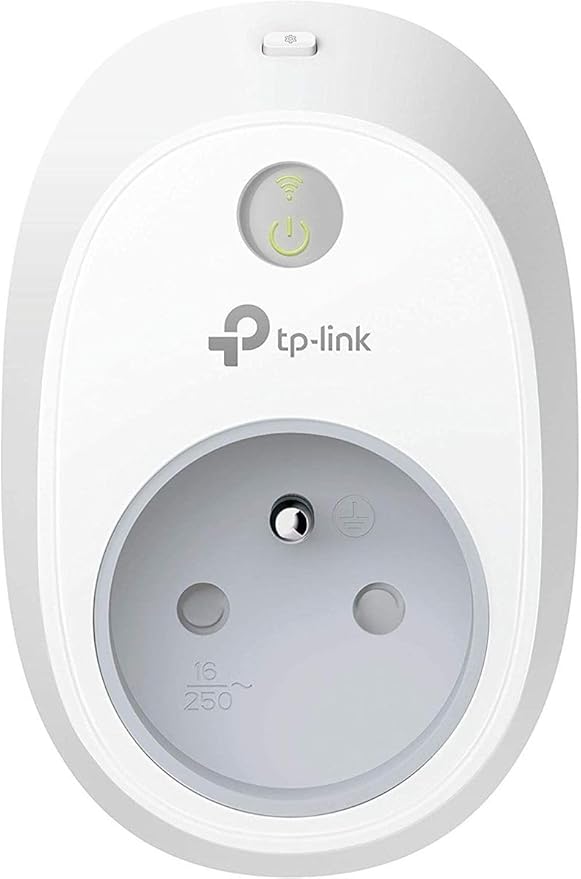
TP-Link HS105 Wi-Fi Smart Plug Mini, Power Outlets, Plug in
The HS105 pairs with the Google Assistant, letting you control connected devices with simple voice commands. Give each smart plug its own unique name and combine multiple smart products into a single group for even easier control. The HS105 can be controlled through your existing Wi-Fi with the Kasa app. Kasa allows you to manage all of your smart plugs from one central location so you can easily keep track of all your connected devices. Download the app to your smartphone or tablet for the ability to turn connected devices on and off from anywhere, and to set schedules around your daily needs. Away Mode helps improve your home security by turning electrical devices like lamps on and off at random intervals to give the appearance that you're home even while you're traveling. Compact housing makes the HS105 considerably smaller than other smart plugs. With a thickness of just 1.5 inches, the smart plug mini blends into your outlet and any rooms dcor without blocking adjacent power sockets.
The HS105 pairs with the Google Assistant, letting you control connected devices with simple voice commands. Give each smart plug its own unique name and combine multiple smart products into a single group for even easier control. The HS105 can be controlled through your existing Wi-Fi with the Kasa app. Kasa allows you to manage all of your smart plugs from one central location so you can easily keep track of all your connected devices. Download the app to your smartphone or tablet for the ability to turn connected devices on and off from anywhere, and to set schedules around your daily needs. Away Mode helps improve your home security by turning electrical devices like lamps on and off at random intervals to give the appearance that you're home even while you're traveling. Compact housing makes the HS105 considerably smaller than other smart plugs. With a thickness of just 1.5 inches, the smart plug mini blends into your outlet and any rooms dcor without blocking adjacent power sockets.
The HS105 pairs with the Google Assistant, letting you control connected devices with simple voice commands. Give each smart plug its own unique name and combine multiple smart products into a single group for even easier control. The HS105 can be controlled through your existing Wi-Fi with the Kasa app. Kasa allows you to manage all of your smart plugs from one central location so you can easily keep track of all your connected devices. Download the app to your smartphone or tablet for the ability to turn connected devices on and off from anywhere, and to set schedules around your daily needs. Away Mode helps improve your home security by turning electrical devices like lamps on and off at random intervals to give the appearance that you're home even while you're traveling. Compact housing makes the HS105 considerably smaller than other smart plugs. With a thickness of just 1.5 inches, the smart plug mini blends into your outlet and any rooms dcor without blocking adjacent power sockets.
The HS105 pairs with the Google Assistant, letting you control connected devices with simple voice commands. Give each smart plug its own unique name and combine multiple smart products into a single group for even easier control. The HS105 can be controlled through your existing Wi-Fi with the Kasa app. Kasa allows you to manage all of your smart plugs from one central location so you can easily keep track of all your connected devices. Download the app to your smartphone or tablet for the ability to turn connected devices on and off from anywhere, and to set schedules around your daily needs. Away Mode helps improve your home security by turning electrical devices like lamps on and off at random intervals to give the appearance that you're home even while you're traveling. Compact housing makes the HS105 considerably smaller than other smart plugs. With a thickness of just 1.5 inches, the smart plug mini blends into your outlet and any rooms dcor without blocking adjacent power sockets.
in 3 offers
The lowest price for TP-Link HS105 Wi-Fi Smart Plug Mini, Power Outlets, Plug in right now is $12.43 at eBay.com.au.
The all-time low was $12.07 on 12 May 2026 — today's price is 3% above the lowest ever. This is at or near its all-time low — a good time to buy.
Prices last updated 9 June 2026.
Last updated at 09/06/2026 01:17:29
Tp-link Hs105(us)plug-in Socket Controller Kasa Smart Wi-fi Plug Mini
Delivery $32.50
Affiliate Disclosure: We may receive a small commission for purchases made through this link at no extra cost to you. This helps support our site. Thank you!
Tp-link Hs105 Plug-in Socket Controller
Delivery $33.96
Affiliate Disclosure: We may receive a small commission for purchases made through this link at no extra cost to you. This helps support our site. Thank you!
Tp-link Kasa Smart Wi-fi Plug Mini Hs105 Google Assistant Amazon Alexa
Free delivery
Affiliate Disclosure: We may receive a small commission for purchases made through this link at no extra cost to you. This helps support our site. Thank you!
originally posted on influenster.com
I have been using TP-Link Kasa smart plugs for years. I recently got a 3D printer and wanted a way to turn it off remotely if there was a problem or a print finished. I purchased one of these and it works just as well as my other Kasa outlets. Set up was easy, however, the do not list this plugs model in the app, a future update to the app might change that, but I was able to get it connected using the normal smart plug setup. No connection issues to wifi, even with all my IoT devices on a separate Vlan and responsiveness from the app or a smart speaker is quick and reliable.
originally posted on influenster.com
The HP Kasa Smart Plugs were my first experience using any type of smart plug, so I honestly didn't know what to expect. The setup was so much easier than I expected. I used two of them to plug in lamps cords so that I can turn the lamp on and off by voice. You will need to differentiate if you are plugging in two of the same item within the same vicinity, such as “hallway lamp” and “living room lamp”. Great product!
originally posted on ebay.com
They are good but not perfect if you use Nest/Google Home. I've had several of these outlets for a few years now, and they serve me well, and I bought this one to control my Christmas Tree lights, but 2 nights ago the server for Kasa devices went down briefly, and I lost access to all my outlets(11 in total) having to reset them adding them back as new devices one by one in the Kasa app, and then disconnecting my account from the Nest/Google Home app, then relinking my entire TP-Link account with a new password, then moving the outlets around to the correct rooms again one by one, then having to wait about 30 minutes before Google Nest Home app could see them as fully online, and not greyed out, this has only happened once before so bit of a pain, but better than ... MoreThey are good but not perfect if you use Nest/Google Home. I've had several of these outlets for a few years now, and they serve me well, and I bought this one to control my Christmas Tree lights, but 2 nights ago the server for Kasa devices went down briefly, and I lost access to all my outlets(11 in total) having to reset them adding them back as new devices one by one in the Kasa app, and then disconnecting my account from the Nest/Google Home app, then relinking my entire TP-Link account with a new password, then moving the outlets around to the correct rooms again one by one, then having to wait about 30 minutes before Google Nest Home app could see them as fully online, and not greyed out, this has only happened once before so bit of a pain, but better than the generic round ones you see for cheap in multipacks, also they are also only 2.4Ghz compatible, so they might not like some mixed 2.4Ghz/5Ghz networks so you might have to make a 2.4Ghz only guest network, thankfully my TP-Link Deco X20 Mesh routers work with them just fine. So I say give these a go if you have tried the generic round smart plugs that just randomly stop working, and won't link up with the Tulya Smart Life app, and/or your WiFi Network. so 4 out of 5 stars.
Tp-link Hs105(us)plug-in Socket Controller Kasa Smart Wi-fi Plug Mini
Delivery $32.50
Affiliate Disclosure: We may receive a small commission for purchases made through this link at no extra cost to you. This helps support our site. Thank you!
Tp-link Hs105 Plug-in Socket Controller
Delivery $33.96
Affiliate Disclosure: We may receive a small commission for purchases made through this link at no extra cost to you. This helps support our site. Thank you!
Tp-link Kasa Smart Wi-fi Plug Mini Hs105 Google Assistant Amazon Alexa
Free delivery
Affiliate Disclosure: We may receive a small commission for purchases made through this link at no extra cost to you. This helps support our site. Thank you!
I have been using TP-Link Kasa smart plugs for years. I recently got a 3D printer and wanted a way to turn it off remotely if there was a problem or a print finished. I purchased one of these and it works just as well as my other Kasa outlets. Set up was easy, however, the do not list this plugs model in the app, a future update to the app might change that, but I was able to get it connected using the normal smart plug setup. No connection issues to wifi, even with all my IoT devices on a separate Vlan and responsiveness from the app or a smart speaker is quick and reliable.
The HP Kasa Smart Plugs were my first experience using any type of smart plug, so I honestly didn't know what to expect. The setup was so much easier than I expected. I used two of them to plug in lamps cords so that I can turn the lamp on and off by voice. You will need to differentiate if you are plugging in two of the same item within the same vicinity, such as “hallway lamp” and “living room lamp”. Great product!
They are good but not perfect if you use Nest/Google Home. I've had several of these outlets for a few years now, and they serve me well, and I bought this one to control my Christmas Tree lights, but 2 nights ago the server for Kasa devices went down briefly, and I lost access to all my outlets(11 in total) having to reset them adding them back as new devices one by one in the Kasa app, and then disconnecting my account from the Nest/Google Home app, then relinking my entire TP-Link account with a new password, then moving the outlets around to the correct rooms again one by one, then having to wait about 30 minutes before Google Nest Home app could see them as fully online, and not greyed out, this has only happened once before so bit of a pain, but better than ... MoreThey are good but not perfect if you use Nest/Google Home. I've had several of these outlets for a few years now, and they serve me well, and I bought this one to control my Christmas Tree lights, but 2 nights ago the server for Kasa devices went down briefly, and I lost access to all my outlets(11 in total) having to reset them adding them back as new devices one by one in the Kasa app, and then disconnecting my account from the Nest/Google Home app, then relinking my entire TP-Link account with a new password, then moving the outlets around to the correct rooms again one by one, then having to wait about 30 minutes before Google Nest Home app could see them as fully online, and not greyed out, this has only happened once before so bit of a pain, but better than the generic round ones you see for cheap in multipacks, also they are also only 2.4Ghz compatible, so they might not like some mixed 2.4Ghz/5Ghz networks so you might have to make a 2.4Ghz only guest network, thankfully my TP-Link Deco X20 Mesh routers work with them just fine. So I say give these a go if you have tried the generic round smart plugs that just randomly stop working, and won't link up with the Tulya Smart Life app, and/or your WiFi Network. so 4 out of 5 stars.
The plug sets up easily and the control app is simple and intuitive. It's also IFTTT compatible, which was a major selling point for me. In these respects it's all good, but one of it's "features" is misleading at best. It's claimed to be able to monitor energy use. All it seems to do is keep track of the time that the switch is on. What it does not do is monitor power utilisation (kWh), nor does it know if the thing(s) plugged into it are drawing power or not. In my particular case, this is useless. I wanted to track energy use by a dehumidifier in my garage. Since the switch itself is always on, the plug simply reports 24/7 activity while the dehumidifier switches on and off constantly. The same "constant use" is reported if the plug is switched on with nothing ... MoreThe plug sets up easily and the control app is simple and intuitive. It's also IFTTT compatible, which was a major selling point for me. In these respects it's all good, but one of it's "features" is misleading at best. It's claimed to be able to monitor energy use. All it seems to do is keep track of the time that the switch is on. What it does not do is monitor power utilisation (kWh), nor does it know if the thing(s) plugged into it are drawing power or not. In my particular case, this is useless. I wanted to track energy use by a dehumidifier in my garage. Since the switch itself is always on, the plug simply reports 24/7 activity while the dehumidifier switches on and off constantly. The same "constant use" is reported if the plug is switched on with nothing plugged into it. Technically true, since the plug itself is drawing power, but not at all what I'd expect from an energy monitoring feature.
I picked up 2 sets of these to control a few plug-in lights around the house. The Setup was easy and they worked well for a couple days then one lost the network connection and had to be reset to factory settings to restore it. It then did the same thing again the next day the the other 3 started doing the same thing. Network signal is well within the accepted range (best was -44db and the worst -66db). I've reset all of them at least once and one of them about four times plus verified they all have the latest firmware (1.5.2). Wish I'd kept the packaging to return them! I have Phillips Hue lights that are 30 feet further away from the router that work with no issues and a google home mini that is 10 feet further away. Even my ring doorbell is further away (and ... MoreI picked up 2 sets of these to control a few plug-in lights around the house. The Setup was easy and they worked well for a couple days then one lost the network connection and had to be reset to factory settings to restore it. It then did the same thing again the next day the the other 3 started doing the same thing. Network signal is well within the accepted range (best was -44db and the worst -66db). I've reset all of them at least once and one of them about four times plus verified they all have the latest firmware (1.5.2). Wish I'd kept the packaging to return them! I have Phillips Hue lights that are 30 feet further away from the router that work with no issues and a google home mini that is 10 feet further away. Even my ring doorbell is further away (and outside) and it works consistently. Will see what happens after I spend some time with support tomorrow. Good: - Easy to setup - Compact Size - Google home integration worked very well - Inexpensive Bad: - Won't maintain Wifi connections despite strong signal which makes them expensive manual plug-in switches!!!
In addition to turning ON and OFF lights around my home, I bought this Smart Plug to use as a momentary switch for my garage door and a gate. The garage and gate operate using a momentary switch. Unfortunately the Kasa Wi-Fi Plug is not capable of performing a momentary function (ON-WAIT-OFF) for wait times less than one minute. It's disappointing as I like the user interface and ability to assign any picture as an 'avatar' (is that the right word?) to the switch. It works fine as an ON or OFF switch so if that's all you need then this smart Wi-Fi plug will work for you. It is very easy to configure and only takes a couple minutes to integrate it into your network. I hope the folks at TP-Link find a fix. Until then I will buy the more expensive Sonoff Smart Plug.
I now have a smart outlet addiction because of these plugs. I did my research and found that these were highly rated, so I initally bought 4 as they were the. 7.99 per plug. The ease of setting them up on the Kasa app was great, the Google Home app was more of a pain. I bought 2 more the next day...then 2 more after that. Please note that half are for my elderly mother, so she can control her lights and electric blanket without possible injury. But.... I'm now looking around for more devices to plug into these. I'll soon have a house full of lamps, coffee makers and tvs if I don't stop. I did also buy the two outlet outdoor plug for my balcony lights, and that is going to be great in -20 below Minnesota weather this winter.
If your setup fits (i.e. seems like it only works with 2.4Ghz signal) and other factors such as wifi connectivity is not a problem, then you will love this ! I have set it up and tested it, works great and it does exactly what it stated on the box and product description. The away mode is very useful when you are away to control lighting for example. There are many uses you can do with this product but different people's situation are different. So basically you just have to understand it and turn ON and OFF with scheduling feature and can remotely power ON / OFF or schedule your Power ON/ OFF with the Kasa app which hasnt' crashed on me yet or other problems such as not responding. Simple App, nothing super Fancy. Not sure why people would complain the setup time ... MoreIf your setup fits (i.e. seems like it only works with 2.4Ghz signal) and other factors such as wifi connectivity is not a problem, then you will love this ! I have set it up and tested it, works great and it does exactly what it stated on the box and product description. The away mode is very useful when you are away to control lighting for example. There are many uses you can do with this product but different people's situation are different. So basically you just have to understand it and turn ON and OFF with scheduling feature and can remotely power ON / OFF or schedule your Power ON/ OFF with the Kasa app which hasnt' crashed on me yet or other problems such as not responding. Simple App, nothing super Fancy. Not sure why people would complain the setup time or hard to setup...if they know what they're doing and have the proper wifi connection (remember 2.4, read the instruction dont' be lazy) it took me less than 2 mins to setup 1. Plug it in (just plug it in, nothing else - ck and see blue and orange flashing), using your phone with installed Kasa app just follow the prompts and your Plug will be setup in less than 2 mins (literally, from the time you have your app up on your phone). I haven't found any operation error yet (i.e. when I press Power Off there is no response or something like takes two clicks to enable the power etc etc)
I like these because of their flexibility, their (mini) size, and they save you from having to replace actual receptacles. They're an easy way to get into controlling things (Christmas lights, electric fireplace, whatever) because they work so well. I have had no problem with them and had to write this because of all the misinformed bad reviews dragging it down. Ignore the review from Ipse that says these don't work with SmartThings. They most certainly do, and I currently have three of them setup so both Google Home and Alexa are able to control them via SmartThings. I also don't understand why they say they can't be scheduled... the Kasa app allows you to control when they turn on/off by the minute (you literally touch the button for the plug, then touch ... MoreI like these because of their flexibility, their (mini) size, and they save you from having to replace actual receptacles. They're an easy way to get into controlling things (Christmas lights, electric fireplace, whatever) because they work so well. I have had no problem with them and had to write this because of all the misinformed bad reviews dragging it down. Ignore the review from Ipse that says these don't work with SmartThings. They most certainly do, and I currently have three of them setup so both Google Home and Alexa are able to control them via SmartThings. I also don't understand why they say they can't be scheduled... the Kasa app allows you to control when they turn on/off by the minute (you literally touch the button for the plug, then touch "Schedule"). To get them working with SmartThings, you need to install the Kasa TP-LINK app, and then do a Google search for "TP-Link Bulbs and Plugs Control" to pull up the post on the SmartThings Community. You need to follow a few steps to install them (including signing into "SmartThings IDE") following the Cloud installation method. It really is easier to do than the technical talk may come across. Once you do this, you link/authorize them in Kasa/SmartThings initially and go from there (additional devices can be scanned/found afterward). As for the low reviews dragging an otherwise great product down, people need to understand that all these retail companies operate with a new flyer dropping every Thursday. That means that "Black Friday" doesn't actually start on Friday - it starts on Thursday when a new flyer comes out. These definitely were in stock when the sale started early morning Thursday, but sold out by Friday when people expected to purchase.
This plug works with Linux, on a Raspberry PI, with an open source driver. The RMS voltage reads correctly as true RMS. The plug has to be first configured using an android app, before it will respond to the Linux drivers; but that's fine for my application. As for monitoring power, the current sensor on the device has an accuracy sensing only down to 100mW. So my soldering iron registers either 100mW high or low. 25.1/25.9 = 0.8% error max. Reed relay makes reliability medium.