Last updated at 30/06/2026 04:45:27
TP-Link 8 Port Gigabit Unmanaged Desktop Switch with 4-Port PoE+ - UN/7.0 (TL-SG1008P)
30-day returns
Tp-link Tl-sg1008p V6 8-port Gigabit Desktop Switch With 4-port Poe
Free delivery
Affiliate Disclosure: We may receive a small commission for purchases made through this link at no extra cost to you. This helps support our site. Thank you!
TP-Link TL-SG1008P 8-Port Gigabit Desktop Switch with 4-Port PoE
Delivery between 4–9 July $9.70
originally posted on ebuyer.com
Brilliant little switch with 4 POE ports.Simple for the average home user as no setup required, really is plug and play.I bought to replace an old 8 port switch that kept failing, never looked back, network speeds improved and all in all a great product.
originally posted on homeessentialsdirect.com
Bought this switch to replace a non-POE Gigabit switch that I had. As a basic switch it's still working fine but after about 18 months the POE portion of it went out. I was able to get by on some POE injectors I had lying around for a while, but considering that I already had a gigabit switch and this one was purchased solely for the addition of POE, it is effectively a wasted upgrade now. I'll probably try a different brand in a few months when I feel like tinkering with the setup again.
originally posted on bhphotovideo.com
I purchased four (4) of these TP-Link TL-SG1008P 8-Port Desktop Switches from B&H. F. Y. I. - I get all of my electronics from B&H using mt Payboo Card. When my previous Verizon Actiontec Wi-Fi Router died, it somehow blew out the four Linksys 8-Port 1-Gigabit Speed switches I previously had that were connected to each of the four router ports on that Wi-Fi Router. I bought one TP-Link Switch for each of the four 1-Gigabit Speed Ports on the back of my New Frontier (Arris) Wi-Fi Router; for a total of 32 individual 1-Gigabit Speed Hard-Wired Ethernet Ports. YES these TP-Link TL-SG1008P Switches work perfectly as expected!!! I Love The LED Status Indicators Being On The Front Of The Switch And The Connecting Ports Being On The Back!!! Shure will make any network ... MoreI purchased four (4) of these TP-Link TL-SG1008P 8-Port Desktop Switches from B&H. F. Y. I. - I get all of my electronics from B&H using mt Payboo Card. When my previous Verizon Actiontec Wi-Fi Router died, it somehow blew out the four Linksys 8-Port 1-Gigabit Speed switches I previously had that were connected to each of the four router ports on that Wi-Fi Router. I bought one TP-Link Switch for each of the four 1-Gigabit Speed Ports on the back of my New Frontier (Arris) Wi-Fi Router; for a total of 32 individual 1-Gigabit Speed Hard-Wired Ethernet Ports. YES these TP-Link TL-SG1008P Switches work perfectly as expected!!! I Love The LED Status Indicators Being On The Front Of The Switch And The Connecting Ports Being On The Back!!! Shure will make any network issues that may pop up down the road easier to analyze, isolate and resolve!!! What good does it do to have the LED Status Indicators on the back of the equipment where you can't glance at them the very second you need too while using your network. I have only about 6 spare Hard-Wired Ethernet Ports left open and available. If you're looking for a great reliable un-managed switch at a great price; Look No Further.Thank You B&H & Thank You TP-Link!!!
TP-Link 8 Port Gigabit Unmanaged Desktop Switch with 4-Port PoE+ - UN/7.0 (TL-SG1008P)
30-day returns
Tp-link Tl-sg1008p V6 8-port Gigabit Desktop Switch With 4-port Poe
Free delivery
Affiliate Disclosure: We may receive a small commission for purchases made through this link at no extra cost to you. This helps support our site. Thank you!
TP-Link TL-SG1008P 8-Port Gigabit Desktop Switch with 4-Port PoE
Delivery between 4–9 July $9.70
Brilliant little switch with 4 POE ports.Simple for the average home user as no setup required, really is plug and play.I bought to replace an old 8 port switch that kept failing, never looked back, network speeds improved and all in all a great product.
Bought this switch to replace a non-POE Gigabit switch that I had. As a basic switch it's still working fine but after about 18 months the POE portion of it went out. I was able to get by on some POE injectors I had lying around for a while, but considering that I already had a gigabit switch and this one was purchased solely for the addition of POE, it is effectively a wasted upgrade now. I'll probably try a different brand in a few months when I feel like tinkering with the setup again.
I purchased four (4) of these TP-Link TL-SG1008P 8-Port Desktop Switches from B&H. F. Y. I. - I get all of my electronics from B&H using mt Payboo Card. When my previous Verizon Actiontec Wi-Fi Router died, it somehow blew out the four Linksys 8-Port 1-Gigabit Speed switches I previously had that were connected to each of the four router ports on that Wi-Fi Router. I bought one TP-Link Switch for each of the four 1-Gigabit Speed Ports on the back of my New Frontier (Arris) Wi-Fi Router; for a total of 32 individual 1-Gigabit Speed Hard-Wired Ethernet Ports. YES these TP-Link TL-SG1008P Switches work perfectly as expected!!! I Love The LED Status Indicators Being On The Front Of The Switch And The Connecting Ports Being On The Back!!! Shure will make any network ... MoreI purchased four (4) of these TP-Link TL-SG1008P 8-Port Desktop Switches from B&H. F. Y. I. - I get all of my electronics from B&H using mt Payboo Card. When my previous Verizon Actiontec Wi-Fi Router died, it somehow blew out the four Linksys 8-Port 1-Gigabit Speed switches I previously had that were connected to each of the four router ports on that Wi-Fi Router. I bought one TP-Link Switch for each of the four 1-Gigabit Speed Ports on the back of my New Frontier (Arris) Wi-Fi Router; for a total of 32 individual 1-Gigabit Speed Hard-Wired Ethernet Ports. YES these TP-Link TL-SG1008P Switches work perfectly as expected!!! I Love The LED Status Indicators Being On The Front Of The Switch And The Connecting Ports Being On The Back!!! Shure will make any network issues that may pop up down the road easier to analyze, isolate and resolve!!! What good does it do to have the LED Status Indicators on the back of the equipment where you can't glance at them the very second you need too while using your network. I have only about 6 spare Hard-Wired Ethernet Ports left open and available. If you're looking for a great reliable un-managed switch at a great price; Look No Further.Thank You B&H & Thank You TP-Link!!!
Have it installed in our basement right under our stairs and it feeds the rest of the house. 2 kids rooms a master bedroom and living room and soon out to our garage and office. Test speeds have come in right where they should be and temps are just right. *** update*** Almost a year of ownership and slowly over the last few months starting from the right the ports have slowly been dying. One by one. We are down to 9 working ports. Will not buy again.
I use this POE 8-port switch to power three IP security cameras, along with handling the data for several others. These cameras are running 24/7/365, sending their video streams to the PC that runs the NVR. I set all this up for the first time in October of 2014! I've been expecting something to go wrong, as it seems nothing is designed to last very long these days. Here we are, starting off 2020 and this little switch is still humming along with no issues. I gotta say, I am pretty impressed that something at this price point can take this kind of constant workload and keep going for 6 years (or longer!). I have another TP-Link 16 port switch that handles the rest of my network (not camera related) traffic for the house and it has also been flawless for 6 years now too.
I used 10 of these (T1500G-10PS) for a wireless network in Haiti. Pros: - Relatively inexpensive for a PoE switch with 2x SFP slots - 802.3af provides plenty of power for the APs we're using - 48vdc input makes it easy to set up a dc-dc battery-backed power supply system. - Easy configuration - Functionally, these seem to work great - Lifetime warranty Cons: - Firmware doesn't seem to be updated regularly, if at all. The units I got were all v1 hardware, and the firmware was last updated in June 2017. - Security - These seem to be insecure by design; they come set for management over HTTP and Telnet, but with options for HTTPS and SSH. However, the ciphers available for SSH are horribly outdated and known to be broken. - Admin interface is preconfigured to ... MoreI used 10 of these (T1500G-10PS) for a wireless network in Haiti. Pros: - Relatively inexpensive for a PoE switch with 2x SFP slots - 802.3af provides plenty of power for the APs we're using - 48vdc input makes it easy to set up a dc-dc battery-backed power supply system. - Easy configuration - Functionally, these seem to work great - Lifetime warranty Cons: - Firmware doesn't seem to be updated regularly, if at all. The units I got were all v1 hardware, and the firmware was last updated in June 2017. - Security - These seem to be insecure by design; they come set for management over HTTP and Telnet, but with options for HTTPS and SSH. However, the ciphers available for SSH are horribly outdated and known to be broken. - Admin interface is preconfigured to 192.168.0.1; in the past, I've seen this "feature" of TP-Link products take down networks due to IP conflicts with the network gateway. Of all the possible IPs to choose as a default for a switch, this may possibly be the worst option available. - Mounting The only mounting options for this switch are slots on the bottom for a wall mount, making it difficult to put in a rack (have to use a slotted shelf, and attach it with screws). - Layout: Power and ports are on one side, and status LEDs on the other, so one has to choose when mounting which one they want accessible. It worked out OK, but I would prefer to have status LEDs on the same side as ports (or even LEDs on both sides, so the end user can choose if they want ports in front or back, without giving up status LEDs no matter which option they choose). Would I buy again? Yes, but mostly because it's the only PoE switch I've found in this price range with these features and a DC input. The closest competitor I've found is a Ubiquity ES-8-150w, which runs almost twice the price.
I was already in the attic running CAT5E cable for some POE cameras and had a lot of CAT5E left over so I decided to run ethernet ports to every room. I'm using a Netgear router (non-mesh) to cover around 2200 sq. ft. and it just doesn't reach the back office very well and my Plex server in the living room doesn't like Wifi either. About 2 years ago I got some TP-Link Powerline Adapters and they've been serving me pretty well. The first speed test after getting the office wired up have been quite encouraging. 234% speed improvement. Not shabby! The switch is mounted in the garage attic, trying to limit the length of my runs a bit. So far, very happy.
Incredible value for money! Pros Eight, 1 GB ports, with four of them capable of POE and in a full metal, fanless, silent, chassis for under 50 including delivery. Simplicity itself to install, literally plug and play. What I particularly like about this switch is, its clear frontal presentation. All the monitoring lights are on the front, while the power and the rest of the "plumbing" are around the back where most devices have their connections anyway. It means there are no messy cables dangling around the front. Cons While I understand the need for an external power supply with a compact, fanless switch, the unit TP-Link supplies is a real beast. Not only is it large, it comes with quite a length of fairly thick, not very flexible cable. It's a slight ... MoreIncredible value for money! Pros Eight, 1 GB ports, with four of them capable of POE and in a full metal, fanless, silent, chassis for under 50 including delivery. Simplicity itself to install, literally plug and play. What I particularly like about this switch is, its clear frontal presentation. All the monitoring lights are on the front, while the power and the rest of the "plumbing" are around the back where most devices have their connections anyway. It means there are no messy cables dangling around the front. Cons While I understand the need for an external power supply with a compact, fanless switch, the unit TP-Link supplies is a real beast. Not only is it large, it comes with quite a length of fairly thick, not very flexible cable. It's a slight inconvenience, but not enough to discourage me from recommending it wholeheartedly.
Packaging and Un-boxing: Stand metal case (found on most network switches these days). Comes with a power adapter (that you would find for a laptop)... I suppose that’s for providing the necessary power for the 4 PoE ports. Packaging contains: 1 - TL-SG1008P desktop switch 1 - power adapter 1 - instruction manual I don’t currently have any need / means of testing the PoE… but it’s good to know that I have it in case I wanted to do a few PoE security cameras around the home. The PoE ports on this switch provide 15.4W, with a total of 53W across all PoE ports. This more than adequate if one were to want to install some PoE cameras using this switch. This switch’s ports and power plug are on the back-side of this switch with all of it’s LED indicator lights on the ... MorePackaging and Un-boxing: Stand metal case (found on most network switches these days). Comes with a power adapter (that you would find for a laptop)... I suppose that’s for providing the necessary power for the 4 PoE ports. Packaging contains: 1 - TL-SG1008P desktop switch 1 - power adapter 1 - instruction manual I don’t currently have any need / means of testing the PoE… but it’s good to know that I have it in case I wanted to do a few PoE security cameras around the home. The PoE ports on this switch provide 15.4W, with a total of 53W across all PoE ports. This more than adequate if one were to want to install some PoE cameras using this switch. This switch’s ports and power plug are on the back-side of this switch with all of it’s LED indicator lights on the front side; some folks look for this. Other switches would have the ports and indicator lights on the front side with the power plug in the back… I’m not dedicated to either configuration. Doesn’t bother me either way… obviously if this were a rack-mount switch, I’d expect it to have ports / lights in the front and power in the back. Wrap-Up: Not only one of the most affordable gigabit network switches WITH PoE, but it is THE most affordable gigabit network out there with PoE. Period. I’ve used several TP-LINK networking products and never had an issue with any of them at all. Pick this one up now!
This review is for the 24 port version (T2600G-28TS) Summary/TLDR: If you want a $400 switch, but can't afford a $400 switch, get this $200 switch. I have a small but VERY high traffic home network (a mix of 40 real and virtual devices, 16 physical drops through the house, 3 servers, 14 security camera (using their own POE switch), 2 media centers, 2 AP's) and I've had a few 24 port switches from DLINK and HP, with mixed results (the DLINK was very short lived and I kept cooking its ports, and the low end HP packet pushing performance was poor)... so I tried this TP Link switch. Pros: -Its cheap. The next closest switch in terms of capability (that didn't have any significant out-of-the-box-flaws, throughput and ports bumped things up ) was around $380. -Its ... MoreThis review is for the 24 port version (T2600G-28TS) Summary/TLDR: If you want a $400 switch, but can't afford a $400 switch, get this $200 switch. I have a small but VERY high traffic home network (a mix of 40 real and virtual devices, 16 physical drops through the house, 3 servers, 14 security camera (using their own POE switch), 2 media centers, 2 AP's) and I've had a few 24 port switches from DLINK and HP, with mixed results (the DLINK was very short lived and I kept cooking its ports, and the low end HP packet pushing performance was poor)... so I tried this TP Link switch. Pros: -Its cheap. The next closest switch in terms of capability (that didn't have any significant out-of-the-box-flaws, throughput and ports bumped things up ) was around $380. -Its flexible and capable- you'll have tons of options, some of which are only available in higher end switches, including loop testing features. -Its performance is good. Again, on a highly saturated network, my low end HP Procurve gigabit switch was pushing about 28 megabytes/second. After the install, my numbers were closer to 70 megabytes/second. I was expecting a modest increase, but this was really surprising. Cons: -Its fan-less... From the sounds of things, some people like to sleep with their switch under their pillow at night (LOL) but I need stability more than quiet. Given my propensity to cook ports on switches, at some point I'll doctor this to add a 45mm fan or two. Other thoughts: -The default 192.168.0.1 address thing is not a big deal... just grab a laptop or something, set it to 192.168.0.2, plug it into the switch directly, log in to the switch, click "L3 FEATURES" then "Interface", enter the new IP, then click SAVE and reboot. In my case, I just set the thing for DHCP... and done with that issue. -The "profile" feature can get some getting used to. When you change settings for the switch, they're not save-saved... they're only active until the switch reboots. This is actually a blessing in disguise. You can change your settings, commit/apply them... and if the switch keeps working normally, then you save it. Which means they'll load on the next reboot... if you don't save the settings profile, it'll revert to whatever was saved before. -The dual firmware feature: I think this is a good thing. By default, it has two firmwares equipped in the router. When you update the firmware, it'll go into the slot thats not used. You can then configure the switch to bring up the new firmware temporarily (only on the next boot), reboot the switch and see if things still work...and if they do you can set this new firmware as the default for all subsequent reboots. Its a safety feature and ultimately with good intention. -By default, the device is set to use an OCONUS NTP server. Make sure to reconfigure using a US based NTP server. I go with either NIST or US Naval Observatory (I don't like setting it to a pool)
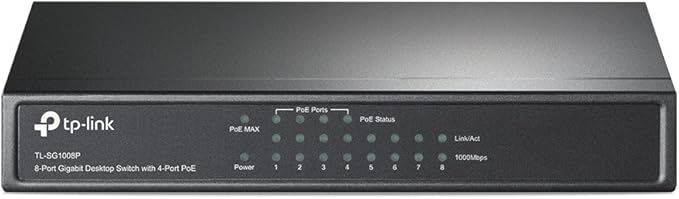
TP-Link TL-SG1008P 8 Port Gigabit Switch, POE(4), IGMP Snooping, QoS, 5YR WTY
What This Product Does 8-Port Gigabit Desktop Switch with 4-Port PoE provides the seamless network connection. It integrates 1000Mbps Gigabit Ethernet and 10/100Mbps Fast Ethernet network capabilities. How This Product Works 4 of the 8 Auto-Negotiation RJ45 ports (port-1 to port-4) of the switch support Power over Ethernet (PoE) function. These PoE ports can automatically detect and supply power with those IEEE 802.3af compliant Powered Devices (PDs). In this situation, the electrical power is transmitted along with data in one single cable allowing you to expand your network where there are no power lines or outlets, where you wish to fix devices such as APs, IP Cameras or IP Phones, etc. Overload Arrangement TL-SG1008P has the priority function which will help protect the system when the system power is overloaded. If all PoE PDs power consumption is >= 53W, a priority will be arranged among the PoE ports, then the system will cut off the power of the lowest-priority port. Port Priority Function Priority (port-1>port-2>port-3>port-4): This function will help protect the system if the system power becomes overloaded. For example, Port 1, 2 and 4 are using 15.4w (maximum power per port is 15.4W), the system power is 46.2w in total (PoE max LED is red ). If there is an additional PD inserted to Port 3 with 10w then the system will cut off Port 4 to protect the system, this means Port 1, 2 will use 15.4w, and Port3 will use 10w, and no power will be supplied to Port 4. Easy To Use TL-SG1008P is easy to install and use. It requires no configuration and installation. With desktop design, outstanding performance and quality, the TP-LINK TL-SG1008P 8-Port Gigabit Desktop Switch with 4-Port PoE is a great selection for expanding your home or office network.
What This Product Does 8-Port Gigabit Desktop Switch with 4-Port PoE provides the seamless network connection. It integrates 1000Mbps Gigabit Ethernet and 10/100Mbps Fast Ethernet network capabilities. How This Product Works 4 of the 8 Auto-Negotiation RJ45 ports (port-1 to port-4) of the switch support Power over Ethernet (PoE) function. These PoE ports can automatically detect and supply power with those IEEE 802.3af compliant Powered Devices (PDs). In this situation, the electrical power is transmitted along with data in one single cable allowing you to expand your network where there are no power lines or outlets, where you wish to fix devices such as APs, IP Cameras or IP Phones, etc. Overload Arrangement TL-SG1008P has the priority function which will help protect the system when the system power is overloaded. If all PoE PDs power consumption is >= 53W, a priority will be arranged among the PoE ports, then the system will cut off the power of the lowest-priority port. Port Priority Function Priority (port-1>port-2>port-3>port-4): This function will help protect the system if the system power becomes overloaded. For example, Port 1, 2 and 4 are using 15.4w (maximum power per port is 15.4W), the system power is 46.2w in total (PoE max LED is red ). If there is an additional PD inserted to Port 3 with 10w then the system will cut off Port 4 to protect the system, this means Port 1, 2 will use 15.4w, and Port3 will use 10w, and no power will be supplied to Port 4. Easy To Use TL-SG1008P is easy to install and use. It requires no configuration and installation. With desktop design, outstanding performance and quality, the TP-LINK TL-SG1008P 8-Port Gigabit Desktop Switch with 4-Port PoE is a great selection for expanding your home or office network.
What This Product Does 8-Port Gigabit Desktop Switch with 4-Port PoE provides the seamless network connection. It integrates 1000Mbps Gigabit Ethernet and 10/100Mbps Fast Ethernet network capabilities. How This Product Works 4 of the 8 Auto-Negotiation RJ45 ports (port-1 to port-4) of the switch support Power over Ethernet (PoE) function. These PoE ports can automatically detect and supply power with those IEEE 802.3af compliant Powered Devices (PDs). In this situation, the electrical power is transmitted along with data in one single cable allowing you to expand your network where there are no power lines or outlets, where you wish to fix devices such as APs, IP Cameras or IP Phones, etc. Overload Arrangement TL-SG1008P has the priority function which will help protect the system when the system power is overloaded. If all PoE PDs power consumption is >= 53W, a priority will be arranged among the PoE ports, then the system will cut off the power of the lowest-priority port. Port Priority Function Priority (port-1>port-2>port-3>port-4): This function will help protect the system if the system power becomes overloaded. For example, Port 1, 2 and 4 are using 15.4w (maximum power per port is 15.4W), the system power is 46.2w in total (PoE max LED is red ). If there is an additional PD inserted to Port 3 with 10w then the system will cut off Port 4 to protect the system, this means Port 1, 2 will use 15.4w, and Port3 will use 10w, and no power will be supplied to Port 4. Easy To Use TL-SG1008P is easy to install and use. It requires no configuration and installation. With desktop design, outstanding performance and quality, the TP-LINK TL-SG1008P 8-Port Gigabit Desktop Switch with 4-Port PoE is a great selection for expanding your home or office network.
What This Product Does 8-Port Gigabit Desktop Switch with 4-Port PoE provides the seamless network connection. It integrates 1000Mbps Gigabit Ethernet and 10/100Mbps Fast Ethernet network capabilities. How This Product Works 4 of the 8 Auto-Negotiation RJ45 ports (port-1 to port-4) of the switch support Power over Ethernet (PoE) function. These PoE ports can automatically detect and supply power with those IEEE 802.3af compliant Powered Devices (PDs). In this situation, the electrical power is transmitted along with data in one single cable allowing you to expand your network where there are no power lines or outlets, where you wish to fix devices such as APs, IP Cameras or IP Phones, etc. Overload Arrangement TL-SG1008P has the priority function which will help protect the system when the system power is overloaded. If all PoE PDs power consumption is >= 53W, a priority will be arranged among the PoE ports, then the system will cut off the power of the lowest-priority port. Port Priority Function Priority (port-1>port-2>port-3>port-4): This function will help protect the system if the system power becomes overloaded. For example, Port 1, 2 and 4 are using 15.4w (maximum power per port is 15.4W), the system power is 46.2w in total (PoE max LED is red ). If there is an additional PD inserted to Port 3 with 10w then the system will cut off Port 4 to protect the system, this means Port 1, 2 will use 15.4w, and Port3 will use 10w, and no power will be supplied to Port 4. Easy To Use TL-SG1008P is easy to install and use. It requires no configuration and installation. With desktop design, outstanding performance and quality, the TP-LINK TL-SG1008P 8-Port Gigabit Desktop Switch with 4-Port PoE is a great selection for expanding your home or office network.
in 3 offers
The lowest price for TP-Link TL-SG1008P 8 Port Gigabit Switch, POE(4), IGMP Snooping, QoS, 5YR WTY right now is $71.00 at Umart, compared across 3 retailers.
The all-time low was $69.00 on 17 Nov 2025 — today's price is 3% above the lowest ever. This is at or near its all-time low — a good time to buy.
Prices last updated 30 June 2026.

