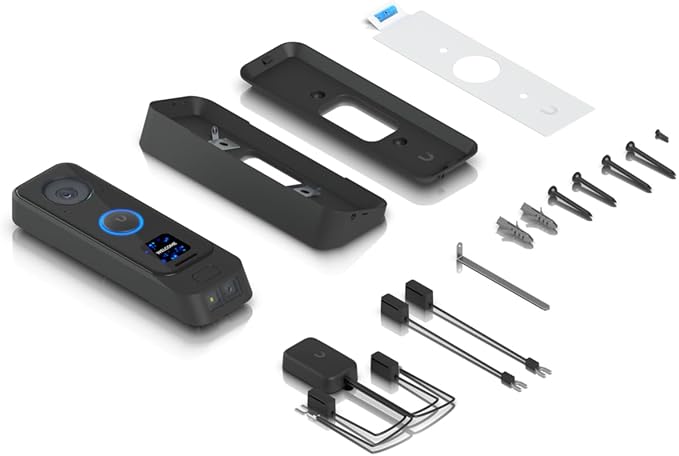
Ubiquiti UniFi Protect G4 Doorbell
Ubiquiti Doorbell G4 UniFi Protect G4 Doorbell is a Wi-Fi video doorbell with a built-in display and real-time two-way audio communication. 1600x1200 (2MP) HD stream with night vision Integrated entrance lighting Real-time two-way audio with echo cancellation Built-in display Dual-band 802.11ac Wi-Fi PIR motion detection sensor Weather-resistant UniFi Protect integration Comes with EU-rated 230V / 16VAC doorbell transformer The camera features a high-quality 5MP sensor with enhanced night vision. Image streams can be viewed in up to 1600x1200 (2MP) HD at 30 FPS. UniFi Protect G4 Doorbell includes a PIR sensor for instant motion detection alerts. Integration with UniFi Protect provides an easy-to-use interface. HD Image Quality Built-in HD 5MP camera with 45 FPS. Weather-resistant Reliable performance in the harshest conditions. Night Vision See objects and visitors even in the middle of the night. Entrance Lighting An in-unit light helps you instantly identify visitors. PIR Motion Detection Detects motion around your door and alerts you. Built-in Display Welcome messages, access statuses, and more. Weather-resistant IPX4 Its weatherproof design ensures reliable performance in the harshest conditions.
Ubiquiti Doorbell G4 UniFi Protect G4 Doorbell is a Wi-Fi video doorbell with a built-in display and real-time two-way audio communication. 1600x1200 (2MP) HD stream with night vision Integrated entrance lighting Real-time two-way audio with echo cancellation Built-in display Dual-band 802.11ac Wi-Fi PIR motion detection sensor Weather-resistant UniFi Protect integration Comes with EU-rated 230V / 16VAC doorbell transformer The camera features a high-quality 5MP sensor with enhanced night vision. Image streams can be viewed in up to 1600x1200 (2MP) HD at 30 FPS. UniFi Protect G4 Doorbell includes a PIR sensor for instant motion detection alerts. Integration with UniFi Protect provides an easy-to-use interface. HD Image Quality Built-in HD 5MP camera with 45 FPS. Weather-resistant Reliable performance in the harshest conditions. Night Vision See objects and visitors even in the middle of the night. Entrance Lighting An in-unit light helps you instantly identify visitors. PIR Motion Detection Detects motion around your door and alerts you. Built-in Display Welcome messages, access statuses, and more. Weather-resistant IPX4 Its weatherproof design ensures reliable performance in the harshest conditions.
Ubiquiti Doorbell G4 UniFi Protect G4 Doorbell is a Wi-Fi video doorbell with a built-in display and real-time two-way audio communication. 1600x1200 (2MP) HD stream with night vision Integrated entrance lighting Real-time two-way audio with echo cancellation Built-in display Dual-band 802.11ac Wi-Fi PIR motion detection sensor Weather-resistant UniFi Protect integration Comes with EU-rated 230V / 16VAC doorbell transformer The camera features a high-quality 5MP sensor with enhanced night vision. Image streams can be viewed in up to 1600x1200 (2MP) HD at 30 FPS. UniFi Protect G4 Doorbell includes a PIR sensor for instant motion detection alerts. Integration with UniFi Protect provides an easy-to-use interface. HD Image Quality Built-in HD 5MP camera with 45 FPS. Weather-resistant Reliable performance in the harshest conditions. Night Vision See objects and visitors even in the middle of the night. Entrance Lighting An in-unit light helps you instantly identify visitors. PIR Motion Detection Detects motion around your door and alerts you. Built-in Display Welcome messages, access statuses, and more. Weather-resistant IPX4 Its weatherproof design ensures reliable performance in the harshest conditions.
Ubiquiti Doorbell G4 UniFi Protect G4 Doorbell is a Wi-Fi video doorbell with a built-in display and real-time two-way audio communication. 1600x1200 (2MP) HD stream with night vision Integrated entrance lighting Real-time two-way audio with echo cancellation Built-in display Dual-band 802.11ac Wi-Fi PIR motion detection sensor Weather-resistant UniFi Protect integration Comes with EU-rated 230V / 16VAC doorbell transformer The camera features a high-quality 5MP sensor with enhanced night vision. Image streams can be viewed in up to 1600x1200 (2MP) HD at 30 FPS. UniFi Protect G4 Doorbell includes a PIR sensor for instant motion detection alerts. Integration with UniFi Protect provides an easy-to-use interface. HD Image Quality Built-in HD 5MP camera with 45 FPS. Weather-resistant Reliable performance in the harshest conditions. Night Vision See objects and visitors even in the middle of the night. Entrance Lighting An in-unit light helps you instantly identify visitors. PIR Motion Detection Detects motion around your door and alerts you. Built-in Display Welcome messages, access statuses, and more. Weather-resistant IPX4 Its weatherproof design ensures reliable performance in the harshest conditions.
in 55 offers
The lowest price for Ubiquiti UniFi Protect G4 Doorbell right now is $169.00 at Computers & Parts Land, compared across 42 retailers.
The all-time low was $155.00 on 24 Sept 2026 — today's price is 9% above the lowest ever. That's a little above the best price we've seen.
Prices last updated 10 Oct 2026.
Last updated at 10/10/2026 18:26:40
Ubiquiti UniFi Protect UVC-G4-DoorBell Wi-Fi Video Doorbell with a Built-in Display, White
Free delivery
Affiliate Disclosure: We may receive a small commission for purchases made through this link at no extra cost to you. This helps support our site. Thank you!
Ubiquiti UVC-Doorbell-Lite-B Unifi Doorbell Lite Black
Delivery between 14–19 Oct $14.50
Ubiquiti UVC-G4-DOORBELL UniFi Protect G4 Doorbell
Delivery $12.99
Ubiquiti Networks UVC-G4-DOORBELL Unifi Protect G4 Doorbell
Free delivery between Tue – Fri
Ubiquiti UniFi Protect G4 Doorbell
Delivery between Tue – Thu $15
UniFi Protect G4 Doorbell UVC-G4-Doorbell AU
Delivery $25
UniFi Protect G4 Doorbell — 2MP PIR Night Vision
Free delivery between Tue – Thu
Ubiquiti UniFi Protect G4 Doorbell, 2MP Video W/ Night vision, 30 FPS, PIR Sensor, Built In Display - Requires UCK-G2-PLUS or UDM-PRO
Delivery between 14–20 Oct $20
Ubiquiti UniFi Protect G4 Doorbell 2MP Video W / Night vision 30 FPS PIR Sensor Integrates W / UniFi Protect. Built In Display - 1 Year RTB
Delivery $16.50
Ubiquiti UniFi Protect G4 Doorbell, 2MP Video W/ Night vision, 30 FPS, PIR Sensor, Built In Display - Requires UCK-G2-PLUS or UDM-PRO
Delivery between 14–20 Oct $11.95
originally posted on multilink.us
My current residence does not have access to xfinity though it goes to surrounding houses. Our choices have been dsl thru centurylink or satellite. I found out about LTE and tried a mikrotik LTE SXT-US for the past year. It worked flawlessly.Just recently the internet account provider changed hands, raised prices and insisted mikrotik could not possibly work since it was not on the certified list- probably a licensing issue. I tried the recommended mofi 4500 sim 7 but it needed developing to mount on the rooftop permanently. The cell tower I can access is about 1.5 miles away thru lots of trees. I knew about mikrotik LHG LTE6 and elected to try it. It was easy to set up for a rooftop installation, aim to the correct cell tower and use the appropriate APN and the ... MoreMy current residence does not have access to xfinity though it goes to surrounding houses. Our choices have been dsl thru centurylink or satellite. I found out about LTE and tried a mikrotik LTE SXT-US for the past year. It worked flawlessly.Just recently the internet account provider changed hands, raised prices and insisted mikrotik could not possibly work since it was not on the certified list- probably a licensing issue. I tried the recommended mofi 4500 sim 7 but it needed developing to mount on the rooftop permanently. The cell tower I can access is about 1.5 miles away thru lots of trees. I knew about mikrotik LHG LTE6 and elected to try it. It was easy to set up for a rooftop installation, aim to the correct cell tower and use the appropriate APN and the typical download runs between 15 and 30 mb and upload is around 22-30 mb depending on time of day and cell tower traffic loading. Pre covid speeds were often 50 mb down and 30 mb up. Currently the speeds seem to be several mb faster than I was getting with my mofi installation with a Proxicast panel antenna. Would a different antenna make a difference? Quite possibly. I spent under $200 on the mikrotik. Mofi new is $300, then add external antennas, cabling, a weather resistant housing, and whatever else. Granted, the mofi can possibly provide faster speeds and also has access to band 71. Does not help my situation. Locally I don't have band 71 and neither appliance came anywhere near 100mb download speeds.
originally posted on bhphotovideo.com
This doorbell camera works great! It has plenty of options available via Unifi Protect. The defaults seemed to work great for my use case. Motion sensing and person/vehicle detection have gotten better over time. I had to do some minor sensitivity adjustments over a few months, but nothing too crazy.My biggest concern about buying this product is that we have extreme winters. I was worried about the doorbell's ability to operate in temperatures around -10 Fahrenheit, but it has powered through the entire winter just fine. So if you're worried about extreme cold, I'd still give this doorbell a shot.Set up Difficulty: It seemed pretty easy for me, but I work in the tech field. I'd imagine this doorbell is a bit more involved if you're setting up the Unifi ... MoreThis doorbell camera works great! It has plenty of options available via Unifi Protect. The defaults seemed to work great for my use case. Motion sensing and person/vehicle detection have gotten better over time. I had to do some minor sensitivity adjustments over a few months, but nothing too crazy.My biggest concern about buying this product is that we have extreme winters. I was worried about the doorbell's ability to operate in temperatures around -10 Fahrenheit, but it has powered through the entire winter just fine. So if you're worried about extreme cold, I'd still give this doorbell a shot.Set up Difficulty: It seemed pretty easy for me, but I work in the tech field. I'd imagine this doorbell is a bit more involved if you're setting up the Unifi ecosystem from scratch. But if you are already planning on using the Unifi ecosystem, you're probably just like me and enjoy tinkering with tech at home. I would probably steer clear if you're just looking for a smart doorbell and nothing else.You're going to want to make sure you can get an access point close by to supply a good wifi signal to this device. I still need to relocate an AP to get the camera to stop complaining in the Unifi Protect interface.Overall, A+ from me. I just wish it could be powered and operated by PoE.
originally posted on microcenter.com
Bought this to replace a Ring Doorbell 2 which was just not cutting it. I love not having to pay to view my own videos, the web interface accessible from everywhere, access to an entire timeline of about a week (expandable with a bigger hard drive in my UDM-Pro) with 2 cameras installed. Being able to catch things that might not trigger a motion alert is definitely a big plus.The one quibble I have I guess is that the custom message option for the little screen. If you have a message of the maximum allowable length, the front and back of the message will be cut off by the doorbell's bezel, a definite design oversight. I never have need of a message that long, and even being able to put a custom message up there is a giant plus and a great feature.
| Battery Power Source | Wired |
| Components | Doorbell |
| Type | Doorbell |
| Motion Detection | Yes |
| Monitoring Highlights | Live view (on wall-mounted dashboard) |

Ubiquiti UniFi Protect UVC-G4-DoorBell Wi-Fi Video Doorbell with a Built-in Display, White
Free delivery
Affiliate Disclosure: We may receive a small commission for purchases made through this link at no extra cost to you. This helps support our site. Thank you!
Ubiquiti UVC-Doorbell-Lite-B Unifi Doorbell Lite Black
Delivery between 14–19 Oct $14.50
Ubiquiti UVC-G4-DOORBELL UniFi Protect G4 Doorbell
Delivery $12.99
Ubiquiti Networks UVC-G4-DOORBELL Unifi Protect G4 Doorbell
Free delivery between Tue – Fri
Ubiquiti UniFi Protect G4 Doorbell
Delivery between Tue – Thu $15
My current residence does not have access to xfinity though it goes to surrounding houses. Our choices have been dsl thru centurylink or satellite. I found out about LTE and tried a mikrotik LTE SXT-US for the past year. It worked flawlessly.Just recently the internet account provider changed hands, raised prices and insisted mikrotik could not possibly work since it was not on the certified list- probably a licensing issue. I tried the recommended mofi 4500 sim 7 but it needed developing to mount on the rooftop permanently. The cell tower I can access is about 1.5 miles away thru lots of trees. I knew about mikrotik LHG LTE6 and elected to try it. It was easy to set up for a rooftop installation, aim to the correct cell tower and use the appropriate APN and the ... MoreMy current residence does not have access to xfinity though it goes to surrounding houses. Our choices have been dsl thru centurylink or satellite. I found out about LTE and tried a mikrotik LTE SXT-US for the past year. It worked flawlessly.Just recently the internet account provider changed hands, raised prices and insisted mikrotik could not possibly work since it was not on the certified list- probably a licensing issue. I tried the recommended mofi 4500 sim 7 but it needed developing to mount on the rooftop permanently. The cell tower I can access is about 1.5 miles away thru lots of trees. I knew about mikrotik LHG LTE6 and elected to try it. It was easy to set up for a rooftop installation, aim to the correct cell tower and use the appropriate APN and the typical download runs between 15 and 30 mb and upload is around 22-30 mb depending on time of day and cell tower traffic loading. Pre covid speeds were often 50 mb down and 30 mb up. Currently the speeds seem to be several mb faster than I was getting with my mofi installation with a Proxicast panel antenna. Would a different antenna make a difference? Quite possibly. I spent under $200 on the mikrotik. Mofi new is $300, then add external antennas, cabling, a weather resistant housing, and whatever else. Granted, the mofi can possibly provide faster speeds and also has access to band 71. Does not help my situation. Locally I don't have band 71 and neither appliance came anywhere near 100mb download speeds.
This doorbell camera works great! It has plenty of options available via Unifi Protect. The defaults seemed to work great for my use case. Motion sensing and person/vehicle detection have gotten better over time. I had to do some minor sensitivity adjustments over a few months, but nothing too crazy.My biggest concern about buying this product is that we have extreme winters. I was worried about the doorbell's ability to operate in temperatures around -10 Fahrenheit, but it has powered through the entire winter just fine. So if you're worried about extreme cold, I'd still give this doorbell a shot.Set up Difficulty: It seemed pretty easy for me, but I work in the tech field. I'd imagine this doorbell is a bit more involved if you're setting up the Unifi ... MoreThis doorbell camera works great! It has plenty of options available via Unifi Protect. The defaults seemed to work great for my use case. Motion sensing and person/vehicle detection have gotten better over time. I had to do some minor sensitivity adjustments over a few months, but nothing too crazy.My biggest concern about buying this product is that we have extreme winters. I was worried about the doorbell's ability to operate in temperatures around -10 Fahrenheit, but it has powered through the entire winter just fine. So if you're worried about extreme cold, I'd still give this doorbell a shot.Set up Difficulty: It seemed pretty easy for me, but I work in the tech field. I'd imagine this doorbell is a bit more involved if you're setting up the Unifi ecosystem from scratch. But if you are already planning on using the Unifi ecosystem, you're probably just like me and enjoy tinkering with tech at home. I would probably steer clear if you're just looking for a smart doorbell and nothing else.You're going to want to make sure you can get an access point close by to supply a good wifi signal to this device. I still need to relocate an AP to get the camera to stop complaining in the Unifi Protect interface.Overall, A+ from me. I just wish it could be powered and operated by PoE.
Bought this to replace a Ring Doorbell 2 which was just not cutting it. I love not having to pay to view my own videos, the web interface accessible from everywhere, access to an entire timeline of about a week (expandable with a bigger hard drive in my UDM-Pro) with 2 cameras installed. Being able to catch things that might not trigger a motion alert is definitely a big plus.The one quibble I have I guess is that the custom message option for the little screen. If you have a message of the maximum allowable length, the front and back of the message will be cut off by the doorbell's bezel, a definite design oversight. I never have need of a message that long, and even being able to put a custom message up there is a giant plus and a great feature.
As I wanted to replace my ring pro doorbell due to the fact of not been able to store my videos locally and the due to the monthly/yearly subscription. I opted for this doorbell, as I have seen a couple of good reviews and since I have a udm pro it feelt like a no brainer to go for this doorbell.Installation:The installation was quite easy although the documentation was a little bit vague. A had to buy a larger (24v 25va) bell transformer in order too use the bell in my situation, which isn't included in.Set up:Once everything is connected and powered on the set up began, the bell was quickly located with the unifi protect app and setup was done in minutes.But then the problems began, although I had a strong WiFi signal at my front door (according to my ... MoreAs I wanted to replace my ring pro doorbell due to the fact of not been able to store my videos locally and the due to the monthly/yearly subscription. I opted for this doorbell, as I have seen a couple of good reviews and since I have a udm pro it feelt like a no brainer to go for this doorbell.Installation:The installation was quite easy although the documentation was a little bit vague. A had to buy a larger (24v 25va) bell transformer in order too use the bell in my situation, which isn't included in.Set up:Once everything is connected and powered on the set up began, the bell was quickly located with the unifi protect app and setup was done in minutes.But then the problems began, although I had a strong WiFi signal at my front door (according to my phone) the doorbell began to lose connection every now and then (4 time in an hour). After searching I found that a lot of users have this issue with disconnects and all seem to point to the power supply. Since I knew my power supply was more then sufficient and a had a spare ap, I decided to test if it would help to put the spare ap behind my door to get a even stronger WiFi signal. This helped and since then I had no disconnects.The soft unifi protect:I feel the software is still not were it should be, although it works. I still mis things which other doorbells had. For example, you cannot get a different notification when motion is detected or the doorbell rings, you can only choose to be notified by push notification or email. In the push notification I miss the thumbnail.I do now that ubiquiti is still developing this and hopefully will update to include some of the features.I'm still happy with my purchase and would recommend this doorbell to anybody that has either a udm pro or the ubiquiti NVR.
I've had this doorbell installed for about 1 year. The first 6 months were perfect and then the issues started.1. The doorbell would reboot itself as soon as the button was pressed. Support suggested it was a problem with the wiring or transformer, not the doorbell itself despite the doorbell having worked flawlessly for 6 months prior. They did not give me the option to RMA the unit. The problem has resolved itself once the weather warmed up but I suspect it will return next winter. The Ubiquiti community forums are flooded with similar cases, with cold weather being a likely culprit.2. The latest problem is that the doorbell goes into a loop of disconnects and reconnects. Every such event spams my email and phone with notifications. I get 50-100 such events ... MoreI've had this doorbell installed for about 1 year. The first 6 months were perfect and then the issues started.1. The doorbell would reboot itself as soon as the button was pressed. Support suggested it was a problem with the wiring or transformer, not the doorbell itself despite the doorbell having worked flawlessly for 6 months prior. They did not give me the option to RMA the unit. The problem has resolved itself once the weather warmed up but I suspect it will return next winter. The Ubiquiti community forums are flooded with similar cases, with cold weather being a likely culprit.2. The latest problem is that the doorbell goes into a loop of disconnects and reconnects. Every such event spams my email and phone with notifications. I get 50-100 such events per day so I've had to disable notifications entirely, rendering the smart doorbell next to useless.3. Quality issues aside, I really wish this doorbell had the option of connecting it with a CAT6 cable, which is what drew me to UniFi Protect products in the first place. Sadly this isn't the case, and I've had to add a new WiFi access point to my setup just to get the signal on the porch strong enough for the camera.I really want to love Ubiquiti gear - when it works it's wonderful. But quality is not their strong suit - I've had to RMA several of their products in the past. Lately their support has seemingly gotten worse, and they are no longer keen to RMA units that are clearly defective. Lastly, they have massive supply chain issues (which was always the case even pre-pandemic) so buying new units to replace defective ones may easily take over half a year.
Have had this for about a month now. Had cloudkey plus I added this to, and am using the ubiquiti doorbell power supply with it. Very easy to physically install as well as to add into the cloudkey and configure. Highly recommend having someone help during installation, mainly they hold the doorbell in place and you see if you like the position/camera angle/etc. before you drill anything. The location I placed it in doesn't get great wifi, (I need to move the AP to a better spot.) but the camera still manages to output 2MP picture to 2 different devices without too many interruptions/connection drops.The smart detect is pretty decent at spotting actual people and cars vs. the myriad of squirrels, cats, and birds in our location. Drawing the 'detection zone' borders ... MoreHave had this for about a month now. Had cloudkey plus I added this to, and am using the ubiquiti doorbell power supply with it. Very easy to physically install as well as to add into the cloudkey and configure. Highly recommend having someone help during installation, mainly they hold the doorbell in place and you see if you like the position/camera angle/etc. before you drill anything. The location I placed it in doesn't get great wifi, (I need to move the AP to a better spot.) but the camera still manages to output 2MP picture to 2 different devices without too many interruptions/connection drops.The smart detect is pretty decent at spotting actual people and cars vs. the myriad of squirrels, cats, and birds in our location. Drawing the 'detection zone' borders is pretty straightforward.Not too much documentation with the product itself, just a quick diagram on how to install. Thinking about installing a physical doorbell chime to tie into it (the website has a list of compatible ones), as we don't always have our phones on us to know someone is ringing the doorbell.I also very much like that you have the option of NOT saving all your video on the cloud, providing some form of control over my privacy. Won't get that with some of the other brands.Great picture in daylight, and at night with the built in light and our porch light on, it's 'low light mode' works great and you can still see a really good picture.Have not used the mic/speaker too much, but the basic testing i did they worked fine / could hear things and the other end could hear me just fine.
Been waiting for this doorbell for over a year and eventually decided to take the plunge and pay a little more ordering it from the US. Very easy to set up with Unifi CloudKey running Protect. A simple case of installing the app on pho e, enabling Bluetooth and entering WiFi password. The only issue when using this outside the US is that it is designed for 24vac mechanical chimes. There is currently no Unifi chime unit although that may well change. As most UK doorbells are either 8 or 16vac, a relay is required in addition to a 24vac 30va transformer. I used the BCS Ideas VDBI solid state current sensing relay, which is a tad expensive but also silent. After installing the Homebridge Unifi Protect plugin, I now get doorbell notifications on my Apple TVs. I also ... MoreBeen waiting for this doorbell for over a year and eventually decided to take the plunge and pay a little more ordering it from the US. Very easy to set up with Unifi CloudKey running Protect. A simple case of installing the app on pho e, enabling Bluetooth and entering WiFi password. The only issue when using this outside the US is that it is designed for 24vac mechanical chimes. There is currently no Unifi chime unit although that may well change. As most UK doorbells are either 8 or 16vac, a relay is required in addition to a 24vac 30va transformer. I used the BCS Ideas VDBI solid state current sensing relay, which is a tad expensive but also silent. After installing the Homebridge Unifi Protect plugin, I now get doorbell notifications on my Apple TVs. I also hooked up a Raspberry Pi with a relay board in series with the door chime so I can have a do not disturb feature for the chime during unsociable hours. Very pleased, far better than the subscription based doorbells that are so common.
Warning! This product will only work if you already have a Ubiquiti Protect Device on your Network. This is NOT INCLUDED with the G4 doorbell. The Ubiquiti Protect for Android and iOS, which is downloadable IS NOT enough. The G4 doorbell does not work unless it can connect with a Ubiquiti Protect Device on your Network. Without the additional equipment (which costs approximately twice as much as the doorbell), this G4 doorbell is just an ornament for your door. The B&H website does not disclose this unfortunate fact.
I've been using Ubiquiti products for around 6 years now. The first doorbell we had lasted all of 2 months before it started randomly pulsing the doorbell quietly. Still waiting on a return, which is back-ordered. I feel Ubiquiti should prioritize RMAs over regular orders for stock. Also having issues with our Cloud Key Gen 2 plus. Unfortunately it looks like I am not alone in this and Ubiquiti's support is horrible. I will be selling what still works and moving to another company for my networking needs. Tired of the games and pretty software updates that decrease functionality and reliability in the way of what looks pretty and flashy.
I've been a Ubiquiti user for years, but hadn't jumped into the video doorbell yet. I should not have waited. The installation was very easy and all the accessories were in the box (I did need to get a 24v transformer for the doorbell). The unit adopted to the Dream Machine with no issues, but this is where the Wow starts. Crisp clear video, large field to zoom in, and great night vision. The Protect app provides all the features you could imagine for configuring a doorbell plus sensor configuration, communication, messaging, geofencing, and more. It's upheld in the wide range of weather conditions we have here on a weekly basis.
| Battery Power Source | Wired |
| Components | Doorbell |
| Type | Doorbell |
| Motion Detection | Yes |
| Monitoring Highlights | Live view (on wall-mounted dashboard) |