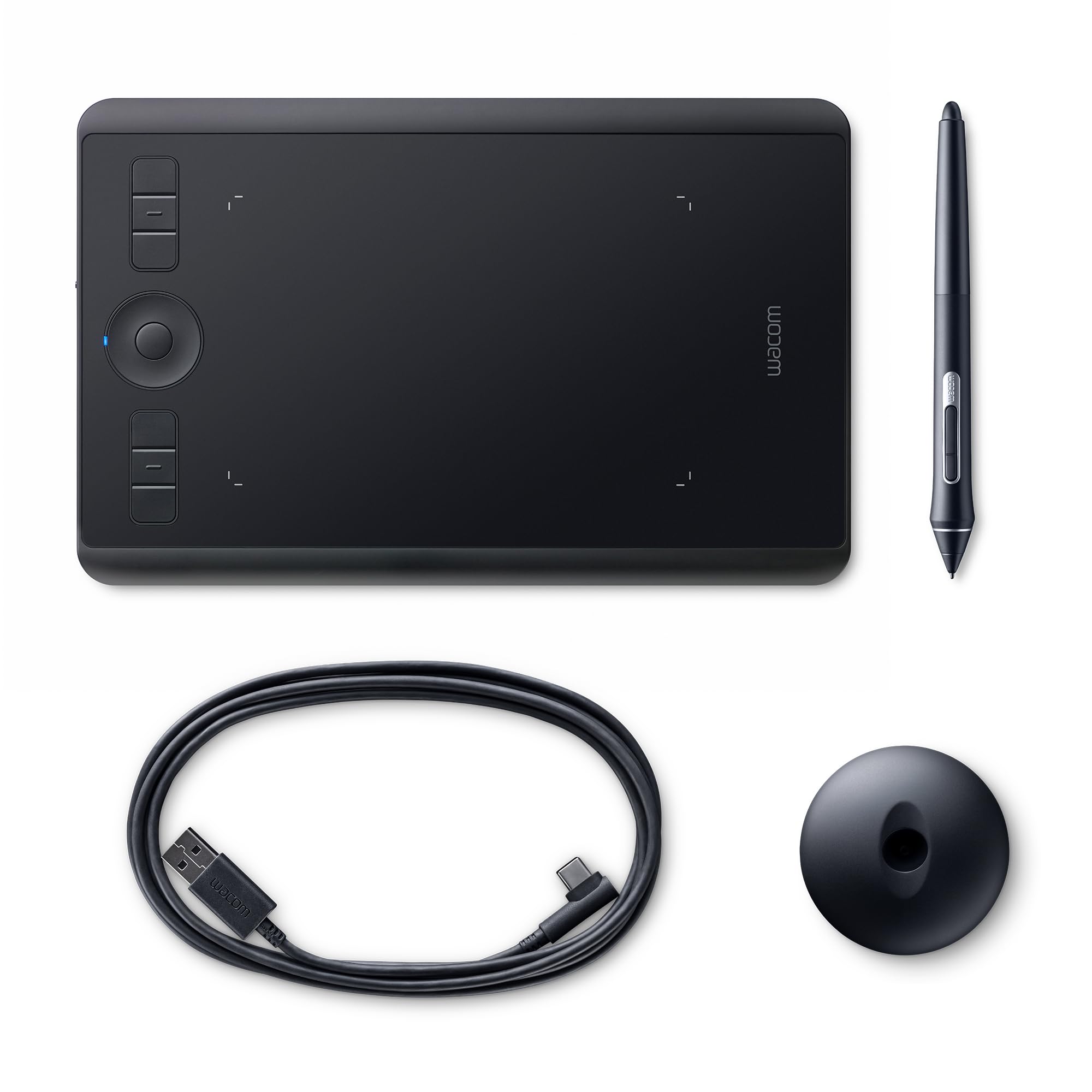
Wacom Intuos Pro Medium Graphics Tablet Wireless Kit
Show off your creative abilities with the Intuos Pro Creative Pen & Touch medium tablet. Compatible with your favourite creative software programs, this wireless touch tablet lets you draw, sketch, edit photos and more with the natural comfort of a pen. It features 2,048 levels of pen-pressure sensitivity, a multi-touch surface and 60 levels of tilt recognition.
Show off your creative abilities with the Intuos Pro Creative Pen & Touch medium tablet. Compatible with your favourite creative software programs, this wireless touch tablet lets you draw, sketch, edit photos and more with the natural comfort of a pen. It features 2,048 levels of pen-pressure sensitivity, a multi-touch surface and 60 levels of tilt recognition.
Show off your creative abilities with the Intuos Pro Creative Pen & Touch medium tablet. Compatible with your favourite creative software programs, this wireless touch tablet lets you draw, sketch, edit photos and more with the natural comfort of a pen. It features 2,048 levels of pen-pressure sensitivity, a multi-touch surface and 60 levels of tilt recognition.
Show off your creative abilities with the Intuos Pro Creative Pen & Touch medium tablet. Compatible with your favourite creative software programs, this wireless touch tablet lets you draw, sketch, edit photos and more with the natural comfort of a pen. It features 2,048 levels of pen-pressure sensitivity, a multi-touch surface and 60 levels of tilt recognition.
in 33 offers
The lowest price for Wacom Intuos Pro Medium Graphics Tablet Wireless Kit right now is $85.50 at eBay.com.au, compared across 12 retailers.
The all-time low was $58.95 on 12 Mar 2026 — today's price is 45% above the lowest ever. It has been notably cheaper before — worth setting a price alert.
Prices last updated 9 June 2026.
Last updated at 09/06/2026 04:13:57
Wacom Intuos Pro Medium Graphics Tablet with Bluetooth Function - Popular Format for Digital Drawing and Photo Retouching with Ultra High Pressure
Affiliate Disclosure: We may receive a small commission for purchases made through this link at no extra cost to you. This helps support our site. Thank you!
Wacom PTH-651 Graphics Tablet - Black
Affiliate Disclosure: We may receive a small commission for purchases made through this link at no extra cost to you. This helps support our site. Thank you!
Wacom Intuos Pro Pth-651 Medium Pen & Touch Table
Delivery $20
Affiliate Disclosure: We may receive a small commission for purchases made through this link at no extra cost to you. This helps support our site. Thank you!
Wacom Intuos Pro Pth651 Pth-651 Creative Pen & Touch Tablet Medium
Delivery $66
Affiliate Disclosure: We may receive a small commission for purchases made through this link at no extra cost to you. This helps support our site. Thank you!
Wacom PTH660 Intuos Pro Graphic Tablet
Affiliate Disclosure: We may receive a small commission for purchases made through this link at no extra cost to you. This helps support our site. Thank you!
Wacom Intuos Pro Medium Graphics Tablet
Affiliate Disclosure: We may receive a small commission for purchases made through this link at no extra cost to you. This helps support our site. Thank you!
Wacom - Intuos Pro Pth-660 Graphics Tablet (medium)
Delivery $15
Affiliate Disclosure: We may receive a small commission for purchases made through this link at no extra cost to you. This helps support our site. Thank you!
Wacom Intuos Pro Graphics Tablet - Black
Affiliate Disclosure: We may receive a small commission for purchases made through this link at no extra cost to you. This helps support our site. Thank you!
Wacom Intuos Pro Graphics Tablet Medium(pth-660) + Wacom Pro Pen 2
Delivery $20
Affiliate Disclosure: We may receive a small commission for purchases made through this link at no extra cost to you. This helps support our site. Thank you!
Wacom Intuos Pro Graphics Tablet - Black_paper Edition
Delivery $25
Affiliate Disclosure: We may receive a small commission for purchases made through this link at no extra cost to you. This helps support our site. Thank you!
originally posted on influenster.com
First tablet I ever got and it works like a dream! If you're someone who likes drawing on the couch/ on your lap, the small is probably the best place to start. The workspace is just the right size if you're working with a laptop. Wireless function is awesome and the battery life is excellent. The touch function is the only the extra that I don't use at all - so it's something to consider if you're deciding to buy a tablet with or without touch capabilities. Beyond that, the whole thing is by far worth the price. Very affordable for a top quality product. Pro tip: if you want the surface to stay neat and clean without any scratches, consider putting a clear film or paper on top of the drawing area. The the tablet senses the stylus without any problems even with ... MoreFirst tablet I ever got and it works like a dream! If you're someone who likes drawing on the couch/ on your lap, the small is probably the best place to start. The workspace is just the right size if you're working with a laptop. Wireless function is awesome and the battery life is excellent. The touch function is the only the extra that I don't use at all - so it's something to consider if you're deciding to buy a tablet with or without touch capabilities. Beyond that, the whole thing is by far worth the price. Very affordable for a top quality product. Pro tip: if you want the surface to stay neat and clean without any scratches, consider putting a clear film or paper on top of the drawing area. The the tablet senses the stylus without any problems even with paper in between.
originally posted on influenster.com
Personally as a graphic designer and illustrator I can not live without my Wacom tablets I have both this one and the Wacom one with display and have not been disappointed. It is super easy to set up on your laptop or computer and ready to go right out the box. While with any new tool getting used to how to position yourself and the feeling of drawing on a tablet is initially awkward the Wacom is super user friendly and I recommend to anyone from a novice to expert.
originally posted on influenster.com
The HP Wacom Intuos Pro is a high-end digital drawing tablet that's perfect for artists, designers, and anyone who wants to create digital art. It's got a large active area, a pressure-sensitive pen, and a variety of features that make it easy to create natural-looking strokes. I've been using the Intuos and Bamboo for years, and I'm really impressed with it. The pen feels great in my hand, and the pressure sensitivity is spot-on. I can create really fine lines or broad strokes with ease, and the pen feels just like a real pencil. The Intuos Pro also has a variety of other features that make it great for digital art. The ExpressKeys are customizable, so you can assign them to different shortcuts. The Touch Ring is also really handy for zooming and scrolling. And the ... MoreThe HP Wacom Intuos Pro is a high-end digital drawing tablet that's perfect for artists, designers, and anyone who wants to create digital art. It's got a large active area, a pressure-sensitive pen, and a variety of features that make it easy to create natural-looking strokes. I've been using the Intuos and Bamboo for years, and I'm really impressed with it. The pen feels great in my hand, and the pressure sensitivity is spot-on. I can create really fine lines or broad strokes with ease, and the pen feels just like a real pencil. The Intuos Pro also has a variety of other features that make it great for digital art. The ExpressKeys are customizable, so you can assign them to different shortcuts. The Touch Ring is also really handy for zooming and scrolling. And the software that comes with the Intuos Pro is really easy to use. As an artist, every Wacom tablet for me is the best. You know that the weak part of this brand is the price. New brands are taking along the way because of this. But Wacom as always show great capacity in technology with all their tablets. I recommend this tablet if you are a proffesionalartist in the industry.
| General | |
| Device Type | Digitizer |
| Orientation | Right and left-handed |
| Width | 38 cm |
| Depth | 25.1 cm |
Wacom Intuos Pro Medium Graphics Tablet with Bluetooth Function - Popular Format for Digital Drawing and Photo Retouching with Ultra High Pressure
Affiliate Disclosure: We may receive a small commission for purchases made through this link at no extra cost to you. This helps support our site. Thank you!
Wacom PTH-651 Graphics Tablet - Black
Affiliate Disclosure: We may receive a small commission for purchases made through this link at no extra cost to you. This helps support our site. Thank you!
Wacom Intuos Pro Pth-651 Medium Pen & Touch Table
Delivery $20
Affiliate Disclosure: We may receive a small commission for purchases made through this link at no extra cost to you. This helps support our site. Thank you!
Wacom Intuos Pro Pth651 Pth-651 Creative Pen & Touch Tablet Medium
Delivery $66
Affiliate Disclosure: We may receive a small commission for purchases made through this link at no extra cost to you. This helps support our site. Thank you!
Wacom PTH660 Intuos Pro Graphic Tablet
Affiliate Disclosure: We may receive a small commission for purchases made through this link at no extra cost to you. This helps support our site. Thank you!
First tablet I ever got and it works like a dream! If you're someone who likes drawing on the couch/ on your lap, the small is probably the best place to start. The workspace is just the right size if you're working with a laptop. Wireless function is awesome and the battery life is excellent. The touch function is the only the extra that I don't use at all - so it's something to consider if you're deciding to buy a tablet with or without touch capabilities. Beyond that, the whole thing is by far worth the price. Very affordable for a top quality product. Pro tip: if you want the surface to stay neat and clean without any scratches, consider putting a clear film or paper on top of the drawing area. The the tablet senses the stylus without any problems even with ... MoreFirst tablet I ever got and it works like a dream! If you're someone who likes drawing on the couch/ on your lap, the small is probably the best place to start. The workspace is just the right size if you're working with a laptop. Wireless function is awesome and the battery life is excellent. The touch function is the only the extra that I don't use at all - so it's something to consider if you're deciding to buy a tablet with or without touch capabilities. Beyond that, the whole thing is by far worth the price. Very affordable for a top quality product. Pro tip: if you want the surface to stay neat and clean without any scratches, consider putting a clear film or paper on top of the drawing area. The the tablet senses the stylus without any problems even with paper in between.
Personally as a graphic designer and illustrator I can not live without my Wacom tablets I have both this one and the Wacom one with display and have not been disappointed. It is super easy to set up on your laptop or computer and ready to go right out the box. While with any new tool getting used to how to position yourself and the feeling of drawing on a tablet is initially awkward the Wacom is super user friendly and I recommend to anyone from a novice to expert.
The HP Wacom Intuos Pro is a high-end digital drawing tablet that's perfect for artists, designers, and anyone who wants to create digital art. It's got a large active area, a pressure-sensitive pen, and a variety of features that make it easy to create natural-looking strokes. I've been using the Intuos and Bamboo for years, and I'm really impressed with it. The pen feels great in my hand, and the pressure sensitivity is spot-on. I can create really fine lines or broad strokes with ease, and the pen feels just like a real pencil. The Intuos Pro also has a variety of other features that make it great for digital art. The ExpressKeys are customizable, so you can assign them to different shortcuts. The Touch Ring is also really handy for zooming and scrolling. And the ... MoreThe HP Wacom Intuos Pro is a high-end digital drawing tablet that's perfect for artists, designers, and anyone who wants to create digital art. It's got a large active area, a pressure-sensitive pen, and a variety of features that make it easy to create natural-looking strokes. I've been using the Intuos and Bamboo for years, and I'm really impressed with it. The pen feels great in my hand, and the pressure sensitivity is spot-on. I can create really fine lines or broad strokes with ease, and the pen feels just like a real pencil. The Intuos Pro also has a variety of other features that make it great for digital art. The ExpressKeys are customizable, so you can assign them to different shortcuts. The Touch Ring is also really handy for zooming and scrolling. And the software that comes with the Intuos Pro is really easy to use. As an artist, every Wacom tablet for me is the best. You know that the weak part of this brand is the price. New brands are taking along the way because of this. But Wacom as always show great capacity in technology with all their tablets. I recommend this tablet if you are a proffesionalartist in the industry.
I purchased the pro version. It was fun but not essential. Unless you are doing a lot of photo editing or visual graphics, it isn't' necessary. It has good feedback and it feels great doing visual design, but I quickly stopped using it. I was not a heavy visual designer and I just didn't' find myself coming back to it. If you use a pencil, like an Apple pencil, I HIGHLY recommend this. However, if you're on the fence, I think it is just an okay purchase when not on sale.
I am a digital illustrator and I have been using wacom products for over 15 years. The tablets themselves surpass any other brand that I’ve used and are very accurate with pressure features. If you treat them right they last longer than software updates and that’s pretty much where they become obsolete. Aside from no legacy updates these are really great tablets that should last you a very long time. 
I use this mainly for digital painting and drawing, it was an upgrade from a Wacom I had had for around four years, so a much needed upgrade at that. Features like touch, zoom, swivel, where new to me when first using this pad. I normally just keep them turned off as my work style has me always holding the stylus in my right hand while using hotkeys and panning with my left on the keyboard. In another review they mentioned the roughness of the drawing surface. I did notice this as well but just went into the tablet settings and messed around with my pen pressure sensitivity. My nibs have been lasting longer as a result. The plastic nibs though do feel extremely rough while drawing and made me start stressing about how it may "damage" the drawing surface. To rid ... MoreI use this mainly for digital painting and drawing, it was an upgrade from a Wacom I had had for around four years, so a much needed upgrade at that. Features like touch, zoom, swivel, where new to me when first using this pad. I normally just keep them turned off as my work style has me always holding the stylus in my right hand while using hotkeys and panning with my left on the keyboard. In another review they mentioned the roughness of the drawing surface. I did notice this as well but just went into the tablet settings and messed around with my pen pressure sensitivity. My nibs have been lasting longer as a result. The plastic nibs though do feel extremely rough while drawing and made me start stressing about how it may "damage" the drawing surface. To rid myself of this stress I've just started using felt only nibs and have fallen in love with their feel on the pad. Note that the felt tips have a shorter life then the plastic. Bottom line, Wacom gives you enough features to really gear this thing to your work style and preferences giving it 5/5 in my opinion.
Pros: Touch Gestures, TrackingCons: Freebie Software InstallOther thoughts: Pros: Tracking is incredible. I can write as fast as I can and it keeps up no problem. I can even (unfortunately) see the same little wisps of lines digitally as I do when with a real pencil I don't lift the tip completely before moving to a new letter. (Time to improve my handwriting.) Pressure sensitivity is smooth. Pen is comfortable to hold. I bought it for the pen input and didn't even really care about touch, but the touch is great as well. Two finger pan is SO handy. You can also pinch-zoom on Android emulators/VMs so you can finally see the entire Angry Birds level :D. The size of this thing is great too. It's active area is almost as large as my screen giving me an almost 1:1 ... MorePros: Touch Gestures, TrackingCons: Freebie Software InstallOther thoughts: Pros: Tracking is incredible. I can write as fast as I can and it keeps up no problem. I can even (unfortunately) see the same little wisps of lines digitally as I do when with a real pencil I don't lift the tip completely before moving to a new letter. (Time to improve my handwriting.) Pressure sensitivity is smooth. Pen is comfortable to hold. I bought it for the pen input and didn't even really care about touch, but the touch is great as well. Two finger pan is SO handy. You can also pinch-zoom on Android emulators/VMs so you can finally see the entire Angry Birds level :D. The size of this thing is great too. It's active area is almost as large as my screen giving me an almost 1:1 ratio. The build quality is great and the device feels solid. Installation of the DEVICE was very easy, basically one-click. (Free software was a bit more complicated, see below.)Included Photoshop Elements software is quite capable and does work with the pressure sensitivity. Just remember to set the software in Advanced Mode or else it's a glorified cropping tool.This device is even upgradeable to wireless if you buy the extra kit which includes a battery and a transmitter/receiver.This device has far exceeded my expectations and I think it was at a really good price.Cons: The process of finding and downloading the freebie software was a bit cumbersome. You had to go to some minimalist sites and enter your included redemption code. It was a bit unnerving to read basically that if you don't get all the downloads you want properly at this time you're out of luck. Everything did work though, but the process is a bit unpolished.Bezel outside of the active area could be smaller, BUT this might be less comfortable for drawing. Tracking on the TOUCH is not quite as good as some better laptop trackpads, BUT if you need more precision just pick up your pen.Other Thoughts: I recommend checking the setting for 'Force Proportions' in the Mapping tab of the pen options. That way if you draw circles on the tablet they will show as such on the screen.PC Info: Intel Core2 Quad @ 3GHz, 8GB Ram, Win7 Pro x64, SSD.
Started using a Wacom PTH651because of tendon pain in my arm and shoulder from too much mouse use. Being a graphics professional I spend hours on end in Photoshop eating photos. This Wacom has changed my life, seriously. Learning curve is about two days more or less, but worth the initial unfamiliar awkwardness. There's turning going back now. I don't know how I lasted for so many years with just a mouse. Do yourself a favor, if you do a lot of editing then the Intuos Pro Graphic is for you. I recommend the medium size, it's a very natural size for movement (maybe if I had learned to use the smaller one I'd say the same thing about it, but I can't imagine a different size, mediums feels perfect).
This Wacom Intuos Pro Small Graphics Tablet is great! How a tablet is used makes a big difference to how easy and intuitive it feels. I have this tablet propped up at an angle and just to the right of centre (because I'm right-handed) of the external monitor screen that it is used with. My laptop sits to the left of the screen and tablet for when that keyboard is used. I don't have any difficulties at all in drawing on one surface while looking at another. The tablet is obviously lined up (not at an angle to) the screen I'm looking at and along with it being propped up at an angle (about 45 degrees for me) that makes a big difference to how easy and enjoyable it is to use. This tablet is great as an everyday-replacement for a mouse or laptop tracker pad, but I ... MoreThis Wacom Intuos Pro Small Graphics Tablet is great! How a tablet is used makes a big difference to how easy and intuitive it feels. I have this tablet propped up at an angle and just to the right of centre (because I'm right-handed) of the external monitor screen that it is used with. My laptop sits to the left of the screen and tablet for when that keyboard is used. I don't have any difficulties at all in drawing on one surface while looking at another. The tablet is obviously lined up (not at an angle to) the screen I'm looking at and along with it being propped up at an angle (about 45 degrees for me) that makes a big difference to how easy and enjoyable it is to use. This tablet is great as an everyday-replacement for a mouse or laptop tracker pad, but I actually bought it as a replacement to an old Wacom Bamboo tablet, so have been used to using a tablet anyway. I use it with drawing / animation software (TVPaint) and find that its size is fine for drawing. I know that there are also two sizes that are larger for this particular tablet, but I think that even without budget considerations that this might the ideal size out of the three. It is large enough to draw with shoulder movements is that is how you usually draw, and it is not too great a travel distance to move from one side of a screen to the other by moving the pen on the tablet. By my calculations, the effective resolution of the tablet would be 30480px x 17780px which is many multiples of the sheet size I draw on and of the external screen's resolution, so there are no issues of a small tablet meaning that detail cannot be shown. (And this is before considering that zooming in using the drawing software gives even more detail if that is needed.) The other alternative product would have been something like a Wacom Cintiq where you actually see the image you are drawing on the tablet as you are drawing on the tablet. One argument for a Cintiq is that some people have written that they find drawing on one surface while viewing another is difficult (as one does with the Intuos), but I think that is probably a very small minority of people who have that issue - given how many tablets are in use there aren't that many threads bemoaning how difficult they are to use. (Arguments against Cintiqs include that your hand obscures what you are drawing, and if the Cintiq is not positioned well, you are likely to get neck ache. But really, I'm sure that the Cintiq is also a great product is that is within your budget range - though I have no actual experience of using one...) With the Intuos it iseasy to set the proportions of the drawing tablet in use to match the screen being used by clicking the second-down of the tablet's express keys which brings up the driver software, then settings > grip pen (under tool) > mapping > 'force proportions' box ticked. This means drawing a circle on the tablet results in a circle on the screen (and not an ellipse), and handwriting comes up undistorted. This is worth doing. I've written a lengthy review because I did a lot of reading up on this tablet before getting it, and have seen a lot of caution about all tablet offerings. But in my view, the Wacom Intuos Pro Small is a great tablet at a great price, and completely adequate for drawing and animation use.
If you are required to teach online, you have got to get a tablet to effectively lecture interactively and the WACOM Pro is a very quality piece for that purpose. The look and feel of the WACOM is first-rate. As an engineer, I appreciate a well-constructed device and this tablet certainly meets that requirement. Although these tablets are typically used by artists for editing, they also serve well as a problem-solving platform for engineering problems sets. As well, you can annotate virtually any document, application page, or visual design. In light of the new reality of teaching synchronously online, a tablet was a must to replace the Smartboard and that device needed to be both reliable and highly flexible. The WACOM Pro has met those requirements to date. There ... MoreIf you are required to teach online, you have got to get a tablet to effectively lecture interactively and the WACOM Pro is a very quality piece for that purpose. The look and feel of the WACOM is first-rate. As an engineer, I appreciate a well-constructed device and this tablet certainly meets that requirement. Although these tablets are typically used by artists for editing, they also serve well as a problem-solving platform for engineering problems sets. As well, you can annotate virtually any document, application page, or visual design. In light of the new reality of teaching synchronously online, a tablet was a must to replace the Smartboard and that device needed to be both reliable and highly flexible. The WACOM Pro has met those requirements to date. There are less expensive tablets available, but for my purposes, the extra cost was worth it.
| General | |
| Device Type | Digitizer |
| Orientation | Right and left-handed |
| Width | 38 cm |
| Depth | 25.1 cm |

