Wacom One Creative Pen Display
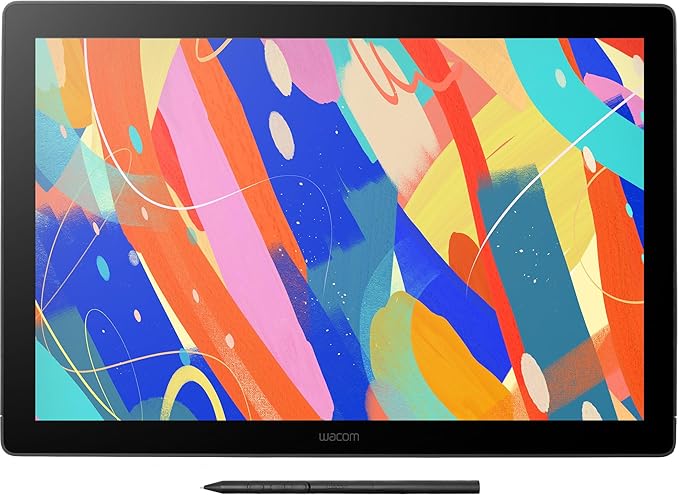
Whether you’re just starting in digital creation, want to add a twist to your visual thinking or looking to improve your digital expression, Wacom One delivers a great experience. It comes with all the essentials to spice up your digital life. There’s the natural pen feel on the 13.3” screen, the included creative software – even the ability to connect to certain Android devices. And it’s compatible with leading pen brands too. Open up new possibilities with Wacom One. Create freely with Wacom One It comes with all the essentials to spice up your digital life. There’s the natural pen feel on the 13.3” screen, the included creative software – even the ability to connect to Android devices. And it’s compatible with leading pen brands too. Find your creative outlet Wacom One is an all-in-one creative solution with downloadable software programs to get you started. Distance learning or Remote working Use Wacom to easily write, annotate documents or convey ideas to students or colleagues when web-conferencing. Compact second screen Measuring 13.3”, Wacom One’s HD screen can serve double-duty as a second monitor if you find yourself working or learning in a new or different location. Tech built on years of experience Anyone who needs pen accuracy on a comfortably large screen, needs Wacom One. The light and ergonomically designed pen means you can tweak documents and jot down notes in a way that’s so familiar, you’ll forget you’re doing it digitally. The great thing is, it comes with our Bonus Pack and is compatible with your computer as well as certain Android devices to get you off to a flying start.
Whether you’re just starting in digital creation, want to add a twist to your visual thinking or looking to improve your digital expression, Wacom One delivers a great experience. It comes with all the essentials to spice up your digital life. There’s the natural pen feel on the 13.3” screen, the included creative software – even the ability to connect to certain Android devices. And it’s compatible with leading pen brands too. Open up new possibilities with Wacom One. Create freely with Wacom One It comes with all the essentials to spice up your digital life. There’s the natural pen feel on the 13.3” screen, the included creative software – even the ability to connect to Android devices. And it’s compatible with leading pen brands too. Find your creative outlet Wacom One is an all-in-one creative solution with downloadable software programs to get you started. Distance learning or Remote working Use Wacom to easily write, annotate documents or convey ideas to students or colleagues when web-conferencing. Compact second screen Measuring 13.3”, Wacom One’s HD screen can serve double-duty as a second monitor if you find yourself working or learning in a new or different location. Tech built on years of experience Anyone who needs pen accuracy on a comfortably large screen, needs Wacom One. The light and ergonomically designed pen means you can tweak documents and jot down notes in a way that’s so familiar, you’ll forget you’re doing it digitally. The great thing is, it comes with our Bonus Pack and is compatible with your computer as well as certain Android devices to get you off to a flying start.
Whether you’re just starting in digital creation, want to add a twist to your visual thinking or looking to improve your digital expression, Wacom One delivers a great experience. It comes with all the essentials to spice up your digital life. There’s the natural pen feel on the 13.3” screen, the included creative software – even the ability to connect to certain Android devices. And it’s compatible with leading pen brands too. Open up new possibilities with Wacom One. Create freely with Wacom One It comes with all the essentials to spice up your digital life. There’s the natural pen feel on the 13.3” screen, the included creative software – even the ability to connect to Android devices. And it’s compatible with leading pen brands too. Find your creative outlet Wacom One is an all-in-one creative solution with downloadable software programs to get you started. Distance learning or Remote working Use Wacom to easily write, annotate documents or convey ideas to students or colleagues when web-conferencing. Compact second screen Measuring 13.3”, Wacom One’s HD screen can serve double-duty as a second monitor if you find yourself working or learning in a new or different location. Tech built on years of experience Anyone who needs pen accuracy on a comfortably large screen, needs Wacom One. The light and ergonomically designed pen means you can tweak documents and jot down notes in a way that’s so familiar, you’ll forget you’re doing it digitally. The great thing is, it comes with our Bonus Pack and is compatible with your computer as well as certain Android devices to get you off to a flying start.
Whether you’re just starting in digital creation, want to add a twist to your visual thinking or looking to improve your digital expression, Wacom One delivers a great experience. It comes with all the essentials to spice up your digital life. There’s the natural pen feel on the 13.3” screen, the included creative software – even the ability to connect to certain Android devices. And it’s compatible with leading pen brands too. Open up new possibilities with Wacom One. Create freely with Wacom One It comes with all the essentials to spice up your digital life. There’s the natural pen feel on the 13.3” screen, the included creative software – even the ability to connect to Android devices. And it’s compatible with leading pen brands too. Find your creative outlet Wacom One is an all-in-one creative solution with downloadable software programs to get you started. Distance learning or Remote working Use Wacom to easily write, annotate documents or convey ideas to students or colleagues when web-conferencing. Compact second screen Measuring 13.3”, Wacom One’s HD screen can serve double-duty as a second monitor if you find yourself working or learning in a new or different location. Tech built on years of experience Anyone who needs pen accuracy on a comfortably large screen, needs Wacom One. The light and ergonomically designed pen means you can tweak documents and jot down notes in a way that’s so familiar, you’ll forget you’re doing it digitally. The great thing is, it comes with our Bonus Pack and is compatible with your computer as well as certain Android devices to get you off to a flying start.
in 15 offers
The lowest price for Wacom One Creative Pen Display right now is $289.00 at eBay.com.au, compared across 10 retailers.
The all-time low was $160.00 on 30 May 2026 — today's price is 81% above the lowest ever. It has been notably cheaper before — worth setting a price alert.
Prices last updated 26 Oct 2026.
Last updated at 26/10/2026 00:20:24
Wacom One 13.3" Creative Pen Display
Delivery $9.95
Affiliate Disclosure: We may receive a small commission for purchases made through this link at no extra cost to you. This helps support our site. Thank you!
*Ex Demo* Wacom One DTC133 13inch Creative Pen Display
Delivery $17
Wacom One 13.3" Creative Pen Display
Free next-day delivery
Wacom One 13.3" Creative Pen Display
Free delivery between Tue – Fri
Wacom One 13.3" Creative Pen Display
Free delivery between 29 Oct – 6 Nov
Wacom One 13.3" Creative Pen Display
Free delivery between Wed – Sat
Wacom One Display Pen Tablet DTC133W0C
Delivery $16.65
Wacom One Creative Pen Display Tablet
Delivery $10
Wacom One Creative Pen Display Tablet
Free delivery between 29 Oct – 6 Nov
Wacom Graphics Tablet DTC133W0C, Wacom One Display Pen Tablet (Gen 1) Wacom One Display Pen Tablet (Gen 1)...
Delivery between 29 Oct – 2 Nov $17
originally posted on pbtech.co.nz
While the price by itself is a lot higher than other tablets you can find online from other brands, what you don't realize on the surface is that buying the tablet comes with at the very least $360 worth of FREE permanent software, as well as an additional $240 worth of some subscriptions to other software thanks to the WACOM bonus package you get with them by owning the tablet. So for it's price, it is a STEAL. Haven't used it for very long yet, but it is felt very nice and intuitive for a first time user.
originally posted on pbtech.co.nz
I bought the tablet display as I've always been wanting to have one at home for digital art and 3D scultping. I'm a 3D artist with 8 years of working in the industry and I'm pretty happy with how this tablet handles. The tablet is very responsive and I've been able to make really good art with it and it also works well with zBrush. The color range for the tablet is also pretty good as expected from a wacom product. Another great feature is that you can connect this to your phone as well if you don't want to use a computer. It works with various apps like medibang or ibis paint pro thus allowing you to just make art using your phone. My only issue though would be that the stylus has only 1 button instead of the usual 2 button styluses that exist for most wacom ... MoreI bought the tablet display as I've always been wanting to have one at home for digital art and 3D scultping. I'm a 3D artist with 8 years of working in the industry and I'm pretty happy with how this tablet handles. The tablet is very responsive and I've been able to make really good art with it and it also works well with zBrush. The color range for the tablet is also pretty good as expected from a wacom product. Another great feature is that you can connect this to your phone as well if you don't want to use a computer. It works with various apps like medibang or ibis paint pro thus allowing you to just make art using your phone. My only issue though would be that the stylus has only 1 button instead of the usual 2 button styluses that exist for most wacom tablets, hence the 4/5 stars. This means that you won't be able to get a middle mouse click when you need it, for example if you work with Autodesk Maya. Overall a great tablet for aspiring digital artist with a relatively decent price tag and I'm sure veteran artists will be able to use this to make great art as well.
originally posted on pbtech.co.nz
Nowhere in the page does it mention that it needs a power adapter to run the thing. It has a USB C on the tablet end that a weird cable goes into - so if you lose that cable, you're stuffed. The other end needs HDMI, USB A for the PC and a weird large oversized USB A for their power brick. Never occurred to them to use a USB C for the whole lot? Plenty of other displays are powered and get their signal thru a USB C port so its not really an unreasonable expectation. It lists android in the specs page, and turns out that it needs an additional adapter to function off anything that turns the android devices USB C port into a USB A and HDMI port.
| General | |
| Device Type | Digitiser |
| Orientation | Right and left-handed |
| Width | 35.7 cm |
| Depth | 1.46 cm |
Wacom One 13.3" Creative Pen Display
Delivery $9.95
Affiliate Disclosure: We may receive a small commission for purchases made through this link at no extra cost to you. This helps support our site. Thank you!
*Ex Demo* Wacom One DTC133 13inch Creative Pen Display
Delivery $17
Wacom One 13.3" Creative Pen Display
Free next-day delivery
Wacom One 13.3" Creative Pen Display
Free delivery between Tue – Fri
Wacom One 13.3" Creative Pen Display
Free delivery between 29 Oct – 6 Nov
While the price by itself is a lot higher than other tablets you can find online from other brands, what you don't realize on the surface is that buying the tablet comes with at the very least $360 worth of FREE permanent software, as well as an additional $240 worth of some subscriptions to other software thanks to the WACOM bonus package you get with them by owning the tablet. So for it's price, it is a STEAL. Haven't used it for very long yet, but it is felt very nice and intuitive for a first time user.
I bought the tablet display as I've always been wanting to have one at home for digital art and 3D scultping. I'm a 3D artist with 8 years of working in the industry and I'm pretty happy with how this tablet handles. The tablet is very responsive and I've been able to make really good art with it and it also works well with zBrush. The color range for the tablet is also pretty good as expected from a wacom product. Another great feature is that you can connect this to your phone as well if you don't want to use a computer. It works with various apps like medibang or ibis paint pro thus allowing you to just make art using your phone. My only issue though would be that the stylus has only 1 button instead of the usual 2 button styluses that exist for most wacom ... MoreI bought the tablet display as I've always been wanting to have one at home for digital art and 3D scultping. I'm a 3D artist with 8 years of working in the industry and I'm pretty happy with how this tablet handles. The tablet is very responsive and I've been able to make really good art with it and it also works well with zBrush. The color range for the tablet is also pretty good as expected from a wacom product. Another great feature is that you can connect this to your phone as well if you don't want to use a computer. It works with various apps like medibang or ibis paint pro thus allowing you to just make art using your phone. My only issue though would be that the stylus has only 1 button instead of the usual 2 button styluses that exist for most wacom tablets, hence the 4/5 stars. This means that you won't be able to get a middle mouse click when you need it, for example if you work with Autodesk Maya. Overall a great tablet for aspiring digital artist with a relatively decent price tag and I'm sure veteran artists will be able to use this to make great art as well.
Nowhere in the page does it mention that it needs a power adapter to run the thing. It has a USB C on the tablet end that a weird cable goes into - so if you lose that cable, you're stuffed. The other end needs HDMI, USB A for the PC and a weird large oversized USB A for their power brick. Never occurred to them to use a USB C for the whole lot? Plenty of other displays are powered and get their signal thru a USB C port so its not really an unreasonable expectation. It lists android in the specs page, and turns out that it needs an additional adapter to function off anything that turns the android devices USB C port into a USB A and HDMI port.
Purchased as a gift for a significant birthday, the recipient is very happy. We did have to purchase an extra adapter because the recipient's computer only has one HDMI slot. We also had to buy an extension cord because the power pack is quite tall above the actual plug bit and it wouldn't fit in the under-desk-mounted power board. The tablet itself works beautifully.
after buying this as a Christmas present for my son, and receiving the product code within the time frame promised, we are unable to actually download the Corel 2021 painter software. We have send several emails to Wacom for support and no one has been able to assist with solving this for us. The issue is that the Corel painter does not come up as a software to be redeemed on this product so there is no where to actually enter a product code. If the Corel package is important to you, don't bother purchasing this. No one at Wacom can assist, aside from telling us to go to where the software offers are.
After owning the Intuous Pro for about 6 years, I was excited to upgrade my Wacom, so I chose the Wacom One for the promising reviews. However, right out of the box, plugged in exactly as instructed, the drawing tablet would not turn on. One time when I mixed up the two USB cables, the tablet turned on, but the computers wouldn't recognize that the device was connected. I troubleshot any way I could, to no avail. Wacom support confirmed everything was plugged in correctly the first time and diagnosed a faulty cable. They sent a replacement cable in about 3 weeks. But the replacement still had the same issues as the first. Honestly, I was disappointed that I had all these issues before being able to use the device, and that I wasted a month trying to get it to work ... MoreAfter owning the Intuous Pro for about 6 years, I was excited to upgrade my Wacom, so I chose the Wacom One for the promising reviews. However, right out of the box, plugged in exactly as instructed, the drawing tablet would not turn on. One time when I mixed up the two USB cables, the tablet turned on, but the computers wouldn't recognize that the device was connected. I troubleshot any way I could, to no avail. Wacom support confirmed everything was plugged in correctly the first time and diagnosed a faulty cable. They sent a replacement cable in about 3 weeks. But the replacement still had the same issues as the first. Honestly, I was disappointed that I had all these issues before being able to use the device, and that I wasted a month trying to get it to work unsuccessfully. One-star for product, but kind customer service kicks it up a star.
We bought for Xmas for my 11 yo after considerable investigation. We had to pool money from us (parents) with grandparents as it was beyond our budget. We returned from holidays with much excitement to use it. The stylus doesn't work. We spent hours on it, and then hours with Wacom helpline to determine they think it was probably a faulty lead they supplied. I sent them a bunch of things to justify a new lead, but still they are holding out for more (your tax invoice, in fact). I think I'd prefer to have our money back at this stage as it has been hours of pain and disappointment.
I installed the Wacom software 5 years ago and only used it a few times at work. I now can't open Illustrator without a pop up every time telling me I need to update my Wacom software, even though I haven't used the product since 2018. I've tried EVERYTHING to get rid of all Wacom software/hardware on my computer and it will not go away. I'm even trying to use a third party app to get rid of all hidden Wacom files. If I had known the product was going to linger on my computer like a virus I would have never downloaded the driver in the first place.
DO not buy this product. I have had this tablet for 6 months and still cannot get my pen to work. I have spent so much extra money for software and the tablet itself and I will not even be able to use it due to the websites being unhelpful and there being no tutorials or guide on how to use. So disappointed and so upset about the amount of money we spent trying to just use is and still haven't used it once because there is no instructions in how use. DO NOT BUY. unless you are very good with electronic devices.
Bought the Wacom one /Corel bundle. Still waiting for my Corel software digital key. it has been 8 days. Best Buy online help service has no idea what’s going on with this deal or how it works or how to help me, told me to call Corel or Wacom. Corel and Wacom say call Best Buy. How can something so simple be so utterly disorganized. A friend of mine bought the same bundle, has now been waiting three weeks with same amount of headache.
| General | |
| Device Type | Digitiser |
| Orientation | Right and left-handed |
| Width | 35.7 cm |
| Depth | 1.46 cm |