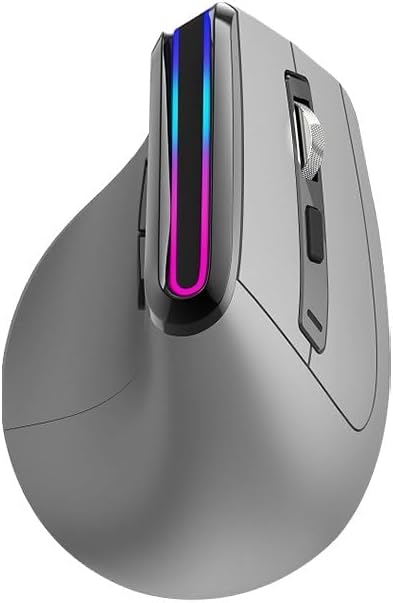
[910-005449] MX Vertical Wireless Mouse Ergonomic Design Reduces Muscle Strain
Looking for a mouse that will revolutionize the way you work? Say hello to the Logitech MX Vertical Advanced Ergonomic Mouse! This innovative mouse is designed to help you reduce muscle strain, improve your posture, and increase your comfort level while you work. With its natural handshake position, vertical construction, and thumb rest, this mouse reduces muscular strain by up to 10% and promotes a more ergonomic posture. The 57-degree vertical angle reduces pressure on your wrist, while the advanced optical tracking and dedicated cursor speed switch require four times less hand movement, reducing muscle and hand fatigue. The Logitech MX Vertical Advanced Ergonomic Mouse is designed to fit a variety of hand shapes and sizes, with a textured rubber surface that provides a solid, natural grip. Plus, the scroll wheel allows you to quickly navigate through pages with ease. So why struggle with discomfort and fatigue at your desk? Order the Logitech MX Vertical Advanced Ergonomic Mouse today and experience the difference for yourself. Rise above discomfort, reduce muscle strain, and improve your posture - all with one amazing mouse!
Looking for a mouse that will revolutionize the way you work? Say hello to the Logitech MX Vertical Advanced Ergonomic Mouse! This innovative mouse is designed to help you reduce muscle strain, improve your posture, and increase your comfort level while you work. With its natural handshake position, vertical construction, and thumb rest, this mouse reduces muscular strain by up to 10% and promotes a more ergonomic posture. The 57-degree vertical angle reduces pressure on your wrist, while the advanced optical tracking and dedicated cursor speed switch require four times less hand movement, reducing muscle and hand fatigue. The Logitech MX Vertical Advanced Ergonomic Mouse is designed to fit a variety of hand shapes and sizes, with a textured rubber surface that provides a solid, natural grip. Plus, the scroll wheel allows you to quickly navigate through pages with ease. So why struggle with discomfort and fatigue at your desk? Order the Logitech MX Vertical Advanced Ergonomic Mouse today and experience the difference for yourself. Rise above discomfort, reduce muscle strain, and improve your posture - all with one amazing mouse!
Looking for a mouse that will revolutionize the way you work? Say hello to the Logitech MX Vertical Advanced Ergonomic Mouse! This innovative mouse is designed to help you reduce muscle strain, improve your posture, and increase your comfort level while you work. With its natural handshake position, vertical construction, and thumb rest, this mouse reduces muscular strain by up to 10% and promotes a more ergonomic posture. The 57-degree vertical angle reduces pressure on your wrist, while the advanced optical tracking and dedicated cursor speed switch require four times less hand movement, reducing muscle and hand fatigue. The Logitech MX Vertical Advanced Ergonomic Mouse is designed to fit a variety of hand shapes and sizes, with a textured rubber surface that provides a solid, natural grip. Plus, the scroll wheel allows you to quickly navigate through pages with ease. So why struggle with discomfort and fatigue at your desk? Order the Logitech MX Vertical Advanced Ergonomic Mouse today and experience the difference for yourself. Rise above discomfort, reduce muscle strain, and improve your posture - all with one amazing mouse!
Looking for a mouse that will revolutionize the way you work? Say hello to the Logitech MX Vertical Advanced Ergonomic Mouse! This innovative mouse is designed to help you reduce muscle strain, improve your posture, and increase your comfort level while you work. With its natural handshake position, vertical construction, and thumb rest, this mouse reduces muscular strain by up to 10% and promotes a more ergonomic posture. The 57-degree vertical angle reduces pressure on your wrist, while the advanced optical tracking and dedicated cursor speed switch require four times less hand movement, reducing muscle and hand fatigue. The Logitech MX Vertical Advanced Ergonomic Mouse is designed to fit a variety of hand shapes and sizes, with a textured rubber surface that provides a solid, natural grip. Plus, the scroll wheel allows you to quickly navigate through pages with ease. So why struggle with discomfort and fatigue at your desk? Order the Logitech MX Vertical Advanced Ergonomic Mouse today and experience the difference for yourself. Rise above discomfort, reduce muscle strain, and improve your posture - all with one amazing mouse!
in 34 offers
The lowest price for [910-005449] MX Vertical Wireless Mouse Ergonomic Design Reduces Muscle Strain right now is $99.99 at Techinn.com, compared across 16 retailers.
The all-time low was $65.00 on 27 Feb 2026 — today's price is 54% above the lowest ever. It has been notably cheaper before — worth setting a price alert.
Prices last updated 9 June 2026.
Last updated at 09/06/2026 15:40:09
Logitech MX Vertical Advanced Ergonomic Wireless Mouse, Graphite
Free delivery
Affiliate Disclosure: We may receive a small commission for purchases made through this link at no extra cost to you. This helps support our site. Thank you!
Logitech Mx Vertical Wireless Ergonomic Mouse Black
Delivery $19.99
Logitech MX Vertical Advanced Ergonomic Mouse 910 005449 - Mouse
Delivery $13.14
Logitech MX Vertical Advanced Ergonomic Mouse
Delivery between Thu – Mon $15
Logitech Mx Vertical Advanced Ergonomic Wireless Mouse, Graphite
Free delivery
Affiliate Disclosure: We may receive a small commission for purchases made through this link at no extra cost to you. This helps support our site. Thank you!
Logitech Mx Vertical Advanced Ergonomic Mouse
Delivery $13
Affiliate Disclosure: We may receive a small commission for purchases made through this link at no extra cost to you. This helps support our site. Thank you!
Logitech MX Vertical Advanced Ergonomic Mouse
Delivery between Thu – Tue $11.64
Logitech MX Vertical Advanced Ergonomic Mouse
Delivery between 11–22 June $11.64
Logitech MX Vertical Advanced Ergonomic Wireless Mouse [910-005449]
Delivery between 12–24 June $10
Logitech MX Vertical Advanced Ergonomic Mouse
Delivery between 12–24 June $10
originally posted on influenster.com
I am so glad I opted to buy this type of mouse, and specifically, the Logitech MX Vertical. For those new to vertical mice, they put your hand in a bit of a handshake orientation which is much more comfortable for use. It only takes a little while to get used to it. I use my computer several hours a day, and the feel of this mouse is wonderful. I am a female who wears medium sized gloves and it is a perfect size for me. Although, I can definitely see it working for a range of hand sizes. Apparently, Logitech now also makes a smaller vertical mouse, but I am very happy I have this one. The slight rubberized feel for most of the hand helps to keep you stabilized, while the smoother finger buttons allow for quick clicks. The buttons are programmable through the free ... MoreI am so glad I opted to buy this type of mouse, and specifically, the Logitech MX Vertical. For those new to vertical mice, they put your hand in a bit of a handshake orientation which is much more comfortable for use. It only takes a little while to get used to it. I use my computer several hours a day, and the feel of this mouse is wonderful. I am a female who wears medium sized gloves and it is a perfect size for me. Although, I can definitely see it working for a range of hand sizes. Apparently, Logitech now also makes a smaller vertical mouse, but I am very happy I have this one. The slight rubberized feel for most of the hand helps to keep you stabilized, while the smoother finger buttons allow for quick clicks. The buttons are programmable through the free Logitech software. Mine are programed to be volume up/down and play/pause. The mouse wheel is smooth with mildly tactical, yet silent, dial clicks. I keep mine wireless and am impressed with how long it goes on a charge. Also, I've never had problems with responsiveness and precision. My husband tried to get away with a slightly cheaper vertical mouse, but it sounds like he will soon be buying this one, as it is just better all around.
originally posted on logitech.com
This is one awesome piece of equipment. You never realize how important ergonomics are until you experience the sigh of relief from eliminating daily strain. That is to say, this mouse most definitely took some getting used to (just look at it) but it is so worth it for the sake of your body!It's a little jarring at first but once you relax, the mouse fits so naturally, it's incredible. The curves make this the most comfortable mouse I've ever used.It's also super customizable, which I appreciate! You can program different functionality between apps and even use it across multiple devices. It's dope!**Be careful not to knock it off your desk due to the height**
originally posted on logitech.com
As my review will explain in more detail, I find that the MX Vertical does not position my wrist for ideal comfort; the Vertical functions no better than an average mouse and not as well overall as the MX Master 3S; and the Vertical appears to be incompatible with the Logitech wireless Unifying receiver. Therefore, I think the MX Vertical deserves no more than a two-star rating.The design of the MX Vertical does reduce some of the pressure on the median nerve within my wrist. But it provides less comfort and less relief from carpal-tunnel syndrome than I had hoped to experience. The ergonomic benefit to me of using the MX Vertical ends within about five minutes of continuous mousing activity.I find that the MX Vertical is less quick and more awkward to use than ... MoreAs my review will explain in more detail, I find that the MX Vertical does not position my wrist for ideal comfort; the Vertical functions no better than an average mouse and not as well overall as the MX Master 3S; and the Vertical appears to be incompatible with the Logitech wireless Unifying receiver. Therefore, I think the MX Vertical deserves no more than a two-star rating.The design of the MX Vertical does reduce some of the pressure on the median nerve within my wrist. But it provides less comfort and less relief from carpal-tunnel syndrome than I had hoped to experience. The ergonomic benefit to me of using the MX Vertical ends within about five minutes of continuous mousing activity.I find that the MX Vertical is less quick and more awkward to use than the more conventional MX Master 3S; positioning the pointer precisely requires more conscious effort with the Vertical. The MX Vertical also is not large enough for my hand; and because its textured surface is oddly slippery, the Vertical moves about within my grasp and is not always in a ready position for using the click buttons and scroll wheel. I think that the added mechanical effort for my hand to control the Vertical contributes to the Vertical’s limited ergonomic utility. I also find the scroll wheel of the Vertical to be imprecise (it often slips the position at which I have stopped it by a scrolling step or two).I think it is a note-worthy deficiency that the MX Vertical does not function properly when connected via the Logitech-provided Unifying (USB) receiver (using the latest firmware). In this connection mode, the pointer of the MX Vertical behaves erratically and, therefore, uselessly. Smooth, continuous motion of the mouse does not translate into smooth, continuous motion of the pointer. Instead, the pointer stops unexpectedly and then suddenly shoots across the screen as if to catch-up with where the mouse is or is expected to be. Often the pointer appears to become repetitively trapped in this stop-and-overshoot mode, making it impossible to position the pointer anywhere close to its intended target. And in this trapped mode, the click buttons of the MX Vertical often do not function.The MX Vertical does function properly when connected via Bluetooth. But I would assume that the intended connection by design is via the Unifying receiver. And if one does not have Bluetooth, then it appears that the only way one can use the MX Vertical is via the USB cable, in which case one has purchased a relatively expensive wireless mouse when a simple wired mouse would have done the job.
| Collect | 172 Everyday Rewards points |
| Warranty Information | 1-Year Limited Hardware Warranty |
Logitech MX Vertical Advanced Ergonomic Wireless Mouse, Graphite
Free delivery
Affiliate Disclosure: We may receive a small commission for purchases made through this link at no extra cost to you. This helps support our site. Thank you!
Logitech Mx Vertical Wireless Ergonomic Mouse Black
Delivery $19.99
Logitech MX Vertical Advanced Ergonomic Mouse 910 005449 - Mouse
Delivery $13.14
Logitech MX Vertical Advanced Ergonomic Mouse
Delivery between Thu – Mon $15
Logitech Mx Vertical Advanced Ergonomic Wireless Mouse, Graphite
Free delivery
Affiliate Disclosure: We may receive a small commission for purchases made through this link at no extra cost to you. This helps support our site. Thank you!
I am so glad I opted to buy this type of mouse, and specifically, the Logitech MX Vertical. For those new to vertical mice, they put your hand in a bit of a handshake orientation which is much more comfortable for use. It only takes a little while to get used to it. I use my computer several hours a day, and the feel of this mouse is wonderful. I am a female who wears medium sized gloves and it is a perfect size for me. Although, I can definitely see it working for a range of hand sizes. Apparently, Logitech now also makes a smaller vertical mouse, but I am very happy I have this one. The slight rubberized feel for most of the hand helps to keep you stabilized, while the smoother finger buttons allow for quick clicks. The buttons are programmable through the free ... MoreI am so glad I opted to buy this type of mouse, and specifically, the Logitech MX Vertical. For those new to vertical mice, they put your hand in a bit of a handshake orientation which is much more comfortable for use. It only takes a little while to get used to it. I use my computer several hours a day, and the feel of this mouse is wonderful. I am a female who wears medium sized gloves and it is a perfect size for me. Although, I can definitely see it working for a range of hand sizes. Apparently, Logitech now also makes a smaller vertical mouse, but I am very happy I have this one. The slight rubberized feel for most of the hand helps to keep you stabilized, while the smoother finger buttons allow for quick clicks. The buttons are programmable through the free Logitech software. Mine are programed to be volume up/down and play/pause. The mouse wheel is smooth with mildly tactical, yet silent, dial clicks. I keep mine wireless and am impressed with how long it goes on a charge. Also, I've never had problems with responsiveness and precision. My husband tried to get away with a slightly cheaper vertical mouse, but it sounds like he will soon be buying this one, as it is just better all around.
This is one awesome piece of equipment. You never realize how important ergonomics are until you experience the sigh of relief from eliminating daily strain. That is to say, this mouse most definitely took some getting used to (just look at it) but it is so worth it for the sake of your body!It's a little jarring at first but once you relax, the mouse fits so naturally, it's incredible. The curves make this the most comfortable mouse I've ever used.It's also super customizable, which I appreciate! You can program different functionality between apps and even use it across multiple devices. It's dope!**Be careful not to knock it off your desk due to the height**
As my review will explain in more detail, I find that the MX Vertical does not position my wrist for ideal comfort; the Vertical functions no better than an average mouse and not as well overall as the MX Master 3S; and the Vertical appears to be incompatible with the Logitech wireless Unifying receiver. Therefore, I think the MX Vertical deserves no more than a two-star rating.The design of the MX Vertical does reduce some of the pressure on the median nerve within my wrist. But it provides less comfort and less relief from carpal-tunnel syndrome than I had hoped to experience. The ergonomic benefit to me of using the MX Vertical ends within about five minutes of continuous mousing activity.I find that the MX Vertical is less quick and more awkward to use than ... MoreAs my review will explain in more detail, I find that the MX Vertical does not position my wrist for ideal comfort; the Vertical functions no better than an average mouse and not as well overall as the MX Master 3S; and the Vertical appears to be incompatible with the Logitech wireless Unifying receiver. Therefore, I think the MX Vertical deserves no more than a two-star rating.The design of the MX Vertical does reduce some of the pressure on the median nerve within my wrist. But it provides less comfort and less relief from carpal-tunnel syndrome than I had hoped to experience. The ergonomic benefit to me of using the MX Vertical ends within about five minutes of continuous mousing activity.I find that the MX Vertical is less quick and more awkward to use than the more conventional MX Master 3S; positioning the pointer precisely requires more conscious effort with the Vertical. The MX Vertical also is not large enough for my hand; and because its textured surface is oddly slippery, the Vertical moves about within my grasp and is not always in a ready position for using the click buttons and scroll wheel. I think that the added mechanical effort for my hand to control the Vertical contributes to the Vertical’s limited ergonomic utility. I also find the scroll wheel of the Vertical to be imprecise (it often slips the position at which I have stopped it by a scrolling step or two).I think it is a note-worthy deficiency that the MX Vertical does not function properly when connected via the Logitech-provided Unifying (USB) receiver (using the latest firmware). In this connection mode, the pointer of the MX Vertical behaves erratically and, therefore, uselessly. Smooth, continuous motion of the mouse does not translate into smooth, continuous motion of the pointer. Instead, the pointer stops unexpectedly and then suddenly shoots across the screen as if to catch-up with where the mouse is or is expected to be. Often the pointer appears to become repetitively trapped in this stop-and-overshoot mode, making it impossible to position the pointer anywhere close to its intended target. And in this trapped mode, the click buttons of the MX Vertical often do not function.The MX Vertical does function properly when connected via Bluetooth. But I would assume that the intended connection by design is via the Unifying receiver. And if one does not have Bluetooth, then it appears that the only way one can use the MX Vertical is via the USB cable, in which case one has purchased a relatively expensive wireless mouse when a simple wired mouse would have done the job.
First, let me mention that I love this mouse. I tried the smaller Lift version and my right pinky and ring finger kept dragging on my desk surface. However, this larger MX Vertical product is perfect in its size, shape and ALMOST perfect in its operation.I have two comments that, if implemented, would easily turn this review turn into a five star review.I have been using the older version of the MX Master mouse from Logitech for years now. I've noticed that they have a newer version called the MX Master 3s but my comments are for the earlier version.There are a couple of features of the MX Master mouse that the MX Vertical does not have. One is regarding where I place my right thumb on the MX Master; there is a thumbwheel for horizontal scrolling that is often ... MoreFirst, let me mention that I love this mouse. I tried the smaller Lift version and my right pinky and ring finger kept dragging on my desk surface. However, this larger MX Vertical product is perfect in its size, shape and ALMOST perfect in its operation.I have two comments that, if implemented, would easily turn this review turn into a five star review.I have been using the older version of the MX Master mouse from Logitech for years now. I've noticed that they have a newer version called the MX Master 3s but my comments are for the earlier version.There are a couple of features of the MX Master mouse that the MX Vertical does not have. One is regarding where I place my right thumb on the MX Master; there is a thumbwheel for horizontal scrolling that is often very convenient; the MX Vertical does not have this feature. Also, I have a glass desk mat and the MX Master easily let me move my mouse over the mat with no problems, precisely placing my mouse cursor where I want it on my screen. Apparently, the laser easily goes through the clear mat and reflects off of my wooden desk surface. Unfortunately, I cannot do this with the MX Vertical. The latter issue is not a big deal I do have to slightly adjust where I placed my keyboard, but it would have been nice if it worked as well in this regard as the MX Master.Otherwise, what appeared as a gimmick at first is real. My right hand is in a more natural position using this mouse, and I highly recommend that if you are in the market for a new mouse, give this one a try. I think you'll be as positively surprised as I was.
I was using a traditional mouse with my right hand and was experiencing wrist pain on my right side. I read the reviews on this and decided to give it a try. At first, the change in posture was a little difficult to adapt, but after a few days, I was able to use it just fine. My right hand muscles did experience some initial soreness because of the change in posture, but ultimately, the pain went away completely in my right wrist. So thankful this change in position worked! Downside to the mouse is that it's size requires you to pick it up on occasion to recenter it on the computer screen. Definitely NOT a mouse for gaming. Otherwise, an excellent mouse for someone looking to avoid pain on the job from working at desk.
I was looking forward to and received my equipment today.Out of the box it works great and ergonomically speaking it feels very comfortable to type with the K860 for business and using the MX Vertical for business as an ergo combo. With the mouse you can definitely feel a relief in your wrists across the board. Both work great for users with big hands. My typing habits improved dramatically with the split keyboard and vertical mouse after a few hours of use. No doubt about it. I have both peripherals set-up to my personal computer via bluetooth in Windows 11 and pairing them is seamless if you have a wifi 6e wireless network card with bluetooth 5 or higher. So from that aspect both devices are great and easy to configure through the Logi Options+ software.The only ... MoreI was looking forward to and received my equipment today.Out of the box it works great and ergonomically speaking it feels very comfortable to type with the K860 for business and using the MX Vertical for business as an ergo combo. With the mouse you can definitely feel a relief in your wrists across the board. Both work great for users with big hands. My typing habits improved dramatically with the split keyboard and vertical mouse after a few hours of use. No doubt about it. I have both peripherals set-up to my personal computer via bluetooth in Windows 11 and pairing them is seamless if you have a wifi 6e wireless network card with bluetooth 5 or higher. So from that aspect both devices are great and easy to configure through the Logi Options+ software.The only con, complaint, downside and huge disappointment at the ergo combo for business use cases is that for computers that have no bluetooth, the companionship of the K860 keyboard and the MX Vertical mouse would mean losing 2 USB ports. Also, a device with a bolt receiver cannot mingle with a unifying receiver device so you can't marry both peripherals in one receiver or the other regardless if it's logibolt or unifying. So that right there was a huge dissapointment. For how expensive buying both the keyboard and mouse together is, I would expect compatibility between the two or at least logibolt compatibility for all the business devices.Otherwise, it was simple to set up both equipped dongles for a second device from Logi Options+ in my personal computer and then connect the 2 dongles to my work computer. So far it works fine on my work computer as well.
Pros Logitech MX Master 3 Wireless Darkfield MouseI highly recommend the Logitech MX Master 3 Wireless Darkfield Mouse as a high quality, modern yet reasonablypriced mouse.Initial thoughts during unboxing The Logitech MX Master 3 Wireless Darkfield Mouse and wireless receiver are packaged very well with minimal throwaway packaging to dispose of, showing thought about the environment. The box clearly indicates the main things you need to know about the mouse. As well as the wireless receiver dongle which is handy for desktop computers that are unlikely to facilitate Bluetooth connectivity, a good quality USBAC cable is included in the box as well as documentation including a sheet explaining how to access the builtin battery if it ever needs replacing. The mouse ... MorePros Logitech MX Master 3 Wireless Darkfield MouseI highly recommend the Logitech MX Master 3 Wireless Darkfield Mouse as a high quality, modern yet reasonablypriced mouse.Initial thoughts during unboxing The Logitech MX Master 3 Wireless Darkfield Mouse and wireless receiver are packaged very well with minimal throwaway packaging to dispose of, showing thought about the environment. The box clearly indicates the main things you need to know about the mouse. As well as the wireless receiver dongle which is handy for desktop computers that are unlikely to facilitate Bluetooth connectivity, a good quality USBAC cable is included in the box as well as documentation including a sheet explaining how to access the builtin battery if it ever needs replacing. The mouse itself has a very stylish look and a comfortable feel its length is about the same as other mice but where this mouse is different is in the width and height It is a little wider to allow for the thumb restbutton, about 83mm at its widest point and the width of the area you hold between your thumb and 3rd4th finger is about 60mm It is possibly a little higher than others, about 50mm at its highest point, where the basefirst joint of your index finger sits the rest of the top surface slopes downwards towards the front and the right side of the mouse The mouse is about 125mm at its longest point.Setting up The Logitech MX Master 3 Wireless Darkfield Mouse is very quick and easy to setup. As a suggestion, leave your old mouse plugged in until the new Logitech mouse is setup and for each computer the mouse connects to, set the number 13 beforehand by pressing the button on the underside of the mouse. If your computer does not have builtin Bluetooth wireless connectivity, simply plug in the supplied wireless receiver USB dongle into your computer for nearinstant operation. Make sure to store the dongle in a safe place for future use. For those using Bluetooth connectivity, pair the mouse via your computers Bluetooth settings. This is now a good time to charge the mouse using the supplied USB cable. Logitech also provides Logitech Options software requires downloadinginstalling allowing you to granularly configure your mouse buttons and wheels make sure to check out the good variety of options, especially as a particular action you may be used to might default to a different action. The Logitech Options software is also required to operate the Flow functionality allowing you to conveniently share your mouse or even copypaste files between computers by moving your mouse to the edge of the monitor.During use The Logitech MX Master 3 Wireless Darkfield Mouse has the expected leftrightclick and backforward buttons as well as the middle scroll wheel, but it doesnt end there. The MagSpeed Electromagnetic middle scroll wheel is known for its two modes of operation, either of which you can select with a simple press of the button which is discreetly located on top of the mousebehind the scroll wheel You can select freespin scrolling which provides near silent operation, excellent for quickly scrolling up and down windows or even when zooming in or out of content good for people who like to work quicklywant to save time Alternatively you can select ratchetstyle scrolling which is ideal if you need more precision or control and where you can feel the scroll wheel move in steps, like a typical mouse. When freespin scrolling mode is enabled some may find themselves inadvertently zooming in or out of pages as a result of pressing the CTRL key when typing in Windows due to the sensitivity of the scroll wheel as the wheel may still be spinning for example this is just something to be mindful about. The mouse also has a side scroll wheel which, like the main scroll wheel, can also be configured to perform certain actions, but by default will cycle through browser tabs, horizontally through spreadsheets and so forth which will be appreciated by many. Theres also a hidden thumb button which, when pressed downwards, can perform certain actions by default it will let you switch between applications or perform other gestures. Depending on your view, I have several criticismssuggestions for improvement. The first would be about the backforward buttons on the left side of the mouse. Compared to backforward buttons on other mice the buttons on the Logitech mouse may not be as prominent they are a little on the small side and may therefore take a bit of getting used to. The second thing is that although the Logitech Options software is easy to install and provides a good intro on first use, it requires a Logitech account to be created in order to start using the software once installed before allowing you to configure the mouse. A third, which is more of a design consideration, is that the rightclick button could have been made longer given the middle finger is longer than the index finger. A fourth is that lefthanded mice users are missing out unless theyre ambidextrous A fifth is that only select keyboardsmice work with the Logitech Options software and crucially utilise the Flow functionality thereby limiting hardware choice, so if you are looking for a keyboard and you need the Flow functionality this is something to bear in mind note, one good looking keyboard that seems to make use of the Flow functionality is the Logitech Craft. Most or possibly none of these, I would think, should be a dealbreaker. Other than that, the Logitech MX Master 3 Wireless Darkfield Mouse does not feel heavy to move and the surface of the mouse is nice visually as well as to hold Most of the mouse with the exception of the buttons themselves and a classy trim at the backbottom edge has a very subtle soft feel and the left side and back of the mouse has a slightly ridgedtextured feel though nothing too obvious both of which may help you to grip the mouse, particularly around the thumb area. The builtin battery keeps its charge for a long period of time, reportedly up to 70 days on a full charge and I can confirm I have not have had to charge it so far during the month Ive had the mouse. A few things to be aware about If youre using the wireless receiver USB dongle and are experiencing a bit of lag when using the mouse, try plugging the dongle into a USB port of the computer or monitor that is closer to where the mouse is When hovering over a Word document the backforward buttons respectively perform the undo and redo action which is good, however you dont need to have clicked withinbe focussed on the document in order to carry out these actions, so beware of this to prevent inadvertent undoredo actions Another possible issue for some hoping to use this mouse with work computers is that you may find enabling the Flow functionality impossible, possibly due to company IT group policy settings, so if your hope is to share your mouse or even files between computers for that matter you may need to check this with your IT department. Once you have spent time configuring each buttons action and how they interact with each application, make sure to back up your settings within the Logitech Options software in case they need to be restored at a later date.Conclusion At the time of writing, this is Logitechs current version of MX Master mouse. Given the array of functionality, configurability, design and experience outlined above, together with Logitechs history for manufacturing excellent hardware, the Logitech MX Master 3 Wireless Darkfield Mouse is a reasonably priced high quality and versatile mouse that will suit everyone, no matter their usecase.
After trying the Lift and realizing it was too small for me, I was excited to try the MX Vertical. Logitech markets them like they're comparable products, but that's absolutely not the case.The MX Vertical feels like it's made with the cheapest components possible with buttons and a scroll wheel that feel significantly worse than $30 mice I've tried, and I have tried 2 different MX Verticals; so it was not some fluke. Meanwhile the buttons and especially scroll wheel of the Lift are immaculate by comparison.Calling this a vertical mouse is false advertising to me because halfway between 45° (diagonal) and 90° (vertical) is 67.5°, and this is shallower than that. Would need to be at least 68° to consider calling itself "vertical".Also the Lift has a magnetic ... MoreAfter trying the Lift and realizing it was too small for me, I was excited to try the MX Vertical. Logitech markets them like they're comparable products, but that's absolutely not the case.The MX Vertical feels like it's made with the cheapest components possible with buttons and a scroll wheel that feel significantly worse than $30 mice I've tried, and I have tried 2 different MX Verticals; so it was not some fluke. Meanwhile the buttons and especially scroll wheel of the Lift are immaculate by comparison.Calling this a vertical mouse is false advertising to me because halfway between 45° (diagonal) and 90° (vertical) is 67.5°, and this is shallower than that. Would need to be at least 68° to consider calling itself "vertical".Also the Lift has a magnetic compartment to store the USB receiver like every other wireless mouse... except this thing.I'm giving you 2 stars here only because there is no competition for this overpriced underwhelming product.My advice for an "MX Vertical 2":1) use the buttons and wheel from the Lift2) make the angle at least 70°3) add a compartment so you don't lose the receiver4) add a lip around the side to rest your pinky/side of palm
I have had this wonderful little nifty gadget for maybe a year now. Is it the pinnacle of logitech tech? No. Is it their greatest or most beautiful product? No. But you know what this baby can do? It has gotten me through thick and thin. This baby takes damage no joke. I have thrown, split, sprayed and dunked this thing it anything and everything this god forbidden earth has given me and it's works better than my 250$ HP mouse. This is the ‘08 Camry of Mice, the indestructible, reliabile and irrefutably the best in perseverance. The pebble is a masterpiece of tech, pop it in your pocket and just go. Need to do your assigjment last minute and fidget at the same time? The pebbles for you. Need to keep your hands to yourself while your nervous? Crush the mouse. Need to ... MoreI have had this wonderful little nifty gadget for maybe a year now. Is it the pinnacle of logitech tech? No. Is it their greatest or most beautiful product? No. But you know what this baby can do? It has gotten me through thick and thin. This baby takes damage no joke. I have thrown, split, sprayed and dunked this thing it anything and everything this god forbidden earth has given me and it's works better than my 250$ HP mouse. This is the ‘08 Camry of Mice, the indestructible, reliabile and irrefutably the best in perseverance. The pebble is a masterpiece of tech, pop it in your pocket and just go. Need to do your assigjment last minute and fidget at the same time? The pebbles for you. Need to keep your hands to yourself while your nervous? Crush the mouse. Need to hardcore rage at Papa’s Cluckeria? (Don’t lie I know we all do) get this lil guy and throw him. Only for the hardcore. Truly a one in a million.
I recently got this mouse to replace my MX Master 3S as my home setup mouse. I didn’t want to switch, but the MX Vertical does a great job of offering most of the same mods and adjustments as the MX Master, and it’s super comfortable to use for long periods. I like the new hand position because it’s so comfortable, but it does take a bit of getting used to so you don’t feel like it’s going to slip out of your hand. The build quality is really good, but it’s light and it shows that it’s made of plastic.I think this mouse is perfect for anyone with hand or wrist problems because of an injury or ailment. It’s a great choice that’s a consistent price for Logitech peripherals. I would definitely recommend it and buy it again for myself.
| Collect | 172 Everyday Rewards points |
| Warranty Information | 1-Year Limited Hardware Warranty |