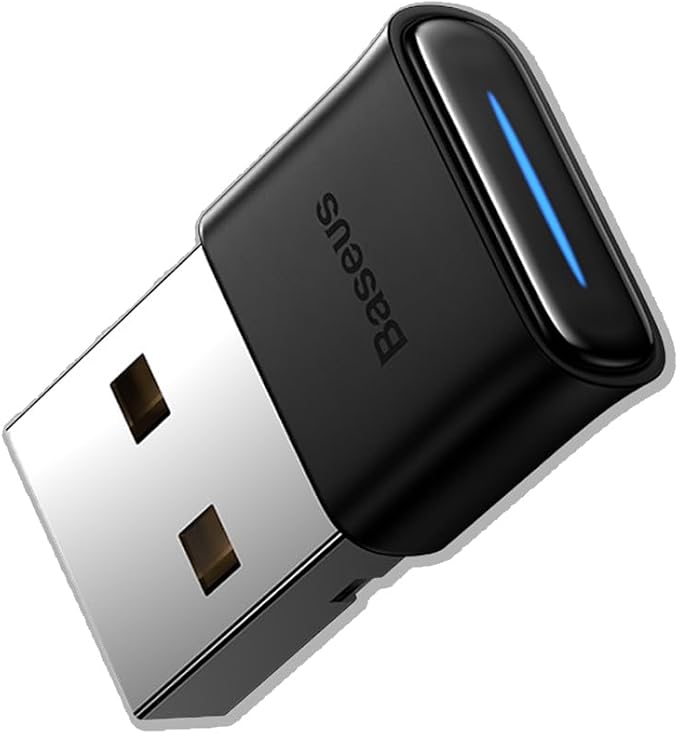
Asus USB-BT500 Bluetooth 5.0 USB Adapter, Receiver/Transmitter, 5.0, Universal
Experience the Power of Bluetooth 5.0 with Asus USB-BT500 Take your wireless connectivity to the next level with the Asus USB-BT500 Bluetooth 5.0 adapter. This ultra-small external adapter enables wireless communication with a wide range of devices, including computers, printers, phones, headsets, speakers, and keyboards. With Bluetooth 5.0, you can enjoy faster speeds and longer range than ever before. Faster and Further Coverage with BLE The Asus USB-BT500 adapter supports Bluetooth Low Energy (BLE) technology, which allows for energy-saving wireless connectivity. This means you can enjoy up to 2X faster transmit speeds and 4X greater range than previous Bluetooth versions. Whether you're at home, in the office, or on-the-go, this adapter has got you covered. Seamless Compatibility with Any Device The Asus USB-BT500 adapter is designed to be compatible with a wide range of devices, including desktop computers, printers, smartphones, keyboards, headsets, and speakers. It's also backward compatible with Bluetooth 2.1, 3.x, and 4.x, so you don't have to worry about compatibility issues. Power Saving for Your Devices The Asus USB-BT500 adapter features Bluetooth Low Energy technology, which helps reduce power consumption and extend the battery life of your devices. This means you can enjoy wireless connectivity without worrying about running out of power. Convenient and Portable Design The Asus USB-BT500 adapter is designed to be ultra-small and portable, making it easy to take with you wherever you go. Simply plug it into your device and you're ready to enjoy wireless connectivity. Its compact design also makes it easy to store away when not in use.
Experience the Power of Bluetooth 5.0 with Asus USB-BT500 Take your wireless connectivity to the next level with the Asus USB-BT500 Bluetooth 5.0 adapter. This ultra-small external adapter enables wireless communication with a wide range of devices, including computers, printers, phones, headsets, speakers, and keyboards. With Bluetooth 5.0, you can enjoy faster speeds and longer range than ever before. Faster and Further Coverage with BLE The Asus USB-BT500 adapter supports Bluetooth Low Energy (BLE) technology, which allows for energy-saving wireless connectivity. This means you can enjoy up to 2X faster transmit speeds and 4X greater range than previous Bluetooth versions. Whether you're at home, in the office, or on-the-go, this adapter has got you covered. Seamless Compatibility with Any Device The Asus USB-BT500 adapter is designed to be compatible with a wide range of devices, including desktop computers, printers, smartphones, keyboards, headsets, and speakers. It's also backward compatible with Bluetooth 2.1, 3.x, and 4.x, so you don't have to worry about compatibility issues. Power Saving for Your Devices The Asus USB-BT500 adapter features Bluetooth Low Energy technology, which helps reduce power consumption and extend the battery life of your devices. This means you can enjoy wireless connectivity without worrying about running out of power. Convenient and Portable Design The Asus USB-BT500 adapter is designed to be ultra-small and portable, making it easy to take with you wherever you go. Simply plug it into your device and you're ready to enjoy wireless connectivity. Its compact design also makes it easy to store away when not in use.
Experience the Power of Bluetooth 5.0 with Asus USB-BT500 Take your wireless connectivity to the next level with the Asus USB-BT500 Bluetooth 5.0 adapter. This ultra-small external adapter enables wireless communication with a wide range of devices, including computers, printers, phones, headsets, speakers, and keyboards. With Bluetooth 5.0, you can enjoy faster speeds and longer range than ever before. Faster and Further Coverage with BLE The Asus USB-BT500 adapter supports Bluetooth Low Energy (BLE) technology, which allows for energy-saving wireless connectivity. This means you can enjoy up to 2X faster transmit speeds and 4X greater range than previous Bluetooth versions. Whether you're at home, in the office, or on-the-go, this adapter has got you covered. Seamless Compatibility with Any Device The Asus USB-BT500 adapter is designed to be compatible with a wide range of devices, including desktop computers, printers, smartphones, keyboards, headsets, and speakers. It's also backward compatible with Bluetooth 2.1, 3.x, and 4.x, so you don't have to worry about compatibility issues. Power Saving for Your Devices The Asus USB-BT500 adapter features Bluetooth Low Energy technology, which helps reduce power consumption and extend the battery life of your devices. This means you can enjoy wireless connectivity without worrying about running out of power. Convenient and Portable Design The Asus USB-BT500 adapter is designed to be ultra-small and portable, making it easy to take with you wherever you go. Simply plug it into your device and you're ready to enjoy wireless connectivity. Its compact design also makes it easy to store away when not in use.
Experience the Power of Bluetooth 5.0 with Asus USB-BT500 Take your wireless connectivity to the next level with the Asus USB-BT500 Bluetooth 5.0 adapter. This ultra-small external adapter enables wireless communication with a wide range of devices, including computers, printers, phones, headsets, speakers, and keyboards. With Bluetooth 5.0, you can enjoy faster speeds and longer range than ever before. Faster and Further Coverage with BLE The Asus USB-BT500 adapter supports Bluetooth Low Energy (BLE) technology, which allows for energy-saving wireless connectivity. This means you can enjoy up to 2X faster transmit speeds and 4X greater range than previous Bluetooth versions. Whether you're at home, in the office, or on-the-go, this adapter has got you covered. Seamless Compatibility with Any Device The Asus USB-BT500 adapter is designed to be compatible with a wide range of devices, including desktop computers, printers, smartphones, keyboards, headsets, and speakers. It's also backward compatible with Bluetooth 2.1, 3.x, and 4.x, so you don't have to worry about compatibility issues. Power Saving for Your Devices The Asus USB-BT500 adapter features Bluetooth Low Energy technology, which helps reduce power consumption and extend the battery life of your devices. This means you can enjoy wireless connectivity without worrying about running out of power. Convenient and Portable Design The Asus USB-BT500 adapter is designed to be ultra-small and portable, making it easy to take with you wherever you go. Simply plug it into your device and you're ready to enjoy wireless connectivity. Its compact design also makes it easy to store away when not in use.
in 17 offers
The lowest price for Asus USB-BT500 Bluetooth 5.0 USB Adapter, Receiver/Transmitter, 5.0, Universal right now is $11.20 at BIG W, compared across 11 retailers.
The all-time low was $8.00 on 21 Oct 2024 — today's price is 40% above the lowest ever. It has been notably cheaper before — worth setting a price alert.
Prices last updated 5 Oct 2026.
Last updated at 05/10/2026 11:25:59
ASUS USB-BT500 Bluetooth 5.0 USB Adapter with Ultra Small Design, Backward Compatible with Bluetooth 2.1/3.x/4.x
Affiliate Disclosure: We may receive a small commission for purchases made through this link at no extra cost to you. This helps support our site. Thank you!
Asus USB-BT500 Bluetooth USB Adapter (USB-BT500)
Delivery $12
Asus USB-BT500 Bluetooth USB Adapter (USB-BT500)
Delivery between 8–16 Oct $10
Asus USB-BT500 Bluetooth USB Adapter (USB-BT500)
Delivery between 8–12 Oct $10
1pc Asus Usb-bt500 Bluetooth Adapter For Laptop Desktop Universal
Delivery $7.90
Affiliate Disclosure: We may receive a small commission for purchases made through this link at no extra cost to you. This helps support our site. Thank you!
1 pcs USB-BT500 Bluetooth Adapter for Asus Laptop desktop universal Receiver
Delivery $8.66
Bluetooth adapter ASUS USB-BT500 Bluetooth 5.0 USB
Delivery $8.03
Adapter ASUS USB-BT500, USB 2.0 BT 5.0
ASUS USB-BT500 network card Bluetooth 3 Mbit/s (USB-BT500)
Free delivery
Asus (USB-BT500) USB Micro Bluetooth 5.0 Adapter, Backward Compatible
Delivery between 11–14 Oct $29
originally posted on bestbuy.ca
My PC and laptop still work perfectly on Win7-64, no need to change anything, always found drivers for new printers etc for W7. Except: the BT was missing! The one I had for the past few months was 4.0, it was not downwards compatible with my (also older) stereo BT. LOL. Got this BT-500, even it says on the box ~OS Support Win10 and Linux~. Plugged the dongle into my PC, downloading/installing started...then the statement popped up that it was not completed, no driver/s found. Gah! I googled "driver for ASUS USB-BT500" and found something on "driverconn******s", free download, for Win7-64 (I think even Win7-32) and upwards. Bingo! Download, unzip, setup/install, add and connect all devices. BOOM! Computer, laptop, stereo, cellphones, headphones, and more.. all of ... MoreMy PC and laptop still work perfectly on Win7-64, no need to change anything, always found drivers for new printers etc for W7. Except: the BT was missing! The one I had for the past few months was 4.0, it was not downwards compatible with my (also older) stereo BT. LOL. Got this BT-500, even it says on the box ~OS Support Win10 and Linux~. Plugged the dongle into my PC, downloading/installing started...then the statement popped up that it was not completed, no driver/s found. Gah! I googled "driver for ASUS USB-BT500" and found something on "driverconn******s", free download, for Win7-64 (I think even Win7-32) and upwards. Bingo! Download, unzip, setup/install, add and connect all devices. BOOM! Computer, laptop, stereo, cellphones, headphones, and more.. all of them are now one happy BT-connected family. Win7 users: yes, you can make this device work!
originally posted on bestbuy.com
Bought this little guy to replace my current BT USB adapter that would lose connection to my Xbox one controller even if it was within 4ft line of sight of the adapter. Got it home downloaded the drivers from Asus, inserted the adapter, installed the software, and restarted my PC. After it restarted I connected my phone, an Xbox one BT controller, then my new Xbox Series X/S controller. I had zero issues connecting the devices. I did have issues removing an old device but that is not this adapters fault, I had to install my old adapter to uninstall the old device then reinsert this adapter and do another restart. It's worked flawlessly since then. I have read that the Xbox series X/S controllers have issues with this adapter but for me it just worked. It's a good ... MoreBought this little guy to replace my current BT USB adapter that would lose connection to my Xbox one controller even if it was within 4ft line of sight of the adapter. Got it home downloaded the drivers from Asus, inserted the adapter, installed the software, and restarted my PC. After it restarted I connected my phone, an Xbox one BT controller, then my new Xbox Series X/S controller. I had zero issues connecting the devices. I did have issues removing an old device but that is not this adapters fault, I had to install my old adapter to uninstall the old device then reinsert this adapter and do another restart. It's worked flawlessly since then. I have read that the Xbox series X/S controllers have issues with this adapter but for me it just worked. It's a good device I hope that I can get a couple of years use out of this adapter,
originally posted on microcenter.com
I went through two other USB bluetooth dongles trying to get my 1000xm4s to play without audio cutting out periodically, thankfully I found this ASUS one. My headphones work with this on my desktop perfectly and I'm really relieved. I even almost bought a $70 pci-e bluetooth/wifi card out of frustration, but luckily I gave these a shot. This isn't a cheap piece of junk like some of the other ones around this price point, asus always seems to have quality products. Just plug it in and install the latest driver from the ASUS website and you should be good to go. Totally worth 20 bucks for a quality bluetooth connection and peace of mind
| Interface Type | USB |
| Ports and Interfaces | USB 2.0, USB 3.0 |
| USB Standard | USB 2.0 |
| Wireless Standard | IEEE 802.11ac |
| Dual Band | Yes |

ASUS USB-BT500 Bluetooth 5.0 USB Adapter with Ultra Small Design, Backward Compatible with Bluetooth 2.1/3.x/4.x
Affiliate Disclosure: We may receive a small commission for purchases made through this link at no extra cost to you. This helps support our site. Thank you!
Asus USB-BT500 Bluetooth USB Adapter (USB-BT500)
Delivery $12
Asus USB-BT500 Bluetooth USB Adapter (USB-BT500)
Delivery between 8–16 Oct $10
Asus USB-BT500 Bluetooth USB Adapter (USB-BT500)
Delivery between 8–12 Oct $10
1pc Asus Usb-bt500 Bluetooth Adapter For Laptop Desktop Universal
Delivery $7.90
Affiliate Disclosure: We may receive a small commission for purchases made through this link at no extra cost to you. This helps support our site. Thank you!
My PC and laptop still work perfectly on Win7-64, no need to change anything, always found drivers for new printers etc for W7. Except: the BT was missing! The one I had for the past few months was 4.0, it was not downwards compatible with my (also older) stereo BT. LOL. Got this BT-500, even it says on the box ~OS Support Win10 and Linux~. Plugged the dongle into my PC, downloading/installing started...then the statement popped up that it was not completed, no driver/s found. Gah! I googled "driver for ASUS USB-BT500" and found something on "driverconn******s", free download, for Win7-64 (I think even Win7-32) and upwards. Bingo! Download, unzip, setup/install, add and connect all devices. BOOM! Computer, laptop, stereo, cellphones, headphones, and more.. all of ... MoreMy PC and laptop still work perfectly on Win7-64, no need to change anything, always found drivers for new printers etc for W7. Except: the BT was missing! The one I had for the past few months was 4.0, it was not downwards compatible with my (also older) stereo BT. LOL. Got this BT-500, even it says on the box ~OS Support Win10 and Linux~. Plugged the dongle into my PC, downloading/installing started...then the statement popped up that it was not completed, no driver/s found. Gah! I googled "driver for ASUS USB-BT500" and found something on "driverconn******s", free download, for Win7-64 (I think even Win7-32) and upwards. Bingo! Download, unzip, setup/install, add and connect all devices. BOOM! Computer, laptop, stereo, cellphones, headphones, and more.. all of them are now one happy BT-connected family. Win7 users: yes, you can make this device work!
Bought this little guy to replace my current BT USB adapter that would lose connection to my Xbox one controller even if it was within 4ft line of sight of the adapter. Got it home downloaded the drivers from Asus, inserted the adapter, installed the software, and restarted my PC. After it restarted I connected my phone, an Xbox one BT controller, then my new Xbox Series X/S controller. I had zero issues connecting the devices. I did have issues removing an old device but that is not this adapters fault, I had to install my old adapter to uninstall the old device then reinsert this adapter and do another restart. It's worked flawlessly since then. I have read that the Xbox series X/S controllers have issues with this adapter but for me it just worked. It's a good ... MoreBought this little guy to replace my current BT USB adapter that would lose connection to my Xbox one controller even if it was within 4ft line of sight of the adapter. Got it home downloaded the drivers from Asus, inserted the adapter, installed the software, and restarted my PC. After it restarted I connected my phone, an Xbox one BT controller, then my new Xbox Series X/S controller. I had zero issues connecting the devices. I did have issues removing an old device but that is not this adapters fault, I had to install my old adapter to uninstall the old device then reinsert this adapter and do another restart. It's worked flawlessly since then. I have read that the Xbox series X/S controllers have issues with this adapter but for me it just worked. It's a good device I hope that I can get a couple of years use out of this adapter,
I went through two other USB bluetooth dongles trying to get my 1000xm4s to play without audio cutting out periodically, thankfully I found this ASUS one. My headphones work with this on my desktop perfectly and I'm really relieved. I even almost bought a $70 pci-e bluetooth/wifi card out of frustration, but luckily I gave these a shot. This isn't a cheap piece of junk like some of the other ones around this price point, asus always seems to have quality products. Just plug it in and install the latest driver from the ASUS website and you should be good to go. Totally worth 20 bucks for a quality bluetooth connection and peace of mind
This ASUS USB Bluetooth 5.0 adapter will work great with a laptop, PC, or any other Bluetooth device that you need a reliable Bluetooth connection with. It has a really outstanding solid connection with Bluetooth headphones, a controller, and even more Bluetooth compatible devices. I would recommend this to ANYONE with or without Bluetooth built into their computer as it offers such a more reliable connection. I had no problems with this device whatsoever. This is ultimately a great product; would recommend.
I got this to use my headphones and a Bluetooth keyboard with an older computer that didn’t have it already. I successfully connected 3 Bluetooth headphones (with mic) and a Bluetooth keyboard without issue. Sounds was clear in the headphones and their was no mis-clicks or stutter with the keyboard. All in all a great simple, relatively cheap way to add Bluetooth support or a newer Bluetooth standard to an older system. If your system already has Bluetooth, read the directions. You’ll want to disable the original Bluetooth hardware before plugging in the new dongle.
This USB bluetooth device is great when it works. I've used this for a couple months now, and I have learned that this bluetooth device has a major flaw when it comes to connectivity - it is extremely susceptible to heat and can stop working/connecting bluetooth devices if it is not near a cool USB port. I have a high-end PC from 2014 which is mid/low range now ; my PC generates a lot of heat near the USB ports, and I've noticed that this device and only this device tends to malfunction when it is directly connected to any of the USB ports on my computer. However, this product functions perfectly fine via my USB HUB (which is far away from my PC) or the USB ports on my monitor. This leads me to believe that this product is very susceptible to any sort of heat and ... MoreThis USB bluetooth device is great when it works. I've used this for a couple months now, and I have learned that this bluetooth device has a major flaw when it comes to connectivity - it is extremely susceptible to heat and can stop working/connecting bluetooth devices if it is not near a cool USB port. I have a high-end PC from 2014 which is mid/low range now ; my PC generates a lot of heat near the USB ports, and I've noticed that this device and only this device tends to malfunction when it is directly connected to any of the USB ports on my computer. However, this product functions perfectly fine via my USB HUB (which is far away from my PC) or the USB ports on my monitor. This leads me to believe that this product is very susceptible to any sort of heat and will malfunction if it is not near a cool USB port. Otherwise, this bluetooth device is great and functions as it should when it is near a cool USB port. I've used bluetooth earbuds for hours with this dongle and they did not disconnect once.
It doesn't get much easier. I plugged it into a usb cable as I am streaming to speakers in another room, so the cable gives it better coverage. Windows 10 immediately recognized it and installed drivers, so I did not have to download any. My system now immediately enabled Bluetooth in my system settings, and from the computer, I was quickly able to identify and pair with the speakers. I have been streaming Pandora from my phone, and I had read that Pandora via a computer browser had a much higher bit rate than a phone app. Had to get details, but I tried it out using my laptop and it sounded better. Hmm. So, my desktop computer did not have BT, so hence I bought this and achieved the same effect. The music sounds much better, and this little guy works perfectly. For ... MoreIt doesn't get much easier. I plugged it into a usb cable as I am streaming to speakers in another room, so the cable gives it better coverage. Windows 10 immediately recognized it and installed drivers, so I did not have to download any. My system now immediately enabled Bluetooth in my system settings, and from the computer, I was quickly able to identify and pair with the speakers. I have been streaming Pandora from my phone, and I had read that Pandora via a computer browser had a much higher bit rate than a phone app. Had to get details, but I tried it out using my laptop and it sounded better. Hmm. So, my desktop computer did not have BT, so hence I bought this and achieved the same effect. The music sounds much better, and this little guy works perfectly. For the price, what is not to love. Now I have BT 5.0 (not sure if it's any higher than this) for under 20 bucks US> Thanks Best Buy for having this in stock.
I installed this, updated all the drivers, and it seemed to be fine at first, but it quickly failed. 8bitdo wireless controller (not 2.4 ghz) - constantly either temporarily DCs (my character will continue to run in whatever direction I was holding, seconds after I've stopped pushing that direction), or completely COMPLETELY DC (during a nighttime sprint in Dying Light, my guy stops moving and just keeps slowly looking down and to the left). I wound up getting 8bitdo's wireless adapter and it works perfectly fine. Bose QC2 - if I step more than 4 feet away from my PC, the sound immediately starts crackling. It's inaudible. Even when I'm sitting right next to my rig, it'll occasionally start crackling. I've run those headphones through my LG V30 and my Note20 Ultra, ... MoreI installed this, updated all the drivers, and it seemed to be fine at first, but it quickly failed. 8bitdo wireless controller (not 2.4 ghz) - constantly either temporarily DCs (my character will continue to run in whatever direction I was holding, seconds after I've stopped pushing that direction), or completely COMPLETELY DC (during a nighttime sprint in Dying Light, my guy stops moving and just keeps slowly looking down and to the left). I wound up getting 8bitdo's wireless adapter and it works perfectly fine. Bose QC2 - if I step more than 4 feet away from my PC, the sound immediately starts crackling. It's inaudible. Even when I'm sitting right next to my rig, it'll occasionally start crackling. I've run those headphones through my LG V30 and my Note20 Ultra, and I've never had a single problem from those two devices. Waste of money, in my experience. Maybe it works for some people, but all I wanted to donwas reduce the number of wires floating around my setup. This did not help.
Have an older (i7 second gen) desktop that still works well and gets used every day in spite of having several newer computers. Unfortunately, it did not come with Bluetooth oh so many years ago. Given that I use Bluetooth headphones for my other computers, I wanted to bring the desktop more up to date. I plugged in the adapter and Bluetooth appeared. For three months now, it has worked flawlessly. It has range and sound similar to the Bluetooth built into my laptops that are a year old. Was a good upgrade
I was looking for a way to connect my ps4 controller to my computer without having to use the usb cord. I found a lot of pleasant reviews about this product so I purchased one for myself. Pros: Did not have to download any software/drivers Works well with playstation 4 controller with 1 minor issue. (see below) connects well with headphones/earbuds/etc. negligible disconnections (see below) Cons: The price tag is a bit steep for a tiny thing so be careful not to lose it. Very rare disconnections with immediate reconnect (the windows audio notif plays) but not enough to be bothersome. Have heard some people with problems when connecting to usb 3.0, so please have an open usb 2.0 slot just in case.
| Interface Type | USB |
| Ports and Interfaces | USB 2.0, USB 3.0 |
| USB Standard | USB 2.0 |
| Wireless Standard | IEEE 802.11ac |
| Dual Band | Yes |