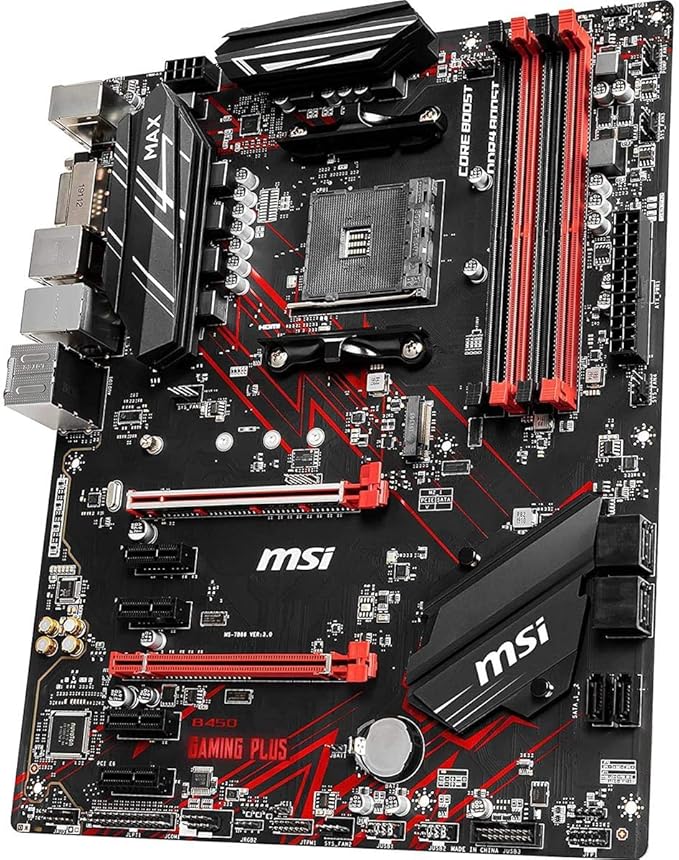
The motherboard or mainboard is the component that connects all the different parts of your computer. Often it has some integrated components like a sound card enabling your computer to play sound or a network card to connect your computer to the network. The standard form factor size for motherboards is ATX you need at least a midi-tower to fit one of those in. Micro-ATX motherboards are often more complete and have more onboard devices like a video board and fit in smaller cases but are generally less expandable.
The motherboard or mainboard is the component that connects all the different parts of your computer. Often it has some integrated components like a sound card enabling your computer to play sound or a network card to connect your computer to the network. The standard form factor size for motherboards is ATX you need at least a midi-tower to fit one of those in. Micro-ATX motherboards are often more complete and have more onboard devices like a video board and fit in smaller cases but are generally less expandable.
in 3 offers
The lowest price for Asus Prime B450-PLUS AM4 ATX Motherboard right now is $171.18 at eBay.com.au, compared across 2 retailers.
The all-time low was $98.99 on 24 June 2024 — today's price is 73% above the lowest ever. It has been notably cheaper before — worth setting a price alert.
Prices last updated 10 Sept 2026.
Asus Prime B450-PLUS AM4 ATX Motherboard
The motherboard or mainboard is the component that connects all the different parts of your computer. Often it has some integrated components like a sound card enabling your computer to play sound or a network card to connect your computer to the network. The standard form factor size for motherboards is ATX you need at least a midi-tower to fit one of those in. Micro-ATX motherboards are often more complete and have more onboard devices like a video board and fit in smaller cases but are generally less expandable.
The motherboard or mainboard is the component that connects all the different parts of your computer. Often it has some integrated components like a sound card enabling your computer to play sound or a network card to connect your computer to the network. The standard form factor size for motherboards is ATX you need at least a midi-tower to fit one of those in. Micro-ATX motherboards are often more complete and have more onboard devices like a video board and fit in smaller cases but are generally less expandable.
Last updated at 10/09/2026 03:55:37
Asus Prime B450-plus Motherboard Amd B450 Socket Am4 Ddr4 M.2 Atx
Delivery $34.97
Affiliate Disclosure: We may receive a small commission for purchases made through this link at no extra cost to you. This helps support our site. Thank you!
Asus Prime B450-plus Amd Am4 Ryzen Atx Motherboard Aura Sync Rgb M.2
Free delivery
Affiliate Disclosure: We may receive a small commission for purchases made through this link at no extra cost to you. This helps support our site. Thank you!
Asus Prime B450-PLUS Mthbrd
Free delivery
originally posted on newegg.com
I really don't see why people whine about the Foxconn socket. Is true that you must put a little pressure to thread screws 2 and 3, but is not much. My Foxconn socket worked without a problem on the first boot. Everything worked great. People just whine too much about little details.
originally posted on neweggbusiness.com
Its a Beast!!! So far So good. Bluetooth comes in usefull if you own a bluetooth speaker or headphones. I try to keep my PC as cool as possible so it wears out slower. Even put some heatsinks on the m2. SSD drive.
originally posted on newegg.com
The only reason I picked this board up is because I found it on sale for $250. I think $250 is a reasonable price for this board, but at regular price you get more for your money with most other boards on the market. Here you are paying a premium for the Brand and I don't quite think that premium is worth it this time around. My build: Corsair RGB PRO 64gb 3200 Gigabyte RTX 2080 EKWB Phoenix with sTR4 CPU cooler and 360 rad Lian Li 011 Dynamic
| Memory | |
| Unbuffered memory | Y |
| Maximum internal memory | 64 GB |
| Supported memory clock speeds | 2133,2400,2666,2800,3000,3200 MHz |
| ECC | Y |
Asus Prime B450-plus Motherboard Amd B450 Socket Am4 Ddr4 M.2 Atx
Delivery $34.97
Affiliate Disclosure: We may receive a small commission for purchases made through this link at no extra cost to you. This helps support our site. Thank you!
Asus Prime B450-plus Amd Am4 Ryzen Atx Motherboard Aura Sync Rgb M.2
Free delivery
Affiliate Disclosure: We may receive a small commission for purchases made through this link at no extra cost to you. This helps support our site. Thank you!
Asus Prime B450-PLUS Mthbrd
Free delivery
I really don't see why people whine about the Foxconn socket. Is true that you must put a little pressure to thread screws 2 and 3, but is not much. My Foxconn socket worked without a problem on the first boot. Everything worked great. People just whine too much about little details.
Its a Beast!!! So far So good. Bluetooth comes in usefull if you own a bluetooth speaker or headphones. I try to keep my PC as cool as possible so it wears out slower. Even put some heatsinks on the m2. SSD drive.
The only reason I picked this board up is because I found it on sale for $250. I think $250 is a reasonable price for this board, but at regular price you get more for your money with most other boards on the market. Here you are paying a premium for the Brand and I don't quite think that premium is worth it this time around. My build: Corsair RGB PRO 64gb 3200 Gigabyte RTX 2080 EKWB Phoenix with sTR4 CPU cooler and 360 rad Lian Li 011 Dynamic
I am a new to building PCs. This was the second motherboard after trying the Zenith Extreme. The assembly didn't take very long and every thing worked as expected.
easy to setup and fired up right the first time. Only issue i ran into was loading operating system on the Samsung 960 M.2 drive. First go at it, loaded operating system onto the M.2 and i also had a 1tb hard drive connected to the sata bus. The OS loaded to the m2, but system would not boot up. Removed the hard drive and cleaned the M.2 drive of OS and re-installed windows with only the M.2 installed .This worked and install went well. Re-installed other 1TB hard drive and continued on without any issues. Looks like you must install OS first if on M.2 drive before any other hard-drives are installed. . update 9/2/18 Found that my wireless Microsoft Comfort 5050 keyboard and 5000 mouse work great on BIOS 0503 and older. On Bios 0601 and 0807, the mouse is errant and ... Moreeasy to setup and fired up right the first time. Only issue i ran into was loading operating system on the Samsung 960 M.2 drive. First go at it, loaded operating system onto the M.2 and i also had a 1tb hard drive connected to the sata bus. The OS loaded to the m2, but system would not boot up. Removed the hard drive and cleaned the M.2 drive of OS and re-installed windows with only the M.2 installed .This worked and install went well. Re-installed other 1TB hard drive and continued on without any issues. Looks like you must install OS first if on M.2 drive before any other hard-drives are installed. . update 9/2/18 Found that my wireless Microsoft Comfort 5050 keyboard and 5000 mouse work great on BIOS 0503 and older. On Bios 0601 and 0807, the mouse is errant and very slow to respond. Hard to hit target to configure bios with mouse. Keyboard still works fine. Sticking with 0503 till Asus admits they have a bios issue and fixes problem. Make sure if you experience this issue with the 0601 and 0807 bios to get it documented here or in a forum that deals with threadripper and x399 chipsets.
There's no good reason this should ever happen. QA should have pulled this board before it was ever packaged for distribution. Not cool how I've wasted my time troubleshooting this board and having to wait for a new board to arrive. I won't be buying anything from ASUS again.
I wanted to update on my experiences with this board. It was my second one my first was obviously a bad one. Which can happen with any electrical product. This board is absolutely stable with w10 and Linux installs. I also want to point out that the other reviews that support is slow is kind of ridiculous. I had zero issues getting responses from their support. You can even message their facebook page and get responses pretty quickly. Also, the person complaining about lacking certain features compared to other brands or something. IT CLEARLY states what this board has and supports on the main page. It also has the entire guide book on their website. You cannot blame the manufacturer for clearly stating what this board supports and has. Research.
Okay now for an interesting story. Last year I purchased an Asus PRIME X399-A motherboard, 12 core 1920x Threadripper cpu, and 3000mHz G.Skill DDR4 quad channel ram. I have been using and loving this setup. Powerful and fast. Zoom! :) So last month when the 3rd gen Threadrippers came out and I looked at the price of the 3960x with mobo... Well after regaining consciousness and getting back to my feet, I looked at the much lower prices of the second gen hardware. So, I decided this time to go for the 16 core 2950x Threadripper cpu and ASUS ROG STRIX X399-E mobo to be paired with my existing quad 3000mHz G.Skill ram. But after putting together the new parts and upgrading the Bios, it failed to post with four ram sticks. After trial and error it would work with three ... MoreOkay now for an interesting story. Last year I purchased an Asus PRIME X399-A motherboard, 12 core 1920x Threadripper cpu, and 3000mHz G.Skill DDR4 quad channel ram. I have been using and loving this setup. Powerful and fast. Zoom! :) So last month when the 3rd gen Threadrippers came out and I looked at the price of the 3960x with mobo... Well after regaining consciousness and getting back to my feet, I looked at the much lower prices of the second gen hardware. So, I decided this time to go for the 16 core 2950x Threadripper cpu and ASUS ROG STRIX X399-E mobo to be paired with my existing quad 3000mHz G.Skill ram. But after putting together the new parts and upgrading the Bios, it failed to post with four ram sticks. After trial and error it would work with three or less but not four. :( But now the strange part... I put my old 1920x into the new X399-E and tada, it works no problem with the quad 3000mHz. Also, the new 2950x works in the old X399-A with the quad ram. There you have it. All's well that ends well. I would recommend the Asus PRIME X399-A over the Asus ROG STRIX X399-E for ram compatability. p.s. I have been using the Noctua NH-U14S TR4-SP3 and Noctua NH-U12S TR4-SP3 cpu coolers on my 2950x and 1920x. The are effective quiet and simple. Happy 'puting all! ;)
Pros: After my old PC began to struggle, my new one as amazing. Back to normal and more.Cons: Not really. It was built very well and looks good in my office. I am more than happy.
Asus USED to be the hallmark of quality. Now they are just the peddlers of junk. Save your money and avoid this brand at all cost. -EDIT- I look like an idiot but I will own this misunderstanding. Hopefully the review is useful for others. I'm used to the motherboards just letting the temp red line and die. Rigging the voltages to be able to keep going weirds me out. The placement for the pump PWM is horrible IMHO. I can't be the only one too lazy to mess with the DYI water cooling rigs.
| Memory | |
| Unbuffered memory | Y |
| Maximum internal memory | 64 GB |
| Supported memory clock speeds | 2133,2400,2666,2800,3000,3200 MHz |
| ECC | Y |