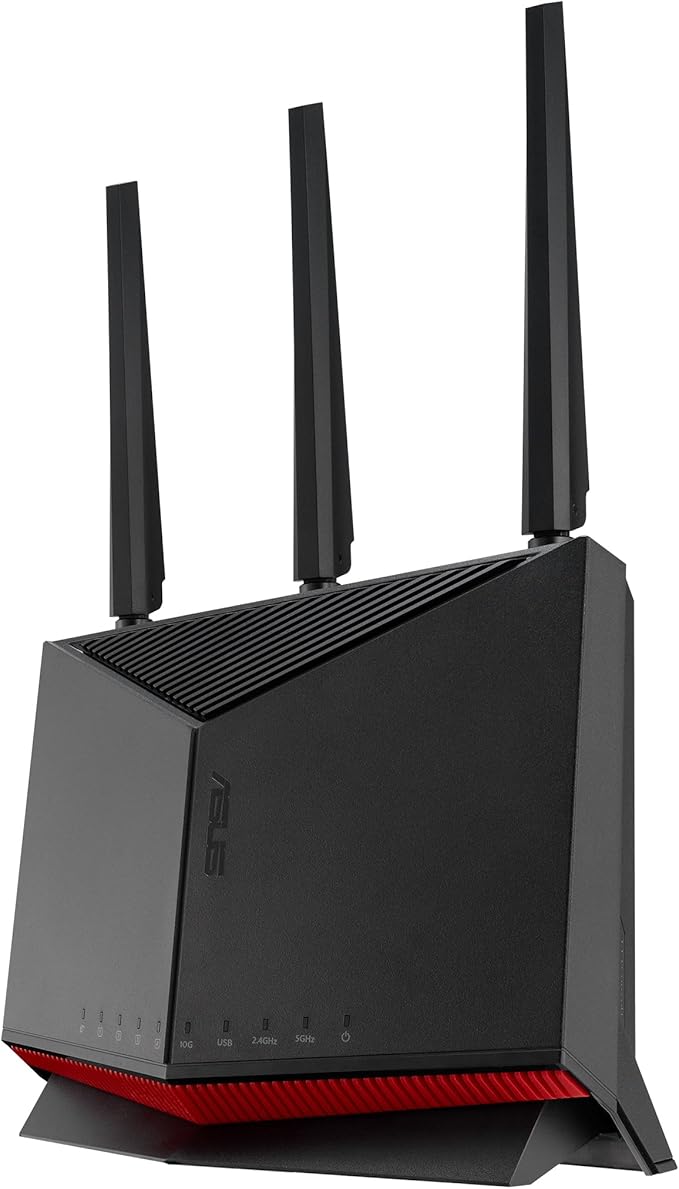
Network - Consumer Wireless Routers Asus GT-AX11000 ROG Rapture AX11000 Tri-Band Wi-Fi 6
ROG PCs (motherboard, laptop, desktops) and ROG Wi-Fi routers together with Game First V network acceleration software ensure smoother online game with lower ping and less lag. No matter wire or wireless, Game First and Game Boost prioritize gaming packets and decrease so that you do not miss a bullet from the back. GT-AX11000 provides triple-level game acceleration to boost game traffic every step of the way. This lowers ping rate and reduce game latency for better gaming experience. Port forwarding is critical for gamers, to avoid the awkward situation of not being able to team up with friends. Open NAT on GT-AX11000 cannot be easier, it only takes 3 steps. No more frustrating and complicated process needed. GT-AX11000 is designed with just one mission in mind: Make your gaming network awesome. It's packed with powerful gaming optimizations, and delivers dominating Wi-Fi performance, rock-solid stability and state-of-the-art security. The ROG-themed Gaming Center interface provides easy point-and-click control over every incredible feature. Features Triple-level Game Acceleration – Accelerate game traffic every step of the way - from device to game server. Battle-ready-hardware – 1.8GHz quad-core CPU and 2.5GBase -T port for ultimate performance. Front-line Network Security – Neutralize internet threats before they hit your network.
ROG PCs (motherboard, laptop, desktops) and ROG Wi-Fi routers together with Game First V network acceleration software ensure smoother online game with lower ping and less lag. No matter wire or wireless, Game First and Game Boost prioritize gaming packets and decrease so that you do not miss a bullet from the back. GT-AX11000 provides triple-level game acceleration to boost game traffic every step of the way. This lowers ping rate and reduce game latency for better gaming experience. Port forwarding is critical for gamers, to avoid the awkward situation of not being able to team up with friends. Open NAT on GT-AX11000 cannot be easier, it only takes 3 steps. No more frustrating and complicated process needed. GT-AX11000 is designed with just one mission in mind: Make your gaming network awesome. It's packed with powerful gaming optimizations, and delivers dominating Wi-Fi performance, rock-solid stability and state-of-the-art security. The ROG-themed Gaming Center interface provides easy point-and-click control over every incredible feature. Features Triple-level Game Acceleration – Accelerate game traffic every step of the way - from device to game server. Battle-ready-hardware – 1.8GHz quad-core CPU and 2.5GBase -T port for ultimate performance. Front-line Network Security – Neutralize internet threats before they hit your network.
ROG PCs (motherboard, laptop, desktops) and ROG Wi-Fi routers together with Game First V network acceleration software ensure smoother online game with lower ping and less lag. No matter wire or wireless, Game First and Game Boost prioritize gaming packets and decrease so that you do not miss a bullet from the back. GT-AX11000 provides triple-level game acceleration to boost game traffic every step of the way. This lowers ping rate and reduce game latency for better gaming experience. Port forwarding is critical for gamers, to avoid the awkward situation of not being able to team up with friends. Open NAT on GT-AX11000 cannot be easier, it only takes 3 steps. No more frustrating and complicated process needed. GT-AX11000 is designed with just one mission in mind: Make your gaming network awesome. It's packed with powerful gaming optimizations, and delivers dominating Wi-Fi performance, rock-solid stability and state-of-the-art security. The ROG-themed Gaming Center interface provides easy point-and-click control over every incredible feature. Features Triple-level Game Acceleration – Accelerate game traffic every step of the way - from device to game server. Battle-ready-hardware – 1.8GHz quad-core CPU and 2.5GBase -T port for ultimate performance. Front-line Network Security – Neutralize internet threats before they hit your network.
ROG PCs (motherboard, laptop, desktops) and ROG Wi-Fi routers together with Game First V network acceleration software ensure smoother online game with lower ping and less lag. No matter wire or wireless, Game First and Game Boost prioritize gaming packets and decrease so that you do not miss a bullet from the back. GT-AX11000 provides triple-level game acceleration to boost game traffic every step of the way. This lowers ping rate and reduce game latency for better gaming experience. Port forwarding is critical for gamers, to avoid the awkward situation of not being able to team up with friends. Open NAT on GT-AX11000 cannot be easier, it only takes 3 steps. No more frustrating and complicated process needed. GT-AX11000 is designed with just one mission in mind: Make your gaming network awesome. It's packed with powerful gaming optimizations, and delivers dominating Wi-Fi performance, rock-solid stability and state-of-the-art security. The ROG-themed Gaming Center interface provides easy point-and-click control over every incredible feature. Features Triple-level Game Acceleration – Accelerate game traffic every step of the way - from device to game server. Battle-ready-hardware – 1.8GHz quad-core CPU and 2.5GBase -T port for ultimate performance. Front-line Network Security – Neutralize internet threats before they hit your network.
in 3 offers
The lowest price for Network - Consumer Wireless Routers Asus GT-AX11000 ROG Rapture AX11000 Tri-Band Wi-Fi 6 right now is $349.00 at eBay.com.au, compared across 3 retailers.
The all-time low was $349.00 on 8 Oct 2026. That's the lowest price we've ever tracked — a great time to buy.
Prices last updated 10 Oct 2026.
Last updated at 10/10/2026 13:31:47
Asus Rog Rapture Gt-ax11000 Tri-band Wifi 6 Wireless Gaming Router
Free delivery
Affiliate Disclosure: We may receive a small commission for purchases made through this link at no extra cost to you. This helps support our site. Thank you!
ASUS WiFi WiFi6 4804+4804+1148Mbps GT-AX11000 3 / 4LDK PS5/Nintendo Switch/iPhone/android
Free delivery between 20–23 Oct
ROG Rapture GT-AX11000 IEEE 802.11ax Ethernet Wireless Router - 2.40 GHz ISM Band - 5 GHz UNII Band - 11000 Mbit/s Wireless Speed - 5 X Network Port -
Delivery $28.63
originally posted on binglee.com.au
The GT AX1 1000 was just what I needed to distribute new fiber optic cable service in my home. It’s positioned in a 3rd floor room of my three-story home with nine foot ceilings. Signal strength is good throughout the home, and even the backyard, during most times of day. (I occasionally get some re-buffering on the TV in the lower level during especially busy times of day.) Adding another ASUS router in the lower level should solve that problem, and the addition sounds like a seamless plug and play using the AiMesh feature. I love the Tri-band (one 2.4GHz + two 5Ghz bands) feature, and have my unit configured to auto-select the band with the least amount of traffic for all connected wireless devices/clients. Also, one band can be prioritized for a particular ... MoreThe GT AX1 1000 was just what I needed to distribute new fiber optic cable service in my home. It’s positioned in a 3rd floor room of my three-story home with nine foot ceilings. Signal strength is good throughout the home, and even the backyard, during most times of day. (I occasionally get some re-buffering on the TV in the lower level during especially busy times of day.) Adding another ASUS router in the lower level should solve that problem, and the addition sounds like a seamless plug and play using the AiMesh feature. I love the Tri-band (one 2.4GHz + two 5Ghz bands) feature, and have my unit configured to auto-select the band with the least amount of traffic for all connected wireless devices/clients. Also, one band can be prioritized for a particular application, a great feature for gamers. Or one band can be isolated just for guest-use. I wanted a WiFi 6 router, to accommodate that standard for many newer devices/clients, and the GT-AX fits that bill. The unit is futuristic-looking even though the 8 external antennas look weird (picture an upside down spider). The Aura RGB feature illuminates the symbol on the top with changing lights, a cool feature since it’s not located in a room where I sleep. Accessing the router remotely with a mobile device is a pleasure, allowing for settings and features adjustments on a well-designed, intuitively laid-out website. The purchase of this ASUS router was a good choice, and I’d make that choice again.
originally posted on binglee.com.au
This is the best router I have ever owned... The router is very advanced IMO, but setup was actually not hard to figure out...Here is a breakdown on what I think about this router -Router App - The online app for this router is far more advanced than any I've seen with past routers from a different maker... You have complete control over everything you can think of, and then some... It is feature rich allowing the owner to customize the router to meet their individual needs...Performance - I have a Cox Gigablast internet plan that for the first time I am able to realize the full potential of...According to 'Speedtest by Ookla' I can get between 800-900 Mbps download speeds consistently when not connected to my VPN...With my VPN connected speeds are slightly ... MoreThis is the best router I have ever owned... The router is very advanced IMO, but setup was actually not hard to figure out...Here is a breakdown on what I think about this router -Router App - The online app for this router is far more advanced than any I've seen with past routers from a different maker... You have complete control over everything you can think of, and then some... It is feature rich allowing the owner to customize the router to meet their individual needs...Performance - I have a Cox Gigablast internet plan that for the first time I am able to realize the full potential of...According to 'Speedtest by Ookla' I can get between 800-900 Mbps download speeds consistently when not connected to my VPN...With my VPN connected speeds are slightly slower in the 500-600 Mbps download speed...Range - I'm very impressed by the range of this router... I can stay connected to WiFi from my neighbors yard in excess of 75 feet away through the walls of my home on the 2.4Ghz channel...Final Thoughts - I am really impressed with this router... The online app. is feature rich allowing the owner complete control and the ability to customize the router to suit their needs... Both of my adult kids love this router for all of their online gaming...I would gladly recommend this router for gaming or anything else for that matter...
originally posted on bestbuy.ca
I already had a good wireless Network router (Asus 3100) and kept it up to date. But I was never 100% happy with the connection around my house. 2000 SqftI finally decided to upgrade to the AX11000 a bit concerned that the hype would not translate into a big difference and I would be left feeling like it’s a lot of money not well spent. This is not the casePlugged it in, established 3 networks with the same password and then walked around the house trying the connection speed and ping on both the 2.4 and 5Ghz bands. With the one exception of 5Gz out at the far corner of a big garden the connection maxed out at 120 mb second which is my providers speed. And that’s using wifi 5. Tried it with wifi 6 and it’s maxed out every where. I have a busy house and full of ... MoreI already had a good wireless Network router (Asus 3100) and kept it up to date. But I was never 100% happy with the connection around my house. 2000 SqftI finally decided to upgrade to the AX11000 a bit concerned that the hype would not translate into a big difference and I would be left feeling like it’s a lot of money not well spent. This is not the casePlugged it in, established 3 networks with the same password and then walked around the house trying the connection speed and ping on both the 2.4 and 5Ghz bands. With the one exception of 5Gz out at the far corner of a big garden the connection maxed out at 120 mb second which is my providers speed. And that’s using wifi 5. Tried it with wifi 6 and it’s maxed out every where. I have a busy house and full of devices and tried simultaneous down loads, all maxed out at 120mbs. Pings are all at 11msI set the 2.4 GHz up as my smart home network, the first 5 ghz as the general use, second 5 GHz as for devices that stream like Apple TV. 3 weeks in everything is 100% reliable everywhere. I was going to upgrade my providers speed but see no reason to now.I used to get some challenges with the Nest devices becoming disconnected and even Apple car play getting confused when I jump into my car. All those little annoying issues have gone away.This is a phenomenal wireless router, it feels like I am getting 50% more out of my connection and for that reason alone it’s worth investing in. It’s only going to get better as I upgrade my devices over time to wifi 6
| Encryption Type | WPA, WPA2 |
| Gigabit Ethernet | Yes |
| Brand | ASUS |
| Wireless Standard | Wireless-AC, Wireless-N, Wireless-G |
| Wireless Band Count | Tri-band |
Asus Rog Rapture Gt-ax11000 Tri-band Wifi 6 Wireless Gaming Router
Free delivery
Affiliate Disclosure: We may receive a small commission for purchases made through this link at no extra cost to you. This helps support our site. Thank you!
ASUS WiFi WiFi6 4804+4804+1148Mbps GT-AX11000 3 / 4LDK PS5/Nintendo Switch/iPhone/android
Free delivery between 20–23 Oct
ROG Rapture GT-AX11000 IEEE 802.11ax Ethernet Wireless Router - 2.40 GHz ISM Band - 5 GHz UNII Band - 11000 Mbit/s Wireless Speed - 5 X Network Port -
Delivery $28.63
The GT AX1 1000 was just what I needed to distribute new fiber optic cable service in my home. It’s positioned in a 3rd floor room of my three-story home with nine foot ceilings. Signal strength is good throughout the home, and even the backyard, during most times of day. (I occasionally get some re-buffering on the TV in the lower level during especially busy times of day.) Adding another ASUS router in the lower level should solve that problem, and the addition sounds like a seamless plug and play using the AiMesh feature. I love the Tri-band (one 2.4GHz + two 5Ghz bands) feature, and have my unit configured to auto-select the band with the least amount of traffic for all connected wireless devices/clients. Also, one band can be prioritized for a particular ... MoreThe GT AX1 1000 was just what I needed to distribute new fiber optic cable service in my home. It’s positioned in a 3rd floor room of my three-story home with nine foot ceilings. Signal strength is good throughout the home, and even the backyard, during most times of day. (I occasionally get some re-buffering on the TV in the lower level during especially busy times of day.) Adding another ASUS router in the lower level should solve that problem, and the addition sounds like a seamless plug and play using the AiMesh feature. I love the Tri-band (one 2.4GHz + two 5Ghz bands) feature, and have my unit configured to auto-select the band with the least amount of traffic for all connected wireless devices/clients. Also, one band can be prioritized for a particular application, a great feature for gamers. Or one band can be isolated just for guest-use. I wanted a WiFi 6 router, to accommodate that standard for many newer devices/clients, and the GT-AX fits that bill. The unit is futuristic-looking even though the 8 external antennas look weird (picture an upside down spider). The Aura RGB feature illuminates the symbol on the top with changing lights, a cool feature since it’s not located in a room where I sleep. Accessing the router remotely with a mobile device is a pleasure, allowing for settings and features adjustments on a well-designed, intuitively laid-out website. The purchase of this ASUS router was a good choice, and I’d make that choice again.
This is the best router I have ever owned... The router is very advanced IMO, but setup was actually not hard to figure out...Here is a breakdown on what I think about this router -Router App - The online app for this router is far more advanced than any I've seen with past routers from a different maker... You have complete control over everything you can think of, and then some... It is feature rich allowing the owner to customize the router to meet their individual needs...Performance - I have a Cox Gigablast internet plan that for the first time I am able to realize the full potential of...According to 'Speedtest by Ookla' I can get between 800-900 Mbps download speeds consistently when not connected to my VPN...With my VPN connected speeds are slightly ... MoreThis is the best router I have ever owned... The router is very advanced IMO, but setup was actually not hard to figure out...Here is a breakdown on what I think about this router -Router App - The online app for this router is far more advanced than any I've seen with past routers from a different maker... You have complete control over everything you can think of, and then some... It is feature rich allowing the owner to customize the router to meet their individual needs...Performance - I have a Cox Gigablast internet plan that for the first time I am able to realize the full potential of...According to 'Speedtest by Ookla' I can get between 800-900 Mbps download speeds consistently when not connected to my VPN...With my VPN connected speeds are slightly slower in the 500-600 Mbps download speed...Range - I'm very impressed by the range of this router... I can stay connected to WiFi from my neighbors yard in excess of 75 feet away through the walls of my home on the 2.4Ghz channel...Final Thoughts - I am really impressed with this router... The online app. is feature rich allowing the owner complete control and the ability to customize the router to suit their needs... Both of my adult kids love this router for all of their online gaming...I would gladly recommend this router for gaming or anything else for that matter...
I already had a good wireless Network router (Asus 3100) and kept it up to date. But I was never 100% happy with the connection around my house. 2000 SqftI finally decided to upgrade to the AX11000 a bit concerned that the hype would not translate into a big difference and I would be left feeling like it’s a lot of money not well spent. This is not the casePlugged it in, established 3 networks with the same password and then walked around the house trying the connection speed and ping on both the 2.4 and 5Ghz bands. With the one exception of 5Gz out at the far corner of a big garden the connection maxed out at 120 mb second which is my providers speed. And that’s using wifi 5. Tried it with wifi 6 and it’s maxed out every where. I have a busy house and full of ... MoreI already had a good wireless Network router (Asus 3100) and kept it up to date. But I was never 100% happy with the connection around my house. 2000 SqftI finally decided to upgrade to the AX11000 a bit concerned that the hype would not translate into a big difference and I would be left feeling like it’s a lot of money not well spent. This is not the casePlugged it in, established 3 networks with the same password and then walked around the house trying the connection speed and ping on both the 2.4 and 5Ghz bands. With the one exception of 5Gz out at the far corner of a big garden the connection maxed out at 120 mb second which is my providers speed. And that’s using wifi 5. Tried it with wifi 6 and it’s maxed out every where. I have a busy house and full of devices and tried simultaneous down loads, all maxed out at 120mbs. Pings are all at 11msI set the 2.4 GHz up as my smart home network, the first 5 ghz as the general use, second 5 GHz as for devices that stream like Apple TV. 3 weeks in everything is 100% reliable everywhere. I was going to upgrade my providers speed but see no reason to now.I used to get some challenges with the Nest devices becoming disconnected and even Apple car play getting confused when I jump into my car. All those little annoying issues have gone away.This is a phenomenal wireless router, it feels like I am getting 50% more out of my connection and for that reason alone it’s worth investing in. It’s only going to get better as I upgrade my devices over time to wifi 6
This router is total, over-rated junk. I had one in less than a year. It’s super fancy looking and has lots of feature, but so don’t count on your 2.4GHz wifi ever working reliably or quickly. I’m an engineer and I’ve spent hundreds of hours diagnosing the problem, optimizing my network, and eliminating interference. This piece of junk won’t drive more than 10Mbps in 2.4GHz consistently, and often drops out. It’s a well known issue. Google it. You need 2.4 and for many home automation devices and cameras. Save your money.
I have two GT-AX11000 routers in an AIMesh configuration with a CAT6 backhaul. The wired backhaul keeps 100% of the wireless bandwidth available for wireless devices. The mesh network fills in a couple of weird dead spots that I had (happened with other routers too) and also allows for hard-wired connections for my entertainment center downstairs and in my office upstairs. I have a 600Mbps Comcast connection that regularly gets between 8-900Mbps. My wireless devices are getting right at the same speeds as the wired desktops. My home is a 2500 square foot two-story on a third acre lot and I have solid 5GHz WiFi 6 coverage in every corner of my house and yard.I was amazed at how many devices we have on or network when I counted them up. (which is easy to do in the ... MoreI have two GT-AX11000 routers in an AIMesh configuration with a CAT6 backhaul. The wired backhaul keeps 100% of the wireless bandwidth available for wireless devices. The mesh network fills in a couple of weird dead spots that I had (happened with other routers too) and also allows for hard-wired connections for my entertainment center downstairs and in my office upstairs. I have a 600Mbps Comcast connection that regularly gets between 8-900Mbps. My wireless devices are getting right at the same speeds as the wired desktops. My home is a 2500 square foot two-story on a third acre lot and I have solid 5GHz WiFi 6 coverage in every corner of my house and yard.I was amazed at how many devices we have on or network when I counted them up. (which is easy to do in the router's interface) Between TVs, phones, pads, laptops, Roku/Fire sticks, multiple Alexas, Ring devices, Apple watch, DVD/BlueRay - You get the idea... they really add up! We will often have streaming on multiple devices, browsing and gaming all at the same time and these routers handle it without a glitch.TBH - I know that the setup I have is overkill and I could have built out a solid network for a lot cheaper but it happened in stages and just grew into what it is. I really wrestled with buying the second AX11000 when I knew that other, less expensive, Asus routers would have worked just fine. Now that it's done however - I couldn't be happier with the performance and feel good about having a network which will last well in to the future
This is really a great router. Powerful and very capable. Initial setup is fairly easy and you will be up and running in no time. The catch is that in their attempts to tailor this product to gamers, they have seemingly forgotten that the router may be used for other things. Settings are not always located in a place where you would look, and this can make tweaking things difficult. I personally was having issues with certain smart devices seemingly randomly disconnecting. A deeper dive into the router settings pages and I was able to locate a setting that automatically disconnects devices at a defined RSSI (default is -70dBm). This was causing some of my lights and Google Home devices to be removed from the network and seemingly not allowed until they were rebooted ... MoreThis is really a great router. Powerful and very capable. Initial setup is fairly easy and you will be up and running in no time. The catch is that in their attempts to tailor this product to gamers, they have seemingly forgotten that the router may be used for other things. Settings are not always located in a place where you would look, and this can make tweaking things difficult. I personally was having issues with certain smart devices seemingly randomly disconnecting. A deeper dive into the router settings pages and I was able to locate a setting that automatically disconnects devices at a defined RSSI (default is -70dBm). This was causing some of my lights and Google Home devices to be removed from the network and seemingly not allowed until they were rebooted manually. Disabling this setting, rebooting the router and then all the afflicted devices seems to have fixed the issue. Having used the AC5300 version, I had similar issues with hidden settings causing unexpected behavior. Bottom line, if you are buying this you should be prepared to go digging if you need anything outside of the standard gaming configuration and settings.
So, I like to do a lot of research online and reading reviews both on the site and from cnet, wired and other tech focused publications. Before I make a purchase. I would recommend this to anyone who has just upgraded to giga band internet and/or is a gamer. Despite what some of the reviews say about this router not living up to its “hype” this has worked out better than expected thus far. The size does make it cumbersome and bulky but that is really a minor issue to me. We have the router placed in our loft upstairs, In the middle of the home. Compared to the Linksys 1900WTR router, this one replaced, the signal is very strong as we do receive very good signal on our front and back patio (our home is 2701 sq. ft.). We set up the game boost, and my son is very happy ... MoreSo, I like to do a lot of research online and reading reviews both on the site and from cnet, wired and other tech focused publications. Before I make a purchase. I would recommend this to anyone who has just upgraded to giga band internet and/or is a gamer. Despite what some of the reviews say about this router not living up to its “hype” this has worked out better than expected thus far. The size does make it cumbersome and bulky but that is really a minor issue to me. We have the router placed in our loft upstairs, In the middle of the home. Compared to the Linksys 1900WTR router, this one replaced, the signal is very strong as we do receive very good signal on our front and back patio (our home is 2701 sq. ft.). We set up the game boost, and my son is very happy for that. I work from home and we do a lot of online meetings, there has been no buffering since I bought this router (after up grading to giga internet with SPECTRUM). Overall, this router is well worth the money, I also purchased the two-year warranty in addition to the one-year factory warranty. While it has only been a couple weeks since I purchased this so far so good. I will update my review in November 2020. Again, I would recommend this product.
I do give this 5 stars for multiple reasons. 1) Support has been outstanding, they answer questions professional, quickly, and I would say completely (being a Network Engineer, it may be complete enough for me, maybe not always others, so just keep at them until you get the answers you want) 2) The device does provide low latency, and since it has 2 x 5GHz radios, I was able to isolated one to AC only (partly manually, and partly with settings, see above discussion) 3) The speed I get is often the theoretical 1.3Gbps (1300Mpbs) 4) Consistently RSSI is high (this is good), and Noise is low (also good) to AX11K 5) Jitter is overall better (jitter is the measurement of fluctuation in latency) 6) Did I mention really low latency? Well, it does provide this! 7) Using AP ... MoreI do give this 5 stars for multiple reasons. 1) Support has been outstanding, they answer questions professional, quickly, and I would say completely (being a Network Engineer, it may be complete enough for me, maybe not always others, so just keep at them until you get the answers you want) 2) The device does provide low latency, and since it has 2 x 5GHz radios, I was able to isolated one to AC only (partly manually, and partly with settings, see above discussion) 3) The speed I get is often the theoretical 1.3Gbps (1300Mpbs) 4) Consistently RSSI is high (this is good), and Noise is low (also good) to AX11K 5) Jitter is overall better (jitter is the measurement of fluctuation in latency) 6) Did I mention really low latency? Well, it does provide this! 7) Using AP mode means that your modem is your DHCP server, this takes off some of the overall processing necessary on the AX11K, so again, better latency. 8) Future expansion capabilities. 9) TOO MANY PEOPLE FOCUS ON SPEED. Don't be slow here, speed is good, yes, but if you have 1Mbps to the Internet, and you use at most at any time 80Mbps, why have the extra 920Mbps? Yes, I'm a Network Engineer, and as long as you have extra capacity you never use, why the heck do you pay for it? I work with one of the nations largest Internet Service Providers. If you use at most 80Mbps, and only in very rare bursts, you can get away with having only 80Mbps service, or maybe you want a bit more headroom, so say 100Mbps. Here's why: If you have 1Gbps, and I have 80Mbps, and we're playing the same game, and the game uses 8Mbps (this is a very high rate, most are not this high), then you have ABSOLUTELY NO ADVANTAGE over me, b/c it's all about latency on the Internet to the server. If I'm "closer" to the server (that is my latency is lower from my POP (Point of Presence) to the server, then me, with 80Mbps might actually have an advantage over you with 1Gbps, and I have a 2nd advantage in that I pay significantly less for my service than you, so it's only a win-win for me! Dudes, don't get SPEED and LATENCY mixed up, they can be related, yes, but only if you HIT your maximum speed limit a lot! And keep in mind that speeds are asymmetric, that is, you may get 1Mbps down, but you only get a much smaller amount up, usually about 1/10 or less your down speed. So check both, make sure your not saturating your connections out as well. Once you hit the saturation point, they your latency will go up because packets will have to sit and wait longer to either get to you or for you to send out. They literally get backed-up, or even dropped. So watch your speeds, sure, but watch your latency, it's MUCH MORE IMPORTANT! Speed is bragging rights, I get it, but it is NOT latency. It's like saying, my car can do 200 MPH with a speed limit of 55 you are NEVER permitted to go over, WOW! But my car can go to 0-55 in 2.3 seconds, and your 200 MPH car takes 13 seconds to get to 55, which car do you think I'd buy?! POINT: The AX11K has shown that it can handle very high speeds of data through it, thus reducing latency when it's in AP mode. The AX11K can do 200MPH (figuratively), and it does go from 0-55MPH in 2.3 seconds (also figuratively). So, upgrade your service from 80Mbps when it is no longer enough (pay for it then, instead of now), but your wireless device is already future proofed and ready to take on the challenge with the Asus ROG Rapture GT-AX11000!
Background: Overall, this is an excellent product. I live in 3800 sqft home with essentially two floors including basement. Recently, I've upgraded to 1Gbps service from my internet service provider. I have owned Orbi AC3000 series then moved to Eero Pro second generation. Neither system satisfied my desire. Orbi provided great speed across the house, but lacked stability i.e. devices kept disconnecting. Eero was amazingly stable but lacked speed. Both system were relatively weak on customization, which is nature/trade off of Mesh Network when compared to Native/dedicated router system. After discovering the AiMesh, I was thrilled about the concept but if I am going to buy new router(s) I need WiFi 6. Also, I use VPN for couple clients including Apple TV so VPN ... MoreBackground: Overall, this is an excellent product. I live in 3800 sqft home with essentially two floors including basement. Recently, I've upgraded to 1Gbps service from my internet service provider. I have owned Orbi AC3000 series then moved to Eero Pro second generation. Neither system satisfied my desire. Orbi provided great speed across the house, but lacked stability i.e. devices kept disconnecting. Eero was amazingly stable but lacked speed. Both system were relatively weak on customization, which is nature/trade off of Mesh Network when compared to Native/dedicated router system. After discovering the AiMesh, I was thrilled about the concept but if I am going to buy new router(s) I need WiFi 6. Also, I use VPN for couple clients including Apple TV so VPN Fusion concept also was intriguing. ROG GT-AX11000 on paper appeared a dream router. So did it meet my expectation? Coverage & Speed At its core, the router is great. The coverage and speed are phenomenal as a single device. Despite my house needed 3 Eero Pro or 3 Orbi Systems to cover nicely edge to edge, this router seem to cover most of my house with a single device. In fact, I'm already getting faster speed than 3 Eero Pro system at end of my house. But there is still a part of my house, the signal just doesn't reach so I plan to get another GT-AX11000 for AiMesh configuration. WiFi 6 (Ax) This is the future. Upcoming Samsung phone will be supporting this, which means this years iPhone will, and therefore, most likely iPad and other tablets following it. The speed gain and other features from WiFi 6 are huge. VPN Fusion - Some works and some doesn't. VPN Fusion works on some VPN services but not all. I have 3 different VPN subscriptions, but one that I want to have worked doesn't. It has only PPTP and L2TP options whereas other two had OpenVPN options. For the one that does not work, it connects to the VPN server but then the registered client becomes unreachable to internet. To make it even worth, all other clients get also affected, which defeats whole purpose of Fusion VPN. This is very strange as ASUS Merlin on R7000 Netgear have no problem connecting the VPN Server. AiMesh I have not yet had a chance to test this feature. However, I read current firmware uses one 5G band in triband AiMesh as Wireless backhaul, which sounds great if Wireless is indeed the connection one plans to use; however, this is apparently even forced when ethernet backhaul is used i.e. one loses one 5G Band for no reason. Bugs Perhaps everything may be attributable to early bugs, but beside mentioned above, Main Network Client List for instance have an issue for populating i.e. suddenly only 4 devices connected then jump to 25, but in reality they are not real device disconnection as I can still surf net etc. so I am certain its just the UI bug. ASUS Support This is perhaps the main concern I have. I see many complaints/concerns across online forums. This is not just isolated to ASUS as I've seen the same with Netgear, and other companies. However, I still went for my first ASUS router because ASUS router has won/listed as best router on several reputable online review sites. I truly hope the reputation is true and they take that to all the devices rather than just those sold the most. Because with the price tag, I am sure this is the flagship but not going to be the mainstream line of Wifi 6 router from ASUS. Competition to be considered Netgear will have Orbi Ax version. TP Link will have WiFi 6 router with AiMesh competition technology, OneMesh. Other companies are also of course planning WiFi 6 routers, but at least on paper, only one really I felt winning over the GT-AX11000 on spec at least partly is Netgear's flagship WiFi 6 router, NIGHTHAWK AX12. Although they are dual band and overall total speed support lower than AX11000, it has 5Gps and 2.5Gps ethernet ports whereas AX11000 has only single 2.5Gbps. However, I felt this is an acceptable trade off for me, as currently having 10Gbps switch is very expensive and of course, you have to have Cat 6 or above in your home. But the key is AiMesh technology. When times comes, I can always buy a new router from ASUS with those higher rate ethernet port, and use AX11000 as Mesh Node i.e. the router seems to have long lifespan even with someone like myself who like to buy new electronics all the time. Conclusion In the end, I believe this is the router with the greatest potential. Pretty much everything can be firmware/software addressable, but that could also mean never. But even with missing features/existing bugs, I think this router is useful to me. So I'd give 4 stars for now, and hope I can upgrade to 5 stars soon.
This is probably one of the most expensive routers I’ve ever purchased for my home network. I work as a Network Engineer for a living but it was my first time setting up an iMesh Network so for me this was a new learning curve.Once I got the hang of the setup it was a doddle to do. For gaming this is a great router not once have I ever lost a connection gaming like I have done with various routers in the past. Okay I had a few run-ins with ASUs support because I told them for months there was an issue with their firmware and they kept blaming my configuration and I told ASUs that it was the firmware that was as fault wii hi icy was probably early 2020 and eve since they updated the firmware it has been great and the last firmware update was amazing they added a ... MoreThis is probably one of the most expensive routers I’ve ever purchased for my home network. I work as a Network Engineer for a living but it was my first time setting up an iMesh Network so for me this was a new learning curve.Once I got the hang of the setup it was a doddle to do. For gaming this is a great router not once have I ever lost a connection gaming like I have done with various routers in the past. Okay I had a few run-ins with ASUs support because I told them for months there was an issue with their firmware and they kept blaming my configuration and I told ASUs that it was the firmware that was as fault wii hi icy was probably early 2020 and eve since they updated the firmware it has been great and the last firmware update was amazing they added a lot of new features to the router.I won’t to add tho this is a router that is very expensive and to be honest the range of this router is amazing I have an iMesh Network setup and I can sit in my car on my drive with my iPhone and I am still connected to the network. I want to emphasis this is a router that has a lot of me he’s and options that the novice may take a look at and feel sick. If you’re a complete no ice don’t be scare just used the basic setup and let the router do all the world for you when you set up your router.I think this is worth every single penny and it ticks all the boxes for me and I would recommend this to anybody. But if you’re looking at getting a router this year I would hold off of you can until September 2021 as I do believe there is a new version coming out this year that will blow this version out of the water with an eye watering price tag that will make your knees buckle.
| Encryption Type | WPA, WPA2 |
| Gigabit Ethernet | Yes |
| Brand | ASUS |
| Wireless Standard | Wireless-AC, Wireless-N, Wireless-G |
| Wireless Band Count | Tri-band |