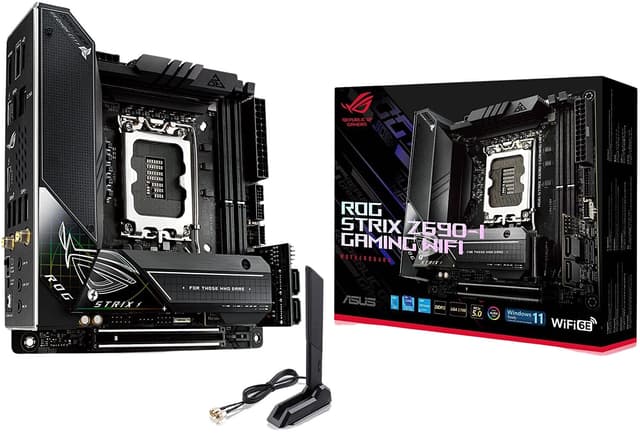
Unleash the Power of Gaming The ASUS ROG Strix Z790-E Gaming WiFi motherboard is a powerhouse designed for gamers who demand nothing but the best. Compatible with Intel's 14th generation CPUs, this motherboard features the advanced LGA 1700 Socket Type that ensures optimal performance and electrifying speeds for immersive gaming experiences. With its robust construction and superior thermal management, players can push their hardware to the limits. Equipped with PCI Express 5.0x16 slots, you'll be able to harness blazing fast data transfer rates and unparalleled graphics rendering. This motherboard doesn't just support intense gaming; it thrives on it, turning your PC into a high-octane gaming machine that leaves the competition in the dust.
Unleash the Power of Gaming The ASUS ROG Strix Z790-E Gaming WiFi motherboard is a powerhouse designed for gamers who demand nothing but the best. Compatible with Intel's 14th generation CPUs, this motherboard features the advanced LGA 1700 Socket Type that ensures optimal performance and electrifying speeds for immersive gaming experiences. With its robust construction and superior thermal management, players can push their hardware to the limits. Equipped with PCI Express 5.0x16 slots, you'll be able to harness blazing fast data transfer rates and unparalleled graphics rendering. This motherboard doesn't just support intense gaming; it thrives on it, turning your PC into a high-octane gaming machine that leaves the competition in the dust.
in 2 offers
The lowest price for Asus ROG Strix Z690-E Gaming Wifi Intel Z690 LGA 1700 ATX right now is $473.57 at eBay.com.au, compared across 2 retailers.
The all-time low was $185.20 on 24 Sept 2024 — today's price is 156% above the lowest ever. It has been notably cheaper before — worth setting a price alert.
Prices last updated 3 Nov 2026.
Asus ROG Strix Z690-E Gaming Wifi Intel Z690 LGA 1700 ATX
Unleash the Power of Gaming The ASUS ROG Strix Z790-E Gaming WiFi motherboard is a powerhouse designed for gamers who demand nothing but the best. Compatible with Intel's 14th generation CPUs, this motherboard features the advanced LGA 1700 Socket Type that ensures optimal performance and electrifying speeds for immersive gaming experiences. With its robust construction and superior thermal management, players can push their hardware to the limits. Equipped with PCI Express 5.0x16 slots, you'll be able to harness blazing fast data transfer rates and unparalleled graphics rendering. This motherboard doesn't just support intense gaming; it thrives on it, turning your PC into a high-octane gaming machine that leaves the competition in the dust.
Unleash the Power of Gaming The ASUS ROG Strix Z790-E Gaming WiFi motherboard is a powerhouse designed for gamers who demand nothing but the best. Compatible with Intel's 14th generation CPUs, this motherboard features the advanced LGA 1700 Socket Type that ensures optimal performance and electrifying speeds for immersive gaming experiences. With its robust construction and superior thermal management, players can push their hardware to the limits. Equipped with PCI Express 5.0x16 slots, you'll be able to harness blazing fast data transfer rates and unparalleled graphics rendering. This motherboard doesn't just support intense gaming; it thrives on it, turning your PC into a high-octane gaming machine that leaves the competition in the dust.
Last updated at 03/11/2026 17:48:44
Asus Rog Strix Z690-e Gaming Wifi 6e Lga 1700 Intel 12th Gen Gaming
Delivery $83.24
Affiliate Disclosure: We may receive a small commission for purchases made through this link at no extra cost to you. This helps support our site. Thank you!
ASUS ROG Strix Z690-E Gaming WiFi 6E LGA 1700(Intel 12th Gen) ATX gaming motherboard(PCIe 5.0,DDR5,2.5 Gb LAN,Thunderbolt 4,5xM.2,1xPCIe 5.0 M.2,ROG
Delivery between 8–12 Nov $41
originally posted on bestbuy.com
Asus Z690-E Gaming Wifi DDR5. Huge box, lots of accessories. Will fit 3, m.2 nvme ssds on the board and has an accessory so you can add 2 more and put them in a pcie slot. Bought this for an Intel i7-13700k. The Bios Flashback at the rear of the mobo is super easy to use. Just search some videos on YouTube and no problem at all. I recommend downloading the Asus Armory Crate as it will have all the drivers and chipset drivers you'll need to finish off your build.Let's talk about the elephant in the room. The price. This mobo is way too expensive to compete with midrange z790 boards at 200 less that you can find on Amazon and newegg. My wife got me a 100 dollar gift card, and I had some BB rewards to offset the price. My issue is that I wanted geek squad on it, but ... MoreAsus Z690-E Gaming Wifi DDR5. Huge box, lots of accessories. Will fit 3, m.2 nvme ssds on the board and has an accessory so you can add 2 more and put them in a pcie slot. Bought this for an Intel i7-13700k. The Bios Flashback at the rear of the mobo is super easy to use. Just search some videos on YouTube and no problem at all. I recommend downloading the Asus Armory Crate as it will have all the drivers and chipset drivers you'll need to finish off your build.Let's talk about the elephant in the room. The price. This mobo is way too expensive to compete with midrange z790 boards at 200 less that you can find on Amazon and newegg. My wife got me a 100 dollar gift card, and I had some BB rewards to offset the price. My issue is that I wanted geek squad on it, but there were really no really good mobos IN STORE that I could purchase for what I wanted, so this piece of kit was it. Don't get me wrong it's really really nice, but a little overkill if I'm not gonna push the CPU beyond a few mhz. Still, no buyers remorse here. Here are the specs of the PC I ended up building.Fractal Meshify 2 White RGBAsus z690-e gaming wifi ddr5CORSAIR - VENGEANCE 32GB (2PK x 16GB) 5600MHz DDR5 C36i7-13700k CPUCorsair rm1000x psuPhantaks glacier One 360 aio CPU coolerWd black sn850x 1tbXFX Merc 319 6800xt
originally posted on bestbuy.com
I'm a highly experienced technical professional and have built countless computers for clients. By far, ASUS boards give me the most head-scratching issues and this board is another example. This appears to be a known issue with ASUS, but I get Q-code 04 and occasionally 05 on every shutdown attempt and the computer will never fully shut down. I've tried all that i know to do and have found online. Removed all components except essential, UEFI/BIOS is set to default and up to date and it still happens. One and two sticks of working QVL certified RAM in varying slots as well as other BIOS settings that other people have had some luck with, but it's still doing it. Other than that, this board is lacking for the price. Only one USB 3.0 header. The future proof PCIe 5.0 ... MoreI'm a highly experienced technical professional and have built countless computers for clients. By far, ASUS boards give me the most head-scratching issues and this board is another example. This appears to be a known issue with ASUS, but I get Q-code 04 and occasionally 05 on every shutdown attempt and the computer will never fully shut down. I've tried all that i know to do and have found online. Removed all components except essential, UEFI/BIOS is set to default and up to date and it still happens. One and two sticks of working QVL certified RAM in varying slots as well as other BIOS settings that other people have had some luck with, but it's still doing it. Other than that, this board is lacking for the price. Only one USB 3.0 header. The future proof PCIe 5.0 SSD slot is a joke because it makes the PCIe x16 slot for your GPU run at x8. I don't care if x8 is still enough, it's borderline bait and switch marketing. You can only run RAID on 4 of the 6 SATA ports when competing boards don't have this permanent restriction. Previous ASUS chipsets/boards allowed RAID across all 6. Just overall disappointed with another ASUS board. I need to stop buying them thinking that it will be better this time.
originally posted on microcenter.com
I come from a gigabyte board. I am not tech savvy. When I say this motherboard is a cancer, please take it with a grain of salt. But I swapped my motherboard out last year and everything was plug and play, from and aorus, to an aorus mobo. Any ASUS mobo apparently need a parasite called armory crate to function, and take this, you CANT UNINSTALL IT.From the moment I booted my computer the cpu fan told me there was an error. I HAVE NOT DONE ANYTHING and that problem went away. I have updated all my drivers based on windows updates and Norton smart updater and they both tell me it’s up to date. I stg the armory crate still tells me I need 2 drivers that ARE LITERALLY OUTDATED. I didn’t realize this the first time, and downloaded and installed them, I have had a $4k ... MoreI come from a gigabyte board. I am not tech savvy. When I say this motherboard is a cancer, please take it with a grain of salt. But I swapped my motherboard out last year and everything was plug and play, from and aorus, to an aorus mobo. Any ASUS mobo apparently need a parasite called armory crate to function, and take this, you CANT UNINSTALL IT.From the moment I booted my computer the cpu fan told me there was an error. I HAVE NOT DONE ANYTHING and that problem went away. I have updated all my drivers based on windows updates and Norton smart updater and they both tell me it’s up to date. I stg the armory crate still tells me I need 2 drivers that ARE LITERALLY OUTDATED. I didn’t realize this the first time, and downloaded and installed them, I have had a $4k brick since. DO NOT BUY UNLESS YOURE TECH SAVVY. If I could give this dog water board a 0/5 I would.
| CPU Manufacturer | Intel |
| Motherboard Socket Type | LGA 1700 |
| Motherboard Chipset | Z690 |
| Motherboard Form Factor | ATX |
| Motherboard Model | ROG Strix Z690-E Gaming WiFi |
Asus Rog Strix Z690-e Gaming Wifi 6e Lga 1700 Intel 12th Gen Gaming
Delivery $83.24
Affiliate Disclosure: We may receive a small commission for purchases made through this link at no extra cost to you. This helps support our site. Thank you!
ASUS ROG Strix Z690-E Gaming WiFi 6E LGA 1700(Intel 12th Gen) ATX gaming motherboard(PCIe 5.0,DDR5,2.5 Gb LAN,Thunderbolt 4,5xM.2,1xPCIe 5.0 M.2,ROG
Delivery between 8–12 Nov $41
Asus Z690-E Gaming Wifi DDR5. Huge box, lots of accessories. Will fit 3, m.2 nvme ssds on the board and has an accessory so you can add 2 more and put them in a pcie slot. Bought this for an Intel i7-13700k. The Bios Flashback at the rear of the mobo is super easy to use. Just search some videos on YouTube and no problem at all. I recommend downloading the Asus Armory Crate as it will have all the drivers and chipset drivers you'll need to finish off your build.Let's talk about the elephant in the room. The price. This mobo is way too expensive to compete with midrange z790 boards at 200 less that you can find on Amazon and newegg. My wife got me a 100 dollar gift card, and I had some BB rewards to offset the price. My issue is that I wanted geek squad on it, but ... MoreAsus Z690-E Gaming Wifi DDR5. Huge box, lots of accessories. Will fit 3, m.2 nvme ssds on the board and has an accessory so you can add 2 more and put them in a pcie slot. Bought this for an Intel i7-13700k. The Bios Flashback at the rear of the mobo is super easy to use. Just search some videos on YouTube and no problem at all. I recommend downloading the Asus Armory Crate as it will have all the drivers and chipset drivers you'll need to finish off your build.Let's talk about the elephant in the room. The price. This mobo is way too expensive to compete with midrange z790 boards at 200 less that you can find on Amazon and newegg. My wife got me a 100 dollar gift card, and I had some BB rewards to offset the price. My issue is that I wanted geek squad on it, but there were really no really good mobos IN STORE that I could purchase for what I wanted, so this piece of kit was it. Don't get me wrong it's really really nice, but a little overkill if I'm not gonna push the CPU beyond a few mhz. Still, no buyers remorse here. Here are the specs of the PC I ended up building.Fractal Meshify 2 White RGBAsus z690-e gaming wifi ddr5CORSAIR - VENGEANCE 32GB (2PK x 16GB) 5600MHz DDR5 C36i7-13700k CPUCorsair rm1000x psuPhantaks glacier One 360 aio CPU coolerWd black sn850x 1tbXFX Merc 319 6800xt
I'm a highly experienced technical professional and have built countless computers for clients. By far, ASUS boards give me the most head-scratching issues and this board is another example. This appears to be a known issue with ASUS, but I get Q-code 04 and occasionally 05 on every shutdown attempt and the computer will never fully shut down. I've tried all that i know to do and have found online. Removed all components except essential, UEFI/BIOS is set to default and up to date and it still happens. One and two sticks of working QVL certified RAM in varying slots as well as other BIOS settings that other people have had some luck with, but it's still doing it. Other than that, this board is lacking for the price. Only one USB 3.0 header. The future proof PCIe 5.0 ... MoreI'm a highly experienced technical professional and have built countless computers for clients. By far, ASUS boards give me the most head-scratching issues and this board is another example. This appears to be a known issue with ASUS, but I get Q-code 04 and occasionally 05 on every shutdown attempt and the computer will never fully shut down. I've tried all that i know to do and have found online. Removed all components except essential, UEFI/BIOS is set to default and up to date and it still happens. One and two sticks of working QVL certified RAM in varying slots as well as other BIOS settings that other people have had some luck with, but it's still doing it. Other than that, this board is lacking for the price. Only one USB 3.0 header. The future proof PCIe 5.0 SSD slot is a joke because it makes the PCIe x16 slot for your GPU run at x8. I don't care if x8 is still enough, it's borderline bait and switch marketing. You can only run RAID on 4 of the 6 SATA ports when competing boards don't have this permanent restriction. Previous ASUS chipsets/boards allowed RAID across all 6. Just overall disappointed with another ASUS board. I need to stop buying them thinking that it will be better this time.
I come from a gigabyte board. I am not tech savvy. When I say this motherboard is a cancer, please take it with a grain of salt. But I swapped my motherboard out last year and everything was plug and play, from and aorus, to an aorus mobo. Any ASUS mobo apparently need a parasite called armory crate to function, and take this, you CANT UNINSTALL IT.From the moment I booted my computer the cpu fan told me there was an error. I HAVE NOT DONE ANYTHING and that problem went away. I have updated all my drivers based on windows updates and Norton smart updater and they both tell me it’s up to date. I stg the armory crate still tells me I need 2 drivers that ARE LITERALLY OUTDATED. I didn’t realize this the first time, and downloaded and installed them, I have had a $4k ... MoreI come from a gigabyte board. I am not tech savvy. When I say this motherboard is a cancer, please take it with a grain of salt. But I swapped my motherboard out last year and everything was plug and play, from and aorus, to an aorus mobo. Any ASUS mobo apparently need a parasite called armory crate to function, and take this, you CANT UNINSTALL IT.From the moment I booted my computer the cpu fan told me there was an error. I HAVE NOT DONE ANYTHING and that problem went away. I have updated all my drivers based on windows updates and Norton smart updater and they both tell me it’s up to date. I stg the armory crate still tells me I need 2 drivers that ARE LITERALLY OUTDATED. I didn’t realize this the first time, and downloaded and installed them, I have had a $4k brick since. DO NOT BUY UNLESS YOURE TECH SAVVY. If I could give this dog water board a 0/5 I would.
This ROG STRIX motherboard is one of the best values among Z690 motherboards currently available. It is nearly the perfect motherboard for most gamers and power users.=== PROS ===- Excellent design and looks.- Tons of rear I/O ports.- Three M.2 slots, one of which supports PCIe 5.0. Heatsinks included.- Two more M.2 slots can be added with the included Hyper M.2 expansion card.- Supports DDR5 and Wi-Fi 6e.- Seamless driver recognition/installation after booting Windows for the first time.- Tons of options and advanced settings available in BIOS.- So far, completely stable after 3+ months of use on this setup: i7-12700K, RTX 3080 Ti, 32GB DDR5 @ 5600MHz=== CONS ===- With four sticks of DDR5, you can't overclock the RAM or use XMP. You'll likely have to ... MoreThis ROG STRIX motherboard is one of the best values among Z690 motherboards currently available. It is nearly the perfect motherboard for most gamers and power users.=== PROS ===- Excellent design and looks.- Tons of rear I/O ports.- Three M.2 slots, one of which supports PCIe 5.0. Heatsinks included.- Two more M.2 slots can be added with the included Hyper M.2 expansion card.- Supports DDR5 and Wi-Fi 6e.- Seamless driver recognition/installation after booting Windows for the first time.- Tons of options and advanced settings available in BIOS.- So far, completely stable after 3+ months of use on this setup: i7-12700K, RTX 3080 Ti, 32GB DDR5 @ 5600MHz=== CONS ===- With four sticks of DDR5, you can't overclock the RAM or use XMP. You'll likely have to stick with two sticks of DDR5 for the highest speeds and greatest compatibility. This is true of most (all?) Z690 boards but will hopefully improve with BIOS updates.- The ASUS Armoury Crate software is confusing to use, with advanced settings buried deep in several different menus.=== OVERALL ===No need to spend more on a super-premium Z690 board unless you are a serious overclocker. This ROG STRIX Z690-E checks all the boxes.
I love this motherboard, it's got amazing features and was pretty simple to set up. The biggest downside is that for Windows 10/11 to be able to install the drivers for the wifi card to work, you need an internet connection. But you can't get an internet connection over wifi since Windows can't use the wifi card by default. Maybe this isn't a problem if you have a working windows installation with the latest updates but I was doing a complete clean install from the official Windows 11 USB Drive and I needed to plug the computer into ethernet to be able to set up the wifi. This was pretty inconvenient as my router was on a different floor of my house...Also the audio drivers that are by default installed comes with some bloatware software that is really difficult ... MoreI love this motherboard, it's got amazing features and was pretty simple to set up. The biggest downside is that for Windows 10/11 to be able to install the drivers for the wifi card to work, you need an internet connection. But you can't get an internet connection over wifi since Windows can't use the wifi card by default. Maybe this isn't a problem if you have a working windows installation with the latest updates but I was doing a complete clean install from the official Windows 11 USB Drive and I needed to plug the computer into ethernet to be able to set up the wifi. This was pretty inconvenient as my router was on a different floor of my house...Also the audio drivers that are by default installed comes with some bloatware software that is really difficult to fully remove. It also has some way to automatically restart itself and stay in your system tray (as a shortcut to re-download the software suite) even if you uninstall it and remove it from startup applications. This type of behavior from software rubs me the wrong way and really makes me reconsider buying ASUS motherboards in the future if this type of software is necessary to use them.This all being said, once I got everything set up and installed, it's worked flawlessly for me.
Hate that it doesn't come in white or silver and that you have to pay this much just to get simple quality of life features like a badly placed 7 segment display that costs all of $1.50 to add onto a motherboard. If ASUS wants clearer product segmentation do it by actually innovating or offering folks more option for each tier, don't do it be removing quality of life features that have been standard on most motherboards for years and years. Those gripes aside, it's a great board with plenty of lanes and IO options, EXPO works great, and the BIOS is fine. If you're into boring black and ugly etched RGB acrylic panels this thing will be right up your alley. If you want something with great features that goes with your overpriced ROG Strix 4090 OC White Edition then I ... MoreHate that it doesn't come in white or silver and that you have to pay this much just to get simple quality of life features like a badly placed 7 segment display that costs all of $1.50 to add onto a motherboard. If ASUS wants clearer product segmentation do it by actually innovating or offering folks more option for each tier, don't do it be removing quality of life features that have been standard on most motherboards for years and years. Those gripes aside, it's a great board with plenty of lanes and IO options, EXPO works great, and the BIOS is fine. If you're into boring black and ugly etched RGB acrylic panels this thing will be right up your alley. If you want something with great features that goes with your overpriced ROG Strix 4090 OC White Edition then I guess just go with another manufacturer or settle for a lesser board with no 7 segment.
The board seems really nice, but there are a couple of minor quality concerns I've got, plus a major red flag.For the red flag, and I realize this is a noob mistake, make sure you check memory compatibility from the manufacturer. I bought some Corsair DDR5 5600 that is not compatible with the board (which is really surprising to me considering this is the board BestBuy sells - with a BestBuy specific serial - and the memory that bestbuy sells is Corsair....)Also, note that this is a DDR5 board - must be DDR5Also, note that this board has PCIe 5, for next gen SSD. This is a major bonus that is not totally obvious.That said, i've been having weird system issues with the board. However, I suspect it is ram related given the above. I am working to get new ram, ... MoreThe board seems really nice, but there are a couple of minor quality concerns I've got, plus a major red flag.For the red flag, and I realize this is a noob mistake, make sure you check memory compatibility from the manufacturer. I bought some Corsair DDR5 5600 that is not compatible with the board (which is really surprising to me considering this is the board BestBuy sells - with a BestBuy specific serial - and the memory that bestbuy sells is Corsair....)Also, note that this is a DDR5 board - must be DDR5Also, note that this board has PCIe 5, for next gen SSD. This is a major bonus that is not totally obvious.That said, i've been having weird system issues with the board. However, I suspect it is ram related given the above. I am working to get new ram, but hard to do right now.As for the quality - there were two places on the board where they put that plastic anti-scratch film on the shiny stuff - except the film wasn't there, but the sticker to remove was. that sticker is very strong, and will peel off the shiny stuff underneath if there isn't any film. I am not an idiot, i promise. So now i am left with sticky residue on parts of the board where i really don't want to be cleaning/scratching. its a minor thing, but very frustrating QC miss.Lastly, if you want to know how i know the serial is best buy specific - its because i used it to get support from Asus support. except that, Asus support told me that because it is a best buy board i've got to get support from Geek Squad..... that is not cool.
Do a Google search to see if my reported issues have been resolved or not as of the date of reading this review. Save you some hassles. And don't expect the BB people to help you or have knowledge about this. Warning: This motherboard is not ready to run out of the box. If you're not good at troubleshooting and /or have experience dealing with these types of issues you may want to go in another direction MB wise. And quite frankly for $400+ it should be ready to go, or at least not have this many serious issues. First issue is while you're at BB purchasing this MB grab a USB network adapter (You should be able to return it once done) unless you have a PCI NIC at home already or can borrow one from a tech friend. For some reason there is an issue with the intel NIC ... MoreDo a Google search to see if my reported issues have been resolved or not as of the date of reading this review. Save you some hassles. And don't expect the BB people to help you or have knowledge about this. Warning: This motherboard is not ready to run out of the box. If you're not good at troubleshooting and /or have experience dealing with these types of issues you may want to go in another direction MB wise. And quite frankly for $400+ it should be ready to go, or at least not have this many serious issues. First issue is while you're at BB purchasing this MB grab a USB network adapter (You should be able to return it once done) unless you have a PCI NIC at home already or can borrow one from a tech friend. For some reason there is an issue with the intel NIC and finding the drivers after installing Win10. Second issue has to do with the raid set up for NVME drives if you plan on using this feature. Boot to bios and hit F7 key. There you must enable the intel raid set up. Go to advanced menu to then set up the raid configuration to either RAID 0/1. Then, Google this driver search and download it to another computer, DRV_RST_Intel_ADL_SZ_TSD_W11_64_V19101001_20211223R and unzip it to a flash drive in addition to the Win10 install drive and load it into the Asus MB usb slot. You should have two USB flash drives installed. Boot to the Win10 usb boot drive. From there you will need to load the raid driver during the selection of the drive to install windows on. The raid drive will not show up until you load the driver. The driver is located on the second USB drive you created. Be sure the USB or other NIC is installed, other wise you won't be able to access the internet for updated drivers. Once win10 is installed go to the ASUS America web site and download all the updated drivers. You may have to run Win10 updates first. Don't forget to go back and enable XMP in the bios if you so desire as well. Its not accessible under the advanced tab but under quick view. F7 will move you in and out of that view. Aside form those issues, it does seem to be a pretty good board with the ddr5 ram and other features with the i9 I'm running. One other note, you will most likely need an upgraded power supply as the MB requires two CPU plugs as opposed to the single one we have been used to on previous motherboards. these are the 8 pins not the 24 one. hope this helps out. Good luck.
1. Accepts DDR5-5600Mhz Ram, for those that want some decently fast ram. I have 32GB so far and seems to be running nice and smooth.2. ATX size which fits into most cases. I have mine set up in a Corsair 5000D Airflow. So far, everything seems to be cooperating with the motherboard (RAM, NVME's, RTX-3090, etc).3. Controls the fans and their colors with the Armory Crate software, which is pretty non-intrusive, and provides a fair amount of information (CPU, GPU, RAM temps. to name a few).4. The motherboard has more than sufficient pin locations for fans and an RGB header for light control.5. Cost was decent, as compared to some other boards that accept DDR-5 RAM, and so were the reviews. This is why I chose this particular board for my build.
I had bought the Tomahawk z790 mobo prior to this, and just wasn't a big fan of it. Had issues with drivers for something on the machine that would never install, nor could windows update find drivers for it. Whenever it went to sleep, I had to press the power button for it to wake up. Returned it for this.This thing though, it's a beast. Able to OC my 13700k to 5.7 all core (I've had it boost to 5.83), super stable, great looking, not a lot of RGB flare, what RGB IS on it is subtle and clean. The additional card for 2/3 more nvme SSDs is super welcome, even if I don't use it, since it already has THREE onboard slots. I'm running Dominator DDR5 5600 2X12 RAM in it and that has been super stable as well.Do note though, mine didn't come with updated bios for 13th ... MoreI had bought the Tomahawk z790 mobo prior to this, and just wasn't a big fan of it. Had issues with drivers for something on the machine that would never install, nor could windows update find drivers for it. Whenever it went to sleep, I had to press the power button for it to wake up. Returned it for this.This thing though, it's a beast. Able to OC my 13700k to 5.7 all core (I've had it boost to 5.83), super stable, great looking, not a lot of RGB flare, what RGB IS on it is subtle and clean. The additional card for 2/3 more nvme SSDs is super welcome, even if I don't use it, since it already has THREE onboard slots. I'm running Dominator DDR5 5600 2X12 RAM in it and that has been super stable as well.Do note though, mine didn't come with updated bios for 13th gen so you MAY need to update the bios prior to use.
| CPU Manufacturer | Intel |
| Motherboard Socket Type | LGA 1700 |
| Motherboard Chipset | Z690 |
| Motherboard Form Factor | ATX |
| Motherboard Model | ROG Strix Z690-E Gaming WiFi |