Last updated at 24/08/2026 17:40:05
Brother HL-L8260CDW Colour Laser Printer HL-L8260CDW
Free delivery between Tue – Fri
Brother Colour Laser Printer Hl-L8260Cdw Automatic 2-Sided Printing And Wireless Connectivity
Delivery between 28 Aug – 1 Sept $9.95
Brother HL-L8260CDW Colour Wireless Laser Printer
Free delivery between 26 Aug – 2 Sept
Brother HL-L8260CDW Colour Wireless Laser Printer
Delivery between Thu – Mon $10
Brother HL-L8260CDW A4 Color Laser Wireless Printer+Duplex+AirPrint 31PPM [HLL8260CDW]
Delivery between 27 Aug – 1 Sept $26.85
Brother HL-L8360CDW Colour Laser Printer
Free delivery between 26 Aug – 3 Sept
originally posted on brother.co.uk
I purchased this whilst Brother was offering a cashback the price belies this printer's capabilities. I thought for the price I would accept compromises, only as a daily printer, it hasn't proved to be the case. Easy to configure using a wireless network, the printer was unboxed, up and running within 10 minutes. Useful duplex function, simple to navigate control interface both on the printer and via the software interface results in something that is effortless for printing either a single page document, double sided or multiple presentation packs, all thanks to the simplicity of use that the device offers. Large paper tray capacity with a clearly visible indicator means for home or small office use. You'll be able to quickly diagnose why a print hasn't completed. ... MoreI purchased this whilst Brother was offering a cashback the price belies this printer's capabilities. I thought for the price I would accept compromises, only as a daily printer, it hasn't proved to be the case. Easy to configure using a wireless network, the printer was unboxed, up and running within 10 minutes. Useful duplex function, simple to navigate control interface both on the printer and via the software interface results in something that is effortless for printing either a single page document, double sided or multiple presentation packs, all thanks to the simplicity of use that the device offers. Large paper tray capacity with a clearly visible indicator means for home or small office use. You'll be able to quickly diagnose why a print hasn't completed. No more reams of paper to have on standby, a quick glance is all it takes with the option of a manual paper feed tray, or by purchasing an additional paper tray that stacks beneath the printer, should you require output to different paper types or just greater capacity between refilling. I am genuinely impressed at how straightforward printing has become with this device. It's not often the case with other brands I have used in the past. That dread of powering on and hoping the device will connect to wireless network, or the need to reset the paper/colour options to get the results you're expecting. You can see that Brother has applied clear logic to the printer's design and operation. Large capacity separate BCMY toners, fast first page to print, I've noticed the anxiety of printing in a hurry is not an issue you'll have to worry about with the 8260CDW. Power it on for the day, wait less than 30 seconds and it successfully reconnects unassisted to the wireless network and is ready to go. (Not always the case with other brands that I've had in the past, offering a less than reliable wireless connectivity, resorting to manually applying an IP address, or the need to go through the connection process from the beginning - the last thing you want to do when you want to just print and leave the office)! Overall I am glad I made the purchase. The only minor negative is the flush mounted control panel when placing on an above desktop height shelf, but that's something that was addressed with this model's successor, and cost was the reason I didn't opt for that. A more prominent power switch or WiFi status light would have been handy, but the lack of issues I have witnessed to date, means it's not something I feel affects daily usage.
originally posted on staples.com
The Ethernet port would not pick up an IPv4 address from my DHCP server, and printer self assigned an address in the 169.254 range. I tried a static address and this also failed. The link light was on, but i could not ping or browse to the printer. I tried known-good cables and switch ports to no avail. Spent 1.5 hours with Brother support chat; still no luck. Staples quickly sent me an even exchange and the second printer had the same defect as the first. I fear the entire product line has bad Ethernet ports. Staples was very helpful with the exchange and refund.
originally posted on brother-usa.com
If you need a printer to print good quality text, at good print speeds, and reasonably priced for a laser, this be the one for you. BUT, if your needing to print areas of solid color, screened backgrounds, photos... this printer is terrible! Streaks all throughout photos and solid color areas, uneven color, "spattered" color; very disappointed in the print quality of this printer. Thought i could get away from the dreaded printer streaks of inkjets by getting a laser, but this printer is worse at streaking than any ink jet I have ever owned. At least with the ink jet I could run a few cleaning cycles and get rid of the streaks, but with this laser there's nothing to do. So unless you are just printing text, or love having streaks all over in your prints, STAY AWAY ... MoreIf you need a printer to print good quality text, at good print speeds, and reasonably priced for a laser, this be the one for you. BUT, if your needing to print areas of solid color, screened backgrounds, photos... this printer is terrible! Streaks all throughout photos and solid color areas, uneven color, "spattered" color; very disappointed in the print quality of this printer. Thought i could get away from the dreaded printer streaks of inkjets by getting a laser, but this printer is worse at streaking than any ink jet I have ever owned. At least with the ink jet I could run a few cleaning cycles and get rid of the streaks, but with this laser there's nothing to do. So unless you are just printing text, or love having streaks all over in your prints, STAY AWAY FROM THIS PIECE OF JUNK!
| Duplex printing mode | Auto |
| Maximum resolution Maximum printing resolution | 2400 x 600 DPI |
| Print speed (colour, draft quality, A4/US Letter) | 31 ppm |
| Warm-up time (from sleep mode) | 29 s |
| Time to first page (black, normal) | 15 s |
Brother HL-L8260CDW Colour Laser Printer HL-L8260CDW
Free delivery between Tue – Fri
Brother Colour Laser Printer Hl-L8260Cdw Automatic 2-Sided Printing And Wireless Connectivity
Delivery between 28 Aug – 1 Sept $9.95
Brother HL-L8260CDW Colour Wireless Laser Printer
Free delivery between 26 Aug – 2 Sept
Brother HL-L8260CDW Colour Wireless Laser Printer
Delivery between Thu – Mon $10
Brother HL-L8260CDW A4 Color Laser Wireless Printer+Duplex+AirPrint 31PPM [HLL8260CDW]
Delivery between 27 Aug – 1 Sept $26.85
I purchased this whilst Brother was offering a cashback the price belies this printer's capabilities. I thought for the price I would accept compromises, only as a daily printer, it hasn't proved to be the case. Easy to configure using a wireless network, the printer was unboxed, up and running within 10 minutes. Useful duplex function, simple to navigate control interface both on the printer and via the software interface results in something that is effortless for printing either a single page document, double sided or multiple presentation packs, all thanks to the simplicity of use that the device offers. Large paper tray capacity with a clearly visible indicator means for home or small office use. You'll be able to quickly diagnose why a print hasn't completed. ... MoreI purchased this whilst Brother was offering a cashback the price belies this printer's capabilities. I thought for the price I would accept compromises, only as a daily printer, it hasn't proved to be the case. Easy to configure using a wireless network, the printer was unboxed, up and running within 10 minutes. Useful duplex function, simple to navigate control interface both on the printer and via the software interface results in something that is effortless for printing either a single page document, double sided or multiple presentation packs, all thanks to the simplicity of use that the device offers. Large paper tray capacity with a clearly visible indicator means for home or small office use. You'll be able to quickly diagnose why a print hasn't completed. No more reams of paper to have on standby, a quick glance is all it takes with the option of a manual paper feed tray, or by purchasing an additional paper tray that stacks beneath the printer, should you require output to different paper types or just greater capacity between refilling. I am genuinely impressed at how straightforward printing has become with this device. It's not often the case with other brands I have used in the past. That dread of powering on and hoping the device will connect to wireless network, or the need to reset the paper/colour options to get the results you're expecting. You can see that Brother has applied clear logic to the printer's design and operation. Large capacity separate BCMY toners, fast first page to print, I've noticed the anxiety of printing in a hurry is not an issue you'll have to worry about with the 8260CDW. Power it on for the day, wait less than 30 seconds and it successfully reconnects unassisted to the wireless network and is ready to go. (Not always the case with other brands that I've had in the past, offering a less than reliable wireless connectivity, resorting to manually applying an IP address, or the need to go through the connection process from the beginning - the last thing you want to do when you want to just print and leave the office)! Overall I am glad I made the purchase. The only minor negative is the flush mounted control panel when placing on an above desktop height shelf, but that's something that was addressed with this model's successor, and cost was the reason I didn't opt for that. A more prominent power switch or WiFi status light would have been handy, but the lack of issues I have witnessed to date, means it's not something I feel affects daily usage.
The Ethernet port would not pick up an IPv4 address from my DHCP server, and printer self assigned an address in the 169.254 range. I tried a static address and this also failed. The link light was on, but i could not ping or browse to the printer. I tried known-good cables and switch ports to no avail. Spent 1.5 hours with Brother support chat; still no luck. Staples quickly sent me an even exchange and the second printer had the same defect as the first. I fear the entire product line has bad Ethernet ports. Staples was very helpful with the exchange and refund.
If you need a printer to print good quality text, at good print speeds, and reasonably priced for a laser, this be the one for you. BUT, if your needing to print areas of solid color, screened backgrounds, photos... this printer is terrible! Streaks all throughout photos and solid color areas, uneven color, "spattered" color; very disappointed in the print quality of this printer. Thought i could get away from the dreaded printer streaks of inkjets by getting a laser, but this printer is worse at streaking than any ink jet I have ever owned. At least with the ink jet I could run a few cleaning cycles and get rid of the streaks, but with this laser there's nothing to do. So unless you are just printing text, or love having streaks all over in your prints, STAY AWAY ... MoreIf you need a printer to print good quality text, at good print speeds, and reasonably priced for a laser, this be the one for you. BUT, if your needing to print areas of solid color, screened backgrounds, photos... this printer is terrible! Streaks all throughout photos and solid color areas, uneven color, "spattered" color; very disappointed in the print quality of this printer. Thought i could get away from the dreaded printer streaks of inkjets by getting a laser, but this printer is worse at streaking than any ink jet I have ever owned. At least with the ink jet I could run a few cleaning cycles and get rid of the streaks, but with this laser there's nothing to do. So unless you are just printing text, or love having streaks all over in your prints, STAY AWAY FROM THIS PIECE OF JUNK!
Good for simple document printing but very bad for graphical printing. It’s not crisp as it is compared to inkjet printing. Also, this changes the image size no matter what application you are using. I’ve called customer service several times and they couldn’t help me with the auto sizing my images. I have wasted so many paper because i had to figure out the numbers on how much the printer resize the image. I figured out that i had to increase my images to 0.0625 to get the actual image when printed. I never had issues like this in other printers. Whatever i have in my image design in my Adobe illustrator, it prints the exact size. Brother does not do that. If i print a 2 inch circle, i get a 1.9375 or less circle. The quality of the printing is not great. It prints ... MoreGood for simple document printing but very bad for graphical printing. It’s not crisp as it is compared to inkjet printing. Also, this changes the image size no matter what application you are using. I’ve called customer service several times and they couldn’t help me with the auto sizing my images. I have wasted so many paper because i had to figure out the numbers on how much the printer resize the image. I figured out that i had to increase my images to 0.0625 to get the actual image when printed. I never had issues like this in other printers. Whatever i have in my image design in my Adobe illustrator, it prints the exact size. Brother does not do that. If i print a 2 inch circle, i get a 1.9375 or less circle. The quality of the printing is not great. It prints darker images. And sometimes the image color or if i print a colored background, the print is a little noisy.. meaning there are white fine dots in the image - it’s not completely clean. Very disappointing. I’ve always have this issue from the moment i took it out from the box. But i gave it a chance but still disappoints me everytime. Wished i could return it but can no longer return it. Also, the toner is VERY EXPENSIVE.
I have used this model for several years, but the one sent made wierd noices, and they said they would replace it and said they did not want other returned. They did not tell me that I had to keep the belt or waste toner so I tossed all away. Now I have a base machine without those components, and there is no guarantee that if I replace them, that the machine will work. I ordered another machine from another dealer, and it made the same sound when I hooked it up, so I returned that machine for a refund and still have this other on hand and do not know if replacing the two parts if it will work. Any ideas if they are having problems with this machine? I notice it is not now available!
First of all, i have wasted so many paper materials (mostly cardstock) with this printer because it just won’t print how i expected it to print. This printer does not offer borderless print - which i thought printers never offer that (because one of the brother representative told me so) until i stumbled upon another brand printer that offers borderless. Not sure if she meant only laser printers don’t offer borderless prints because the one i have (from another brand) prints borderless and is an inkjet printer. Anyway, brother laser printer is disappointing on my end because it resize your image. Again, I called customer service about this matter but they could not give me a definite answer why the image would shrink. Even when i choose the “do not scale” option, i ... MoreFirst of all, i have wasted so many paper materials (mostly cardstock) with this printer because it just won’t print how i expected it to print. This printer does not offer borderless print - which i thought printers never offer that (because one of the brother representative told me so) until i stumbled upon another brand printer that offers borderless. Not sure if she meant only laser printers don’t offer borderless prints because the one i have (from another brand) prints borderless and is an inkjet printer. Anyway, brother laser printer is disappointing on my end because it resize your image. Again, I called customer service about this matter but they could not give me a definite answer why the image would shrink. Even when i choose the “do not scale” option, i still end up with a size adjusted image. So in order for me to get the image (size in this matter) that i want, i had to waste tons of paper and figure out the measurement difference by myself so i can adjust the image in the printer just so i could get the perfect printed image. For example, a simple 2.5 inch circle would be printed as a 2.4375 inch circle. So i had to adjust the circle to 2.5625 inch in Adobe illustrator (the program i always use to edit and print) to get a 2.5 inch circle printed image. Another issue is that it doesn’t print straight (sometimes crooked) when you use the top feeder (since i always print with cardstock) the printed results often be a little off. The margin would be slightly off the line. I assumed it’s because the way the feeder receives the paper makes it unaligned to be begin with. My solution was to assist the feeder when picking up the cardstock - which is not always ends up with good results and still waste alot of special paper. Another issue is the printer tends to print darker. I had called so many times to brother customer service to assist me with color management but still not so satisfied with the print results. Again, other brands were able to satisfy my expectations. So it’s really this printer that doesn’t meet my expectations most of the time. Lastly, the each toners are quite expensive. I really would want to love this printer but the prints just don’t satisfy my expectations like the other brands. I had this printer since 2017, i was still able to print documents which i have no problem at all. But i do not recommend running a small business with this.
I bought this for my small business about 8 months ago. It was doing a good job at the beginning. I used it to print my labels for my business. Maybe about 20 to 30 pages a month. Not a heavy user. After about 6 months, the paper tray started having problems with rolling up the paper and no matter how many pages I put in the tray, the machine can’t detect papers in the tray and won’t rolled them up. Then I switched to manual feed. At first, it printed quite smoothly, however, about 2 months later, the papers kept jammed inside every time when the machine started getting hot, which is after printing the second page. I had to bring it back and reporting the issues and expected to receive a replacement on site. Technicians inspected and told me it is a faulty item. But ... MoreI bought this for my small business about 8 months ago. It was doing a good job at the beginning. I used it to print my labels for my business. Maybe about 20 to 30 pages a month. Not a heavy user. After about 6 months, the paper tray started having problems with rolling up the paper and no matter how many pages I put in the tray, the machine can’t detect papers in the tray and won’t rolled them up. Then I switched to manual feed. At first, it printed quite smoothly, however, about 2 months later, the papers kept jammed inside every time when the machine started getting hot, which is after printing the second page. I had to bring it back and reporting the issues and expected to receive a replacement on site. Technicians inspected and told me it is a faulty item. But they could only send it back to Brother to repair which will take about 14 days although it is still within the 1 year warranty and left me nothing to work with for at least 2 weeks. Very disappointing to Brother!!!
I've had a couple of these printers for years. The printers themselves are reliable, and work very well. The issues I've had to deal with include issues with replacement toner. The Brother replacement toner gives the best results (of course), but if you go through a LOT of pages (as I do), the brother toners are WAY too expensive. So I use other companies' toners, such as Carrot Ink. Over the years, I've had two problems with replacement toner: (1) the printer failing to recognize the toner, and (2) toner spilling into the printing machine area. (1) requires a reset of sorts, which you really have to dig for in the Internet. (2) can be illeviated by the use of compressed air, thoroughly and exhaustively through the machine. One more thing. Buying super cheap paper ... MoreI've had a couple of these printers for years. The printers themselves are reliable, and work very well. The issues I've had to deal with include issues with replacement toner. The Brother replacement toner gives the best results (of course), but if you go through a LOT of pages (as I do), the brother toners are WAY too expensive. So I use other companies' toners, such as Carrot Ink. Over the years, I've had two problems with replacement toner: (1) the printer failing to recognize the toner, and (2) toner spilling into the printing machine area. (1) requires a reset of sorts, which you really have to dig for in the Internet. (2) can be illeviated by the use of compressed air, thoroughly and exhaustively through the machine. One more thing. Buying super cheap paper *can* make a difference. There's an equilibrium between inexpensive paper, and paper that's so inexpensive that it jams a lot.
I purchased a Brother HL-L8260CDW in Dec 2021. It is now just over year since it was first installed and is now out of warranty. It is currently functioning very well and seamlessly communicating with a Dell laptop Windows 11 via the laptops USB port. Have not tried the printer's WiFi facility yet. When initially purchased, though, it was communicating with a different laptop - one that was running Windows 8.1. In my view the printer is a great product, and performs better still now that it is working with the Windows 11 platform. It was very easy to install within the current Windows 11 environment. I do not use the printer every day - primarily I print monochrome documents and the print quality of such products is excellent. The colour print quality appears to be ... MoreI purchased a Brother HL-L8260CDW in Dec 2021. It is now just over year since it was first installed and is now out of warranty. It is currently functioning very well and seamlessly communicating with a Dell laptop Windows 11 via the laptops USB port. Have not tried the printer's WiFi facility yet. When initially purchased, though, it was communicating with a different laptop - one that was running Windows 8.1. In my view the printer is a great product, and performs better still now that it is working with the Windows 11 platform. It was very easy to install within the current Windows 11 environment. I do not use the printer every day - primarily I print monochrome documents and the print quality of such products is excellent. The colour print quality appears to be good to me too, but I have a minor colour vision defect so perhaps I am not the best judge of the quality of colour printing. All in all I am very happy with my purchase.
The printer works great. I am using it with “Air Print “ only. From sending it to the printer to actually printing is very quick. I think it’s 3 or 4 times faster than the Xerox it replaced. Print quality and duplex printing are excellent. My only criticism is enabling Wi-Fi on my network was not at all intuitive. I had to find a video on the Brother web site to help. I installed no software to use printer in my Apple environment.
| Duplex printing mode | Auto |
| Maximum resolution Maximum printing resolution | 2400 x 600 DPI |
| Print speed (colour, draft quality, A4/US Letter) | 31 ppm |
| Warm-up time (from sleep mode) | 29 s |
| Time to first page (black, normal) | 15 s |
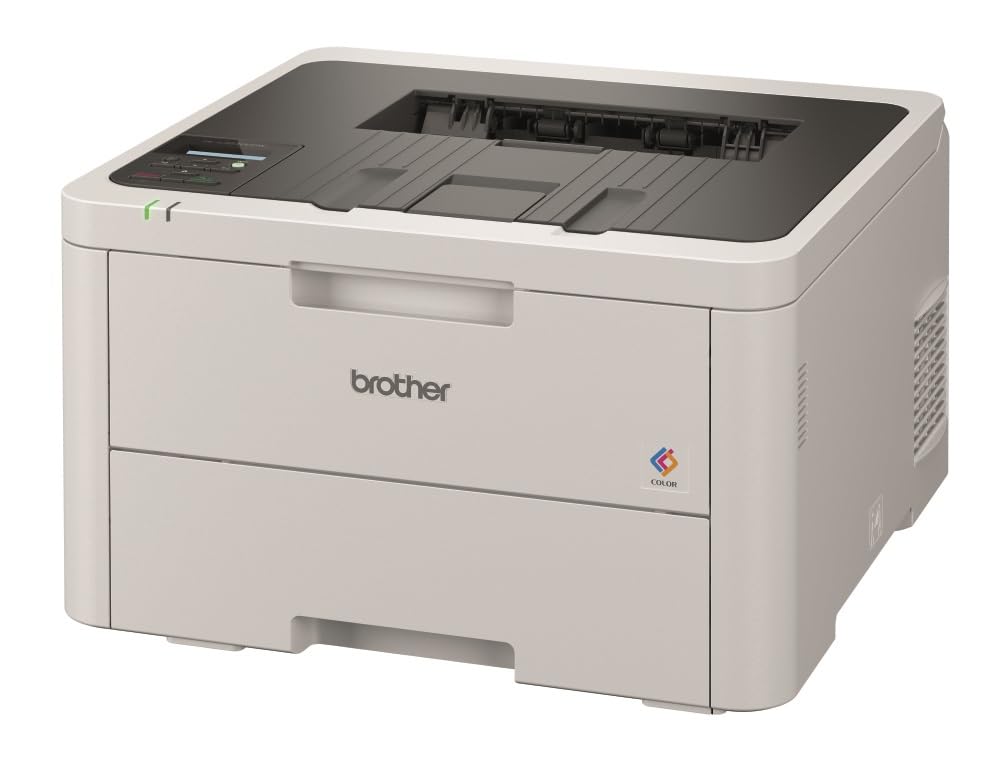
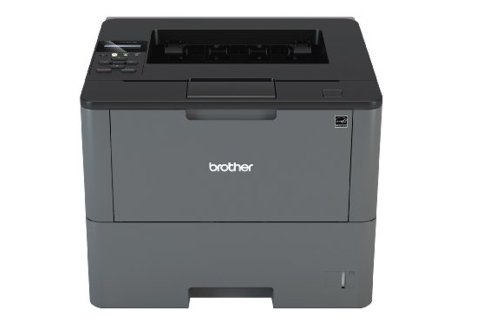
Brother HL-L8260CDW Colour Wireless Laser Printer
The Brother HL-L8260CDW color laser printer is ideal for offices and small workgroups. It delivers cost-efficient output with high-yield replacement cartridges, which can print up to 4,500 pages in black and 4,000 pages in color. The printer also features automatic duplex printing, allowing you to print on both sides of the paper. It produces high-impact color documents at up to 33 pages per minute in black and color. The printer has gigabit Ethernet and wireless networking capabilities, making it easy to connect to your network.
The Brother HL-L8260CDW color laser printer is ideal for offices and small workgroups. It delivers cost-efficient output with high-yield replacement cartridges, which can print up to 4,500 pages in black and 4,000 pages in color. The printer also features automatic duplex printing, allowing you to print on both sides of the paper. It produces high-impact color documents at up to 33 pages per minute in black and color. The printer has gigabit Ethernet and wireless networking capabilities, making it easy to connect to your network.
The Brother HL-L8260CDW color laser printer is ideal for offices and small workgroups. It delivers cost-efficient output with high-yield replacement cartridges, which can print up to 4,500 pages in black and 4,000 pages in color. The printer also features automatic duplex printing, allowing you to print on both sides of the paper. It produces high-impact color documents at up to 33 pages per minute in black and color. The printer has gigabit Ethernet and wireless networking capabilities, making it easy to connect to your network.
The Brother HL-L8260CDW color laser printer is ideal for offices and small workgroups. It delivers cost-efficient output with high-yield replacement cartridges, which can print up to 4,500 pages in black and 4,000 pages in color. The printer also features automatic duplex printing, allowing you to print on both sides of the paper. It produces high-impact color documents at up to 33 pages per minute in black and color. The printer has gigabit Ethernet and wireless networking capabilities, making it easy to connect to your network.
in 6 offers
The lowest price for Brother HL-L8260CDW Colour Wireless Laser Printer right now is $392.45 at Hot Toner, compared across 6 retailers.
The all-time low was $361.35 on 1 Mar 2026 — today's price is 9% above the lowest ever. That's a little above the best price we've seen.
Prices last updated 24 Aug 2026.

