Calibrite ColorChecker Studio
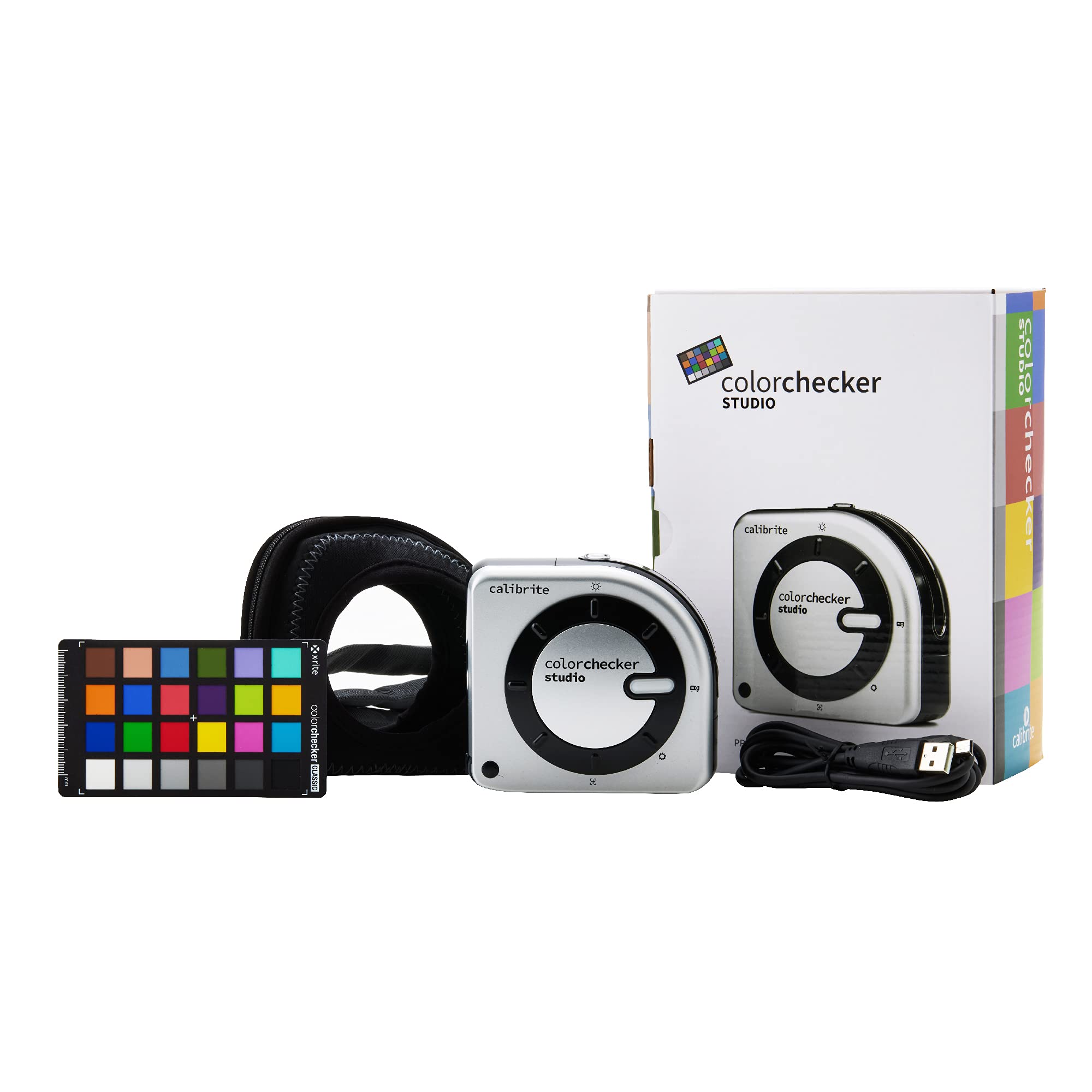
The color across all your digital display devices (desktop monitors, laptop and projector) will vary device to device and will even change over time. The brightness and stability of your monitor and your working environments all are factors when working with color. When you calibrate your displays to create a color profile, you will eliminate countless frustrating hours trying to figure out why your images don’t match across devices or why the image you sent out to a lab or printed yourself doesn’t match the image you spent hours perfecting. The ColorChecker Studio from Calibrite is the color Perfectionists choice for easily profiling all your display devices and getting consistent color across your favourite creative software applications. The ColorChecker Studio includes an cccolorimeter and ccStudio software powered by X-Rite. The wizard-driven interface of the software walks you through the entire process and then reminds you when it’s time to re-profile your displays to maintain consistency. If only life was always this easy. Calibrating your displays is one of the most important steps to ensure that the images you care most about are color consistent across your various displays and printers. This allows you to edit and share your work with confidence and lets you spend more time focusing on the creative stuff rather than the frustrating time-wasting stuff.
The color across all your digital display devices (desktop monitors, laptop and projector) will vary device to device and will even change over time. The brightness and stability of your monitor and your working environments all are factors when working with color. When you calibrate your displays to create a color profile, you will eliminate countless frustrating hours trying to figure out why your images don’t match across devices or why the image you sent out to a lab or printed yourself doesn’t match the image you spent hours perfecting. The ColorChecker Studio from Calibrite is the color Perfectionists choice for easily profiling all your display devices and getting consistent color across your favourite creative software applications. The ColorChecker Studio includes an cccolorimeter and ccStudio software powered by X-Rite. The wizard-driven interface of the software walks you through the entire process and then reminds you when it’s time to re-profile your displays to maintain consistency. If only life was always this easy. Calibrating your displays is one of the most important steps to ensure that the images you care most about are color consistent across your various displays and printers. This allows you to edit and share your work with confidence and lets you spend more time focusing on the creative stuff rather than the frustrating time-wasting stuff.
The color across all your digital display devices (desktop monitors, laptop and projector) will vary device to device and will even change over time. The brightness and stability of your monitor and your working environments all are factors when working with color. When you calibrate your displays to create a color profile, you will eliminate countless frustrating hours trying to figure out why your images don’t match across devices or why the image you sent out to a lab or printed yourself doesn’t match the image you spent hours perfecting. The ColorChecker Studio from Calibrite is the color Perfectionists choice for easily profiling all your display devices and getting consistent color across your favourite creative software applications. The ColorChecker Studio includes an cccolorimeter and ccStudio software powered by X-Rite. The wizard-driven interface of the software walks you through the entire process and then reminds you when it’s time to re-profile your displays to maintain consistency. If only life was always this easy. Calibrating your displays is one of the most important steps to ensure that the images you care most about are color consistent across your various displays and printers. This allows you to edit and share your work with confidence and lets you spend more time focusing on the creative stuff rather than the frustrating time-wasting stuff.
The color across all your digital display devices (desktop monitors, laptop and projector) will vary device to device and will even change over time. The brightness and stability of your monitor and your working environments all are factors when working with color. When you calibrate your displays to create a color profile, you will eliminate countless frustrating hours trying to figure out why your images don’t match across devices or why the image you sent out to a lab or printed yourself doesn’t match the image you spent hours perfecting. The ColorChecker Studio from Calibrite is the color Perfectionists choice for easily profiling all your display devices and getting consistent color across your favourite creative software applications. The ColorChecker Studio includes an cccolorimeter and ccStudio software powered by X-Rite. The wizard-driven interface of the software walks you through the entire process and then reminds you when it’s time to re-profile your displays to maintain consistency. If only life was always this easy. Calibrating your displays is one of the most important steps to ensure that the images you care most about are color consistent across your various displays and printers. This allows you to edit and share your work with confidence and lets you spend more time focusing on the creative stuff rather than the frustrating time-wasting stuff.
in 20 offers
The lowest price for Calibrite ColorChecker Studio right now is $760.00 at SHOP21, compared across 20 retailers.
The all-time low was $527.31 on 7 July 2025 — today's price is 44% above the lowest ever. It has been notably cheaper before — worth setting a price alert.
Prices last updated 19 Oct 2026.
Last updated at 19/10/2026 20:37:26
Calibrite ColorChecker Studio
Free delivery
Affiliate Disclosure: We may receive a small commission for purchases made through this link at no extra cost to you. This helps support our site. Thank you!
Calibrite ColorChecker Display/Printer Calibrators, Photo/Video Charts ColorChecker Studio (CCSTUDIO) Monitor & Printer Calibrator
Delivery $115.95
Calibrite Colorchecker Studio (ccstudio) | Photography Equipment
Delivery $56.40
Affiliate Disclosure: We may receive a small commission for purchases made through this link at no extra cost to you. This helps support our site. Thank you!
Calibrite ColorChecker Studio
Calibrite ColorChecker Studio
Calibrite ColorChecker Studio
Delivery $9.90
Calibrite ColorChecker Studio
Delivery $72.27
ColorChecker Studio
Delivery $7
Calibrite ColorChecker Studio
Delivery between 23–31 Oct $20
Calibrite ColorChecker Studio
Delivery $7.90
originally posted on ebay.com
Well know well constructed and relied upon
originally posted on digitec.ch
Super useful if your goal is to do fine art print, as you can calibrate your display, as well as printers to the same benchmark device.What I like in particular is that you can save progress, if you are calibrating multiple papers for color and B&W, so you can parallelise your work while you wait for ink to dry.Software makes everything super simple and straightforward, you can select your white point and brightness target, and tell the software what HW controls your monitor supports. For example, if you can separately control RGB of your monitor, the software will guide you to fine tune your white point, if not, it will do its best while testing the color patches and then bake that into your icc profile.
originally posted on bhphotovideo.com
I have calibrated my iMac's Monitor and mi Epson printer. Is very importan follow a video for get a effective calibration, or maybe read before in the official website the FAQ's because in my fisrts pirnter calibration i got a dark profile iCC
| Category | Colorimeter |
| Parameters | Color |
| Accuracy | Ensures absolute accuracy across any printer |
| Suitable For | All users that want to achieve a screen to print color match |
| Use Cases | Printer profiling, Create different ‘looks’ to emulate cold tone, high key and black and white profiles |

Calibrite ColorChecker Studio
Free delivery
Affiliate Disclosure: We may receive a small commission for purchases made through this link at no extra cost to you. This helps support our site. Thank you!
Calibrite ColorChecker Display/Printer Calibrators, Photo/Video Charts ColorChecker Studio (CCSTUDIO) Monitor & Printer Calibrator
Delivery $115.95
Calibrite Colorchecker Studio (ccstudio) | Photography Equipment
Delivery $56.40
Affiliate Disclosure: We may receive a small commission for purchases made through this link at no extra cost to you. This helps support our site. Thank you!
Calibrite ColorChecker Studio
Calibrite ColorChecker Studio
Well know well constructed and relied upon
Super useful if your goal is to do fine art print, as you can calibrate your display, as well as printers to the same benchmark device.What I like in particular is that you can save progress, if you are calibrating multiple papers for color and B&W, so you can parallelise your work while you wait for ink to dry.Software makes everything super simple and straightforward, you can select your white point and brightness target, and tell the software what HW controls your monitor supports. For example, if you can separately control RGB of your monitor, the software will guide you to fine tune your white point, if not, it will do its best while testing the color patches and then bake that into your icc profile.
I have calibrated my iMac's Monitor and mi Epson printer. Is very importan follow a video for get a effective calibration, or maybe read before in the official website the FAQ's because in my fisrts pirnter calibration i got a dark profile iCC
Purchased to create printer profiles for Epson LF printer. Already had made profiles using i1pro Publish, very expensive, these CC Studio profiles are AS GOOD you can make printer profiles with confidence
Love this product my monitor and printer were giving me different colors now that I have this device my colors are the same.Indy ortiz. Indy's photography.
I'm using this product to color manage my photography from capture to presentation. This includes calibration of camera, monitor, printer, projector, scanner, and mobile devices. I've used this for a couple of weeks calibrating my monitor and printer. I've been satisfied with the results. I use third party inks with my Canon PRO-10 printer and the paper profiles generated by Calibrite CCStudio have been spot on! My BenQ SW240 monitor after calibration measured: Average ^E=.60 and Maximum ^E=1.55 using Palette Master Element and the Calibrite ColorChecker Studio Calibrator. Everything 5 star so far. The calibrator is a little cumbersome at first to use. To become familiar with it, you need to practice holding it and manipulating the control dial. At first it seems ... MoreI'm using this product to color manage my photography from capture to presentation. This includes calibration of camera, monitor, printer, projector, scanner, and mobile devices. I've used this for a couple of weeks calibrating my monitor and printer. I've been satisfied with the results. I use third party inks with my Canon PRO-10 printer and the paper profiles generated by Calibrite CCStudio have been spot on! My BenQ SW240 monitor after calibration measured: Average ^E=.60 and Maximum ^E=1.55 using Palette Master Element and the Calibrite ColorChecker Studio Calibrator. Everything 5 star so far. The calibrator is a little cumbersome at first to use. To become familiar with it, you need to practice holding it and manipulating the control dial. At first it seems very stiff and not working correctly. Once you get the hang of it all's well. All instructions for use of this product are provided in the software or online at Calibrite.com support. Good tutorials are found on YouTube. It would have been nice to have a downloadable instruction manual. In summation It gets 5 stars for what it does and 4 stars for lacking a instruction manual and my not receiving Luminar AI software (which is described as included in the purchase). So, if you want your printed photo to match what you see on your monitor as closely as possible, this product is for you.
The Calibrite Color checker studio does not include any instructions other than what is included in the software, and that is not adequate. I have experience with the ColorMunki (the earlier version of this same device), but I still needed to contact Calibrite tech support with questions. I do not understand why the company did not include any printed instructions. I finally was successful in calibrating my monitor and printer and saving the printer profile, but it took me about two weeks and three contacts with tech support. Anyway, the device does now seem to work correctly, and the profile gives prints that match the monitor very closely.
Before calibrating my monitor printing was just not working. After calibrating the monitor it was much better but still wasn't quite right. Calibrating the paper for your printer which is what this kit allows you to do is really the best. I know some companies will profile your printer on their paper but with this you can do it yourself and not have to wait for the profile to come back ... this takes very little time, is very easy to use and works brilliantly!
| Category | Colorimeter |
| Parameters | Color |
| Accuracy | Ensures absolute accuracy across any printer |
| Suitable For | All users that want to achieve a screen to print color match |
| Use Cases | Printer profiling, Create different ‘looks’ to emulate cold tone, high key and black and white profiles |