Last updated at 26/04/2026 23:06:17
Corsair Vengeance RGB - 32 GB 2 x 16 GB DDR4 3600 MHz memory module
Corsair Vengeance RGB RT 32GB Kit (2x16GB) DDR4 3600MHz C18 Black Desktop Gaming Memory
Free delivery between 29 Apr – 4 May
Corsair Vengeance RGB RT 32GB (2x16GB) DDR4 3600MHz Gaming Memory for AMD
Delivery $11.99
originally posted on newegg.com
I installed this CORSAIR Vengeance RGB 32GB RAM in my son's aging 4 year old PC. It already had 16GB of RAM, but I thought the additional RAM would give it a boost. It already has RGB fans so I thought this would also give it some additional bling. When I first installed the RAM it was running at 2133 MHz. I didn't realize I needed to select the XMP profile to use. A quick reboot into BIOS, select XMP profile 2 and all was good. The RAM was running at 3200 MHZ with a voltage of 1.36 volts. My son now has RGB fans, RAM, desk and headphones. I didn't play with any of the iCUE profiles. The RAM was an affordable computer upgrade and an easy install. It has helped his PC performance as he insists on having multiple programs running even when gaming.
originally posted on microcenter.com
Really nice looking RAM and was easy to set up. I just installed it and then went into the bios and set the speed to 3600 and changed the voltage to 1.35 and it works perfectly with my 5900x. RGB is really bright and you can control the colors exactly how you want once you download the ICUE software from Corsair. Super fast and haven't had any problems, really happy with it
originally posted on neweggbusiness.com
First off let me be clear, I am a NewEgg.com reviewer, they send me some awesome stuff and sometimes not so good stuff to review. Most of the stuff if any good I keep, the bad and the not needed, go to friends and family or sold online. My reviews go back probably 10yrs or more by now and I am still using one of the first things they sent me, a cable modem, so I will give good and bad reviews as I see fit. A lot of stuff Newegg sends me I wonder how to review because it either works or it doesn't. That definitely applies to ram. Well, this was a bit different as it has leds on it and requires a internet connection to download software, remember the old days when software actually came with the product. Luckily I have two other LED equipped Corsair CUE products ... MoreFirst off let me be clear, I am a NewEgg.com reviewer, they send me some awesome stuff and sometimes not so good stuff to review. Most of the stuff if any good I keep, the bad and the not needed, go to friends and family or sold online. My reviews go back probably 10yrs or more by now and I am still using one of the first things they sent me, a cable modem, so I will give good and bad reviews as I see fit. A lot of stuff Newegg sends me I wonder how to review because it either works or it doesn't. That definitely applies to ram. Well, this was a bit different as it has leds on it and requires a internet connection to download software, remember the old days when software actually came with the product. Luckily I have two other LED equipped Corsair CUE products NewEgg.com sent me, a gaming mouse and a LED lighting strip, so setting this thing up was a piece of cake. Honestly the LED's don't impress me. After playing with them for a few moments I just turn them to bright white to light up my case and desk. I suppose someone younger and into hardcore gaming would love the lighting. So I figured the best review would be a torture test to see if I could get a failure. Testing speed to compare with another is really irrelevant since everything is related to the hardware it's being used on. The first test I ran on it was a simple but long test that most computers have built in but most don't know about, the Microsoft Windows Memory Diagnostic test. I booted into the test then hit F1 and set it to extended with cache on and 15 passes. The next evening when I returned to check on it I found that they passed all the tests with no errors, so I ran the test 1 more time and they passed. Next was a burn-in test for which I used Burn-in Test 10.0 and ran it for 24 hours and am happy to say the ram passed with no problems. At this point I thought I'd better put up a review since its been over a week. I will run the test again after a few days and if I have a failure I will update my review but at this point I can safely give these a 5 star review, reliability, speed, and cost are all good in my book.
| Intel Extreme Memory Profile (XMP) version | 2.0 |
| Cooling type | Heatsink |
| Intel Extreme Memory Profile (XMP) | Y |
| Component for | PC/Server |
| Memory form factor | 288-pin DIMM |
Corsair Vengeance RGB - 32 GB 2 x 16 GB DDR4 3600 MHz memory module
Corsair Vengeance RGB RT 32GB Kit (2x16GB) DDR4 3600MHz C18 Black Desktop Gaming Memory
Free delivery between 29 Apr – 4 May
Corsair Vengeance RGB RT 32GB (2x16GB) DDR4 3600MHz Gaming Memory for AMD
Delivery $11.99
I installed this CORSAIR Vengeance RGB 32GB RAM in my son's aging 4 year old PC. It already had 16GB of RAM, but I thought the additional RAM would give it a boost. It already has RGB fans so I thought this would also give it some additional bling. When I first installed the RAM it was running at 2133 MHz. I didn't realize I needed to select the XMP profile to use. A quick reboot into BIOS, select XMP profile 2 and all was good. The RAM was running at 3200 MHZ with a voltage of 1.36 volts. My son now has RGB fans, RAM, desk and headphones. I didn't play with any of the iCUE profiles. The RAM was an affordable computer upgrade and an easy install. It has helped his PC performance as he insists on having multiple programs running even when gaming.
Really nice looking RAM and was easy to set up. I just installed it and then went into the bios and set the speed to 3600 and changed the voltage to 1.35 and it works perfectly with my 5900x. RGB is really bright and you can control the colors exactly how you want once you download the ICUE software from Corsair. Super fast and haven't had any problems, really happy with it
First off let me be clear, I am a NewEgg.com reviewer, they send me some awesome stuff and sometimes not so good stuff to review. Most of the stuff if any good I keep, the bad and the not needed, go to friends and family or sold online. My reviews go back probably 10yrs or more by now and I am still using one of the first things they sent me, a cable modem, so I will give good and bad reviews as I see fit. A lot of stuff Newegg sends me I wonder how to review because it either works or it doesn't. That definitely applies to ram. Well, this was a bit different as it has leds on it and requires a internet connection to download software, remember the old days when software actually came with the product. Luckily I have two other LED equipped Corsair CUE products ... MoreFirst off let me be clear, I am a NewEgg.com reviewer, they send me some awesome stuff and sometimes not so good stuff to review. Most of the stuff if any good I keep, the bad and the not needed, go to friends and family or sold online. My reviews go back probably 10yrs or more by now and I am still using one of the first things they sent me, a cable modem, so I will give good and bad reviews as I see fit. A lot of stuff Newegg sends me I wonder how to review because it either works or it doesn't. That definitely applies to ram. Well, this was a bit different as it has leds on it and requires a internet connection to download software, remember the old days when software actually came with the product. Luckily I have two other LED equipped Corsair CUE products NewEgg.com sent me, a gaming mouse and a LED lighting strip, so setting this thing up was a piece of cake. Honestly the LED's don't impress me. After playing with them for a few moments I just turn them to bright white to light up my case and desk. I suppose someone younger and into hardcore gaming would love the lighting. So I figured the best review would be a torture test to see if I could get a failure. Testing speed to compare with another is really irrelevant since everything is related to the hardware it's being used on. The first test I ran on it was a simple but long test that most computers have built in but most don't know about, the Microsoft Windows Memory Diagnostic test. I booted into the test then hit F1 and set it to extended with cache on and 15 passes. The next evening when I returned to check on it I found that they passed all the tests with no errors, so I ran the test 1 more time and they passed. Next was a burn-in test for which I used Burn-in Test 10.0 and ran it for 24 hours and am happy to say the ram passed with no problems. At this point I thought I'd better put up a review since its been over a week. I will run the test again after a few days and if I have a failure I will update my review but at this point I can safely give these a 5 star review, reliability, speed, and cost are all good in my book.
This "AMD optimized" thing is just marketing fluff. There's nothing special about 3200 16-18-18-38 timings. Most, if not all, kits at 3200 XMP run at these timings. From what my experience in reading reviews, looking at benchmarks, and my own experience in Lightroom - the best "optimized ram" for Ryzen is dual rank at 3600 with very low latency (like CL 16 or better yet, CL 14). This allows the memory controller to run 1:1 synchronized with the ram speed at the highest speed the memory controller in Zen 2 and 3 run (1800mhz). 3200 used to be the best "bang for your buck," but (especially lately) RAM prices have gone down, negating this a bit. It's possible to have dual rank dual channel memory with 4 sticks of single rank ram, which eliminates the lower "single ... MoreThis "AMD optimized" thing is just marketing fluff. There's nothing special about 3200 16-18-18-38 timings. Most, if not all, kits at 3200 XMP run at these timings. From what my experience in reading reviews, looking at benchmarks, and my own experience in Lightroom - the best "optimized ram" for Ryzen is dual rank at 3600 with very low latency (like CL 16 or better yet, CL 14). This allows the memory controller to run 1:1 synchronized with the ram speed at the highest speed the memory controller in Zen 2 and 3 run (1800mhz). 3200 used to be the best "bang for your buck," but (especially lately) RAM prices have gone down, negating this a bit. It's possible to have dual rank dual channel memory with 4 sticks of single rank ram, which eliminates the lower "single rank" performance. If you value looks and stability over outright performance, and already use iCUE for other components (like a Corsair case and case fans/rgb strips) this kit will be a great addition for your build. And if you want dual rank and higher performance, buy 2 sets of this ram.
Performance is very good for the price and was easy to get set up using XMP in my bios.However, It appears that icue doesn't support RGB sync with my ASRock X470 motherboard, so I had to use a third party tool called OpenRGB. Even with this tool, I couldn't get the sticks to perfectly sync with my motherboard.While the colors would match, using effects like breathing or rainbow would cause the RAM RGBs to change color at a slightly faster rate than my motherboard/case RGBs, which can get annoying if you want your build to look just right.
I installed the RAM, and booted to BIOS. The RAM was instantly recognized. Also, the XMP profile was already enabled and set in my motherboard. I did not have to manually set the XMP profiles. The RAM is automatically configured to maximum supported speed on compatible systems. After I booted into Win 10, I opened up the iCue software. The RAM was automatically recognized by iCue software. There are multiple preset light effect profiles in iCue that you can choose from. You can also create your own lightning effects. I then played some games, did some web browsing and wrote this review. The RAM appeared to be very stable on by Intel based PC. If you are looking for high quality AMD optimized RAM, this RAM will not disappoint you. Additionally, if you have lots of ... MoreI installed the RAM, and booted to BIOS. The RAM was instantly recognized. Also, the XMP profile was already enabled and set in my motherboard. I did not have to manually set the XMP profiles. The RAM is automatically configured to maximum supported speed on compatible systems. After I booted into Win 10, I opened up the iCue software. The RAM was automatically recognized by iCue software. There are multiple preset light effect profiles in iCue that you can choose from. You can also create your own lightning effects. I then played some games, did some web browsing and wrote this review. The RAM appeared to be very stable on by Intel based PC. If you are looking for high quality AMD optimized RAM, this RAM will not disappoint you. Additionally, if you have lots of Corsair RGB hardware, this RAM will also be a very nice addition to your RGB system.
I tested this memory for just over a week in my gaming machine. It was solid during long gaming sessions and doing some video editing. I put it through its paces and was very happy with the stability and performance I saw out of it. I am as always happy to see the lifetime warranty on the product, I have rarely had to deal with sending a product back to Corsair, but when I have, they have been easy to work with and I am consistently happy with them and their products. Test machine specs: AMD Ryzen 5900X Gigabyte Aorus X570 Pro Gigabyte Aorus 3070Ti Corsair 1000 Watt PSU Corsair H115i AiO Samsung 980 Pro NVME 1TB Boot Drive Samsung 970 NVME 2TB Storage Drive Windows 10 Pro 64-bit
iCUE software has gotten substantially optimized to utilize less of your CPU over the years. The first link software that I downloaded would hover around 5-10% CPU usage as a background task back with windows 7, iCUE dropped that by 50% easily and as the software has matured its dropped down to less than 1% of CPU usage (averages 0.1-0.2 with a 5600x) while gaining substantial functionality and ease of use. I personally prefer the aesthetics of this ram over some of the other more popular RGB ram out there. Overall for the price I would say that this is a solid set of AMD optimized ram that has solid RGB software and solid performance. Excuse the poor cable management, this PC has a solid side panel so I was lazy, borrowing my wifes gaming PC until Alder Lake is ... MoreiCUE software has gotten substantially optimized to utilize less of your CPU over the years. The first link software that I downloaded would hover around 5-10% CPU usage as a background task back with windows 7, iCUE dropped that by 50% easily and as the software has matured its dropped down to less than 1% of CPU usage (averages 0.1-0.2 with a 5600x) while gaining substantial functionality and ease of use. I personally prefer the aesthetics of this ram over some of the other more popular RGB ram out there. Overall for the price I would say that this is a solid set of AMD optimized ram that has solid RGB software and solid performance. Excuse the poor cable management, this PC has a solid side panel so I was lazy, borrowing my wifes gaming PC until Alder Lake is available.
The memory was recognized with no problems after opening the solid packaging . I -cue, corsairs supporting software has some interesting features, including a system monitor dashboard and the ability of having the ram's LED's reflect by mapping some state of your system ( like when your processor is starting to smoke a little) You have three colors/temp triggers to pick as indicators, as you can monitor individual functions per stick of memory. Could be handy Really not into bling myself, but I like being able to see the green glow of my processor not melting from a fan gone wonky. I was moderately unhappy with the software problems and it took time to resolve, so I cut one egg. Installers have the ability to be better configured to assure the software package ... MoreThe memory was recognized with no problems after opening the solid packaging . I -cue, corsairs supporting software has some interesting features, including a system monitor dashboard and the ability of having the ram's LED's reflect by mapping some state of your system ( like when your processor is starting to smoke a little) You have three colors/temp triggers to pick as indicators, as you can monitor individual functions per stick of memory. Could be handy Really not into bling myself, but I like being able to see the green glow of my processor not melting from a fan gone wonky. I was moderately unhappy with the software problems and it took time to resolve, so I cut one egg. Installers have the ability to be better configured to assure the software package installed will actually run, or point directly to the error. Having spent 20 years in the industry, I'll just say "it happens, and if it happens to you, we're sorry about that, it ran on 99% of systems we tested against" I eventually got I-cue to run. I do process a bit of video now and then so more ram is always better and had immediate benefit for several of my favorite games I'm a bit more accepting of the bling thing after playing with the visuals on this ram a bit, so I wouldn't be against going with a corsair something ( like a couple of fans) else down the road to get some coordinated effects Its a solid buy considering the current shortages of silicon being reported and a far -cry from the day when memory was sold by the MB, not the GB
~ although this ram is labeled optimized for Ryzen, it works just fine with Intel. I paired this ram with a Z370 board and an Intel i9 9900k. I did have some initial problems trying to pair this ram with my board, although this board has been stubborn with other RAM kits in the past. My motherboard didnt detect this kit even after clearing CMOS jumpers, popping the battery and pulling the power. It just wouldnt boot, until I paired 1 stick of this ram with 1 stick of my old ram (8GB). Once I mixed the RAM, it booted into the UEFI BIOS, both sticks were recognized and I could set the timings properly for this 32GB set. I removed the old stick and installed the other half of this kit, and from there I was able to select the XMP and this kit has worked flawlessly ... More~ although this ram is labeled optimized for Ryzen, it works just fine with Intel. I paired this ram with a Z370 board and an Intel i9 9900k. I did have some initial problems trying to pair this ram with my board, although this board has been stubborn with other RAM kits in the past. My motherboard didnt detect this kit even after clearing CMOS jumpers, popping the battery and pulling the power. It just wouldnt boot, until I paired 1 stick of this ram with 1 stick of my old ram (8GB). Once I mixed the RAM, it booted into the UEFI BIOS, both sticks were recognized and I could set the timings properly for this 32GB set. I removed the old stick and installed the other half of this kit, and from there I was able to select the XMP and this kit has worked flawlessly since. I chalked this up as my board being older, and this is RAM is not on the QVL of the motherboard... although just about every Corsair 16GB kit is, the board is listed as maxing out at 64GB of RAM, and the BIOS had been updated to the latest availble. My recommendation for Ryzen is that you may want to select the 3600MHz or 3800MHz kits for the performance sweet spot, plenty of information out there regarding this. 3200MHz isnt a slouch of performance, but slightly faster speeds have been shown to improve performance marginally in gaming. Other than the initial installation issue, Ive had no problems at all throughout my use. This kit has performed flawlessly, the RGB is some of the brightest and vibrant I have seen. Gaming has been great with the 32GB overhead, and I dont feel as guilty having 100+ browser tabs open 5 eggs.
| Intel Extreme Memory Profile (XMP) version | 2.0 |
| Cooling type | Heatsink |
| Intel Extreme Memory Profile (XMP) | Y |
| Component for | PC/Server |
| Memory form factor | 288-pin DIMM |
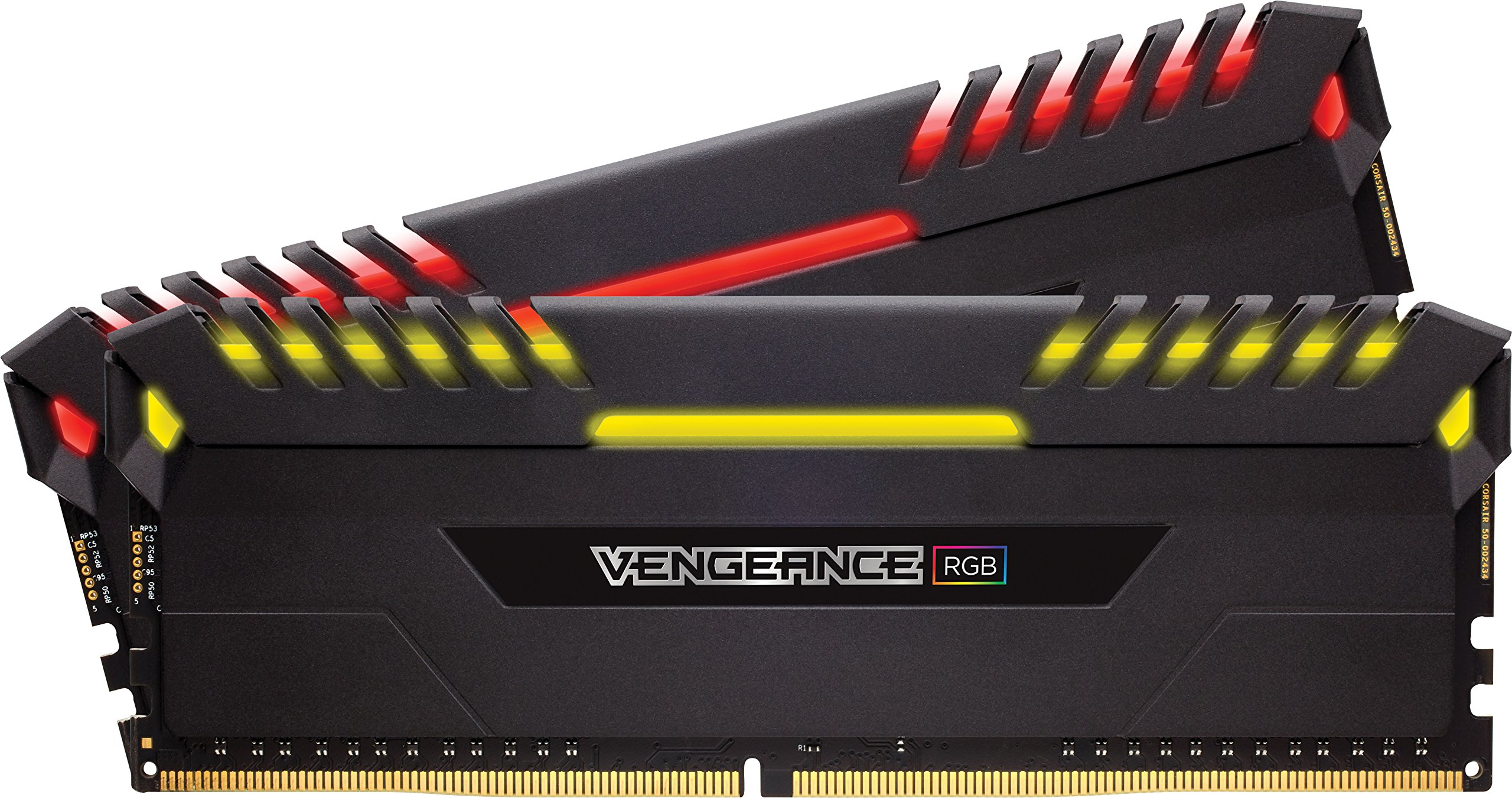
Corsair Vengeance RGB RT 32GB (2x16GB) DDR4 3600MHz Gaming Memory for AMD
Whether you're upgrading a system, building an ultra-fast gaming rig, or aiming for new overclocking records, Corsair's memory modules will exceed your expectations! Introducing the family member: Vengeance RGB. The DDR4 memory modules from the Corsair Vengeance RGB Series are designed using patented technology to create stunning RGB lighting effects without cables and to integrate seamlessly and cleanly into existing systems. Use Corsair iCUE to program lighting effects, monitor memory temperature, timings, and frequencies, and synchronize them with other Corsair products. All modules feature a custom high-performance PCB to optimize signal integrity, while carefully screened integrated circuits ensure excellent overclocking and reliability on the latest AMD and Intel DDR4 motherboards. Pre-configured XMP 2.0 profiles allow for automatic, reliable overclocking. Corsair iCUE is compatible with Windows Intel and AMD DDR4 systems, ensuring the colors meet your exact requirements. With iCUE, you can create custom temperature alerts, so the LED color of each memory module indicates performance levels at a glance. But that's not all: through the wireless Corsair iCUE software integration, various Corsair components can be monitored, whether it's case fans or high-performance Hydro Series liquid coolers. The Corsair iCUE software brings your system to life with dynamic RGB lighting control that can synchronize with all your iCUE-compatible products, including memory, fans, RGB LED light strips, keyboards, mice, and more.
Whether you're upgrading a system, building an ultra-fast gaming rig, or aiming for new overclocking records, Corsair's memory modules will exceed your expectations! Introducing the family member: Vengeance RGB. The DDR4 memory modules from the Corsair Vengeance RGB Series are designed using patented technology to create stunning RGB lighting effects without cables and to integrate seamlessly and cleanly into existing systems. Use Corsair iCUE to program lighting effects, monitor memory temperature, timings, and frequencies, and synchronize them with other Corsair products. All modules feature a custom high-performance PCB to optimize signal integrity, while carefully screened integrated circuits ensure excellent overclocking and reliability on the latest AMD and Intel DDR4 motherboards. Pre-configured XMP 2.0 profiles allow for automatic, reliable overclocking. Corsair iCUE is compatible with Windows Intel and AMD DDR4 systems, ensuring the colors meet your exact requirements. With iCUE, you can create custom temperature alerts, so the LED color of each memory module indicates performance levels at a glance. But that's not all: through the wireless Corsair iCUE software integration, various Corsair components can be monitored, whether it's case fans or high-performance Hydro Series liquid coolers. The Corsair iCUE software brings your system to life with dynamic RGB lighting control that can synchronize with all your iCUE-compatible products, including memory, fans, RGB LED light strips, keyboards, mice, and more.
Whether you're upgrading a system, building an ultra-fast gaming rig, or aiming for new overclocking records, Corsair's memory modules will exceed your expectations! Introducing the family member: Vengeance RGB. The DDR4 memory modules from the Corsair Vengeance RGB Series are designed using patented technology to create stunning RGB lighting effects without cables and to integrate seamlessly and cleanly into existing systems. Use Corsair iCUE to program lighting effects, monitor memory temperature, timings, and frequencies, and synchronize them with other Corsair products. All modules feature a custom high-performance PCB to optimize signal integrity, while carefully screened integrated circuits ensure excellent overclocking and reliability on the latest AMD and Intel DDR4 motherboards. Pre-configured XMP 2.0 profiles allow for automatic, reliable overclocking. Corsair iCUE is compatible with Windows Intel and AMD DDR4 systems, ensuring the colors meet your exact requirements. With iCUE, you can create custom temperature alerts, so the LED color of each memory module indicates performance levels at a glance. But that's not all: through the wireless Corsair iCUE software integration, various Corsair components can be monitored, whether it's case fans or high-performance Hydro Series liquid coolers. The Corsair iCUE software brings your system to life with dynamic RGB lighting control that can synchronize with all your iCUE-compatible products, including memory, fans, RGB LED light strips, keyboards, mice, and more.
Whether you're upgrading a system, building an ultra-fast gaming rig, or aiming for new overclocking records, Corsair's memory modules will exceed your expectations! Introducing the family member: Vengeance RGB. The DDR4 memory modules from the Corsair Vengeance RGB Series are designed using patented technology to create stunning RGB lighting effects without cables and to integrate seamlessly and cleanly into existing systems. Use Corsair iCUE to program lighting effects, monitor memory temperature, timings, and frequencies, and synchronize them with other Corsair products. All modules feature a custom high-performance PCB to optimize signal integrity, while carefully screened integrated circuits ensure excellent overclocking and reliability on the latest AMD and Intel DDR4 motherboards. Pre-configured XMP 2.0 profiles allow for automatic, reliable overclocking. Corsair iCUE is compatible with Windows Intel and AMD DDR4 systems, ensuring the colors meet your exact requirements. With iCUE, you can create custom temperature alerts, so the LED color of each memory module indicates performance levels at a glance. But that's not all: through the wireless Corsair iCUE software integration, various Corsair components can be monitored, whether it's case fans or high-performance Hydro Series liquid coolers. The Corsair iCUE software brings your system to life with dynamic RGB lighting control that can synchronize with all your iCUE-compatible products, including memory, fans, RGB LED light strips, keyboards, mice, and more.
in 3 offers
The lowest price for Corsair Vengeance RGB RT 32GB (2x16GB) DDR4 3600MHz Gaming Memory for AMD right now is $195.00 at Clove Technology, compared across 3 retailers.
The all-time low was $155.39 on 13 July 2025 — today's price is 25% above the lowest ever. It has been notably cheaper before — worth setting a price alert.
Prices last updated 26 Apr 2026.

