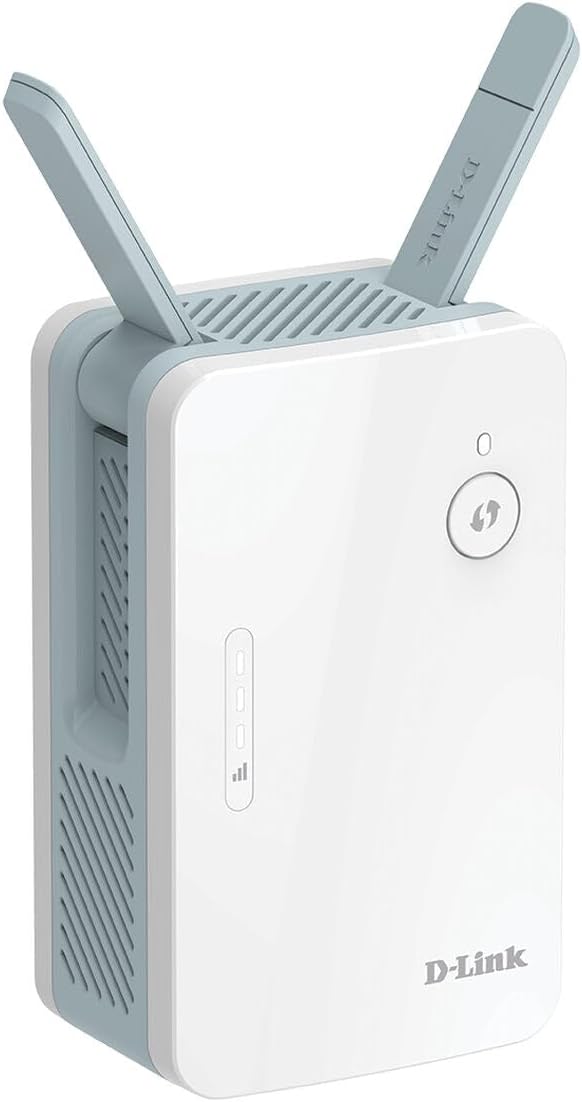
D-Link AX1500 Eagle Pro AI Mesh System (2-Pack)
With combined dual-band speeds of up to 1200Mbps on 5GHz and 300Mbps on 2.4GHz, this system keeps streaming, gaming and video calls running smoothly across multiple devices. Covering up to 370 square metres, the two mesh units work together to create a seamless network that adapts as you move from room to room. Built-in AI-based Wi-Fi and Traffic Optimisers automatically manage connections and prioritise bandwidth where it’s needed most, so your experience stays consistent even in busy households. The system supports advanced WPA3 security, along with WPA and WPA2, to help keep your network safe. Compatible with other Eagle Pro AI routers and extenders, this mesh system makes it easy to build a custom, expandable Wi-Fi solution. Whether you're working from home, streaming in 4K or managing a house full of smart devices, this system keeps your connection fast, stable and smart.
With combined dual-band speeds of up to 1200Mbps on 5GHz and 300Mbps on 2.4GHz, this system keeps streaming, gaming and video calls running smoothly across multiple devices. Covering up to 370 square metres, the two mesh units work together to create a seamless network that adapts as you move from room to room. Built-in AI-based Wi-Fi and Traffic Optimisers automatically manage connections and prioritise bandwidth where it’s needed most, so your experience stays consistent even in busy households. The system supports advanced WPA3 security, along with WPA and WPA2, to help keep your network safe. Compatible with other Eagle Pro AI routers and extenders, this mesh system makes it easy to build a custom, expandable Wi-Fi solution. Whether you're working from home, streaming in 4K or managing a house full of smart devices, this system keeps your connection fast, stable and smart.
With combined dual-band speeds of up to 1200Mbps on 5GHz and 300Mbps on 2.4GHz, this system keeps streaming, gaming and video calls running smoothly across multiple devices. Covering up to 370 square metres, the two mesh units work together to create a seamless network that adapts as you move from room to room. Built-in AI-based Wi-Fi and Traffic Optimisers automatically manage connections and prioritise bandwidth where it’s needed most, so your experience stays consistent even in busy households. The system supports advanced WPA3 security, along with WPA and WPA2, to help keep your network safe. Compatible with other Eagle Pro AI routers and extenders, this mesh system makes it easy to build a custom, expandable Wi-Fi solution. Whether you're working from home, streaming in 4K or managing a house full of smart devices, this system keeps your connection fast, stable and smart.
With combined dual-band speeds of up to 1200Mbps on 5GHz and 300Mbps on 2.4GHz, this system keeps streaming, gaming and video calls running smoothly across multiple devices. Covering up to 370 square metres, the two mesh units work together to create a seamless network that adapts as you move from room to room. Built-in AI-based Wi-Fi and Traffic Optimisers automatically manage connections and prioritise bandwidth where it’s needed most, so your experience stays consistent even in busy households. The system supports advanced WPA3 security, along with WPA and WPA2, to help keep your network safe. Compatible with other Eagle Pro AI routers and extenders, this mesh system makes it easy to build a custom, expandable Wi-Fi solution. Whether you're working from home, streaming in 4K or managing a house full of smart devices, this system keeps your connection fast, stable and smart.
in 50 offers
The lowest price for D-Link AX1500 Eagle Pro AI Mesh System (2-Pack) right now is $99.00 at Amazon.com.au, compared across 24 retailers.
The all-time low was $89.00 on 27 May 2026 — today's price is 11% above the lowest ever. That's a little above the best price we've seen.
Prices last updated 20 Oct 2026.
Last updated at 20/10/2026 10:29:52
D-Link 2-Pack Home Mesh WiFi System - Eagle PRO AI AX1500 WiFi6 Wireless Mesh Router (M15-2PK), Google/Alexa Voice Control Compatible Mesh Network,
Free delivery
Affiliate Disclosure: We may receive a small commission for purchases made through this link at no extra cost to you. This helps support our site. Thank you!
D-Link M15 Eagle Pro AI Wi-Fi 6 Mesh System, Pack of 2
Delivery $11
D-Link EAGLE PRO AI AX1500 Mesh System (2-Pack) [M15-2PK] - M15-2PK
Delivery $15
M15-2PK D-Link Eagle Pro AI AX1500 Mesh System (2-Pack)
Free delivery
D-Link Eagle Pro AI AX1500 Mesh System (2-Pack)
Delivery between Wed – Fri $7.92
D-Link EAGLE PRO AI AX1500 Mesh System (2-Pack) [M15-2PK] M15-2PK
Delivery $15
D-Link EAGLE PRO AI AX1500 Mesh System (2-Pack) [M15-2PK] M15-2PK
Delivery $15
Eagle Pro Mesh System 2 Pack
Delivery between 22–28 Oct $15
D-LINK M15-2PK EAGLE PRO AI AX1500 Mesh System (2-Pack)
Free delivery between Thu – Fri
D-LINK M15-2PK EAGLE PRO AI AX1500 Mesh System (2-Pack)
Delivery between 23–31 Oct $10
originally posted on pbtech.co.nz
I had my old Huawei HG659 and following the app instructions had plugged a cable into it to get the mesh up. That didn't quite work and 2Degrees weren't too helpful as their support isn't extended to non-OEM routers. So I called up D-Link. After a very short wait time, they showed me to hook up the mesh straight to Chorus ONT and boom, off we go. Very good speed spread. The AI console allows you to shape traffic and has elementary parental controls. Really a good high quality device with useful after-sales support. PB tech salesperson was great as usual helping me choose the right product for my needs
originally posted on pbtech.co.nz
It is a good product that can solve your wifi connection issues/dead zones if you have a 2 story house or space that cant reach a signal. It is pretty fast since it uses wifi 6 technology. The only downside about it is that setting up the mesh network using the mobile app is a really bad experience. Good thing there was 2 alternative options to set it up.
originally posted on pbtech.co.nz
I am a senior network engineer and wanted something easy to setup and give better wifi coverage at home. These took around 8 attempts to setup, since then I have to periodically reboot all 3 as they forget how to mesh. The 'main' device has lost internet connection 4 times in 2 days and the two I have set as extenders will stop extending after a few hours and just become clients on the main devices wifi network. The app is trash, it crashes frequently. These are so intention holding your hand to make things 'easy' that they are near impossible to setup. I had to factory reset one 14 times before it would stay in setup mode long enough for the app to connect to it. Currently waiting for pbtech to accept my request to return these.
| LED indicators | Power, Status |
| Antenna type | Internal |
| Antennas quantity | 4 |
| Operating temperature (T-T) | 0 - 40 °C |
| Storage temperature (T-T) | -20 - 60 °C |

D-Link 2-Pack Home Mesh WiFi System - Eagle PRO AI AX1500 WiFi6 Wireless Mesh Router (M15-2PK), Google/Alexa Voice Control Compatible Mesh Network,
Free delivery
Affiliate Disclosure: We may receive a small commission for purchases made through this link at no extra cost to you. This helps support our site. Thank you!
D-Link M15 Eagle Pro AI Wi-Fi 6 Mesh System, Pack of 2
Delivery $11
D-Link EAGLE PRO AI AX1500 Mesh System (2-Pack) [M15-2PK] - M15-2PK
Delivery $15
M15-2PK D-Link Eagle Pro AI AX1500 Mesh System (2-Pack)
Free delivery
D-Link Eagle Pro AI AX1500 Mesh System (2-Pack)
Delivery between Wed – Fri $7.92
I had my old Huawei HG659 and following the app instructions had plugged a cable into it to get the mesh up. That didn't quite work and 2Degrees weren't too helpful as their support isn't extended to non-OEM routers. So I called up D-Link. After a very short wait time, they showed me to hook up the mesh straight to Chorus ONT and boom, off we go. Very good speed spread. The AI console allows you to shape traffic and has elementary parental controls. Really a good high quality device with useful after-sales support. PB tech salesperson was great as usual helping me choose the right product for my needs
It is a good product that can solve your wifi connection issues/dead zones if you have a 2 story house or space that cant reach a signal. It is pretty fast since it uses wifi 6 technology. The only downside about it is that setting up the mesh network using the mobile app is a really bad experience. Good thing there was 2 alternative options to set it up.
I am a senior network engineer and wanted something easy to setup and give better wifi coverage at home. These took around 8 attempts to setup, since then I have to periodically reboot all 3 as they forget how to mesh. The 'main' device has lost internet connection 4 times in 2 days and the two I have set as extenders will stop extending after a few hours and just become clients on the main devices wifi network. The app is trash, it crashes frequently. These are so intention holding your hand to make things 'easy' that they are near impossible to setup. I had to factory reset one 14 times before it would stay in setup mode long enough for the app to connect to it. Currently waiting for pbtech to accept my request to return these.
First time I ever connected one of these. Easy enough, just thought the signal from 2nd to 3rd box would be strong enough to travel 5 meters across a room without anything obstructing it. Signal not strong enough to keep the white light solid all the time. Had to connect the fetch tv unit with an ethernet cable to the 3rd unit to keep reasonable signal strength as wireless was weak as the 3rd box drops out now and then. I performed a speed test at the second unit and it was excellent but 3rd extender 5 meters away has weaker signal. A little disappointed as I expected better.
The set up is not as easy as the videos might lead you to believe, if you make an error it is almost impossible to back track using the app. The instructions are not clear that you need to leave the mater permanently plugged into your modem whose network is effectively cancelled by the mesh. Funnily enough I couldn't get my family's iPhones to work on the mesh so I disconnected it. Not recommended
I was recommended this system as i needed to improve my Wi-Fi but i also wanted to keep an eye on what my kids were doing online. The setup was very straightforward using my phone and i was able to create different profiles for my children and tag their devices which is great. I now have total control and i even get reports each week on what devices are using the bandwidth. The features on this model are fantastic and would highly recommend to anyone looking for a bit more from their network.
My son was having problems with his computer, with the USB WiFi device causing his system to crash. The Mesh WiFi enabled him to connect his computer via Ethernet cable at distance from the NBN / Gateway modem on a separate WiFi band. It take a little to set up, but the coverage and improved signal strength is worth the time and effort. No more computer crashes.
Have had a terrible time attempting to set these up. I have probably spent about 10 hours on it at this point, over 3 weeks. The app is terrible and instructions are basically nonexistent! I Attempted to contact support but was sent another copy of the same 1 page instruction manual and no further help!
The app is clunky to setup these wireless mesh devices. I recommend using a computer to set these up. You can use the Web Interface to set these up easier with your home network. Product does well in home environment. I recommed that if you have any other devices using other wireless standards to remove them as your phones my to try to prioritze connecting into those. You want to connect to these ones for best speeds.
I wanted two satellite wi-fi extenders to place around my home, that would both connect through Wi-Fi to my existing router, and was recommended this product. I followed page 1 of the instructions which took me down a path of connecting one device to my router permanently and creating a new network. I completed this setup and this worked, but was not what I wanted. On the flip side of the instructions, I found the simple WPS setup process to connect the two devices wirelessy as I required, but only one would connect, despite many factory resets and attempts, I could not get the other one working. I swapped the product for a replacement but could not get either of the two new devices paired to my router through WPS. It seems to be a common problem reading these ... MoreI wanted two satellite wi-fi extenders to place around my home, that would both connect through Wi-Fi to my existing router, and was recommended this product. I followed page 1 of the instructions which took me down a path of connecting one device to my router permanently and creating a new network. I completed this setup and this worked, but was not what I wanted. On the flip side of the instructions, I found the simple WPS setup process to connect the two devices wirelessy as I required, but only one would connect, despite many factory resets and attempts, I could not get the other one working. I swapped the product for a replacement but could not get either of the two new devices paired to my router through WPS. It seems to be a common problem reading these reviews, so beware. It may work fine if you want to create a new network and have one device permanently wired to your modem.
| LED indicators | Power, Status |
| Antenna type | Internal |
| Antennas quantity | 4 |
| Operating temperature (T-T) | 0 - 40 °C |
| Storage temperature (T-T) | -20 - 60 °C |