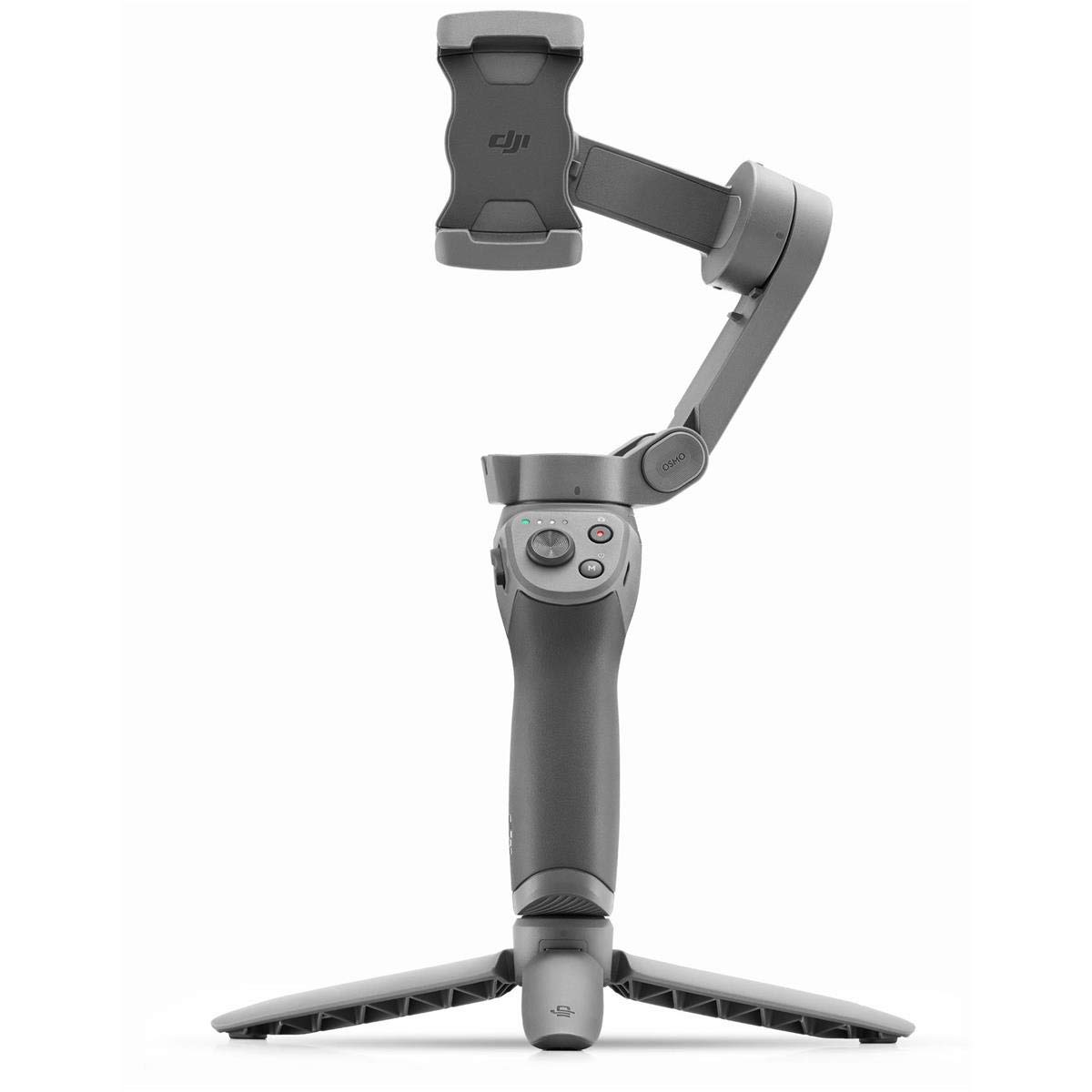
DJI Osmo Mobile 3 Gimbal Combo
Eliminate Shake With a 3-axis gimbal that effectively reduces shaky footage, Osmo Mobile 3 delivers a super-smooth, stabilized image. A lightweight, ultra-responsive design reacts to your movements in real time, letting you focus more on the moment at hand. Your Story, Your Moment From the extraordinary to the everyday, share your unique moment easily and creatively with Story mode. One-Tap Templates Story mode provides multiple templates that transform your footage in seconds by automatically adding movement, music, and other effects for a polished result. Edit & Share Quickly After customizing your video with a variety of music templates, transition effects, and filters, share your work easily on social media and video platforms. Hyperlapse Hype The powerful combination of electronic image stabilization (EIS) and gimbal stabilization is perfect for shooting Hyperlapse videos. Enable ActiveTrack 3.0 for a truly unique Hyperlapse creation that tracks your subject while recording. Creative Shooting Modes Panorama Capture entire scenes with automatic 33 and 180 panoramas. Timelapse Condense time and movement for stunning results. Slow Motion Record every detail of movements you would otherwise miss. Single-Handed Control Convenient buttons and intuitive functions make Osmo Mobile 3 easy to use with just one hand, providing more versatility and freedom of movement.
Eliminate Shake With a 3-axis gimbal that effectively reduces shaky footage, Osmo Mobile 3 delivers a super-smooth, stabilized image. A lightweight, ultra-responsive design reacts to your movements in real time, letting you focus more on the moment at hand. Your Story, Your Moment From the extraordinary to the everyday, share your unique moment easily and creatively with Story mode. One-Tap Templates Story mode provides multiple templates that transform your footage in seconds by automatically adding movement, music, and other effects for a polished result. Edit & Share Quickly After customizing your video with a variety of music templates, transition effects, and filters, share your work easily on social media and video platforms. Hyperlapse Hype The powerful combination of electronic image stabilization (EIS) and gimbal stabilization is perfect for shooting Hyperlapse videos. Enable ActiveTrack 3.0 for a truly unique Hyperlapse creation that tracks your subject while recording. Creative Shooting Modes Panorama Capture entire scenes with automatic 33 and 180 panoramas. Timelapse Condense time and movement for stunning results. Slow Motion Record every detail of movements you would otherwise miss. Single-Handed Control Convenient buttons and intuitive functions make Osmo Mobile 3 easy to use with just one hand, providing more versatility and freedom of movement.
Eliminate Shake With a 3-axis gimbal that effectively reduces shaky footage, Osmo Mobile 3 delivers a super-smooth, stabilized image. A lightweight, ultra-responsive design reacts to your movements in real time, letting you focus more on the moment at hand. Your Story, Your Moment From the extraordinary to the everyday, share your unique moment easily and creatively with Story mode. One-Tap Templates Story mode provides multiple templates that transform your footage in seconds by automatically adding movement, music, and other effects for a polished result. Edit & Share Quickly After customizing your video with a variety of music templates, transition effects, and filters, share your work easily on social media and video platforms. Hyperlapse Hype The powerful combination of electronic image stabilization (EIS) and gimbal stabilization is perfect for shooting Hyperlapse videos. Enable ActiveTrack 3.0 for a truly unique Hyperlapse creation that tracks your subject while recording. Creative Shooting Modes Panorama Capture entire scenes with automatic 33 and 180 panoramas. Timelapse Condense time and movement for stunning results. Slow Motion Record every detail of movements you would otherwise miss. Single-Handed Control Convenient buttons and intuitive functions make Osmo Mobile 3 easy to use with just one hand, providing more versatility and freedom of movement.
Eliminate Shake With a 3-axis gimbal that effectively reduces shaky footage, Osmo Mobile 3 delivers a super-smooth, stabilized image. A lightweight, ultra-responsive design reacts to your movements in real time, letting you focus more on the moment at hand. Your Story, Your Moment From the extraordinary to the everyday, share your unique moment easily and creatively with Story mode. One-Tap Templates Story mode provides multiple templates that transform your footage in seconds by automatically adding movement, music, and other effects for a polished result. Edit & Share Quickly After customizing your video with a variety of music templates, transition effects, and filters, share your work easily on social media and video platforms. Hyperlapse Hype The powerful combination of electronic image stabilization (EIS) and gimbal stabilization is perfect for shooting Hyperlapse videos. Enable ActiveTrack 3.0 for a truly unique Hyperlapse creation that tracks your subject while recording. Creative Shooting Modes Panorama Capture entire scenes with automatic 33 and 180 panoramas. Timelapse Condense time and movement for stunning results. Slow Motion Record every detail of movements you would otherwise miss. Single-Handed Control Convenient buttons and intuitive functions make Osmo Mobile 3 easy to use with just one hand, providing more versatility and freedom of movement.
in 4 offers
The lowest price for DJI Osmo Mobile 3 Gimbal Combo right now is $167.50 at TechCart, compared across 4 retailers.
The all-time low was $17.50 on 1 July 2026 — today's price is 857% above the lowest ever. It has been notably cheaper before — worth setting a price alert.
Prices last updated 13 Oct 2026.
Last updated at 13/10/2026 06:31:30
DJI Osmo Mobile 3 Combo (Black)
Delivery $96
DJI Osmo Mobile 3 Combo
Dji Osmo Mobile 3 Combo - 3-axis Smartphone Gimbal Handheld Stabilizer
Free delivery
Affiliate Disclosure: We may receive a small commission for purchases made through this link at no extra cost to you. This helps support our site. Thank you!
DJI Osmo Mobile 3 Combo - 3-Axis Smartphone Gimbal Handheld Stabilizer Vlog Youtuber Live Video for iPhone Android
Delivery between 17–21 Oct $41
originally posted on ivd-store.com
First off, guys let me tell you one negative feedback about the seller: the MRP for this item is 7990 and the seller keeps selling this for over 8200 which is illegal. I have notified the authorities at DJI Drone Cameras for this however I still see the same seller selling this for price more than the MRP. Coming to the product itself, dji has been fairly renowned brand when it comes to videography. Their drones and action cams are some of the best in the market. The Osmo mobile 3 (though now replaced by the highly anticipated osmo mobile 5) consistently performs well. I have a fairly hefty phone (212g) and the gimbal always takes around 4-5 secs when turned on to self stabilize. Would have been great if there was a memory function where it remembers the equilibrium ... MoreFirst off, guys let me tell you one negative feedback about the seller: the MRP for this item is 7990 and the seller keeps selling this for over 8200 which is illegal. I have notified the authorities at DJI Drone Cameras for this however I still see the same seller selling this for price more than the MRP. Coming to the product itself, dji has been fairly renowned brand when it comes to videography. Their drones and action cams are some of the best in the market. The Osmo mobile 3 (though now replaced by the highly anticipated osmo mobile 5) consistently performs well. I have a fairly hefty phone (212g) and the gimbal always takes around 4-5 secs when turned on to self stabilize. Would have been great if there was a memory function where it remembers the equilibrium of the last used device. Haven't used the gimbal for over an hour continuously so can't comment on the battery life. However, its foldable and portable. Don't go for the combo pack as third party tripods are available at a cheaper price that what dji is selling. Overall, I am happy with the gimbal, though thoroughly disappointed with the seller and DJI Drone Cameras for doing such unscrupulous business with the inflated pricetag.
originally posted on ivd-store.com
This is a very good, stable gimbal that's easy to set up and use with great features and battery life. The only problem is phone compatibility so please check first on the comprehensive list on the DJI website. The same goes for the later models too. I bought it in 2020 for my Samsung S10 Lite but it wasn't compatible. I checked the list and it listed S10 so I assumed it would be fine but as the phone S10 Lite has inbuilt optical stabilisation that the standard S10 doesn't the phone and gimbal fight each other and the gimbal makes continuous slow circles. Please make sure your actual model is listed as variants aren't always compatible. Sadly I had to return this, although I have recently changed my phone and now have the latest model of this gimbal. This is an ... MoreThis is a very good, stable gimbal that's easy to set up and use with great features and battery life. The only problem is phone compatibility so please check first on the comprehensive list on the DJI website. The same goes for the later models too. I bought it in 2020 for my Samsung S10 Lite but it wasn't compatible. I checked the list and it listed S10 so I assumed it would be fine but as the phone S10 Lite has inbuilt optical stabilisation that the standard S10 doesn't the phone and gimbal fight each other and the gimbal makes continuous slow circles. Please make sure your actual model is listed as variants aren't always compatible. Sadly I had to return this, although I have recently changed my phone and now have the latest model of this gimbal. This is an excellent gimbal at a great price, sadly people criticise it because they don't check compatibility which is their fault and not that of DJI or the gimbal.
originally posted on ivd-store.com
The DJI Osmo Mobile 3 is one of the best out there, but like most if not all similar gimbals available, the software is limited to 30fps in 4K UHD with Android devices. Prior to a more recent update (whether to the DJI software or Android OS itself) it seems as if only HD 1080p was available. 30fps UHD isn't too bad. Of course, you can simply shoot and control in 60fps manually with the camera app rather than via DJI app - the gimbal will still perform its fundamental job. All that is required is to install the software and connect with Bluetooth to activate/register the device for the first time. After that, there's no need to use the app again. Of course, you lose tracking functionality and all the silly editing modes from the app, but for most people I really ... MoreThe DJI Osmo Mobile 3 is one of the best out there, but like most if not all similar gimbals available, the software is limited to 30fps in 4K UHD with Android devices. Prior to a more recent update (whether to the DJI software or Android OS itself) it seems as if only HD 1080p was available. 30fps UHD isn't too bad. Of course, you can simply shoot and control in 60fps manually with the camera app rather than via DJI app - the gimbal will still perform its fundamental job. All that is required is to install the software and connect with Bluetooth to activate/register the device for the first time. After that, there's no need to use the app again. Of course, you lose tracking functionality and all the silly editing modes from the app, but for most people I really think these functions are a novelty rather than a necessity.
| Model year | 2019 |
| Flash Memory Type | ; |
| Compatible Devices | Cellphone, Camera |
| Mounting Hardware | Gimbal |
| Colour Screen | No |
DJI Osmo Mobile 3 Combo (Black)
Delivery $96
DJI Osmo Mobile 3 Combo
Dji Osmo Mobile 3 Combo - 3-axis Smartphone Gimbal Handheld Stabilizer
Free delivery
Affiliate Disclosure: We may receive a small commission for purchases made through this link at no extra cost to you. This helps support our site. Thank you!
DJI Osmo Mobile 3 Combo - 3-Axis Smartphone Gimbal Handheld Stabilizer Vlog Youtuber Live Video for iPhone Android
Delivery between 17–21 Oct $41
First off, guys let me tell you one negative feedback about the seller: the MRP for this item is 7990 and the seller keeps selling this for over 8200 which is illegal. I have notified the authorities at DJI Drone Cameras for this however I still see the same seller selling this for price more than the MRP. Coming to the product itself, dji has been fairly renowned brand when it comes to videography. Their drones and action cams are some of the best in the market. The Osmo mobile 3 (though now replaced by the highly anticipated osmo mobile 5) consistently performs well. I have a fairly hefty phone (212g) and the gimbal always takes around 4-5 secs when turned on to self stabilize. Would have been great if there was a memory function where it remembers the equilibrium ... MoreFirst off, guys let me tell you one negative feedback about the seller: the MRP for this item is 7990 and the seller keeps selling this for over 8200 which is illegal. I have notified the authorities at DJI Drone Cameras for this however I still see the same seller selling this for price more than the MRP. Coming to the product itself, dji has been fairly renowned brand when it comes to videography. Their drones and action cams are some of the best in the market. The Osmo mobile 3 (though now replaced by the highly anticipated osmo mobile 5) consistently performs well. I have a fairly hefty phone (212g) and the gimbal always takes around 4-5 secs when turned on to self stabilize. Would have been great if there was a memory function where it remembers the equilibrium of the last used device. Haven't used the gimbal for over an hour continuously so can't comment on the battery life. However, its foldable and portable. Don't go for the combo pack as third party tripods are available at a cheaper price that what dji is selling. Overall, I am happy with the gimbal, though thoroughly disappointed with the seller and DJI Drone Cameras for doing such unscrupulous business with the inflated pricetag.
This is a very good, stable gimbal that's easy to set up and use with great features and battery life. The only problem is phone compatibility so please check first on the comprehensive list on the DJI website. The same goes for the later models too. I bought it in 2020 for my Samsung S10 Lite but it wasn't compatible. I checked the list and it listed S10 so I assumed it would be fine but as the phone S10 Lite has inbuilt optical stabilisation that the standard S10 doesn't the phone and gimbal fight each other and the gimbal makes continuous slow circles. Please make sure your actual model is listed as variants aren't always compatible. Sadly I had to return this, although I have recently changed my phone and now have the latest model of this gimbal. This is an ... MoreThis is a very good, stable gimbal that's easy to set up and use with great features and battery life. The only problem is phone compatibility so please check first on the comprehensive list on the DJI website. The same goes for the later models too. I bought it in 2020 for my Samsung S10 Lite but it wasn't compatible. I checked the list and it listed S10 so I assumed it would be fine but as the phone S10 Lite has inbuilt optical stabilisation that the standard S10 doesn't the phone and gimbal fight each other and the gimbal makes continuous slow circles. Please make sure your actual model is listed as variants aren't always compatible. Sadly I had to return this, although I have recently changed my phone and now have the latest model of this gimbal. This is an excellent gimbal at a great price, sadly people criticise it because they don't check compatibility which is their fault and not that of DJI or the gimbal.
The DJI Osmo Mobile 3 is one of the best out there, but like most if not all similar gimbals available, the software is limited to 30fps in 4K UHD with Android devices. Prior to a more recent update (whether to the DJI software or Android OS itself) it seems as if only HD 1080p was available. 30fps UHD isn't too bad. Of course, you can simply shoot and control in 60fps manually with the camera app rather than via DJI app - the gimbal will still perform its fundamental job. All that is required is to install the software and connect with Bluetooth to activate/register the device for the first time. After that, there's no need to use the app again. Of course, you lose tracking functionality and all the silly editing modes from the app, but for most people I really ... MoreThe DJI Osmo Mobile 3 is one of the best out there, but like most if not all similar gimbals available, the software is limited to 30fps in 4K UHD with Android devices. Prior to a more recent update (whether to the DJI software or Android OS itself) it seems as if only HD 1080p was available. 30fps UHD isn't too bad. Of course, you can simply shoot and control in 60fps manually with the camera app rather than via DJI app - the gimbal will still perform its fundamental job. All that is required is to install the software and connect with Bluetooth to activate/register the device for the first time. After that, there's no need to use the app again. Of course, you lose tracking functionality and all the silly editing modes from the app, but for most people I really think these functions are a novelty rather than a necessity.
For everyone asking about their larger phones. I would not recommend this for anything larger the maybe a galaxy s8 phone. Especially if you use a bulker case, that being said, dji just launched the dji om4 which offers multiple magnetic solutions for larger phones. Definitely glad i held off and waited to pick that one up so I can use my case at the same timeI enjoyed using the gimbal on the occassions that i had a chance to use it. I should have done more research on the gimbal itself before purchasing it as my Note 10+ was too large to use with the case i had on it. I did switch to a otterbox commuter series case that seemed to sort of, ish, fit, but i wouldnt recommend it. Considering the phone didnt fit exactly with the case, it did fit nicely in the phone ... MoreFor everyone asking about their larger phones. I would not recommend this for anything larger the maybe a galaxy s8 phone. Especially if you use a bulker case, that being said, dji just launched the dji om4 which offers multiple magnetic solutions for larger phones. Definitely glad i held off and waited to pick that one up so I can use my case at the same timeI enjoyed using the gimbal on the occassions that i had a chance to use it. I should have done more research on the gimbal itself before purchasing it as my Note 10+ was too large to use with the case i had on it. I did switch to a otterbox commuter series case that seemed to sort of, ish, fit, but i wouldnt recommend it. Considering the phone didnt fit exactly with the case, it did fit nicely in the phone holder of the gimbal, very secure, i wasn't horribly worried about it falling out when using it in a controlled environment, but i was planning this more for family trips and conventions/ drunk vacations/ the gf likes to make tiktok videos and i wouldn't trust my phone in a more action packed setting with out a case on it in the rare situation something happens (learned this the hard way many times)The gimbal was able to balance my phone out very easily once i was more accustomed to the device and the software. At first the gimbal did show that it was connected but in app it showed disconnected in one screen and connected in another, this lead to some initial frustration on my end as nothing was working and i thought my phone was simply incompatible. After an unpairing and and uninstall/reinstall i was able to get everything up and running and i have to say i was impressed with what it was able to do and its ease of use. I'm excited to see what Osmo has instore for the next iteration that will, undoubtedly, handle the larger phone sizes now out there with greater ease.
So by now you know I film truck and tractor pulling for a living and I and number one in America at it on YouTube and number 2 in overall across all social media platforms. This device boosted up my closeup game, interactive with participants, and interviewing the general public. It is unbelievably smooth. The footage is incredible and saves directly to your device. The subject tracking is amazing!The only downside to this device is the sideways turning. You have to turn the handle. Using the toggle switch is extremely slow. You will miss shots. Up, down, tracking is all good. But the side scrolling is brutal. DJI makes killer products and the App support on this makes it feel every bit as professional right out of the box as their other products.
I will need to come back and update this later when I'm six months in and have more experience with this device, but considering the amount of varying info here and on the web in general about the use of an external mic with an Android phone, I figured I'd weigh in. At present, I can only report on using this device and the Mini app with a Pixel 4a(I have a couple other Pixels around here and will report back if I can get the proper adapters to test them).But I can confirm that an external mic plugged into my Pixel 4a is absolutely used as the sound source in the DJI Mimo app. There are no specific settings in the app, it is just picked up by default when the mic is plugged into the 4a, which for the record sports a standard 3.5mm 'mini' audio jack. It is absolutely ... MoreI will need to come back and update this later when I'm six months in and have more experience with this device, but considering the amount of varying info here and on the web in general about the use of an external mic with an Android phone, I figured I'd weigh in. At present, I can only report on using this device and the Mini app with a Pixel 4a(I have a couple other Pixels around here and will report back if I can get the proper adapters to test them).But I can confirm that an external mic plugged into my Pixel 4a is absolutely used as the sound source in the DJI Mimo app. There are no specific settings in the app, it is just picked up by default when the mic is plugged into the 4a, which for the record sports a standard 3.5mm 'mini' audio jack. It is absolutely necessary that the jack that plugs in be TRRS on the phone side - so TRS to TRRS is fine. I will note that the balance on the Mobile 3 is rather delicate and it doesn't tolerate much variation before 'flopping' into a self protective position, so whether you add a cold shoe mount to the Mobile 3's base or a clamp around the handle, you are going to want as light a cable connecting mic to phone as possible that accomodate the Mobile 3's full range, for where the input on the phone happens to be for both landscape and portrait modes, if you plan to use both. This is likely going to be somewhere around 14-16", although this might differ for your setup. You can expect this to be a 'fussy' situation, no matter what phone you are using, but it is possible. Also, I'd like to clarify because I've seen it misrepresented elsewhere - the Mimo app for Android, at least as of Dec 2020, supports 4k resolution at a max frame rate of 30fps, and 1080 and 720p resolutions at a max frame rate of 60fps. Again, this all I have tested and can only confirm for use with the Pixel 4a. Considering that it's not even listed as one of the officially supported phone models, I think that's pretty good. And by and large, the app functions well for all advertised features. I have had crashes in story mode when stitching *specifically* with the 'fashion' template and no others, which is weird but has been consistent. In any case I am not particularly interested in story mode. As for a more substantive review, time will tell. Clearly I am pushing the limits of what the Mobile 3 was designed for - the top end mechanically and the bare minimum when it comes to memory and processing power, but it is absolutely doing everything I hoped it would at the moment, and it is my sincere wish that you should all be so lucky.
This device is absolutely amazing! The stabilization that it provides is stunning for a 3-axis gimbal. It has and continues to work flawlessly. The only word of caution is with their application. They provide a compatibility list on their website and THEY ARE SERIOUS ABOUT THAT LIST. If you're exact phone brand and model isn't on the list, it's highly likely their DJI Mimo app will NOT work on your phone. What this means is that you WON'T be able to use their cool app video features, like automatic subject tracking. It also means you won't be able to use some of the buttons on the gimbal that are designed to work specifically with their app only. What you CAN do is still use the gimbal with any other video recording and editing app you like. Other apps just won't ... MoreThis device is absolutely amazing! The stabilization that it provides is stunning for a 3-axis gimbal. It has and continues to work flawlessly. The only word of caution is with their application. They provide a compatibility list on their website and THEY ARE SERIOUS ABOUT THAT LIST. If you're exact phone brand and model isn't on the list, it's highly likely their DJI Mimo app will NOT work on your phone. What this means is that you WON'T be able to use their cool app video features, like automatic subject tracking. It also means you won't be able to use some of the buttons on the gimbal that are designed to work specifically with their app only. What you CAN do is still use the gimbal with any other video recording and editing app you like. Other apps just won't have a Bluetooth connection to some of the gimbal buttons. You will still be able to use the power button (which is also used to switch horizontal and vertical orientation) as well as the "joystick" button to tilt the phone up, down, left, and right. UPDATE 5/8/2021This device was working perfectly with my Google Pixel 3A XL, including the DJI MIMO app. Then I tried to do a firmware update that DJI pushed. The update failed and the device became completely useless. I was very angry. I contacted DJI support and much to my amazement, they pointed me to a place on their site to fill in a repair request. The rep was cautious about promising me anything about the cost. After I sent them the proof of purchase (it was WAY out of warranty) and explained in the online ticket what happened, I was amazed to find that DJI provided free shipping to their facility in California, free shipping back to my home, and they gave me a completely refurbished device COMPLETELY WITHOUT CHARGE even though I was WAY out of warranty. This is the type of company that I would always want to buy products from! Nice going DJI. UPDATE 1/1/2020The DJI Mimo app is so frustrating and is definitely not up to par relative to the DJI OSMO Mobile 3 hardware. I just discovered that the app does NOT support external microphones on my Moto G6 phone. Maybe not on any phone. I'm not sure. I did a wind test with the built-in phone mic and then an external mic I have using a "dead cat" furry wind screen. When I did this test with Open Camera, an open source app, there was a dramatic difference in the wind noise with and without the external mic plugged in, indicating the mic jack works fine for Open Camera. When I performed the same test with the DJI Mimo app, there was no difference in the wind noise, clearly indicating that even though I had en external mic plugged in, the app still used the internal mic. Very disappointing. Furthermore, there are no mic audio settings in the app to even switch the type of mic being used for recording videos. UPDATE 12/14/2019I was pleasantly surprised to discover recently that the DJI Mimo Android app now works with my Motorola Moto 6 phone. I presume they updated the app and/or the firmware for the device. So this is a nice step forward, however, I'm still leaving the 4-star rating because even though I can use the app, it has limited functionality on Android compared with IOS. For example, I can't shoot 1920 x 1080 video at 60 fps even though my phone hardware supports it and I can shoot video with this using other apps like the Open Source app Open Camera. Shooting at 60 fps is extremely important for shooting fast moving subjects or if you pan left and right a lot when shooting.
I had held off on purchasing a gimbal for either phones or smaller cameras since their introduction for one reason or another, but as of the last year my reasons for wanting one were raised significantly as I found my phone videos of my toddler becoming more and more intolerable to watch during any kind of action or following him around. Checking back in on the status of their development it seems many companies are settling on a design for them that maximizes portability use cases and overcomes previous technical limitations. Namely, no top or bottom ports are blocked now during use allowing for plugging in power or external mics, while folding up during non use into a fairly small space.The design change isn't without its flaws, however, as some maneuvers seem a ... MoreI had held off on purchasing a gimbal for either phones or smaller cameras since their introduction for one reason or another, but as of the last year my reasons for wanting one were raised significantly as I found my phone videos of my toddler becoming more and more intolerable to watch during any kind of action or following him around. Checking back in on the status of their development it seems many companies are settling on a design for them that maximizes portability use cases and overcomes previous technical limitations. Namely, no top or bottom ports are blocked now during use allowing for plugging in power or external mics, while folding up during non use into a fairly small space.The design change isn't without its flaws, however, as some maneuvers seem a little more obtuse to accomplish than it would seem should be possible, and initial balancing is a bit cumbersome and needs to be repeated every time leading to a repeated time consuming setup. Combined with the fact that the terminology present in the DJI software to control it is downright confusing and misleading, upon first use I was originally hating this device and within hours I was ready to return it. I'm glad I cooled off a bit and looked into some YouTube videos of people who had reviewed it in depth in a fashion that made sense to the typical end user as to what was actually right and wrong with it during use (iPhonedo on YouTube), because over the next couple days it all made sense and I was creating videos with an astounding upgrade in professionalism to them.While the DJI app shows off a lot of what it can do for you, and is probably good enough for most people who just want a steady shot, it stops short in so many ways and is the only real issue I still have with it as a whole. After you figure it out and are able to maneuver it, if it's true video quality you're after, the DJI app as a capture platform isn't great. Jumping over to even the stock iOS camera app will often do better for me, and even better yet FilmicPro will take you to the next level. However, even 3 months post launch DJI has yet to release their SDK so using the gimbal properly is not possible in any other app. This can be somewhat remedied by dropping into the DJI app and setting the operation mode you want to be in for how it rotates, and then jumping back to Filmic or whatever to record. For me that's setting it to FPV in video record mode and then quitting. However, you're still pretty much left with no access to any of the buttons and are forced to tap the screen to record or change settings. Some apps will recognize the record button for what it is, but others sometimes don't, so again you're left tapping the screen. I do believe this will change once the SDK comes out, so I'm holding out on knocking points off for that.
Ill start by saying I am a fan of DJI products, having had two of their drones, an Osmo Pocket and an Osmo Action camera, so I knew I wouldnt be disappointed with this. Id also watched loads of online video reviews for smartphone gimbals and this one came out on top every time. Id so nearly bought the previous versions, but they seemed a bit big and cumbersome, but the designers at DJI have obviously learnt from them and come up with this third model, which to me is just about perfect I love that it all folds up so neatly and small and its very quick to get out and be up and running shooting video. You soon get well practiced at mounting your phone mine is an iPhone XS Max and balancing it not absolutely essential, but it improves battery life though not having to ... MoreIll start by saying I am a fan of DJI products, having had two of their drones, an Osmo Pocket and an Osmo Action camera, so I knew I wouldnt be disappointed with this. Id also watched loads of online video reviews for smartphone gimbals and this one came out on top every time. Id so nearly bought the previous versions, but they seemed a bit big and cumbersome, but the designers at DJI have obviously learnt from them and come up with this third model, which to me is just about perfect I love that it all folds up so neatly and small and its very quick to get out and be up and running shooting video. You soon get well practiced at mounting your phone mine is an iPhone XS Max and balancing it not absolutely essential, but it improves battery life though not having to hold the phone level against gravity. In operation, all the controls are easily learned most buttons have several functions but its not at all complicated. Movements are buttery smooth, though you still have to compensate for bouncing up and down as you walk, otherwise the video will be very up and down. You become accustomed to doing the ninja walk knees slightly bent and walking heel to toe to keep vertical movements to a minimum. This is common with all gimbals though and not a minus point for this one.Downsides The only one Ive found so far is that you cant use it in a torchlight type hold with the gimbal pointing outwards and horizontally because the motorarm gets in the way. Again, online reviews taught me that you can achieve the same low level shooting by holding it sideways instead, then lower it. Difficult to explain in words, but Google it if you dont understand.For the money, I think its great value for money, though I did wait for it to come down to 79 before purchasing.
Let me say this first, I should have read further into this product AFTER they modified the APP for THIS specific product. I went by Osmo 2 since this product was so new.The reviews were great for previous products. I purchased this because (sale/coupons) and seemed like a great price for a very advanced gimbal that could follow me. I do a lot of live art and crafts and well as tattooing and thought it would be very advantageous to be able to follow my hands. I also do cosplay, large events etc. so I felt like this could come in handy there as well.However when I downloaded the NEW NEW DJI App I was pretty upset that live stream functionality was no where to be found. DJI's APP used to support LIVE STREAMING, but does not for this product. I'm not sure if it ... MoreLet me say this first, I should have read further into this product AFTER they modified the APP for THIS specific product. I went by Osmo 2 since this product was so new.The reviews were great for previous products. I purchased this because (sale/coupons) and seemed like a great price for a very advanced gimbal that could follow me. I do a lot of live art and crafts and well as tattooing and thought it would be very advantageous to be able to follow my hands. I also do cosplay, large events etc. so I felt like this could come in handy there as well.However when I downloaded the NEW NEW DJI App I was pretty upset that live stream functionality was no where to be found. DJI's APP used to support LIVE STREAMING, but does not for this product. I'm not sure if it does for the other older products. I delved in to more reviews about the Dji Mimo APP and found similar responses from purchasers who assumed that because previous builds had this functionality, the fanciest newest build would continue the trend. Some going so far to return it just out of frustration.Now, there is STILL functionality without play through---it is incredibly limited. No follow you, No finger zoom, no ability to do much of anything but flip screens and rotate, and I guess have a smooth video--but I have to have a hand on it to do so which makes it pretty pointless.Until DJI upgrades their APP (and who knows if they will, their own answers to this question have been less than transparent) ---this is really truly a very expensive selfie stick.I had a lot of hope and was let down. It still works, and as long as I'm only recording video---if you need it for that----get it! Thus the two stars.I've set it aside in hopes that they will listen to their customers. With no big events this year (Covid Cancel) I can't really test it out and that fashion.
| Model year | 2019 |
| Flash Memory Type | ; |
| Compatible Devices | Cellphone, Camera |
| Mounting Hardware | Gimbal |
| Colour Screen | No |

